engine HONDA CIVIC 2017 10.G Workshop Manual
[x] Cancel search | Manufacturer: HONDA, Model Year: 2017, Model line: CIVIC, Model: HONDA CIVIC 2017 10.GPages: 601, PDF Size: 32.51 MB
Page 151 of 601
150
Controls
Security System
Immobilizer System
The immobilizer system prevents a key that has not been pre-registered from
starting the engine. Each key contains el ectronic transmitters that use electronic
signals to verify the key.
Pay attention to the following when inserti ng the key into the ignition switch or
pressing the ENGINE START/STOP button:
• Do not allow objects that emit strong radio waves near the ignition switch or the
ENGINE START/STOP button.
• Make sure the key is not covered by or touching a metal object.
• Do not bring a key from anot her vehicle’s immobilizer system near the ignition
switch or the ENGINE START/STOP button.
• Do not put the key near magnetic items. Electronic devices, such as televisions
and audio systems emit strong magnetic fields. Note that even a key chain can
become magnetic.
Security System Alarm
The security system alarm activates wh en the trunk, hood or doors are forcibly
opened. The alarm does not go off if the trunk or doors are opened with the key,
remote transmitter or smart entry system
*.
However, the alarm activates if a door is opened with the key and then the shift lever
is moved out of
(P (continuously variable transmission models) or the hood is
opened before the ignition switch is turned to ON (w*1.
■When the security system alarm activates
The horn sounds intermittently and all the exterior lights flash.
■To deactivate the security system alarm
Unlock the vehicle using remote transmitter, or smart entry system*. The system,
along with the horn and flashing lights, is deactivated.
*1: Models with the smart entry system have an ENGINE START/STOP button instead of an
ignition switch.
1 Immobilizer System
NOTICE
Leaving the key in the vehicl e can result in theft or
accidental movement of the vehicle.
Always take the key with you whenever you leave the
vehicle unattended.
Do not alter the system or add other devices to it.
Doing so may damage the system and make your
vehicle inoperable.
Canadian models only: Apply and hold the brake
pedal before turning the vehicle on the first time after
the battery has been disconnected.
1 Security System Alarm
The security alarm continues for a maximum of two
minutes until the security system deactivates.
* Not available on all models
17 CIVIC 4D HCM (KA KC KL)-31TBA6100.book 150 ページ 2016年8月31日 水曜日 午後6時5分
Page 152 of 601
Continued151
uuSecurity System uSecurity System Alarm
Controls
■Setting the security system alarm
The security system alarm automatically sets when the following conditions have
been met:
• The ignition switch is in LOCK
(0*1, and the key has been removed from the
ignition switch.
• The hood and trunk are closed.
• All doors are locked with the key, the remote transmitter, or smart entry system
*.
■When the security system alarm sets
The security system alarm indicator in the instrument panel blinks. When the
blinking interval changes after about 15 se conds, the security system alarm is set.
■To cancel the security system alarm
The security system is canc eled when the vehicle is unlocked using the remote
transmitter, smart entry system
*, or the ignition swit ch is turned to ON (w*1. The
security system indicator go es off at the same time.
*1: Models with the smart entry system have an ENGINE START/STOP button instead of an
ignition switch.
1 Security System Alarm
Do not set the security system alarm when someone
is in the vehicle or a window is open. The system can
accidentally activate when:
•Unlocking the door with the lock tab.•Opening the trunk with th e trunk release button on
the driver’s door or th e emergency trunk opener.
•Opening the hood with the hood release.
•Moving the shift lever out of (P.
If the battery goes dead after you have set the
security system alarm, the security alarm may go off
once the battery is re charged or replaced.
If this occurs, deactivate the security system alarm by
unlocking a door using the remote transmitter or
smart entry system
*.
Do not alter the system or add other devices to it.
Doing so may damage the system and make your
vehicle inoperable.
Continuously variable transmission models
* Not available on all models
17 CIVIC 4D HCM (KA KC KL)-31TBA6100.book 151 ページ 2016年8月31日 水曜日 午後6時5分
Page 153 of 601
152
uuSecurity System uSecurity System Alarm
Controls
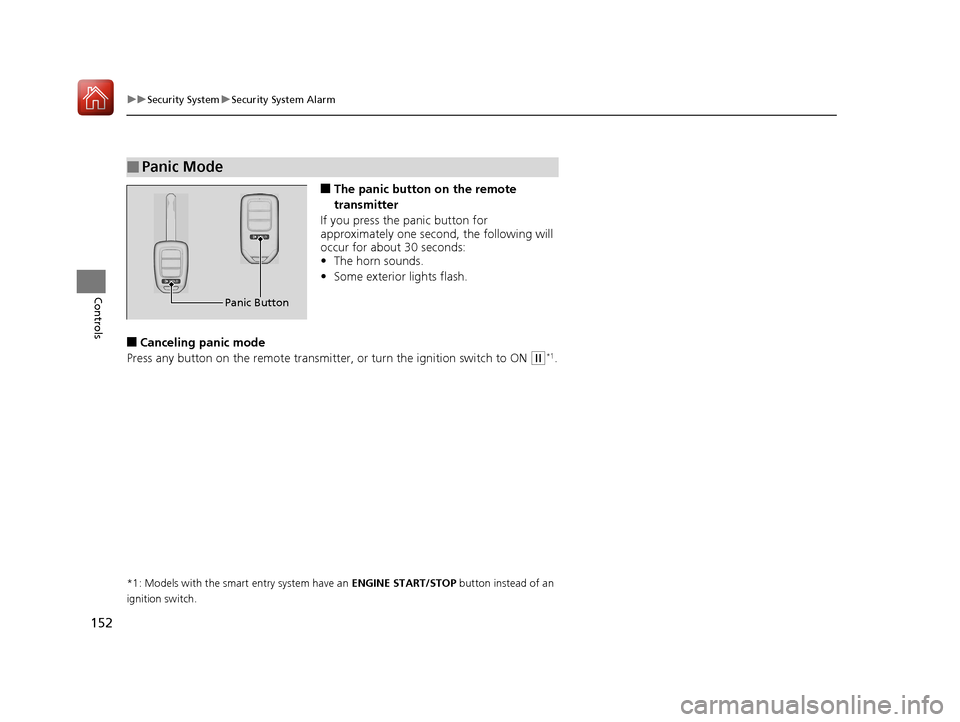
■The panic button on the remote
transmitter
If you press the panic button for
approximately one seco nd, the following will
occur for about 30 seconds:
• The horn sounds.
• Some exterior lights flash.
■Canceling panic mode
Press any button on the remote transmitter, or turn the ignition switch to ON
(w*1.
*1: Models with the smart entry system have an ENGINE START/STOP button instead of an
ignition switch.
■Panic Mode
Panic Button
17 CIVIC 4D HCM (KA KC KL)-31TBA6100.book 152 ページ 2016年8月31日 水曜日 午後6時5分
Page 154 of 601
153Continued
Controls
Opening and Closing the Windows
Opening/Closing the Power Windows
The power windows can be opened and clos ed when the ignition switch is in ON
(w*1, using the switches on the doors. The driver’s side switches can be used to
open and close all of the windows.
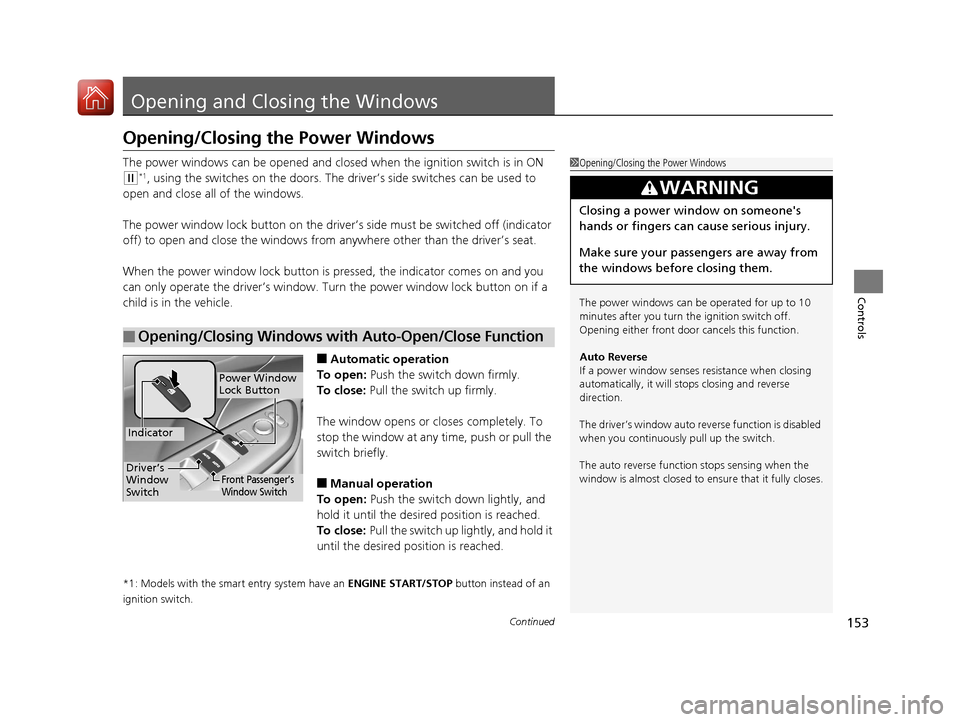
The power window lock button on the driver’s side must be switched off (indicator
off) to open and close the windows from anywhere other than the driver’s seat.
When the power window lock button is pressed, the indicator comes on and you
can only operate the driver’s window. Turn the power window lock button on if a
child is in the vehicle.
■Automatic operation
To open: Push the switch down firmly.
To close: Pull the switch up firmly.
The window opens or closes completely. To
stop the window at any time, push or pull the
switch briefly.
■Manual operation
To open: Push the switch down lightly, and
hold it until the desired position is reached.
To close: Pull the switch up lightly, and hold it
until the desired position is reached.
*1: Models with the smart entry system have an ENGINE START/STOP button instead of an
ignition switch.
■Opening/Closing Windows with Auto-Open/Close Function
1 Opening/Closing the Power Windows
The power windows can be operated for up to 10
minutes after you turn the ignition switch off.
Opening either front door cancels this function.
Auto Reverse
If a power window senses resistance when closing
automatically, it will st ops closing and reverse
direction.
The driver’s window auto re verse function is disabled
when you continuously pull up the switch.
The auto reverse function stops sensing when the
window is almost closed to en sure that it fully closes.
3WARNING
Closing a power window on someone's
hands or fingers can cause serious injury.
Make sure your passengers are away from
the windows before closing them.
Power Window
Lock Button
Indicator
Driver’s
Window
SwitchFront Passenger’s
Window Switch
17 CIVIC 4D HCM (KA KC KL)-31TBA6100.book 153 ページ 2016年8月31日 水曜日 午後6時5分
Page 158 of 601
157
Controls
Operating the Switches Around the Steering Wheel
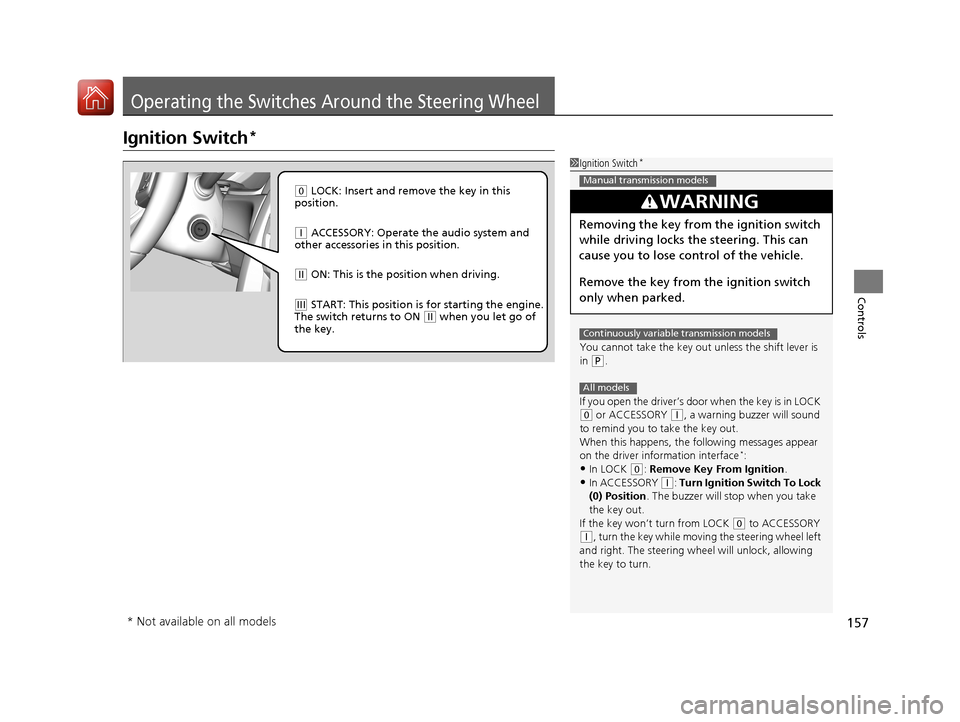
Ignition Switch*
1Ignition Switch*
You cannot take the key out unless the shift lever is
in
( P.
If you open the driver’s door when the key is in LOCK
(0 or ACCESSORY (q, a warning buzzer will sound
to remind you to take the key out.
When this happens, the following messages appear
on the driver information interface
*:•In LOCK ( 0: Remove Key From Ignition.
•In ACCESSORY (q: Turn Ignition Switch To Lock
(0) Position . The buzzer will stop when you take
the key out.
If the key won’t turn from LOCK
( 0 to ACCESSORY
(q, turn the key while moving the steering wheel left
and right. The steering wh eel will unlock, allowing
the key to turn.
3WARNING
Removing the key from the ignition switch
while driving locks the steering. This can
cause you to lose control of the vehicle.
Remove the key from the ignition switch
only when parked.
Manual transmission models
Continuously variable transmission models
All models
( 0 LOCK: Insert and remove the key in this
position.
( q ACCESSORY: Operate the audio system and
other accessories in this position.
( w ON: This is the position when driving.
(e START: This position is for starting the engine.
The switch returns to ON ( w when you let go of
the key.
* Not available on all models
17 CIVIC 4D HCM (KA KC KL)-31TBA6100.book 157 ページ 2016年8月31日 水曜日 午後6時5分
Page 159 of 601
158
uuOperating the Switches Around the Steering Wheel uENGINE START/STOP Button*
Controls
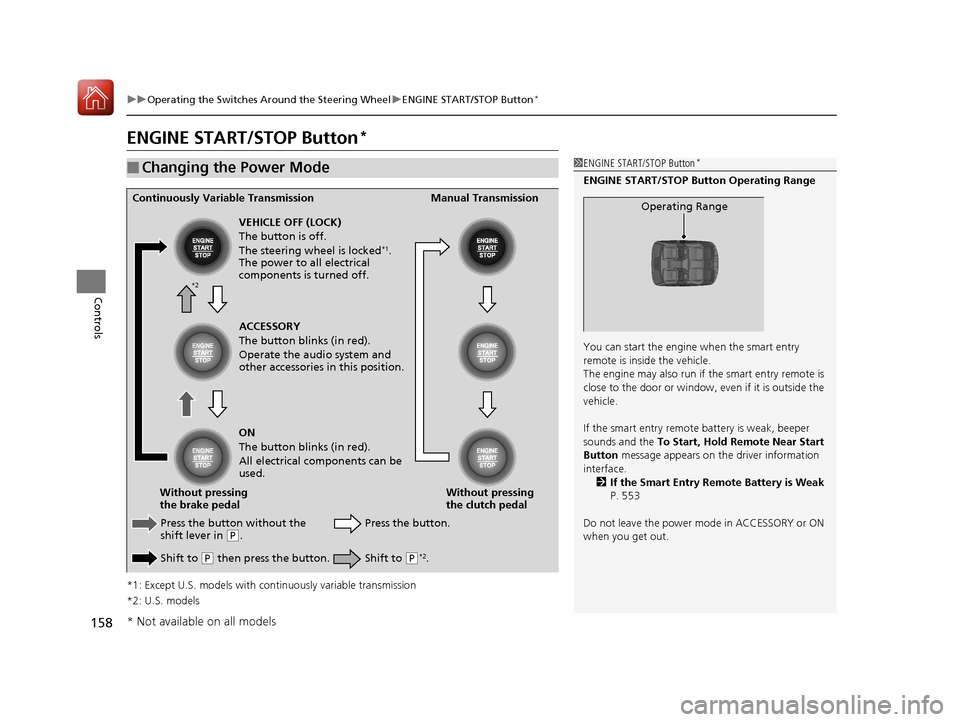
ENGINE START/STOP Button*
*1: Except U.S. models with c ontinuously variable transmission
*2: U.S. models
■Changing the Power Mode1 ENGINE START/STOP Button*
ENGINE START/STOP Button Operating Range
You can start the engine when the smart entry
remote is inside the vehicle.
The engine may also run if the smart entry remote is
close to the door or window, ev en if it is outside the
vehicle.
If the smart entry remote battery is weak, beeper
sounds and the To Start, Hold Remote Near Start
Button message appears on th e driver information
interface. 2 If the Smart Entry Remote Battery is Weak
P. 553
Do not leave the power mode in ACCESSORY or ON
when you get out.
Operating RangeContinuously Variable Transmission Manual Transmission
VEHICLE OFF (LOCK)
The button is off.
The steering wheel is locked
*1.
The power to all electrical
components is turned off.
Press the button without the
shift lever in
( P.
Shift to
( P then press the button. Press the button.
Without pressing
the clutch pedal
Without pressing
the brake pedal ACCESSORY
The button blinks (in red).
Operate the audio system and
other accessories in this position.
ON
The button blinks (in red).
All electrical components can be
used.
Shift to (P*2.
*2
* Not available on all models
17 CIVIC 4D HCM (KA KC KL)-31TBA6100.book 158 ページ 2016年8月31日 水曜日 午後6時5分
Page 160 of 601
Continued159
uuOperating the Switches Around the Steering Wheel uENGINE START/STOP Button*
Controls
If you leave the vehicle for 30 to 60 minutes with the shift lever in (P*1 and the
power mode in ACCESSORY, the vehicle automa tically goes into the mode similar to
VEHICLE OFF (LOCK) to avoid draining the battery.
When in this mode:
The steering wheel does not lock.
You cannot lock or unlock doors with th e remote transmitter or the smart entry
system.
Press the ENGINE START/STOP button twice to switch the mode to VEHICLE OFF
(LOCK).
*1: Continuously variab le transmission models
■Automatic Power Off1Changing the Power Mode
If the power mode does not change from VEHICLE
OFF to ACCESSORY, press the ENGINE START/STOP
button while moving the st eering wheel left and
right. The steering wheel will unlock, allowing the
mode to change.
Except U.S. continuously variable transmission models
Except U.S. continuously variable transmission models
All models
17 CIVIC 4D HCM (KA KC KL)-31TBA6100.book 159 ページ 2016年8月31日 水曜日 午後6時5分
Page 161 of 601
uuOperating the Switches Around the Steering Wheel uENGINE START/STOP Button*
160
Controls
If you open the driver’s doo r when the power mode is set to ACCESSORY, a warning
beep sounds.
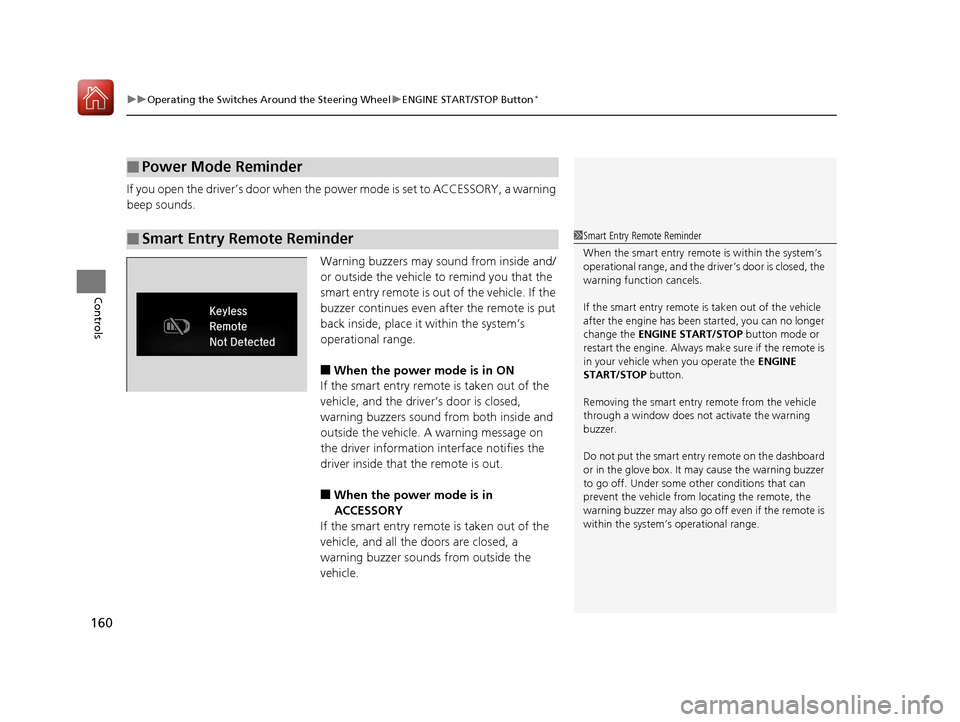
Warning buzzers may sound from inside and/
or outside the vehicle to remind you that the
smart entry remote is out of the vehicle. If the
buzzer continues even after the remote is put
back inside, place it within the system’s
operational range.
■When the power mode is in ON
If the smart entry remote is taken out of the
vehicle, and the driver’s door is closed,
warning buzzers sound from both inside and
outside the vehicle. A warning message on
the driver information interface notifies the
driver inside that the remote is out.
■When the power mode is in
ACCESSORY
If the smart entry remote is taken out of the
vehicle, and all the doors are closed, a
warning buzzer sounds from outside the
vehicle.
■Power Mode Reminder
■Smart Entry Remote Reminder1 Smart Entry Remote Reminder
When the smart entry remote is within the system’s
operational range, and the driv er’s door is closed, the
warning function cancels.
If the smart entry remote is taken out of the vehicle
after the engine has been started, you can no longer
change the ENGINE START/STOP button mode or
restart the engine. Always make sure if the remote is
in your vehicle when you operate the ENGINE
START/STOP button.
Removing the smart entry remote from the vehicle
through a window does not activate the warning
buzzer.
Do not put the smart entr y remote on the dashboard
or in the glove box. It may cause the warning buzzer
to go off. Under some other conditions that can
prevent the vehicle from locating the remote, the
warning buzzer may al so go off even if the remote is
within the system’s operational range.
17 CIVIC 4D HCM (KA KC KL)-31TBA6100.book 160 ページ 2016年8月31日 水曜日 午後6時5分
Page 162 of 601
161
uuOperating the Switches Around the Steering Wheel uIgnition Switch and Power Mode Comparison
Controls
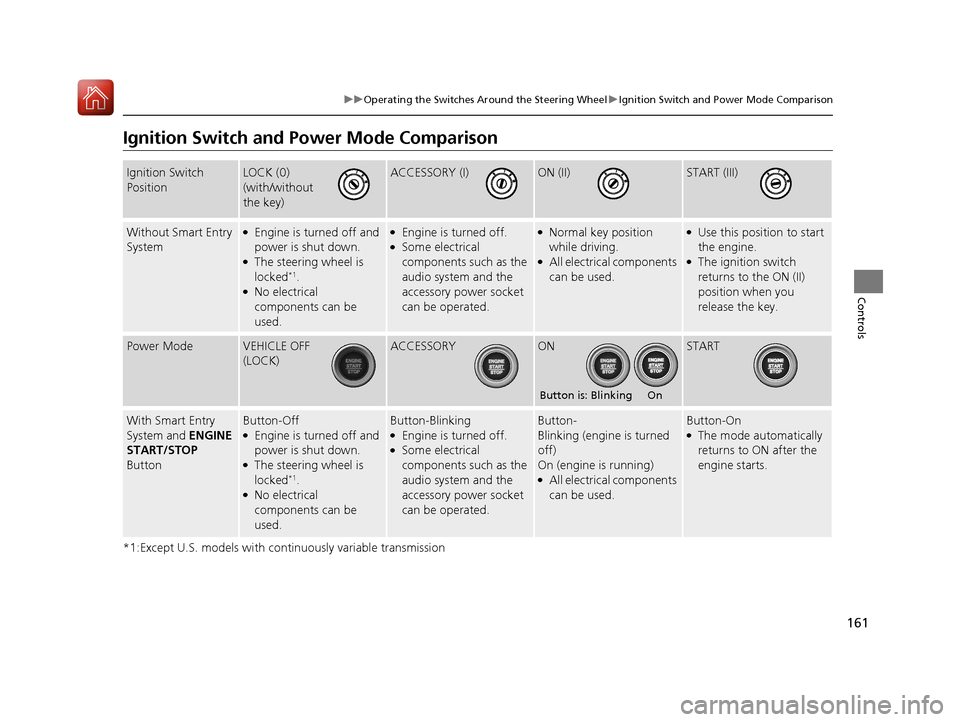
Ignition Switch and Po wer Mode Comparison
*1:Except U.S. models with continuously variable transmission
Ignition Switch
PositionLOCK (0)
(with/without
the key)ACCESSORY (I)ON (II)START (III)
Without Smart Entry
System●Engine is turned off and
power is shut down.
●The steering wheel is
locked*1.●No electrical
components can be
used.
●Engine is turned off.●Some electrical
components such as the
audio system and the
accessory power socket
can be operated.
●Normal key position
while driving.
●All electrical components
can be used.
●Use this position to start
the engine.
●The ignition switch
returns to the ON (II)
position when you
release the key.
Power ModeVEHICLE OFF
(LOCK)ACCESSORYONSTART
With Smart Entry
System and ENGINE
START/STOP
ButtonButton-Off●Engine is turned off and
power is shut down.
●The steering wheel is
locked*1.●No electrical
components can be
used.
Button-Blinking●Engine is turned off.●Some electrical
components such as the
audio system and the
accessory power socket
can be operated.
Button-
Blinking (engine is turned
off)
On (engine is running)
●All electrical components
can be used.
Button-On●The mode automatically
returns to ON after the
engine starts.
Button is: Blinking On
17 CIVIC 4D HCM (KA KC KL)-31TBA6100.book 161 ページ 2016年8月31日 水曜日 午後6時5分
Page 163 of 601
162
uuOperating the Switches Around the Steering Wheel uTurn Signals
Controls
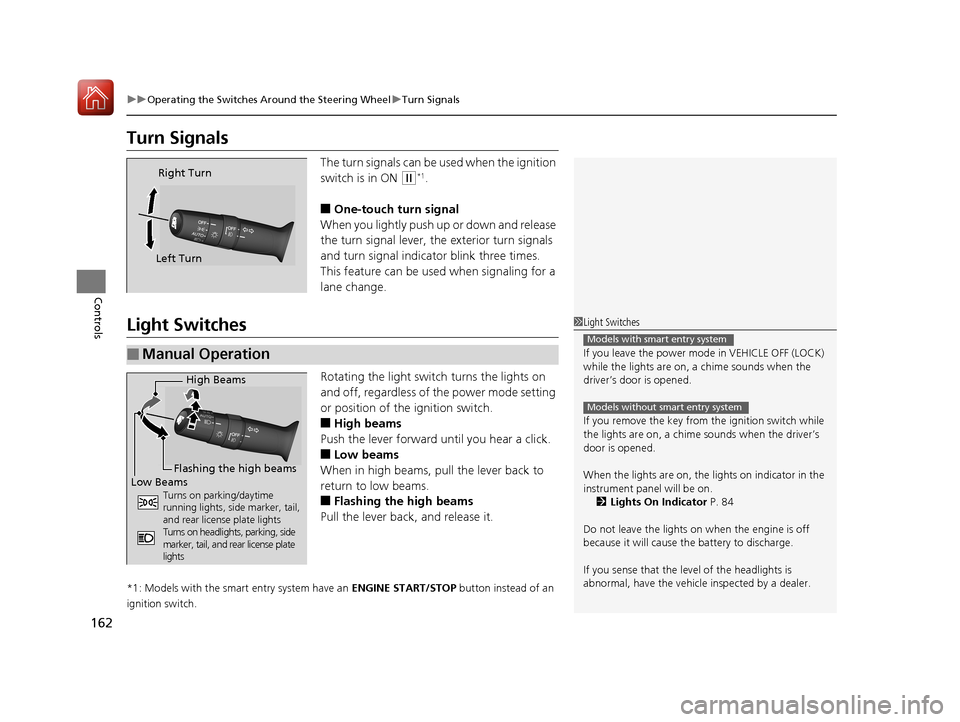
Turn Signals
The turn signals can be used when the ignition
switch is in ON
(w*1.
■One-touch turn signal
When you lightly push up or down and release
the turn signal lever, th e exterior turn signals
and turn signal indicator blink three times.
This feature can be used when signaling for a
lane change.
Light Switches
Rotating the light switch turns the lights on
and off, regardless of the power mode setting
or position of the ignition switch.
■High beams
Push the lever forward until you hear a click.
■Low beams
When in high beams, pull the lever back to
return to low beams.
■Flashing the high beams
Pull the lever back, and release it.
*1: Models with the smart entry system have an ENGINE START/STOP button instead of an
ignition switch.
Right Turn
Left Turn
■Manual Operation
1 Light Switches
If you leave the power mode in VEHICLE OFF (LOCK)
while the lights are on, a chime sounds when the
driver’s door is opened.
If you remove the key from the ignition switch while
the lights are on, a chime sounds when the driver’s
door is opened.
When the lights are on, the lights on indicator in the
instrument pane l will be on.
2 Lights On Indicator P. 84
Do not leave the lights on when the engine is off
because it will cause the battery to discharge.
If you sense that the le vel of the headlights is
abnormal, have the vehicl e inspected by a dealer.
Models with smart entry system
Models without smart entry system
High Beams
Flashing the high beams
Low Beams
Turns on parking/daytime
running lights, side marker, tail,
and rear license plate lights
Turns on headlights, parking, side
marker, tail, and rear license plate
lights
17 CIVIC 4D HCM (KA KC KL)-31TBA6100.book 162 ページ 2016年8月31日 水曜日 午後6時5分