lock HONDA CIVIC 2022 Owners Manual
[x] Cancel search | Manufacturer: HONDA, Model Year: 2022, Model line: CIVIC, Model: HONDA CIVIC 2022Pages: 700, PDF Size: 13.98 MB
Page 578 of 700
577
uuRefueling uHow to Refuel
Driving
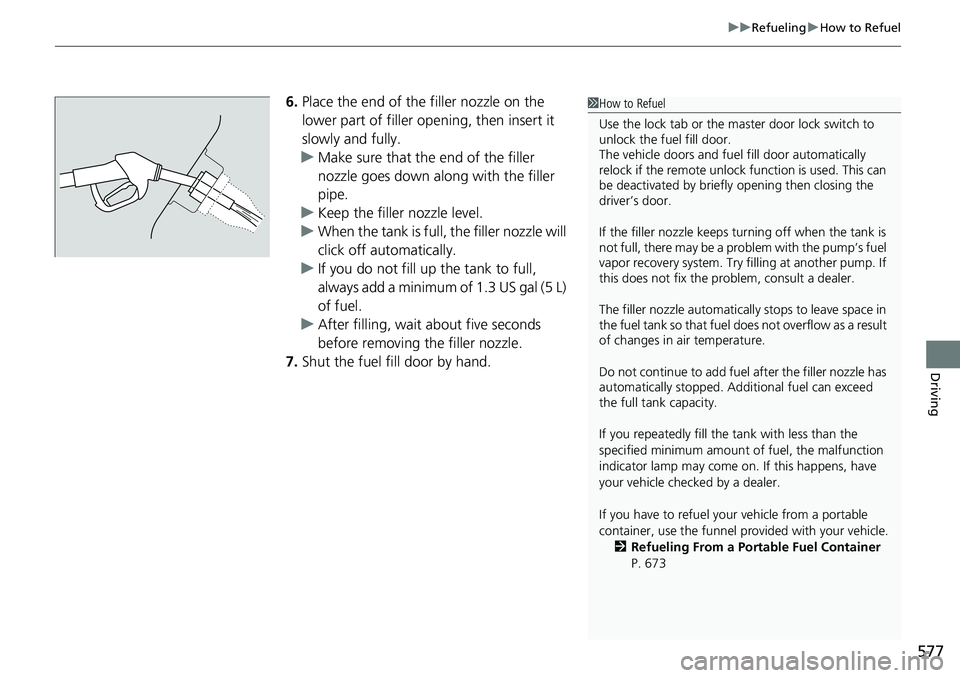
6. Place the end of the filler nozzle on the
lower part of filler opening, then insert it
slowly and fully.
u Make sure that the end of the filler
nozzle goes down along with the filler
pipe.
u Keep the filler nozzle level.
u When the tank is full, the filler nozzle will
click off automatically.
u If you do not fill up the tank to full,
always add a minimum of 1.3 US gal (5 L)
of fuel.
u After filling, wait about five seconds
before removing the filler nozzle.
7. Shut the fuel fill door by hand.1How to Refuel
Use the lock tab or the ma ster door lock switch to
unlock the fuel fill door.
The vehicle doors and fuel fill door automatically
relock if the remote unlock function is used. This can
be deactivated by briefl y opening then closing the
driver’s door.
If the filler nozzle keeps tu rning off when the tank is
not full, there may be a pr oblem with the pump’s fuel
vapor recovery system. Try fi lling at another pump. If
this does not fix the problem, consult a dealer.
The filler nozzle automatically stops to leave space in
the fuel tank so that fuel does not overflow as a result
of changes in air temperature.
Do not continue to add fuel after the filler nozzle has
automatically stopped. Addi tional fuel can exceed
the full tank capacity.
If you repeatedly fill the tank with less than the
specified minimum amount of fuel, the malfunction
indicator lamp may come on. If this happens, have
your vehicle checked by a dealer.
If you have to refuel y our vehicle from a portable
container, use the funnel pr ovided with your vehicle.
2 Refueling From a Portable Fuel Container
P. 673
Page 603 of 700
602
uuMaintenance Under the Hood uChanging the Engine Oil and Oil Filter
Maintenance
Changing the Engine Oil and Oil Filter
You must change the engine oil and oil f ilter regularly in order to maintain the
engine’s lubrication. The engine may be damaged if they are not changed regularly.
Change the oil and filter in accordance with the maintenance message on the driver
information interface. 1.Run the engine until it reaches normal
operating temperature, and then turn the
engine off.
2. Open the hood and remove the engine oil
fill cap.
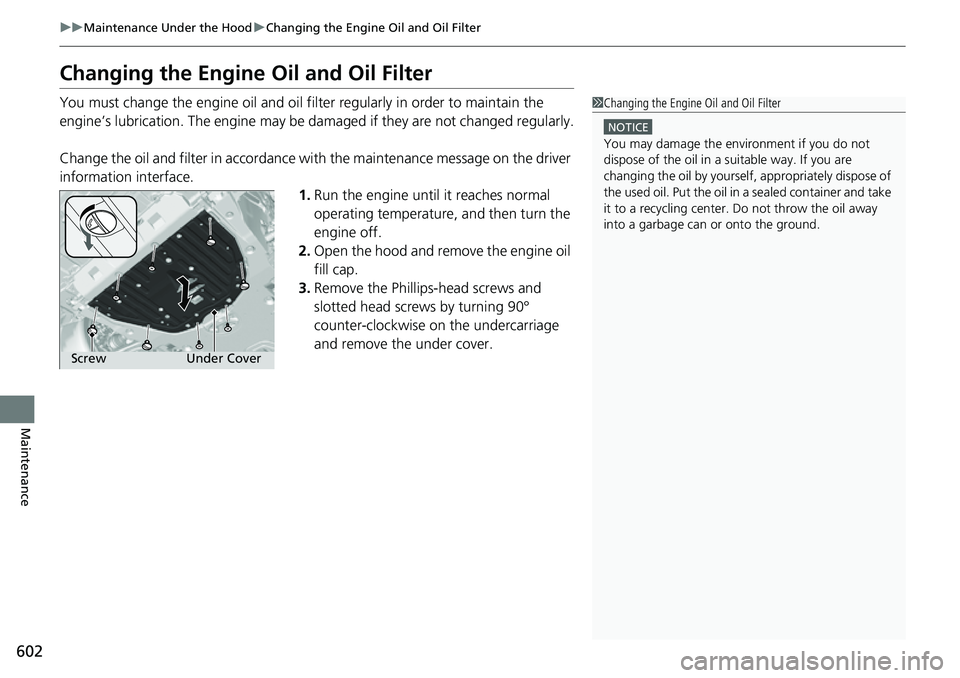
3. Remove the Phillips-head screws and
slotted head screws by turning 90°
counter-clockwise on the undercarriage
and remove the under cover.1Changing the Engine Oil and Oil Filter
NOTICE
You may damage the environment if you do not
dispose of the oil in a suitable way. If you are
changing the oil by yourself , appropriately dispose of
the used oil. Put the oil in a sealed container and take
it to a recycling center. Do not throw the oil away
into a garbage can or onto the ground.
Under Cover
Screw
Page 605 of 700
uuMaintenance Under the Hood uChanging the Engine Oil and Oil Filter
604
Maintenance
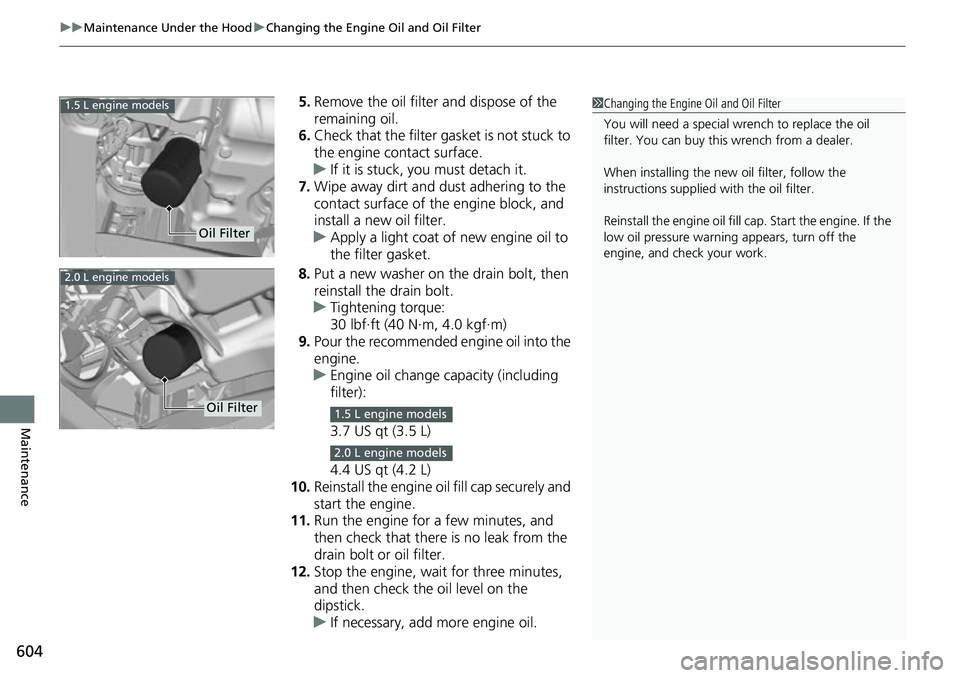
5. Remove the oil filter and dispose of the
remaining oil.
6. Check that the filter ga sket is not stuck to
the engine contact surface.
u If it is stuck, you must detach it.
7. Wipe away dirt and dust adhering to the
contact surface of the engine block, and
install a new oil filter.
u Apply a light coat of new engine oil to
the filter gasket.
8. Put a new washer on the drain bolt, then
reinstall the drain bolt.
u Tightening torque:
30 lbf∙ft (40 N∙m, 4.0 kgf∙m)
9. Pour the recommended engine oil into the
engine.
u Engine oil change capacity (including
filter):
3.7 US qt (3.5 L)
4.4 US qt (4.2 L)
10. Reinstall the engine oi l fill cap securely and
start the engine.
11. Run the engine for a few minutes, and
then check that there is no leak from the
drain bolt or oil filter.
12. Stop the engine, wait for three minutes,
and then check the oil level on the
dipstick.
u If necessary, add more engine oil.1Changing the Engine Oil and Oil Filter
You will need a special wrench to replace the oil
filter. You can buy this wrench from a dealer.
When installing the new oil filter, follow the
instructions supplied with the oil filter.
Reinstall the engine oil fill cap. Start the engine. If the
low oil pressure warning appears, turn off the
engine, and check your work.
Oil Filter
1.5 L engine models
2.0 L engine models
Oil Filter1.5 L engine models
2.0 L engine models
Page 607 of 700
uuMaintenance Under the Hood uEngine Coolant
606
Maintenance
1. Make sure the engine and radiator are
cool.
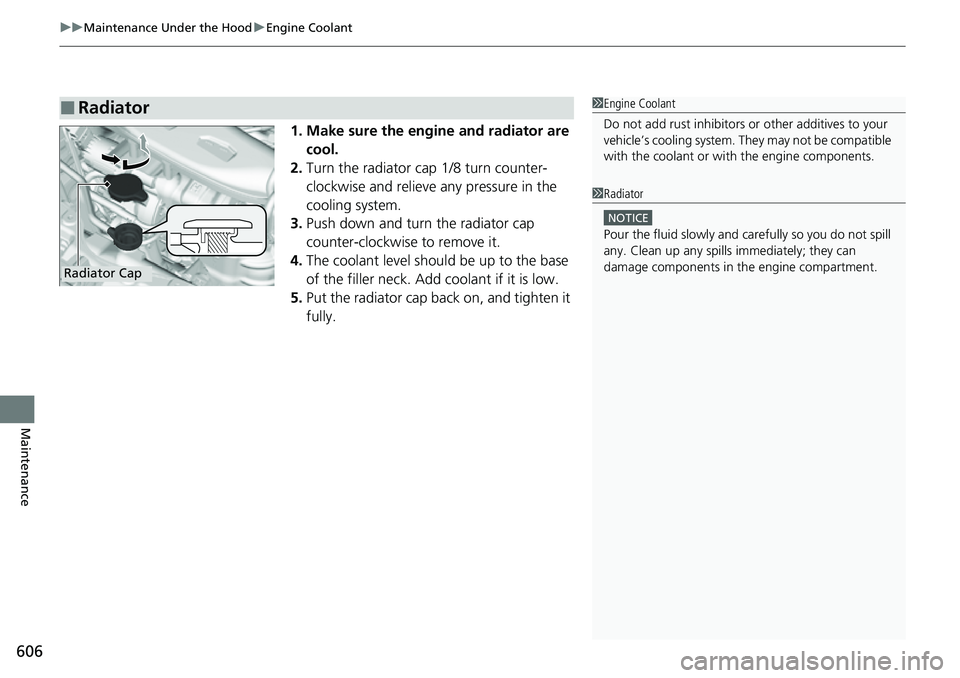
2. Turn the radiator cap 1/8 turn counter-
clockwise and relieve any pressure in the
cooling system.
3. Push down and turn the radiator cap
counter-clockwise to remove it.
4. The coolant level should be up to the base
of the filler neck. Add coolant if it is low.
5. Put the radiator cap back on, and tighten it
fully.
■Radiator1Engine Coolant
Do not add rust inhibitors or other additives to your
vehicle’s cooling system. Th ey may not be compatible
with the coolant or with the engine components.
1 Radiator
NOTICE
Pour the fluid slowly and ca refully so you do not spill
any. Clean up any spills immediately; they can
damage components in the engine compartment.
Radiator Cap
Page 613 of 700
612
uuReplacing Light Bulbs uBrake Light, Taillight, Rear Side Marker Light, and Rear Turn Signal Light Bulbs
Maintenance
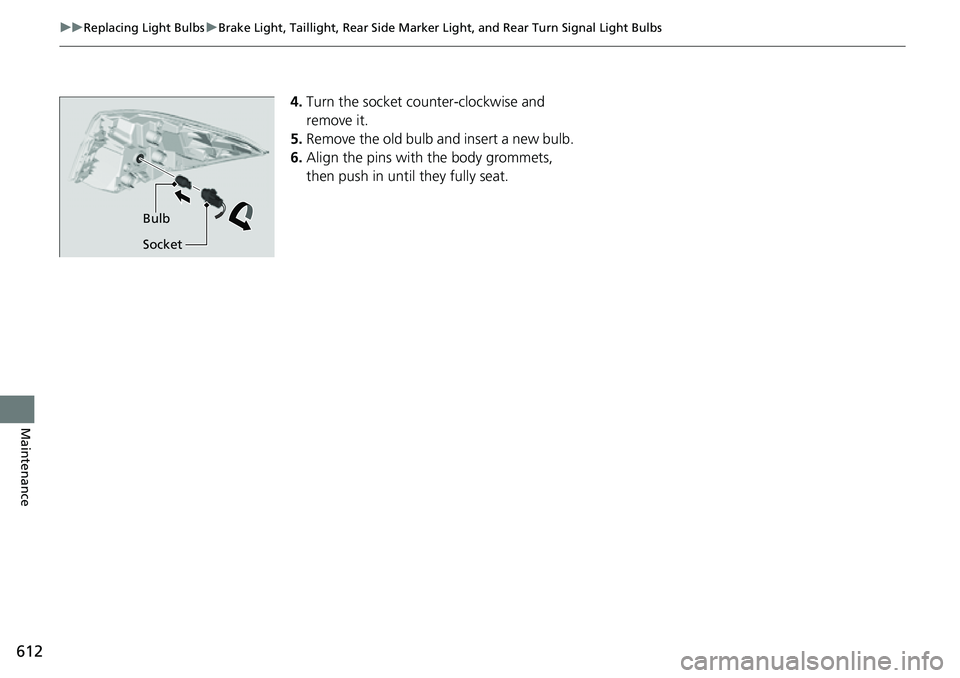
4.Turn the socket counter-clockwise and
remove it.
5. Remove the old bulb and insert a new bulb.
6. Align the pins with the body grommets,
then push in unt il they fully seat.
Bulb
Socket
Page 614 of 700
613
uuReplacing Light Bulbs uTaillight and Back-Up Light Bulbs
Maintenance
Taillight and Back-Up Light Bulbs
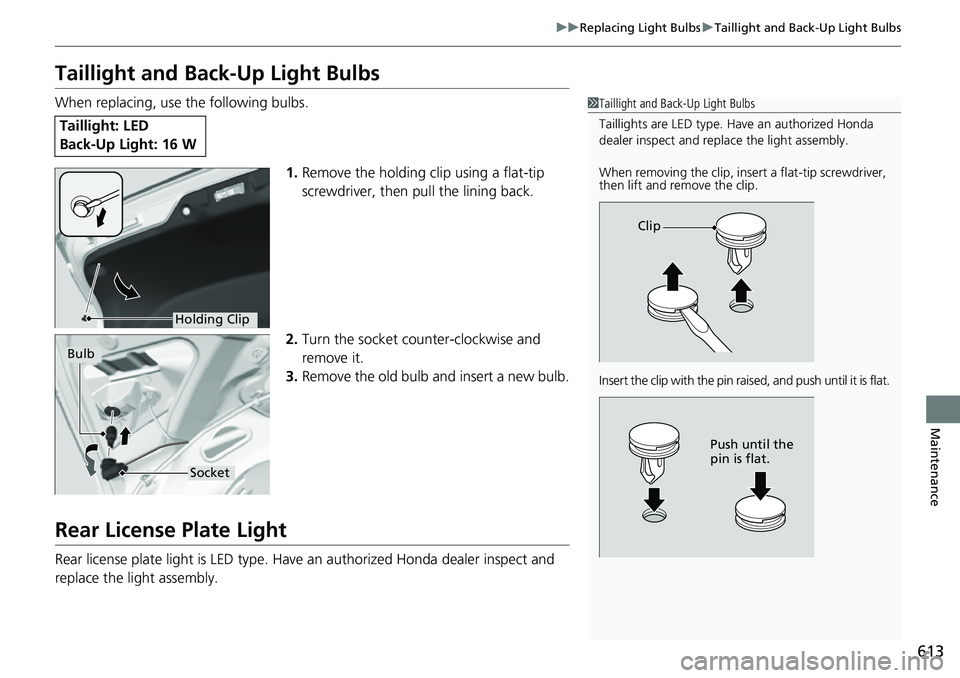
When replacing, use the following bulbs.
1.Remove the holding clip using a flat-tip
screwdriver, then pull the lining back.
2. Turn the socket counter-clockwise and
remove it.
3. Remove the old bulb and insert a new bulb.
Rear License Plate Light
Rear license plate light is LED type. Have an authorized Honda dealer inspect and
replace the light assembly.
Taillight: LED
Back-Up Light: 16 W
1Taillight and Back-Up Light Bulbs
Taillights are LED type. Ha ve an authorized Honda
dealer inspect and replace the light assembly.
When removing the clip, insert a flat-tip screwdriver,
then lift and remove the clip.
Insert the clip with the pin raised, and push until it is flat.
Clip
Push until the
pin is flat.
Holding Clip
Bulb
Socket
Page 615 of 700
614
uuReplacing Light Bulbs uHigh-Mount Brake Light Bulb
Maintenance
High-Mount Brake Light Bulb
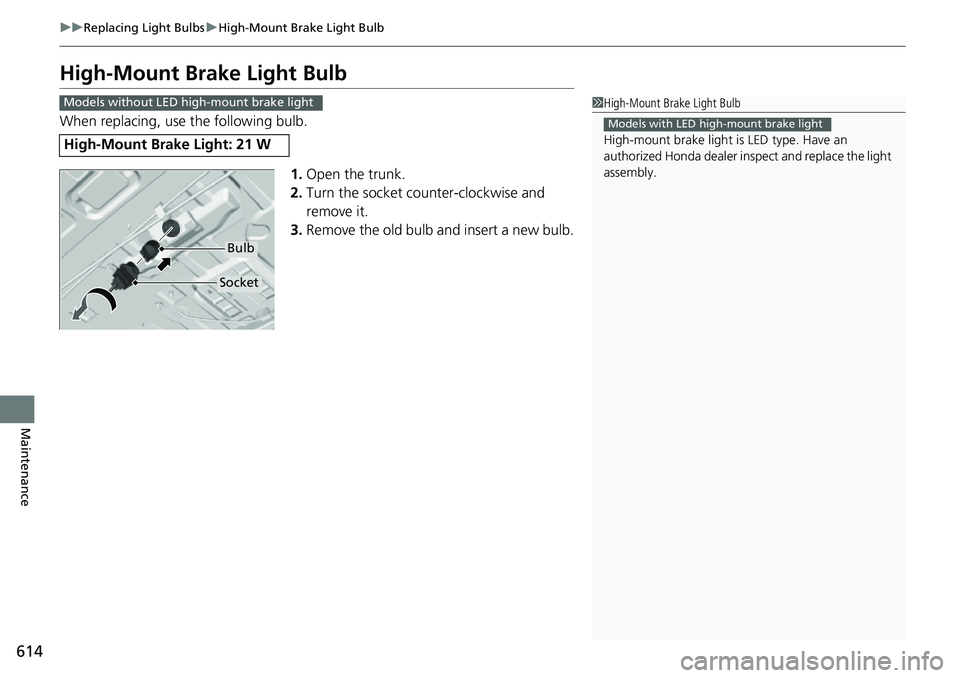
When replacing, use the following bulb.
1.Open the trunk.
2. Turn the socket counter-clockwise and
remove it.
3. Remove the old bulb and insert a new bulb.
High-Mount Brake Light: 21 W
1High-Mount Brake Light Bulb
High-mount brake light is LED type. Have an
authorized Honda d ealer inspect and replace the light
assembly.
Models with LED high-mount brake light
Models without LED high-mount brake light
Bulb
Socket
Page 617 of 700
616
uuChecking and Maintaining Wiper Blades uChanging the Wiper Blade
Maintenance
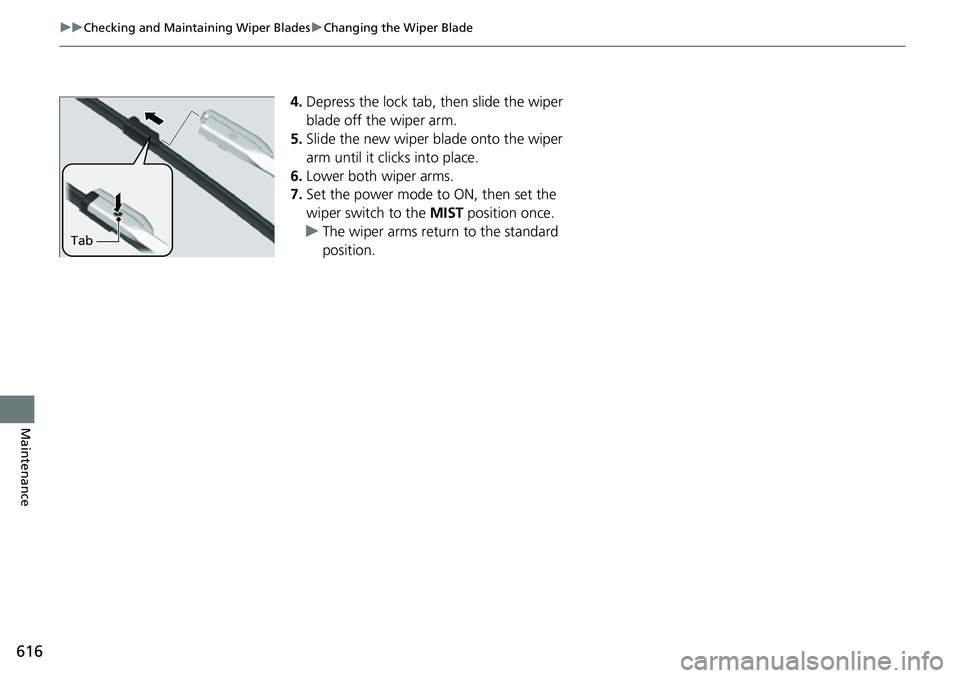
4. Depress the lock tab, then slide the wiper
blade off the wiper arm.
5. Slide the new wiper blade onto the wiper
arm until it clicks into place.
6. Lower both wiper arms.
7. Set the power mode to ON, then set the
wiper switch to the MIST position once.
u The wiper arms return to the standard
position.
Tab
Page 633 of 700
uuCleaning uInterior Care
632
Maintenance
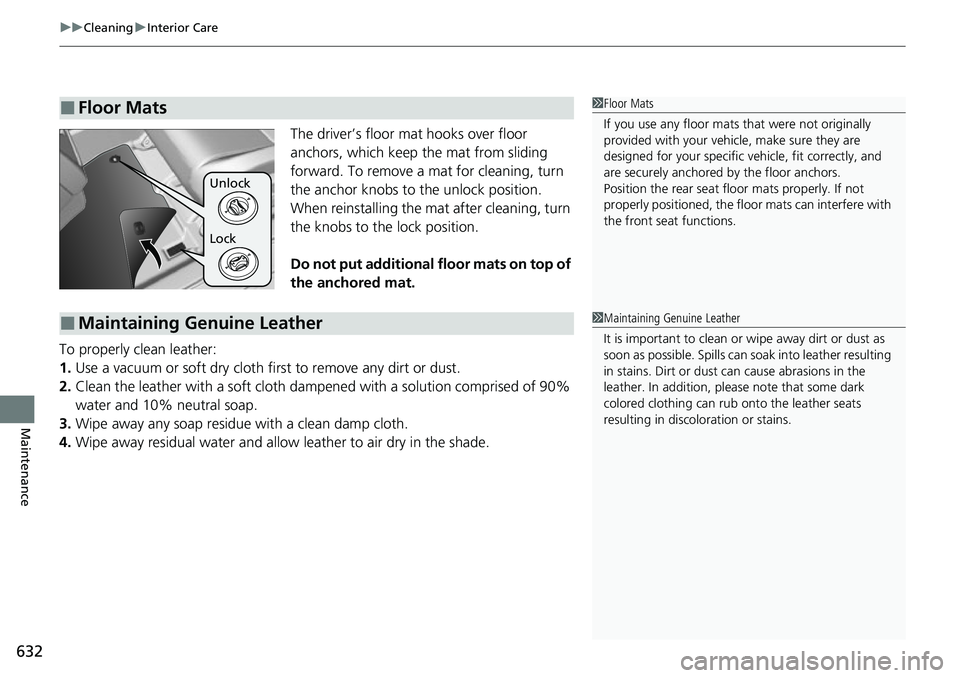
The driver’s floor mat hooks over floor
anchors, which keep the mat from sliding
forward. To remove a mat for cleaning, turn
the anchor knobs to the unlock position.
When reinstalling the mat after cleaning, turn
the knobs to the lock position.
Do not put additional floor mats on top of
the anchored mat.
To properly clean leather:
1. Use a vacuum or soft dry cloth first to remove any dirt or dust.
2. Clean the leather with a soft cloth dampen ed with a solution comprised of 90%
water and 10% neutral soap.
3. Wipe away any soap residu e with a clean damp cloth.
4. Wipe away residual water and allow leather to air dry in the shade.
■Floor Mats1Floor Mats
If you use any floor mats that were not originally
provided with your vehicle, make sure they are
designed for your specific ve hicle, fit correctly, and
are securely anchored by the floor anchors.
Position the rear seat floor mats properly. If not
properly positioned, the floor mats can interfere with
the front seat functions.
Lock Unlock
■Maintaining Genuine Leather1 Maintaining Genuine Leather
It is important to clean or wipe away dirt or dust as
soon as possible. Spills can soak into leather resulting
in stains. Dirt or dust ca n cause abrasions in the
leather. In addition, pl ease note that some dark
colored clothing can rub onto the leather seats
resulting in discol oration or stains.
Page 640 of 700
639
Handling the Unexpected
This chapter explains how to handle unexpected troubles.
ToolsTypes of Tools .................................. 640
If a Tire Goes Flat
Changing a Flat Tire ......................... 641
Engine Does Not Start Checking the Engine ........................ 648
If the Remote Key Battery is Weak.... 649
Emergency Engine Start ................... 650
Emergency Engine Stop ................... 651
If the Battery Is Dead Jump Starting Procedure .................. 652
Shift Lever Does Not Move .............. 655Overheating
How to Handle Overheating............. 656
Indicator, Coming On/Blinking
If the Low Oil Pressure Warning Appears ... 658If the Charging System Indicator Comes On ............................................. 659
If the Malfunction Indicator Lamp Comes
On or Blinks ................................... 659
If the Brake System Indicator (Red) Comes
On or Blinks ................................... 660
If the Brake System Indicator (Red) Comes On or Blinks at the Same Time When the Brake
System Indicator (Amber) Comes On .....661
If the Electric Power Steering (EPS) System
Indicator Comes On ....................... 662
If the Low Tire Pressure/TPMS Indicator Comes On or Blinks ....................... 663
Fuses Fuse Locations ................................. 664
Inspecting and Changing Fuses ........ 668
Emergency Towing ........................... 670
If You Cannot Unlock the Fuel Fill Door .... 671
If You Cannot Open the Trunk............672
Refueling........................................... 673