display HONDA CIVIC 2022 Owners Manual
[x] Cancel search | Manufacturer: HONDA, Model Year: 2022, Model line: CIVIC, Model: HONDA CIVIC 2022Pages: 700, PDF Size: 13.98 MB
Page 411 of 700
uuBluetooth ® HandsFreeLink ®u Using HFL
410
Features
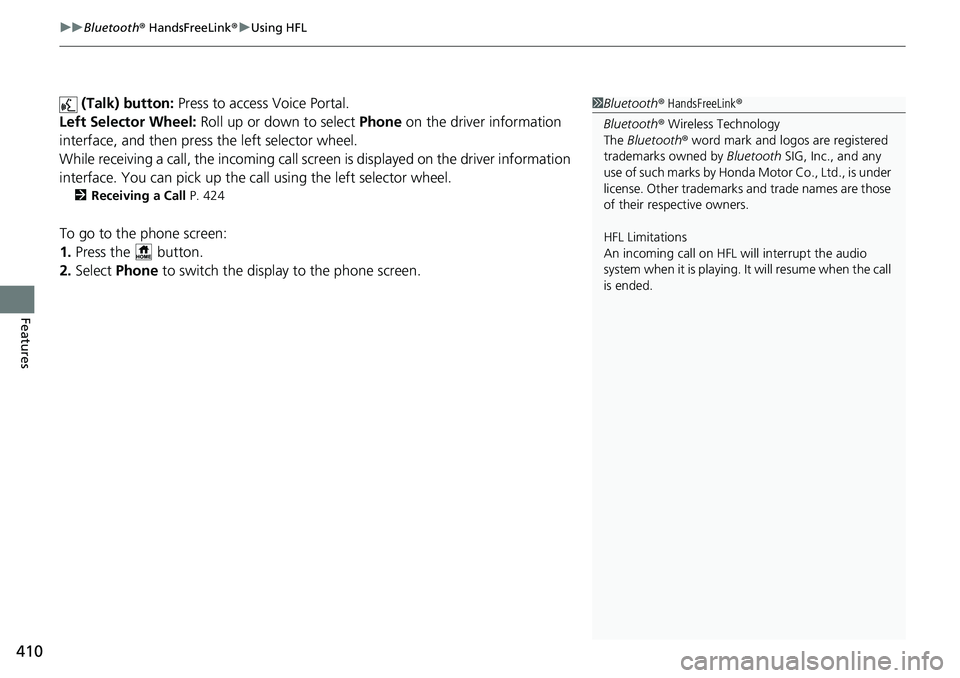
(Talk) button: Press to access Voice Portal.
Left Selector Wheel: Roll up or down to select Phone on the driver information
interface, and then press the left selector wheel.
While receiving a call, the incoming call scr een is displayed on the driver information
interface. You can pick up the call using the left selector wheel.
2 Receiving a Call P. 424
To go to the phone screen:
1.Press the button.
2. Select Phone to switch the display to the phone screen.
1Bluetooth ® HandsFreeLink ®
Bluetooth ® Wireless Technology
The Bluetooth ® word mark and logos are registered
trademarks owned by Bluetooth SIG, Inc., and any
use of such marks by Honda Motor Co., Ltd., is under
license. Other trademarks and trade names are those
of their respective owners.
HFL Limitations
An incoming call on HFL will interrupt the audio
system when it is playing. It will resume when the call
is ended.
Page 412 of 700
411
uuBluetooth ® HandsFreeLink ®u Using HFL
Features
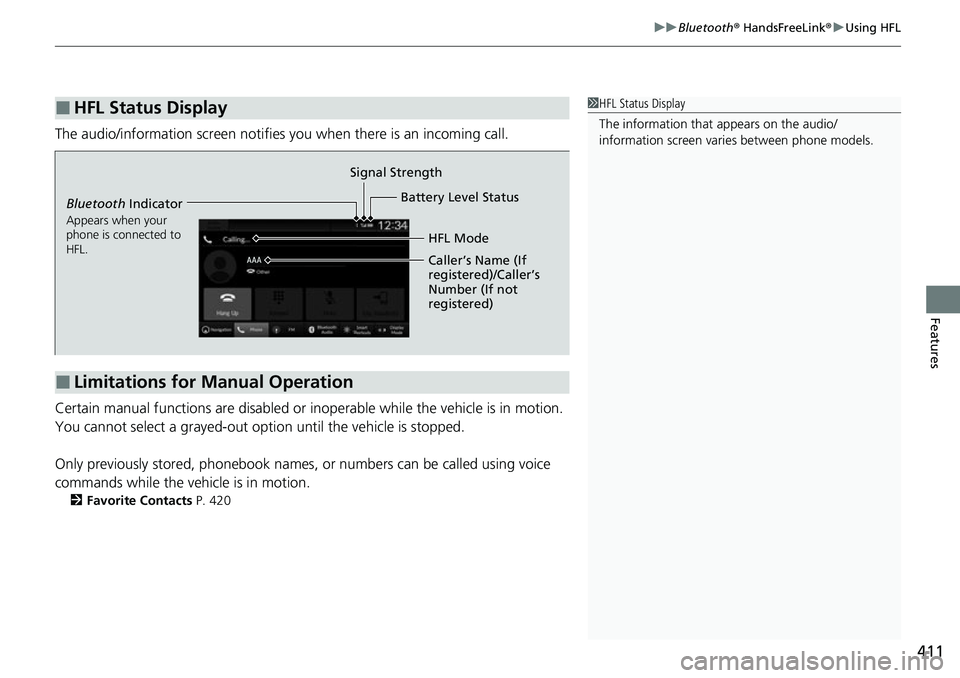
The audio/information scr een notifies you when there is an incoming call.
Certain manual functions are disabled or inoperable while the vehicle is in motion.
You cannot select a grayed-out option until the vehicle is stopped.
Only previously stored, phonebook names, or numbers can be called using voice
commands while the vehicle is in motion.
2 Favorite Contacts P. 420
■HFL Status Display1HFL Status Display
The information that appears on the audio/
information screen vari es between phone models.
■Limitations for Manual Operation
Bluetooth Indicator
Appears when your
phone is connected to
HFL.
Signal Strength
HFL Mode
Battery Level Status
Caller’s Name (If
registered)/Caller’s
Number (If not
registered)
Page 414 of 700
413
uuBluetooth ® HandsFreeLink ®u HFL Menus
Continued
Features
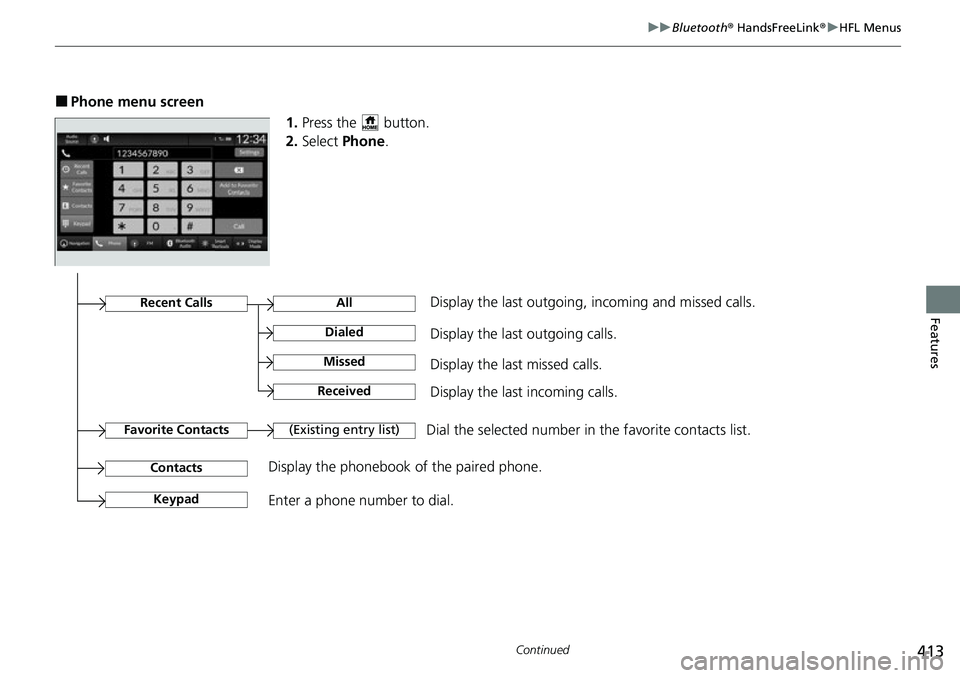
■Phone menu screen
1.Press the button.
2. Select Phone .
Dial the selected number in the favorite contacts list.
All
(Existing entry list)
Display the last outgoing calls.
Recent CallsDisplay the last outgoing, incoming and missed calls.
Favorite Contacts
Contacts
Keypad
Display the phonebook of the paired phone.
Enter a phone number to dial.
Dialed
Display the last missed calls.Missed
Display the last incoming calls.Received
Page 415 of 700
uuBluetooth ® HandsFreeLink ®u HFL Menus
414
Features
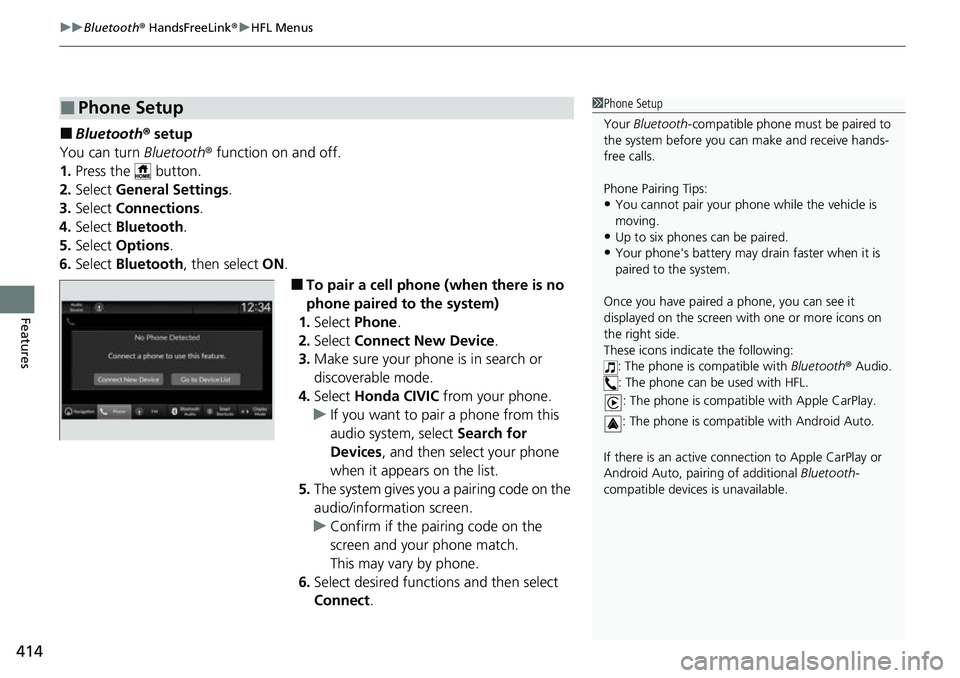
■Bluetooth ® setup
You can turn Bluetooth® function on and off.
1. Press the button.
2. Select General Settings .
3. Select Connections .
4. Select Bluetooth .
5. Select Options.
6. Select Bluetooth , then select ON.
■To pair a cell phone (when there is no
phone paired to the system)
1. Select Phone .
2. Select Connect New Device .
3. Make sure your phone is in search or
discoverable mode.
4. Select Honda CIVIC from your phone.
u If you want to pair a phone from this
audio system, select Search for
Devices , and then select your phone
when it appears on the list.
5. The system gives you a pairing code on the
audio/information screen.
u Confirm if the pairing code on the
screen and your phone match.
This may vary by phone.
6. Select desired functions and then select
Connect .
■Phone Setup1Phone Setup
Your Bluetooth -compatible phone must be paired to
the system before you ca n make and receive hands-
free calls.
Phone Pairing Tips:
•You cannot pair your phone while the vehicle is
moving.
•Up to six phones can be paired.
•Your phone's battery may dr ain faster when it is
paired to the system.
Once you have paired a phone, you can see it
displayed on the screen with one or more icons on
the right side.
These icons indicate the following: : The phone is compatible with Bluetooth® Audio.
: The phone can be used with HFL.
: The phone is compatib le with Apple CarPlay.
: The phone is compatible with Android Auto.
If there is an active connection to Appl e CarPlay or
Android Auto, pairing of additional Bluetooth-
compatible devices is unavailable.
Page 426 of 700
425
uuBluetooth ® HandsFreeLink ®u HFL Menus
Features
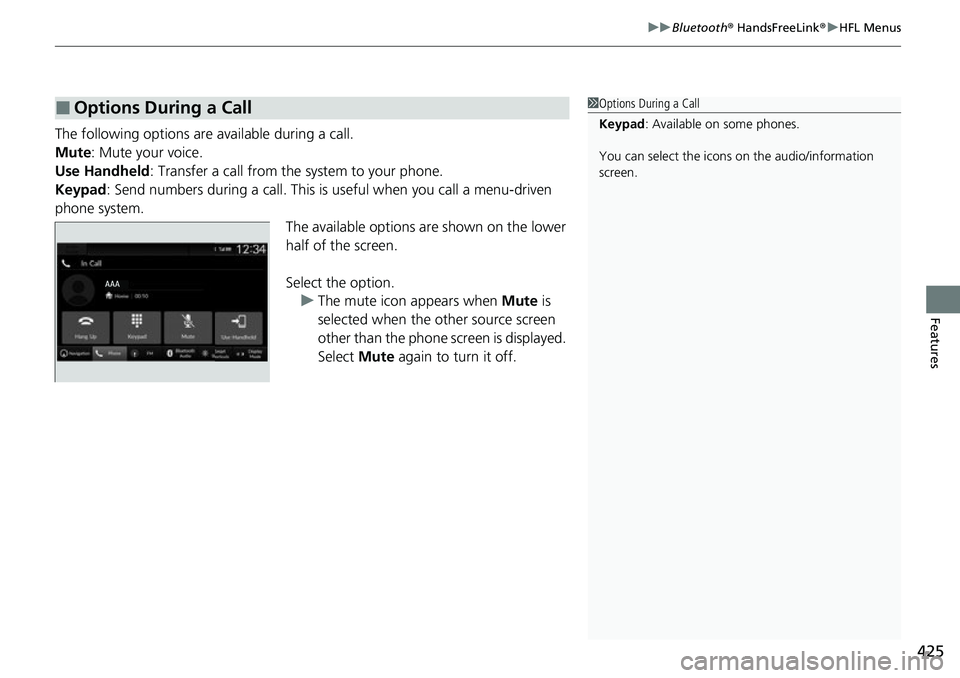
The following options ar e available during a call.
Mute: Mute your voice.
Use Handheld : Transfer a call from the system to your phone.
Keypad : Send numbers during a call. This is useful when you call a menu-driven
phone system. The available options are shown on the lower
half of the screen.
Select the option.u The mute icon appears when Mute is
selected when the other source screen
other than the phone screen is displayed.
Select Mute again to turn it off.
■Options During a Call1Options During a Call
Keypad : Available on some phones.
You can select the icons on the audio/information
screen.
Page 429 of 700
428
Features
Refuel Recommend
Your vehicle is equipped with a feature that automatically calculates when to refuel.
This feature will notify you when refueling is recommended as well as enable you to
search for gas stations that are loca ted in the vicinity of your vehicle.
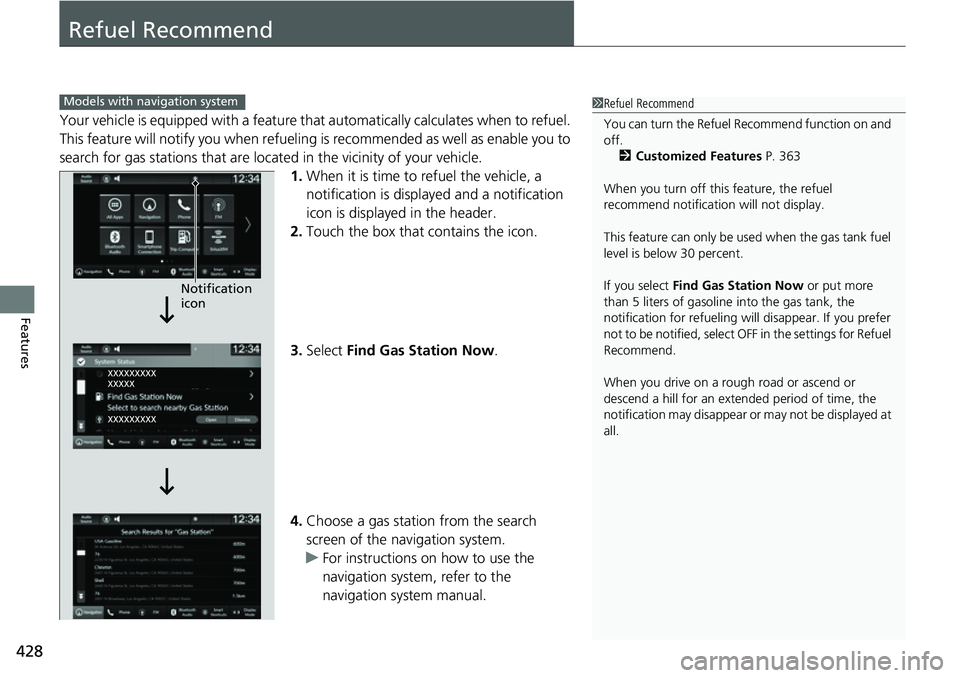
1. When it is time to refuel the vehicle, a
notification is displayed and a notification
icon is displayed in the header.
2. Touch the box that contains the icon.
3. Select Find Gas Station Now .
4. Choose a gas station from the search
screen of the navigation system.
u For instructions on how to use the
navigation system, refer to the
navigation system manual.
1Refuel Recommend
You can turn the Refuel Recommend function on and
off.
2 Customized Features P. 363
When you turn off this feature, the refuel
recommend notification will not display.
This feature can only be us ed when the gas tank fuel
level is below 30 percent.
If you select Find Gas Station Now or put more
than 5 liters of gasoline into the gas tank, the
notification for refueling will disappear. If you prefer
not to be notified, select O FF in the settings for Refuel
Recommend.
When you drive on a rough road or ascend or
descend a hill for an ex tended period of time, the
notification may disappear or may not be displayed at
all.Models with navigation system
Notification
icon
Page 445 of 700
uuWhen Driving uShifting
444
Driving
■Shift Operation1Shift Operation
NOTICE
When you change the shift position from (D to ( R
and vice versa, come to a complete stop and keep the
brake pedal depressed.
Operating the shift lever be fore the vehicle has come
to a complete standstill can damage the transmission.
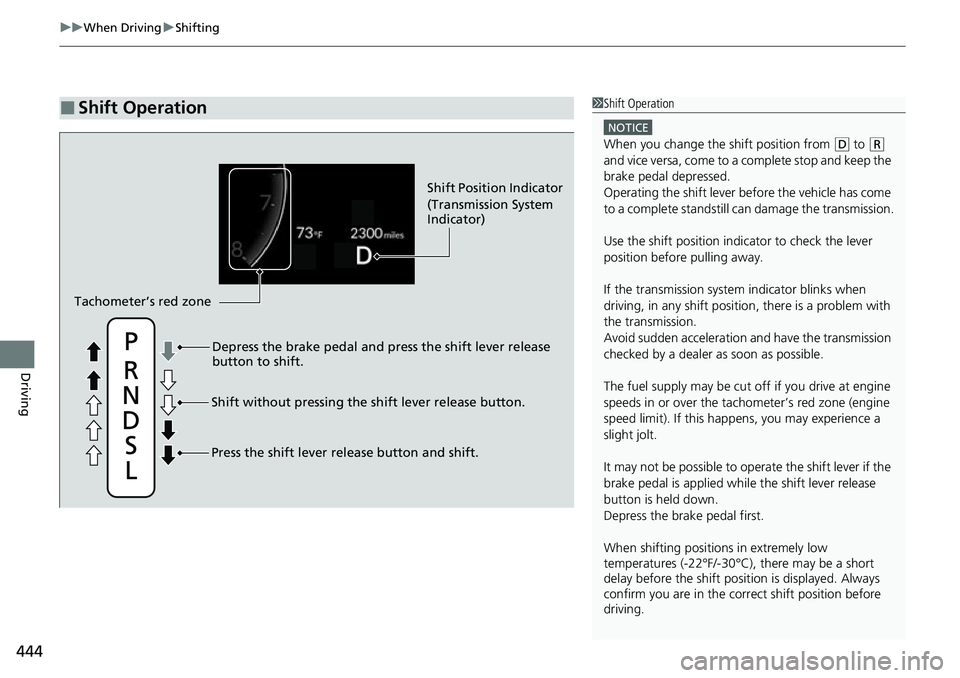
Use the shift position indicator to check the lever
position before pulling away.
If the transmission system indicator blinks when
driving, in any shift positi on, there is a problem with
the transmission.
Avoid sudden acceleration and have the transmission
checked by a dealer as soon as possible.
The fuel supply may be cut of f if you drive at engine
speeds in or over the tac hometer’s red zone (engine
speed limit). If this happe ns, you may experience a
slight jolt.
It may not be possible to operate the shift lever if the
brake pedal is applied while the shift lever release
button is held down.
Depress the brake pedal first.
When shifting positions in extremely low
temperatures (-22°F/-30°C), there may be a short
delay before the shift posit ion is displayed. Always
confirm you are in the corr ect shift position before
driving.
Shift Position Indicator
(Transmission System
Indicator)
Depress the brake pedal and press the shift lever release
button to shift.
Shift without pressing the shift lever release button.
Press the shift lever re lease button and shift.
Tachometer’s red zone
Page 447 of 700
uuWhen Driving uShifting
446
Driving
■Shift Operation1Shift Operation
NOTICE
When you change the shift position from (D to ( R
and vice versa, come to a complete stop and keep the
brake pedal depressed.
Operating the shift lever be fore the vehicle has come
to a complete standstill can damage the transmission.
Use the shift position indicator to check the lever
position before pulling away.
If the transmission system indicator blinks when
driving, in any shift positi on, there is a problem with
the transmission.
Avoid sudden acceleration and have the transmission
checked by a dealer as soon as possible.
The fuel supply may be cut of f if you drive at engine
speeds in or over the tac hometer's red zone (engine
speed limit). If this happe ns, you may experience a
slight jolt.
It may not be possible to operate the shift lever if the
brake pedal is applied while the shift lever release
button is held down.
Depress the brake pedal first.
When shifting positions in extremely low
temperatures (-22°F/-30°C), there may be a short
delay before the shift posit ion is displayed. Always
confirm you are in the corr ect shift position before
driving.
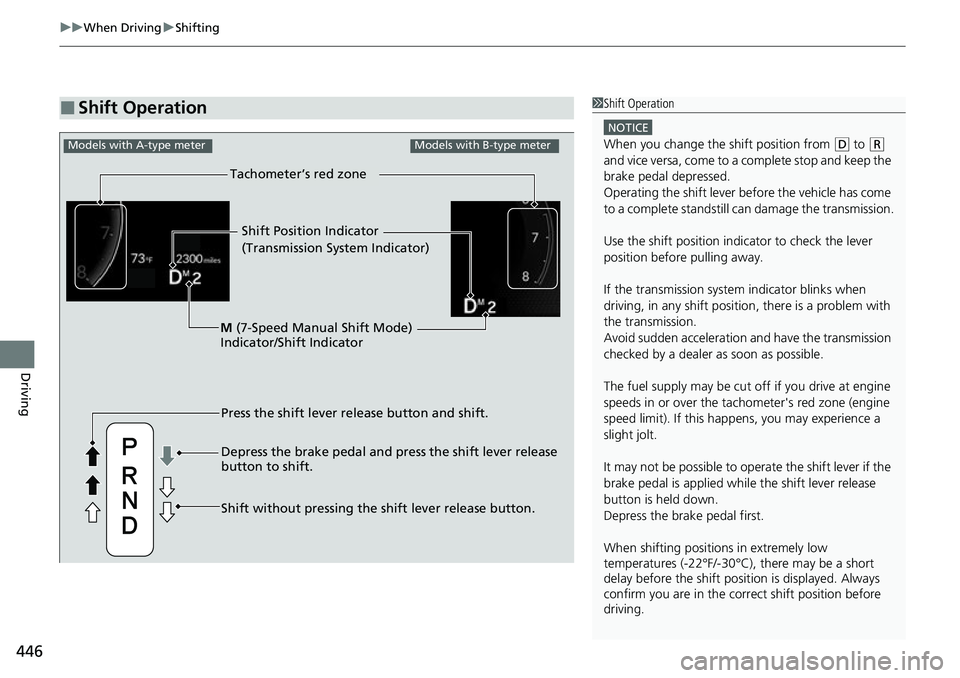
Shift Position Indicator
(Transmission System Indicator)
Press the shift lever release button and shift.
Depress the brake pedal and press the shift lever release
button to shift.
Shift without pressing the shift lever release button.
M
(7-Speed Manual Shift Mode)
Indicator/Shift Indicator
Tachometer’s red zone
Models with A-type meterModels with B-type meter
Page 448 of 700
Continued447
uuWhen Driving uShifting
Driving
Use the paddle shifters to change between 1st and 7th speeds without releasing
your hands from the steering wheel. The transmission switches to the 7-speed
manual shift mode when you pull a paddle shifter while driving. This mode is useful
when engine braking is needed.
■When the transmi ssion is in (D:
The shift mode goes into the 7-speed ma nual shift mode temporarily, and the
number is displayed in the shift indicator.
The 7-speed manual shift mode is canceled automatically if you drive at constant
speed or accelerate, and the number in the shift indicator goes off.
You can cancel this mode by pulling the
(+ paddle shifter for a few seconds.
The 7-speed manual shift mode is especial ly useful when reducing the vehicle speed
temporarily before making a turn.
■When the transmi ssion is in (D with SPORT mode:
The shift mode goes into the 7-speed manual shift mode. The M indicator and the
speed number are displayed in the shift indicator. As the vehicle speed slows down,
the transmission automatically shifts down accordingly. When the vehicle comes to
a stop, it automatically shifts down into 1st.
If the vehicle speed increases and the engi ne speed reaches near the tachometer’s
red zone, the transmission automatically shifts up.
You can only pull away in 1st speed.
When canceling the 7-speed manual shift m ode, use the drive mode switch to select
other than SPORT mode or pull the
(+ paddle shifter for a few seconds. When the
7-speed manual shift mode is canceled, the M indicator and shift indicator will turn
off.
■7-Speed Manual Shift Mode1 7-Speed Manual Shift Mode
In the 7-speed manual shif t mode, the transmission
shifts up or down by opera ting either paddle shifter
under the following conditions:
Shift Up: The engine sp eed reaches the lowest
threshold of the higher speed position.
Shift Down: The engine sp eed reaches the highest
threshold of the lower speed position.
When the engine speed reaches near the
tachometer’s red zone, the transmission shifts up
automatically.
When the engine speed reaches the lowest threshold
of the selected speed positi on, the transmission shifts
down automatically.
Operating the paddle shifte rs on slippery surfaces
may cause the tires to lock up. In this case, the 7-
speed manual shift mode is canceled and goes back
to the normal
( D driving mode.
Page 451 of 700
450
uuWhen Driving uDrive Mode Switch*
Driving
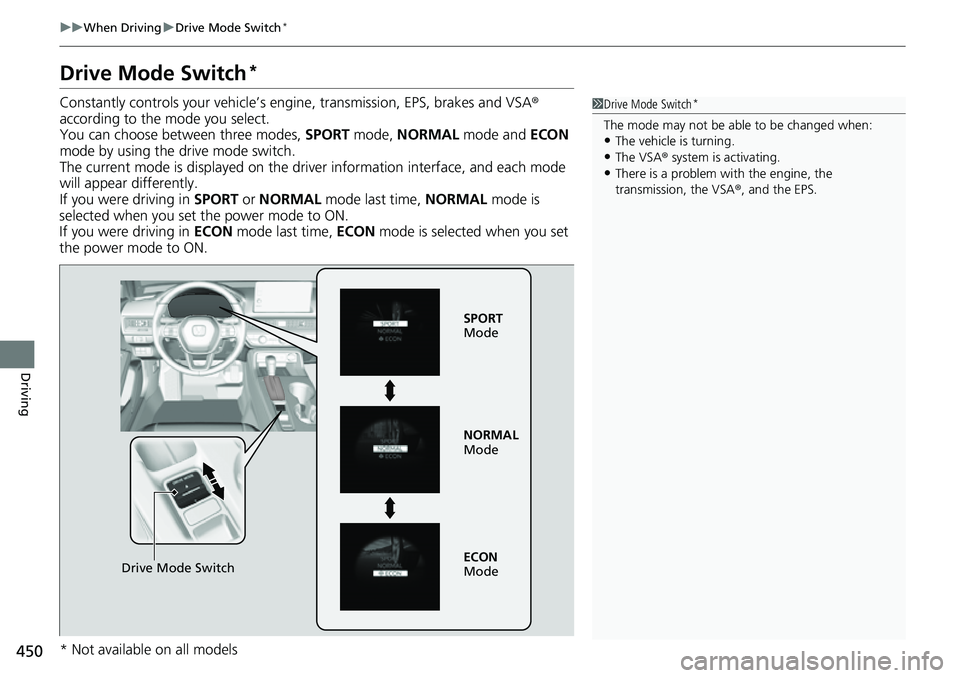
Drive Mode Switch*
Constantly controls your vehicle’s engine, transmission, EPS, brakes and VSA ®
according to the mode you select.
You can choose between three modes, SPORT mode, NORMAL mode and ECON
mode by using the drive mode switch.
The current mode is displayed on the driver information interface, and each mode
will appear differently.
If you were driving in SPORT or NORMAL mode last time, NORMAL mode is
selected when you set the power mode to ON.
If you were driving in ECON mode last time, ECON mode is selected when you set
the power mode to ON.1 Drive Mode Switch*
The mode may not be able to be changed when:
•The vehicle is turning.•The VSA ® system is activating.
•There is a problem wi th the engine, the
transmission, the VSA® , and the EPS.
Drive Mode Switch
SPORT
Mode
NORMAL
Mode
ECON
Mode
* Not available on all models