automatic transmission HONDA CIVIC 2022 User Guide
[x] Cancel search | Manufacturer: HONDA, Model Year: 2022, Model line: CIVIC, Model: HONDA CIVIC 2022Pages: 700, PDF Size: 13.98 MB
Page 456 of 700
Continued455
uuWhen Driving uAuto Idle Stop
Driving
The vehicle stops with the transmission in (D and the brake pedal depressed.
When you put the transmission into
(P quickly with depressing the brake pedal, the
Auto Idle Stop continues to operate, even if the brake pedal is released.
u If you depress the brake pedal, the engine may automatically restart.
■Auto Idle Stop does not activate when:
• The Auto Idle Stop OFF button is pressed.
• The driver’s seat belt is not fastened.
• The engine is adequately not warmed up or coolant temperature is high.
• The transmission fluid temperature is low or high.
• The vehicle comes to a stop again befo re the vehicle speed reaches 3 mph (5
km/h) after the engine starts.
• The vehicle is stopped on a steep incline.
• The transmission is in a position other than
(D.
• The engine is started with the hood open.
u Turn off the engine. Close the hood before you restart the engine to activate
Auto Idle Stop.
• The battery charge is low.
• The internal temperature of the battery is 41°F (5°C) or less.
• The climate control system is in use, and the outside temperature is below −4°F
(−20°C) or over 104°F (40°C).
• The climate control system is in use, and the temperature is set to Hi or Lo .
• is ON (indicator on).
• The drive mode is in the SPORT mode.
■Auto Idle Stop Activates When:1Auto Idle Stop Activates When:
Do not open the hood while the Auto Idle Stop
function is activated. If the hood is opened, the
engine will not re start automatically.
In this case, restart the engine with the ENGINE
START/STOP button.
2 Starting the Engine P. 436
When Adaptive Cruise Control (ACC) with Low
Speed Follow is in oper ation, the vehicle stops
without depressing the br ake pedal and Auto Idle
Stop may activate. In such cases, the engine may
restart if you change the shift position other than
(D.
Pressing the ENGINE START/STOP button causes
the engine to no longer restar ts automatically. Follow
the standard procedure to start the engine.
2 Starting the Engine P. 436
Models with Drive Mode Switch
Page 458 of 700
Continued457
uuWhen Driving uAuto Idle Stop
Driving
• The brake pedal is released (without the automatic brake hold system activated).
• The accelerator pedal is depressed (w ith the automatic brake hold system
activated).
2 Automatic Brake Hold P. 558
•When the transmission is put into (P from (D or (N on a slope.
■The engine restarts even if the brake pedal is depressed*1 when:
• The Auto Idle Stop OFF button is pressed.
• The steering wheel is operated.
• The transmission is put into
(R, (S*, or (L*, or when it is set from (N to (D.
u If you put the tra nsmission into
(P after the Auto Idle Stop activates, the Auto
Idle Stop continues to operate. In this case, the engine restarts when you
depress the brake pedal.
• The pressure on the brake pedal is reduced and the vehicle starts moving while
stopped on an incline.
• The pressure on the brake pedal is repeated ly applied and released slightly during
a stop.
• The battery charge becomes low.
• The accelerator pedal is depressed.
• The driver’s seat belt is unlatched.
• is ON (indicator on).
• The climate control system is in use, and the difference between the set
temperature and actual interior temperature becomes significant.
• The climate control system is being used to dehumidify the interior.
• The vehicle ahead of you starts again when your vehicle stops automatically with
Adaptive Cruise Control ( ACC) with Low Speed Follow.
• The SPORT mode is selected by using the drive mode switch.
■The Engine Automatically Restarts When:1The Engine Automatically Restarts When:
If you are using an electroni c device during Auto Idle
Stop, the device may tempor arily be turned off when
the engine restarts.
1 The engine restarts even if the brake pedal is depressed*1 when:
*1: With the automatic brake hold system activated,
you can release the brake pedal while Auto Idle Stop
is in operation.
If the automatic brake hold system has been turned
off, or if there is a problem with the system, the
engine will restart automatically when you release
the brake pedal. 2 Automatic Brake Hold P. 558
Models with Drive Mode Switch
* Not available on all models
Page 556 of 700
Continued555
uuBraking uBrake System
Driving
■Automatic parking brake feature operation
If the automatic parking brake feature has been activated:
• The parking brake is applied automatically when you set the power mode to
VEHICLE OFF.
• To confirm that the parking brake is applied, check if the parking brake and brake
system indicator (red) is on.
2 Activating and deactivating the automatic parking brake feature P. 556
■To release automatically
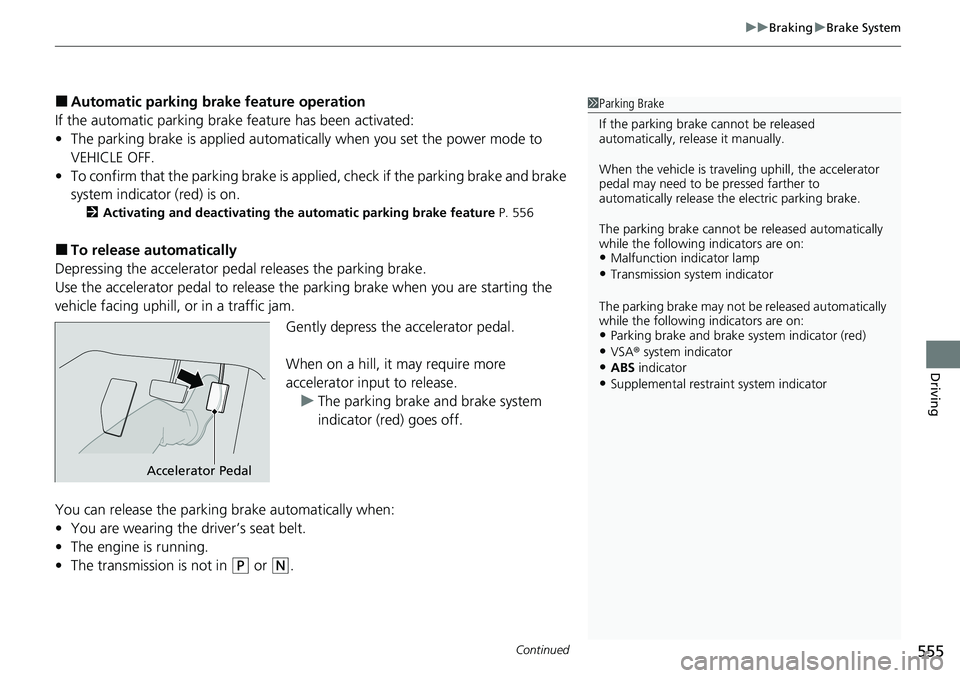
Depressing the accelerator pedal releases the parking brake.
Use the accelerator pedal to release the parking brake when you are starting the
vehicle facing uphill, or in a traffic jam.
Gently depress the accelerator pedal.
When on a hill, it may require more
accelerator input to release.u The parking brake and brake system
indicator (red) goes off.
You can release the parking brake automatically when:
• You are wearing the driver’s seat belt.
• The engine is running.
• The transmission is not in
(P or (N.
1Parking Brake
If the parking brake cannot be released
automatically, release it manually.
When the vehicle is travel ing uphill, the accelerator
pedal may need to be pressed farther to
automatically release the electric parking brake.
The parking brake cannot be released automatically
while the following indicators are on:
•Malfunction indicator lamp
•Transmission system indicator
The parking brake may not be released automatically
while the following indicators are on:
•Parking brake and brake system indicator (red)
•VSA® system indicator•ABS indicator
•Supplemental restraint system indicator
Accelerator Pedal
Page 557 of 700
uuBraking uBrake System
556
Driving
■Activating and deactivating the au tomatic parking brake feature
With the power mode is in ON, carry out th e following steps to either activate or
deactivate the automatic parking brake feature.
1. Put the transmission into
(P.
2. Without depressing the brake pedal, pull up and release the electric parking brake
switch.
u Check that the parking brake and brake system indicator (red) has come on.
3. Pull up and hold the electric parking br ake switch. When you hear a beeping
sound, release the switch and within 3 seconds pull up and hold the switch again.
4. When you hear a sound indicating that the procedure is completed, release the
switch.
u Two beeps indicates that the feature has been activated.
u One beep indicates that the feature has been deactivated.
u When you have completed activating the feature, the parking brake will
remain applied after you turn off the engine.
u To confirm that the parking brake is ap plied, check if the parking brake and
brake system indicator (red) is on.
If you need to temporarily deactivate the feature while putting your vehicle through
a conveyor type car wash, you can follow the procedure explained below.
1. Depress the brake pedal and bring the vehicle to a stop.
2. Set the power mode to VEHICLE OFF and then within 2 seconds push down the
electric parking brake switch.
u Activation and deactivation settings fo r the feature will not be affected.
u Before temporarily deactivating the feat ure, make sure to first turn off both
Adaptive Cruise Control (ACC) with Low Speed Follow and the automatic
brake hold system.
u To confirm that the parking brake is ap plied, check if the parking brake and
brake system indicator (red) is on.
1 Parking Brake
In cold climates, the parking brake may freeze in
place if applied.
When parking the vehicle, chock the wheels and
make sure the automatic parking brake feature is
deactivated.
Also, when putting your vehicle through a conveyor-
type car wash or when ha ving your vehicle towed,
deactivate the automatic parking brake feature and
leave the parking brake released.
Page 559 of 700
uuBraking uBrake System
558
Driving
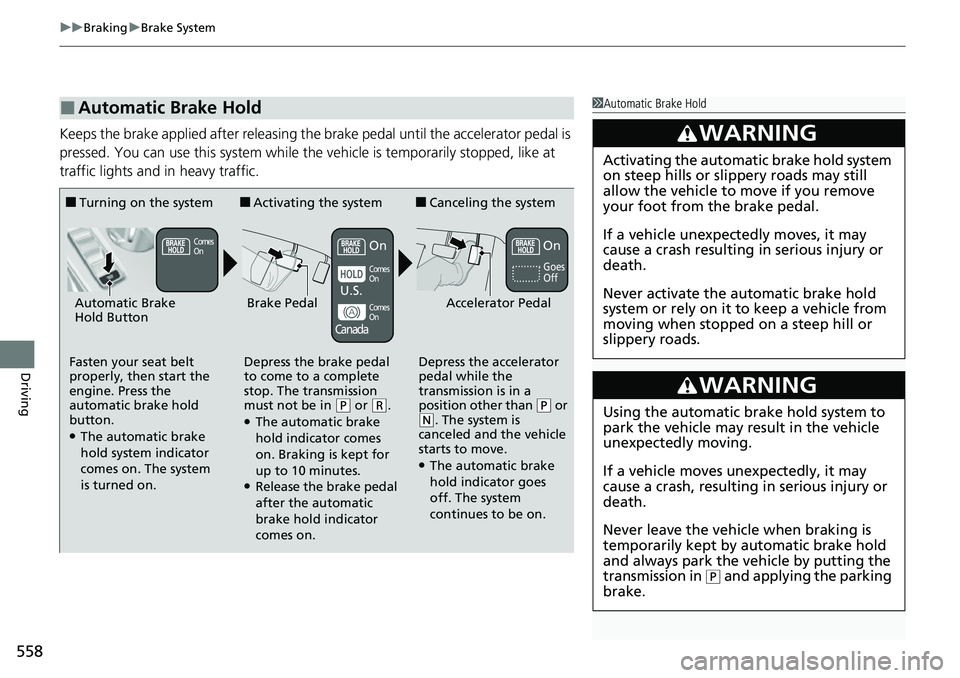
Keeps the brake applied after releasing the brake pedal until the accelerator pedal is
pressed. You can use this system while the vehicle is temporarily stopped, like at
traffic lights and in heavy traffic.
■Automatic Brake Hold1Automatic Brake Hold
3WARNING
Activating the automatic brake hold system
on steep hills or slippery roads may still
allow the vehicle to move if you remove
your foot from the brake pedal.
If a vehicle unexpectedly moves, it may
cause a crash resulting in serious injury or
death.
Never activate the automatic brake hold
system or rely on it to keep a vehicle from
moving when stopped on a steep hill or
slippery roads.
3WARNING
Using the automatic brake hold system to
park the vehicle may result in the vehicle
unexpectedly moving.
If a vehicle moves unexpectedly, it may
cause a crash, resulting in serious injury or
death.
Never leave the vehicle when braking is
temporarily kept by automatic brake hold
and always park the vehicle by putting the
transmission in
( P and applying the parking
brake.
■Turning on the system
Fasten your seat belt
properly, then start the
engine. Press the
automatic brake hold
button.
●The automatic brake
hold system indicator
comes on. The system
is turned on.
■Activating the system
Depress the brake pedal
to come to a complete
stop. The transmission
must not be in
( P or (R.●The automatic brake
hold indicator comes
on. Braking is kept for
up to 10 minutes.
●Release the brake pedal
after the automatic
brake hold indicator
comes on.
■Canceling the system
Depress the accelerator
pedal while the
transmission is in a
position other than
( P or ( N. The system is
canceled and the vehicle
starts to move.
●The automatic brake
hold indicator goes
off. The system
continues to be on.
Accelerator PedalBrake PedalAutomatic Brake
Hold Button
Goes
Off
Comes
OnOn On
Comes
On
Comes
On
U.S.
Canada
Page 560 of 700
559
uuBraking uBrake System
Driving
■The system automatically cancels when:
• You engage the parking brake.
• You depress the brake pedal a nd put the transmission into
(P or (R.
■The system automatically cancels and the parking brake is applied when:
• Braking is kept for more than 10 minutes.
• The driver’s seat belt is unfastened.
• The engine is turned off.
• There is a problem with automatic brake hold system.
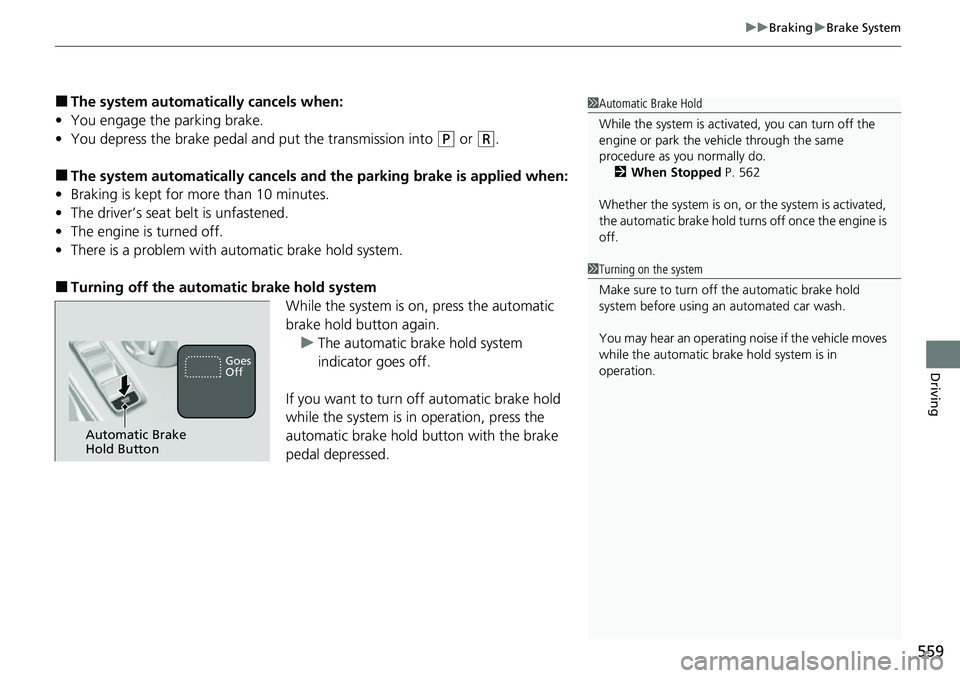
■Turning off the automa tic brake hold system
While the system is on, press the automatic
brake hold button again.
u The automatic brake hold system
indicator goes off.
If you want to turn off automatic brake hold
while the system is in operation, press the
automatic brake hold button with the brake
pedal depressed.
1 Automatic Brake Hold
While the system is activated, you can turn off the
engine or park the ve hicle through the same
procedure as you normally do. 2 When Stopped P. 562
Whether the system is on, or the system is activated,
the automatic brake hold turn s off once the engine is
off.
1 Turning on the system
Make sure to turn off the automatic brake hold
system before using an automated car wash.
You may hear an operating noi se if the vehicle moves
while the automatic brake hold system is in
operation.
Automatic Brake
Hold Button
Goes
Off
Page 574 of 700
573Continued
Driving
Multi-View Rear Camera
About Your Multi-View Rear Camera
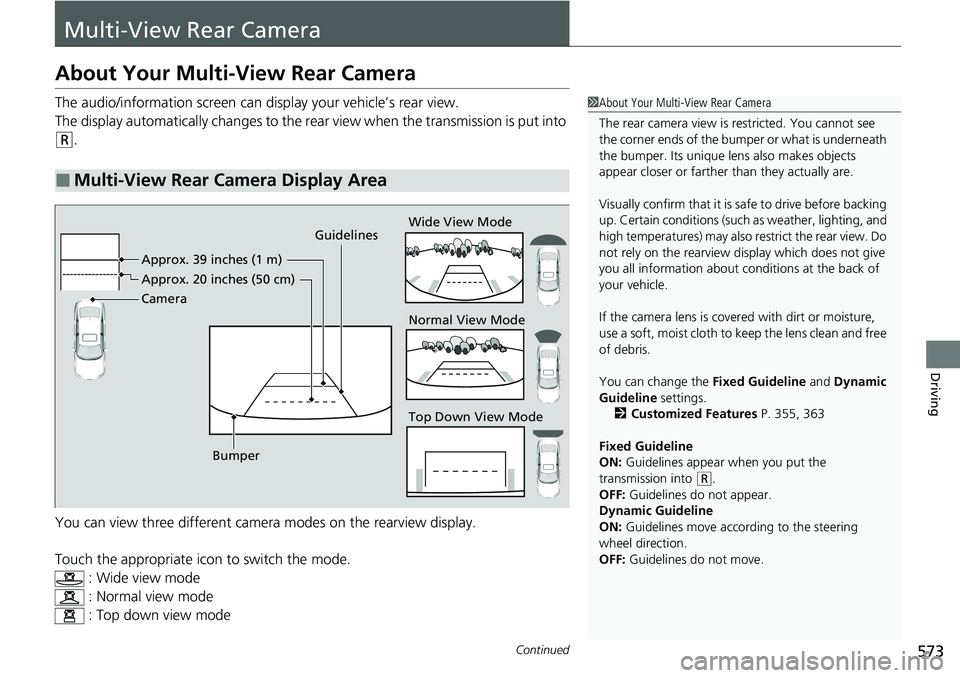
The audio/information screen can display your vehicle’s rear view.
The display automatically changes to the rear view when the transmission is put into
(R.
You can view three different camera modes on the rearview display.
Touch the appropriate icon to switch the mode. : Wide view mode
: Normal view mode
: Top down view mode
■Multi-View Rear Camera Display Area
1About Your Multi-View Rear Camera
The rear camera view is restricted. You cannot see
the corner ends of the bumper or what is underneath
the bumper. Its unique le ns also makes objects
appear closer or farther than they actually are.
Visually confirm that it is safe to drive before backing
up. Certain conditions (such as weather, lighting, and
high temperatures) may also restrict the rear view. Do
not rely on the rearview display which does not give
you all information about conditions at the back of
your vehicle.
If the camera lens is cove red with dirt or moisture,
use a soft, moist cloth to keep the lens clean and free
of debris.
You can change the Fixed Guideline and Dynamic
Guideline settings. 2 Customized Features P. 355, 363
Fixed Guideline
ON: Guidelines appear when you put the
transmission into
( R.
OFF: Guidelines do not appear.
Dynamic Guideline
ON: Guidelines move according to the steering
wheel direction.
OFF: Guidelines do not move.
Guidelines
Bumper Wide View Mode
Normal View Mode
Top Down View Mode
Camera Approx. 39 inches (1 m)
Appr
ox. 20 inc
hes (50 cm)
Page 662 of 700
661
uuIndicator, Coming On/BlinkinguIf the Brake System Indicator (Red) Comes On or Blinks at the Same Time When the Brake System Indicator (Amber) Comes On
Handling the Unexpected
If the Brake System Indicator (Red) Comes On or
Blinks at the Same Time When the Brake System
Indicator (Amber) Comes On
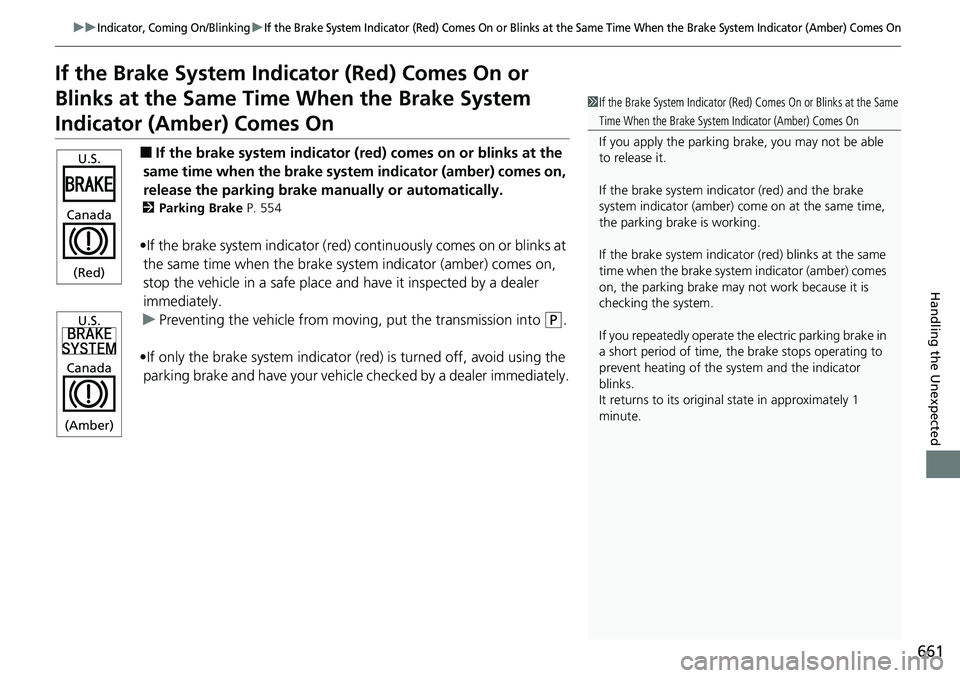
■If the brake system indicator (red) comes on or blinks at the
same time when the brake syst em indicator (amber) comes on,
release the parking brake ma nually or automatically.
2Parking Brake P. 554
•If the brake system indicator (red) continuously comes on or blinks at
the same time when the brake system indicator (amber) comes on,
stop the vehicle in a safe place a nd have it inspected by a dealer
immediately.
u Preventing the vehicle from mo ving, put the transmission into
(P.
•If only the brake system indicator (r ed) is turned off, avoid using the
parking brake and have your vehicle checked by a dealer immediately.
1If the Brake System Indicator (Red) Comes On or Blinks at the Same
Time When the Brake System Indicator (Amber) Comes On
If you apply the parking brake, you may not be able
to release it.
If the brake system indicator (red) and the brake
system indicator (amber) come on at the same time,
the parking brake is working.
If the brake system indicator (red) blinks at the same
time when the brake system indicator (amber) comes
on, the parking brake may not work because it is
checking the system.
If you repeatedly operate the electric parking brake in
a short period of time, the brake stops operating to
prevent heating of the system and the indicator
blinks.
It returns to its original state in approximately 1
minute.
U.S.
Canada
(Red)
U.S.
Canada
(Amber)
Page 694 of 700
693
Index
F
Features.................................................... 229
Filters Dust and Pollen....................................... 630
Oil .......................................................... 602
Flat Tire ..................................................... 641
Floor Mats ................................................ 632
Fluids
Brake ...................................................... 608
Continuously Variable Transmission ........ 607
Engine Coolant ....................................... 605
Windshield Washer ................................. 609
FM/AM Radio ................................... 240, 286
Fog Light Indicator .................................... 98
Folding Down the Rear Seats .................. 201
Foot Brake ................................................ 557
Front Airbags (SRS) .................................... 54
Front Head Restraints .............................. 204
Front Seat Heaters ................................... 220
Front Seats Adjusting ................................................ 198
Front Wide View Camera ........................ 551
Fuel ..................................................... 28, 575
Average Fuel Economy .................... 116, 141
Economy................................................. 578
Gauge .................................................... 110
Instant Fuel Economy ...................... 116, 141
Low Fuel Indicator..................................... 95
Range ............................................. 116, 141
Recommendation.................................... 575
Refueling ........................................ 575, 673 Fuel Economy
............................................ 578
Fuel Fill Door ....................................... 28, 576
Fuses .......................................................... 664
Inspecting and Changing ......................... 668
Locations ......................................... 664, 666
G
Gasoline (Fuel) Average Fuel Economy .................... 116, 141
Economy ................................................. 578
Gauge ..................................................... 110
Information ............................................. 575
Instant Fuel Economy ....................... 116, 141
Low Fuel Indicator ..................................... 95
Refueling ......................................... 575, 673
Gauges ...................................................... 109
Glass (care) ........................................ 631, 634
Glove Box .................................................. 209
H
Handling the Unexpected ........................ 639
HandsFreeLink ® (HFL) ....................... 389, 409
Automatic Import of Cellular Phonebook and
Call History .................................... 401, 419
Automatic Transferring .................... 399, 418
Favorite Contacts ............................. 402, 420
HFL Buttons ..................................... 389, 409
HFL Menus ...................................... 392, 412
HFL Status Display ........................... 391, 411 In Case of Emergency .............................. 426
Limitations for Manual Operation .... 391, 411
Making a Call .................................. 404, 422
Options During a Call ...................... 408, 425
Phone Setup.................................... 394, 414
Receiving a Call ............................... 407, 424
Ring Tone........................................ 399, 418
Hazard Warning Button .............................. 8
HD Radio
TM............................................... 287
Headlights ................................................. 183
Aiming .................................................... 610
Auto High-Beam ..................................... 187
Automatic Operation............................... 184
Dimming ................................................. 183
Operating................................................ 183
Heated Steering Wheel ............................ 219
Heaters (Front Seat) ................................. 220
Heaters (Rear Seat) ................................... 221
HFL (HandsFreeLink ®)....................... 389, 409
High Beam Indicator .................................. 98
Hill Start Assist System ............................. 440
HomeLink ® Universal Transceiver ............ 386
Honda App License Agreement .............. 336
Honda Sensing ®................................ 29, 473
HondaLink® ............................................. 310
Page 695 of 700
694
Index
I
Identification NumbersVehicle Identification ............................... 680
Illumination Control Dial.................................................. 193, 194
Immobilizer System .................................. 173
Indicator .................................................. 101
Indicators ..................................................... 88
Adaptive Cruise Control (ACC) with Low Speed Follow............................................ 104, 494
Adaptive Cruise Control (ACC) with Low Speed
Follow Interval ....................................... 105
Anti-lock Brake System (ABS) ..................... 95
Auto High-Beam ........................................ 98
Auto Idle Stop (Green) ............................. 102
Auto Idle Stop OFF................................... 102
Auto Idle Stop Suspend ........................... 103
Auto Idle Stop System (Amber) ................ 102
Automatic Brake Hold........................ 92, 558
Automatic Brake Hold System ............ 92, 558
Charging System ............................... 93, 659
Cruise Mode ............................................ 105
ECON Mode ............................ 100, 449, 450
Electric Power Steering (EPS) System ............................................. 96, 662
Fog Light ................................................... 98
High Beam................................................. 98
Immobilizer System .................................. 101
Lane Keeping Assist System (LKAS) .......... 105
Lights On ................................................... 98
Low Fuel .................................................... 95 Low Temperature .................................... 100
Low Tire Pressure/TPMS ..... 97, 462, 467, 663
M (7-speed manual shift mode) Indicator/
Shift ........................................................ 93
Malfunction Indicator Lamp............... 93, 659
NORMAL Mode ............................... 100, 450
Parking Brake a nd Brake System
(Amber) ........................................... 92, 661
Parking Brake a nd Brake System
(Red) ................................. 90, 91, 660, 661
Safety Support ................................ 106, 108
Seat Belt Reminder .............................. 44, 94
Security System Alarm ............................. 101
Shift Position ............................................. 93
SPORT Mode ................................... 100, 450
Supplemental Restraint System ............ 67, 95
System Message ........................................ 99
Transmission System.................................. 94
Turn Signal and Hazard Warning ............... 98
Vehicle Stability Assist
TM (VSA ®)
OFF ................................................. 96, 460
Vehicle Stability Assist
TM (VSA ®)
System ............................................ 96, 459
Information .............................................. 675
Instant Fuel Economy ....................... 116, 141
Instrument Panel ........................................ 87
Brightness Control........................... 193, 194
Interior Lights ........................................... 207
Interior Rearview Mirror .......................... 196
iPod ................................................... 242, 301
J
Jack (Wheel Nut Wrench) ........................ 644
Jump Starting ........................................... 652
K
Key Number Tag ...................................... 157
Keyless Access System .............................. 159
Keys ........................................................... 156
Number Tag............................................ 157
Rear Door Won’t Open ........................... 168
Remote Transmitter ................................ 163
Types and Functions................................ 156
Kickdown (Continuously Variable Transmission) .......................................... 442
L
Lane Keeping Assist System (LKAS) ........ 516
LATCH (Child Seats) ................................... 76
Lights ................................................ 183, 610
Auto High-Beam ..................................... 187
Automatic............................................... 184
Bulb Replacement ................................... 610
Daytime Running Lights .......................... 186
Fog Lights ............................................... 186
High Beam Indicator ................................. 98
Interior.................................................... 207
Light Switches......................................... 183
Lights On Indicator .................................... 98
Turn Signals ............................................ 182