buttons HONDA CIVIC 2022 Owner's Manual
[x] Cancel search | Manufacturer: HONDA, Model Year: 2022, Model line: CIVIC, Model: HONDA CIVIC 2022Pages: 700, PDF Size: 13.98 MB
Page 388 of 700
387
uuHomeLink ® Universal Transceiver*u Training HomeLink
Continued
Features
Training HomeLink
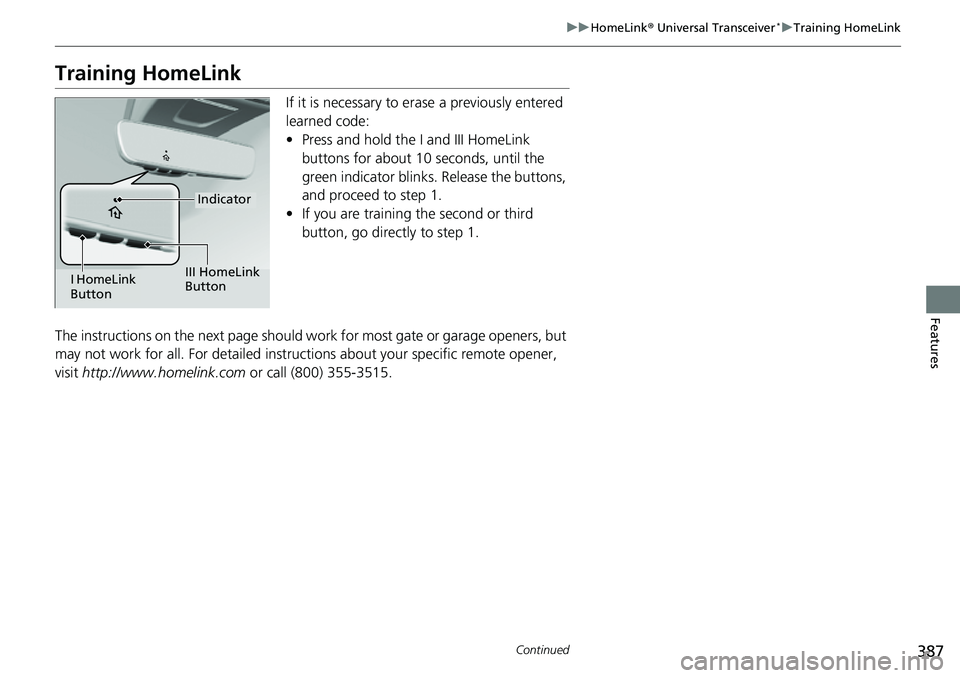
If it is necessary to er ase a previously entered
learned code:
• Press and hold the I and III HomeLink
buttons for about 10 seconds, until the
green indicator blinks. Release the buttons,
and proceed to step 1.
• If you are training the second or third
button, go directly to step 1.
The instructions on the next page should work for most gate or garage openers, but
may not work for all. For detailed instructions about your specific remote opener,
visit http://www.homelink.com or call (800) 355-3515.
Indicator
I HomeLink
Button III HomeLink
Button
Page 389 of 700
uuHomeLink ® Universal Transceiver*u Training HomeLink
388
Features
■Programming a Button1Training HomeLink
Reprogramming a Button
If you want to retrain a programmed button for a
new device, you do not ha ve to erase all button
memory. You can replace the existing memory code
using this procedure:
2.
1. Press and hold the desired HomeLink button until
the HomeLink indi
cator begins to slowly flash
orange . This should take about 20 seconds.
Release the HomeLink button and position the
remote transmitter you wish to link 1 - 3 inches
(3 - 8 cm) from the Home Link button you want to
program, then follow steps 3 - 6 under
“programming a button.”
Erasing Button MemoryTo erase programming from the buttons, press and hold
the two outside HomeLink buttons until the HomeLink
indicator changes from
orange to rapidly flashing green.
This should take about 10 seconds. You should erase all
programming before selling the vehicle.
Operating
To operate, simply press and release the programmed
HomeLink button. Activati on will now occur for the
trained device.
Questions
For questions or comments, visit
www.HomeLink.com , www.youtube.com/
HomeLinkGentex , or by calling the HomeLink Hotline
(North America only) at (800) 355-3515.
HomeLink® is a registered tra demark of Gentex
Corporation.Training
CompleteHomeLink LED is
continuously on green .
YES
YES
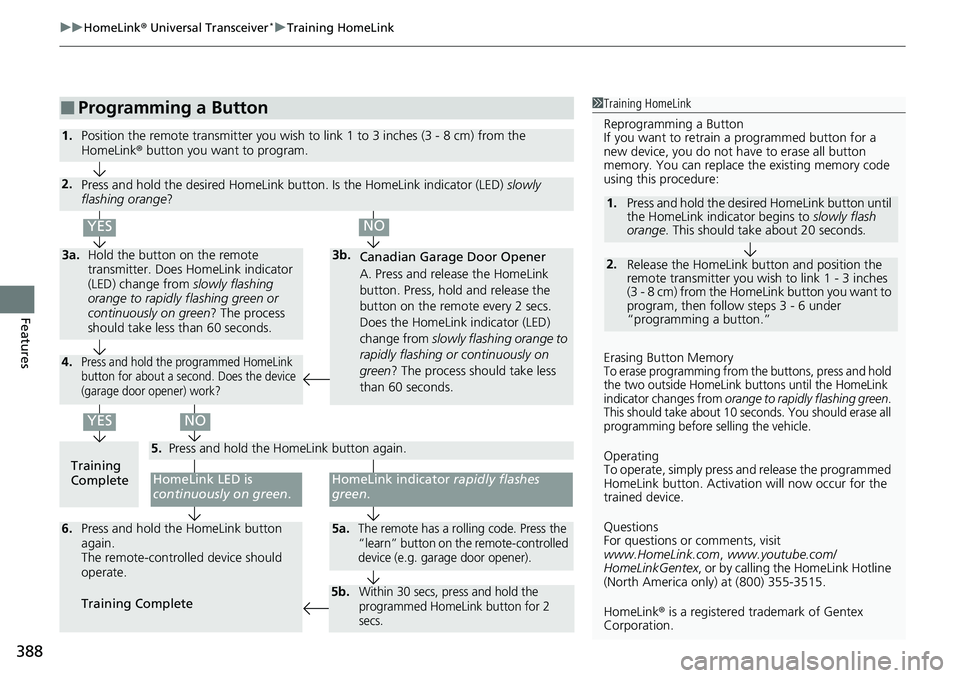
1.Position the remote transmitter you wish to link 1 to 3 inches (3 - 8 cm) from the
HomeLink® button you want to program.
3b.
Canadian Garage Door Opener
A. Press and release the HomeLink
button. Press, hold and release the
button on the remote every 2 secs.
Does the HomeLink indicator (LED)
change from slowly flashing orange to
rapidly flashing or continuously on
green ? The process should take less
than 60 seconds.
NO
2. Press and hold the desired HomeLink butt on. Is the HomeLink indicator (LED) slowly
flashing orange ?
NO
3a.Hold the button on the remote
transmitter. Does HomeLink indicator
(LED) change from slowly flashing
orange to rapidly flashing green or
continuously on green? The process
should take less than 60 seconds.
5. Press and hold the HomeLink button again.
HomeLink indicator rapidly flashes
green .
5a.The remote has a rolling code. Press the
“learn” button on the remote-controlled
device (e.g. garage door opener).6.Press and hold the HomeLink button
again.
The remote-controll ed device should
operate.
Training Complete
5b.Within 30 secs, press and hold the
programmed HomeLink button for 2
secs.
4.Press and hold the programmed HomeLink
button for about a second. Does the device
(garage door opener) work?
Page 390 of 700
389Continued
Features
Bluetooth® HandsFreeLink ®
Bluetooth® HandsFreeLink ® (HFL) allows you to place and receive phone calls using
your vehicle’s audio system, without handling your cell phone.
Using HFL
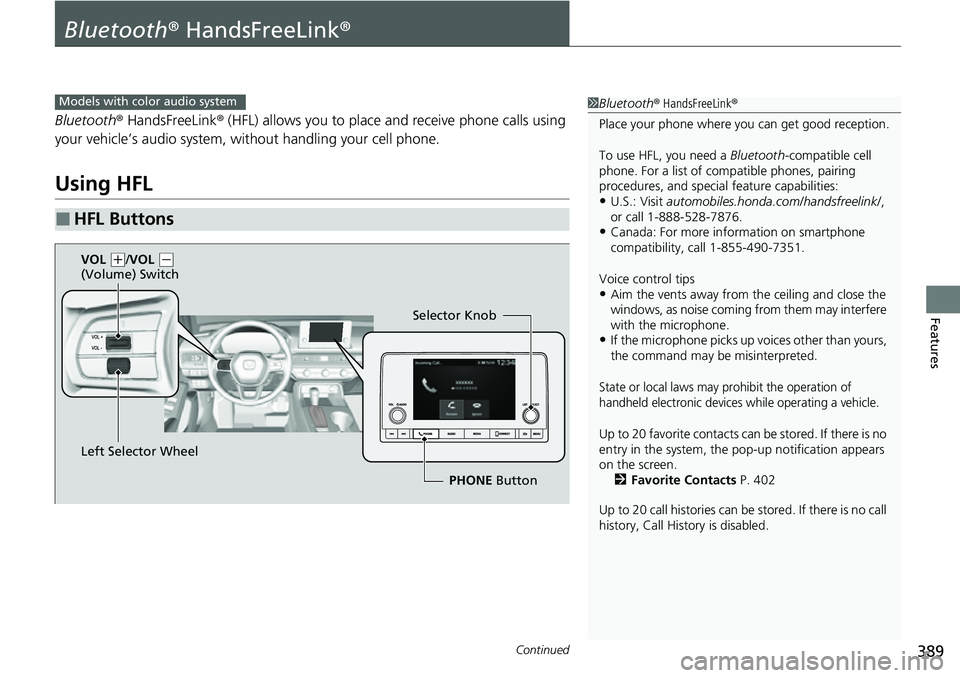
■HFL Buttons
1 Bluetooth ® HandsFreeLink ®
Place your phone where y ou can get good reception.
To use HFL, you need a Bluetooth-compatible cell
phone. For a list of compatible phones, pairing
procedures, and special feature capabilities:
•U.S.: Visit automobiles.honda.com/handsfreelink/ ,
or call 1-888-528-7876.
•Canada: For more info rmation on smartphone
compatibility, call 1-855-490-7351.
Voice control tips
•Aim the vents away from the ceiling and close the
windows, as noise coming from them may interfere
with the microphone.
•If the microphone picks up vo ices other than yours,
the command may be misinterpreted.
State or local laws may prohibit the operation of
handheld electronic devices while operating a vehicle.
Up to 20 favorite contacts ca n be stored. If there is no
entry in the system, the pop-up notification appears
on the screen. 2 Favorite Contacts P. 402
Up to 20 call histories can be stored. If there is no call
history, Call History is disabled.
Models with color audio system
Selector Knob
Left Selector Wheel PHONE Button
VOL
(
+/VOL (-
(Volume) Switch
Page 410 of 700
409Continued
Features
Bluetooth® HandsFreeLink ®
Bluetooth® HandsFreeLink ® (HFL) allows you to place and receive phone calls using
your vehicle’s audio system, without handling your cell phone.
Using HFL
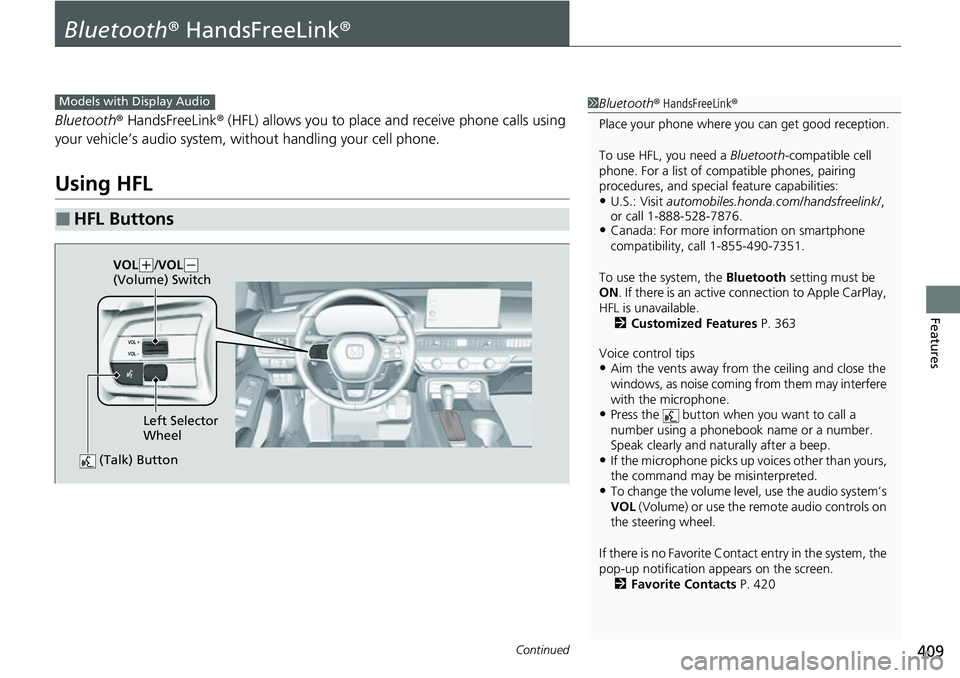
■HFL Buttons
1 Bluetooth ® HandsFreeLink ®
Place your phone where y ou can get good reception.
To use HFL, you need a Bluetooth-compatible cell
phone. For a list of compatible phones, pairing
procedures, and special feature capabilities:
•U.S.: Visit automobiles.honda.com/handsfreelink/ ,
or call 1-888-528-7876.
•Canada: For more info rmation on smartphone
compatibility, call 1-855-490-7351.
To use the system, the Bluetooth setting must be
ON . If there is an active c onnection to Apple CarPlay,
HFL is unavailable. 2 Customized Features P. 363
Voice control tips
•Aim the vents away from the ceiling and close the
windows, as noise coming from them may interfere
with the microphone.
•Press the button when you want to call a
number using a phonebook name or a number.
Speak clearly and naturally after a beep.
•If the microphone picks up vo ices other than yours,
the command may be misinterpreted.
•To change the volume level, use the audio system’s
VOL (Volume) or use the remote audio controls on
the steering wheel.
If there is no Favorite Contact entry in the system, the
pop-up notification appears on the screen. 2 Favorite Contacts P. 420
Models with Display Audio
(Talk) Button
Left Selector
Wheel
VOL
(
+/VOL( -
(Volume) Switch
Page 531 of 700
uuHonda Sensing ®u Traffic Jam Assist
530
Driving
Traffic Jam Assist is activated when all of the following conditions exist:
• LKAS is activated.
• The lane in which you are driving has dete ctable lane markers on both sides, and
your vehicle is in the center of the lane.
• The vehicle is traveling between about 0 and 45mph (0 and 72km/h).
• You are driving on a straight or slightly curved road.
• The driver is gripping the steering wheel.
• The shift position is in
(D.
Do not use Traffic Jam Assist in any of the following situations:
• You are traveling on a ro ad with sharp curves.
u The system may not allow your vehicle to respond in a manner best suited for
the road conditions.
• You are entering a toll booth, interchange, service area, or parking area.
• You are driving in adverse weat her (rain, fog, snow, etc.).
• The surface of the road is slippery; for ex ample, it is icy or covered with snow.
u The tires may slip, causing you to lose control of the vehicle.
■Traffic Jam Assist Activation1Traffic Jam Assist Activation
Refer to the following pa ge for proper handling of
the Lane Keeping Assist System (LKAS):
2 Lane Keeping Assist System (LKAS) P. 516
Refer to the following page for steering buttons and
displays: 2 Operation Switches for the Adaptive
Cruise Control (ACC) with Low Speed
Follow/Lane Keeping Assist System
(LKAS)/Traffic Jam Assist P. 474
Page 630 of 700
629
Maintenance
Remote Transmitter Care
Replacing the Remote Battery
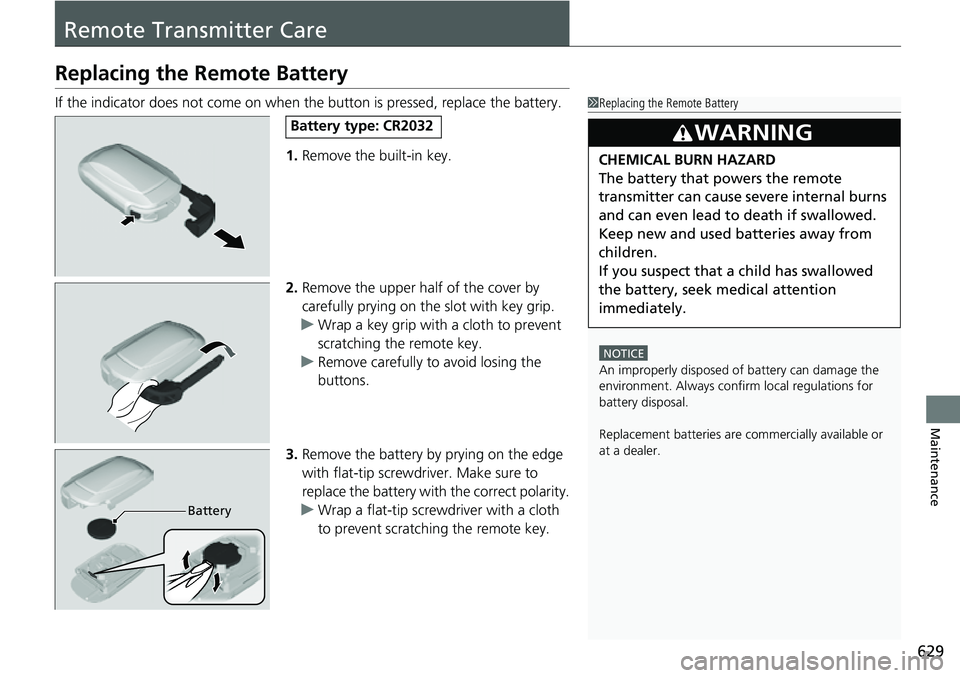
If the indicator does not come on when the button is pressed, replace the battery.
1. Remove the built-in key.
2. Remove the upper half of the cover by
carefully prying on the slot with key grip.
u Wrap a key grip with a cloth to prevent
scratching the remote key.
u Remove carefully to avoid losing the
buttons.
3. Remove the battery by prying on the edge
with flat-tip screwdriver. Make sure to
replace the battery with the correct polarity.
u Wrap a flat-tip screwdriver with a cloth
to prevent scratching the remote key.1Replacing the Remote Battery
NOTICE
An improperly disposed of battery can damage the
environment. Always conf irm local regulations for
battery disposal.
Replacement batteries are commercially available or
at a dealer.
3WARNING
CHEMICAL BURN HAZARD
The battery that powers the remote
transmitter can cause severe internal burns
and can even lead to death if swallowed.
Keep new and used batteries away from
children.
If you suspect that a child has swallowed
the battery, seek medical attention
immediately.
Battery type: CR2032
Battery
Page 650 of 700
649
uuEngine Does Not Start uIf the Remote Key Battery is Weak
Handling the Unexpected
If the Remote Key Battery is Weak
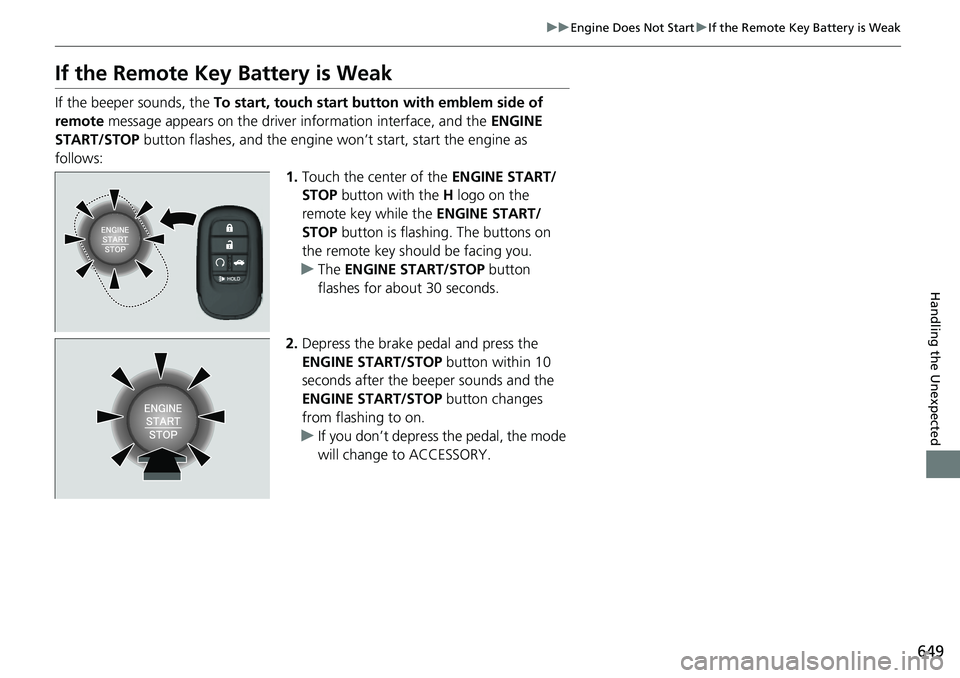
If the beeper sounds, the To start, touch start button with emblem side of
remote message appears on the driver information interface, and the ENGINE
START/STOP button flashes, and the engine wo n’t start, start the engine as
follows: 1.Touch the center of the ENGINE START/
STOP button with the H logo on the
remote key while the ENGINE START/
STOP button is flashing. The buttons on
the remote key should be facing you.
u The ENGINE START/STOP button
flashes for about 30 seconds.
2. Depress the brake pedal and press the
ENGINE START/STOP button within 10
seconds after the beeper sounds and the
ENGINE START/STOP button changes
from flashing to on.
u If you don’t depress the pedal, the mode
will change to ACCESSORY.
Page 694 of 700
693
Index
F
Features.................................................... 229
Filters Dust and Pollen....................................... 630
Oil .......................................................... 602
Flat Tire ..................................................... 641
Floor Mats ................................................ 632
Fluids
Brake ...................................................... 608
Continuously Variable Transmission ........ 607
Engine Coolant ....................................... 605
Windshield Washer ................................. 609
FM/AM Radio ................................... 240, 286
Fog Light Indicator .................................... 98
Folding Down the Rear Seats .................. 201
Foot Brake ................................................ 557
Front Airbags (SRS) .................................... 54
Front Head Restraints .............................. 204
Front Seat Heaters ................................... 220
Front Seats Adjusting ................................................ 198
Front Wide View Camera ........................ 551
Fuel ..................................................... 28, 575
Average Fuel Economy .................... 116, 141
Economy................................................. 578
Gauge .................................................... 110
Instant Fuel Economy ...................... 116, 141
Low Fuel Indicator..................................... 95
Range ............................................. 116, 141
Recommendation.................................... 575
Refueling ........................................ 575, 673 Fuel Economy
............................................ 578
Fuel Fill Door ....................................... 28, 576
Fuses .......................................................... 664
Inspecting and Changing ......................... 668
Locations ......................................... 664, 666
G
Gasoline (Fuel) Average Fuel Economy .................... 116, 141
Economy ................................................. 578
Gauge ..................................................... 110
Information ............................................. 575
Instant Fuel Economy ....................... 116, 141
Low Fuel Indicator ..................................... 95
Refueling ......................................... 575, 673
Gauges ...................................................... 109
Glass (care) ........................................ 631, 634
Glove Box .................................................. 209
H
Handling the Unexpected ........................ 639
HandsFreeLink ® (HFL) ....................... 389, 409
Automatic Import of Cellular Phonebook and
Call History .................................... 401, 419
Automatic Transferring .................... 399, 418
Favorite Contacts ............................. 402, 420
HFL Buttons ..................................... 389, 409
HFL Menus ...................................... 392, 412
HFL Status Display ........................... 391, 411 In Case of Emergency .............................. 426
Limitations for Manual Operation .... 391, 411
Making a Call .................................. 404, 422
Options During a Call ...................... 408, 425
Phone Setup.................................... 394, 414
Receiving a Call ............................... 407, 424
Ring Tone........................................ 399, 418
Hazard Warning Button .............................. 8
HD Radio
TM............................................... 287
Headlights ................................................. 183
Aiming .................................................... 610
Auto High-Beam ..................................... 187
Automatic Operation............................... 184
Dimming ................................................. 183
Operating................................................ 183
Heated Steering Wheel ............................ 219
Heaters (Front Seat) ................................. 220
Heaters (Rear Seat) ................................... 221
HFL (HandsFreeLink ®)....................... 389, 409
High Beam Indicator .................................. 98
Hill Start Assist System ............................. 440
HomeLink ® Universal Transceiver ............ 386
Honda App License Agreement .............. 336
Honda Sensing ®................................ 29, 473
HondaLink® ............................................. 310