automatic parking brake HONDA CIVIC 2022 Owners Manual
[x] Cancel search | Manufacturer: HONDA, Model Year: 2022, Model line: CIVIC, Model: HONDA CIVIC 2022Pages: 700, PDF Size: 13.98 MB
Page 11 of 700
Visual Index
10
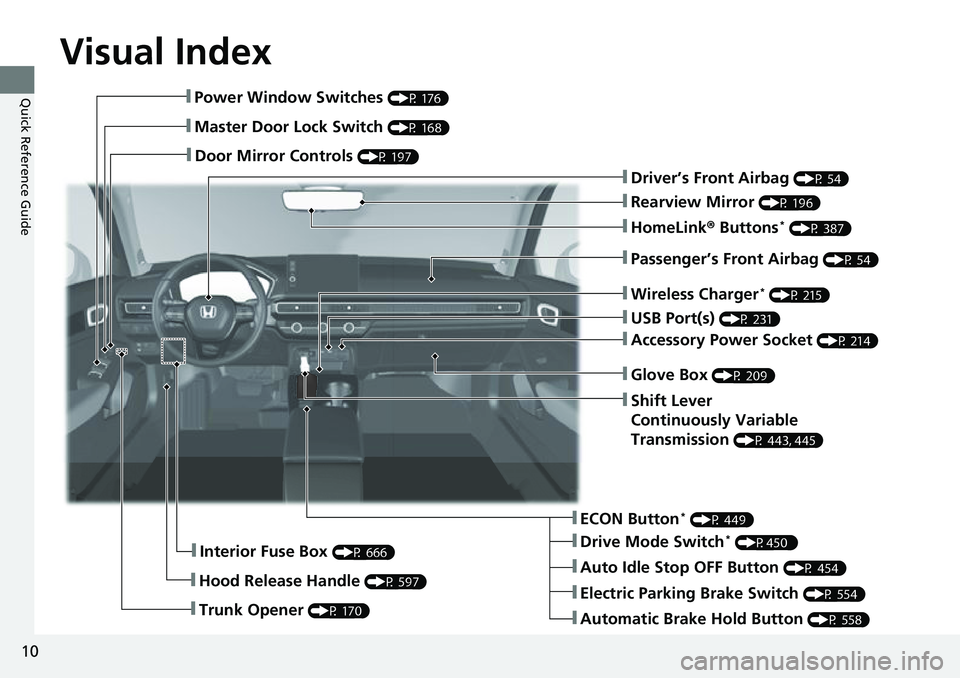
Quick Reference Guide❚Power Window Switches (P 176)
❚Master Door Lock Switch (P 168)
❚Door Mirror Controls (P 197)
❚Trunk Opener (P 170)
❚Interior Fuse Box (P 666)
❚Hood Release Handle (P 597)
❚Driver’s Front Airbag (P 54)
❚Rearview Mirror (P 196)
❚HomeLink® Buttons* (P 387)
❚Passenger’s Front Airbag (P 54)
❚Wireless Charger* (P 215)
❚USB Port(s) (P 231)
❚ECON Button* (P 449)
❚Electric Parking Brake Switch (P 554)
❚Drive Mode Switch* (P450 )
❚Accessory Power Socket (P 214)
❚Glove Box (P 209)
❚Shift Lever
Continuously Variable
Transmission
(P 443, 445)
❚Auto Idle Stop OFF Button (P 454)
❚Automatic Brake Hold Button (P 558)
Page 36 of 700
35
Quick Reference Guide
Depressing the accelerator
pedal does not release the
parking brake
automatically. Why?●Fasten the driver’s seat belt.
●Check if the transmission is in (P or (N. If so, select any other
position.
Why do I hear a screeching
sound when I apply the
brake pedal?The brake pads may need to be replaced. Have your vehicle
inspected by a dealer.
Page 89 of 700
88
Instrument Panel
Indicators
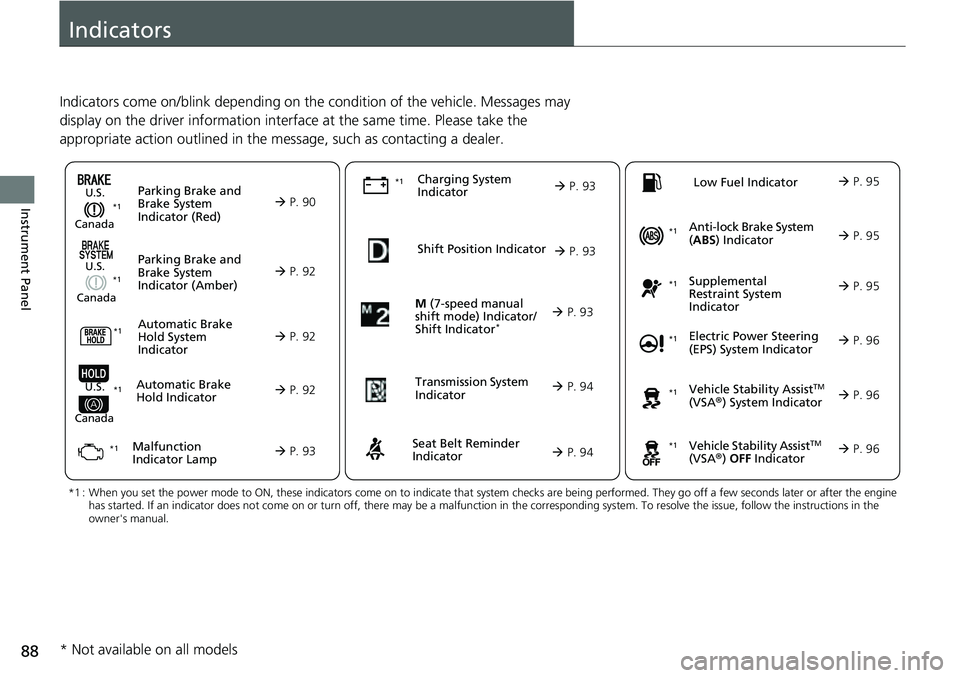
Indicators come on/blink depending on the condition of the vehicle. Messages may
display on the driver information interface at the same time. Please take the
appropriate action outlined in the message, such as contacting a dealer.
M (7-speed manual
shift mode) Indicator/
Shift Indicator
* P. 93
Parking Brake and
Brake System
Indicator (Red)
Parking Brake and
Brake System
Indicator (Amber)U.S.
Canada
U.S.
Canada
Automatic Brake
Hold System
Indicator
Automatic Brake
Hold IndicatorU.S.
Canada
*1 : When you set the power mode to ON, these indicators come on to indicate that system checks are being performed. They go off a few seconds later or after the engine
has started. If an indicator does not come on or turn off, ther e may be a malfunction in the corresponding system. To resolve the issue, follow the instructions in the
owner's manual.
P. 90*1
Malfunction
Indicator Lamp Charging System
IndicatorSeat Belt Reminder
Indicator
Low Fuel Indicator
P. 92
P. 92
P.
92
P. 93
P. 93*1
*1 *1
Shift Position Indicator
P. 93
Trans
mission System
Indicat
or
P. 94
P. 94
P. 95
*1
*1
Anti-lock Brake System
(ABS ) Indicator
Vehicle Stability AssistTM
(VSA®) System Indicator
Vehicle Stability Assist
TM
(VSA®) OFF Indicator
Supplemental
Restraint System
Indicator
Electric Power Steering
(EPS) System Indicator
*1
P. 95
P. 95
P. 96*1
*1
*1
P. 96
*1 P. 96
* Not available on all models
Page 93 of 700
92
uuIndicators u
Instrument Panel
IndicatorNameOn/BlinkingExplanation
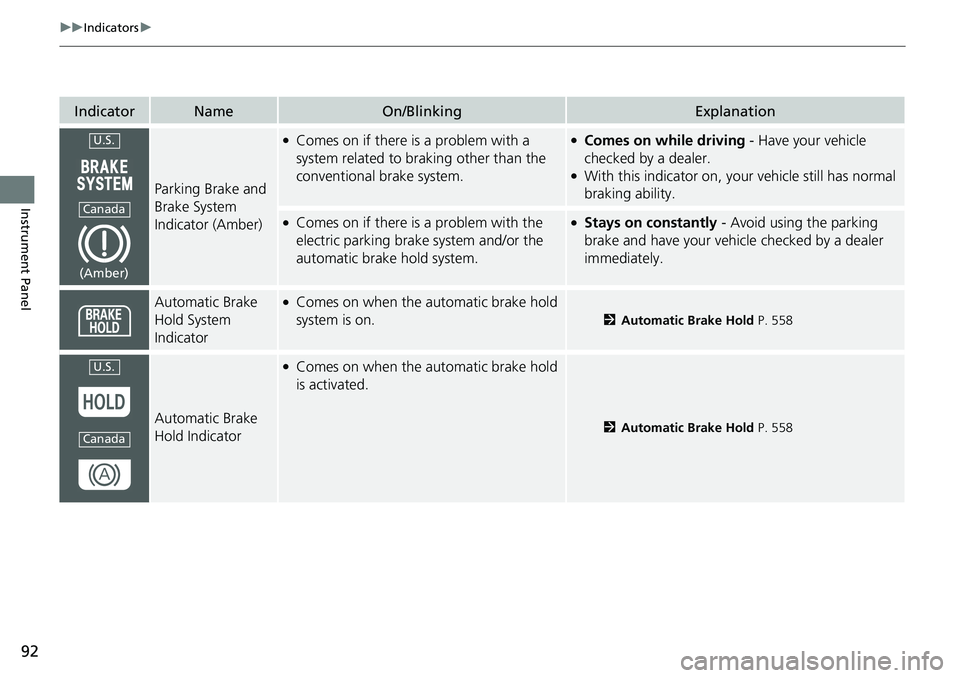
Parking Brake and
Brake System
Indicator (Amber)
●Comes on if there is a problem with a
system related to braking other than the
conventional brake system.●Comes on while driving - Have your vehicle
checked by a dealer.
●With this indicator on, your vehicle still has normal
braking ability.
●Comes on if there is a problem with the
electric parking brake system and/or the
automatic brake hold system.●Stays on constantly - Avoid using the parking
brake and have your vehicle checked by a dealer
immediately.
Automatic Brake
Hold System
Indicator●Comes on when the automatic brake hold
system is on.
2 Automatic Brake Hold P. 558
Automatic Brake
Hold Indicator
●Comes on when the automatic brake hold
is activated.
2Automatic Brake Hold P. 558
U.S.
Canada
(Amber)
U.S.
Canada
Page 184 of 700
183
uuOperating the Switches Around the Steering Wheel uLight Switches
Continued
Controls
Light Switches
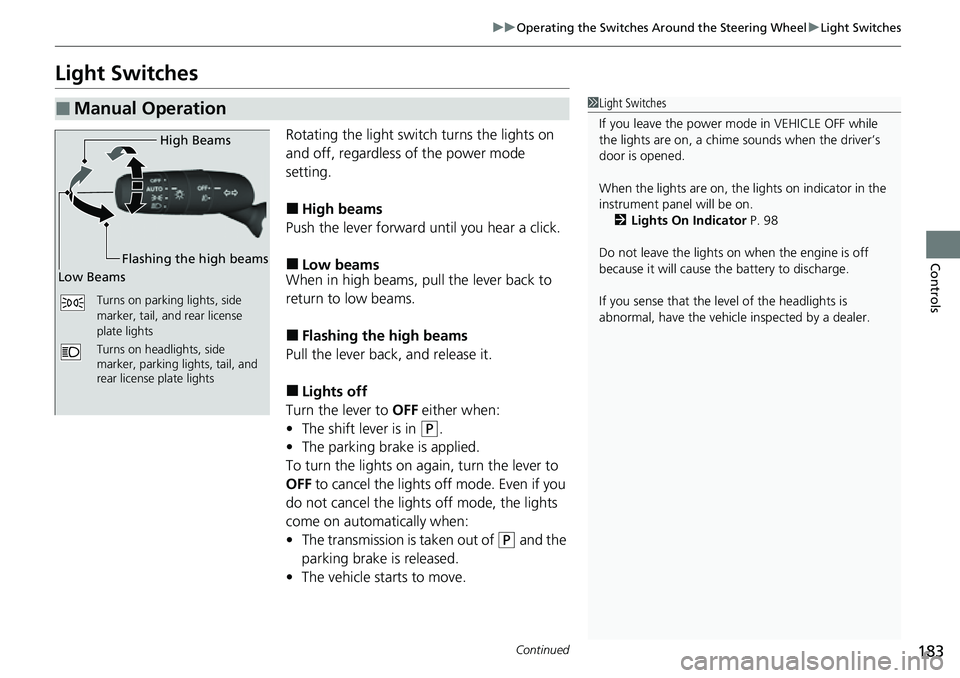
Rotating the light switch turns the lights on
and off, regardless of the power mode
setting.
■High beams
Push the lever forward until you hear a click.
■Low beams
When in high beams, pull the lever back to
return to low beams.
■Flashing the high beams
Pull the lever back, and release it.
■Lights off
Turn the lever to OFF either when:
• The shift lever is in
(P.
• The parking brake is applied.
To turn the light s on again, turn the lever to
OFF to cancel the lights off mode. Even if you
do not cancel the lights off mode, the lights
come on automatically when:
• The transmission is taken out of
(P and the
parking brake is released.
• The vehicle starts to move.
■Manual Operation1Light Switches
If you leave the power mode in VEHICLE OFF while
the lights are on, a chime sounds when the driver’s
door is opened.
When the lights are on, the lights on indicator in the
instrument pane l will be on.
2 Lights On Indicator P. 98
Do not leave the lights on when the engine is off
because it will cause the battery to discharge.
If you sense that the le vel of the headlights is
abnormal, have the vehicl e inspected by a dealer.
Turns on parking lights, side
marker, tail, and rear license
plate lights
Turns on headlights, side
marker, parking lights, tail, and
rear license plate lights
High Beams
Flashing the high beams
Low Beams
Page 441 of 700
uuWhen Driving uStarting the Engine
440
Driving
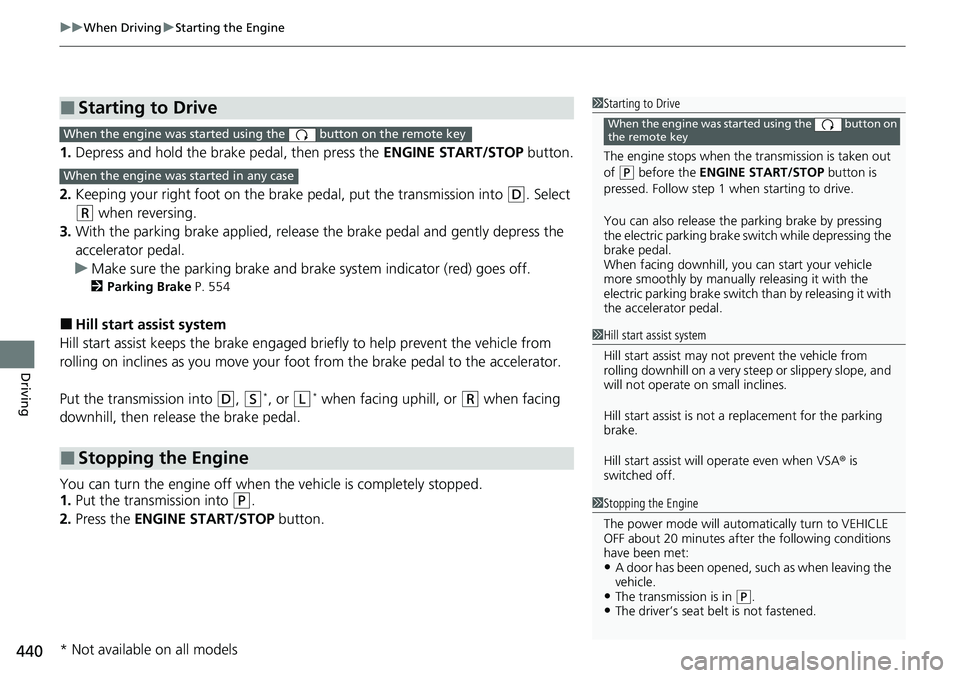
1. Depress and hold the brake pedal, then press the ENGINE START/STOP button.
2. Keeping your right foot on the brake pedal, put the transmission into
(D. Select
(R when reversing.
3. With the parking brake applied, release the brake pedal and gently depress the
accelerator pedal.
u Make sure the parking brake and brake system indicator (red) goes off.
2 Parking Brake P. 554
■Hill start assist system
Hill start assist keeps the brake engaged br iefly to help prevent the vehicle from
rolling on inclines as you move your fo ot from the brake pedal to the accelerator.
Put the transmission into
(D, (S*, or (L* when facing uphill, or (R when facing
downhill, then release the brake pedal.
You can turn the engine off when the vehicle is completely stopped.
1. Put the transmission into
(P.
2. Press the ENGINE START/STOP button.
■Starting to Drive
■Stopping the Engine
1Starting to Drive
The engine stops when th e transmission is taken out
of
( P before the ENGINE START/STOP button is
pressed. Follow step 1 when starting to drive.
You can also release the parking brake by pressing
the electric parking brake sw itch while depressing the
brake pedal.
When facing downhill, you can start your vehicle
more smoothly by manually releasing it with the
electric parking brake switch than by releasing it with
the accelerator pedal.
When the engine was started using the button on
the remote keyWhen the engine was started using the button on the remote key
When the engine was started in any case
1 Hill start assist system
Hill start assist may not prevent the vehicle from
rolling downhill on a very st eep or slippery slope, and
will not operate on small inclines.
Hill start assist is not a replacement for the parking
brake.
Hill start assist will operate even when VSA ® is
switched off.
1 Stopping the Engine
The power mode will automatically turn to VEHICLE
OFF about 20 minutes afte r the following conditions
have been met:
•A door has been opened, such as when leaving the
vehicle.
•The transmission is in ( P.•The driver’s seat belt is not fastened.
* Not available on all models
Page 486 of 700
485
uuHonda Sensing ®u Collision Mitigation Braking SystemTM (CMBSTM)
Continued
Driving
■Automatic shutoff
The CMBSTM may automatically shut itself o ff and the safety support indicator
(amber) comes and stays on when:
• You drive off-road or on a mountain road, or curved and winding road for an
extended period.
• Driving in bad weather (rain, fog, snow, etc.).
• Driving with the parking brake applied.
• The camera temperature gets too high.
• The front of the camera is covered by dirt, fog, rain, mud, wet snow, seals,
accessories, stickers, or film on the windshield.
• An abnormal tire condition is detected (incorrect tire size, flat tire, etc.).
Once the conditions that caused the CMBS
TM to shut off improve or are addressed
(e.g., cleaning), the system comes back on.
Page 513 of 700
uuHonda Sensing ®u Adaptive Cruise Control (ACC) with Low Speed Follow
512
Driving
■Automatic cancellation
The beeper sounds and a message appears on the driver information interface when
ACC with Low Speed Follow is automaticall y canceled. Any of these conditions may
cause the ACC with Low Speed Fo llow to automatically cancel:
• Bad weather (rain, fog, snow, etc.)
• The vehicle ahead of you cannot be detected.
• An abnormal tire condition is detected, or the tires are skidding.
• Driving on a mountainous road, or driving off road for extended periods.
• Abrupt steering wheel movement.
• When the ABS, VSA ®, CMBS
TM or Low Speed Braking Control* is activated.
• When the VSA ® system indicator comes on.
• When the vehicle is stopped on a very steep slope.
• When you manually apply the parking brake.
• Water is sprayed by or snow blown from a vehicle ahead.
• Driving into low sunlight (e.g., at dawn or dusk).
• When the detected vehicle within the ACC with Low Speed Follow range is too
close to your vehicle.
• When accelerating rapidly.
• The front of the camera is covered by dirt, fog, rain, mud, wet snow, seals,
accessories, stickers, or film on the windshield.
• The vehicle is loaded heavy load in the trunk or rear seats.
• When passing through a dark place, such as tunnel.
• When the parking brake and brake sy stem indicator (amber) comes on.
• The vehicle has repeatedly applied the brakes to maintain the set speed (for
example, you are descending a long slope).
• When the system doesn't detect any driv ing actions from the driver for a certain
amount of time while the LKAS is also activated.
The ACC with Low Speed Follow automatic ca ncellation can be also triggered by the
following causes. In these cases, the pa rking brake will be automatically applied.
• The driver’s seat belt is unfasten ed when the vehicle is stationary.
• The vehicle stops for mo re than 10 minutes.
• The engine is turned off.
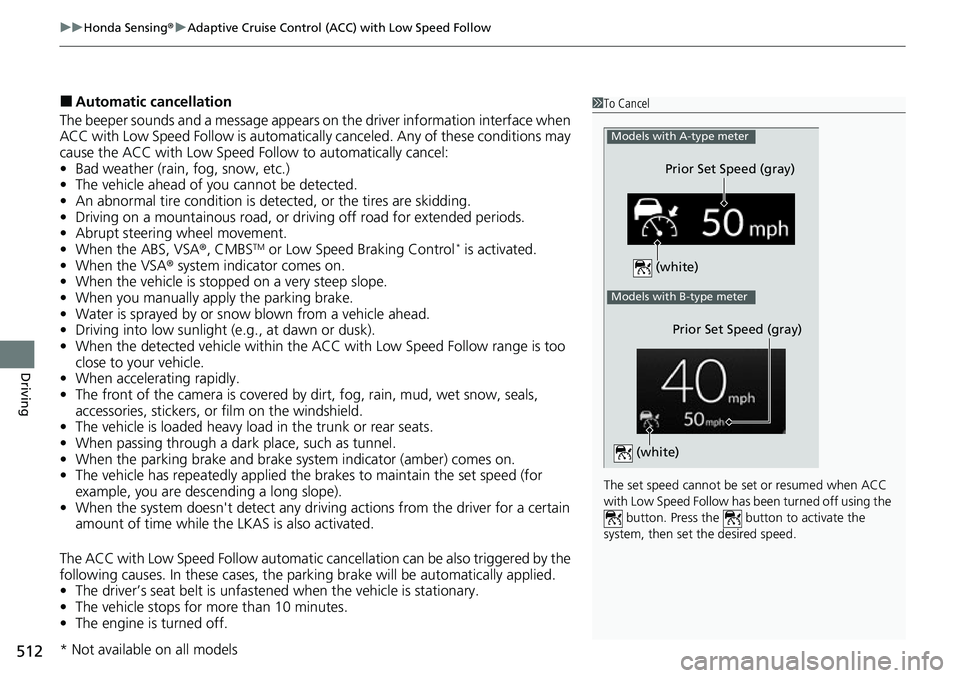
1To Cancel
The set speed cannot be set or resumed when ACC
with Low Speed Follow has been turned off using the button. Press the button to activate the
system, then set the desired speed.
Models with A-type meter
Prior Set Speed (gray)
(white)
Models with B-type meter
Prior Set Speed (gray)
(white)
* Not available on all models
Page 555 of 700

554
Driving
Braking
Brake System
Use the parking brake to keep the vehicle stationary when parked. When the
parking brake is applied, you can ma nually or automatically release it.
■To apply
The electric parking brake can be applied any
time the vehicle has battery, no matter which
position the power mode is in.
Pull the electric parking brake switch up gently
and securely. u The indicator in the switch comes on.
u The parking brake and brake system
indicator (red) comes on.
■To release
The power mode must be in ON in order to
release the electric parking brake.
1. Depress the brake pedal.
2. Press the electric parking brake switch.
u The indicator in the switch goes off.
u The parking brake and brake system
indicator (red) goes off.
Manually releasing the parking brake using
the switch helps your ve hicle start slowly and
smoothly when facing downhill on steep hills.
■Parking Brake1 Parking Brake
You may hear the electric parking brake system
motor operating from the re ar wheel area when you
apply or release the parking brake. This is normal.
The brake pedal may slightly move due to the electric
parking brake system opera tion when you apply or
release the parking br ake. This is normal.
You cannot apply or release the parking brake if the
battery goes dead. 2 If the Battery Is Dead P. 652
If you pull up and hold the electric parking brake
switch while driving, the brakes on all four wheels
are applied by the VSA
® system until the vehicle
comes to a stop. The electric parking brake then
applies, and the switch should be released.
In the following situations, the parking brake
automatically operates.
•When the vehicle stops more than 10 minutes
while Adaptive Cruise Control (ACC) with Low
Speed Follow is activated.
•When the driver’s seat belt is unfastened while
your vehicle is stopped au tomatically by ACC with
Low Speed Follow.
•When the engine is turned off, except by Auto Idle
Stop system, while ACC with Low Speed Follow is
activated.
•When the vehicle stops with the automatic brake
hold system activated for more than 10 minutes.
•When the driver’s seat belt is unfastened while
your vehicle is stopped and brake hold is applied.
•When the engine is turned off, except by Auto Idle
Stop system, while brake hold system is applied.
•When there is a problem with the brake hold
system while brake hold is applied.
Electric Parking
Brake Switch
Electric Parking
Brake Switch
Page 556 of 700
Continued555
uuBraking uBrake System
Driving
■Automatic parking brake feature operation
If the automatic parking brake feature has been activated:
• The parking brake is applied automatically when you set the power mode to
VEHICLE OFF.
• To confirm that the parking brake is applied, check if the parking brake and brake
system indicator (red) is on.
2 Activating and deactivating the automatic parking brake feature P. 556
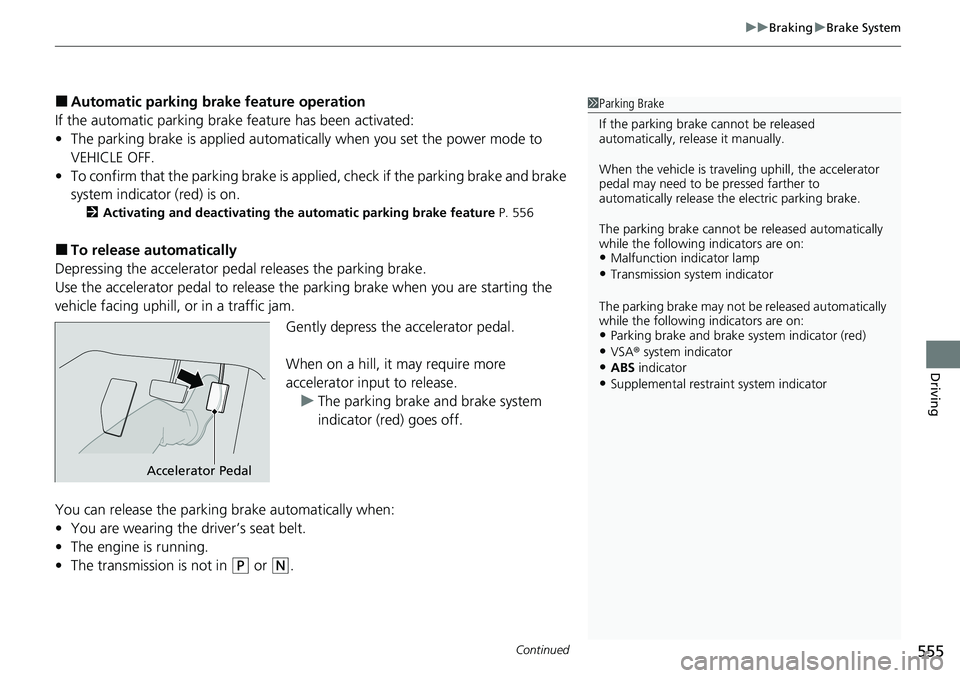
■To release automatically
Depressing the accelerator pedal releases the parking brake.
Use the accelerator pedal to release the parking brake when you are starting the
vehicle facing uphill, or in a traffic jam.
Gently depress the accelerator pedal.
When on a hill, it may require more
accelerator input to release.u The parking brake and brake system
indicator (red) goes off.
You can release the parking brake automatically when:
• You are wearing the driver’s seat belt.
• The engine is running.
• The transmission is not in
(P or (N.
1Parking Brake
If the parking brake cannot be released
automatically, release it manually.
When the vehicle is travel ing uphill, the accelerator
pedal may need to be pressed farther to
automatically release the electric parking brake.
The parking brake cannot be released automatically
while the following indicators are on:
•Malfunction indicator lamp
•Transmission system indicator
The parking brake may not be released automatically
while the following indicators are on:
•Parking brake and brake system indicator (red)
•VSA® system indicator•ABS indicator
•Supplemental restraint system indicator
Accelerator Pedal