VSA OFF HONDA CIVIC 2023 User Guide
[x] Cancel search | Manufacturer: HONDA, Model Year: 2023, Model line: CIVIC, Model: HONDA CIVIC 2023Pages: 840, PDF Size: 26.53 MB
Page 550 of 840
uuWhen Driving uBlind Spot Information System*
548
Driving
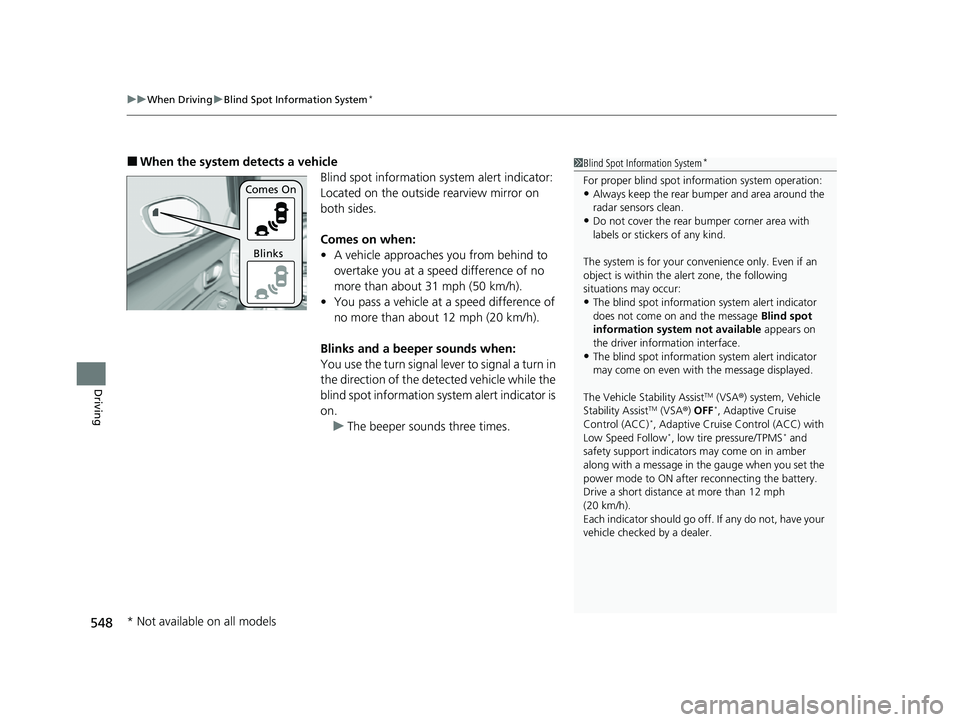
■When the system detects a vehicle
Blind spot information system alert indicator:
Located on the outside rearview mirror on
both sides.
Comes on when:
•A vehicle approaches you from behind to
overtake you at a speed difference of no
more than about 31 mph (50 km/h).
• You pass a vehicle at a speed difference of
no more than abou t 12 mph (20 km/h).
Blinks and a beeper sounds when:
You use the turn signal lever to signal a turn in
the direction of the detected vehicle while the
blind spot information system alert indicator is
on. u The beeper sounds three times.1Blind Spot Information System*
For proper blind spot information system operation:•Always keep the rear bumper and area around the
radar sensors clean.
•Do not cover the rear bumper corner area with
labels or sticke rs of any kind.
The system is for your convenience only. Even if an
object is within the alert zone, the following
situations may occur:
•The blind spot informatio n system alert indicator
does not come on and the message Blind spot
information system not available appears on
the driver information interface.
•The blind spot informatio n system alert indicator
may come on even with the message displayed.
The Vehicle Stability Assist
TM (VSA ®) system, Vehicle
Stability AssistTM (VSA ®) OFF*, Adaptive Cruise
Control (ACC)*, Adaptive Cruise Control (ACC) with
Low Speed Follow*, low tire pressure/TPMS* and
safety support indicators may come on in amber
along with a message in the gauge when you set the
power mode to ON after reconnecting the battery.
Drive a short distance at more than 12 mph
(20 km/h).
Each indicator should go off. If any do not, have your
vehicle checked by a dealer.
Comes On
Blinks
* Not available on all models
23 CIVIC HATCHBACK TYPE R-31T406100_03.book 548 ページ 2022年6月23日 木曜日 午後9時28分
Page 561 of 840
Continued559
uuHonda Sensing ®u Collision Mitigation Braking SystemTM (CMBSTM)
Driving
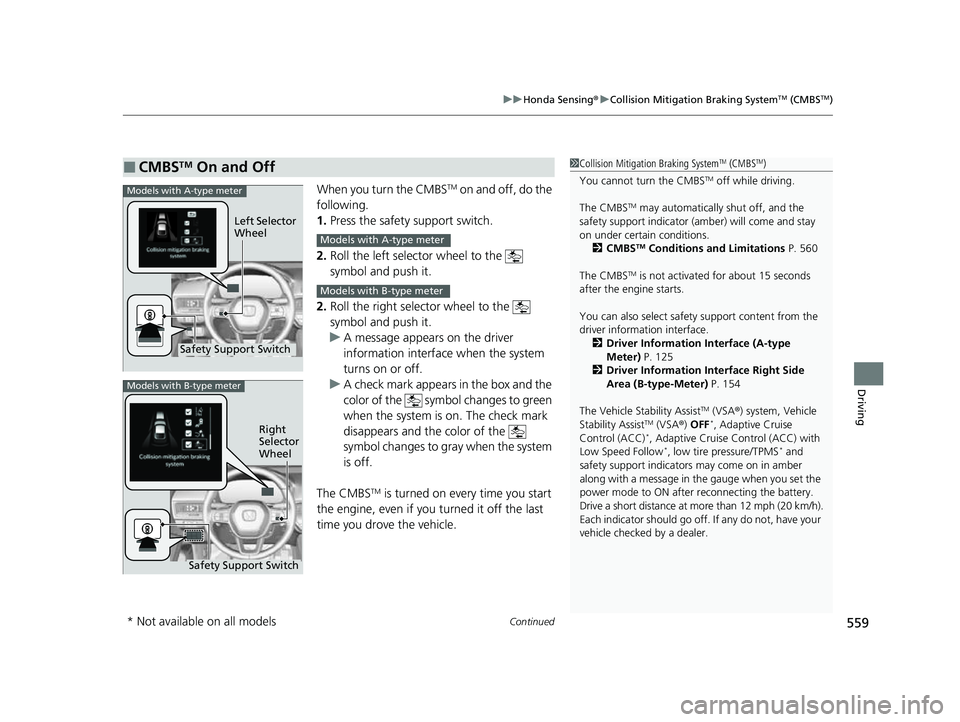
When you turn the CMBSTM on and off, do the
following.
1. Press the safety support switch.
2. Roll the left selector wheel to the
symbol and push it.
2. Roll the right selector wheel to the
symbol and push it.
u A message appears on the driver
information interface when the system
turns on or off.
u A check mark appears in the box and the
color of the symbol changes to green
when the system is on. The check mark
disappears and the color of the
symbol changes to gray when the system
is off.
The CMBS
TM is turned on every time you start
the engine, even if you turned it off the last
time you drove the vehicle.
■CMBSTM On and Off1 Collision Mitigation Braking SystemTM (CMBSTM)
You cannot turn the CMBS
TM off while driving.
The CMBS
TM may automatically shut off, and the
safety support indicator (amb er) will come and stay
on under certain conditions. 2 CMBS
TM Conditions and Limitations P. 560
The CMBS
TM is not activated for about 15 seconds
after the engine starts.
You can also sele ct safety support content from the
driver information interface.
2 Driver Information Interface (A-type
Meter) P. 125
2 Driver Information Interface Right Side
Area (B-type-Meter) P. 154
The Vehicle Stability Assist
TM (VSA ®) system, Vehicle
Stability AssistTM (VSA ®) OFF*, Adaptive Cruise
Control (ACC)*, Adaptive Cruise Control (ACC) with
Low Speed Follow*, low tire pressure/TPMS* and
safety support indicators may come on in amber
along with a message in the gauge when you set the
power mode to ON after reconnecting the battery.
Drive a short distance at more than 12 mph (20 km/h).
Each indicator should go off. If any do not, have your
vehicle checked by a dealer.
Safety Support Switch Left Selector
Wheel
Models with A-type meter
Models with A-type meter
Models with B-type meter
Models with B-type meter
Right
Selector
Wheel
Safety Support Switch
* Not available on all models
23 CIVIC HATCHBACK TYPE R-31T406100_03.book 559 ページ 2022年6月23日 木曜日 午後9時28分
Page 582 of 840
uuHonda Sensing ®u Adaptive Cruise Control (ACC) with Low Speed Follow*
580
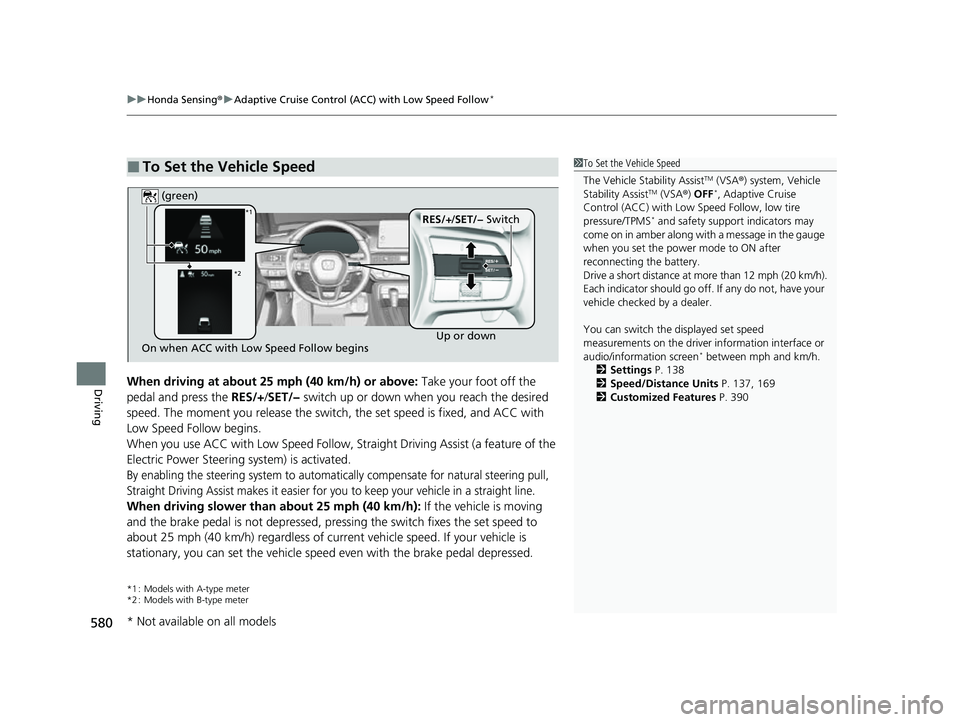
DrivingWhen driving at about 25 mph (40 km/h) or above: Take your foot off the
pedal and press the RES/+/SET/− switch up or down when you reach the desired
speed. The moment you release the switch, the set speed is fixed, and ACC with
Low Speed Follow begins.
When you use ACC with Low Speed Follow, Stra ight Driving Assist (a feature of the
Electric Power Steering system) is activated.
By enabling the steering system to automatically compensate for natural steering pull,
Straight Driving Assist makes it easier for you to keep your vehicle in a straight line.
When driving slower than about 25 mph (40 km/h): If the vehicle is moving
and the brake pedal is not depressed, pres sing the switch fixes the set speed to
about 25 mph (40 km/h) regardless of current vehicle speed. If your vehicle is
stationary, you can set the vehicle speed even with the brake pedal depressed.
*1 : Models with A-type meter
*2 : Models with B-type meter
■To Set the Vehicle Speed1 To Set the Vehicle Speed
The Vehicle Stability Assist
TM (VSA ®) system, Vehicle
Stability AssistTM (VSA ®) OFF*, Adaptive Cruise
Control (ACC) with Low Speed Follow, low tire
pressure/TPMS
* and safety suppor t indicators may
come on in amber along with a message in the gauge
when you set the power mode to ON after
reconnecting the battery.
Drive a short distance at more than 12 mph (20 km/h).
Each indicator should go off. If any do not, have your
vehicle checked by a dealer.
You can switch the displayed set speed
measurements on the driver information interface or
audio/information screen
* between mph and km/h.
2 Settings P. 138
2 Speed/Distance Units P. 137, 169
2 Customized Features P. 390On when ACC with Low Speed Follow begins Up or down
RES/+
/SET/− Switch
(green)*1
*2
* Not available on all models
23 CIVIC HATCHBACK TYPE R-31T406100_03.book 580 ページ 2022年6月23日 木曜日 午後9時28分
Page 597 of 840
Continued595
uuHonda Sensing ®u Adaptive Cruise Control (ACC) with Low Speed Follow*
Driving
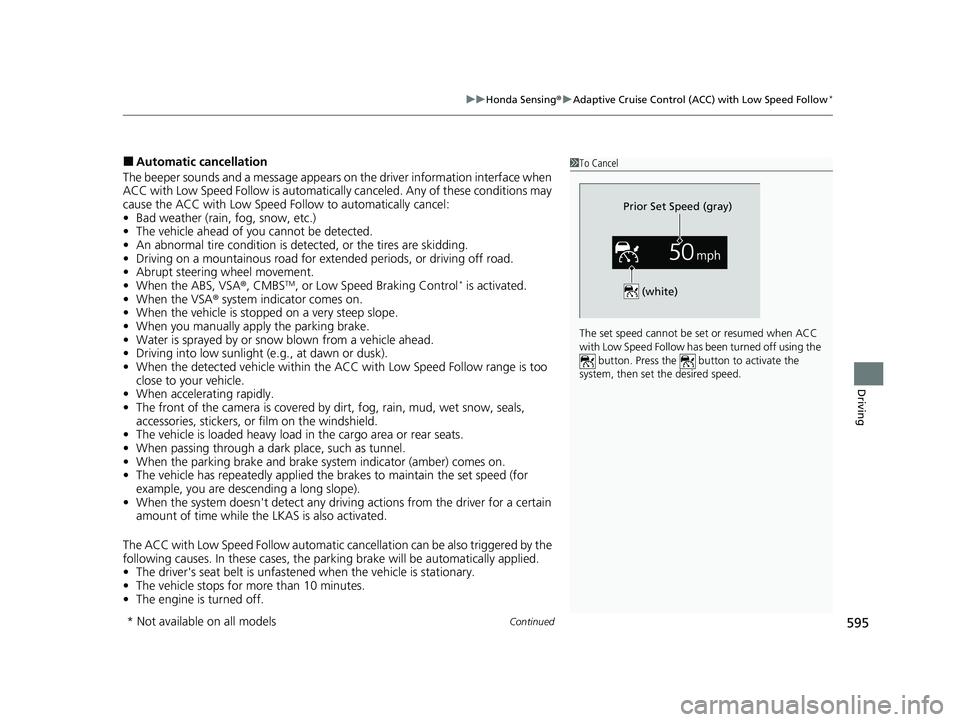
■Automatic cancellation
The beeper sounds and a message appears on the driver information interface when
ACC with Low Speed Follow is automatically canceled. Any of these conditions may
cause the ACC with Low Speed Fo llow to automatically cancel:
• Bad weather (rain, fog, snow, etc.)
• The vehicle ahead of yo u cannot be detected.
• An abnormal tire condition is de tected, or the tires are skidding.
• Driving on a mountainous road for extended periods, or driving off road.
• Abrupt steering wheel movement.
• When the ABS, VSA ®, CMBS
TM, or Low Speed Braking Control* is activated.
• When the VSA ® system indicator comes on.
• When the vehicle is stopped on a very steep slope.
• When you manually apply the parking brake.
• Water is sprayed by or snow blown from a vehicle ahead.
• Driving into low sunlight (e.g., at dawn or dusk).
• When the detected vehicle within the AC C with Low Speed Follow range is too
close to your vehicle.
• When accelerating rapidly.
• The front of the camera is covered by dirt, fog, rain, mud, wet snow, seals,
accessories, stickers, or film on the windshield.
• The vehicle is loaded heavy load in the carg o area or rear seats.
• When passing through a dark place, such as tunnel.
• When the parking brake and brake system indicator (amber) comes on.
• The vehicle has repeatedly applied the brakes to maintain the set speed (for
example, you are descending a long slope).
• When the system doesn't detect any drivi ng actions from the driver for a certain
amount of time while the LKAS is also activated.
The ACC with Low Speed Follow automatic cancellation can be also triggered by the
following causes. In these cases, the parking brake will be automatically applied.
• The driver's seat belt is unfastened when the vehicle is stationary.
• The vehicle stops for more than 10 minutes.
• The engine is turned off.
1To Cancel
The set speed cannot be set or resumed when ACC
with Low Speed Follow has been turned off using the button. Press the button to activate the
system, then set the desired speed.
(white)
Prior Set Speed (gray)
* Not available on all models
23 CIVIC HATCHBACK TYPE R-31T406100_03.book 595 ページ 2022年6月23日 木曜日 午後9時28分
Page 602 of 840
uuHonda Sensing ®u Adaptive Cruise Control (ACC)*
600
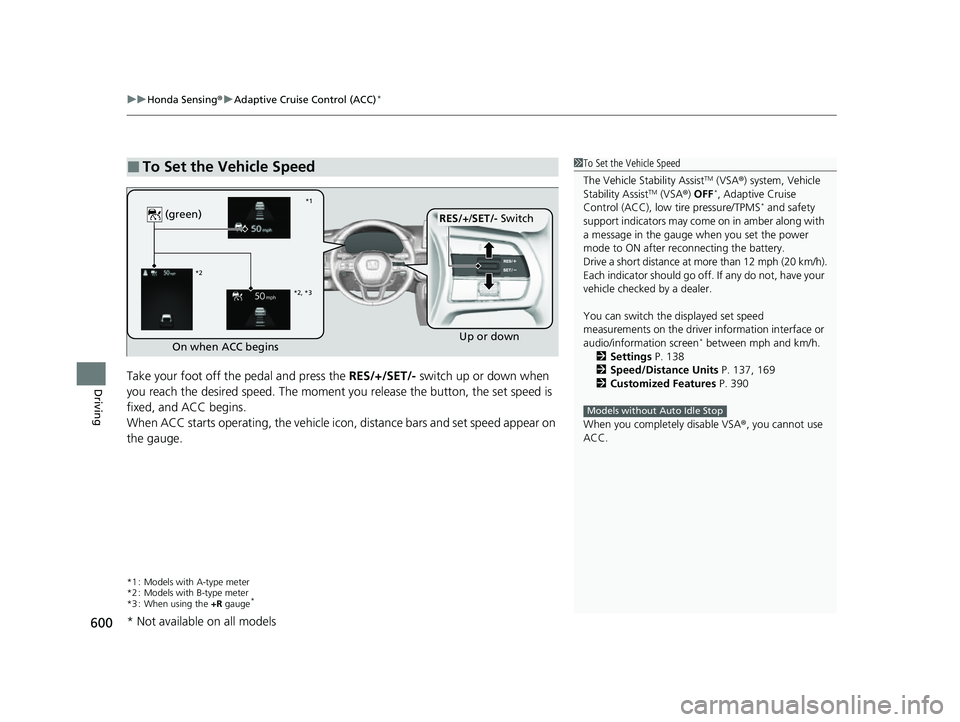
DrivingTake your foot off the pedal and press the RES/+/SET/- switch up or down when
you reach the desired speed. The moment y ou release the button, the set speed is
fixed, and ACC begins.
When ACC starts operating, the vehicle ic on, distance bars and set speed appear on
the gauge.
*1 : Models with A-type meter
*2 : Models with B-type meter
*3 : When using the +R gauge
*
■To Set the Vehicle Speed1To Set the Vehicle Speed
The Vehicle Stability Assist
TM (VSA ®) system, Vehicle
Stability AssistTM (VSA ®) OFF*, Adaptive Cruise
Control (ACC), low tire pressure/TPMS* and safety
support indicators may come on in amber along with
a message in the gauge when you set the power
mode to ON after re connecting the battery.
Drive a short distance at more than 12 mph (20 km/h).
Each indicator should go off. If any do not, have your
vehicle checked by a dealer.
You can switch the displayed set speed
measurements on the driver information interface or
audio/information screen
* between mph and km/h.
2 Settings P. 138
2 Speed/Distance Units P. 137, 169
2 Customized Features P. 390
When you completely disable VSA® , you cannot use
ACC.
Models without Auto Idle Stop
On when ACC begins Up or down
RES/+
/SET/- Switch
(green)
*1
*2
*2, *3
* Not available on all models
23 CIVIC HATCHBACK TYPE R-31T406100_03.book 600 ページ 2022年6月23日 木曜日 午後9時28分
Page 616 of 840
uuHonda Sensing ®u Adaptive Cruise Control (ACC)*
614
Driving
■Automatic cancellation
The beeper sounds and a message appears on the driver information interface when
ACC is automatically canceled. Any of these conditions may cause the ACC to
automatically cancel:
• Bad weather (rain, fog, snow, etc.)
• The vehicle ahead of you cannot be detected.
• An abnormal tire condition is detected, or the tires are skidding.
• Driving on a mountainous road for extended periods, or driving off road.
• Abrupt steering wheel movement.
• When the ABS, VSA ®, CMBS
TM, or Low Speed Braking Control* is activated.
• When the VSA ® system indicator comes on.
• When you manually apply the parking brake.
• When vehicle speed is less than 22 mph (35 km/h).
• Water is sprayed by or snow blown from a vehicle ahead.
• Driving into low sunlight (e.g., at dawn or dusk).
• When the detected vehicle within the ACC range is too close to your vehicle.
• When accelerating rapidly.
• The front of the camera is covered by dirt, fog, rain, mud, wet snow, seals,
accessories, stickers, or film on the windshield.
• The engine is turned off.
• The vehicle is loaded heavy load in the cargo area or rear seats.
• When passing through a dark place, such as tunnel.
• When the parking brake and brake system indicator (amber) comes on.
• The vehicle has repeatedly applied the brakes to maintain the set speed (for
example, you are descending a long slope).
• When the system doesn't detect any driv ing actions from the driver for a certain
amount of time while the LKAS is also activated.
• Ignoring shift down indication shown in the gauge will cancel the ACC after
about 10 seconds.
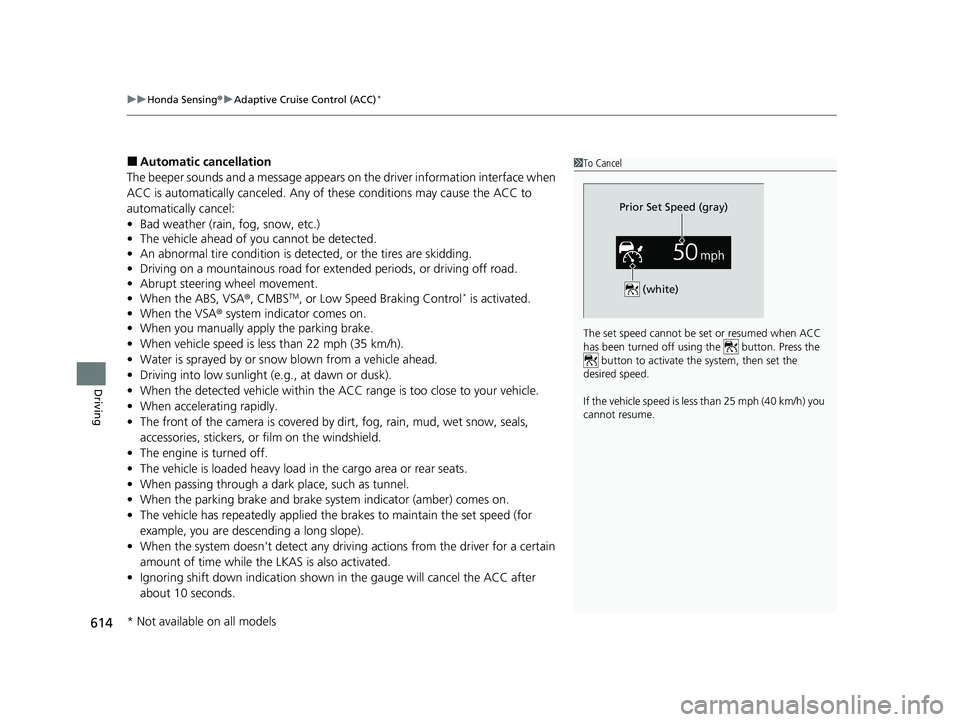
1To Cancel
The set speed cannot be set or resumed when ACC
has been turned off usi ng the button. Press the
button to activate the system, then set the
desired speed.
If the vehicle speed is less than 25 mph (40 km/h) you
cannot resume.
Prior Set Speed (gray)
(white)
* Not available on all models
23 CIVIC HATCHBACK TYPE R-31T406100_03.book 614 ページ 2022年6月23日 木曜日 午後9時28分
Page 623 of 840
Continued621
uuHonda Sensing ®u Lane Keeping Assist System (LKAS)
Driving
The system can be used when th e following conditions are met.
• The lane in which you are driving has detectable lane markers on both sides, and
your vehicle is in the center of the lane.
• The vehicle is traveling between about 45 and 90 mph (72 and 145 km/h).
• You are driving on a straight or slightly curved road.
• The turn signals are off.
• The brake pedal is not depressed.
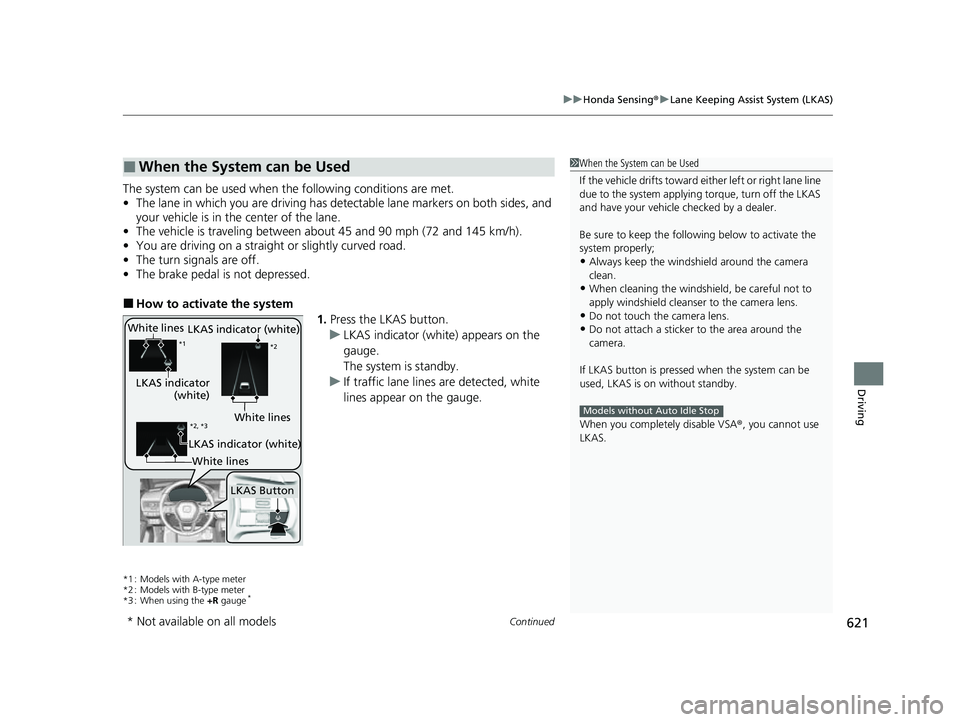
■How to activate the system
1.Press the LKAS button.
u LKAS indicator (white) appears on the
gauge.
The system is standby.
u If traffic lane lines are detected, white
lines appear on the gauge.
*1 : Models with A-type meter
*2 : Models with B-type meter
*3 : When using the +R gauge
*
■When the System can be Used1When the System can be Used
If the vehicle drifts toward ei ther left or right lane line
due to the system applying torque, turn off the LKAS
and have your vehicle checked by a dealer.
Be sure to keep the following below to activate the
system properly;
•Always keep the windshi eld around the camera
clean.
•When cleaning the windshield, be careful not to
apply windshield cleanser to the camera lens.
•Do not touch the camera lens.
•Do not attach a sticker to the area around the
camera.
If LKAS button is pressed when the system can be
used, LKAS is on without standby.
When you completely disable VSA® , you cannot use
LKAS.
Models without Auto Idle Stop
White lines
LKAS indicator
(white)
*1 *2
LKAS Button
*2, *3White lines
LKAS indicator (white)
LKAS indicator (white)
White lines
* Not available on all models
23 CIVIC HATCHBACK TYPE R-31T406100_03.book 621 ページ 2022年6月23日 木曜日 午後9時28分
Page 642 of 840
uuHonda Sensing ®u Road Departure Mitigation System
640
Driving
The system cancels assisting operations when you turn th e steering wheel to avoid
crossing over detected lane markings or approaching the outer edge of the
pavement (into grass or gravel border) or an oncoming vehicle.
If the system operates several times without detecting driver response, the system
beeps to alert you.1 Road Departure Mitigation System
The Road Departure Miti gation system does not
function while VSA ® is completely disabled.
There are times when you may not notice the Road
Departure Mitigation system functions due to your
operation of the vehicle, or road surface conditions.
You can change the settin gs for the Road Departure
Mitigation system.
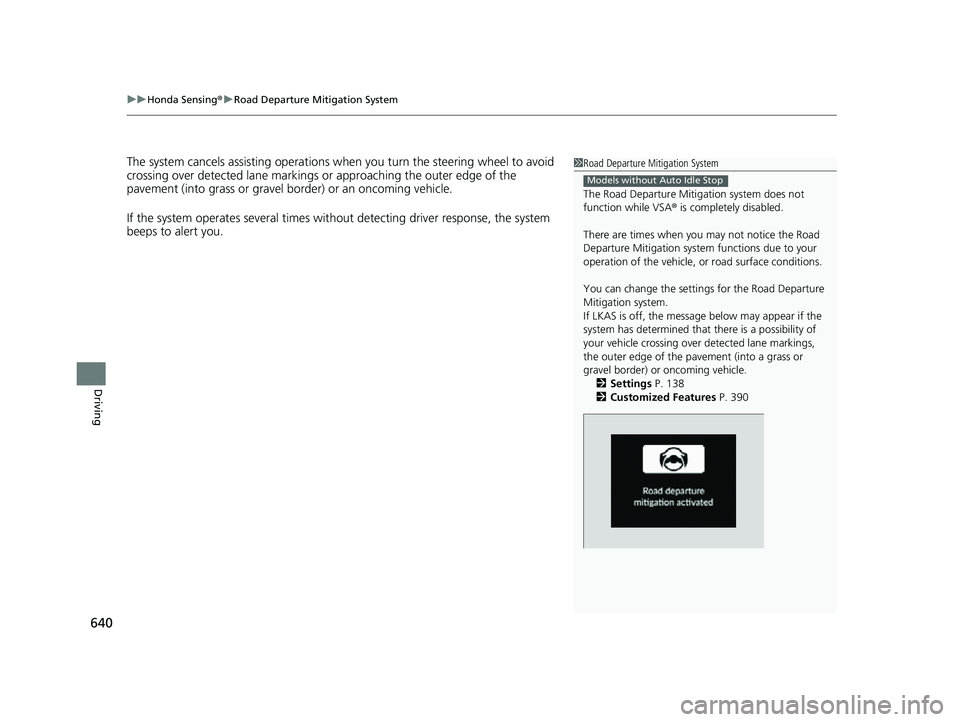
If LKAS is off, the message below may appear if the
system has determined that there is a possibility of
your vehicle crossing over detected lane markings,
the outer edge of the pavement (into a grass or
gravel border) or oncoming vehicle.
2 Settings P. 138
2 Customized Features P. 390
Models without Auto Idle Stop
23 CIVIC HATCHBACK TYPE R-31T406100_03.book 640 ページ 2022年6月23日 木曜日 午後9時28分
Page 644 of 840
uuHonda Sensing ®u Road Departure Mitigation System
642
Driving
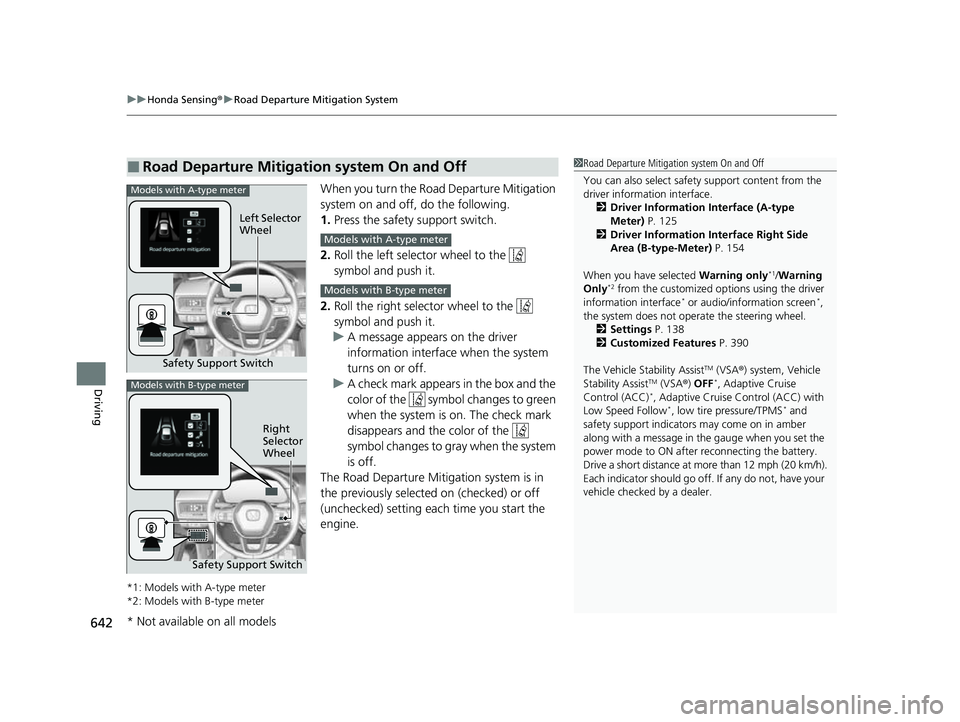
When you turn the Road Departure Mitigation
system on and off, do the following.
1. Press the safety support switch.
2. Roll the left selector wheel to the
symbol and push it.
2. Roll the right selector wheel to the
symbol and push it.
u A message appears on the driver
information interface when the system
turns on or off.
u A check mark appears in the box and the
color of the symbol changes to green
when the system is on. The check mark
disappears and the color of the
symbol changes to gray when the system
is off.
The Road Departure Mitigation system is in
the previously selected on (checked) or off
(unchecked) setting each time you start the
engine.
*1: Models with A-type meter
*2: Models with B-type meter
■Road Departure Mitigation system On and Off1 Road Departure Mitigation system On and Off
You can also sele ct safety support content from the
driver information interface.
2 Driver Information Interface (A-type
Meter) P. 125
2 Driver Information Interface Right Side
Area (B-type-Meter) P. 154
When you have selected Warning only
*1/Warning
Only*2 from the customized options using the driver
information interface* or audio/information screen*,
the system does not opera te the steering wheel.
2 Settings P. 138
2 Customized Features P. 390
The Vehicle Stability Assist
TM (VSA ®) system, Vehicle
Stability AssistTM (VSA ®) OFF*, Adaptive Cruise
Control (ACC)*, Adaptive Cruise Control (ACC) with
Low Speed Follow*, low tire pressure/TPMS* and
safety support indicators may come on in amber
along with a message in the gauge when you set the
power mode to ON after reconnecting the battery.
Drive a short distance at more than 12 mph (20 km/h).
Each indicator should go off. If any do not, have your
vehicle checked by a dealer.
Safety Support Switch Left Selector
Wheel
Models with A-type meter
Models with A-type meter
Models with B-type meter
Models with B-type meter
Right
Selector
Wheel
Safety Support Switch
* Not available on all models
23 CIVIC HATCHBACK TYPE R-31T406100_03.book 642 ページ 2022年6月23日 木曜日 午後9時28分
Page 659 of 840
657Continued
Driving
Braking
Brake System
Use the parking brake to keep the vehicle stationary when parked. When the
parking brake is applied, you can manu ally or automatically release it.
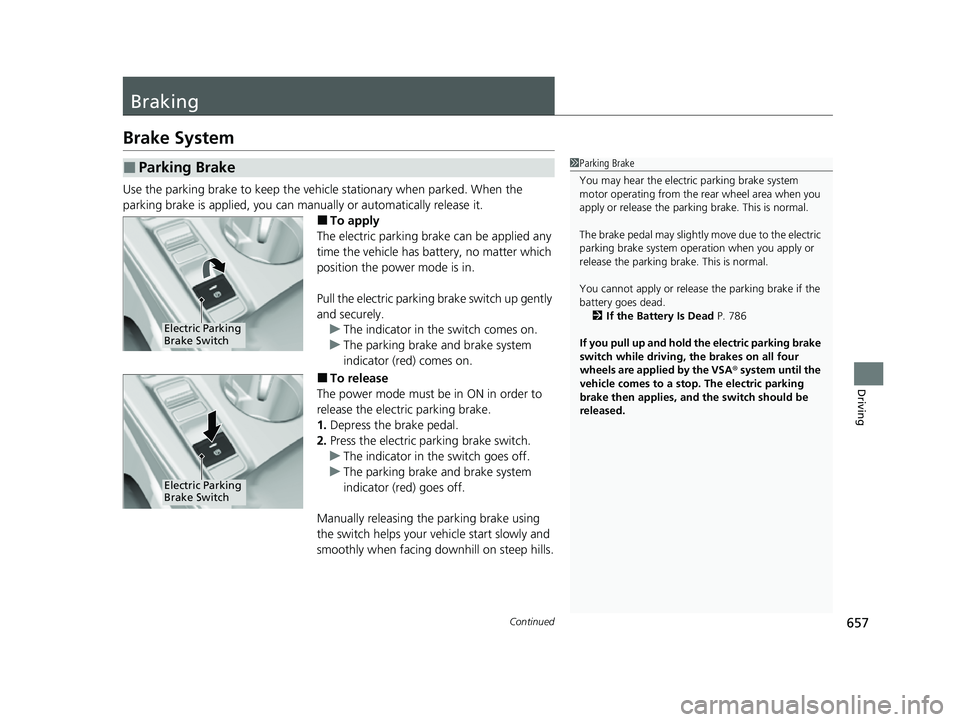
■To apply
The electric parking brake can be applied any
time the vehicle has battery, no matter which
position the power mode is in.
Pull the electric parking brake switch up gently
and securely. u The indicator in the switch comes on.
u The parking brake and brake system
indicator (red) comes on.
■To release
The power mode must be in ON in order to
release the electric parking brake.
1. Depress the brake pedal.
2. Press the electric parking brake switch.
u The indicator in the switch goes off.
u The parking brake and brake system
indicator (red) goes off.
Manually releasing the parking brake using
the switch helps your vehicle start slowly and
smoothly when facing downhill on steep hills.
■Parking Brake1 Parking Brake
You may hear the electric parking brake system
motor operating from the re ar wheel area when you
apply or release the parki ng brake. This is normal.
The brake pedal may slightly move due to the electric
parking brake system opera tion when you apply or
release the parking br ake. This is normal.
You cannot apply or release the parking brake if the
battery goes dead. 2 If the Battery Is Dead P. 786
If you pull up and hold the electric parking brake
switch while driving, the brakes on all four
wheels are applied by the VSA ® system until the
vehicle comes to a stop. The electric parking
brake then applies, and the switch should be
released.
Electric Parking
Brake Switch
Electric Parking
Brake Switch
23 CIVIC HATCHBACK TYPE R-31T406100_03.book 657 ページ 2022年6月23日 木曜日 午後9時28分