fuel type HONDA CIVIC 2023 User Guide
[x] Cancel search | Manufacturer: HONDA, Model Year: 2023, Model line: CIVIC, Model: HONDA CIVIC 2023Pages: 840, PDF Size: 26.53 MB
Page 98 of 840
96
Instrument Panel
Indicators
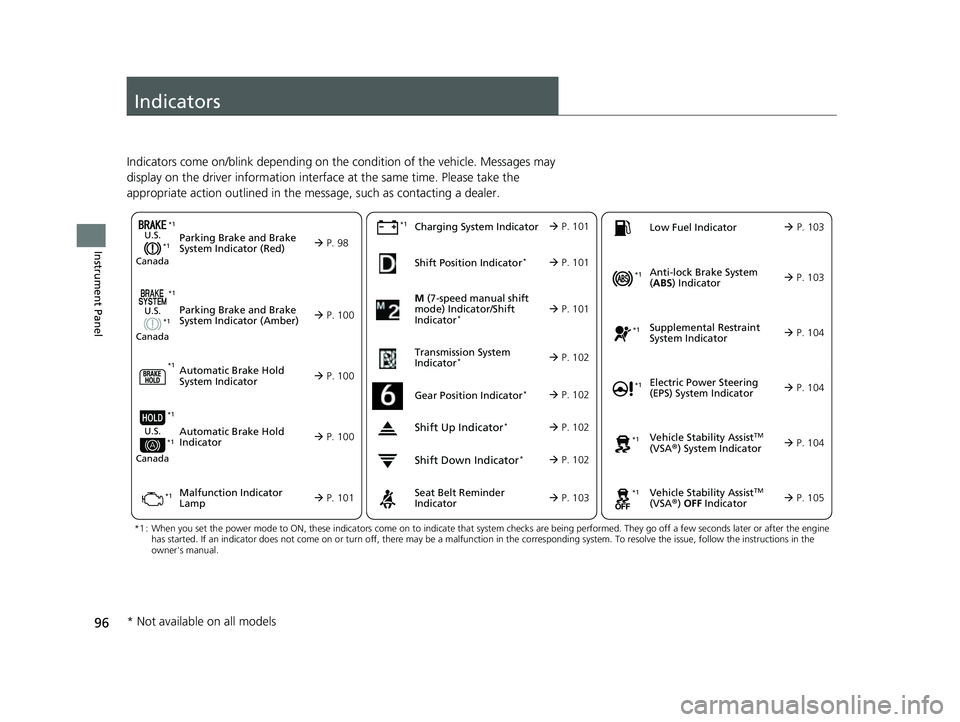
Indicators come on/blink depending on the condition of the vehicle. Messages may
display on the driver information interface at the same time. Please take the
appropriate action outlined in the message, such as contacting a dealer.
M (7-speed manual shift
mode) Indicator/Shift
Indicator
* P. 101
Parking Brake and Brake
System Indicator (Red)
Parking Brake and Brake
System Indicator (Amber)U.S.
Canada
U.S.
Canada
Automatic Brake Hold
System Indicator
Automatic Brake Hold
IndicatorU.S.
Canada
*1 : When you set the power mode to ON, these indicators come on to indicate that system checks are being perf ormed. They go off a few seconds later or after the engine
has started. If an indicator does not come on or turn off, th ere may be a malfunction in the corresponding system. To resolve the issue, follow the instructions in the
owner's manual.
P. 98*1
Malfunction Indicator
Lamp Charging System IndicatorSeat Belt Reminder
Indicator
Low Fuel Indicator
P. 100
P. 1
00
P. 100
P. 101
P. 101*1
*1 *1
Shift Position Indicator*
P. 101
Transmission System
Indicator
* P. 102
P. 103
P. 103
*1
*1
Anti-lock Brake System
( ABS ) Indicator
Vehicle Stability AssistTM
(VSA®) System Indicator
Vehicle Stability Assist
TM
(VSA®) OFF Indicator
Supplemental Restraint
System Indicator
Electric Power Steering
(EPS) System Indicator
*1
P. 103
P. 104
P. 104*1
*1
*1
P. 105
*1 P. 104
Shift Up Indicator* P. 102
Shift Down Indicator* P. 102
Gear Position Indicator* P. 102
*1
*1
*1
* Not available on all models
23 CIVIC HATCHBACK TYPE R-31T406100_03.book 96 ページ 2022年6月23日 木曜日 午後9時28分
Page 105 of 840
103
uuIndicators u
Continued
Instrument Panel
IndicatorNameOn/BlinkingExplanation
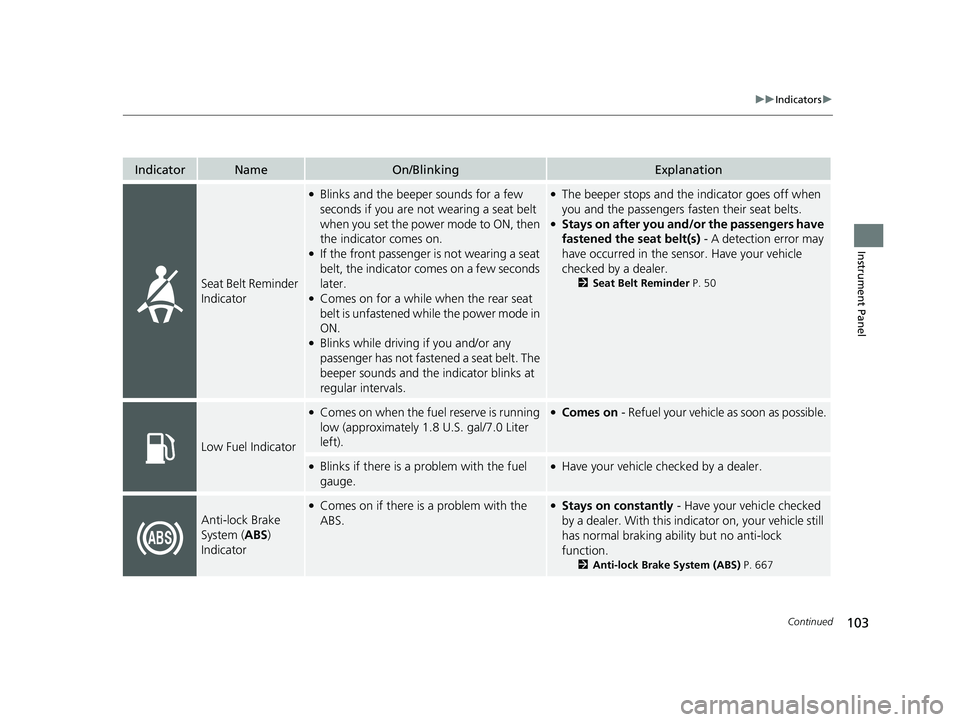
Seat Belt Reminder
Indicator
●Blinks and the beeper sounds for a few
seconds if you are not wearing a seat belt
when you set the power mode to ON, then
the indicator comes on.
●If the front passenger is not wearing a seat
belt, the indicator comes on a few seconds
later.
●Comes on for a while when the rear seat
belt is unfastened while the power mode in
ON.
●Blinks while driving if you and/or any
passenger has not fastened a seat belt. The
beeper sounds and the indicator blinks at
regular intervals.
●The beeper stops and the indicator goes off when
you and the passengers fasten their seat belts.
●Stays on after you and/or the passengers have
fastened the seat belt(s) - A detection error may
have occurred in the sensor. Have your vehicle
checked by a dealer.
2 Seat Belt Reminder P. 50
Low Fuel Indicator
●Comes on when the fuel reserve is running
low (approximately 1.8 U.S. gal/7.0 Liter
left).●Comes on - Refuel your vehicle as soon as possible.
●Blinks if there is a problem with the fuel
gauge.●Have your vehicle checked by a dealer.
Anti-lock Brake
System (ABS)
Indicator
●Comes on if there is a problem with the
ABS.●Stays on constantly - Have your vehicle checked
by a dealer. With this indi cator on, your vehicle still
has normal braking abili ty but no anti-lock
function.
2 Anti-lock Brake System (ABS) P. 667
23 CIVIC HATCHBACK TYPE R-31T406100_03.book 103 ページ 2022年6月23日 木曜日 午後9時28分
Page 120 of 840
118
Instrument Panel
Gauges and Driver Information Interface
Gauges
Gauges include the speedometer, fuel gauge, and other related indicators.
They are displayed when the power mode is in ON.
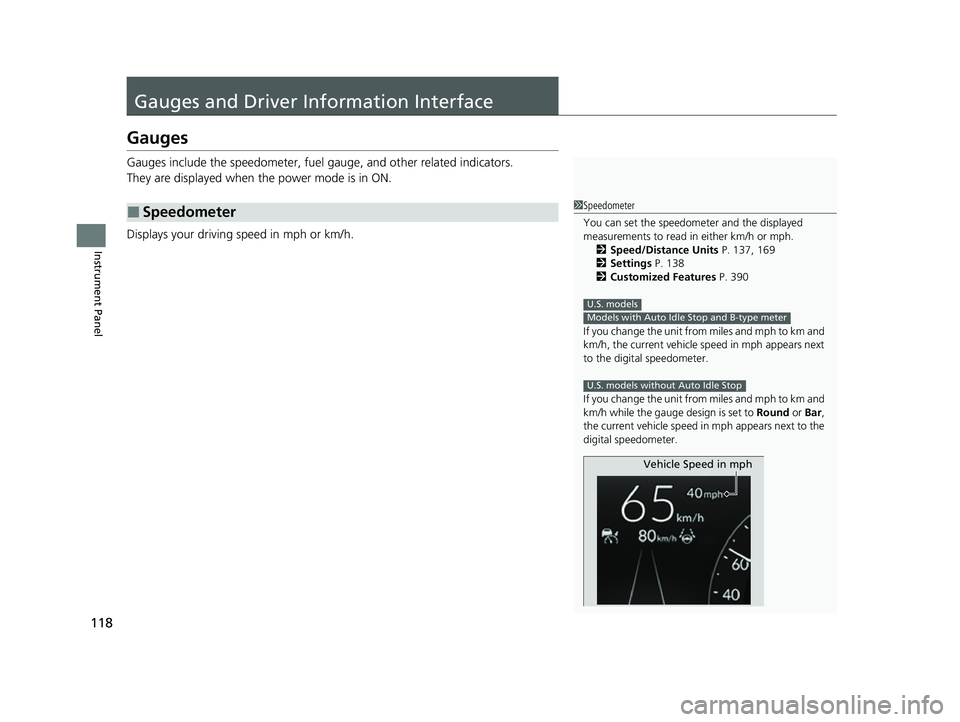
Displays your driving speed in mph or km/h.
■Speedometer1Speedometer
You can set the speedometer and the displayed
measurements to read in either km/h or mph.
2 Speed/Distance Units P. 137, 169
2 Settings P. 138
2 Customized Features P. 390
If you change the unit from miles and mph to km and
km/h, the current vehicle speed in mph appears next
to the digital speedometer.
If you change the unit from miles and mph to km and
km/h while the gauge design is set to Round or Bar ,
the current vehicle speed in mph appears next to the
digital speedometer.
U.S. models
Models with Auto Idle Stop and B-type meter
U.S. models without Auto Idle Stop
Vehicle Speed in mph
23 CIVIC HATCHBACK TYPE R-31T406100_03.book 118 ページ 2022年6月23日 木曜日 午後9時28分
Page 121 of 840
Continued119
uuGauges and Driver Information Interface uGauges
Instrument Panel
Shows the number of engine revolutions per minute.
Displays the amount of fuel left in the fuel tank.
Displays the temperature of the engine coolant.
■Tachometer
■Fuel Gauge
■Temperature Gauge
1Tachometer
The tachometer can be turned on and off using the
driver information interface.
2 Settings P. 138
Even if you have turned off the tachometer on the
driver information interface, if No content is selected
on the driver information interface, it will change to a
tachometer-only display.
The shift up alarm sounds when the tachometer
reading approaches the red zone.
You can turn the shift up alarm feature on and off. 2 Customized Features P. 390
Models with A-type meter
Models without Auto Idle Stop
1Fuel Gauge
NOTICE
You should refuel when the reading approaches .
Running out of fuel can cause the engine to misfire,
damaging the cata lytic converter.
The actual amount of remain ing fuel may differ from
the fuel gauge reading.E
Models with B-type meter
1 Temperature Gauge
NOTICE
Driving with the temperat ure gauge pointer in the
upper zone can cause serious engine damage. Pull
safely to the side of th e road and allow engine
temperature to return to normal.
2 Overheating P. 791
23 CIVIC HATCHBACK TYPE R-31T406100_03.book 119 ページ 2022年6月23日 木曜日 午後9時28分
Page 127 of 840
125
uuGauges and Driver Information Interface uDriver Information Interface (A-type Meter)
Continued
Instrument Panel
Driver Information In terface (A-type Meter)
The driver information interface shows info rmation such as the estimated travelable
distance and fuel economy of the vehicle. It also displays messages such as warnings
and other helpful information.
When a warning message displays, please check the message and contact a dealer
and have the vehicle inspected if necessary . Please refer to the pages below if the
Engine oil pressure low or Engine temperature too hot message is displayed.
2If the Engine oil pressure low Warning Appears P. 795
2 Overheating P. 791
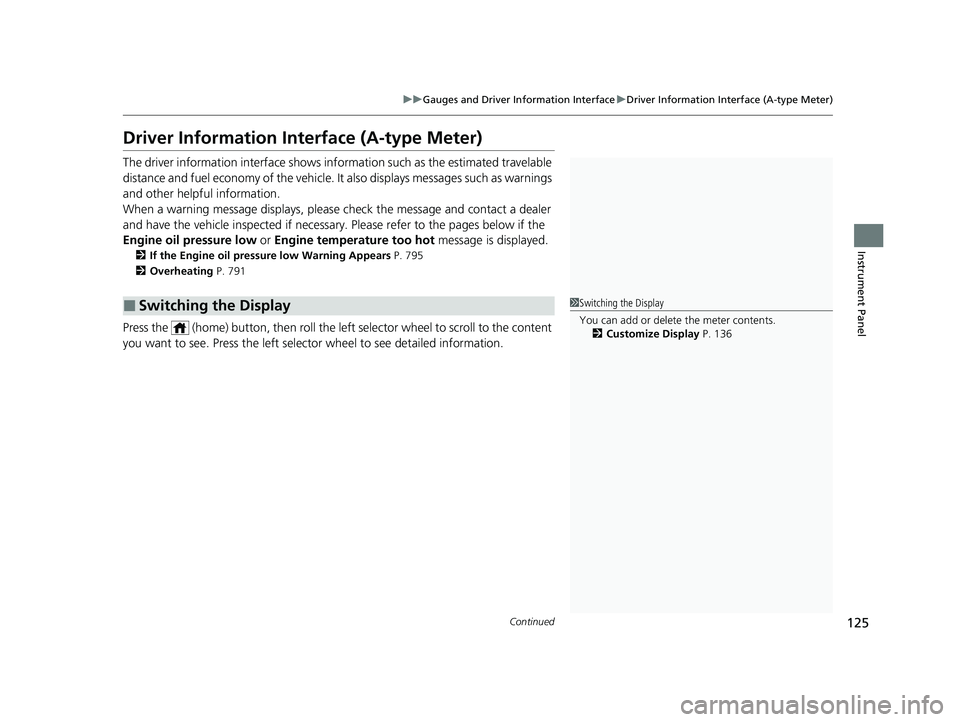
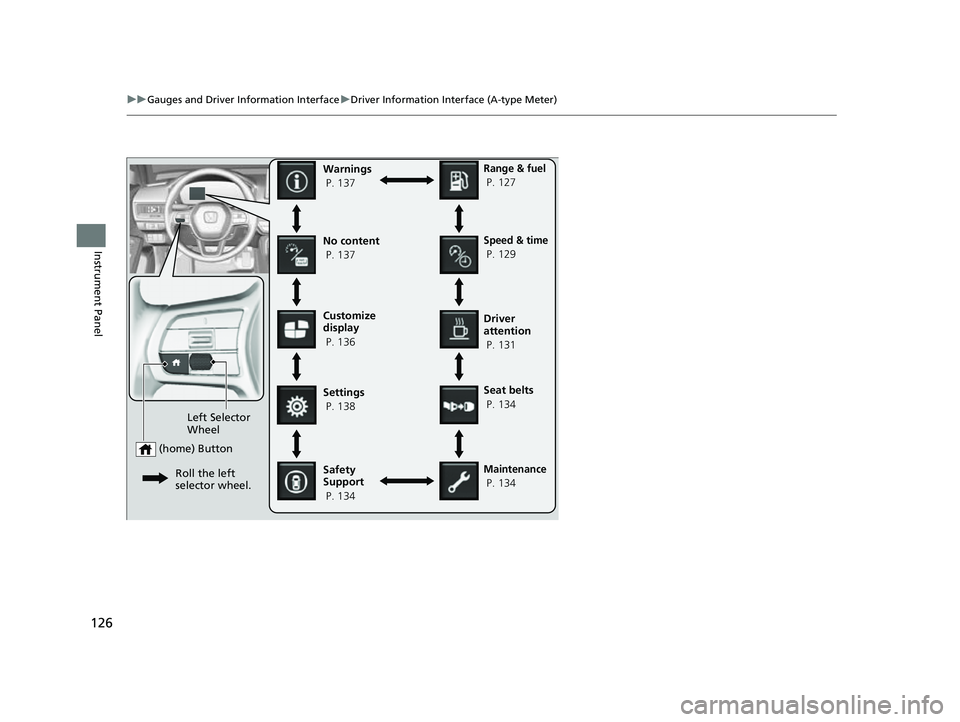
Press the (home) button, th en roll the left selector wheel to scroll to the content
you want to see. Press the left sele ctor wheel to see detailed information.
■Switching the Display1Switching the Display
You can add or delete the meter contents.
2 Customize Display P. 136
23 CIVIC HATCHBACK TYPE R-31T406100_03.book 125 ページ 2022年6月23日 木曜日 午後9時28分
Page 128 of 840
126
uuGauges and Driver Information Interface uDriver Information Interface (A-type Meter)
Instrument Panel
Customize
display
P. 136
Left Selector
Wheel
(home) Button
Roll the left
selector wheel.
No content
P. 137Speed & time
P. 129
Warnings
P. 137
Range & fuel
P. 127
Settings
P. 138 Driver
attention
P. 131
Seat belts
P. 134
Safety
Support
P. 134
Maintenance
P. 134
23 CIVIC HATCHBACK TYPE R-31T406100_03.book 126 ページ 2022年6月23日 木曜日 午後9時28分
Page 129 of 840
127
uuGauges and Driver Information Interface uDriver Information Interface (A-type Meter)
Continued
Instrument Panel
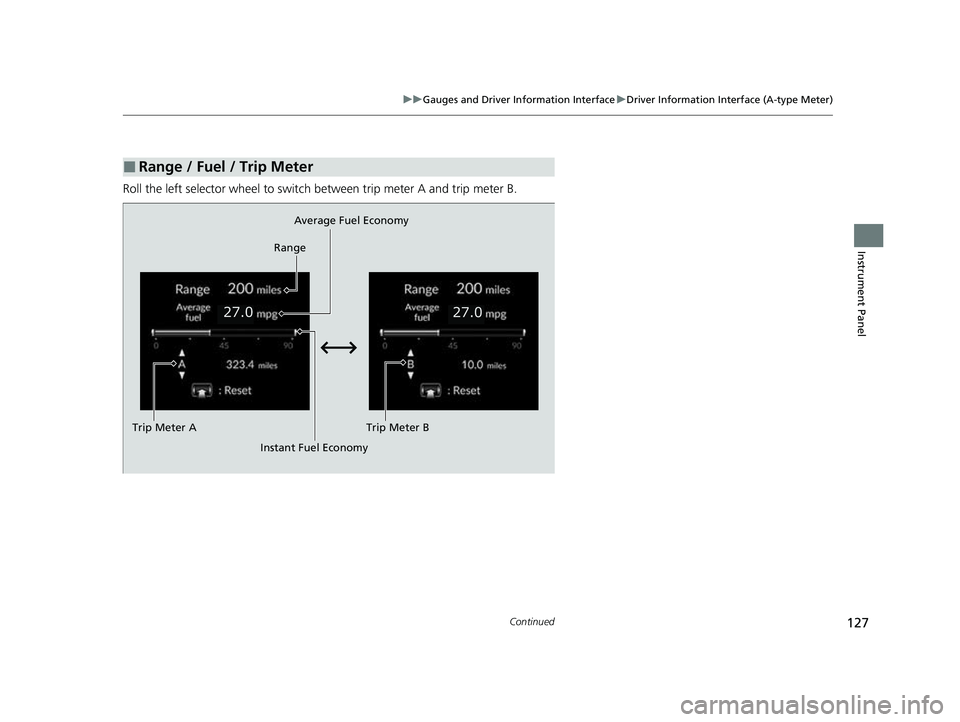
Roll the left selector wheel to switch between trip meter A and trip meter B.
■Range / Fuel / Trip Meter
Average Fuel Economy
Range
Trip Meter B
Instant Fuel Economy
Trip Meter A
23 CIVIC HATCHBACK TYPE R-31T406100_03.book 127 ページ 2022年6月23日 木曜日 午後9時28分
Page 130 of 840
uuGauges and Driver Information Interface uDriver Information Interface (A-type Meter)
128
Instrument Panel
■Trip meter
Shows the total number of miles or kilomete rs driven since the last reset. Meters A
and B can be used to measure two separate trips.
Resetting a trip meter
To reset the trip meter, display it, press the left selector wheel and then select Reset.
u The trip meter is reset to 0.0.
■Range
Shows the estimated distance you can trave l on the remaining fuel. This estimated
distance is based on the ve hicle's current fuel economy.
■Average fuel economy
Shows the estimated average fuel economy of each trip meter in mpg or l/100 km.
The display is updated at set intervals. Wh en a trip meter is reset, the average fuel
economy is also reset.
■Instant fuel economy
Shows the instant fuel economy as a bar graph in mpg or l/100 km.
1Range
The driving range displayed is only an estimate and
may differ to the actual distance the vehicle can
travel.
1 Average fuel economy
You can change when to reset the average fuel
economy.
2 Settings P. 138
23 CIVIC HATCHBACK TYPE R-31T406100_03.book 128 ページ 2022年6月23日 木曜日 午後9時28分
Page 143 of 840
141
uuGauges and Driver Information Interface uDriver Information Interface (A-type Meter)
Continued
Instrument Panel
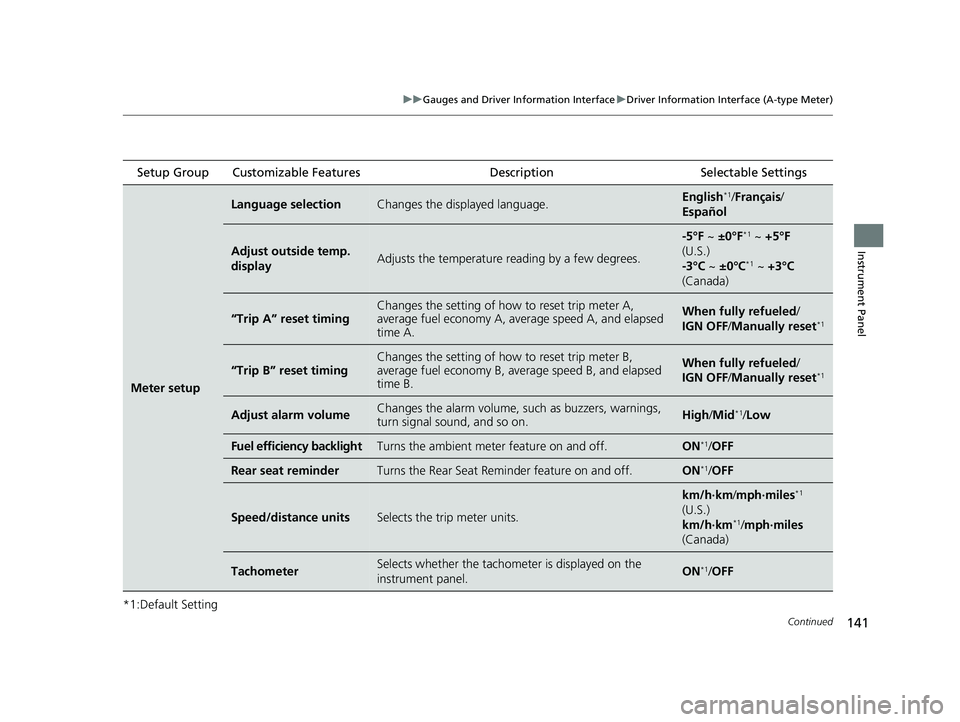
*1:Default Setting Setup Group Customizable Features
Description Selectable Settings
Meter setup
Language selectionChanges the displayed language.English*1/Français /
Español
Adjust outside temp.
displayAdjusts the temperature r eading by a few degrees.
-5°F ~ ±0°F*1 ~ +5°F
(U.S.)
-3°C ~ ±0°C
*1 ~ +3°C
(Canada)
“Trip A” reset timingChanges the setting of how to reset trip meter A,
average fuel economy A, av erage speed A, and elapsed
time A.When fully refueled/
IGN OFF /Manually reset*1
“Trip B” reset timing
Changes the setting of ho w to reset trip meter B,
average fuel economy B, av erage speed B, and elapsed
time B.When fully refueled/
IGN OFF /Manually reset*1
Adjust alarm volumeChanges the alarm volume, su ch as buzzers, warnings,
turn signal sound, and so on.High /Mid*1/Low
Fuel efficiency backlightTurns the ambient meter feature on and off.ON*1/ OFF
Rear seat reminderTurns the Rear Seat Reminder feature on and off.ON*1/OFF
Speed/distance unitsSelects the trip meter units.
km/h∙km /mph∙miles*1
(U.S.)
km/h∙km
*1/ mph∙miles
(Canada)
TachometerSelects whether the tachom eter is displayed on the
instrument panel.ON*1/ OFF
23 CIVIC HATCHBACK TYPE R-31T406100_03.book 141 ページ 2022年6月23日 木曜日 午後9時28分
Page 147 of 840
145
uuGauges and Driver Information Interface uDriver Information Interface (A-type Meter)
Continued
Instrument Panel
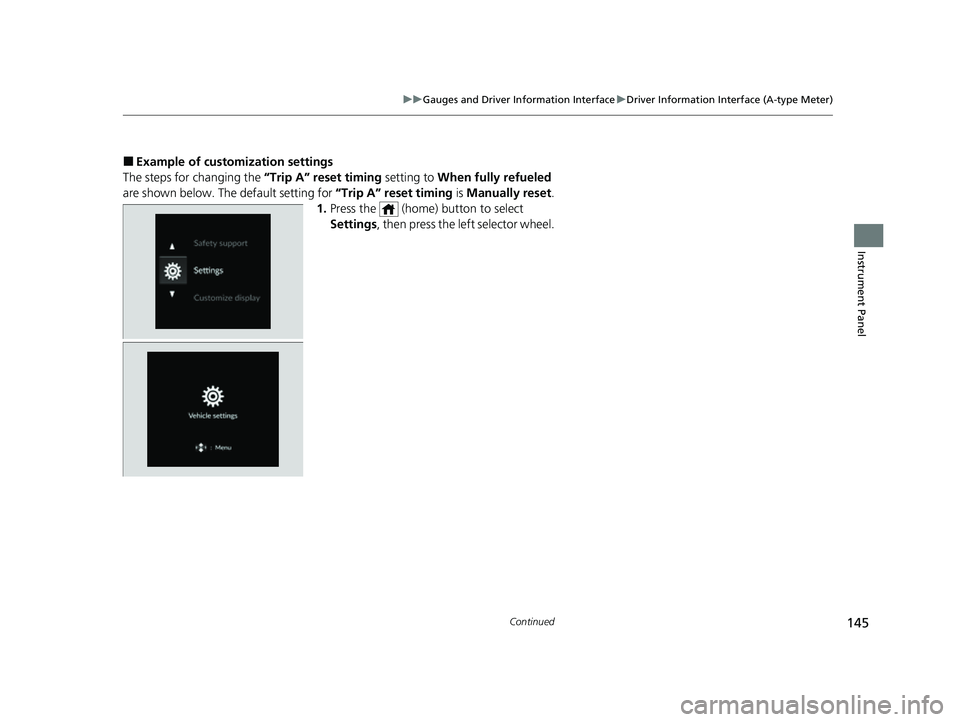
■Example of customization settings
The steps for changing the “Trip A” reset timing setting to When fully refueled
are shown below. The default setting for “Trip A” reset timing is Manually reset .
1. Press the (home) button to select
Settings , then press the left selector wheel.
23 CIVIC HATCHBACK TYPE R-31T406100_03.book 145 ページ 2022年6月23日 木曜日 午後9時28分