manual transmission HONDA CIVIC 2023 User Guide
[x] Cancel search | Manufacturer: HONDA, Model Year: 2023, Model line: CIVIC, Model: HONDA CIVIC 2023Pages: 840, PDF Size: 26.53 MB
Page 140 of 840
uuGauges and Driver Information Interface uDriver Information Interface (A-type Meter)
138
Instrument Panel
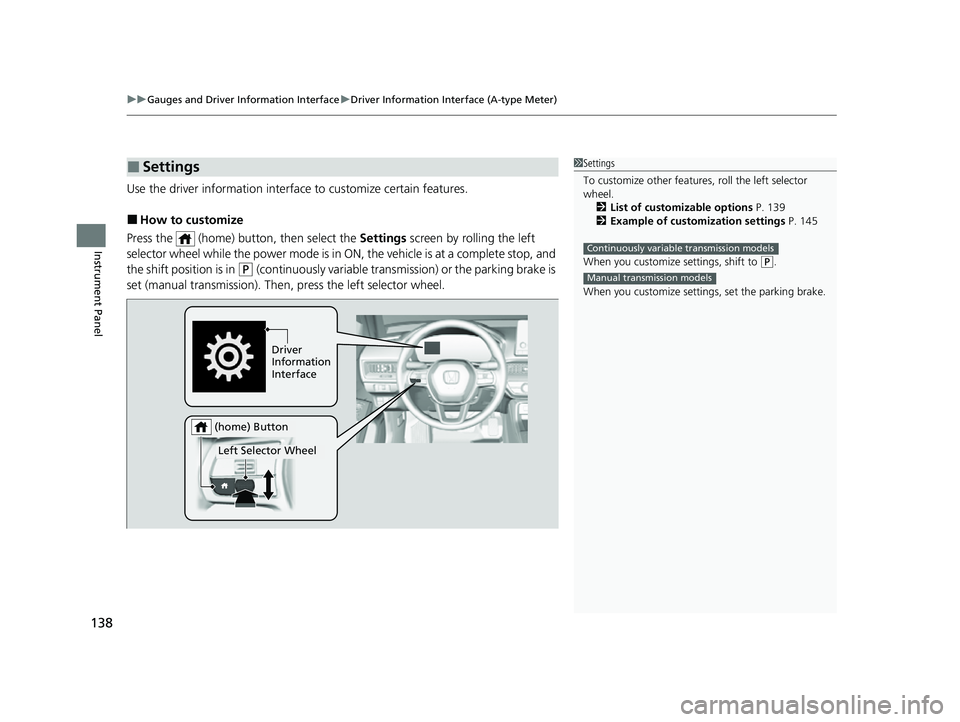
Use the driver information interfac e to customize certain features.
■How to customize
Press the (home) button, then select the Settings screen by rolling the left
selector wheel while the power mode is in ON, the vehicle is at a complete stop, and
the shift position is in
(P (continuously variable transmission) or the parking brake is
set (manual transmission). Then, press the left selector wheel.
■Settings1Settings
To customize other features , roll the left selector
wheel.
2 List of customizable options P. 139
2 Example of customization settings P. 145
When you customize settings, shift to
( P.
When you customize setti ngs, set the parking brake.
Continuously variable transmission models
Manual transmission models
Driver
Information
Interface
Left Selector Wheel
(home) Button
23 CIVIC HATCHBACK TYPE R-31T406100_03.book 138 ページ 2022年6月23日 木曜日 午後9時28分
Page 145 of 840
143
uuGauges and Driver Information Interface uDriver Information Interface (A-type Meter)
Continued
Instrument Panel
*1:Default SettingSetup Group Customizable Features Description Selectable Settings
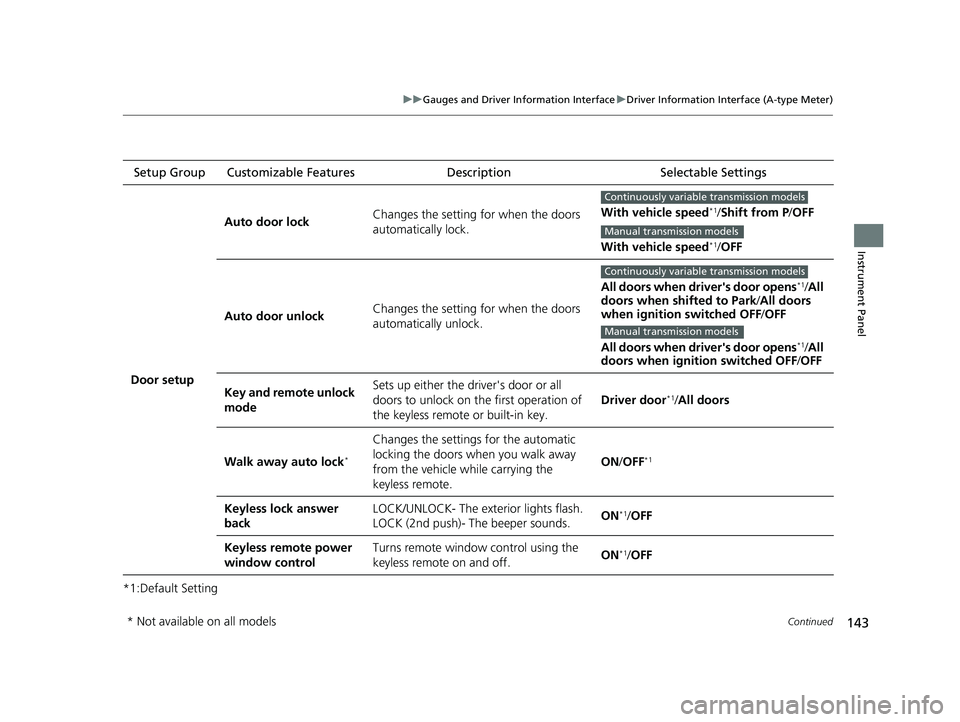
Door setup Auto door lock
Changes the setting for when the doors
automatically lock. With vehicle speed
*1/
Shift from P /OFF
With vehicle speed
*1/ OFF
Auto door unlock Changes the setting for when the doors
automatically unlock. All doors when driver's door opens
*1/
All
doors when shifted to Park /All doors
when ignition switched OFF /OFF
All doors when driver's door opens
*1/ All
doors when ignition switched OFF /OFF
Key and remote unlock
mode Sets up either the driver's door or all
doors to unlock on the first operation of
the keyless remote or built-in key.
Driver door
*1/
All doors
Walk away auto lock
*
Changes the settings for the automatic
locking the doors when you walk away
from the vehicle while carrying the
keyless remote. ON
/OFF
*1
Keyless lock answer
back LOCK/UNLOCK- The exterior lights flash.
LOCK (2nd push)- The beeper sounds.
ON*1/
OFF
Keyless remote power
window control Turns remote window control using the
keyless remote on and off.
ON
*1/
OFF
Continuously variable transmission models
Manual transmission models
Continuously variable transmission models
Manual transmission models
* Not available on all models
23 CIVIC HATCHBACK TYPE R-31T406100_03.book 143 ページ 2022年6月23日 木曜日 午後9時28分
Page 153 of 840
Continued151
uuGauges and Driver Information Interface uDriver Information Interface Left Side Area (B-type-Meter)
Instrument Panel
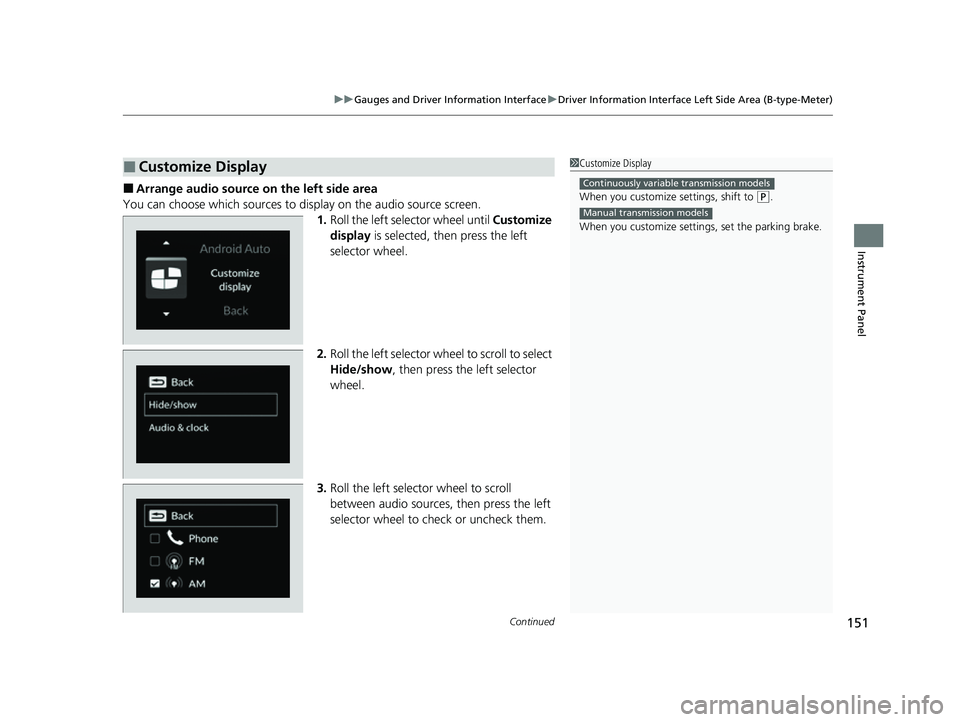
■Arrange audio source on the left side area
You can choose which sources to display on the audio source screen. 1.Roll the left selector wheel until Customize
display is selected, then press the left
selector wheel.
2. Roll the left selector wheel to scroll to select
Hide/show , then press the left selector
wheel.
3. Roll the left selector wheel to scroll
between audio sources, then press the left
selector wheel to check or uncheck them.
■Customize Display1Customize Display
When you customize settings, shift to
(P.
When you customize setti ngs, set the parking brake.
Continuously variable transmission models
Manual transmission models
23 CIVIC HATCHBACK TYPE R-31T406100_03.book 151 ページ 2022年6月23日 木曜日 午後9時28分
Page 172 of 840
uuGauges and Driver Information Interface uDriver Information Interface Right Side Area (B-type-Meter)
170
Instrument Panel
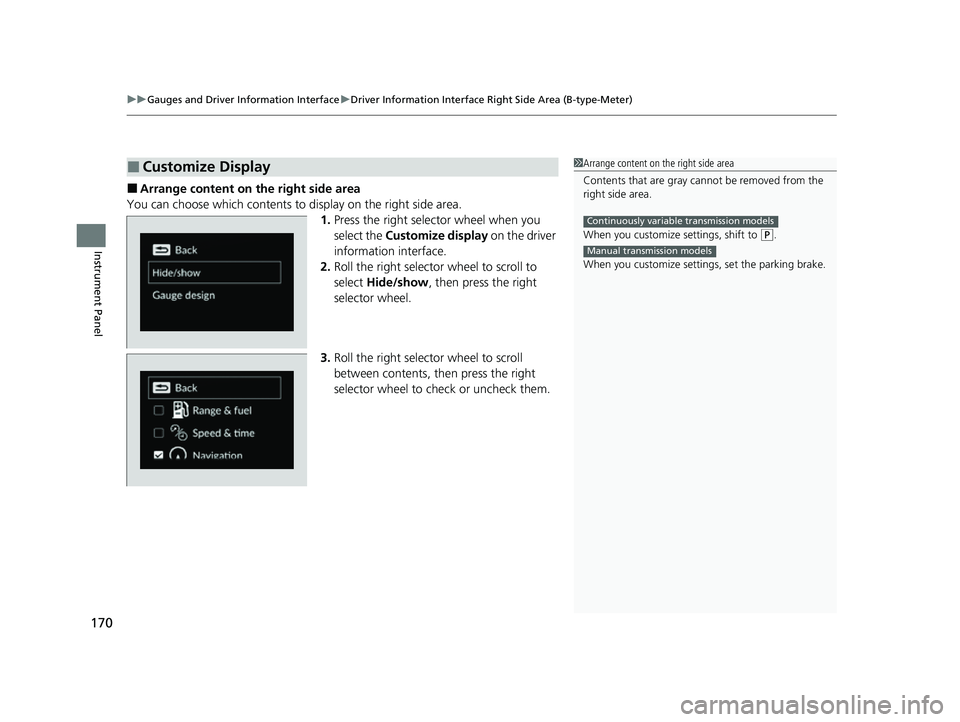
■Arrange content on the right side area
You can choose which contents to display on the right side area. 1.Press the right selector wheel when you
select the Customize display on the driver
information interface.
2. Roll the right selector wheel to scroll to
select Hide/show , then press the right
selector wheel.
3. Roll the right selector wheel to scroll
between contents, th en press the right
selector wheel to check or uncheck them.
■Customize Display1 Arrange content on the right side area
Contents that are gray ca nnot be removed from the
right side area.
When you customize settings, shift to
( P.
When you customize setti ngs, set the parking brake.
Continuously variable transmission models
Manual transmission models
23 CIVIC HATCHBACK TYPE R-31T406100_03.book 170 ページ 2022年6月23日 木曜日 午後9時28分
Page 204 of 840
202
Controls
Operating the Switches Around the Steering Wheel
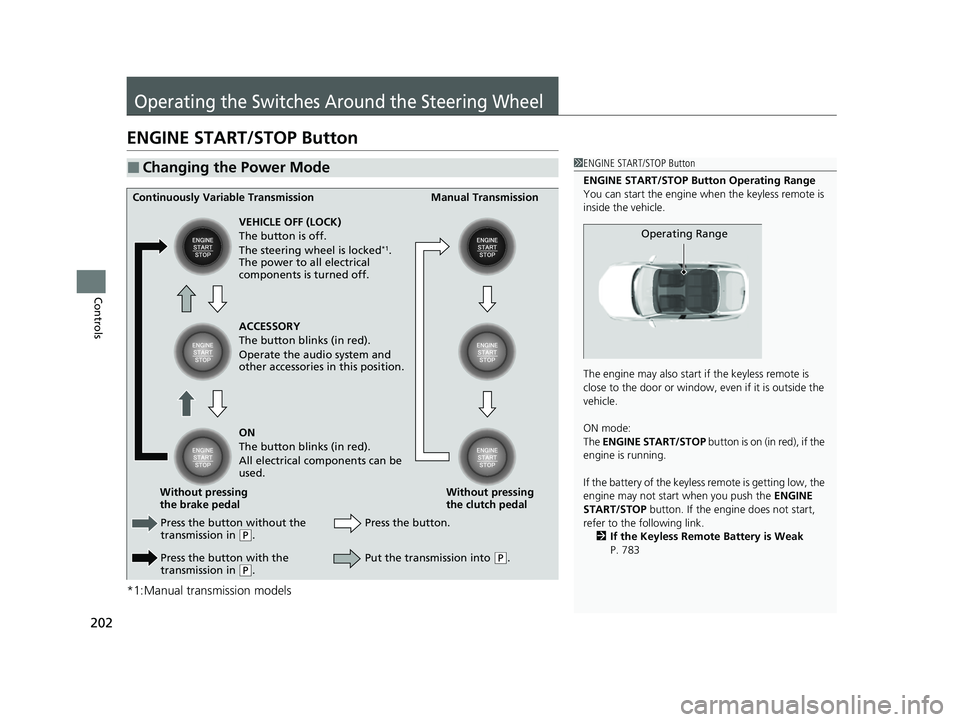
ENGINE START/STOP Button
*1:Manual transmission models
■Changing the Power Mode1ENGINE START/STOP Button
ENGINE START/STOP Button Operating Range
You can start the engine when the keyless remote is
inside the vehicle.
The engine may also start if the keyless remote is
close to the door or window, ev en if it is outside the
vehicle.
ON mode:
The ENGINE START/STOP button is on (in red), if the
engine is running.
If the battery of the keyless remote is getting low, the
engine may not start when you push the ENGINE
START/STOP button. If the engi ne does not start,
refer to the following link. 2 If the Keyless Remote Battery is Weak
P. 783
Operating Range
Continuously Variable Transmission Manual Transmission
VEHICLE OFF (LOCK)
The button is off.
The steering wheel is locked
*1.
The power to all electrical
components is turned off.
Press the button without the
transmission in
( P.
Press the button with the
transmission in
( P. Press the button.
Without pressing
the clutch pedal
Without pressing
the brake pedal ACCESSORY
The button blinks (in red).
Operate the audio system and
other accessories in this position.
ON
The button blinks (in red).
All electrical components can be
used.
Put the transmission into (P.
23 CIVIC HATCHBACK TYPE R-31T406100_03.book 202 ページ 2022年6月23日 木曜日 午後9時28分
Page 205 of 840
Continued203
uuOperating the Switches Around the Steering Wheel uENGINE START/STOP Button
Controls
If you leave the vehicle for 30 to 60 minutes with the transmission in (P
(continuously variable transmission) and the power mode in ACCESSORY, the
vehicle automatically goes into the mode similar to VEHICLE OFF (LOCK) to avoid
draining the battery.
When in this mode:
The steering wheel does not lock. You cannot lock or unlock doors with the remote
transmitter or the keyless access system. Press the ENGINE START/STOP button
twice to switch the mode to VEHICLE OFF (LOCK).
If you open the driver's door when the power mode is in ACCESSORY, a warning
beep sounds.
■Automatic Power Off
■Power Mode Reminder
1 ENGINE START/STOP Button
If the power mode does not change from VEHICLE
OFF to ACCESSORY, press the ENGINE START/STOP
button while moving the st eering wheel left and
right. The steering wheel will unlock, allowing the
mode to change.
Do not leave the power mode in ACCESSORY or ON
when you get out.
Manual transmission models
Manual transmission models
23 CIVIC HATCHBACK TYPE R-31T406100_03.book 203 ページ 2022年6月23日 木曜日 午後9時28分
Page 208 of 840
206
uuOperating the Switches Around the Steering Wheel uLight Switches
Controls
Light Switches
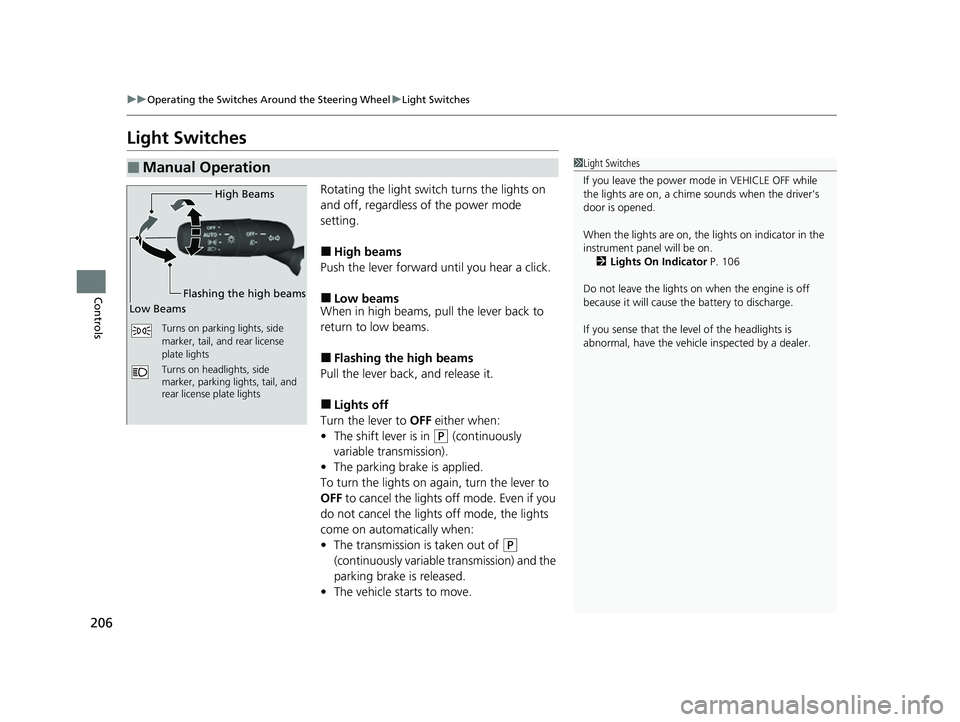
Rotating the light switch turns the lights on
and off, regardless of the power mode
setting.
■High beams
Push the lever forward until you hear a click.
■Low beams
When in high beams, pull the lever back to
return to low beams.
■Flashing the high beams
Pull the lever back, and release it.
■Lights off
Turn the lever to OFF either when:
• The shift lever is in
(P (continuously
variable transmission).
• The parking brake is applied.
To turn the lights on ag ain, turn the lever to
OFF to cancel the lights off mode. Even if you
do not cancel the lights off mode, the lights
come on automatically when:
• The transmission is taken out of
(P
(continuously variable transmission) and the
parking brake is released.
• The vehicle starts to move.
■Manual Operation1Light Switches
If you leave the power mode in VEHICLE OFF while
the lights are on, a chime sounds when the driver's
door is opened.
When the lights are on, the lights on indicator in the
instrument pane l will be on.
2 Lights On Indicator P. 106
Do not leave the lights on when the engine is off
because it will cause the battery to discharge.
If you sense that the le vel of the headlights is
abnormal, have the vehicl e inspected by a dealer.
Turns on parking lights, side
marker, tail, and rear license
plate lights
Turns on headlights, side
marker, parking lights, tail, and
rear license plate lights
High Beams
Flashing the high beams
Low Beams
23 CIVIC HATCHBACK TYPE R-31T406100_03.book 206 ページ 2022年6月23日 木曜日 午後9時28分
Page 253 of 840
Continued251
uuClimate Control System uUsing Automatic Climate Control
Controls
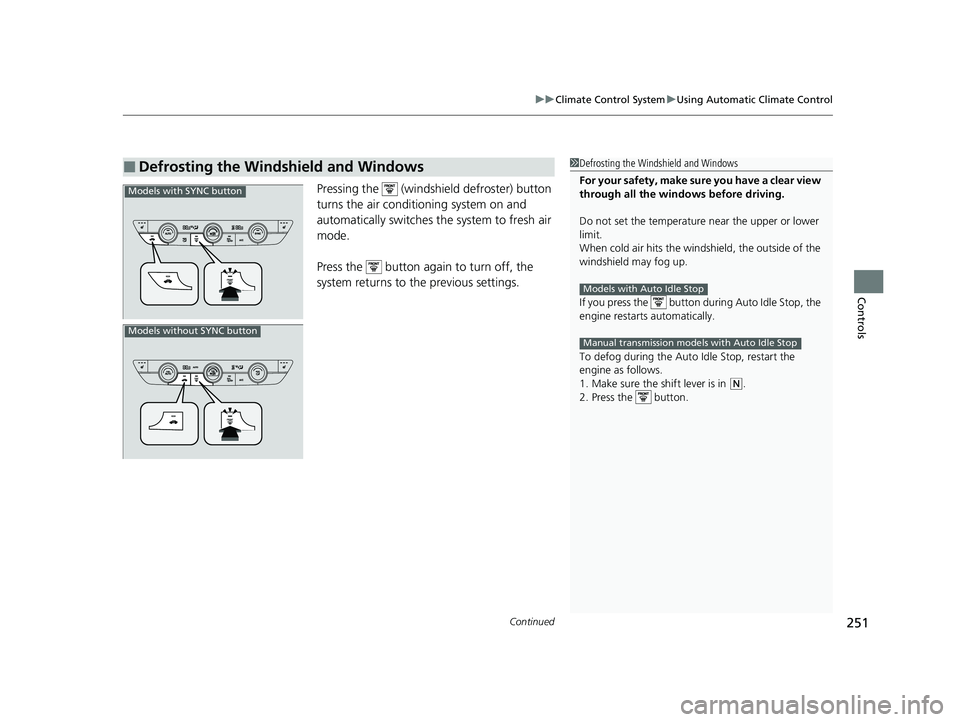
Pressing the (windshield defroster) button
turns the air conditioning system on and
automatically switches th e system to fresh air
mode.
Press the button again to turn off, the
system returns to the previous settings.
■Defrosting the Windshield and Windows1 Defrosting the Windshield and Windows
For your safety, make sure you have a clear view
through all the windows before driving.
Do not set the temperatur e near the upper or lower
limit.
When cold air hits the windshield, the outside of the
windshield may fog up.
If you press the button during Auto Idle Stop, the
engine restarts automatically.
To defog during the Auto Idle Stop, restart the
engine as follows.
1. Make sure the shift lever is in
( N.
2. Press the button.
Models with Auto Idle Stop
Manual transmission models with Auto Idle Stop
Models with SYNC button
Models without SYNC button
23 CIVIC HATCHBACK TYPE R-31T406100_03.book 251 ページ 2022年6月23日 木曜日 午後9時28分
Page 285 of 840
Continued283
uuAudio System Basic Operation uApple CarPlay
Features
After you have connected your iPhone to the system via the front USB, use the
following procedure to set up Apple CarPlay. Use of Apple CarPlay will result in the
transmission of certain user and vehicle information (such as vehicle location, speed,
and status) to your iPhone to enhance the Apple CarPlay experience. You will need
to consent to the sharing of this info rmation on the audio/information screen.
1. Connect the iPhone to the USB port using the USB cable.
2 USB Port(s) P. 257
uThe confirmation screen will be displayed.
2. Select Yes.
u If you do not want to connect Apple CarPlay, select No.
You may change the consent settings under the Smartphone Settings menu.
■Setting Up Apple CarPlay1Setting Up Apple CarPlay
Only initialize Apple CarP lay when you are safely
parked.
When Apple CarPlay first detects your iPhone, you
will need to set up your iPhone. Refer to the
instruction manual that came with your iPhone.
You can use the following procedure to disconnect or
delete the devices conn ecting Apple CarPlay:
Press the MENU button
Select Smartphone Settings Apple CarPlay
Select device
Use of user and vehicle information
The use and handling of user and vehicle information
transmitted to/from your iP hone by Apple CarPlay is
governed by the Apple iOS terms and conditions and
Apple's Privacy Policy.
■Connecting Apple CarPlay Using the USB Cable to the USB Port
23 CIVIC HATCHBACK TYPE R-31T406100_03.book 283 ページ 2022年6月23日 木曜日 午後9時28分
Page 346 of 840
344
uuAudio System Basic Operation uWi-Fi Connection
Features
Wi-Fi Connection
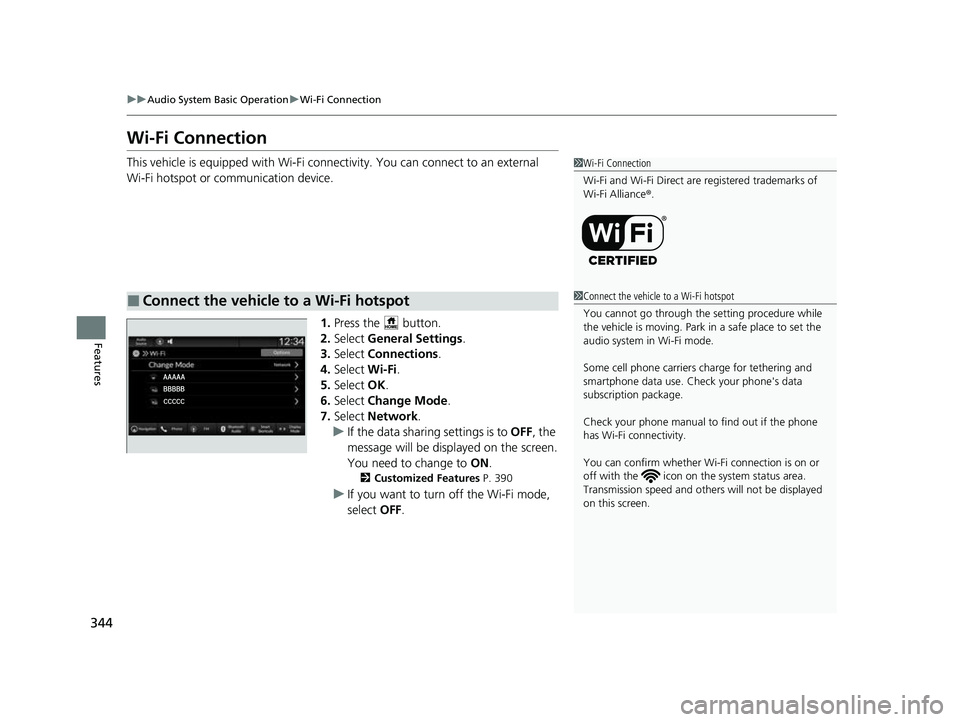
This vehicle is equipped wi th Wi-Fi connectivity. You ca n connect to an external
Wi-Fi hotspot or communication device.
1.Press the button.
2. Select General Settings .
3. Select Connections .
4. Select Wi-Fi.
5. Select OK.
6. Select Change Mode .
7. Select Network.
u If the data sharing settings is to OFF, the
message will be displayed on the screen.
You need to change to ON.
2Customized Features P. 390
uIf you want to turn off the Wi-Fi mode,
select OFF.
■Connect the vehicle to a Wi-Fi hotspot
1Wi-Fi Connection
Wi-Fi and Wi-Fi Direct are registered trademarks of
Wi-Fi Alliance ®.
1 Connect the vehicle to a Wi-Fi hotspot
You cannot go through the setting procedure while
the vehicle is moving. Park in a safe place to set the
audio system in Wi-Fi mode.
Some cell phone carriers charge for tethering and
smartphone data use. Check your phone's data
subscription package.
Check your phone manual to find out if the phone
has Wi-Fi connectivity.
You can confirm whether Wi -Fi connection is on or
off with the icon on th e system status area.
Transmission speed and others will not be displayed
on this screen.
23 CIVIC HATCHBACK TYPE R-31T406100_03.book 344 ページ 2022年6月23日 木曜日 午後9時28分