transmission HONDA CIVIC 2023 User Guide
[x] Cancel search | Manufacturer: HONDA, Model Year: 2023, Model line: CIVIC, Model: HONDA CIVIC 2023Pages: 840, PDF Size: 26.53 MB
Page 77 of 840
75
uuAirbags uAirbag System Indicators
Safe Driving
1Passenger Airbag Off Indicator
The passenger airbag off indicator may come on and
go off periodically if the tota l weight on the seat is
near the airbag cutoff threshold. For a small adult,
depending on physique and posture, the system may
not recognize him/her as an adult and thus deactivate
the passenger's airbag.
If this occurs, please confirm that the conditions set
forth in the above bullet points on the previous page
are met.
If the above conditions are met and the indicator is
still on, then with the transmission in park, set the
power mode to OFF and back to ON.
Have your vehicle checked by a dealer as soon as
possible if:
•All of the above conditions are met, and the
indicator comes on with an adult seated in the
front passenger seat.
•The seat is empty and the indicator is off.
Do not allow an adult passe nger to ride in the front
seat when the indicator is on.
23 CIVIC HATCHBACK TYPE R-31T406100_03.book 75 ページ 2022年6月23日 木曜日 午後9時28分
Page 98 of 840
96
Instrument Panel
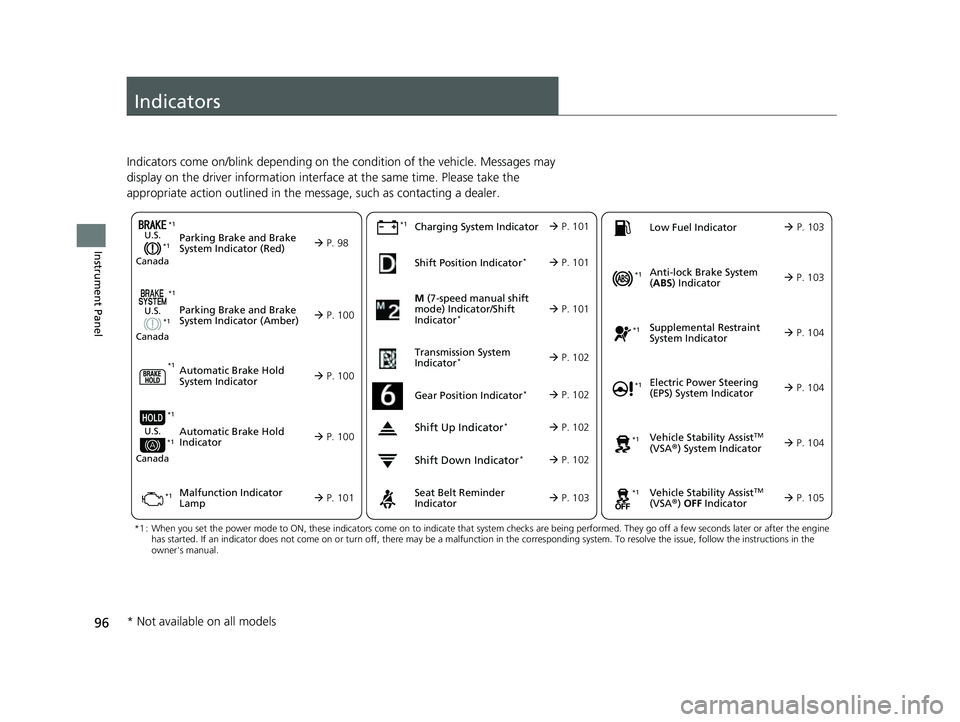
Indicators
Indicators come on/blink depending on the condition of the vehicle. Messages may
display on the driver information interface at the same time. Please take the
appropriate action outlined in the message, such as contacting a dealer.
M (7-speed manual shift
mode) Indicator/Shift
Indicator
* P. 101
Parking Brake and Brake
System Indicator (Red)
Parking Brake and Brake
System Indicator (Amber)U.S.
Canada
U.S.
Canada
Automatic Brake Hold
System Indicator
Automatic Brake Hold
IndicatorU.S.
Canada
*1 : When you set the power mode to ON, these indicators come on to indicate that system checks are being perf ormed. They go off a few seconds later or after the engine
has started. If an indicator does not come on or turn off, th ere may be a malfunction in the corresponding system. To resolve the issue, follow the instructions in the
owner's manual.
P. 98*1
Malfunction Indicator
Lamp Charging System IndicatorSeat Belt Reminder
Indicator
Low Fuel Indicator
P. 100
P. 1
00
P. 100
P. 101
P. 101*1
*1 *1
Shift Position Indicator*
P. 101
Transmission System
Indicator
* P. 102
P. 103
P. 103
*1
*1
Anti-lock Brake System
( ABS ) Indicator
Vehicle Stability AssistTM
(VSA®) System Indicator
Vehicle Stability Assist
TM
(VSA®) OFF Indicator
Supplemental Restraint
System Indicator
Electric Power Steering
(EPS) System Indicator
*1
P. 103
P. 104
P. 104*1
*1
*1
P. 105
*1 P. 104
Shift Up Indicator* P. 102
Shift Down Indicator* P. 102
Gear Position Indicator* P. 102
*1
*1
*1
* Not available on all models
23 CIVIC HATCHBACK TYPE R-31T406100_03.book 96 ページ 2022年6月23日 木曜日 午後9時28分
Page 104 of 840
102
uuIndicators u
Instrument Panel
IndicatorNameOn/BlinkingExplanation
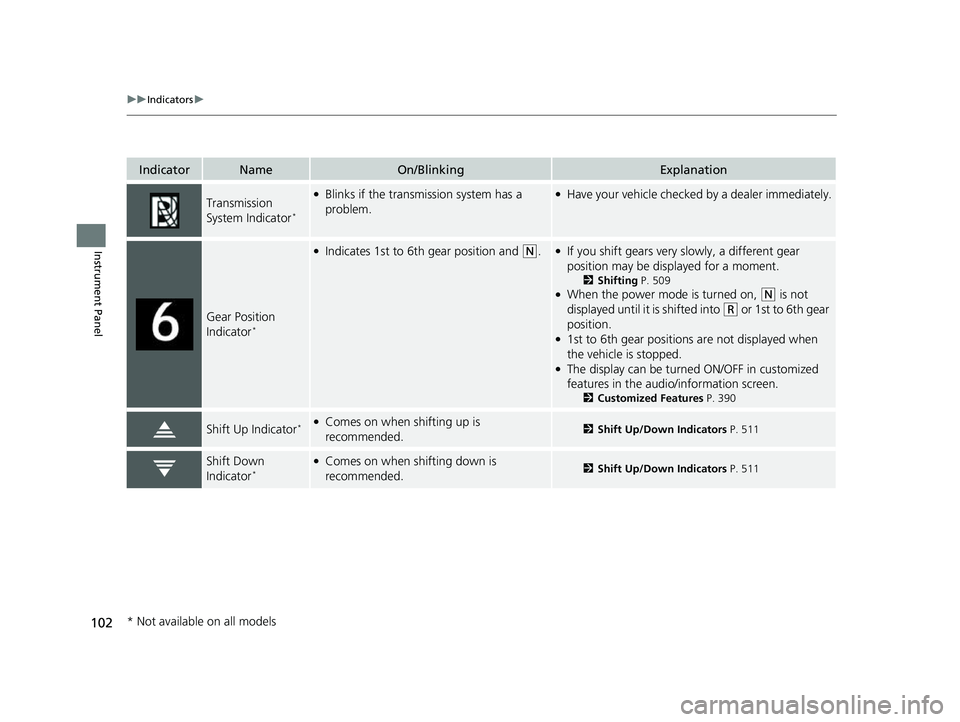
Transmission
System Indicator*
●Blinks if the transmission system has a
problem.●Have your vehicle checked by a dealer immediately.
Gear Position
Indicator*
●Indicates 1st to 6th gear position and (N.●If you shift gears very slowly, a different gear
position may be displayed for a moment.
2 Shifting P. 509●When the power mode is turned on, (N is not
displayed until it is shifted into
(R or 1st to 6th gear
position.
●1st to 6th gear positions are not displayed when
the vehicle is stopped.
●The display can be turned ON/OFF in customized
features in the audio/information screen.
2 Customized Features P. 390
Shift Up Indicator*●Comes on when shifting up is
recommended.2Shift Up/Down Indicators P. 511
Shift Down
Indicator*●Comes on when shifting down is
recommended.2Shift Up/Down Indicators P. 511
* Not available on all models
23 CIVIC HATCHBACK TYPE R-31T406100_03.book 102 ページ 2022年6月23日 木曜日 午後9時28分
Page 114 of 840
112
uuIndicators u
Instrument Panel
IndicatorNameOn/BlinkingExplanation
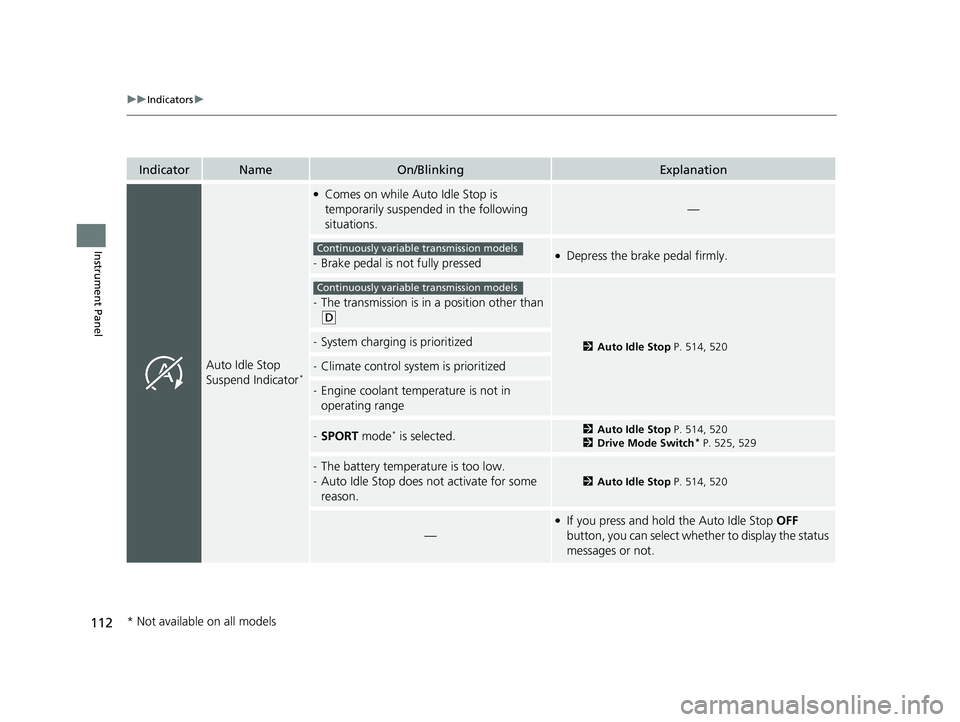
Auto Idle Stop
Suspend Indicator*
●Comes on while Auto Idle Stop is
temporarily suspended in the following
situations.
—
-Brake pedal is not fully pressed●Depress the brake pedal firmly.
-The transmission is in a position other than
(D
2Auto Idle Stop P. 514, 520-System charging is prioritized
-Climate control system is prioritized
-Engine coolant temperature is not in
operating range
-SPORT mode* is selected.2Auto Idle Stop P. 514, 520
2 Drive Mode Switch* P. 525, 529
-The battery temperature is too low.
- Auto Idle Stop does not activate for some
reason.
2 Auto Idle Stop P. 514, 520
—
●If you press and hold the Auto Idle Stop OFF
button, you can select whether to display the status
messages or not.
Continuously variable transmission models
Continuously variable transmission models
* Not available on all models
23 CIVIC HATCHBACK TYPE R-31T406100_03.book 112 ページ 2022年6月23日 木曜日 午後9時28分
Page 138 of 840
uuGauges and Driver Information Interface uDriver Information Interface (A-type Meter)
136
Instrument Panel
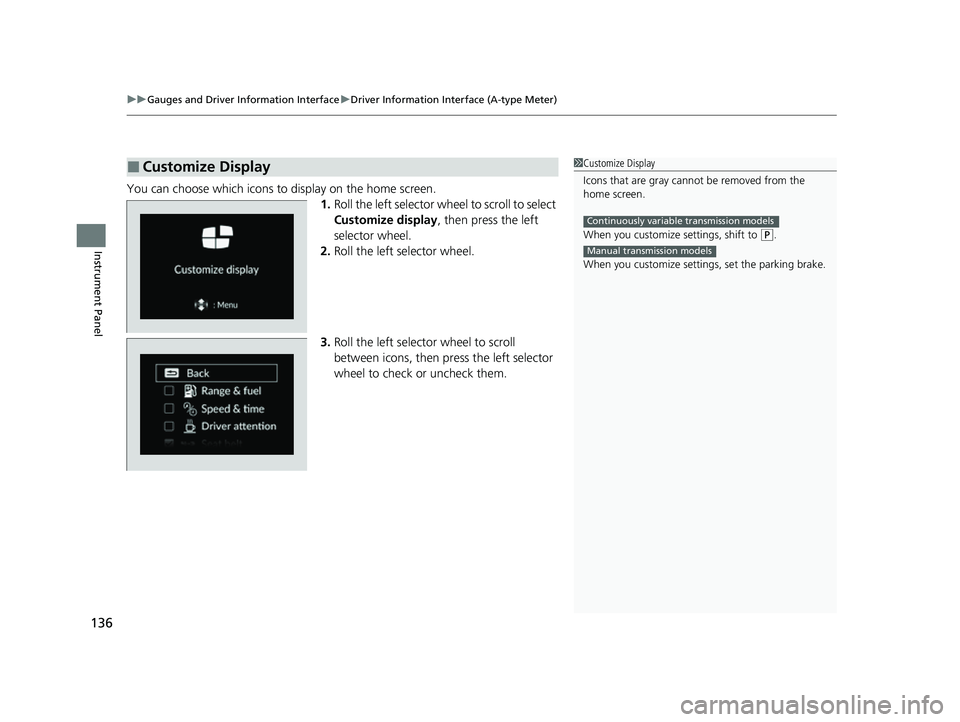
You can choose which icons to display on the home screen.
1.Roll the left selector wheel to scroll to select
Customize display , then press the left
selector wheel.
2. Roll the left selector wheel.
3. Roll the left selector wheel to scroll
between icons, then press the left selector
wheel to check or uncheck them.
■Customize Display1Customize Display
Icons that are gray cannot be removed from the
home screen.
When you customize settings, shift to
(P.
When you customize setti ngs, set the parking brake.
Continuously variable transmission models
Manual transmission models
23 CIVIC HATCHBACK TYPE R-31T406100_03.book 136 ページ 2022年6月23日 木曜日 午後9時28分
Page 140 of 840
uuGauges and Driver Information Interface uDriver Information Interface (A-type Meter)
138
Instrument Panel
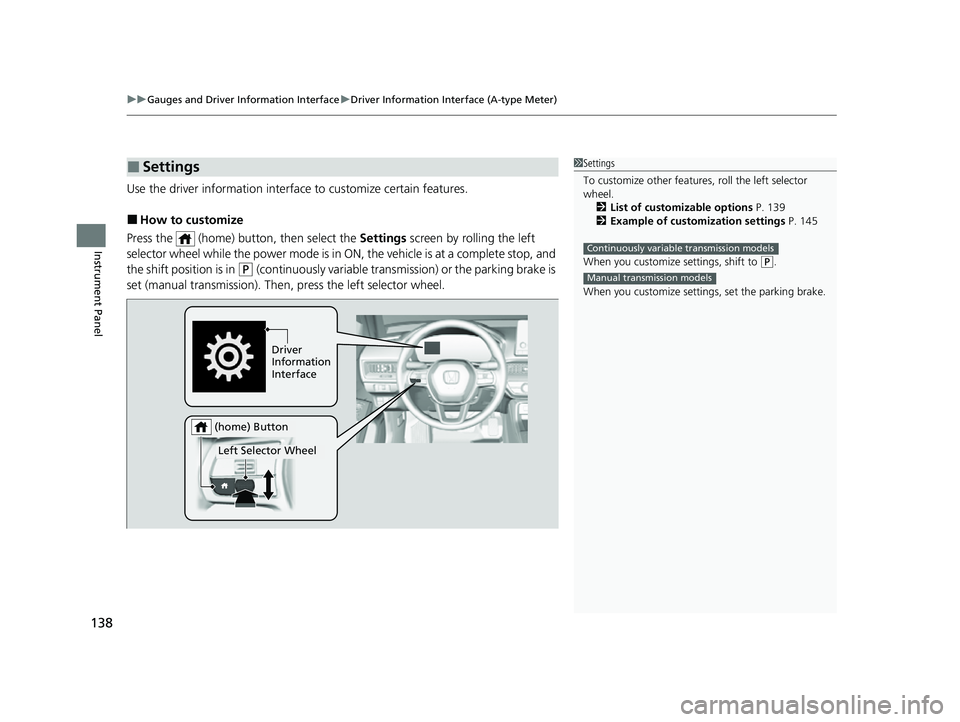
Use the driver information interfac e to customize certain features.
■How to customize
Press the (home) button, then select the Settings screen by rolling the left
selector wheel while the power mode is in ON, the vehicle is at a complete stop, and
the shift position is in
(P (continuously variable transmission) or the parking brake is
set (manual transmission). Then, press the left selector wheel.
■Settings1Settings
To customize other features , roll the left selector
wheel.
2 List of customizable options P. 139
2 Example of customization settings P. 145
When you customize settings, shift to
( P.
When you customize setti ngs, set the parking brake.
Continuously variable transmission models
Manual transmission models
Driver
Information
Interface
Left Selector Wheel
(home) Button
23 CIVIC HATCHBACK TYPE R-31T406100_03.book 138 ページ 2022年6月23日 木曜日 午後9時28分
Page 145 of 840
143
uuGauges and Driver Information Interface uDriver Information Interface (A-type Meter)
Continued
Instrument Panel
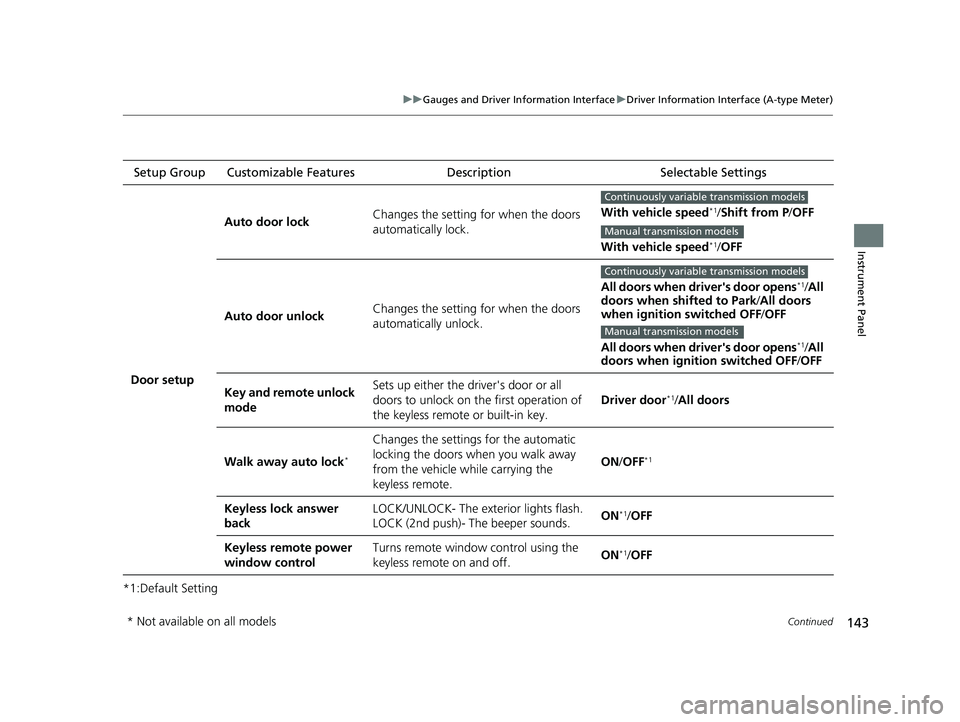
*1:Default SettingSetup Group Customizable Features Description Selectable Settings
Door setup Auto door lock
Changes the setting for when the doors
automatically lock. With vehicle speed
*1/
Shift from P /OFF
With vehicle speed
*1/ OFF
Auto door unlock Changes the setting for when the doors
automatically unlock. All doors when driver's door opens
*1/
All
doors when shifted to Park /All doors
when ignition switched OFF /OFF
All doors when driver's door opens
*1/ All
doors when ignition switched OFF /OFF
Key and remote unlock
mode Sets up either the driver's door or all
doors to unlock on the first operation of
the keyless remote or built-in key.
Driver door
*1/
All doors
Walk away auto lock
*
Changes the settings for the automatic
locking the doors when you walk away
from the vehicle while carrying the
keyless remote. ON
/OFF
*1
Keyless lock answer
back LOCK/UNLOCK- The exterior lights flash.
LOCK (2nd push)- The beeper sounds.
ON*1/
OFF
Keyless remote power
window control Turns remote window control using the
keyless remote on and off.
ON
*1/
OFF
Continuously variable transmission models
Manual transmission models
Continuously variable transmission models
Manual transmission models
* Not available on all models
23 CIVIC HATCHBACK TYPE R-31T406100_03.book 143 ページ 2022年6月23日 木曜日 午後9時28分
Page 153 of 840
Continued151
uuGauges and Driver Information Interface uDriver Information Interface Left Side Area (B-type-Meter)
Instrument Panel
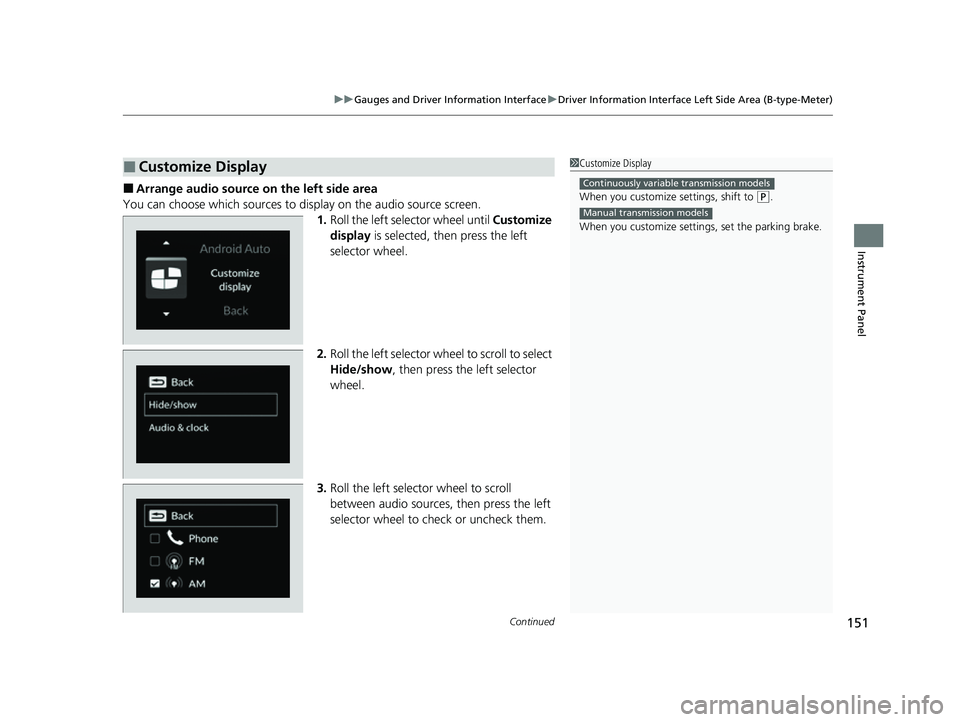
■Arrange audio source on the left side area
You can choose which sources to display on the audio source screen. 1.Roll the left selector wheel until Customize
display is selected, then press the left
selector wheel.
2. Roll the left selector wheel to scroll to select
Hide/show , then press the left selector
wheel.
3. Roll the left selector wheel to scroll
between audio sources, then press the left
selector wheel to check or uncheck them.
■Customize Display1Customize Display
When you customize settings, shift to
(P.
When you customize setti ngs, set the parking brake.
Continuously variable transmission models
Manual transmission models
23 CIVIC HATCHBACK TYPE R-31T406100_03.book 151 ページ 2022年6月23日 木曜日 午後9時28分
Page 172 of 840
uuGauges and Driver Information Interface uDriver Information Interface Right Side Area (B-type-Meter)
170
Instrument Panel
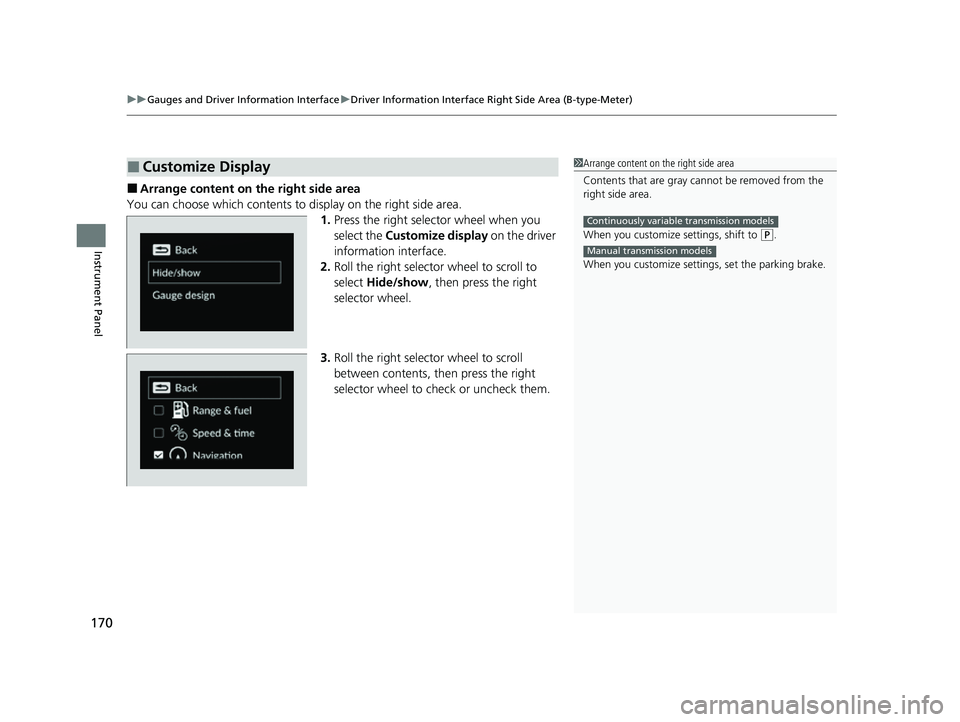
■Arrange content on the right side area
You can choose which contents to display on the right side area. 1.Press the right selector wheel when you
select the Customize display on the driver
information interface.
2. Roll the right selector wheel to scroll to
select Hide/show , then press the right
selector wheel.
3. Roll the right selector wheel to scroll
between contents, th en press the right
selector wheel to check or uncheck them.
■Customize Display1 Arrange content on the right side area
Contents that are gray ca nnot be removed from the
right side area.
When you customize settings, shift to
( P.
When you customize setti ngs, set the parking brake.
Continuously variable transmission models
Manual transmission models
23 CIVIC HATCHBACK TYPE R-31T406100_03.book 170 ページ 2022年6月23日 木曜日 午後9時28分
Page 197 of 840
195Continued
Controls
Security System
Immobilizer System
This system prevents a key that has not been pre-registered from starting the
engine.
Pay attention to the follo wing when pressing the ENGINE START/STOP button:
• Do not allow objects that emit strong radio waves near the ENGINE START/
STOP button.
• Make sure the key is not covered by or touching a metal object.
• Do not bring a key from another vehicle's immobilizer system near the ENGINE
START/STOP button.
• Do not put the key near magnetic items. Electronic devices, such as televisions
and audio systems emit strong magnetic fields. Note that even a key chain can
become magnetic.
Security System Alarm
The security system alarm activates when the hatch, hood or doors are forcibly
opened. The alarm does not activate if th e hatch or doors are opened with the key,
remote transmitter or keyless access system
*.
However, the alarm activates if a door is opened with the key and then the
transmission is taken out of
(P (continuously variable transmission models) or the
hood is opened before the power mode is in ON.
1 Immobilizer System
NOTICE
Leaving the key in the vehicl e can result in theft or
accidental movement of the vehicle.
Always take the key with you whenever you leave the
vehicle unattended.
Do not alter the system or add other devices to it.
Doing so may damage the system and make your
vehicle inoperable.
Apply and hold the brake pedal before turning the
vehicle on the first time after the battery has been
disconnected.
Canadian models
1 Security System Alarm
Do not alter the system or add other devices to it.
Doing so may damage the system and make your
vehicle inoperable.
The security system alarm continues for a maximum
of two minutes until the security system alarm
deactivates.
* Not available on all models
23 CIVIC HATCHBACK TYPE R-31T406100_03.book 195 ページ 2022年6月23日 木曜日 午後9時28分