Driving HONDA CIVIC 2023 Owners Manual
[x] Cancel search | Manufacturer: HONDA, Model Year: 2023, Model line: CIVIC, Model: HONDA CIVIC 2023Pages: 840, PDF Size: 26.53 MB
Page 574 of 840
572
uuHonda Sensing ®u Low Speed Braking Control*
Driving
■Examples of situations where the so nar sensor cannot detect obstacles
• The sonar sensor is dirty (covered by snow, water, mud, etc.).
• The vehicle is too hot or cold.
• The steering wheel is turned sharply when approaching the obstacle at an angle.
■Examples of other cases where the system may not work correctly
• The vehicle is tilted due to heavy load or suspension modifications.
• An abnormal tire or wheel condition (incor rect sizes, varied sizes or construction,
improperly inflated, comp act spare tire, etc.).
• Bad weather conditions such as heavy rain, fog, snow, sandstorms, etc.
• The ambient temperature/humidity is too high or low.
• When going down a very steep slope.
• When close to other vehicles with sonar sensors or other objects that emit
ultrasonic waves.
■Situations where the system may activa te even without risk of a collision
• When passing through short or narrow gates.
• When driving on uneven surfaces, gr assy areas, or places with steps.
• When a sloped pillar or wall is protruding from a high position.
• When there are obstacles next to the road.
• When driving toward flags, curtains, tree branches, railroad crossing bars, etc.
• When driving on flooded roads.
23 CIVIC HATCHBACK TYPE R-31T406100_03.book 572 ページ 2022年6月23日 木曜日 午後9時28分
Page 575 of 840
573
uuHonda Sensing ®u Low Speed Braking Control*
Continued
Driving
Low Speed Braking Control*
Using sonar sensors located on the front an d rear bumpers, and the front grille, this
system detects if there is danger of a poten tial collision with a wall or other obstacle
during normal driving. The system then assists in avoiding collisions and reducing
damage from impact through assistive braking.
1 Low Speed Braking Control*
If the Low Speed Braking Control activates in a
situation where you do not want automatic brake
application (such as when the vehicle is between two
railroad crossing gates), si mply press the brake pedal
to deactivate the system and then continue to drive
as intended.
Low Speed Braking Contro l does not function while
VSA ® is completely disabled.
3WARNING
The Low Speed Braking Control System
cannot avoid all collisions and may not
reduce damage in each situation where the
accelerator is mistaken ly or aggressively
pressed. Overreliance on the system may
result in a collision with serious injury or
death. Always check your surroundings,
your shift position, and your pedal use.
Driver remains responsible for safely
operating the vehicle.
Models without Auto Idle Stop
Manual transmission models with parking sensor system
* Not available on all models
23 CIVIC HATCHBACK TYPE R-31T406100_03.book 573 ページ 2022年6月23日 木曜日 午後9時28分
Page 576 of 840
uuHonda Sensing ®u Low Speed Braking Control*
574
Driving
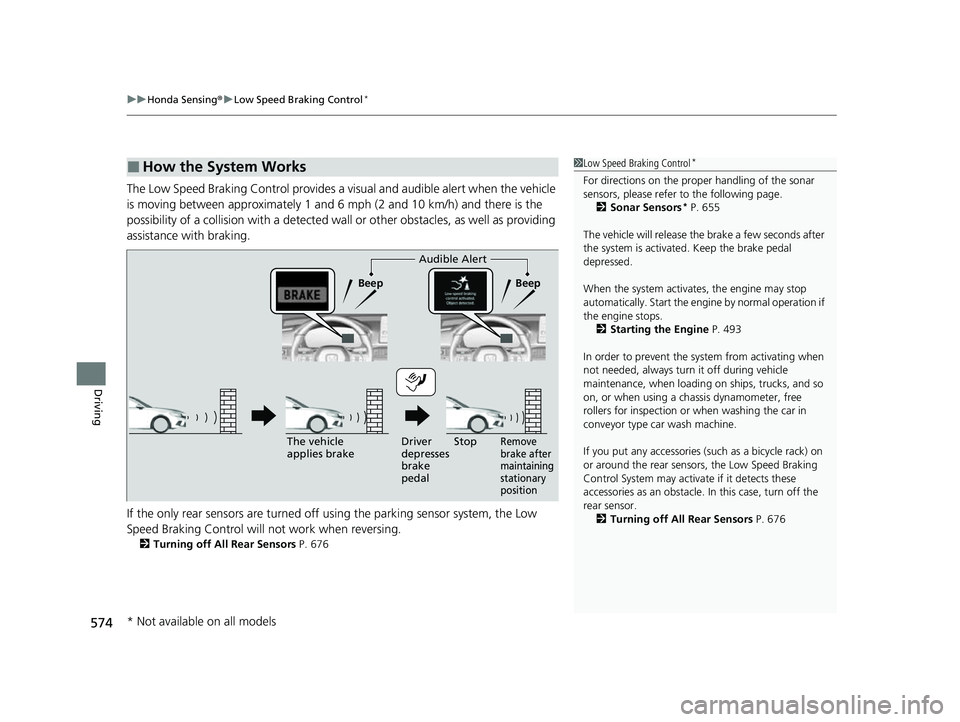
The Low Speed Braking Control provides a visual and audible alert when the vehicle
is moving between approximately 1 and 6 mph (2 and 10 km/h) and there is the
possibility of a collision with a detected wall or other obstacles, as well as providing
assistance with braking.
If the only rear sensors are turned off using the parking sensor system, the Low
Speed Braking Control will not work when reversing.
2Turning off All Rear Sensors P. 676
■How the System Works1Low Speed Braking Control*
For directions on the prop er handling of the sonar
sensors, please refer to the following page.
2 Sonar Sensors
* P. 655
The vehicle will release the brake a few seconds after
the system is activated. Keep the brake pedal
depressed.
When the system activates, the engine may stop
automatically. Start the engine by normal operation if
the engine stops. 2 Starting the Engine P. 493
In order to prevent the sy stem from activating when
not needed, always turn it off during vehicle
maintenance, when loading on ships, trucks, and so
on, or when using a chassis dynamometer, free
rollers for inspection or when washing the car in
conveyor type car wash machine.
If you put any accessories (such as a bicycle rack) on
or around the rear sensors, the Low Speed Braking
Control System may activate if it detects these
accessories as an obstacle. In this case, turn off the
rear sensor. 2 Turning off All Rear Sensors P. 676
Audible Alert
Beep Beep
The vehicle
applies brake Driver
depresses
brake
pedal
Remove
brake after
maintaining
stationary
positionStop
* Not available on all models
23 CIVIC HATCHBACK TYPE R-31T406100_03.book 574 ページ 2022年6月23日 木曜日 午後9時28分
Page 577 of 840
Continued575
uuHonda Sensing ®u Low Speed Braking Control*
Driving
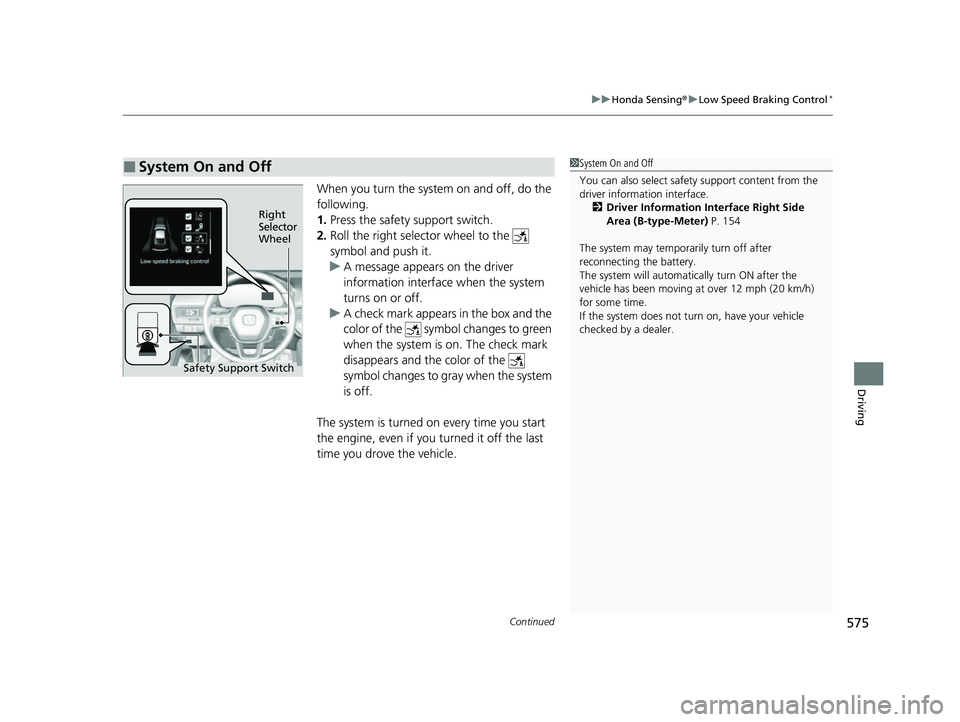
When you turn the system on and off, do the
following.
1. Press the safety support switch.
2. Roll the right selector wheel to the
symbol and push it.
u A message appears on the driver
information interface when the system
turns on or off.
u A check mark appears in the box and the
color of the symbol changes to green
when the system is on. The check mark
disappears and the color of the
symbol changes to gray when the system
is off.
The system is turned on every time you start
the engine, even if you turned it off the last
time you drove the vehicle.
■System On and Off 1 System On and Off
You can also sele ct safety support content from the
driver information interface.
2 Driver Information Interface Right Side
Area (B-type-Meter) P. 154
The system may temporarily turn off after
reconnecting the battery.
The system will automatically turn ON after the
vehicle has been moving at over 12 mph (20 km/h)
for some time.
If the system does not turn on, have your vehicle
checked by a dealer.
Right
Selector
Wheel
Safety Support Switch
23 CIVIC HATCHBACK TYPE R-31T406100_03.book 575 ページ 2022年6月23日 木曜日 午後9時28分
Page 578 of 840
uuHonda Sensing ®u Low Speed Braking Control*
576
Driving
A certain amount of time has passed since activation.
The system may not operate correct ly in the following conditions:
■Examples of obstacles the sonar sensor cannot detect
• Obstacles that do not refl ect sound waves well, such as people, snow, cloth,
sponges, etc.
• Thin obstacles such as fences, bicycles, sign posts, etc.
• Short or small obstacles.
• Obstacles immediately in front of the bumper.
• Moving objects or obstacles that suddenly enter the road.
• Obstacles that are not pe rpendicular to the ground.
■Conditions for Cancellation
■Low Speed Braking Control System Conditions and Limitations
1Conditions for Cancellation
After Low Speed Braking Control has activated once,
it will not activate again for the same obstacle.
They can be activated again after driving for a certain
distance after last activation.
Low Speed Braking Control ac tivates separately when
moving forward and reversing. (For example, if it
activates when moving forwar d, it can be activated
again immediately if reversing.)
23 CIVIC HATCHBACK TYPE R-31T406100_03.book 576 ページ 2022年6月23日 木曜日 午後9時28分
Page 579 of 840
577
uuHonda Sensing ®u Low Speed Braking Control*
Driving
■Examples of situations where the sonar sensor cannot detect obstacles
• The sonar sensor is dirty (cover ed by snow, water, mud, etc.).
• The vehicle is too hot or cold.
• The steering wheel is turned sharply when approaching the obstacle at an angle.
■Examples of other cases where the system may not work correctly
• The vehicle is tilted due to heavy load or su spension modifications.
• An abnormal tire or wheel condition (inco rrect sizes, varied sizes or construction,
improperly inflated, compact spare tire
*, etc.).
• Bad weather conditions such as heav y rain, fog, snow, sandstorms, etc.
• The ambient temperature/humidity is too high or low.
• When going down a very steep slope.
• When close to other vehicles with sonar sensors or other objects that emit
ultrasonic waves.
■Situations where the system may acti vate even without risk of a collision
• When passing through short or narrow gates.
• When driving on uneven surfaces, grassy areas, or places with steps.
• When a sloped pillar or wall is protruding from a high position.
• When there are obstacles next to the road.
• When driving toward flags, curtains, tre e branches, railroad crossing bars, etc.
• When driving on flooded roads.
* Not available on all models
23 CIVIC HATCHBACK TYPE R-31T406100_03.book 577 ページ 2022年6月23日 木曜日 午後9時28分
Page 580 of 840
578
uuHonda Sensing ®u Adaptive Cruise Control (ACC) with Low Speed Follow*
Driving
Adaptive Cruise Control (A CC) with Low Speed Follow*
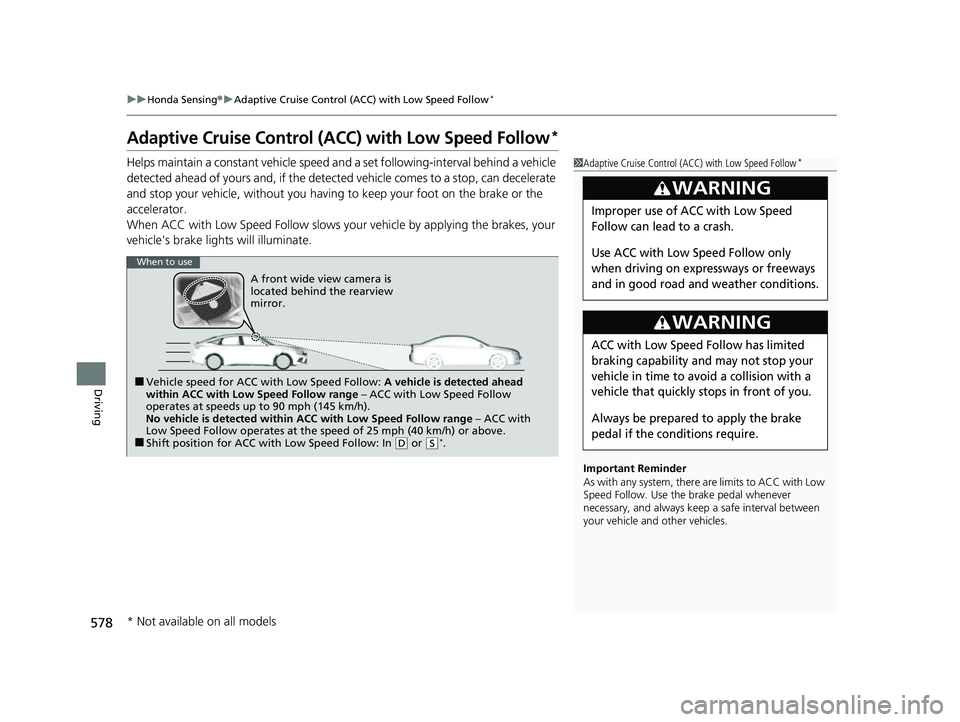
Helps maintain a constant vehicle speed a nd a set following-interval behind a vehicle
detected ahead of yours and, if the detect ed vehicle comes to a stop, can decelerate
and stop your vehicle, without you having to keep your foot on the brake or the
accelerator.
When ACC with Low Speed Follow slows y our vehicle by applying the brakes, your
vehicle's brake lights will illuminate.1 Adaptive Cruise Control (ACC) with Low Speed Follow*
Important Reminder
As with any system, there are limits to ACC with Low
Speed Follow. Use the brake pedal whenever
necessary, and always keep a safe interval between
your vehicle and other vehicles.
3WARNING
Improper use of ACC with Low Speed
Follow can lead to a crash.
Use ACC with Low Speed Follow only
when driving on expressways or freeways
and in good road and weather conditions.
3WARNING
ACC with Low Speed Follow has limited
braking capability and may not stop your
vehicle in time to avoid a collision with a
vehicle that quickly stops in front of you.
Always be prepared to apply the brake
pedal if the conditions require.
When to use
■Vehicle speed for ACC wi th Low Speed Follow: A vehicle is detected ahead
within ACC with Low Speed Follow range – ACC with Low Speed Follow
operates at speeds up to 90 mph (145 km/h).
No vehicle is detected within ACC with Low Speed Follow range – ACC with
Low Speed Follow operates at the speed of 25 mph (40 km/h) or above.
■Shift position for ACC with Low Speed Follow: In ( D or (S*.
A front wide view camera is
located behind the rearview
mirror.
* Not available on all models
23 CIVIC HATCHBACK TYPE R-31T406100_03.book 578 ページ 2022年6月23日 木曜日 午後9時28分
Page 581 of 840
Continued579
uuHonda Sensing ®u Adaptive Cruise Control (ACC) with Low Speed Follow*
Driving
■How to activate the system1Adaptive Cruise Control (ACC) with Low Speed Follow*
You can read about handling information for the
camera equipped with this system.
2 Front Wide View Camera P. 653
ACC with Low Speed Follow may not work properly
under certain conditions.
2 ACC with Low Speed Follow Conditions
and Limitations P. 587
When not using ACC with Low Speed Follow: Turn
off adaptive cruise by pressing the button.
Do not use ACC with Low Speed Follow under the
following conditions:
•On roads with frequent la ne change or continuous
stop and go traffic, ACC with Low Speed Follow
cannot keep an appropriate distance between your
vehicle and the vehicle ahead of you.
•On roads with sharp turns.
•On roads with toll collection facilities or other
objects between lanes of traffic, or in parking
areas, or faci lities with driv e through access.
•On roads with bad weather (rain, fog, snow, etc.),
ACC with Low Speed Follow may not detect the
distance between your vehicle and the vehicle
ahead of you properly.
•On roads with slippery or icy surfaces. The wheels
may spin out and your vehi cle may lose the control
on the condition.
•On roads with steep uphill or steep downhill slopes.
•On roads with undulating slopes.
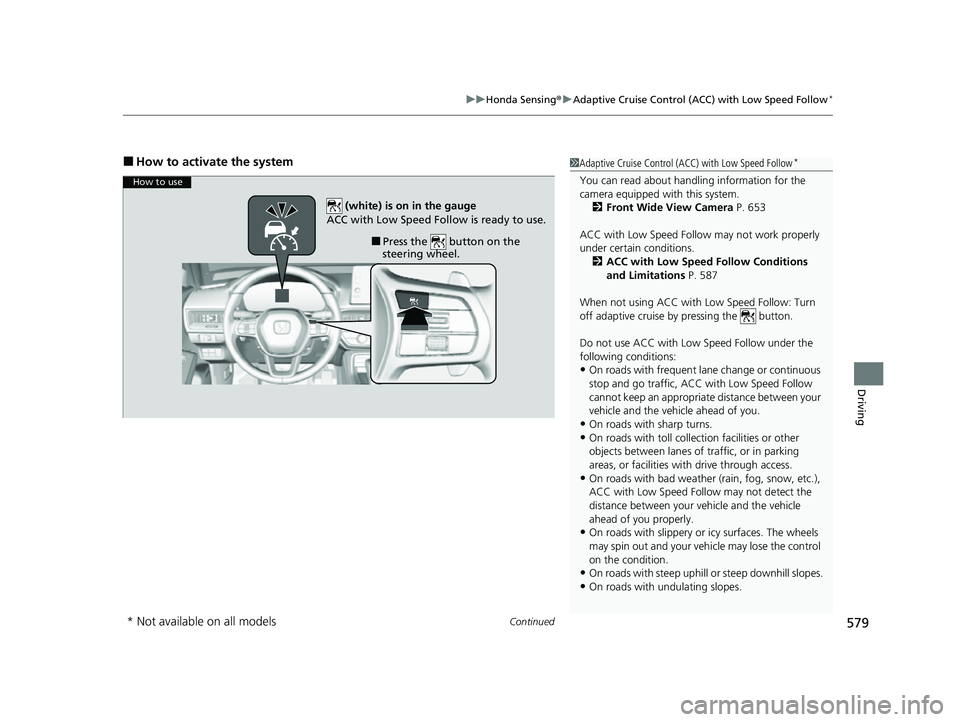
How to use
■Press the button on the
steering wheel.
(white) is on in the gauge
ACC with Low Speed Follow is ready to use.
* Not available on all models
23 CIVIC HATCHBACK TYPE R-31T406100_03.book 579 ページ 2022年6月23日 木曜日 午後9時28分
Page 582 of 840
uuHonda Sensing ®u Adaptive Cruise Control (ACC) with Low Speed Follow*
580
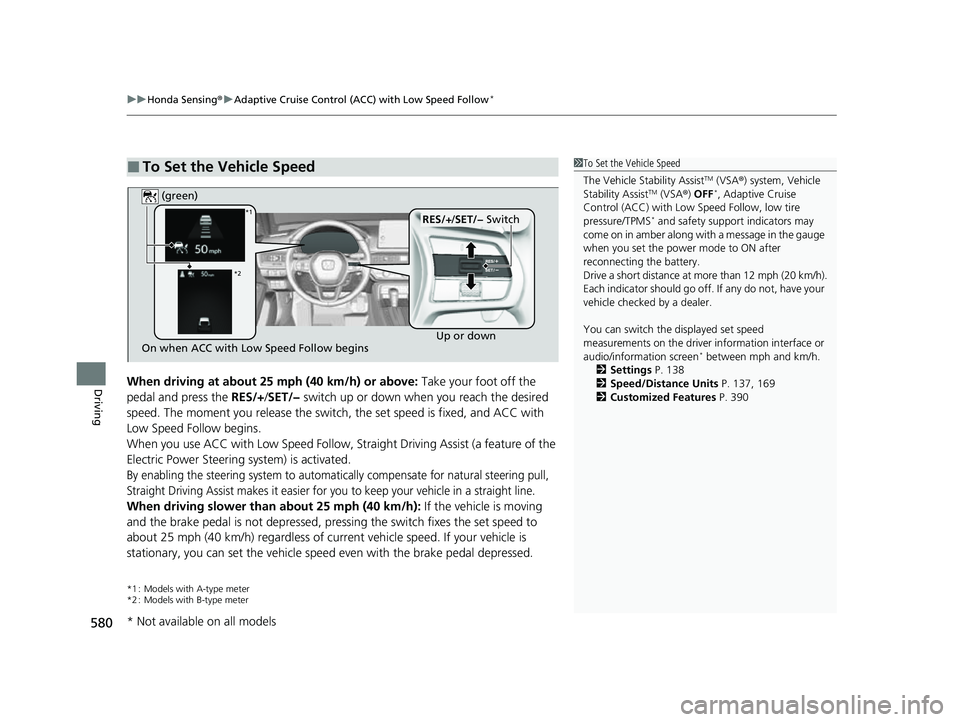
DrivingWhen driving at about 25 mph (40 km/h) or above: Take your foot off the
pedal and press the RES/+/SET/− switch up or down when you reach the desired
speed. The moment you release the switch, the set speed is fixed, and ACC with
Low Speed Follow begins.
When you use ACC with Low Speed Follow, Stra ight Driving Assist (a feature of the
Electric Power Steering system) is activated.
By enabling the steering system to automatically compensate for natural steering pull,
Straight Driving Assist makes it easier for you to keep your vehicle in a straight line.
When driving slower than about 25 mph (40 km/h): If the vehicle is moving
and the brake pedal is not depressed, pres sing the switch fixes the set speed to
about 25 mph (40 km/h) regardless of current vehicle speed. If your vehicle is
stationary, you can set the vehicle speed even with the brake pedal depressed.
*1 : Models with A-type meter
*2 : Models with B-type meter
■To Set the Vehicle Speed1 To Set the Vehicle Speed
The Vehicle Stability Assist
TM (VSA ®) system, Vehicle
Stability AssistTM (VSA ®) OFF*, Adaptive Cruise
Control (ACC) with Low Speed Follow, low tire
pressure/TPMS
* and safety suppor t indicators may
come on in amber along with a message in the gauge
when you set the power mode to ON after
reconnecting the battery.
Drive a short distance at more than 12 mph (20 km/h).
Each indicator should go off. If any do not, have your
vehicle checked by a dealer.
You can switch the displayed set speed
measurements on the driver information interface or
audio/information screen
* between mph and km/h.
2 Settings P. 138
2 Speed/Distance Units P. 137, 169
2 Customized Features P. 390On when ACC with Low Speed Follow begins Up or down
RES/+
/SET/− Switch
(green)*1
*2
* Not available on all models
23 CIVIC HATCHBACK TYPE R-31T406100_03.book 580 ページ 2022年6月23日 木曜日 午後9時28分
Page 583 of 840
581
uuHonda Sensing ®u Adaptive Cruise Control (ACC) with Low Speed Follow*
Continued
Driving
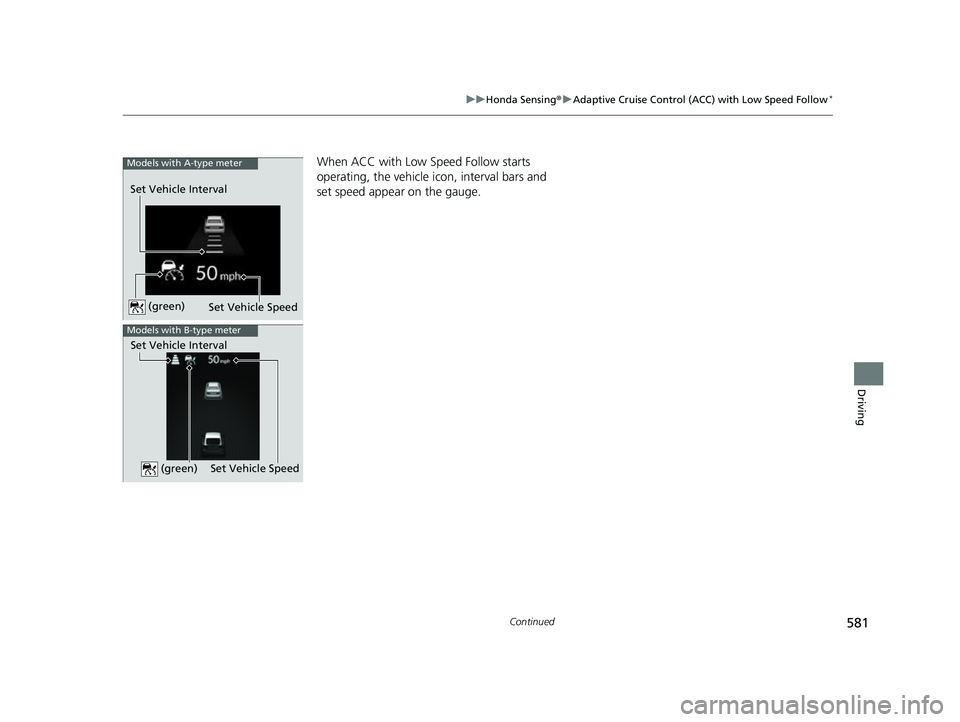
When ACC with Low Speed Follow starts
operating, the vehicle icon, interval bars and
set speed appear on the gauge.
Set Vehicle Speed
Set Vehicle Interval
Models with A-type meter
(green)
Models with B-type meter
Set Vehicle Speed
Set Vehicle Interval (green)
23 CIVIC HATCHBACK TYPE R-31T406100_03.book 581 ページ 2022年6月23日 木曜日 午後9時28分