ECU HONDA CIVIC 2023 Owner's Manual
[x] Cancel search | Manufacturer: HONDA, Model Year: 2023, Model line: CIVIC, Model: HONDA CIVIC 2023Pages: 840, PDF Size: 26.53 MB
Page 112 of 840
110
uuIndicators u
Instrument Panel
IndicatorNameOn/BlinkingExplanation
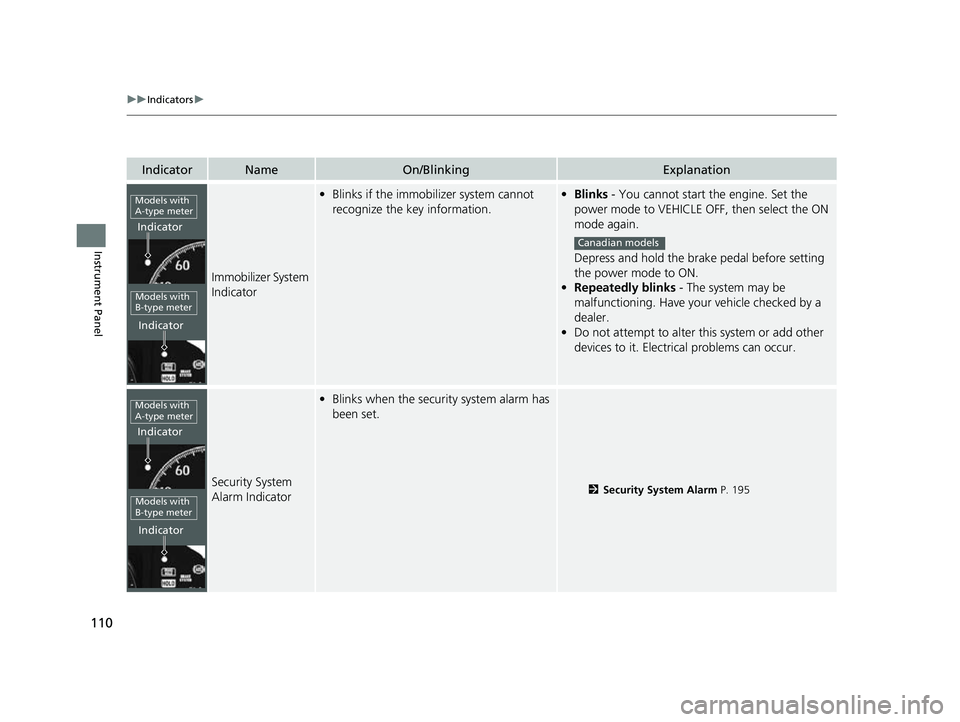
Immobilizer System
Indicator
•Blinks if the immobilizer system cannot
recognize the key information.•Blinks - You cannot start the engine. Set the
power mode to VEHICLE OFF, then select the ON
mode again.
Depress and hold the brake pedal before setting
the power mode to ON.
• Repeatedly blinks - The system may be
malfunctioning. Have your vehicle checked by a
dealer.
• Do not attempt to alter this system or add other
devices to it. Electrical problems can occur.
Security System
Alarm Indicator
•Blinks when the security system alarm has
been set.
2 Security System Alarm P. 195
Models with
A-type meter
Indicator
Indicator
Models with
B-type meter
Canadian models
Models with
A-type meter
Indicator
Indicator
Models with
B-type meter
23 CIVIC HATCHBACK TYPE R-31T406100_03.book 110 ページ 2022年6月23日 木曜日 午後9時28分
Page 175 of 840
173
Controls
This chapter explains how to operate the various controls necessary for driving.
Clock.................................................. 174
Locking and Unlocking the Doors Key .................................................. 176
Low Keyless Remote Signal Strength .... 178
Locking/Unlocking the Doors from the Outside .......................................... 179
Locking/Unlocking the Doors from the Inside ............................................. 188
Childproof Door Locks ..................... 190
Auto Door Locking/Unlocking .......... 191
Hatch ................................................. 192
Security System ................................ 195 Windows
........................................... 198
Moonroof
*........................................ 201
Operating the Switches Around the Steering Wheel ENGINE START/STOP Button............. 202
Turn Signals ..................................... 205
Light Switches.................................. 206
Fog Lights
*...................................... 209
Daytime Running Lights ................... 209
Auto High-Beam .............................. 210
Wipers and Washers ........................ 213 Rear Defogger/Heated Door Mirror
*
Button ........................................... 216
Brightness Control ........................... 217
Adjusting the Steering Wheel .......... 219
Mirrors Interior Rearview Mirror ................... 220
Power Door Mirrors ......................... 221
Seats .................................................. 222
Interior Convenience Items .............. 231
Climate Control System ................... 249
* Not available on all models
23 CIVIC HATCHBACK TYPE R-31T406100_03.book 173 ページ 2022年6月23日 木曜日 午後9時28分
Page 181 of 840
179
uuLocking and Unlocking the Doors uLocking/Unlocking the Doors from the Outside
Continued
Controls
Locking/Unlocking the Doors from the Outside
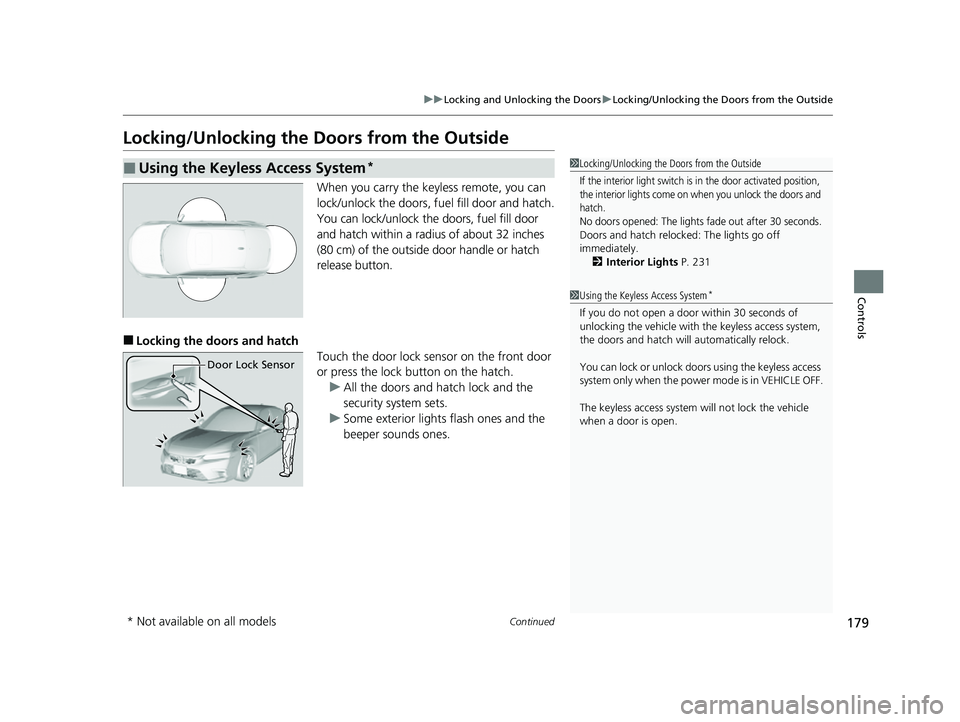
When you carry the keyless remote, you can
lock/unlock the doors, fuel fill door and hatch.
You can lock/unlock the doors, fuel fill door
and hatch within a radius of about 32 inches
(80 cm) of the outside door handle or hatch
release button.
■Locking the doors and hatch
Touch the door lock sensor on the front door
or press the lock button on the hatch.u All the doors and hatch lock and the
security system sets.
u Some exterior lights flash ones and the
beeper sounds ones.
■Using the Keyless Access System*1 Locking/Unlocking the Doors from the Outside
If the interior light switch is in the door activated position,
the interior lights come on when you unlock the doors and
hatch.
No doors opened: The lights fade out after 30 seconds.
Doors and hatch reloc ked: The lights go off
immediately.
2 Interior Lights P. 231
1Using the Keyless Access System*
If you do not open a door within 30 seconds of
unlocking the vehicle with the keyless access system,
the doors and hatch will automatically relock.
You can lock or unlock doors using the keyless access
system only when the power mode is in VEHICLE OFF.
The keyless access system will not lock the vehicle
when a door is open.
Door Lock Sensor
* Not available on all models
23 CIVIC HATCHBACK TYPE R-31T406100_03.book 179 ページ 2022年6月23日 木曜日 午後9時28分
Page 186 of 840
uuLocking and Unlocking the Doors uLocking/Unlocking the Doors from the Outside
184
Controls
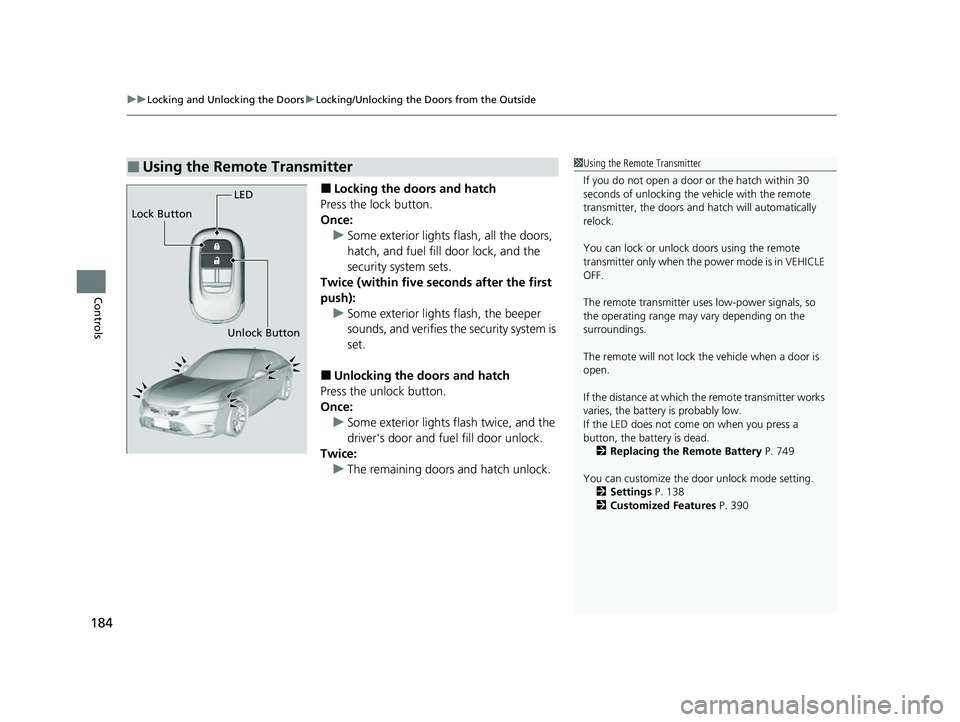
■Locking the doors and hatch
Press the lock button.
Once: u Some exterior lights flash, all the doors,
hatch, and fuel fill door lock, and the
security system sets.
Twice (within five se conds after the first
push): u Some exterior lights flash, the beeper
sounds, and verifies the security system is
set.
■Unlocking the doors and hatch
Press the unlock button.
Once: u Some exterior lights flash twice, and the
driver's door and fuel fill door unlock.
Twice: u The remaining doors and hatch unlock.
■Using the Remote Transmitter1Using the Remote Transmitter
If you do not open a door or the hatch within 30
seconds of unlocking the vehicle with the remote
transmitter, the doors and hatch will automatically
relock.
You can lock or unlock doors using the remote
transmitter only when the power mode is in VEHICLE
OFF.
The remote transmitter us es low-power signals, so
the operating range may vary depending on the
surroundings.
The remote will not lock th e vehicle when a door is
open.
If the distance at which the remote transmitter works
varies, the batter y is probably low.
If the LED does not come on when you press a
button, the battery is dead. 2 Replacing the Remote Battery P. 749
You can customize the door unlock mode setting. 2 Settings P. 138
2 Customized Features P. 390
LED
Unlock Button
Lock Button
23 CIVIC HATCHBACK TYPE R-31T406100_03.book 184 ページ 2022年6月23日 木曜日 午後9時28分
Page 197 of 840
195Continued
Controls
Security System
Immobilizer System
This system prevents a key that has not been pre-registered from starting the
engine.
Pay attention to the follo wing when pressing the ENGINE START/STOP button:
• Do not allow objects that emit strong radio waves near the ENGINE START/
STOP button.
• Make sure the key is not covered by or touching a metal object.
• Do not bring a key from another vehicle's immobilizer system near the ENGINE
START/STOP button.
• Do not put the key near magnetic items. Electronic devices, such as televisions
and audio systems emit strong magnetic fields. Note that even a key chain can
become magnetic.
Security System Alarm
The security system alarm activates when the hatch, hood or doors are forcibly
opened. The alarm does not activate if th e hatch or doors are opened with the key,
remote transmitter or keyless access system
*.
However, the alarm activates if a door is opened with the key and then the
transmission is taken out of
(P (continuously variable transmission models) or the
hood is opened before the power mode is in ON.
1 Immobilizer System
NOTICE
Leaving the key in the vehicl e can result in theft or
accidental movement of the vehicle.
Always take the key with you whenever you leave the
vehicle unattended.
Do not alter the system or add other devices to it.
Doing so may damage the system and make your
vehicle inoperable.
Apply and hold the brake pedal before turning the
vehicle on the first time after the battery has been
disconnected.
Canadian models
1 Security System Alarm
Do not alter the system or add other devices to it.
Doing so may damage the system and make your
vehicle inoperable.
The security system alarm continues for a maximum
of two minutes until the security system alarm
deactivates.
* Not available on all models
23 CIVIC HATCHBACK TYPE R-31T406100_03.book 195 ページ 2022年6月23日 木曜日 午後9時28分
Page 198 of 840
uuSecurity System uSecurity System Alarm
196
Controls
■When the security sy stem alarm activates
The horn sounds intermittently, and some exterior lights flash.
■To deactivate the security system alarm
Unlock the vehicle using the key, remote transmitter or keyless access system*, or
power mode is in ON. The system, along with the horn and flashing lights, is
deactivated.
■Setting the security system alarm
The security system alarm automatically sets when the following conditions have
been met:
• The power mode is set to VEHICLE OFF.
• The hood is closed.
• All doors and hatch are locked from outs ide with the remote transmitter, or
keyless access system
*.
■When the security system alarm sets
The security system alarm indicator in the instrument panel blinks and the blinking
interval changes after about 15 seconds.
■To cancel the security system alarm
The security system alarm is canceled when the vehicle is unlocked using the remote
transmitter or keyless access system
*, or when the power mode is set to ON. The
security system alarm indicator goes off at the same time.
1 Security System Alarm
Do not set the security system alarm when someone
is in the vehicle or a window is open. The system can
accidentally activate when:
•Unlocking the door with the lock tab.•Opening the hood with the hood release.
•Taking the transmission out of ( P.
If the battery goes dead after you have set the
security system alarm, the security alarm may go off
once the battery is re charged or replaced.
If this occurs, deactivate the security system alarm by
unlocking a door using the remote transmitter or
keyless access system
*.
Continuously variable transmission models
* Not available on all models
23 CIVIC HATCHBACK TYPE R-31T406100_03.book 196 ページ 2022年6月23日 木曜日 午後9時28分
Page 199 of 840
197
uuSecurity System uSecurity System Alarm
Controls
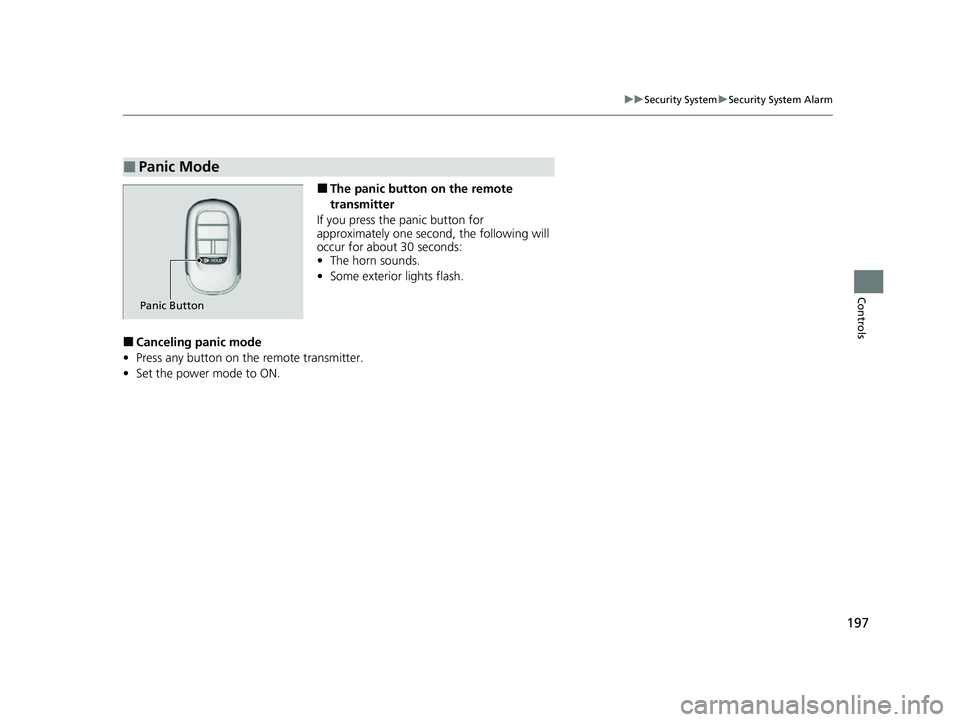
■The panic button on the remote
transmitter
If you press the panic button for
approximately one second, the following will
occur for about 30 seconds:
• The horn sounds.
• Some exterior lights flash.
■Canceling panic mode
• Press any button on the remote transmitter.
• Set the power mode to ON.
■Panic Mode
Panic Button
23 CIVIC HATCHBACK TYPE R-31T406100_03.book 197 ページ 2022年6月23日 木曜日 午後9時28分
Page 221 of 840
219
uuOperating the Switches Around the Steering Wheel uAdjusting the Steering Wheel
Controls
Adjusting the Steering Wheel
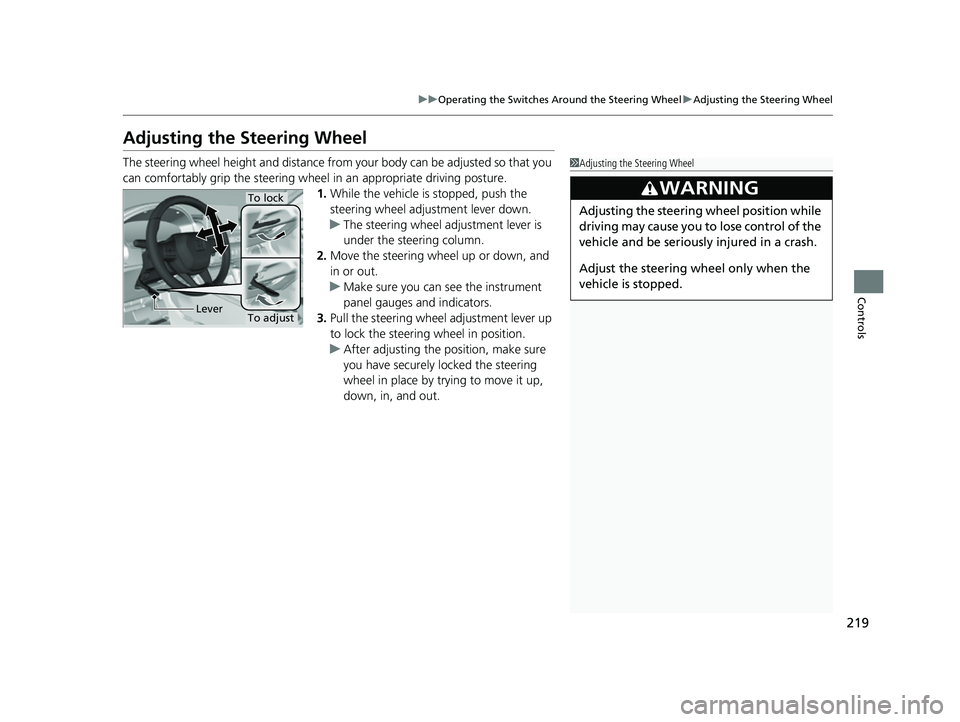
The steering wheel height and distance from your body can be adjusted so that you
can comfortably grip the steering wheel in an appropriate driving posture.
1. While the vehicle is stopped, push the
steering wheel adjustment lever down.
u The steering wheel adjustment lever is
under the steering column.
2. Move the steering wheel up or down, and
in or out.
u Make sure you can see the instrument
panel gauges and indicators.
3. Pull the steering wheel adjustment lever up
to lock the steering wheel in position.
u After adjusting the position, make sure
you have securely locked the steering
wheel in place by trying to move it up,
down, in, and out.1Adjusting the Steering Wheel
3WARNING
Adjusting the steering wheel position while
driving may cause you to lose control of the
vehicle and be seriously injured in a crash.
Adjust the steering wh eel only when the
vehicle is stopped.
To adjust
To lock
Lever
23 CIVIC HATCHBACK TYPE R-31T406100_03.book 219 ページ 2022年6月23日 木曜日 午後9時28分
Page 227 of 840
225
uuSeats uRear Seats
Continued
Controls
Rear Seats
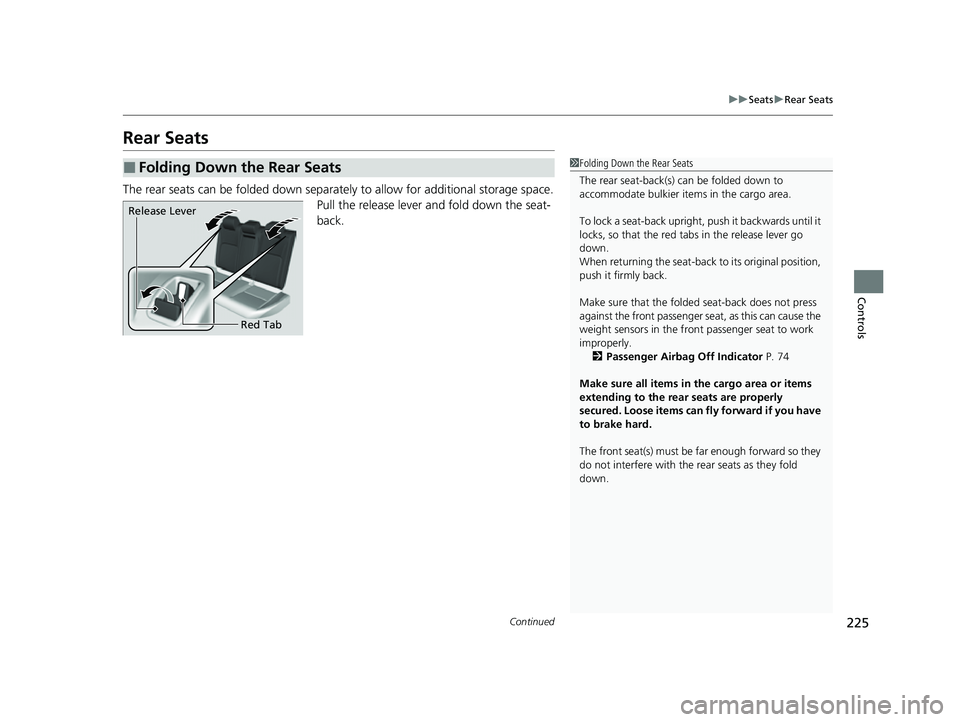
The rear seats can be folded down separa tely to allow for additional storage space.
Pull the release lever and fold down the seat-
back.
■Folding Down the Rear Seats1 Folding Down the Rear Seats
The rear seat-back(s) can be folded down to
accommodate bulkier items in the cargo area.
To lock a seat-back upright, push it backwards until it
locks, so that the red tabs in the release lever go
down.
When returning the seat-back to its original position,
push it firmly back.
Make sure that the folded seat-back does not press
against the front passenger seat, as this can cause the
weight sensors in the front passenger seat to work
improperly. 2 Passenger Airbag Off Indicator P. 74
Make sure all items in the cargo area or items
extending to the rear seats are properly
secured. Loose items can fly forward if you have
to brake hard.
The front seat(s) must be far enough forward so they
do not interfere with the rear seats as they fold
down.
Release Lever
Red Tab
23 CIVIC HATCHBACK TYPE R-31T406100_03.book 225 ページ 2022年6月23日 木曜日 午後9時28分
Page 240 of 840
uuInterior Convenience Items uStorage Items
238
Controls
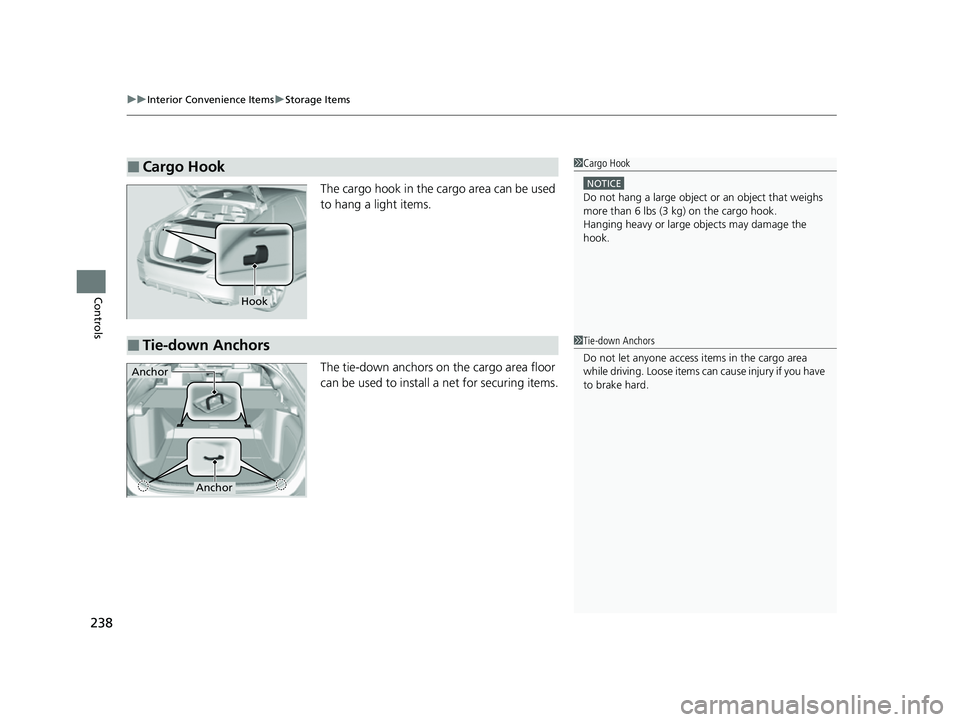
The cargo hook in the cargo area can be used
to hang a light items.
The tie-down anchors on the cargo area floor
can be used to install a net for securing items.
■Cargo Hook1Cargo Hook
NOTICE
Do not hang a large object or an object that weighs
more than 6 lbs (3 kg) on the cargo hook.
Hanging heavy or large objects may damage the
hook.
Hook
■Tie-down Anchors1 Tie-down Anchors
Do not let anyone access items in the cargo area
while driving. Loose items can cause injury if you have
to brake hard.
Anchor
Anchor
23 CIVIC HATCHBACK TYPE R-31T406100_03.book 238 ページ 2022年6月23日 木曜日 午後9時28分