lock HONDA CIVIC 2023 Owner's Manual
[x] Cancel search | Manufacturer: HONDA, Model Year: 2023, Model line: CIVIC, Model: HONDA CIVIC 2023Pages: 840, PDF Size: 26.53 MB
Page 87 of 840
Continued85
uuChild Safety uSafety of Infants and Small Children
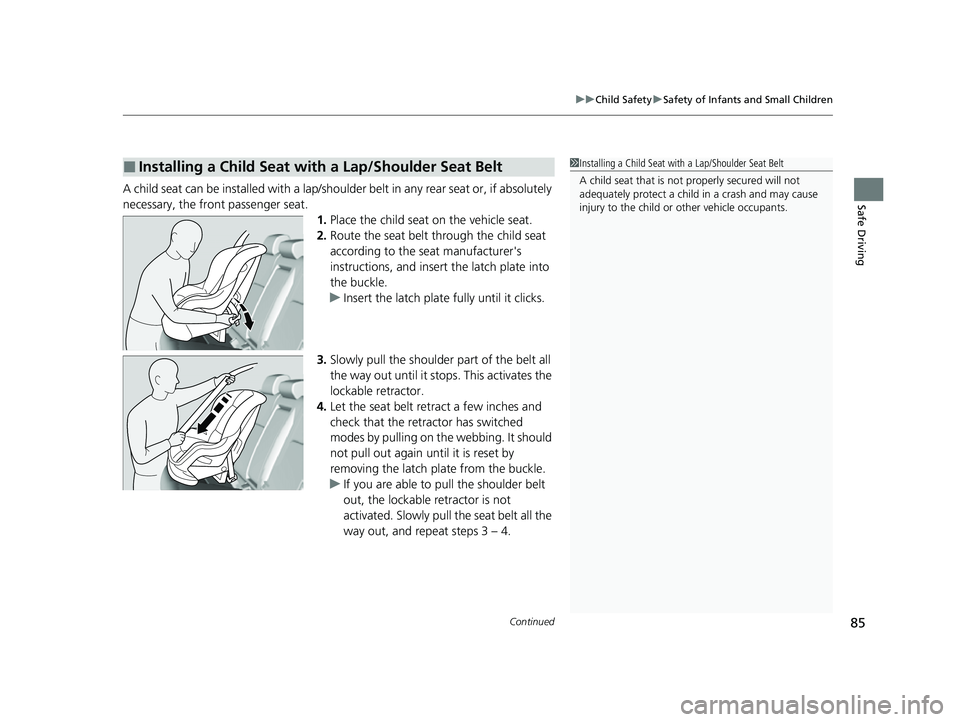
Safe DrivingA child seat can be installed with a lap/shoulder belt in any rear seat or, if absolutely
necessary, the front passenger seat.
1.Place the child seat on the vehicle seat.
2. Route the seat belt through the child seat
according to the seat manufacturer's
instructions, and insert the latch plate into
the buckle.
u Insert the latch plate fully until it clicks.
3. Slowly pull the shoulder part of the belt all
the way out until it stops. This activates the
lockable retractor.
4. Let the seat belt retract a few inches and
check that the retractor has switched
modes by pulling on the webbing. It should
not pull out again until it is reset by
removing the latch pl ate from the buckle.
u If you are able to pull the shoulder belt
out, the lockable retractor is not
activated. Slowly pull the seat belt all the
way out, and repeat steps 3 – 4.
■Installing a Child Seat with a Lap/Shoulder Seat Belt1 Installing a Child Seat with a Lap/Shoulder Seat Belt
A child seat that is not properly secured will not
adequately protect a child in a crash and may cause
injury to the child or other vehicle occupants.
23 CIVIC HATCHBACK TYPE R-31T406100_03.book 85 ページ 2022年6月23日 木曜日 午後9時28分
Page 88 of 840
uuChild Safety uSafety of Infants and Small Children
86
Safe Driving
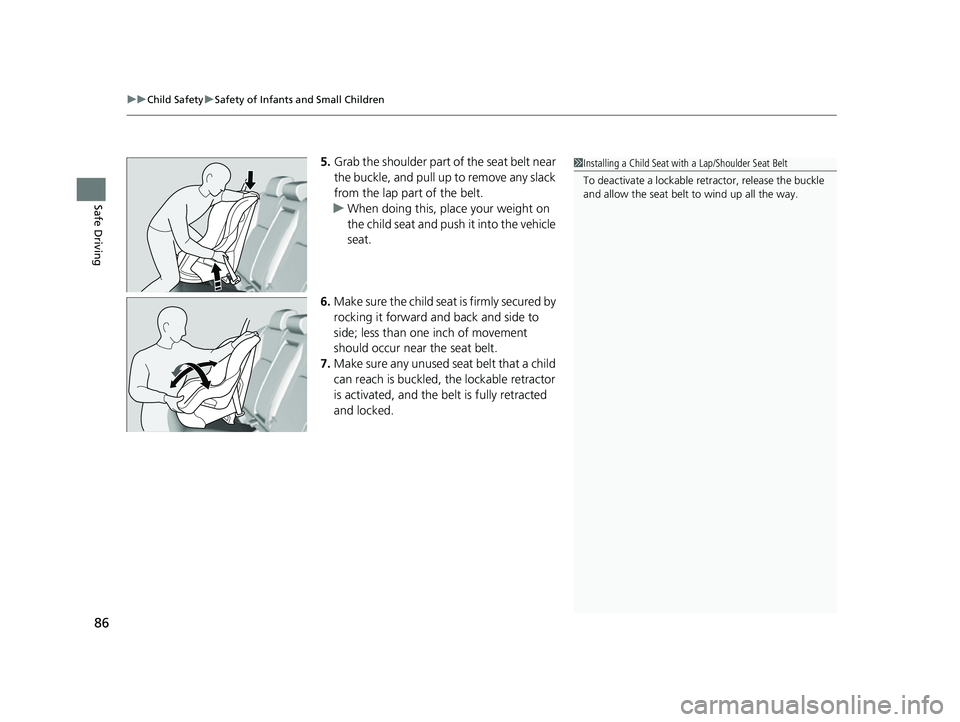
5. Grab the shoulder part of the seat belt near
the buckle, and pull up to remove any slack
from the lap part of the belt.
u When doing this, place your weight on
the child seat and push it into the vehicle
seat.
6. Make sure the child seat is firmly secured by
rocking it forward and back and side to
side; less than one inch of movement
should occur near the seat belt.
7. Make sure any unused seat belt that a child
can reach is buckled, the lockable retractor
is activated, and the be lt is fully retracted
and locked.1 Installing a Child Seat with a Lap/Shoulder Seat Belt
To deactivate a lockable retractor, release the buckle
and allow the seat belt to wind up all the way.
23 CIVIC HATCHBACK TYPE R-31T406100_03.book 86 ページ 2022年6月23日 木曜日 午後9時28分
Page 98 of 840
96
Instrument Panel
Indicators
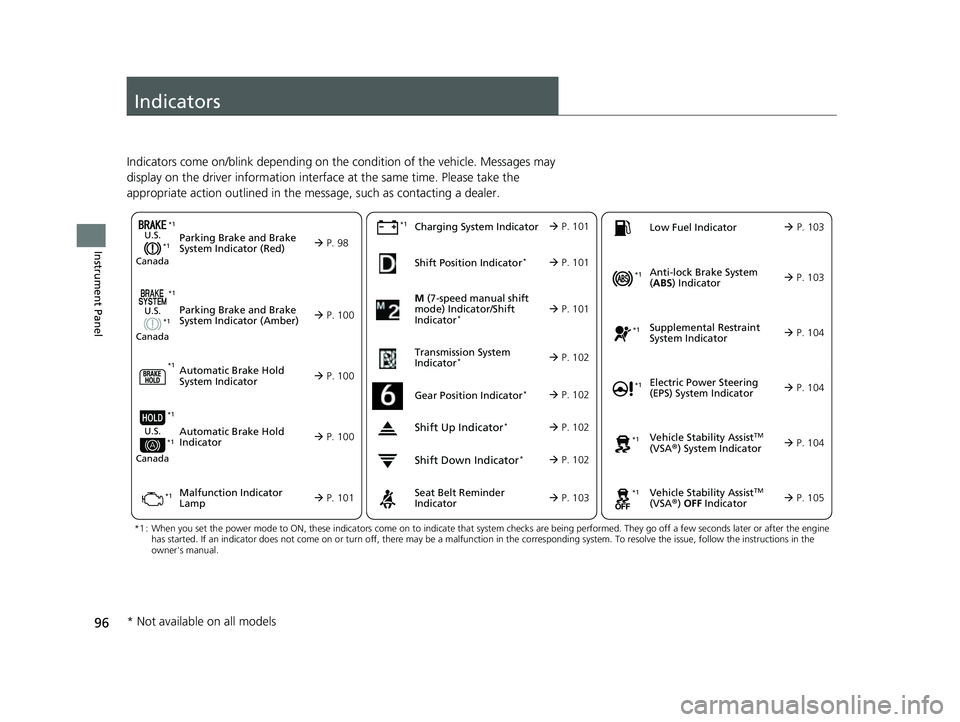
Indicators come on/blink depending on the condition of the vehicle. Messages may
display on the driver information interface at the same time. Please take the
appropriate action outlined in the message, such as contacting a dealer.
M (7-speed manual shift
mode) Indicator/Shift
Indicator
* P. 101
Parking Brake and Brake
System Indicator (Red)
Parking Brake and Brake
System Indicator (Amber)U.S.
Canada
U.S.
Canada
Automatic Brake Hold
System Indicator
Automatic Brake Hold
IndicatorU.S.
Canada
*1 : When you set the power mode to ON, these indicators come on to indicate that system checks are being perf ormed. They go off a few seconds later or after the engine
has started. If an indicator does not come on or turn off, th ere may be a malfunction in the corresponding system. To resolve the issue, follow the instructions in the
owner's manual.
P. 98*1
Malfunction Indicator
Lamp Charging System IndicatorSeat Belt Reminder
Indicator
Low Fuel Indicator
P. 100
P. 1
00
P. 100
P. 101
P. 101*1
*1 *1
Shift Position Indicator*
P. 101
Transmission System
Indicator
* P. 102
P. 103
P. 103
*1
*1
Anti-lock Brake System
( ABS ) Indicator
Vehicle Stability AssistTM
(VSA®) System Indicator
Vehicle Stability Assist
TM
(VSA®) OFF Indicator
Supplemental Restraint
System Indicator
Electric Power Steering
(EPS) System Indicator
*1
P. 103
P. 104
P. 104*1
*1
*1
P. 105
*1 P. 104
Shift Up Indicator* P. 102
Shift Down Indicator* P. 102
Gear Position Indicator* P. 102
*1
*1
*1
* Not available on all models
23 CIVIC HATCHBACK TYPE R-31T406100_03.book 96 ページ 2022年6月23日 木曜日 午後9時28分
Page 105 of 840
103
uuIndicators u
Continued
Instrument Panel
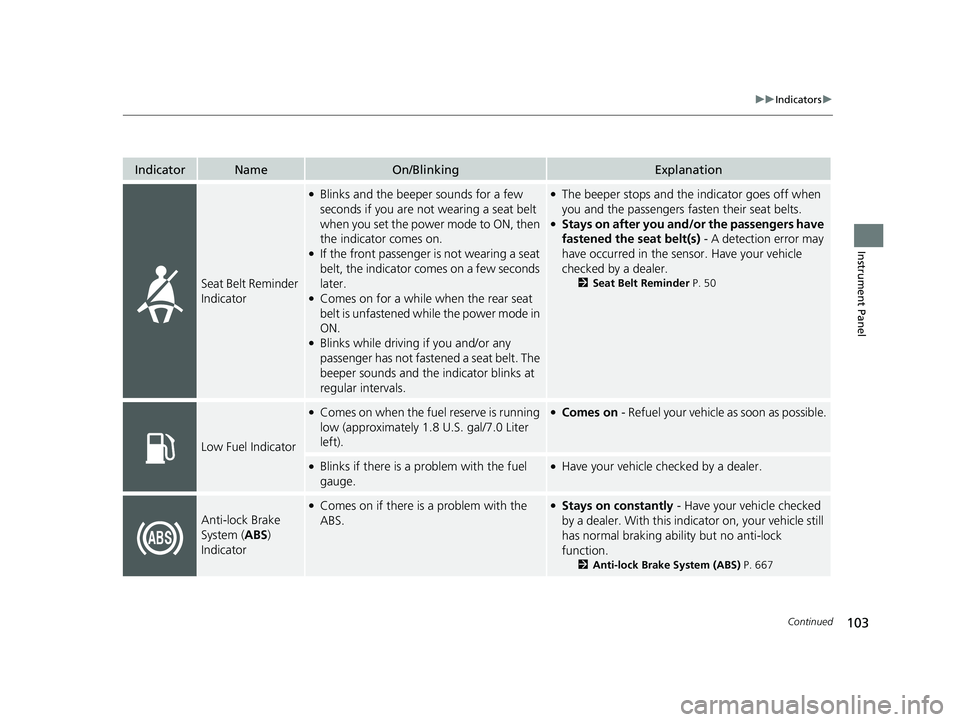
IndicatorNameOn/BlinkingExplanation
Seat Belt Reminder
Indicator
●Blinks and the beeper sounds for a few
seconds if you are not wearing a seat belt
when you set the power mode to ON, then
the indicator comes on.
●If the front passenger is not wearing a seat
belt, the indicator comes on a few seconds
later.
●Comes on for a while when the rear seat
belt is unfastened while the power mode in
ON.
●Blinks while driving if you and/or any
passenger has not fastened a seat belt. The
beeper sounds and the indicator blinks at
regular intervals.
●The beeper stops and the indicator goes off when
you and the passengers fasten their seat belts.
●Stays on after you and/or the passengers have
fastened the seat belt(s) - A detection error may
have occurred in the sensor. Have your vehicle
checked by a dealer.
2 Seat Belt Reminder P. 50
Low Fuel Indicator
●Comes on when the fuel reserve is running
low (approximately 1.8 U.S. gal/7.0 Liter
left).●Comes on - Refuel your vehicle as soon as possible.
●Blinks if there is a problem with the fuel
gauge.●Have your vehicle checked by a dealer.
Anti-lock Brake
System (ABS)
Indicator
●Comes on if there is a problem with the
ABS.●Stays on constantly - Have your vehicle checked
by a dealer. With this indi cator on, your vehicle still
has normal braking abili ty but no anti-lock
function.
2 Anti-lock Brake System (ABS) P. 667
23 CIVIC HATCHBACK TYPE R-31T406100_03.book 103 ページ 2022年6月23日 木曜日 午後9時28分
Page 118 of 840
116
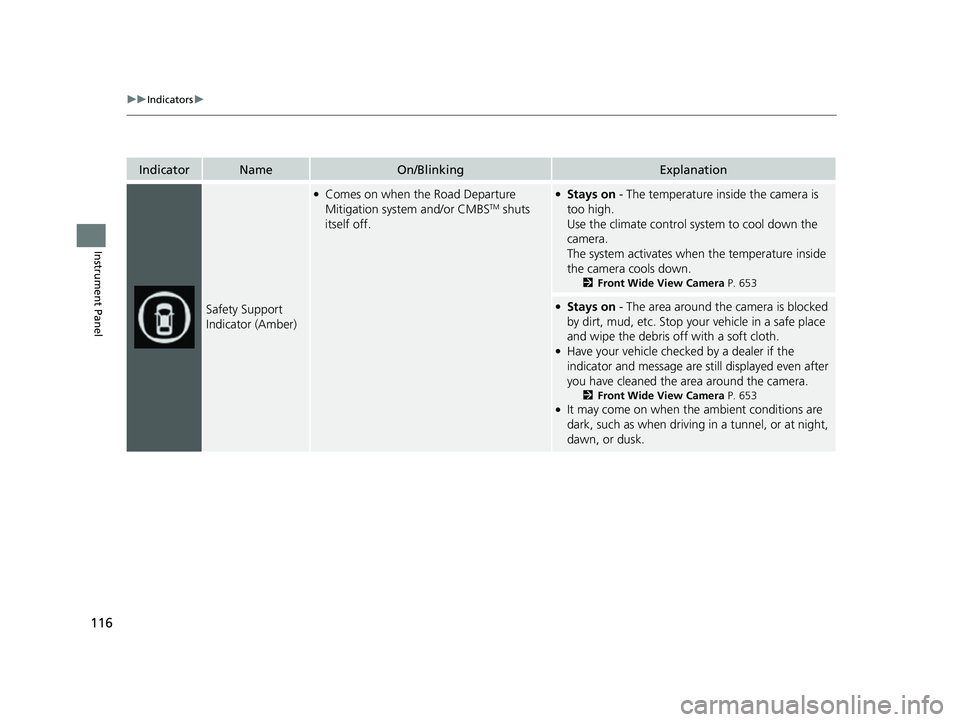
uuIndicators u
Instrument Panel
IndicatorNameOn/BlinkingExplanation
Safety Support
Indicator (Amber)
●Comes on when the Road Departure
Mitigation system and/or CMBSTM shuts
itself off.
●Stays on - The temperature inside the camera is
too high.
Use the climate control sy stem to cool down the
camera.
The system activates when the temperature inside
the camera cools down.
2 Front Wide View Camera P. 653
●Stays on - The area around the camera is blocked
by dirt, mud, etc. Stop your vehicle in a safe place
and wipe the debris off with a soft cloth.
●Have your vehicle checked by a dealer if the
indicator and message are still displayed even after
you have cleaned the area around the camera.
2 Front Wide View Camera P. 653●It may come on when the ambient conditions are
dark, such as when driving in a tunnel, or at night,
dawn, or dusk.
23 CIVIC HATCHBACK TYPE R-31T406100_03.book 116 ページ 2022年6月23日 木曜日 午後9時28分
Page 125 of 840
Continued123
uuGauges and Driver Information Interface uGauges
Instrument Panel
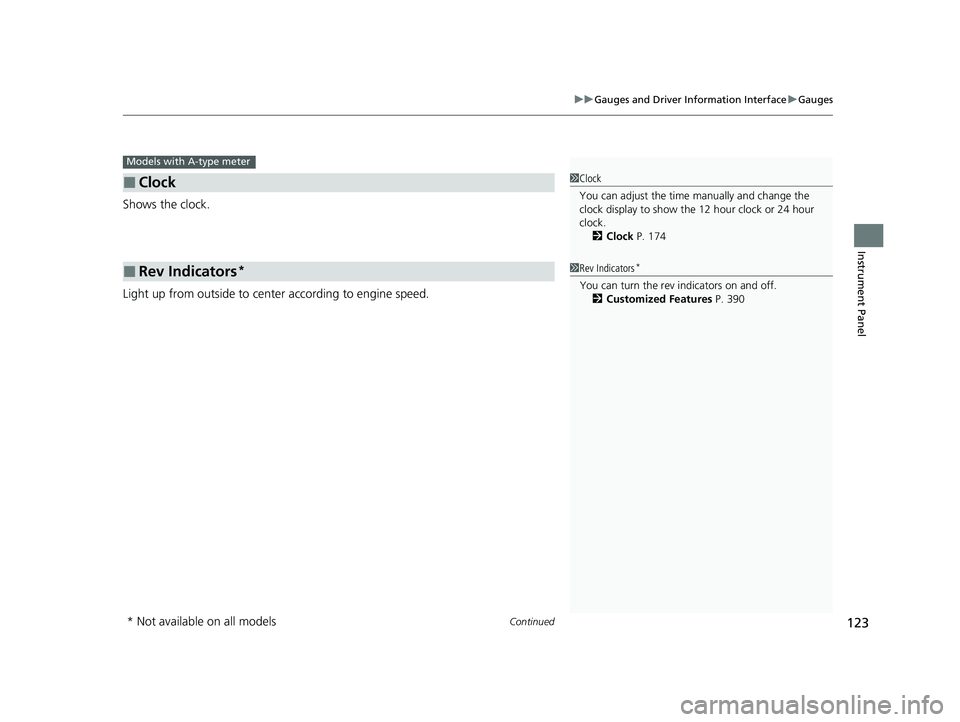
Shows the clock.
Light up from outside to center according to engine speed.
■Clock
■Rev Indicators*
Models with A-type meter
1Clock
You can adjust the time manually and change the
clock display to show the 12 hour clock or 24 hour
clock.
2 Clock P. 174
1Rev Indicators*
You can turn the rev indicators on and off.
2 Customized Features P. 390
* Not available on all models
23 CIVIC HATCHBACK TYPE R-31T406100_03.book 123 ページ 2022年6月23日 木曜日 午後9時28分
Page 144 of 840
142
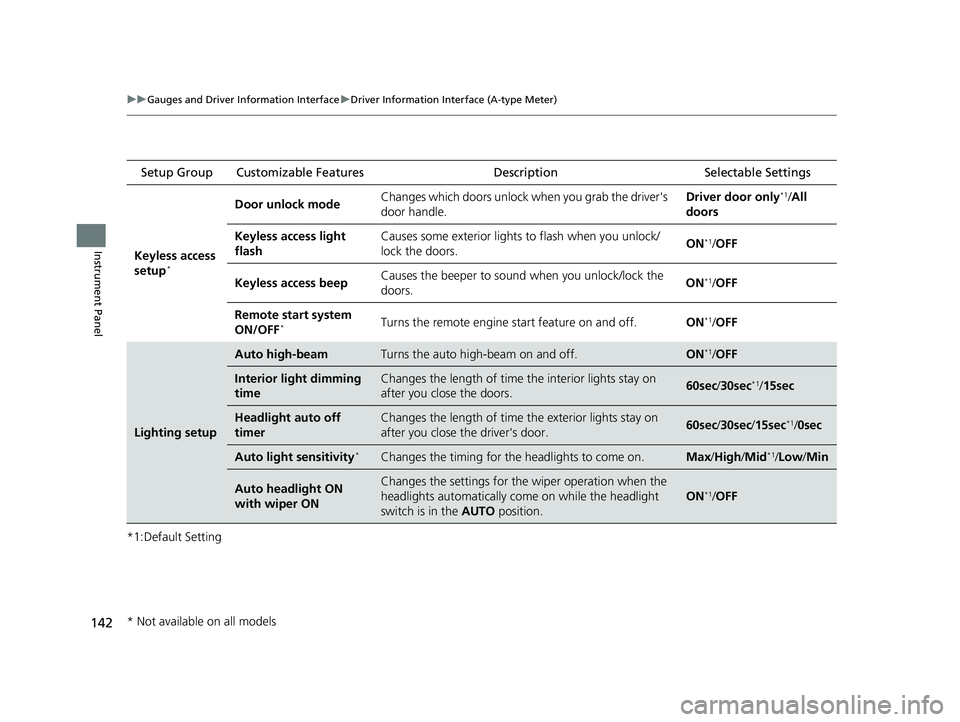
uuGauges and Driver Information Interface uDriver Information Interface (A-type Meter)
Instrument Panel
*1:Default Setting Setup Group Customizable Features
Description Selectable Settings
Keyless access
setup
*
Door unlock mode Changes which doors unlock when you grab the driver's
door handle. Driver door only*1/
All
doors
Keyless access light
flash Causes some exterior lights to flash when you unlock/
lock the doors.
ON
*1/
OFF
Keyless access beep Causes the beeper to soun
d when you unlock/lock the
doors. ON
*1/
OFF
Remote start system
ON/OFF
*Turns the remote engine start feature on and off. ON*1/OFF
Lighting setup
Auto high-beamTurns the auto high-beam on and off.ON*1/OFF
Interior light dimming
timeChanges the length of time the interior lights stay on
after you close the doors.60sec /30sec*1/15sec
Headlight auto off
timerChanges the length of time the exterior lights stay on
after you close the driver's door.60sec /30sec /15sec*1/0sec
Auto light sensitivity*Changes the timing for the headlights to come on.Max/High/ Mid*1/Low /Min
Auto headlight ON
with wiper ONChanges the settings for th e wiper operation when the
headlights automatically come on while the headlight
switch is in the AUTO position.
ON*1/OFF
* Not available on all models
23 CIVIC HATCHBACK TYPE R-31T406100_03.book 142 ページ 2022年6月23日 木曜日 午後9時28分
Page 145 of 840
143
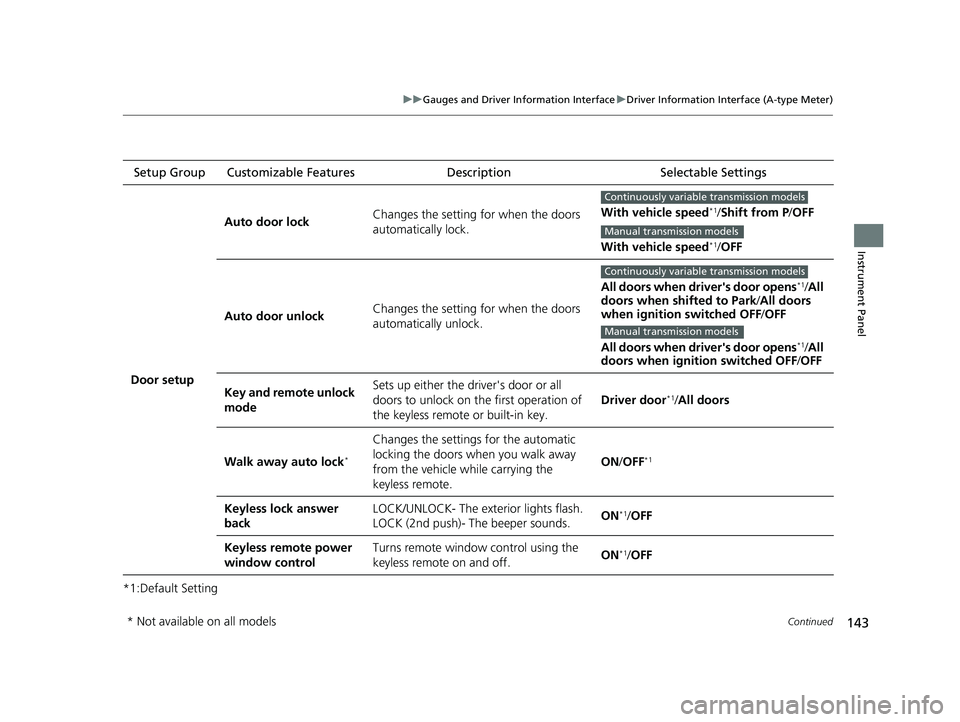
uuGauges and Driver Information Interface uDriver Information Interface (A-type Meter)
Continued
Instrument Panel
*1:Default SettingSetup Group Customizable Features Description Selectable Settings
Door setup Auto door lock
Changes the setting for when the doors
automatically lock. With vehicle speed
*1/
Shift from P /OFF
With vehicle speed
*1/ OFF
Auto door unlock Changes the setting for when the doors
automatically unlock. All doors when driver's door opens
*1/
All
doors when shifted to Park /All doors
when ignition switched OFF /OFF
All doors when driver's door opens
*1/ All
doors when ignition switched OFF /OFF
Key and remote unlock
mode Sets up either the driver's door or all
doors to unlock on the first operation of
the keyless remote or built-in key.
Driver door
*1/
All doors
Walk away auto lock
*
Changes the settings for the automatic
locking the doors when you walk away
from the vehicle while carrying the
keyless remote. ON
/OFF
*1
Keyless lock answer
back LOCK/UNLOCK- The exterior lights flash.
LOCK (2nd push)- The beeper sounds.
ON*1/
OFF
Keyless remote power
window control Turns remote window control using the
keyless remote on and off.
ON
*1/
OFF
Continuously variable transmission models
Manual transmission models
Continuously variable transmission models
Manual transmission models
* Not available on all models
23 CIVIC HATCHBACK TYPE R-31T406100_03.book 143 ページ 2022年6月23日 木曜日 午後9時28分
Page 146 of 840
144
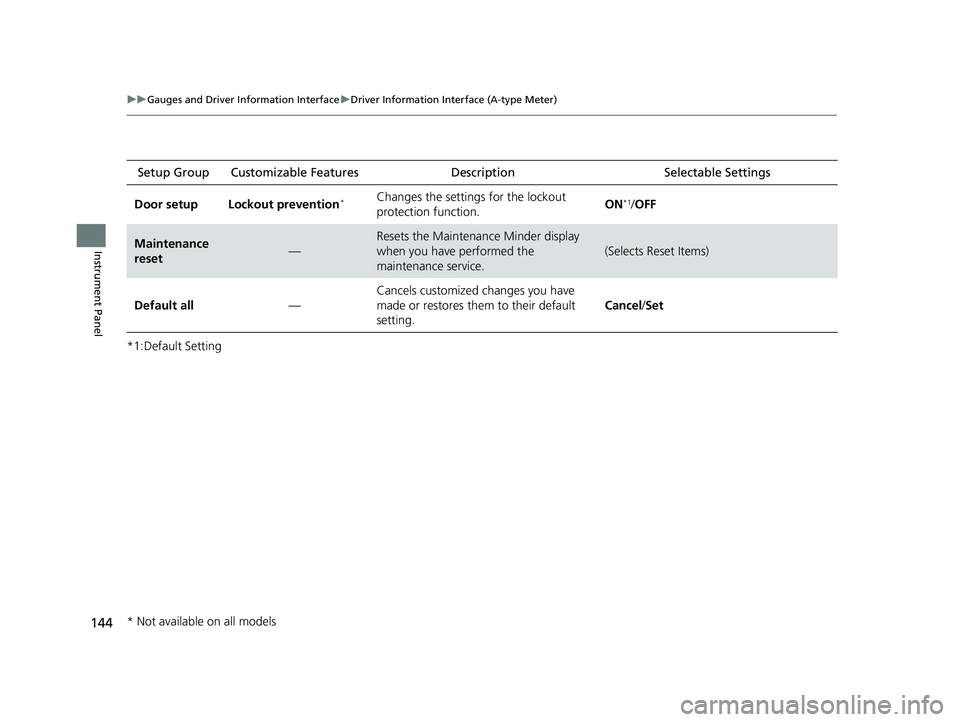
uuGauges and Driver Information Interface uDriver Information Interface (A-type Meter)
Instrument Panel
*1:Default SettingSetup Group Customizabl
e Features Description Selectable Settings
Door setup Lockout prevention
*Changes the settings for the lockout
protection function. ON*1/
OFF
Maintenance
reset—
Resets the Maintenance Minder display
when you have performed the
maintenance service.
(Selects Reset Items)
Default all —Cancels customized changes you have
made or restores them to their default
setting.
Cancel
/Set
* Not available on all models
23 CIVIC HATCHBACK TYPE R-31T406100_03.book 144 ページ 2022年6月23日 木曜日 午後9時28分
Page 150 of 840
148
uuGauges and Driver Information Interface uDriver Information Interface Left Side Area (B-type-Meter)
Instrument Panel
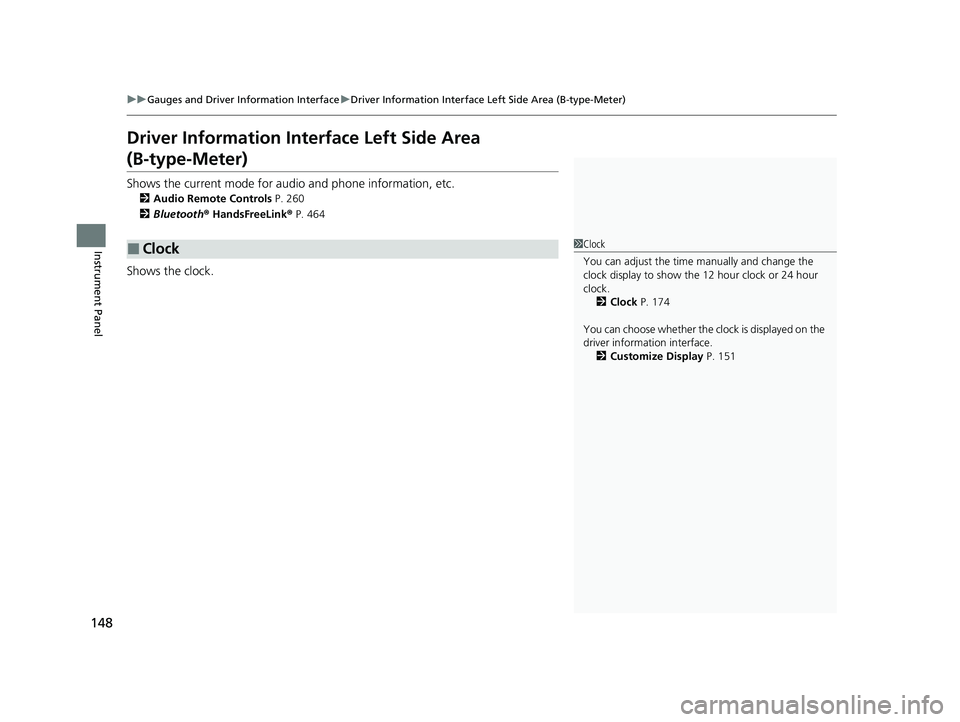
Driver Information Inte rface Left Side Area
(B-type-Meter)
Shows the current mode for audio and phone information, etc.
2Audio Remote Controls P. 260
2 Bluetooth ® HandsFreeLink ® P. 464
Shows the clock.
■Clock1 Clock
You can adjust the time manually and change the
clock display to show the 12 hour clock or 24 hour
clock. 2 Clock P. 174
You can choose whether the clock is displayed on the
driver information interface. 2 Customize Display P. 151
23 CIVIC HATCHBACK TYPE R-31T406100_03.book 148 ページ 2022年6月23日 木曜日 午後9時28分