tow HONDA CIVIC 2023 Owner's Manual
[x] Cancel search | Manufacturer: HONDA, Model Year: 2023, Model line: CIVIC, Model: HONDA CIVIC 2023Pages: 840, PDF Size: 26.53 MB
Page 579 of 840
577
uuHonda Sensing ®u Low Speed Braking Control*
Driving
■Examples of situations where the sonar sensor cannot detect obstacles
• The sonar sensor is dirty (cover ed by snow, water, mud, etc.).
• The vehicle is too hot or cold.
• The steering wheel is turned sharply when approaching the obstacle at an angle.
■Examples of other cases where the system may not work correctly
• The vehicle is tilted due to heavy load or su spension modifications.
• An abnormal tire or wheel condition (inco rrect sizes, varied sizes or construction,
improperly inflated, compact spare tire
*, etc.).
• Bad weather conditions such as heav y rain, fog, snow, sandstorms, etc.
• The ambient temperature/humidity is too high or low.
• When going down a very steep slope.
• When close to other vehicles with sonar sensors or other objects that emit
ultrasonic waves.
■Situations where the system may acti vate even without risk of a collision
• When passing through short or narrow gates.
• When driving on uneven surfaces, grassy areas, or places with steps.
• When a sloped pillar or wall is protruding from a high position.
• When there are obstacles next to the road.
• When driving toward flags, curtains, tre e branches, railroad crossing bars, etc.
• When driving on flooded roads.
* Not available on all models
23 CIVIC HATCHBACK TYPE R-31T406100_03.book 577 ページ 2022年6月23日 木曜日 午後9時28分
Page 623 of 840
Continued621
uuHonda Sensing ®u Lane Keeping Assist System (LKAS)
Driving
The system can be used when th e following conditions are met.
• The lane in which you are driving has detectable lane markers on both sides, and
your vehicle is in the center of the lane.
• The vehicle is traveling between about 45 and 90 mph (72 and 145 km/h).
• You are driving on a straight or slightly curved road.
• The turn signals are off.
• The brake pedal is not depressed.
■How to activate the system
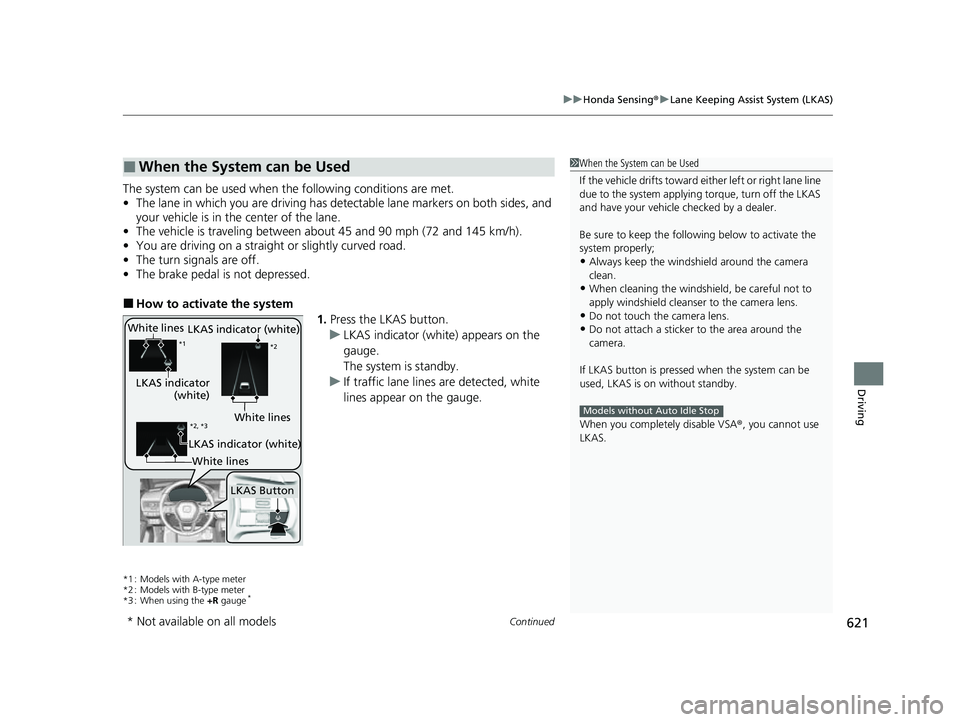
1.Press the LKAS button.
u LKAS indicator (white) appears on the
gauge.
The system is standby.
u If traffic lane lines are detected, white
lines appear on the gauge.
*1 : Models with A-type meter
*2 : Models with B-type meter
*3 : When using the +R gauge
*
■When the System can be Used1When the System can be Used
If the vehicle drifts toward ei ther left or right lane line
due to the system applying torque, turn off the LKAS
and have your vehicle checked by a dealer.
Be sure to keep the following below to activate the
system properly;
•Always keep the windshi eld around the camera
clean.
•When cleaning the windshield, be careful not to
apply windshield cleanser to the camera lens.
•Do not touch the camera lens.
•Do not attach a sticker to the area around the
camera.
If LKAS button is pressed when the system can be
used, LKAS is on without standby.
When you completely disable VSA® , you cannot use
LKAS.
Models without Auto Idle Stop
White lines
LKAS indicator
(white)
*1 *2
LKAS Button
*2, *3White lines
LKAS indicator (white)
LKAS indicator (white)
White lines
* Not available on all models
23 CIVIC HATCHBACK TYPE R-31T406100_03.book 621 ページ 2022年6月23日 木曜日 午後9時28分
Page 656 of 840
uuHonda Sensing ®u Front Wide View Camera
654
Driving
1Front Wide View Camera
If the Some driver assist systems cannot operate:
Camera temperature too high message appears:
•Use the climate control system to cool down the
interior and, if necessary, also use defroster mode
with the airflow directed towards the camera.
•Start driving the vehicle to lower the windshield
temperature, which cool s down the area around
the camera.
If the Some driver assist systems cannot operate:
Clean front windshield or poor viewing
condition. message appears:
•Park your vehicle in a safe place, and make sure the
windshield is clean.
Clean the windshield if it is dirty. If the message
does not disappear after dr iven for a while, have
your vehicle checked by a dealer.
23 CIVIC HATCHBACK TYPE R-31T406100_03.book 654 ページ 2022年6月23日 木曜日 午後9時28分
Page 662 of 840
uuBraking uBrake System
660
Driving
■Activating and deactivating the automatic parking brake feature
With the power mode is in ON, carry out th e following steps to either activate or
deactivate the automatic parking brake feature.
1. Put the transmission into
(P.
2. Without depressing the brake pedal, pull up and release the electric parking brake
switch.
u Check that the parking brake and brake system indicator (red) has come on.
3. Pull up and hold the electric parking br ake switch. When you hear a beeping
sound, release the switch and within 3 seconds pull up and hold the switch again.
4. When you hear a sound indicating that the procedure is completed, release the
switch.
u Two beeps indicates that the feature has been activated.
u One beep indicates that the feature has been deactivated.
u When you have completed activating the feature, the parking brake will
remain applied after you turn off the engine.
u To confirm that the parking brake is ap plied, check if the parking brake and
brake system indicator (red) is on.
If you need to temporarily deactivate the feature while putting your vehicle through
a conveyor type car wash, you can follow the procedure explained below.
1. Depress the brake pedal and bring the vehicle to a stop.
2. Set the power mode to VEHICLE OFF and then within 2 seconds push down the
electric parking brake switch.
u Activation and deactivation settings fo r the feature will not be affected.
u Before temporarily deactivating the feat ure, make sure to first turn off both
Adaptive Cruise Control (ACC) with Low Speed Follow and the automatic
brake hold system.
1 Parking Brake
In cold climates, the parking brake may freeze in
place if applied.
When parking the vehicle, chock the wheels and
make sure the automatic parking brake feature is
deactivated.
Also, when putting your vehicle through a conveyor-
type car wash or when ha ving your vehicle towed,
deactivate the automatic parking brake feature and
leave the parking brake released.
Continuously variable transmission models
23 CIVIC HATCHBACK TYPE R-31T406100_03.book 660 ページ 2022年6月23日 木曜日 午後9時28分
Page 680 of 840
uuParking Your Vehicle uCross Traffic Monitor*
678
Driving
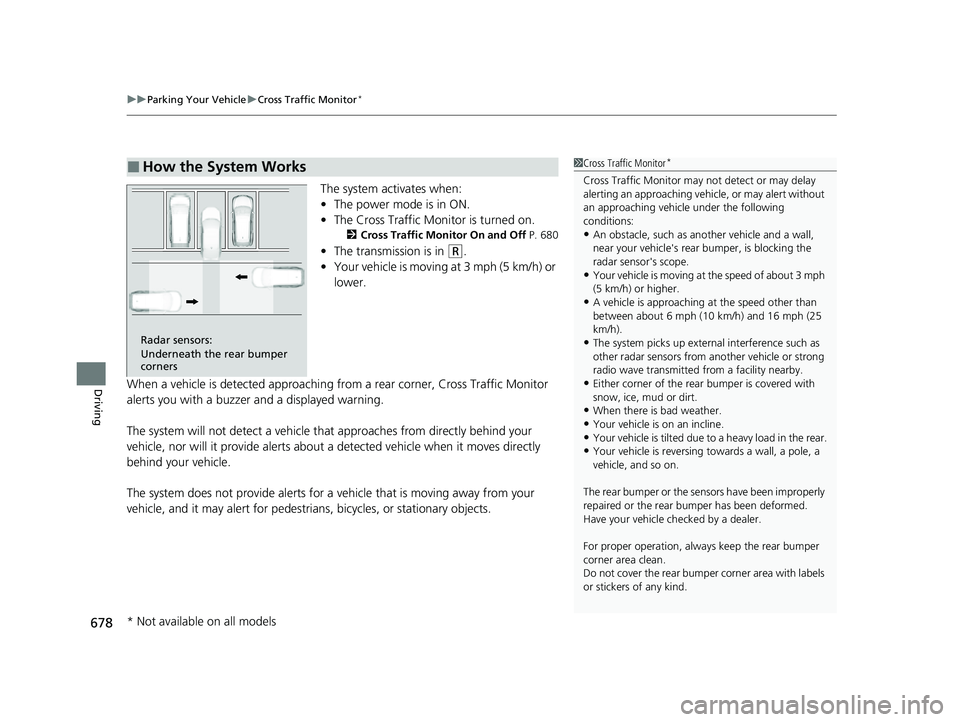
The system activates when:
• The power mode is in ON.
• The Cross Traffic Monitor is turned on.
2 Cross Traffic Monitor On and Off P. 680
•The transmission is in (R.
• Your vehicle is moving at 3 mph (5 km/h) or
lower.
When a vehicle is detected approaching from a rear corner, Cross Traffic Monitor
alerts you with a buzzer and a displayed warning.
The system will not detect a vehicle that approaches from directly behind your
vehicle, nor will it provide alerts about a detected vehicle when it moves directly
behind your vehicle.
The system does not provide alerts for a vehicle that is moving away from your
vehicle, and it may alert for pedestri ans, bicycles, or stationary objects.
■How the System Works1Cross Traffic Monitor*
Cross Traffic Monitor may not detect or may delay
alerting an approaching vehi cle, or may alert without
an approaching vehicle under the following
conditions:
•An obstacle, such as a nother vehicle and a wall,
near your vehicle's rear bumper, is blocking the
radar sensor's scope.
•Your vehicle is moving at the speed of about 3 mph
(5 km/h) or higher.
•A vehicle is approaching at the speed other than
between about 6 mph (10 km/h) and 16 mph (25
km/h).
•The system picks up external interference such as
other radar sensors from an other vehicle or strong
radio wave transmitted fr om a facility nearby.
•Either corner of the rear bumper is covered with
snow, ice, mud or dirt.
•When there is bad weather.
•Your vehicle is on an incline.
•Your vehicle is tilt ed due to a heavy load in the rear.•Your vehicle is reversing towards a wall, a pole, a
vehicle, and so on.
The rear bumper or the sens ors have been improperly
repaired or the rear bum per has been deformed.
Have your vehicle checked by a dealer.
For proper operation, always keep the rear bumper
corner area clean.
Do not cover the rear bumper corner area with labels
or stickers of any kind.
Radar sensors:
Underneath the rear bumper
corners
* Not available on all models
23 CIVIC HATCHBACK TYPE R-31T406100_03.book 678 ページ 2022年6月23日 木曜日 午後9時28分
Page 695 of 840
693
uuBefore Performing Maintenance uSafety When Performing Maintenance
Maintenance
Safety When Performing Maintenance
Some of the most important safety precau tions are given here. However, we cannot
warn you of every conceivable hazard that can arise in performing maintenance.
Only you can decide whether you should perform a given task.
• To reduce the possibility of fire or explos ion, keep cigarettes, sparks, and flames
away from the battery and all fuel related parts.
• Never leave rags, towels, or other flammable objects under the hood.
u Heat from the engine and exhaust can ignite them, causing a fire.
• To clean parts, use a co mmercially available degreaser or parts cleaner, not
gasoline.
• Wear eye protection and prot ective clothing when working with the battery or
compressed air.
• Engine exhaust contains carbon monoxide, which is poisonous and can kill you.
u Only operate the engine if th ere is sufficient ventilation.
• The vehicle must be in a stationary condition.
u Make sure your vehicle is parked on le vel ground, the parking brake is set, and
the engine is off.
• Be aware that hot parts can burn you.
u Make sure to let the engine and exhaust system cool thoroughly before
touching vehicle parts.
• Be aware that moving parts can injure you.
u Do not start the engine unless instruct ed, and keep your hands and limbs away
from moving parts.
u Do not open the hood wh ile the Auto Idle Stop
* function is activated.
■Maintenance Safety
■Vehicle Safety
1Safety When Performing Maintenance
3WARNING
Improperly maintaining this vehicle or
failing to correct a pr oblem before driving
can cause a crash in which you can be
seriously hurt or killed.
Always follow the inspection and
maintenance recommendations according
to the schedules in this owner's manual.
3WARNING
Failure to properly follow maintenance
instructions and prec autions can cause you
to be seriously hurt or killed.
Always follow the procedures and
precautions in this owner's manual.
* Not available on all models
23 CIVIC HATCHBACK TYPE R-31T406100_03.book 693 ページ 2022年6月23日 木曜日 午後9時28分
Page 712 of 840
710
uuMaintenance Under the Hood uOpening the Hood
Maintenance
Opening the Hood
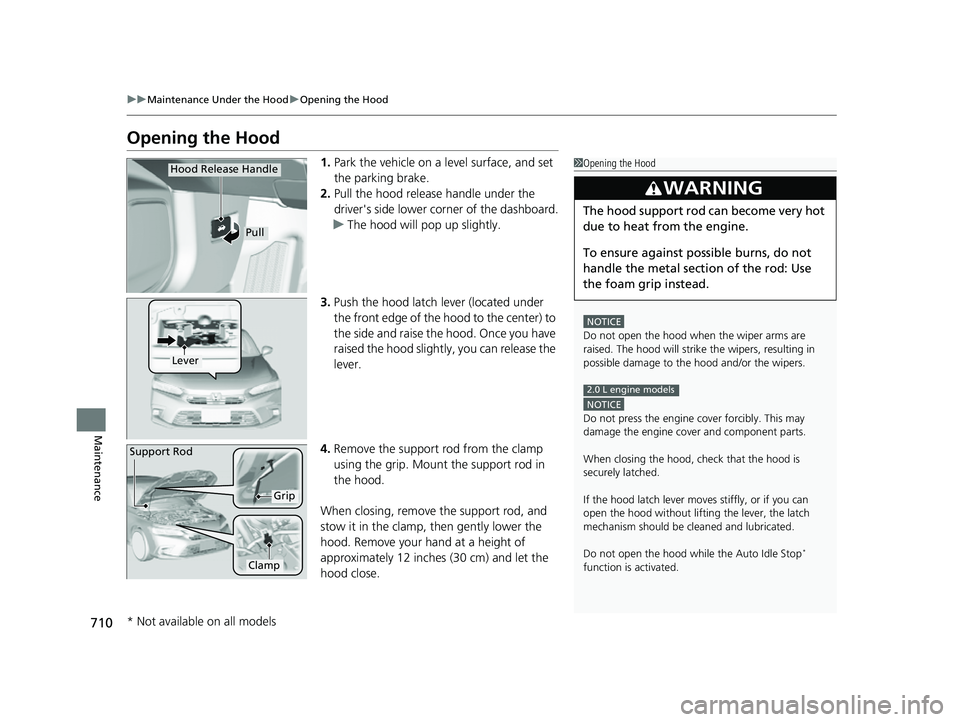
1. Park the vehicle on a level surface, and set
the parking brake.
2. Pull the hood release handle under the
driver's side lower co rner of the dashboard.
u The hood will pop up slightly.
3. Push the hood latch lever (located under
the front edge of the hood to the center) to
the side and raise the hood. Once you have
raised the hood slightly, you can release the
lever.
4. Remove the support rod from the clamp
using the grip. Mount the support rod in
the hood.
When closing, remove the support rod, and
stow it in the clamp, then gently lower the
hood. Remove your hand at a height of
approximately 12 inches (30 cm) and let the
hood close.1 Opening the Hood
NOTICE
Do not open the hood when the wiper arms are
raised. The hood will strike the wipers, resulting in
possible damage to the hood and/or the wipers.
NOTICE
Do not press the engine cover forcibly. This may
damage the engine cover and component parts.
When closing the hood, check that the hood is
securely latched.
If the hood latch lever moves stiffly, or if you can
open the hood without lifti ng the lever, the latch
mechanism should be cl eaned and lubricated.
Do not open the hood while the Auto Idle Stop
*
function is activated.
3WARNING
The hood support rod can become very hot
due to heat from the engine.
To ensure against po ssible burns, do not
handle the metal section of the rod: Use
the foam grip instead.
2.0 L engine models
Hood Release Handle
Pull
Lever
Support Rod
Grip
Clamp
* Not available on all models
23 CIVIC HATCHBACK TYPE R-31T406100_03.book 710 ページ 2022年6月23日 木曜日 午後9時28分
Page 715 of 840
713
uuMaintenance Under the Hood uOil Check
Continued
Maintenance
Oil Check
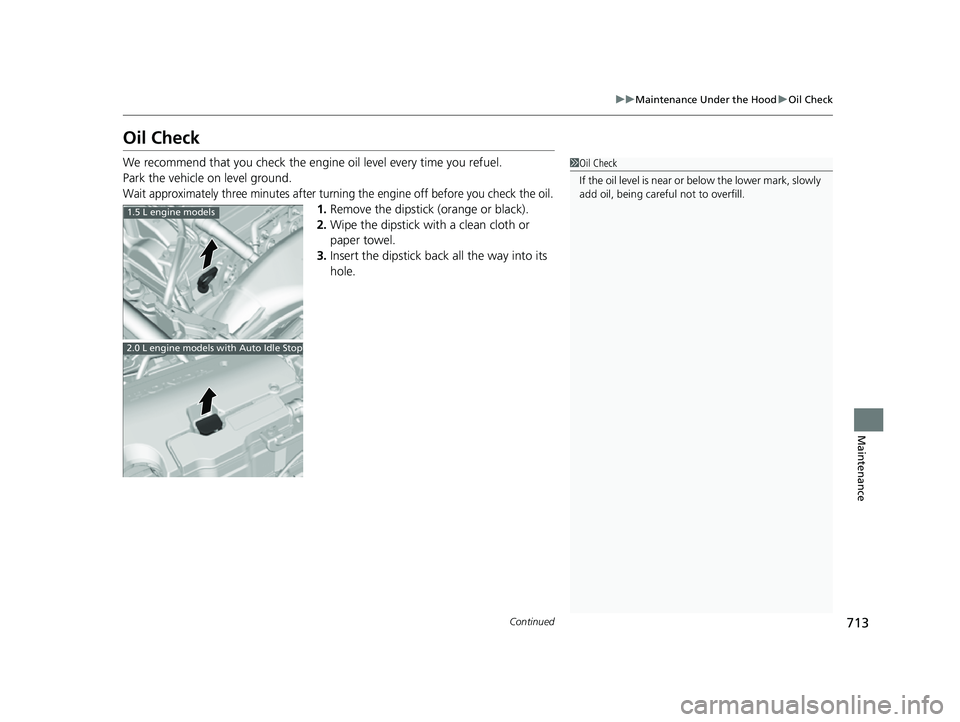
We recommend that you check the engi ne oil level every time you refuel.
Park the vehicle on level ground.
Wait approximately three minutes after turning the engine off before you check the oil.
1. Remove the dipstick (orange or black).
2. Wipe the dipstick with a clean cloth or
paper towel.
3. Insert the dipstick back all the way into its
hole.
1Oil Check
If the oil level is near or below the lower mark, slowly
add oil, being carefu l not to overfill.
1.5 L engine models
2.0 L engine models with Auto Idle Stop
23 CIVIC HATCHBACK TYPE R-31T406100_03.book 713 ページ 2022年6月23日 木曜日 午後9時28分
Page 750 of 840
748
uuBattery uCharging the Battery
Maintenance
Charging the Battery
Disconnect both battery cables to prevent da maging your vehicle's electrical system.
Always disconnect the negative (–) cable first, and reconnect it last.1 Battery
When you find corrosion, cl ean the battery terminals
by applying a baking powder and water solution.
Clean the terminals with a damp towel. Cloth/towel
dry the battery. Coat the terminals with grease to
help prevent future corrosion.
When replacing the battery, the replacement must be
of the same specifications.
Consult a dealer for more information.
The battery installed in this vehicle is specifically
designed for a model with Auto Idle Stop
*.
Using a battery other than this specified type may
shorten the battery life, a nd prevent Auto Idle Stop
*
from activating. If you need to replace the battery,
make sure to select the specified type and size. Ask a
dealer for more details.
The Vehicle Stability Assist
TM (VSA ®) system, Vehicle
Stability AssistTM (VSA ®) OFF*, Adaptive Cruise
Control (ACC) with Low Sp eed Follow, safety support
and low tire pressure/ TPMS
* indicators may come on
in amber along with a message in the gauge when
you set the power mode to ON after reconnecting
the battery.
Drive a short distance at more than 12 mph (20 km/h).
Each indicator should go off. If any do not, have your
vehicle checked by a dealer.
* Not available on all models
23 CIVIC HATCHBACK TYPE R-31T406100_03.book 748 ページ 2022年6月23日 木曜日 午後9時28分
Page 761 of 840
759
Handling the Unexpected
This chapter explains how to handle unexpected troubles.
Tools.................................................. 760
If a Tire Goes Flat Changing a Flat Tire ......................... 761
Temporarily Repairi ng a Flat Tire....... 768
Handling of the Jack ......................... 780
Engine Does Not Start Checking the Engine ........................ 781
If the Keyless Remote Battery is Weak .. 783
Emergency Engine Start ................... 784
Emergency Engine Stop ................... 785
If the Battery Is Dead ....................... 786
Shift Lever Does Not Move .............. 790Overheating
...................................... 791
Indicator, Coming On/Blinking If the Engine oil pressure low Warning Appears ......................................... 795
If the Charging System Indicator Comes On ............................................. 796
If the Malfunction Indicator Lamp Comes
On or Blinks ................................... 796
If the Brake System Indicator (Red) Comes On or Blinks ................................... 797
If the Brake System Indicator (Red) Comes On
or Blinks at the Same Time When the Brake
System Indicator (Amber) Comes On .. 799
If the Electric Power Steering (EPS) System
Indicator Comes On ....................... 798
If the Low Tire Pressure/TPMS Indicator Comes On or Blinks ....................... 800
Fuses .................................................. 801
Emergency Towing ........................... 808
If You Cannot Unlock the Fuel Fill Door.. 809
If You Cannot Open the Hatch ........ 810
Refueling ........................................... 811
23 CIVIC HATCHBACK TYPE R-31T406100_03.book 759 ページ 2022年6月23日 木曜日 午後9時28分