ESP HONDA CIVIC 2023 Workshop Manual
[x] Cancel search | Manufacturer: HONDA, Model Year: 2023, Model line: CIVIC, Model: HONDA CIVIC 2023Pages: 840, PDF Size: 26.53 MB
Page 569 of 840
567
uuHonda Sensing ®u Low Speed Braking Control*
Continued
Driving
Low Speed Braking Control*
Using sonar sensors located on the front an d rear bumpers, and the front grille, this
system detects if there is danger of a poten tial collision with a wall or other obstacle
during normal driving or when the accelerator pedal is depres sed with too much
force. The system then assists in avoiding collisions and reducing damage from
impact through assistive braking and/or assistive driving power suppression.
1Low Speed Braking Control*
If the Low Speed Braking Control activates in a
situation where you do not want automatic brake
application (such as when the vehicle is between two
railroad crossing gates), si mply press the brake pedal
to deactivate the system and then continue to drive
as intended.
3WARNING
The Low Speed Braking Control System
cannot avoid all collisions and may not
reduce damage in each situation where the
accelerator is mistaken ly or aggressively
pressed. Overreliance on the system may
result in a collision with serious injury or
death. Always check your surroundings,
your shift position, and your pedal use.
Driver remains responsible for safely
operating the vehicle.
Continuously variable transmission models with parking sensor system
* Not available on all models
23 CIVIC HATCHBACK TYPE R-31T406100_03.book 567 ページ 2022年6月23日 木曜日 午後9時28分
Page 575 of 840
573
uuHonda Sensing ®u Low Speed Braking Control*
Continued
Driving
Low Speed Braking Control*
Using sonar sensors located on the front an d rear bumpers, and the front grille, this
system detects if there is danger of a poten tial collision with a wall or other obstacle
during normal driving. The system then assists in avoiding collisions and reducing
damage from impact through assistive braking.
1 Low Speed Braking Control*
If the Low Speed Braking Control activates in a
situation where you do not want automatic brake
application (such as when the vehicle is between two
railroad crossing gates), si mply press the brake pedal
to deactivate the system and then continue to drive
as intended.
Low Speed Braking Contro l does not function while
VSA ® is completely disabled.
3WARNING
The Low Speed Braking Control System
cannot avoid all collisions and may not
reduce damage in each situation where the
accelerator is mistaken ly or aggressively
pressed. Overreliance on the system may
result in a collision with serious injury or
death. Always check your surroundings,
your shift position, and your pedal use.
Driver remains responsible for safely
operating the vehicle.
Models without Auto Idle Stop
Manual transmission models with parking sensor system
* Not available on all models
23 CIVIC HATCHBACK TYPE R-31T406100_03.book 573 ページ 2022年6月23日 木曜日 午後9時28分
Page 620 of 840
618
uuHonda Sensing ®u Lane Keeping Assist System (LKAS)
Driving
Lane Keeping Assist System (LKAS)
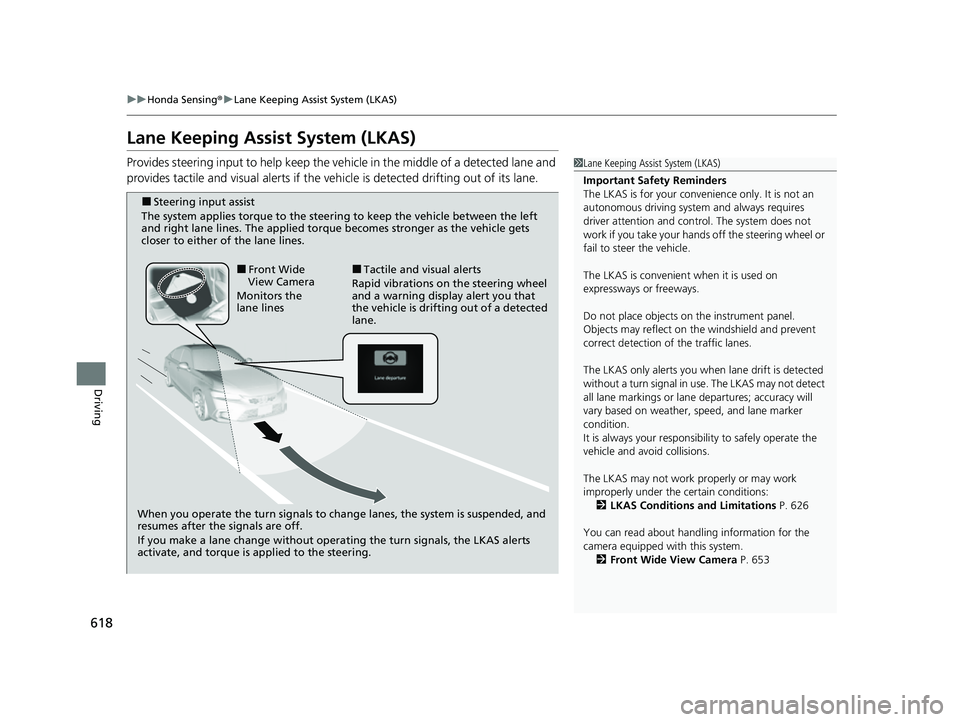
Provides steering input to help keep the vehicle in the middle of a detected lane and
provides tactile and visual alerts if the ve hicle is detected drifting out of its lane.1Lane Keeping Assist System (LKAS)
Important Safety Reminders
The LKAS is for your convenience only. It is not an
autonomous driving system and always requires
driver attention and control. The system does not
work if you take your hands off the steering wheel or
fail to steer the vehicle.
The LKAS is convenient when it is used on
expressways or freeways.
Do not place objects on the instrument panel.
Objects may reflect on th e windshield and prevent
correct detection of the traffic lanes.
The LKAS only alerts you when lane drift is detected
without a turn signal in use. The LKAS may not detect
all lane markings or lane departures; accuracy will
vary based on weather, speed, and lane marker
condition.
It is always your responsibility to safely operate the
vehicle and avoid collisions.
The LKAS may not work properly or may work
improperly under the certain conditions:
2 LKAS Conditions and Limitations P. 626
You can read about handling information for the
camera equipped with this system. 2 Front Wide View Camera P. 653
When you operate the turn signals to chan ge lanes, the system is suspended, and
resumes after the signals are off.
If you make a lane change without operating the turn signals, the LKAS alerts
activate, and torque is applied to the steering.
■Front Wide
View Camera
Monitors the
lane lines■Tactile and visual alerts
Rapid vibrations on the steering wheel
and a warning display alert you that
the vehicle is drifting out of a detected
lane.
■Steering input assist
The system applies torque to the steering to keep the vehicle between the left
and right lane lines. The applied torque becomes stronger as the vehicle gets
closer to either of the lane lines.
23 CIVIC HATCHBACK TYPE R-31T406100_03.book 618 ページ 2022年6月23日 木曜日 午後9時28分
Page 632 of 840
630
uuHonda Sensing ®u Traffic Jam Assist*
Driving
Traffic Jam Assist*
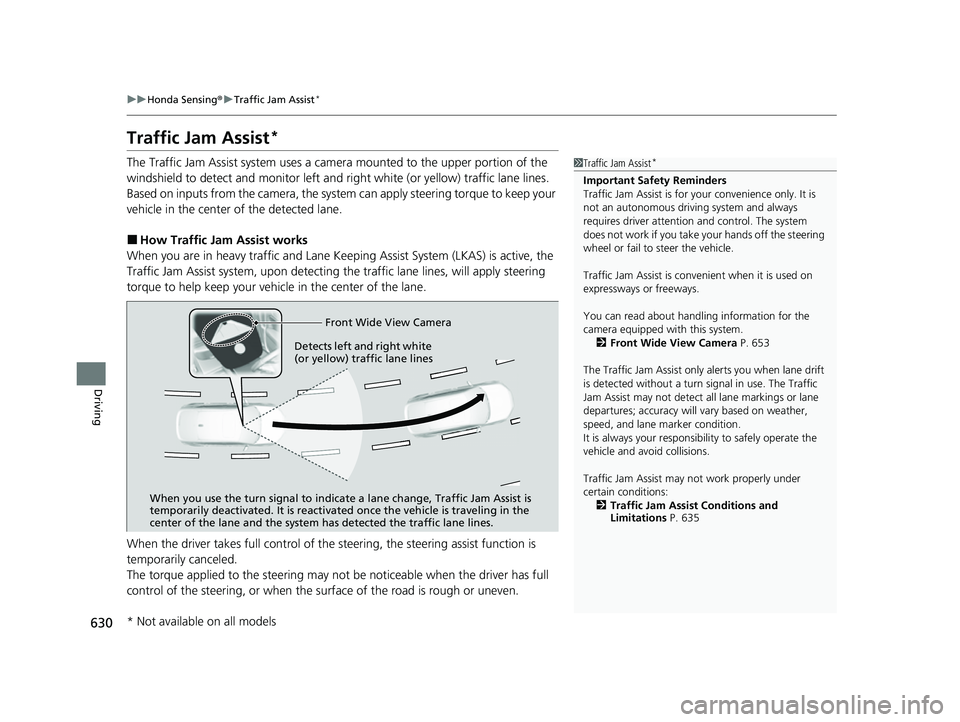
The Traffic Jam Assist system uses a came ra mounted to the upper portion of the
windshield to detect and monitor left and right white (or yellow) traffic lane lines.
Based on inputs from the camera, the system can apply steering torque to keep your
vehicle in the center of the detected lane.
■How Traffic Jam Assist works
When you are in heavy traffic and Lane Keeping Assist System (LKAS) is active, the
Traffic Jam Assist system, upon detectin g the traffic lane lines, will apply steering
torque to help keep your vehicle in the center of the lane.
When the driver takes full control of the steering, the steering assist function is
temporarily canceled.
The torque applied to the steering may not be noticeable when the driver has full
control of the steering, or when the su rface of the road is rough or uneven.
1Traffic Jam Assist*
Important Safety Reminders
Traffic Jam Assist is for your convenience only. It is
not an autonomous driving system and always
requires driver at tention and control. The system
does not work if you take y our hands off the steering
wheel or fail to steer the vehicle.
Traffic Jam Assist is conven ient when it is used on
expressways or freeways.
You can read about handling information for the
camera equipped with this system. 2 Front Wide View Camera P. 653
The Traffic Jam Assist only alerts you when lane drift
is detected without a turn signal in use. The Traffic
Jam Assist may not detect all lane markings or lane
departures; accuracy will vary based on weather,
speed, and lane marker condition.
It is always your responsibility to safely operate the
vehicle and avoid collisions.
Traffic Jam Assist may not work properly under
certain conditions: 2 Traffic Jam Assist Conditions and
Limitations P. 635
Front Wide View Camera
When you use the turn signal to indica te a lane change, Traffic Jam Assist is
temporarily deactivated. It is reactivated once the vehicle is traveling in the
center of the lane and the system has detected the traffic lane lines.
Detects left and right white
(or yellow) traffic lane lines
* Not available on all models
23 CIVIC HATCHBACK TYPE R-31T406100_03.book 630 ページ 2022年6月23日 木曜日 午後9時28分
Page 634 of 840
uuHonda Sensing ®u Traffic Jam Assist*
632
Driving
Traffic Jam Assist is activated when all of the following conditions exist:
• LKAS is activated.
• The lane in which you are driving has dete ctable lane markers on both sides, and
your vehicle is in the center of the lane.
• The vehicle is traveling between about 0 and 45mph (0 and 72km/h).
• You are driving on a straight or slightly curved road.
• The driver is gripping the steering wheel.
• The shift position is in
(D, (S* or (L*.
Do not use Traffic Jam Assist in any of the following situations:
• You are traveling on a ro ad with sharp curves.
u The system may not allow your vehicle to respond in a manner best suited for
the road conditions.
• You are entering a toll booth, interchange, service area, or parking area.
• You are driving in adverse weat her (rain, fog, snow, etc.).
• The surface of the road is slippery; for ex ample, it is icy or covered with snow.
u The tires may slip, causing you to lose control of the vehicle.
■Traffic Jam Assist Activation1Traffic Jam Assist Activation
Refer to the following pa ge for proper handling of
the LKAS:
2 Lane Keeping Assist System (LKAS) P. 618
Refer to the following page for steering buttons and
displays: 2 Operation Switches for the Adaptive
Cruise Control (ACC) with Low Speed
Follow
*/Adaptive Cruise Control (ACC)*/
Lane Keeping Assist System (LKAS)/Traffic
Jam Assist
* P. 552
* Not available on all models
23 CIVIC HATCHBACK TYPE R-31T406100_03.book 632 ページ 2022年6月23日 木曜日 午後9時28分
Page 641 of 840
639
uuHonda Sensing ®u Road Departure Mitigation System
Continued
Driving
Road Departure Mi tigation System
Alerts and helps assist you when the system detects a possibility of your vehicle
crossing over detected lane markings, or approaching the outer edge of the
pavement (into grass or gravel bord er) or a detected oncoming vehicle.
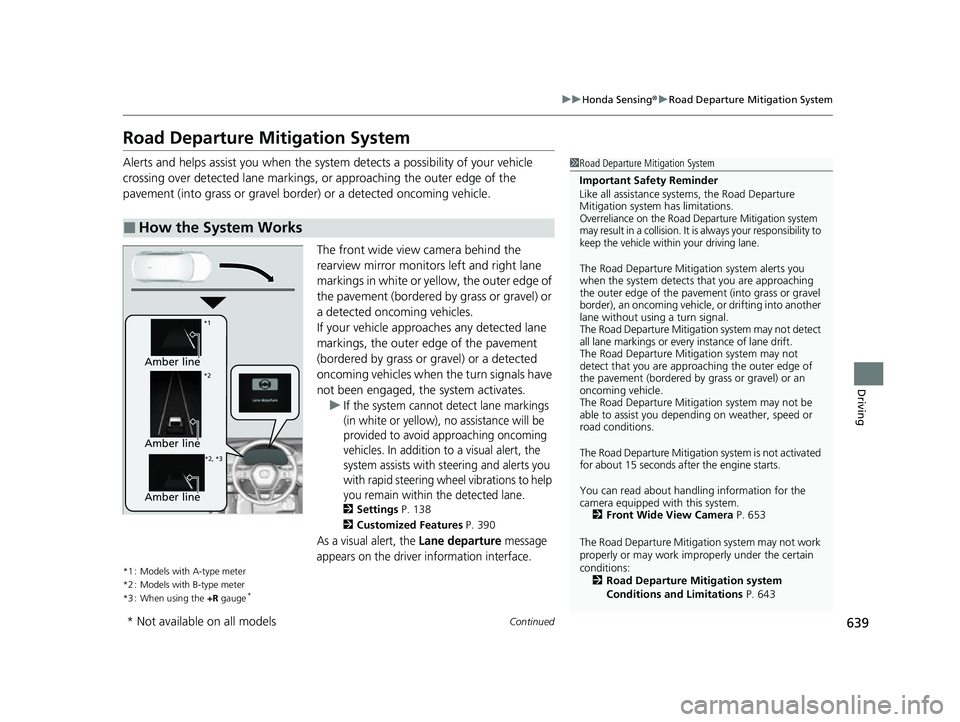
The front wide view camera behind the
rearview mirror monitors left and right lane
markings in white or yellow, the outer edge of
the pavement (bordered by grass or gravel) or
a detected oncoming vehicles.
If your vehicle approach es any detected lane
markings, the outer edge of the pavement
(bordered by grass or gravel) or a detected
oncoming vehicles when the turn signals have
not been engaged, the system activates. u
If the system cannot detect lane markings
(in white or yellow), no assistance will be
provided to avoid approaching oncoming
vehicles. In addition to a visual alert, the
system assists with steering and alerts you
with rapid steering wheel vibrations to help
you remain within the detected lane.
2 Settings P. 138
2 Customized Features P. 390
As a visual alert, the Lane departure message
appears on the driver information interface.
*1 : Models with A-type meter
*2 : Models with B-type meter
*3 : When using the +R gauge
*
■How the System Works
1Road Departure Mitigation System
Important Safety Reminder
Like all assistance systems, the Road Departure
Mitigation system has limitations.
Overreliance on the Road Departure Mitigation system
may result in a collision. It is always your responsibility to
keep the vehicle within your driving lane.
The Road Departure Mitiga tion system alerts you
when the system detects that you are approaching
the outer edge of the paveme nt (into grass or gravel
border), an oncoming vehicle, or drifting into another
lane without using a turn signal.
The Road Departure Mitigation system may not detect
all lane markings or ever y instance of lane drift.
The Road Departure Miti gation system may not
detect that you are approa ching the outer edge of
the pavement (bordered by grass or gravel) or an
oncoming vehicle.
The Road Departure Mitiga tion system may not be
able to assist you depend ing on weather, speed or
road conditions.
The Road Departure Mitigation system is not activated
for about 15 seconds af ter the engine starts.
You can read about handling information for the
camera equipped with this system. 2 Front Wide View Camera P. 653
The Road Departure Mitigati on system may not work
properly or may work im properly under the certain
conditions: 2 Road Departure Mitigation system
Conditions and Limitations P. 643
Amber line
*1
*2
*2, *3
Amber line
Amber line
* Not available on all models
23 CIVIC HATCHBACK TYPE R-31T406100_03.book 639 ページ 2022年6月23日 木曜日 午後9時28分
Page 642 of 840
uuHonda Sensing ®u Road Departure Mitigation System
640
Driving
The system cancels assisting operations when you turn th e steering wheel to avoid
crossing over detected lane markings or approaching the outer edge of the
pavement (into grass or gravel border) or an oncoming vehicle.
If the system operates several times without detecting driver response, the system
beeps to alert you.1 Road Departure Mitigation System
The Road Departure Miti gation system does not
function while VSA ® is completely disabled.
There are times when you may not notice the Road
Departure Mitigation system functions due to your
operation of the vehicle, or road surface conditions.
You can change the settin gs for the Road Departure
Mitigation system.
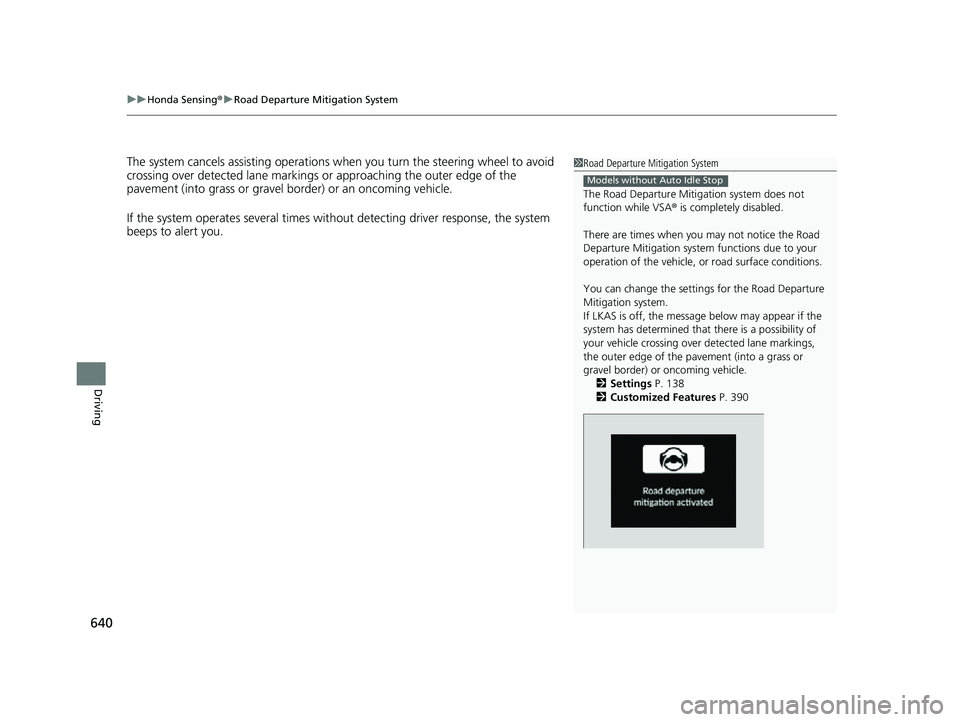
If LKAS is off, the message below may appear if the
system has determined that there is a possibility of
your vehicle crossing over detected lane markings,
the outer edge of the pavement (into a grass or
gravel border) or oncoming vehicle.
2 Settings P. 138
2 Customized Features P. 390
Models without Auto Idle Stop
23 CIVIC HATCHBACK TYPE R-31T406100_03.book 640 ページ 2022年6月23日 木曜日 午後9時28分
Page 742 of 840
uuChecking and Maintaining Tires uDOT Tire Quality Grading (U.S. Vehicles)
740
Maintenance
The traction grades, from highest to lowest, are AA, A, B, and C.
Those grades represent the tire's ability to stop on wet pavement
as measured under controlled conditions on specified
government test surfaces of asphalt and concrete. A tire marked
C may have poor traction performance.
The temperature grades are A (the highest), B, and C,
representing the tire's resistance to the generation of heat and its
ability to dissipate h eat when tested under controlled conditions
on a specified indoor laboratory test wheel. Sustained high
temperature can cause the material of the tire to degenerate and
reduce tire life, and excessive temp erature can lead to sudden tire
failure. The grade C corresponds to a level of performance which
all passenger car tires must meet under the Federal Motor Vehicle
Safety Standard No. 109. Grades B and A represent higher levels
of performance on the laboratory test wheel than the minimum
required by law.
■Traction
■Temperature
1 Traction
Warning: The traction grade
assigned to this tire is based on
straight-ahead braking traction tests,
and does not include acceleration,
cornering, hydroplaning, or peak
traction characteristics.
1Temperature
Warning: The temperature grade for
this tire is establishe d for a tire that is
properly inflated and not
overloaded. Excessive speed,
underinflation, or excessive loading,
either separately or in combination,
can cause heat buildup and possible
tire failure.
23 CIVIC HATCHBACK TYPE R-31T406100_03.book 740 ページ 2022年6月23日 木曜日 午後9時28分
Page 783 of 840
781Continued
Handling the Unexpected
Engine Does Not Start
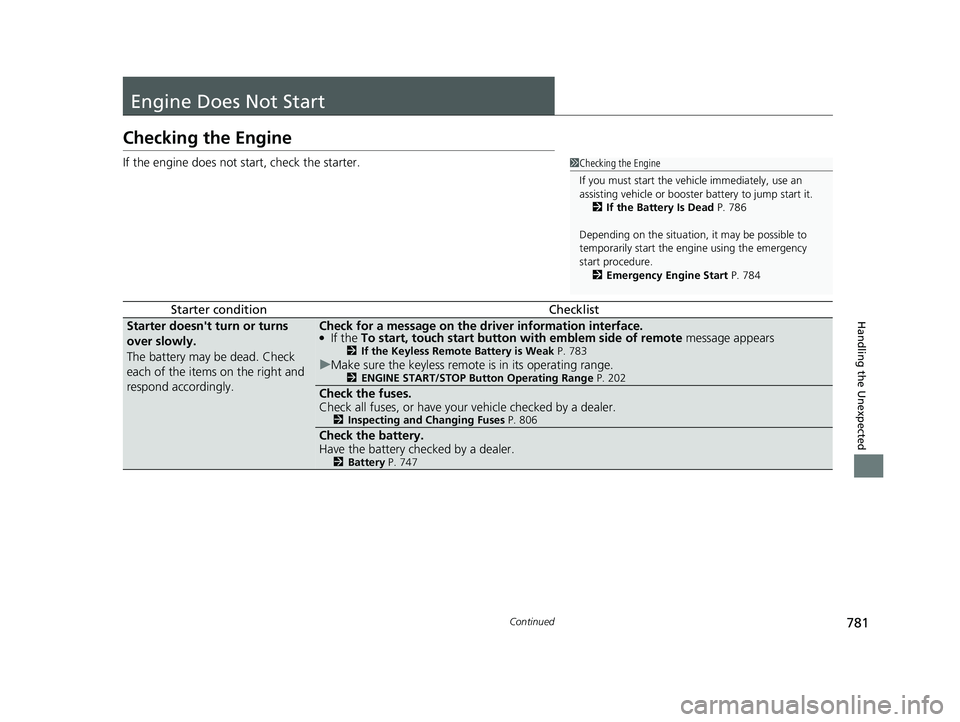
Checking the Engine
If the engine does not start, check the starter.
Starter conditionChecklist
Starter doesn't turn or turns
over slowly.
The battery may be dead. Check
each of the items on the right and
respond accordingly.Check for a message on the driver information interface.●If the To start, touch start button with emblem side of remote message appears2If the Keyless Remote Battery is Weak P. 783
uMake sure the keyless remote is in its operating range.2 ENGINE START/STOP Button Operating Range P. 202
Check the fuses.
Check all fuses, or have your vehicle checked by a dealer.
2Inspecting and Changing Fuses P. 806
Check the battery.
Have the battery checked by a dealer.
2Battery P. 747
1Checking the Engine
If you must start the vehi cle immediately, use an
assisting vehicle or booster battery to jump start it.
2 If the Battery Is Dead P. 786
Depending on the situation, it may be possible to
temporarily start the engine using the emergency
start procedure. 2 Emergency Engine Start P. 784
23 CIVIC HATCHBACK TYPE R-31T406100_03.book 781 ページ 2022年6月23日 木曜日 午後9時28分
Page 784 of 840
782
uuEngine Does Not Start uChecking the Engine
Handling the Unexpected
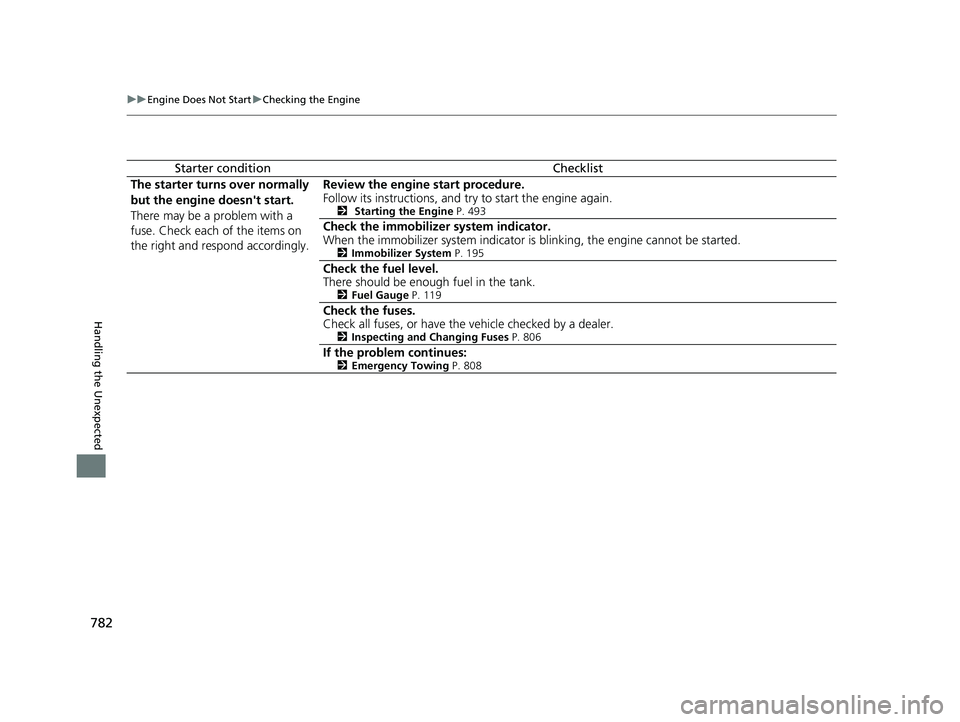
Starter conditionChecklist
The starter turns over normally
but the engine doesn't start.
There may be a problem with a
fuse. Check each of the items on
the right and resp ond accordingly. Review the engine start procedure.
Follow its instructions, and try to start the engine again.
2
Starting the Engine P. 493
Check the immobilizer system indicator.
When the immobilizer system indicator is blinking, the engine cannot be started.
2Immobilizer System P. 195
Check the fuel level.
There should be enough fuel in the tank.
2Fuel Gauge P. 119
Check the fuses.
Check all fuses, or have the vehicle checked by a dealer.
2Inspecting and Changing Fuses P. 806
If the problem continues:2Emergency Towing P. 808
23 CIVIC HATCHBACK TYPE R-31T406100_03.book 782 ページ 2022年6月23日 木曜日 午後9時28分