engine HONDA CIVIC 2023 Workshop Manual
[x] Cancel search | Manufacturer: HONDA, Model Year: 2023, Model line: CIVIC, Model: HONDA CIVIC 2023Pages: 840, PDF Size: 26.53 MB
Page 304 of 840
302
uuAudio System Basic Operation uSystem Updates
Features
System Updates
The audio system's firmware can be update d with a Wi-Fi connection, or with a USB
device.
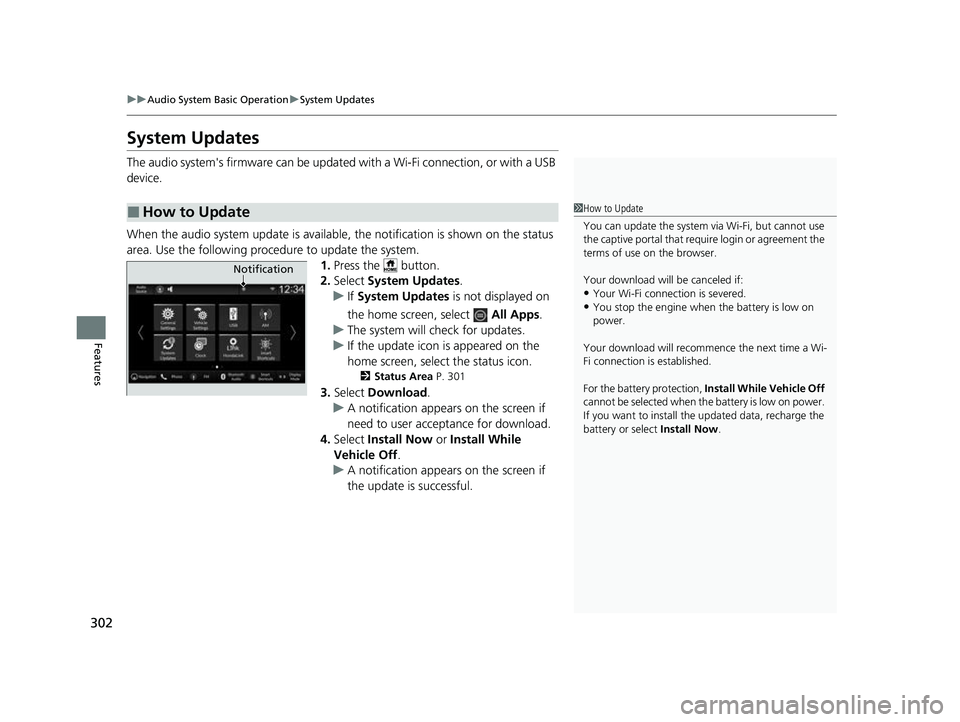
When the audio system update is available, the notification is shown on the status
area. Use the following proc edure to update the system.
1.Press the button.
2. Select System Updates .
u If System Updates is not displayed on
the home screen, select All Apps.
u The system will check for updates.
u If the update icon is appeared on the
home screen, select the status icon.
2 Status Area P. 301
3.Select Download .
u A notification appears on the screen if
need to user acceptance for download.
4. Select Install Now or Install While
Vehicle Off .
u A notification appears on the screen if
the update is successful.
■How to Update1How to Update
You can update the system vi a Wi-Fi, but cannot use
the captive portal that require login or agreement the
terms of use on the browser.
Your download will be canceled if:
•Your Wi-Fi connection is severed.
•You stop the engine when the battery is low on
power.
Your download will recommence the next time a Wi-
Fi connection is established.
For the battery protection, Install While Vehicle Off
cannot be selected when th e battery is low on power.
If you want to install the updated data, recharge the
battery or select Install Now.
Notification
23 CIVIC HATCHBACK TYPE R-31T406100_03.book 302 ページ 2022年6月23日 木曜日 午後9時28分
Page 367 of 840
365
uuGeneral Information on the Audio System uHonda App License Agreement
Continued
Features
(b) Restrictions on Use. The licenses granted under this AGREEMENT do not perm it you to use the SOFTWARE or SERVICES on a device
other than your VEHICLE. As a condition of using the SOFT WARE and SERVICES, you agree that you may not and will not:
6. Intellectual Property Rights. All title and intellectual property rights in and to the SOFTWARE and SERVICES, the accompanying
DOCUMENTATION, and all copies of the SOFTWARE or SERVICES are owned by HONDA, PROVIDERS, or their suppliers or licensors. This
AGREEMENT does not grant you any rights in connection with any trademarks or serv ice marks of HONDA, PROVIDERS, or their licensors,
affiliates, or suppliers. (1) copy, download, distribute, mo
dify, publish, sell, rent, lease, lend, license, sublicense, reuse, or create derivative work s of the
SOFTWARE or SERVICES or any of the content or other material within the SOFTWARE or SERVICES, including without limitation,
HONDA or PROVIDER names, logos, or any other trademarks of HONDA or PROVIDERS or used in association with the SOFTWARE or
any SERVICES, except as required to use the SOFTWARE or SERVICES in accordance with this AGREEMENT, any applicable PROVIDER
TERMS, and the DOCUMENTATION;
(2) access or use the SOFTWARE or SERVICES in any manner intended to damage or impair the operation of the SOFTWARE or SERVICES
or interfere with anyone else's use an d enjoyment of the SOFTWARE or SERVICES;
(3) access or attempt to access any system or server on which the SOFTWARE or SERVICES is hosted or modify or alter the SOFTWARE
or SERVICES in any way;
(4) use the SOFTWARE or SERVICES for any unlawful purpose, or in violation of any third party rights;
(5) use the SOFTWARE or SERVICES in violation of any applicable traffic regulations, rules or laws, including but not limited t o any driver
distraction laws, rules or regulations;
(6) violate the terms of this AGREEMENT, any HONDA TERMS, any PROVIDER TERMS or other applicable third-party terms, conditions,
and privacy policies; or
(7) reverse engineer, decomp ile, disassemble, attempt to derive the source code of, nor permit others to reverse engineer, deco mpile,
or disassemble, or attempt to derive the source code of the SOFT WARE or SERVICES, except and only to the extent that such activity is
expressly permitted (a) by applicable law no twithstanding this limitation or (b) the terms of applicable free or opensource sof tware
licenses.
23 CIVIC HATCHBACK TYPE R-31T406100_03.book 365 ページ 2022年6月23日 木曜日 午後9時28分
Page 371 of 840
369
uuGeneral Information on the Audio System uHonda App License Agreement
Continued
Features
E. Information Collection and Storage
1. Information Collection , Use, Transmission and Storage of Data. Consent to Use of Data:
You agree that HONDA and PROVIDERS may
collect and use your information gathered in any manner as part of product support services related to the SOFTWARE or related services.
HONDA may share such information with third parties, including, without limitation, PR OVIDERS, third party software and services
suppliers, their affiliates and/or their designated agents, solely to improve their products or to provide services or technolo gies to you.
HONDA, third party software and syst ems suppliers, their affiliates and/or their de signated agent may disclose this information to others,
but not in a form that pe rsonally identifies you.
2. Information Storage.
Depending on the type of mult imedia system you have in your VEHICLE, certain information may be stored for ease
of use of the SOFTWARE including, without limitation, search hi story, location history in certain applications, previous and saved
destinations, map locations within certain applications, and device numbers and contact information.
(a) Vehicle Health Information.
Your VEHICLE may remotely transmit information re garding the status and health of your VEHICLE
(“VEHICLE INFORMATION”) to HONDA without notification to you. VEHICLE INFORMATION may contain VEHICLE maintenance and
malfunction status that is derived from VEHICLE diagnostic data and includes, but is not limited to, status of powered doors and windows,
battery life data, battery charging data, VE HICLE speed, coolant temperature, air comp ressor revolution, output power, warning codes,
diagnostic trouble codes, fuel injection volume, and engine rotati ons per minute. VEHICLE HEALTH INFORMATION may be used by HON DA
for research and development, to deliver HONDA SERVICES and informat ion to you, and to contact you, and is retained only for a period
of time necessary to fulfill these goals.
(b) VEHICLE Geolocation Data (non-navigation/map based).
If you opt-in to geolocation-based SERVICES, your vehicle's geolocation data
(latitude and longitude) will be automatically sent from your VEHICLE to HONDA and PROVIDERS.
(c) You understand that the inputting or uploading of information to your VEHICLE's multimedia system or the SOFTWARE or SERVIC ES is
at your own risk and that HONDA is not responsible for unauthori zed access to or use of any personal or other information. All information
uploaded to the SOFTWARE and SERVICES may be stored on your VEHICLES's multimedia system and you understand that the security and
safety of your VEHICLE's multimedia system is your sole responsibility.
23 CIVIC HATCHBACK TYPE R-31T406100_03.book 369 ページ 2022年6月23日 木曜日 午後9時28分
Page 407 of 840
405
uuCustomized Features u
Continued
Features
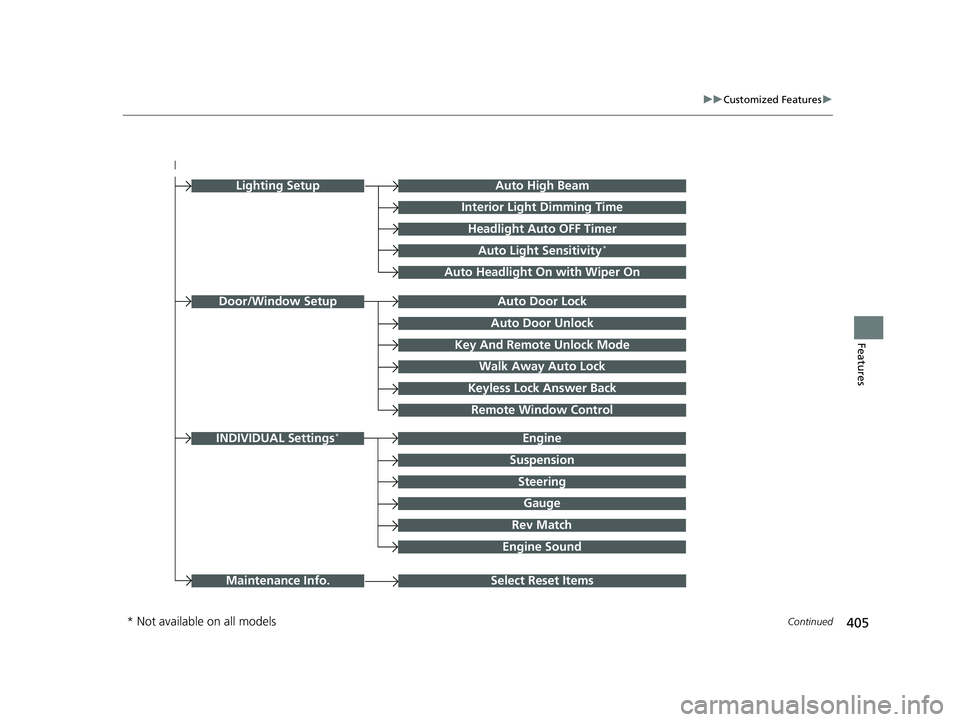
Auto Door Unlock
Auto Door Lock
Key And Remote Unlock Mode
Walk Away Auto Lock
Keyless Lock Answer Back
Door/Window Setup
Lighting SetupAuto High Beam
Interior Light Dimming Time
Headlight Auto OFF Timer
Auto Light Sensitivity*
Auto Headlight On with Wiper On
Remote Window Control
Select Reset ItemsMaintenance Info.
Suspension
Engine
Steering
Gauge
Rev Match
INDIVIDUAL Settings*
Engine Sound
* Not available on all models
23 CIVIC HATCHBACK TYPE R-31T406100_03.book 405 ページ 2022年6月23日 木曜日 午後9時28分
Page 411 of 840
409
uuCustomized Features u
Continued
Features*1:Default Setting
■Keyless Access Setup
*1:Default Setting
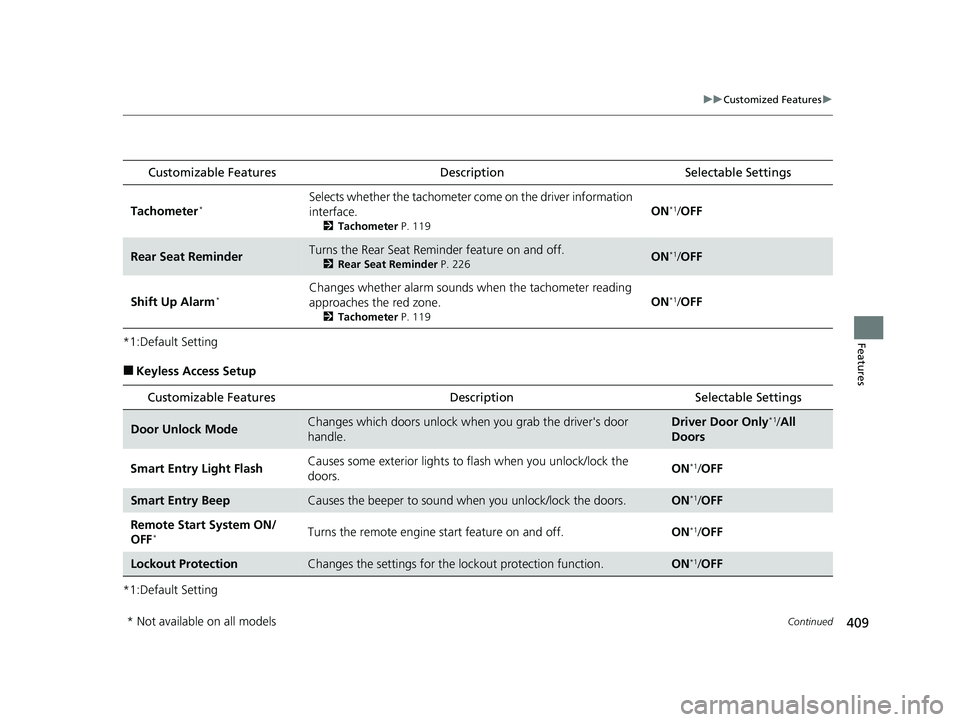
Customizable Features DescriptionSelectable Settings
Tachometer*Selects whether the tachometer come on the driver information
interface.
2 Tachometer P. 119
ON*1/OFF
Rear Seat ReminderTurns the Rear Seat Reminder feature on and off.
2 Rear Seat Reminder P. 226ON*1/OFF
Shift Up Alarm*Changes whether alarm sounds when the tachometer reading
approaches the red zone.
2 Tachometer P. 119
ON*1/OFF
Customizable Features Description Selectable Settings
Door Unlock ModeChanges which doors unlock when you grab the driver's door
handle.Driver Door Only*1/All
Doors
Smart Entry Light Flash Causes some exterior lights to
flash when you unlock/lock the
doors. ON
*1/
OFF
Smart Entry BeepCauses the beeper to sound wh en you unlock/lock the doors.ON*1/OFF
Remote Start System ON/
OFF
*Turns the remote engine start feature on and off. ON*1/OFF
Lockout ProtectionChanges the settings for the lo ckout protection function.ON*1/OFF
* Not available on all models
23 CIVIC HATCHBACK TYPE R-31T406100_03.book 409 ページ 2022年6月23日 木曜日 午後9時28分
Page 414 of 840
412
uuCustomized Features u
Features
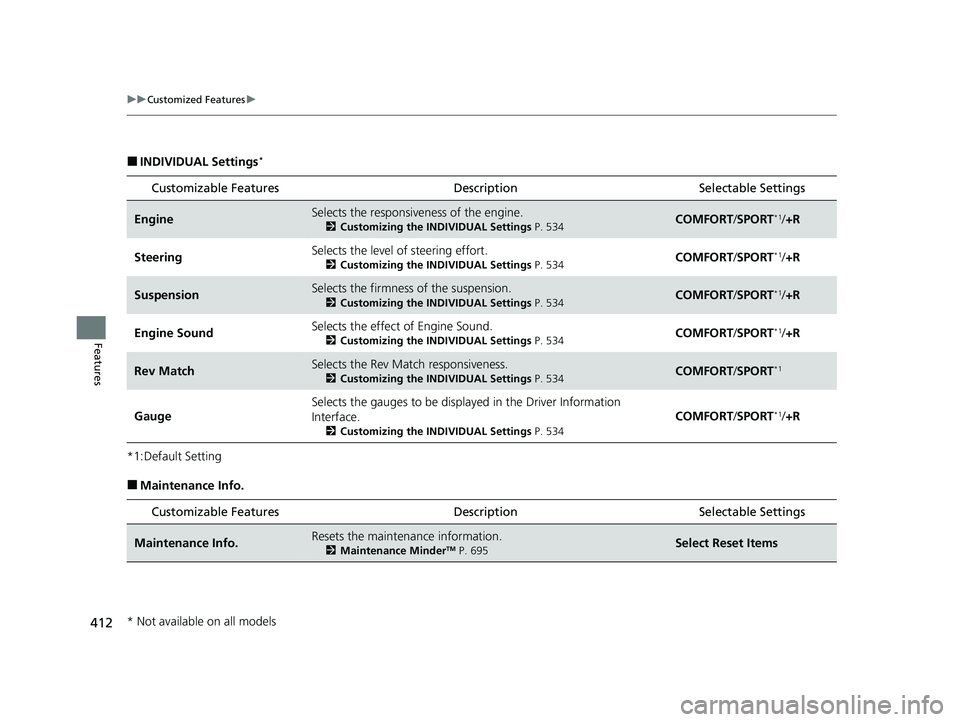
■INDIVIDUAL Settings*
*1:Default Setting
■Maintenance Info.Customizable Features Description Selectable Settings
EngineSelects the responsive
ness of the engine.
2Customizing the INDIVIDUAL Settings P. 534COMFORT/SPORT*1/ +R
SteeringSelects the level of steering effort.
2 Customizing the INDIVIDUAL Settings P. 534COMFORT/SPORT*1/ +R
SuspensionSelects the firmness of the suspension.
2 Customizing the INDIVIDUAL Settings P. 534COMFORT/SPORT*1/ +R
Engine SoundSelects the effect of Engine Sound.
2 Customizing the INDIVIDUAL Settings P. 534COMFORT/SPORT*1/ +R
Rev MatchSelects the Rev Match responsiveness.
2 Customizing the INDIVIDUAL Settings P. 534COMFORT/SPORT*1
Gauge
Selects the gauges to be displa yed in the Driver Information
Interface.
2 Customizing the INDIVIDUAL Settings P. 534
COMFORT/SPORT*1/ +R
Customizable Features Description Selectable Settings
Maintenance Info.Resets the maintenance information.
2 Maintenance MinderTM P. 695Select Reset Items
* Not available on all models
23 CIVIC HATCHBACK TYPE R-31T406100_03.book 412 ページ 2022年6月23日 木曜日 午後9時28分
Page 416 of 840
414
Features
Honda LogR*
About Honda LogR
Monitors driving conditions, and lets you record them. By checking the recorded
data on the audio/information screen or uploading it to a server, you can compare it
with other users' data.
Honda LogR has two modes:
• Auto Score Mode
Evaluates driving performance in everyday situations.
2Auto Score Mode P. 418
•Data Log Mode
Allows you to record and anal yze your track driving data.
2Data Log Mode P. 425
Refer to the commentary in the customiz e menu for more details on each mode.
2Settings P. 437
1Honda LogR*
When selling or transferri ng ownership of a vehicle,
the customer is responsible for initializing the system.
If user consent cannot be given, do not use the app.
2 Settings P. 437
When the telematics control unit (TCU) is not
available, use Honda LogR through Wi-Fi.
Some features cannot be used while driving.
Some features cannot in teract with the maps
function.
After starting the engine, l ogs may not be recorded
for a certain amount of time.
Depending on driving condi tions or connection
status, some features may not be available.
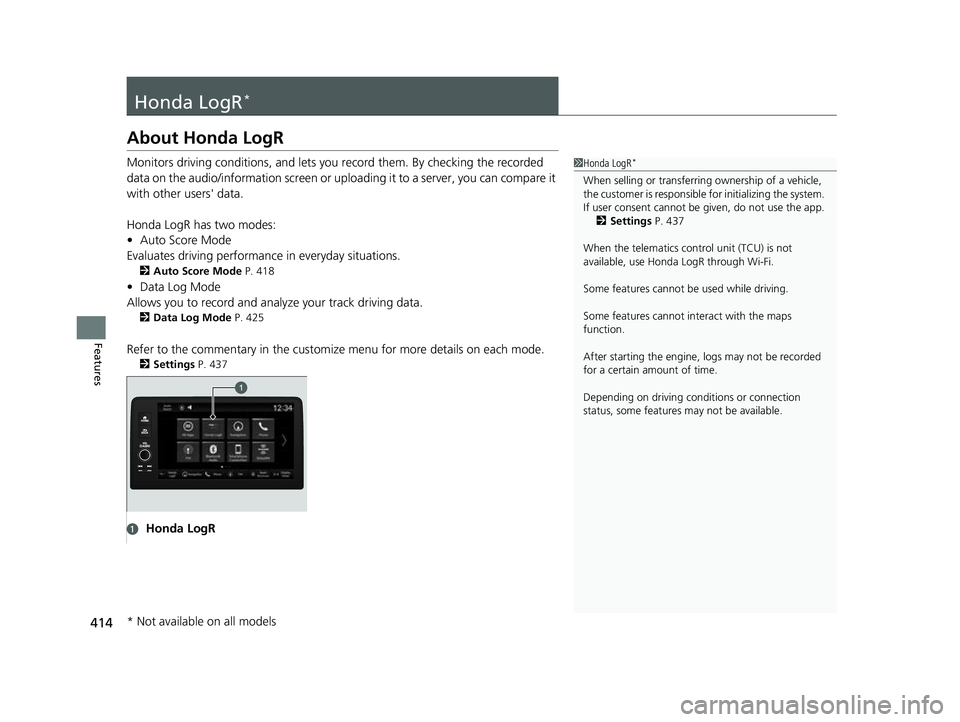
aHonda LogR
* Not available on all models
23 CIVIC HATCHBACK TYPE R-31T406100_03.book 414 ページ 2022年6月23日 木曜日 午後9時28分
Page 487 of 840
485
Driving
This chapter discusses driving and refueling.
Before Driving................................... 486
Towing a Trailer ................................ 492
When Driving Starting the Engine .......................... 493
Precautions While Driving................. 500
Continuously Variable Transmission*... 502
Shifting ............................ 503 , 505, 509
ECON Button*................................. 513
Auto Idle Stop .......................... 514 , 520
Drive Mode Switch
*................. 525 , 529
Vehicle Stability AssistTM (VSA®), aka Electronic
Stability Control (ESC), System .............. 535
Agile Handling Assist ....................... 538
Limited Slip Differential (LSD)*......... 539Tire Pressure Monitoring System (TPMS)*. 540Tire Pressure Monitoring System (TPMS) - Required Federal Explanation*....... 545
Blind Spot Information System*....... 547
Honda Sensing ®................................ 551
Collision Mitigati on Braking System
TM
(CMBSTM) ....................................... 555
Low Speed Braking Control*.... 567, 573
Adaptive Cruise Control (ACC) with Low
Speed Follow
*............................... 578
Adaptive Cruise Control (ACC)*....... 598 Lane Keeping Assist System (LKAS) .. 618
Traffic Jam Assist
*........................... 630
Road Departure Miti gation System... 639
Traffic Sign Recognition System ....... 647
Front Wide View Camera ................. 653
Sonar Sensors
*................................ 655
Braking .............................................. 657
Parking Your Vehicle ........................ 669
Multi-View Rear Camera .................. 681
Refueling ........................................... 683
Fuel Economy and CO
2 Emissions .... 689
Turbo Engine Vehicle*...................... 690
* Not available on all models
23 CIVIC HATCHBACK TYPE R-31T406100_03.book 485 ページ 2022年6月23日 木曜日 午後9時28分
Page 488 of 840
486
Driving
Before Driving
Driving Preparation
Check the following items before you start driving.
• Make sure there are no obstructions on th e windows, door mirrors, exterior
lights, or other parts of the vehicle.
u Remove any frost, snow, or ice.
u Remove any snow on the roof, as this can slip down and obstruct your field of
vision while driving. If frozen solid , remove ice once it has softened.
u When removing ice from around the wheel s, be sure not to damage the wheel
or wheel components.
• Make sure the hood is securely closed.
u If the hood opens while driving, your front view will be blocked.
• Make sure the tires are in good condition.
u Check air pressures, and check for damage and excessive wear.
2Checking and Maintaining Tires P. 736
•Make sure there are no people or ob jects behind or around the vehicle.
u There are blind spots from the inside.
• Check the front bumper ducts for mud, le aves, and road debris that could build
up and prevent proper cooling performance.
■Exterior Checks1 Exterior Checks
NOTICE
When doors are frozen s hut, use warm water around
the door edges to melt any ice. Do not try to force
them open, as this can damage the rubber trim
around the doors. When done, wipe dry to avoid
further freezing.
Do not pour warm water into the key cylinder.
You will be unable to insert the key if the water
freezes in the hole.
Heat from the engine and exhaust can ignite
flammable material s left under the hood, causing a
fire. If you've parked y our vehicle for an extended
period, inspect and remove any debris that may have
collected, such as dried grass and leaves that have
fallen or have been carried in for use as a nest by a
small animal. Also, check under the hood for leftover
flammable materials after you or someone else has
performed maintenance on your vehicle.
Models without Auto Idle Stop
23 CIVIC HATCHBACK TYPE R-31T406100_03.book 486 ページ 2022年6月23日 木曜日 午後9時28分
Page 495 of 840
493Continued
Driving
When Driving
Starting the Engine
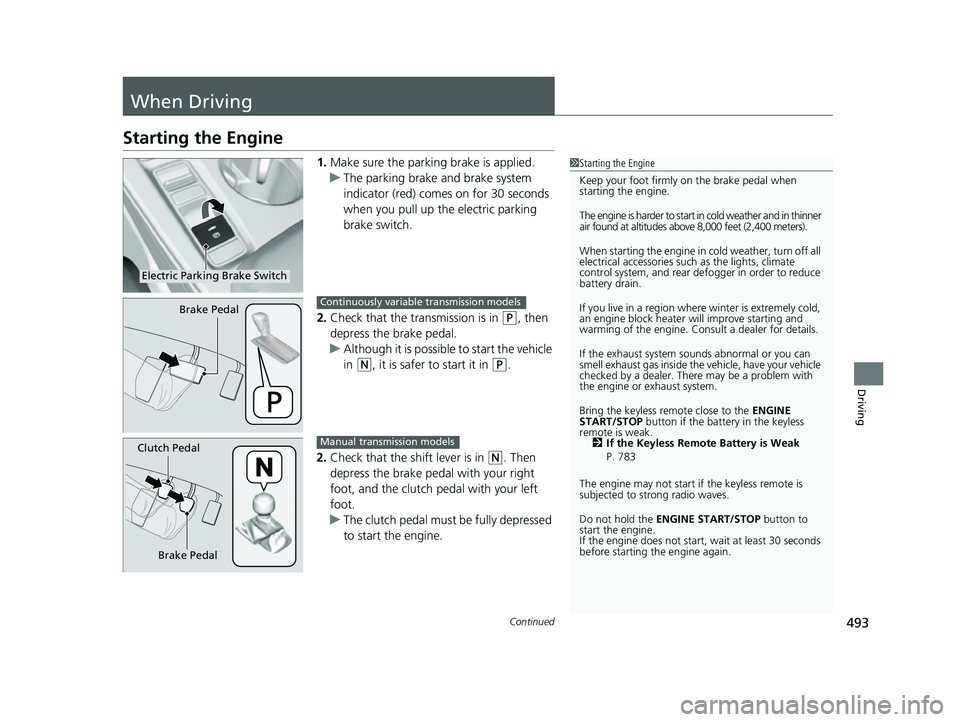
1.Make sure the parkin g brake is applied.
u The parking brake and brake system
indicator (red) comes on for 30 seconds
when you pull up the electric parking
brake switch.
2. Check that the transmission is in
(P, then
depress the brake pedal.
u Although it is possible to start the vehicle
in
(N, it is safer to start it in (P.
2. Check that the shift lever is in
(N. Then
depress the brake pedal with your right
foot, and the clutch pedal with your left
foot.
u The clutch pedal must be fully depressed
to start the engine.
1Starting the Engine
Keep your foot firmly on the brake pedal when
starting the engine.
The engine is harder to start in cold weather and in thinner
air found at altitudes above 8,000 feet (2,400 meters).
When starting the engine in cold weather, turn off all
electrical accessories such as the lights, climate
control system, and rear de fogger in order to reduce
battery drain.
If you live in a region where winter is extremely cold,
an engine block heater will improve starting and
warming of the engine. Cons ult a dealer for details.
If the exhaust system sounds abnormal or you can
smell exhaust gas inside the vehicle, have your vehicle
checked by a dealer. There may be a problem with
the engine or exhaust system.
Bring the keyless remote close to the ENGINE
START/STOP button if the batte ry in the keyless
remote is weak. 2 If the Keyless Remote Battery is Weak
P. 783
The engine may not start if the keyless remote is
subjected to strong radio waves.
Do not hold the ENGINE START/STOP button to
start the engine.
If the engine does not start, wait at least 30 seconds
before starting the engine again.
Electric Parking Brake Switch
Brake PedalContinuously variable transmission models
Brake Pedal
Clutch PedalManual transmission models
23 CIVIC HATCHBACK TYPE R-31T406100_03.book 493 ページ 2022年6月23日 木曜日 午後9時28分