steering HONDA CIVIC 2023 Manual Online
[x] Cancel search | Manufacturer: HONDA, Model Year: 2023, Model line: CIVIC, Model: HONDA CIVIC 2023Pages: 840, PDF Size: 26.53 MB
Page 601 of 840
Continued599
uuHonda Sensing ®u Adaptive Cruise Control (ACC)*
Driving
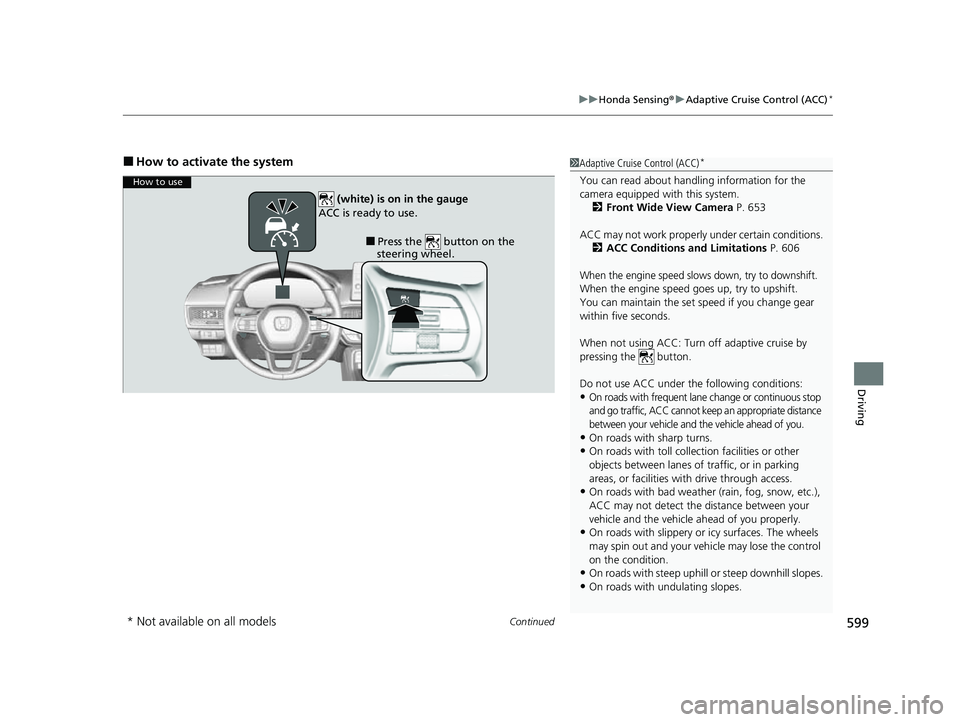
■How to activate the system1Adaptive Cruise Control (ACC)*
You can read about handling information for the
camera equipped with this system.
2 Front Wide View Camera P. 653
ACC may not work properly under certain conditions.
2 ACC Conditions and Limitations P. 606
When the engine speed slows down, try to downshift.
When the engine speed goes up, try to upshift.
You can maintain the set speed if you change gear
within five seconds.
When not using ACC: Turn off adaptive cruise by
pressing the button.
Do not use ACC under the following conditions:
•On roads with frequent lane change or continuous stop
and go traffic, ACC cannot keep an appropriate distance
between your vehicle and the vehicle ahead of you.
•On roads with sharp turns.•On roads with toll collection facilities or other
objects between lanes of traffic, or in parking
areas, or faci lities with driv e through access.
•On roads with bad weather (rain, fog, snow, etc.),
ACC may not detect the distance between your
vehicle and the vehicle ahead of you properly.
•On roads with slippery or icy surfaces. The wheels
may spin out and your vehi cle may lose the control
on the condition.
•On roads with steep uphill or steep downhill slopes.
•On roads with undulating slopes.
How to use
■Press the button on the
steering wheel.
(white) is on in the gauge
ACC is ready to use.
* Not available on all models
23 CIVIC HATCHBACK TYPE R-31T406100_03.book 599 ページ 2022年6月23日 木曜日 午後9時28分
Page 603 of 840
601
uuHonda Sensing ®u Adaptive Cruise Control (ACC)*
Continued
Driving
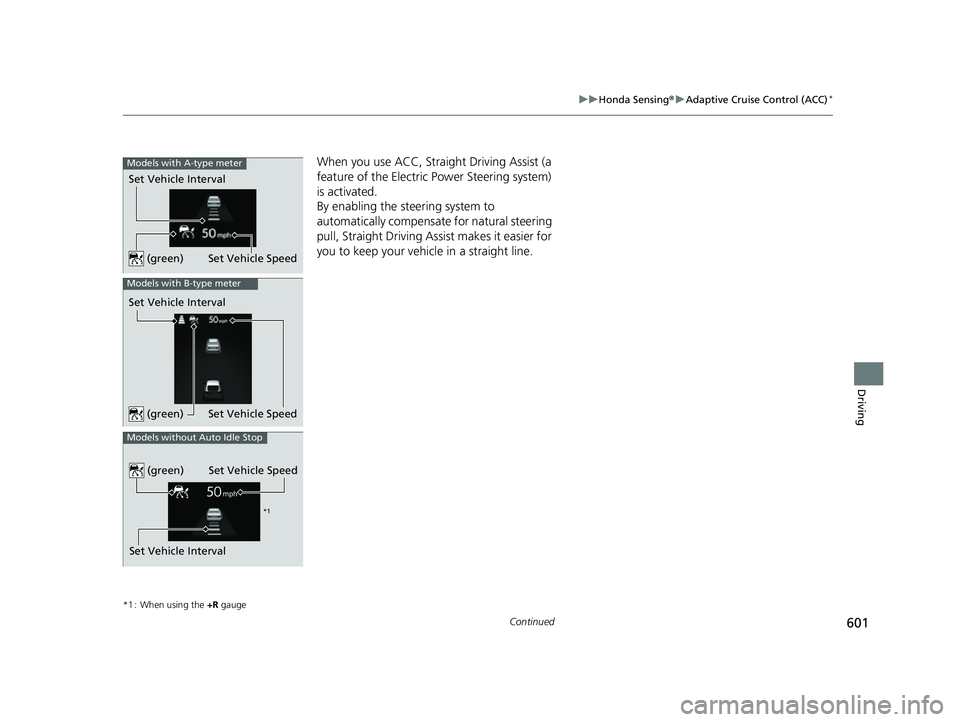
When you use ACC, Straight Driving Assist (a
feature of the Electric Power Steering system)
is activated.
By enabling the steering system to
automatically compensate for natural steering
pull, Straight Driving Assist makes it easier for
you to keep your vehicle in a straight line.
*1 : When using the +R gauge
Set Vehicle Speed
Set Vehicle Interval
Models with A-type meter
(green)
Models with B-type meter
Set Vehicle Interval
Set Vehicle Speed
(green)
Set Vehicle Interval
Models without Auto Idle Stop
Set Vehicle Speed
(green)
*1
23 CIVIC HATCHBACK TYPE R-31T406100_03.book 601 ページ 2022年6月23日 木曜日 午後9時28分
Page 612 of 840
uuHonda Sensing ®u Adaptive Cruise Control (ACC)*
610
Driving
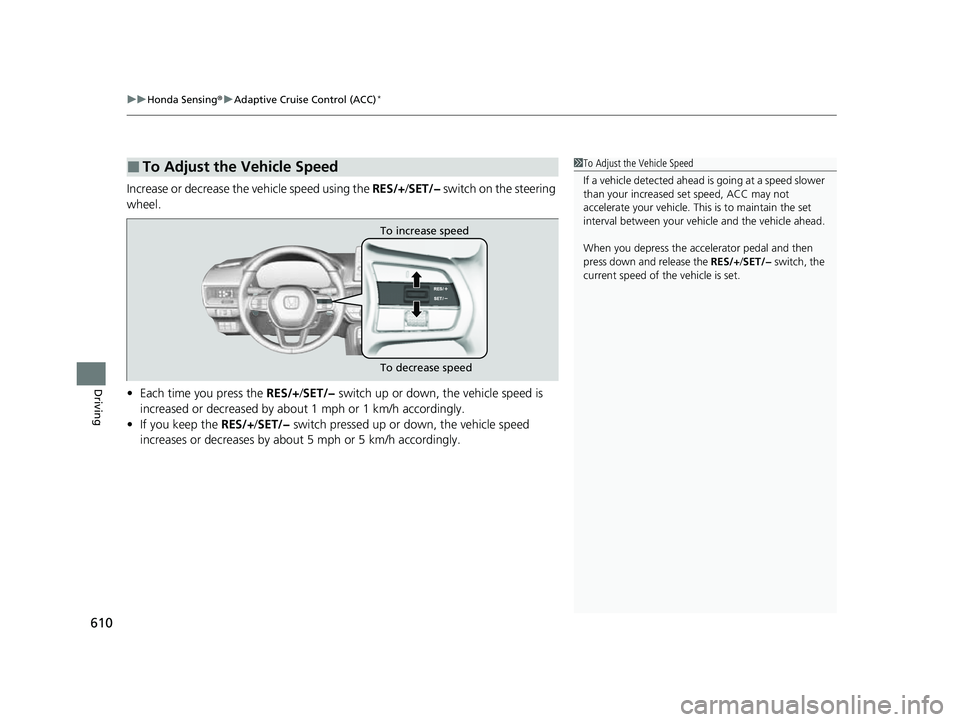
Increase or decrease the vehicle speed using the RES/+/SET/− switch on the steering
wheel.
• Each time you press the RES/+ /SET/− switch up or down, the vehicle speed is
increased or decreased by about 1 mph or 1 km/h accordingly.
• If you keep the RES/+/SET/− switch pressed up or down, the vehicle speed
increases or decreases by about 5 mph or 5 km/h accordingly.
■To Adjust the Vehicle Speed1 To Adjust the Vehicle Speed
If a vehicle detected ahead is going at a speed slower
than your increased set speed, ACC may not
accelerate your vehicle. This is to maintain the set
interval between your vehi cle and the vehicle ahead.
When you depress the accelerator pedal and then
press down and release the RES/+/SET/− switch, the
current speed of the vehicle is set.
To increase speed
To decrease speed
23 CIVIC HATCHBACK TYPE R-31T406100_03.book 610 ページ 2022年6月23日 木曜日 午後9時28分
Page 616 of 840
uuHonda Sensing ®u Adaptive Cruise Control (ACC)*
614
Driving
■Automatic cancellation
The beeper sounds and a message appears on the driver information interface when
ACC is automatically canceled. Any of these conditions may cause the ACC to
automatically cancel:
• Bad weather (rain, fog, snow, etc.)
• The vehicle ahead of you cannot be detected.
• An abnormal tire condition is detected, or the tires are skidding.
• Driving on a mountainous road for extended periods, or driving off road.
• Abrupt steering wheel movement.
• When the ABS, VSA ®, CMBS
TM, or Low Speed Braking Control* is activated.
• When the VSA ® system indicator comes on.
• When you manually apply the parking brake.
• When vehicle speed is less than 22 mph (35 km/h).
• Water is sprayed by or snow blown from a vehicle ahead.
• Driving into low sunlight (e.g., at dawn or dusk).
• When the detected vehicle within the ACC range is too close to your vehicle.
• When accelerating rapidly.
• The front of the camera is covered by dirt, fog, rain, mud, wet snow, seals,
accessories, stickers, or film on the windshield.
• The engine is turned off.
• The vehicle is loaded heavy load in the cargo area or rear seats.
• When passing through a dark place, such as tunnel.
• When the parking brake and brake system indicator (amber) comes on.
• The vehicle has repeatedly applied the brakes to maintain the set speed (for
example, you are descending a long slope).
• When the system doesn't detect any driv ing actions from the driver for a certain
amount of time while the LKAS is also activated.
• Ignoring shift down indication shown in the gauge will cancel the ACC after
about 10 seconds.
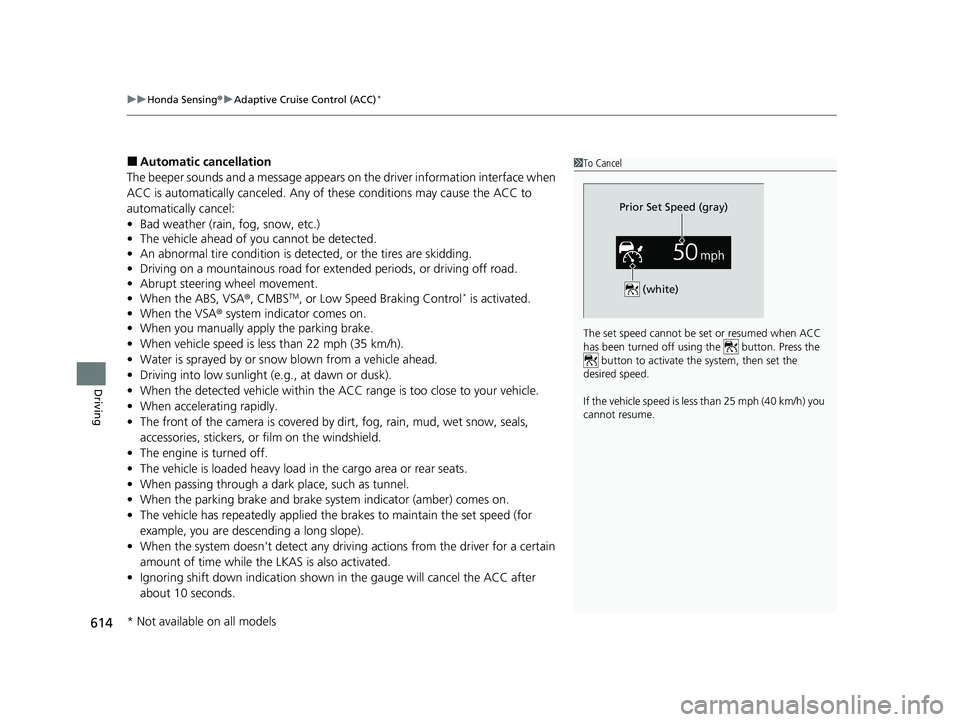
1To Cancel
The set speed cannot be set or resumed when ACC
has been turned off usi ng the button. Press the
button to activate the system, then set the
desired speed.
If the vehicle speed is less than 25 mph (40 km/h) you
cannot resume.
Prior Set Speed (gray)
(white)
* Not available on all models
23 CIVIC HATCHBACK TYPE R-31T406100_03.book 614 ページ 2022年6月23日 木曜日 午後9時28分
Page 618 of 840
uuHonda Sensing ®u Adaptive Cruise Control (ACC)*
616
Driving
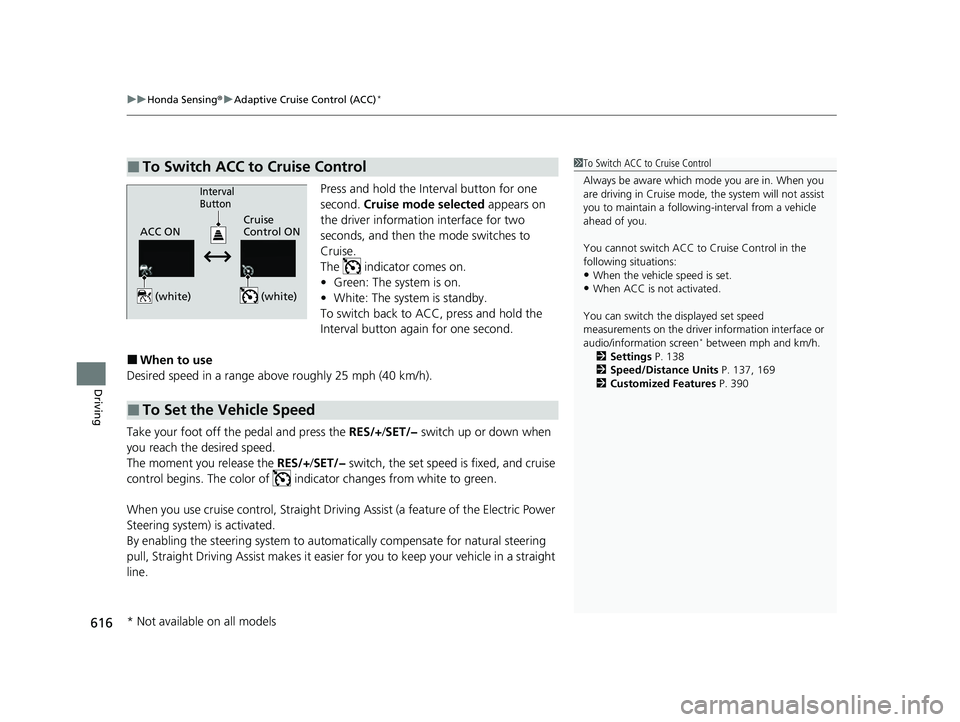
Press and hold the Interval button for one
second. Cruise mode selected appears on
the driver information interface for two
seconds, and then the mode switches to
Cruise.
The indicator comes on.
• Green: The system is on.
• White: The system is standby.
To switch back to ACC, press and hold the
Interval button again for one second.
■When to use
Desired speed in a range above roughly 25 mph (40 km/h).
Take your foot off the pedal and press the RES/+/SET/− switch up or down when
you reach the desired speed.
The moment you release the RES/+/SET/− switch, the set speed is fixed, and cruise
control begins. The color of indicator changes from white to green.
When you use cruise control, Straight Driv ing Assist (a feature of the Electric Power
Steering system) is activated.
By enabling the steering system to automa tically compensate for natural steering
pull, Straight Driving Assist makes it easier for you to keep your vehicle in a straight
line.
■To Switch ACC to Cruise Control1 To Switch ACC to Cruise Control
Always be aware which mode you are in. When you
are driving in Cruise mode, the system will not assist
you to maintain a following-interval from a vehicle
ahead of you.
You cannot switch ACC to Cruise Control in the
following situations:
•When the vehicle speed is set.
•When ACC is not activated.
You can switch the displayed set speed
measurements on the driver information interface or
audio/information screen
* between mph and km/h.
2 Settings P. 138
2 Speed/Distance Units P. 137, 169
2 Customized Features P. 390
ACC ONCruise
Control ON
Interval
Button
(white) (white)
■To Set the Vehicle Speed
* Not available on all models
23 CIVIC HATCHBACK TYPE R-31T406100_03.book 616 ページ 2022年6月23日 木曜日 午後9時28分
Page 620 of 840
618
uuHonda Sensing ®u Lane Keeping Assist System (LKAS)
Driving
Lane Keeping Assist System (LKAS)
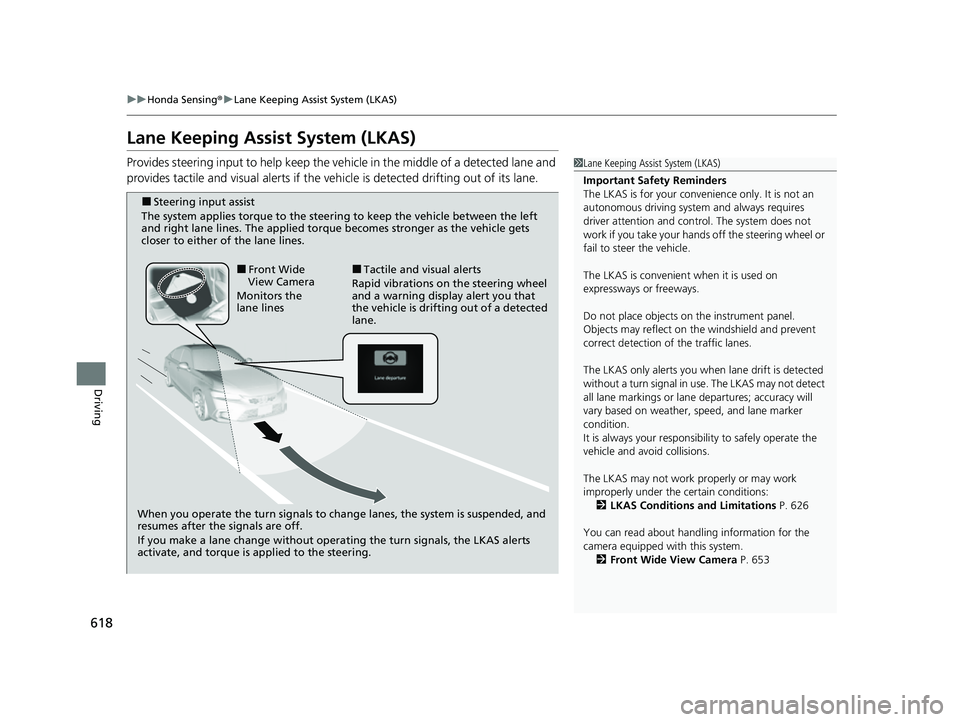
Provides steering input to help keep the vehicle in the middle of a detected lane and
provides tactile and visual alerts if the ve hicle is detected drifting out of its lane.1Lane Keeping Assist System (LKAS)
Important Safety Reminders
The LKAS is for your convenience only. It is not an
autonomous driving system and always requires
driver attention and control. The system does not
work if you take your hands off the steering wheel or
fail to steer the vehicle.
The LKAS is convenient when it is used on
expressways or freeways.
Do not place objects on the instrument panel.
Objects may reflect on th e windshield and prevent
correct detection of the traffic lanes.
The LKAS only alerts you when lane drift is detected
without a turn signal in use. The LKAS may not detect
all lane markings or lane departures; accuracy will
vary based on weather, speed, and lane marker
condition.
It is always your responsibility to safely operate the
vehicle and avoid collisions.
The LKAS may not work properly or may work
improperly under the certain conditions:
2 LKAS Conditions and Limitations P. 626
You can read about handling information for the
camera equipped with this system. 2 Front Wide View Camera P. 653
When you operate the turn signals to chan ge lanes, the system is suspended, and
resumes after the signals are off.
If you make a lane change without operating the turn signals, the LKAS alerts
activate, and torque is applied to the steering.
■Front Wide
View Camera
Monitors the
lane lines■Tactile and visual alerts
Rapid vibrations on the steering wheel
and a warning display alert you that
the vehicle is drifting out of a detected
lane.
■Steering input assist
The system applies torque to the steering to keep the vehicle between the left
and right lane lines. The applied torque becomes stronger as the vehicle gets
closer to either of the lane lines.
23 CIVIC HATCHBACK TYPE R-31T406100_03.book 618 ページ 2022年6月23日 木曜日 午後9時28分
Page 621 of 840
Continued619
uuHonda Sensing ®u Lane Keeping Assist System (LKAS)
Driving
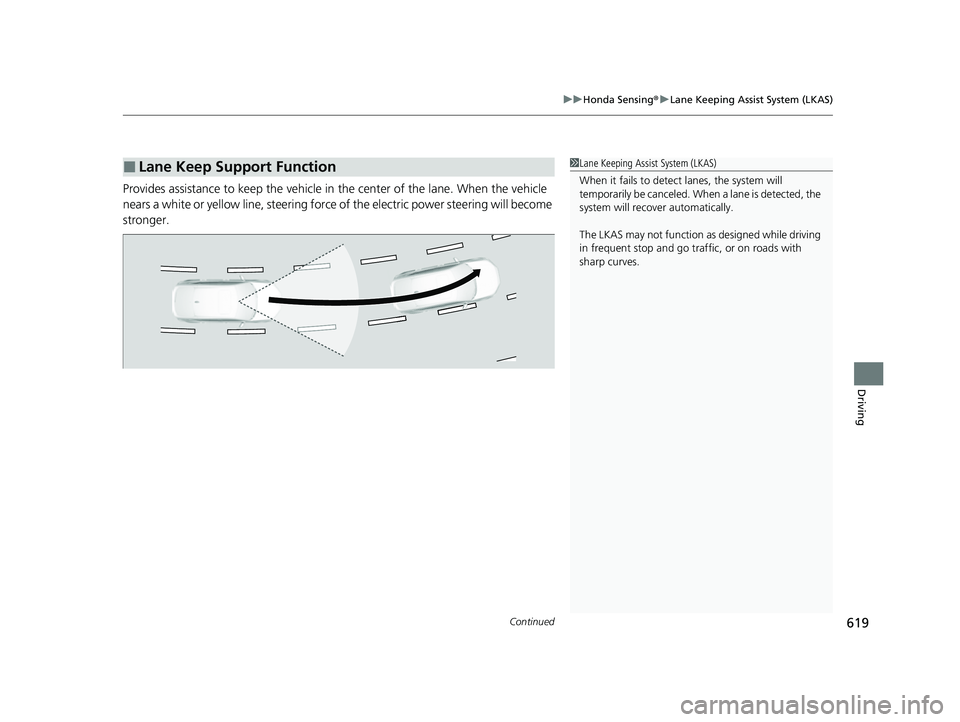
Provides assistance to keep the vehicle in the center of the lane. When the vehicle
nears a white or yellow line, steering force of the electric power steering will become
stronger.
■Lane Keep Support Function1 Lane Keeping Assist System (LKAS)
When it fails to detect lanes, the system will
temporarily be canceled. When a lane is detected, the
system will recover automatically.
The LKAS may not function as designed while driving
in frequent stop and go traf fic, or on roads with
sharp curves.
23 CIVIC HATCHBACK TYPE R-31T406100_03.book 619 ページ 2022年6月23日 木曜日 午後9時28分
Page 622 of 840
620
uuHonda Sensing ®u Lane Keeping Assist System (LKAS)
Driving
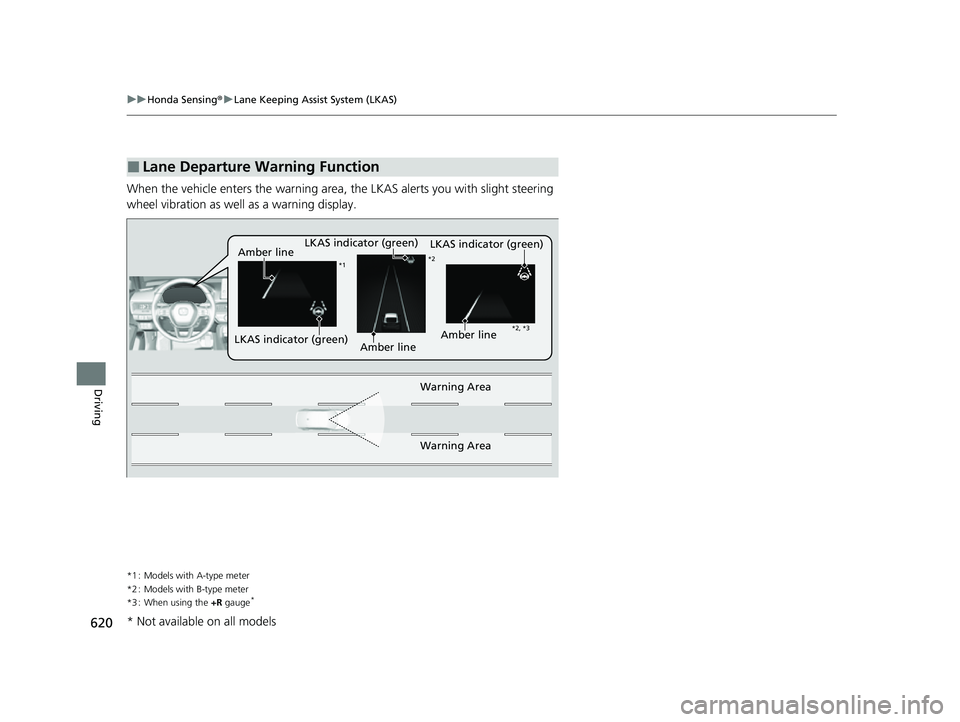
When the vehicle enters the warning area, the LKAS alerts you with slight steering
wheel vibration as well as a warning display.
*1 : Models with A-type meter
*2 : Models with B-type meter
*3 : When using the +R gauge
*
■Lane Departure Warning Function
LKAS indicator (green)
Amber line
Warning Area
Warning Area
*1 *2
*2, *3
Amber lineLKAS indicator (green)
LKAS indicator (green)Amber line
* Not available on all models
23 CIVIC HATCHBACK TYPE R-31T406100_03.book 620 ページ 2022年6月23日 木曜日 午後9時28分
Page 627 of 840
625
uuHonda Sensing ®u Lane Keeping Assist System (LKAS)
Continued
Driving
■The LKAS may be automatically suspended when:
• The system fails to detect lane lines.
• The steering wheel is turned quickly.
• You fail to steer the vehicle.
• Driving through a sharp curve.
• Driving at a speed in excess of approximately 94 mph (150 km/h).
Once these conditions no longer exist, the LKAS automatically resumes.
■The LKAS may be automatically canceled when:
In the following cases, traffic lane lines may disappear on the gauge, the beeper may
sound, and the LKAS may au tomatically be canceled:
• The camera temperature gets extremely high.
• The camera behind the rearview mirror, or the area around the camera, including
the windshield, gets dirty.
• The ABS or VSA ® system engages.
23 CIVIC HATCHBACK TYPE R-31T406100_03.book 625 ページ 2022年6月23日 木曜日 午後9時28分
Page 632 of 840
630
uuHonda Sensing ®u Traffic Jam Assist*
Driving
Traffic Jam Assist*
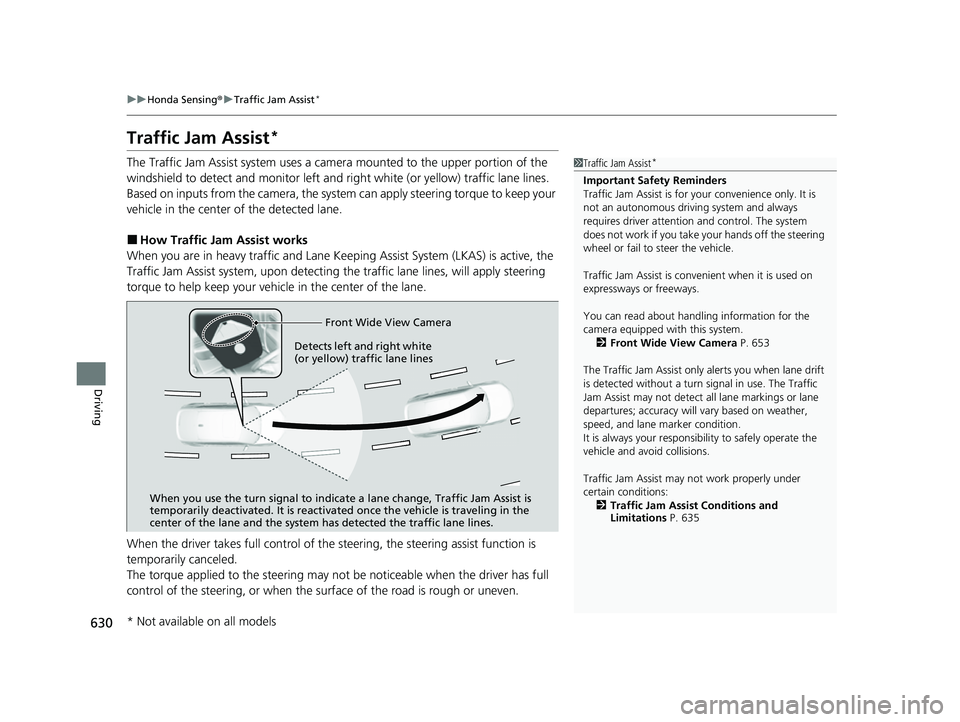
The Traffic Jam Assist system uses a came ra mounted to the upper portion of the
windshield to detect and monitor left and right white (or yellow) traffic lane lines.
Based on inputs from the camera, the system can apply steering torque to keep your
vehicle in the center of the detected lane.
■How Traffic Jam Assist works
When you are in heavy traffic and Lane Keeping Assist System (LKAS) is active, the
Traffic Jam Assist system, upon detectin g the traffic lane lines, will apply steering
torque to help keep your vehicle in the center of the lane.
When the driver takes full control of the steering, the steering assist function is
temporarily canceled.
The torque applied to the steering may not be noticeable when the driver has full
control of the steering, or when the su rface of the road is rough or uneven.
1Traffic Jam Assist*
Important Safety Reminders
Traffic Jam Assist is for your convenience only. It is
not an autonomous driving system and always
requires driver at tention and control. The system
does not work if you take y our hands off the steering
wheel or fail to steer the vehicle.
Traffic Jam Assist is conven ient when it is used on
expressways or freeways.
You can read about handling information for the
camera equipped with this system. 2 Front Wide View Camera P. 653
The Traffic Jam Assist only alerts you when lane drift
is detected without a turn signal in use. The Traffic
Jam Assist may not detect all lane markings or lane
departures; accuracy will vary based on weather,
speed, and lane marker condition.
It is always your responsibility to safely operate the
vehicle and avoid collisions.
Traffic Jam Assist may not work properly under
certain conditions: 2 Traffic Jam Assist Conditions and
Limitations P. 635
Front Wide View Camera
When you use the turn signal to indica te a lane change, Traffic Jam Assist is
temporarily deactivated. It is reactivated once the vehicle is traveling in the
center of the lane and the system has detected the traffic lane lines.
Detects left and right white
(or yellow) traffic lane lines
* Not available on all models
23 CIVIC HATCHBACK TYPE R-31T406100_03.book 630 ページ 2022年6月23日 木曜日 午後9時28分