trunk HONDA CIVIC COUPE 1998 User Guide
[x] Cancel search | Manufacturer: HONDA, Model Year: 1998, Model line: CIVIC COUPE, Model: HONDA CIVIC COUPE 1998Pages: 251, PDF Size: 2.04 MB
Page 79 of 251
Folding Rear Seat, Power Windows
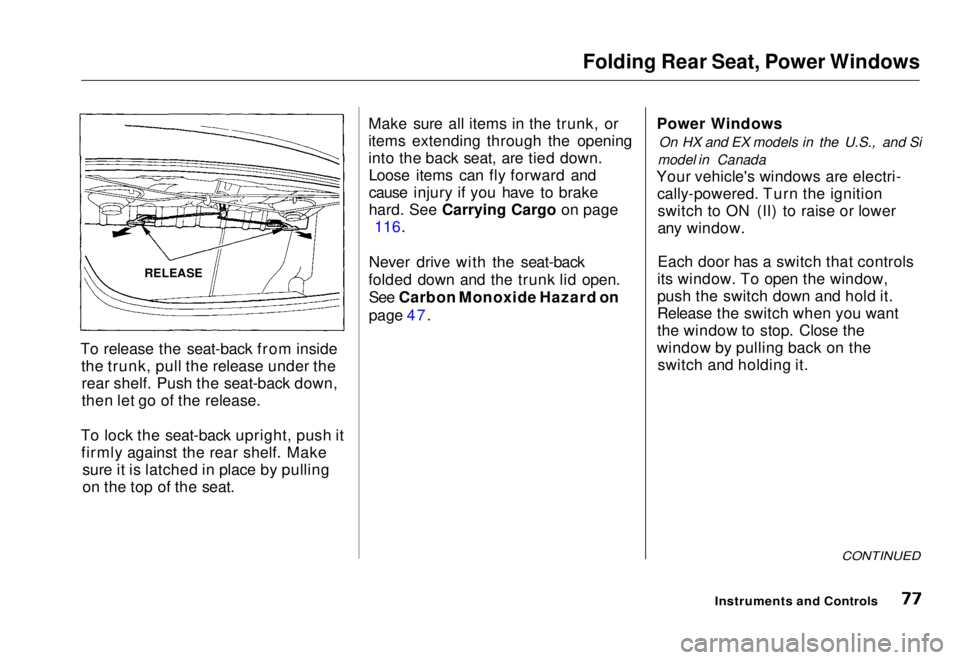
To release the seat-back from inside the trunk, pull the release under therear shelf. Push the seat-back down,
then let go of the release.
To lock the seat-back upright, push it firmly against the rear shelf. Make sure it is latched in place by pulling
on the top of the seat. Make sure all items in the trunk, or
items extending through the opening
into the back seat, are tied down.
Loose items can fly forward and
cause injury if you have to brake
hard
.
See Carrying Cargo on page
116.
Never drive with the seat-back
folded down and the trunk lid open. See Carbon Monoxide Hazard on
page 47. Power Windows
On HX and EX models in the U.S., and Si
model in Canada
Your vehicle's windows are electri- cally-powered. Turn the ignitionswitch to ON (II) to raise or lower
any window.
Each door has a switch that controls
its window. To open the window,
push the switch down and hold it.
Release the switch when you want
the window to stop. Close the
window by pulling back on the switch and holding it.
CONTINUED
Instruments and Controls
RELEASEMain Menu Table of Contents s t
Page 118 of 251
Carrying Cargo
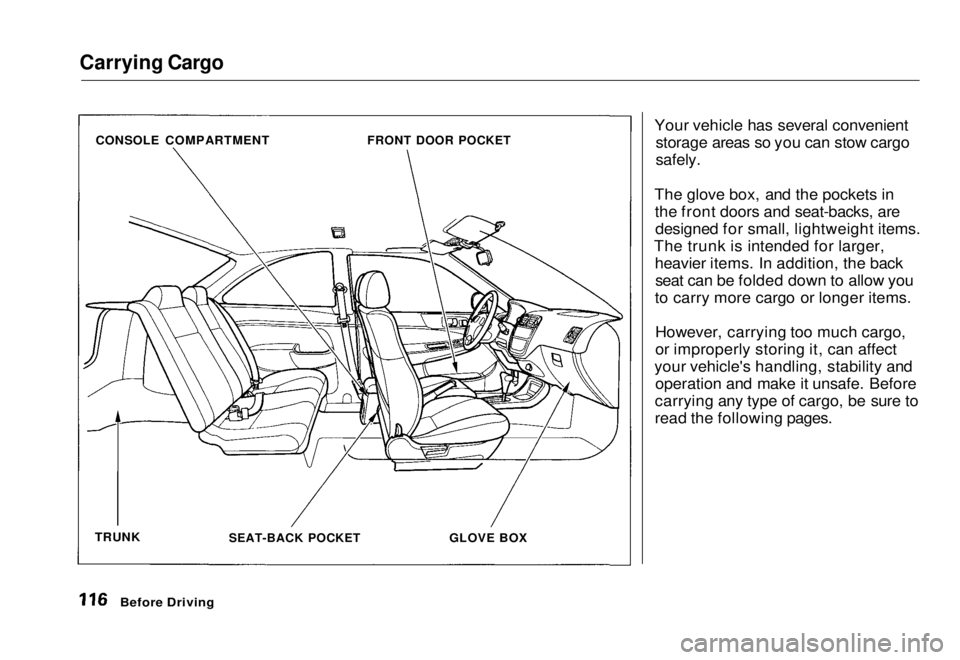
Your vehicle has several convenientstorage areas so you can stow cargo
safely.
The glove box, and the pockets in the front doors and seat-backs, aredesigned for small, lightweight items.
The trunk is intended for larger, heavier items. In addition, the backseat can be folded down to allow you
to carry more cargo or longer items.
However, carrying too much cargo,
or improperly storing it, can affect
your vehicle's handling, stability and operation and make it unsafe. Before
carrying any type of cargo, be sure to
read the following pages.
Before Driving
CONSOLE COMPARTMENT
FRONT DOOR POCKET
SEAT-BACK POCKET
GLOVE BOX
TRUNKMain Menu Table of Contents s t
Page 120 of 251
Carrying Cargo
Carrying Cargo in the Trunk or on
a Roof Rack
Distribute cargo
evenly on the
floor of the trunk, placing the
heaviest items on the bottom and as far forward as possible.
If you fold down the back seat, tie
down items that could be thrown
about the vehicle during a crash or
sudden stop.
If you carry large items that
prevent you from closing the
hatch, exhaust gas can enter the
passenger area. To avoid the
possibility of carbon monoxide poisoning, follow the instructions on page 47. If you can carry any items on a
roof rack, be sure the total weight
of the rack and the items does not
exceed the maximum allowable
weight. Please contact your Honda dealer.
Before DrivingMain Menu Table of Contents s t
Page 122 of 251
Preparing to Drive
You should do the following checks and adjustments every day before
you drive your vehicle.
1. Make sure all windows, mirrors, and outside lights are clean and
unobstructed. Remove frost, snow, or ice.
2. Check that the hood and trunk are fully closed.
3. Visually check the tires. If a tire looks low, use a gauge to check its
pressure.
4. Check that any items you may be
carrying with you inside are stored
properly or fastened down
securely.
5. Check the adjustment of the seat (see page 74).
6. Check the adjustment of the inside and outside mirrors (see
page 79).
7. Check the adjustment of the steering wheel (see page 63).
8. Make sure the doors are securely closed and locked. 9. Fasten your seat belt. Check that
your passengers have fastened
their seat belts (see page 7).
10. Turn the ignition switch ON (II). Check the indicator lights in the
instrument panel.
11. Start the engine (see page 121).
12. Check the gauges and indicator lights in the instrument panel (see
page 33).
DrivingMain Menu Table of Contents s t
Page 135 of 251
Parking
Always use the parking brake when you park your vehicle. The indicator on the instrument panel shows that
the parking brake is not fully
released; it does not indicate that the
parking brake is firmly set. Make sure the parking brake is set firmly
or your vehicle may roll if it is
parked on an incline.
If your vehicle has an automatic
transmission, set the parking brake
before you put the transmission in Park. This keeps the vehicle from
moving and putting pressure on the
parking mechanism in the
transmission — making it easier to move the shift lever out of Park
when you want to drive away. If the vehicle is facing uphill, turn
the front wheels away from the curb.
If you have a manual transmission,
put it in first gear.
If the vehicle is facing downhill, turn
the front wheels toward the curb. If
you have a manual transmission, put it in reverse gear.
Make sure the parking brake is fully
released before driving away.
Driving with the parking brake
partially set can overheat or damage
the rear brakes. Parking Tips Make sure the moonroof and the
windows are closed. Turn off the lights.
Place any packages, valuables, etc.,
in the trunk or take them with you. Lock the doors with the key or the
remote transmitter. Never park over dry leaves, tall
grass, or other flammable materials. The three way catalytic
converter gets very hot, and could
cause these materials to catch on
fire.
DrivingMain Menu Table of Contents s t
Page 189 of 251
Lights
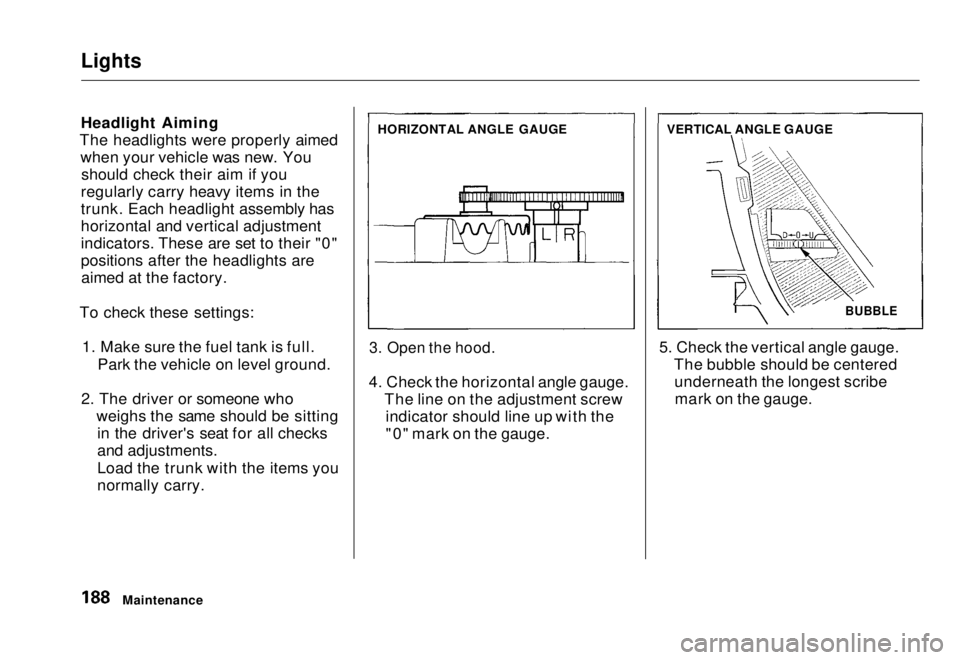
Headlight Aiming
The headlights were properly aimed when your vehicle was new. Youshould check their aim if you
regularly carry heavy items in the
trunk. Each headlight assembly has
horizontal and vertical adjustment
indicators. These are set to their "0"
positions after the headlights are aimed at the factory.
To check these settings: 1. Make sure the fuel tank is full. Park the vehicle on level ground.
2. The driver or someone who weighs the same should be sittingin the driver's seat for all checks
and adjustments.
Load the trunk with the items you
normally carry.
3. Open the hood.
4. Check the horizontal angle gauge. The line on the adjustment screwindicator should line up with the
"0" mark on the gauge. 5. Check the vertical angle gauge.
The bubble should be centeredunderneath the longest scribemark on the gauge.
Maintenance HORIZONTAL ANGLE GAUGE
VERTICAL ANGLE GAUGE
BUBBLEMain Menu Table of Contents s t
Page 193 of 251
Lights
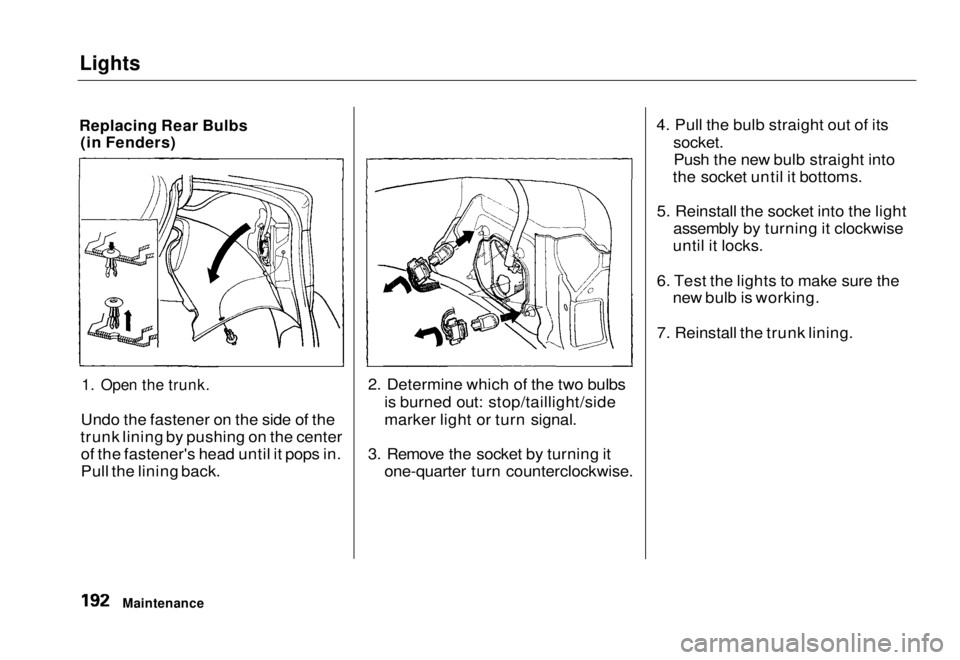
Replacing Rear Bulbs (in Fenders)
1. Open the trunk.
Undo the fastener on the side of the
trunk lining by pushing on the center of the fastener's head until it pops in.
Pull the lining back. 2. Determine which of the two bulbs
is burned out: stop/taillight/side
marker light or turn signal.
3. Remove the socket by turning it one-quarter turn counterclockwise. 4. Pull the bulb straight out of its
socket.
Push the new bulb straight into
the socket until it bottoms.
5. Reinstall the socket into the light assembly by turning it clockwise
until it locks.
6. Test the lights to make sure the new bulb is working.
7. Reinstall the trunk lining.
MaintenanceMain Menu Table of Contents s t
Page 194 of 251
Lights
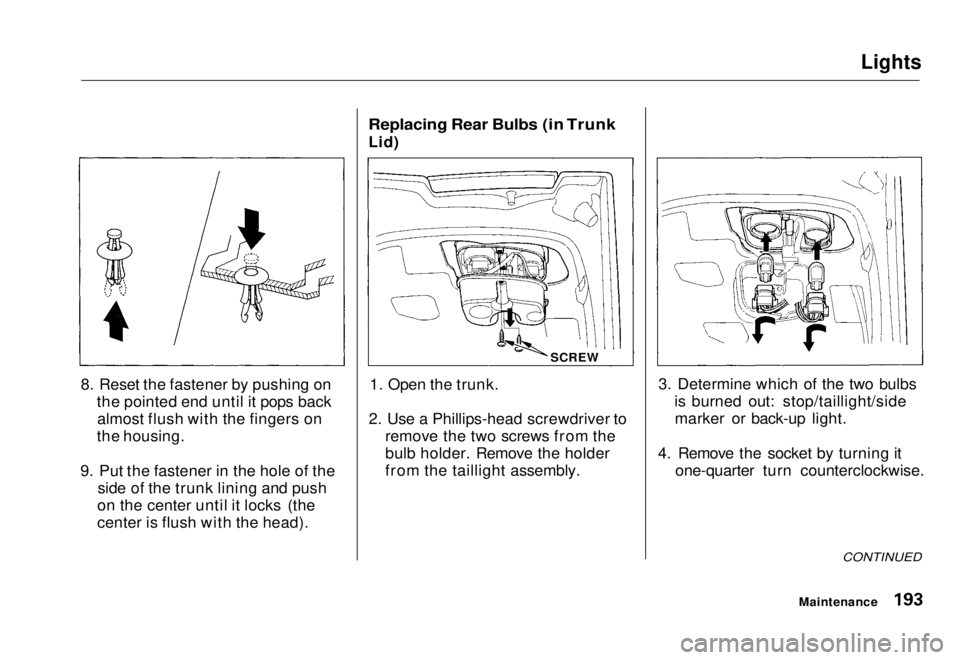
8. Reset the fastener by pushing on the pointed end until it pops backalmost flush with the fingers on
the housing.
9. Put the fastener in the hole of the side of the trunk lining and push
on the center until it locks (the
center is flush with the head).
Replacing Rear Bulbs (in Trunk
Lid)
1. Open the trunk.
2. Use a Phillips-head screwdriver to remove the two screws from the
bulb holder. Remove the holder
from the taillight assembly. 3. Determine which of the two bulbs
is burned out: stop/taillight/sidemarker or back-up light.
4. Remove the socket by turning it one-quarter turn counterclockwise.
CONTINUED
Maintenance
SCREWMain Menu Table of Contents s t
Page 195 of 251
Lights
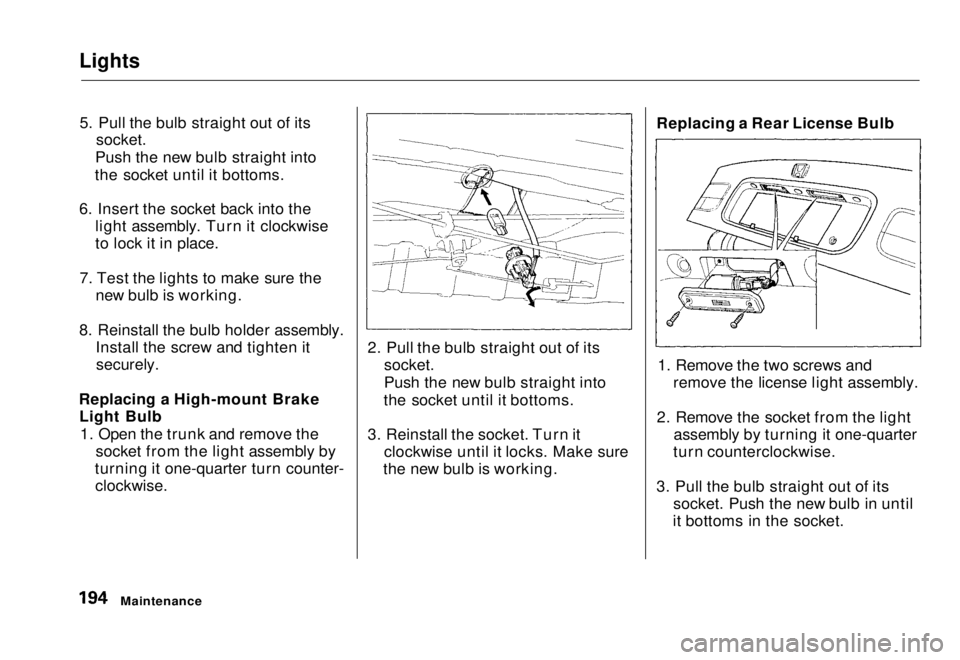
5. Pull the bulb straight out of its
socket.
Push the new bulb straight into
the socket until it bottoms.
6. Insert the socket back into the light assembly. Turn it clockwise
to lock it in place.
7. Test the lights to make sure the new bulb is working.
8. Reinstall the bulb holder assembly. Install the screw and tighten it
securely.
Replacing a High-mount Brake Light Bulb
1. Open the trunk and remove the socket from the light assembly by
turning it one-quarter turn counter-
clockwise.
2. Pull the bulb straight out of its
socket.
Push the new bulb straight into
the socket until it bottoms.
3. Reinstall the socket. Turn it clockwise until it locks. Make sure
the new bulb is working. Replacing a Rear License Bulb
1. Remove the two screws and remove the license light assembly.
2. Remove the socket from the light assembly by turning it one-quarter
turn counterclockwise.
3. Pull the bulb straight out of its socket. Push the new bulb in until
it bottoms in the socket.
MaintenanceMain Menu Table of Contents s t
Page 197 of 251
Lights
(U.S.: EX)
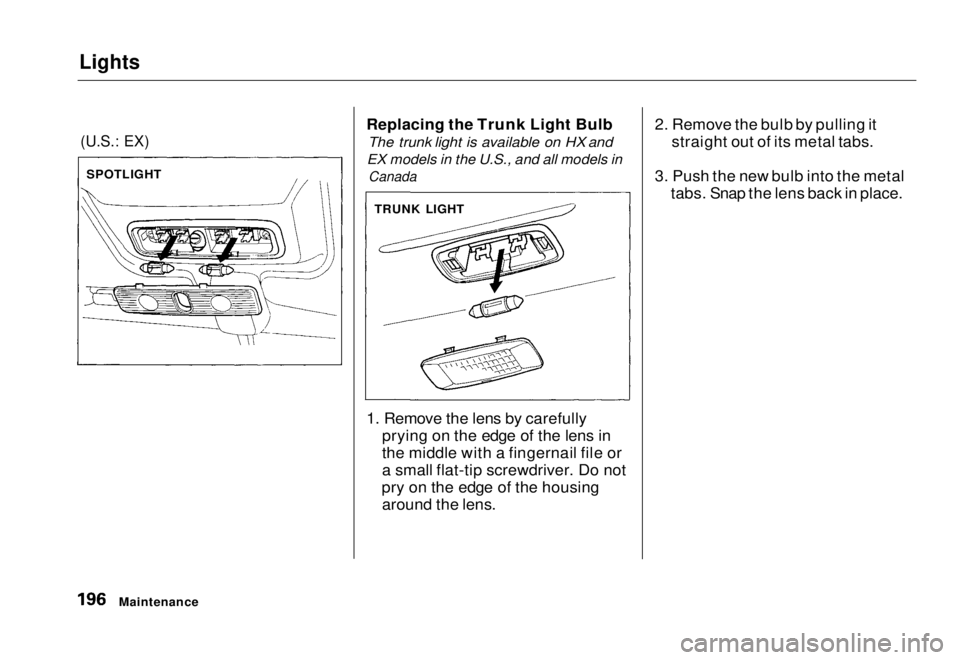
Replacing the Trunk Light Bulb
The trunk light is available on HX and
EX models in the U.S., and all models in
Canada
1. Remove the lens by carefully prying on the edge of the lens in
the middle with a fingernail file or
a small flat-tip screwdriver. Do not
pry on the edge of the housing around the lens. 2. Remove the bulb by pulling it
straight out of its metal tabs.
3. Push the new bulb into the metal tabs. Snap the lens back in place.
Maintenance
SPOTLIGHT
TRUNK LIGHTMain Menu Table of Contents s t