lock HONDA CIVIC COUPE 1998 Owner's Guide
[x] Cancel search | Manufacturer: HONDA, Model Year: 1998, Model line: CIVIC COUPE, Model: HONDA CIVIC COUPE 1998Pages: 251, PDF Size: 2.04 MB
Page 79 of 251
Folding Rear Seat, Power Windows
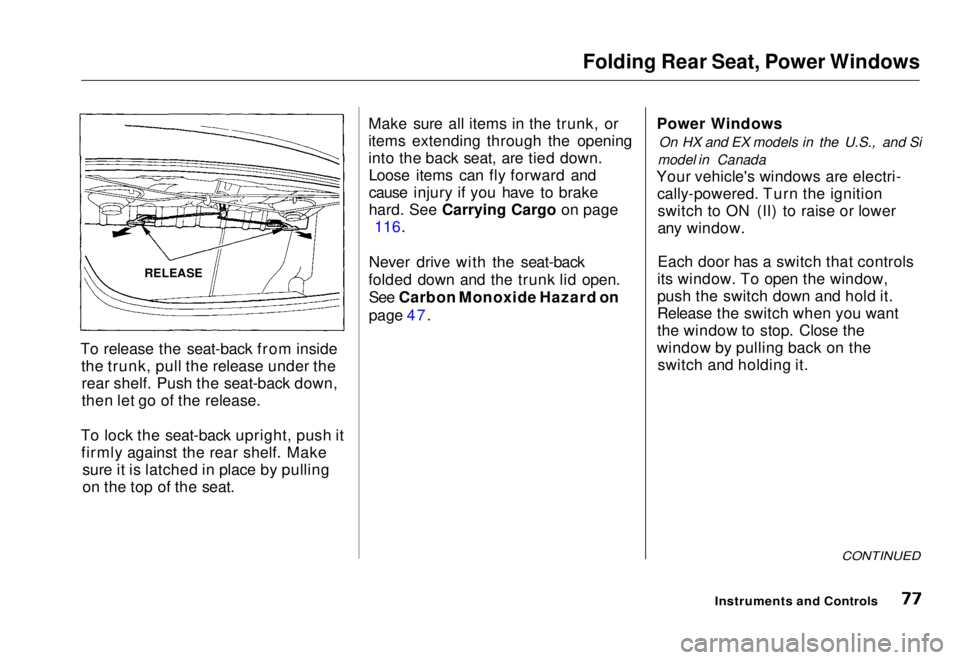
To release the seat-back from inside the trunk, pull the release under therear shelf. Push the seat-back down,
then let go of the release.
To lock the seat-back upright, push it firmly against the rear shelf. Make sure it is latched in place by pulling
on the top of the seat. Make sure all items in the trunk, or
items extending through the opening
into the back seat, are tied down.
Loose items can fly forward and
cause injury if you have to brake
hard
.
See Carrying Cargo on page
116.
Never drive with the seat-back
folded down and the trunk lid open. See Carbon Monoxide Hazard on
page 47. Power Windows
On HX and EX models in the U.S., and Si
model in Canada
Your vehicle's windows are electri- cally-powered. Turn the ignitionswitch to ON (II) to raise or lower
any window.
Each door has a switch that controls
its window. To open the window,
push the switch down and hold it.
Release the switch when you want
the window to stop. Close the
window by pulling back on the switch and holding it.
CONTINUED
Instruments and Controls
RELEASEMain Menu Table of Contents s t
Page 86 of 251
Interior Light
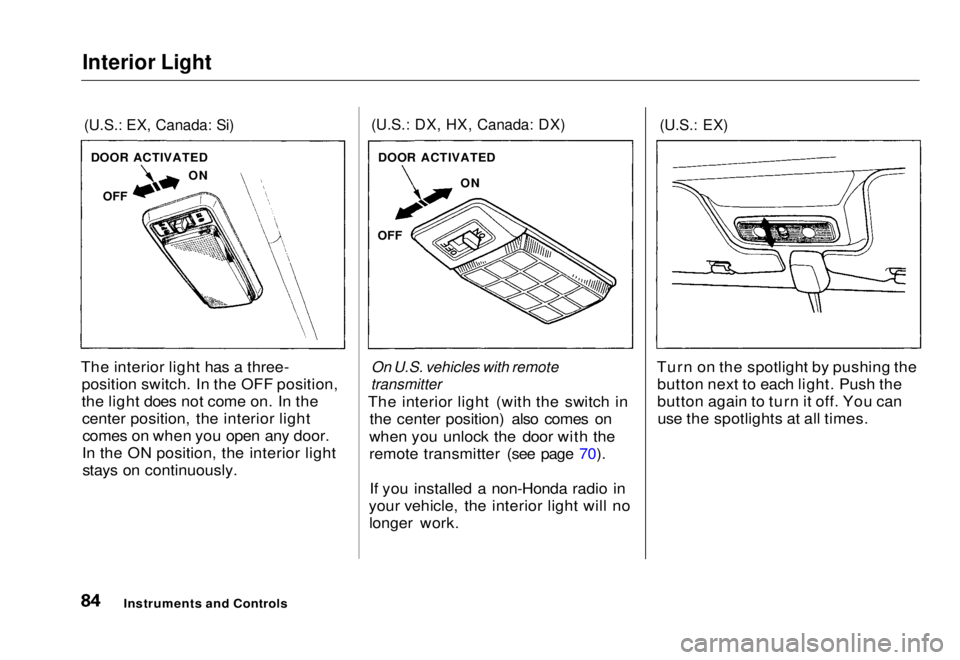
(U.S.: EX, Canada: Si)
The interior light has a three- position switch. In the OFF position,
the light does not come on. In thecenter position, the interior lightcomes on when you open any door.
In the ON position, the interior light stays on continuously.
(U.S.: DX, HX, Canada: DX)
On U.S. vehicles with remote
transmitter
The interior light (with the switch in the center position) also comes on
when you unlock the door with the
remote transmitter (see page 70).
If you installed a non-Honda radio in
your vehicle, the interior light will no longer work.
(U.S.: EX)
Turn on the spotlight by pushing the button next to each light. Push the
button again to turn it off. You canuse the spotlights at all times.
Instruments and Controls
DOOR ACTIVATED
OFF ON
DOOR ACTIVATED
ON
OFFMain Menu Table of Contents s t
Page 87 of 251
Comfort and Convenience Features
The heating and air conditioning* systems in your Honda provide a
comfortable driving environment in
all weather conditions.
The standard audio system has many features. This section de-
scribes those features and how to
use them. (If you selected an optional audio system, refer to the
operating instructions that came
with it.)
* Air conditioning is standard on the
EX model in the U.S. It is optional on
other models.
Heating and Cooling........................ 86
What Each Control Does............ 86How to Use the System............... 88
To Turn Everything Off............. 93
Audio System................................... 94 Operating the Radio.................... 94
Adjusting the Sound.................... 96 Radio Frequencies....................... 97
Radio Reception........................... 97
Digital Clock................................. 99Operating the Cassette Player...................................... 100
Tape Search Functions............. 100 Caring for the Cassette Player...................................... 102
Operating the Optional
CD Player/Changer.............. 103
Protecting Compact Discs........ 105
CD Changer Error Indications.............................. 106
Comfort and Convenience FeaturesMain Menu s t
Page 101 of 251
Audio System
Digital Clock
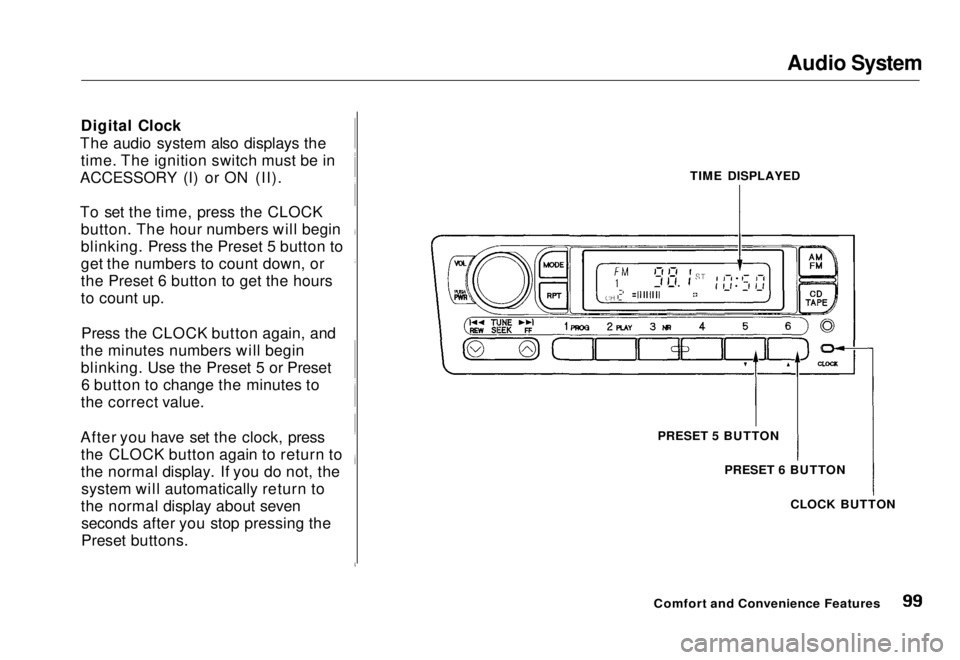
The audio system also displays the time. The ignition switch must be in
ACCESSORY (I) or ON (II).
To set the time, press the CLOCK button. The hour numbers will begin
blinking. Press the Preset 5 button to
get the numbers to count down, or
the Preset 6 button to get the hours
to count up.
Press the CLOCK button again, and
the minutes numbers will begin blinking. Use the Preset 5 or Preset6 button to change the minutes to
the correct value.
After you have set the clock, press the CLOCK button again to return to
the normal display. If you do not, thesystem will automatically return to
the normal display about seven seconds after you stop pressing the
Preset buttons. TIME DISPLAYED
PRESET 5 BUTTON PRESET 6 BUTTON
CLOCK BUTTON
Comfort and Convenience FeaturesMain Menu Table of Contents s t
Page 116 of 251
Accessories and Modifications
Modifying your vehicle, or installingsome non-Honda accessories, can
make your vehicle unsafe. Before
you make any modifications or add
any accessories, be sure to read the
following information.
Accessories
Your dealer has Genuine Honda accessories that allow you to
personalize your vehicle. These accessories have been designed and
approved for your vehicle, and are
covered by warranty.
Non-Honda accessories are usually
designed for universal applications.
Although aftermarket accessories may fit on your vehicle, they may not
meet factory specifications, and
could adversely affect your vehicle's
handling and stability. (See "Modifications" on page 115 for
additional information.) When properly installed, car phones,
alarms, two-way radios, and low-
powered audio systems should not
interfere with your vehicle's
computer-controlled systems, such as the SRS and anti-lock brake
system.
However, if electronic accessories
are improperly installed, or exceed
your vehicle's electrical system capacity, they can interfere with the operation of your vehicle, or even
cause the airbags to deploy.
Before installing any accessory:
Make sure the accessory does notobscure any lights, or interfere
with proper vehicle operation or performance.
Be sure electronic accessories do
not overload electrical circuits (see page 225). Have the installer contact your
Honda dealer for assistance before
installing any electronic accessory.
If possible, have your dealer inspect
the final installation.
Before Driving
Improper accessories or
modifications can affect your
vehicle's handling, stability and performance, and cause a
crash in which you can be hurt
or killed.
Follow all instructions in this
owner's manual regarding
accessories and modifications.Main Menu Table of Contents s t
Page 117 of 251
Accessories and Modifications
Modifications Do not remove any original
equipment or modify your vehicle in
any way that would alter its design or
operation. This could make your
vehicle unsafe and illegal to drive.
For example, do not make any
modifications that would change the
ride height of your vehicle, or install
wheels and tires with a different overall diameter.
Such modifications can adversely
affect handling, and interfere with
the operation of the vehicle's anti-
lock brakes and other systems. In addition, any modifications that
decrease ground clearance increase
the chance of undercarriage parts striking a curb, speed bump, or other
raised object, which could cause
your airbags to deploy.
Do not modify your steering wheelor any other part of your
Supplemental Restraint System.
Modifications could make the system ineffective. Additional Safety Precaution
Do not attach or place objects on theairbag covers. Any object attached to
or placed on the covers marked "SRS,"
in the center of the steering wheel and on top of the dashboard, could
interfere with the proper operation of the airbags. Or, if the airbags
inflate, the objects could be
propelled inside the vehicle and hurt
someone.
Before DrivingMain Menu Table of Contents s t
Page 119 of 251
Carrying Cargo
Load Limit
The maximum load for your vehicle
is
850
Ib
(395 kg).
This figure includes the total weight of all occupants, cargo and
accessories.
To figure out how much cargo you can carry:
Add up the weight of all occupants. Subtract the total from 850 Ib (395
kg).
The final number is the total weight
of cargo you can carry. Carrying Items in the Passenger
Compartment Store or secure all items that could
be thrown around and hurt someone during a crash.
Do not put any items on top of the
rear shelf. They can block your
view and be thrown around the vehicle during a crash.
Be sure items placed on the floor
behind the front seats cannot roll
under the seats and interfere with
the driver's ability to operate the pedals, or with the proper
operation of the seats. Keep the glove box closed while
driving. If the lid is open, a
passenger could injure their knees during a crash or sudden stop.
Before Driving
Overloading or improper
loading can affect handling and
stability and cause a crash in
which you can be hurt or killed.
Follow all load limits and other
loading guidelines in this
manual.Main Menu Table of Contents s t
Page 121 of 251
Driving
This section gives you tips on starting the engine under various
conditions, and how to operate the 5-speed manual and automatic
transmissions. It also includes impor-
tant information on parking your
vehicle, and the braking system. Preparing to Drive......................... 120
Starting the Engine........................ 121 Starting in Cold Weatherat High Altitude ..................... 121
5-speed Manual Transmission..... 122 Recommended Shift Points...... 122
Maximum Allowable Speeds.... 123
Automatic Transmission............... 124 Shift Lever Position Indicator.. 124
Shift Lever Positions................. 125
Maximum Allowable Speeds.... 127
Shift Lock Release..................... 128
Continuously Variable Transmission (CVT)............. 129
Parking............................................ 133 Parking Tips............................... 133
The Braking System...................... 134 Brake Wear Indicators.............. 134Brake System Design................ 135
Anti-lock Brakes........................ 135
Important SafetyReminders.......................... 136
ABS Indicator......................... 137
Driving in Bad Weather................ 138
Towing a Trailer............................ 139
DrivingMain Menu s t
Page 122 of 251
Preparing to Drive
You should do the following checks and adjustments every day before
you drive your vehicle.
1. Make sure all windows, mirrors, and outside lights are clean and
unobstructed. Remove frost, snow, or ice.
2. Check that the hood and trunk are fully closed.
3. Visually check the tires. If a tire looks low, use a gauge to check its
pressure.
4. Check that any items you may be
carrying with you inside are stored
properly or fastened down
securely.
5. Check the adjustment of the seat (see page 74).
6. Check the adjustment of the inside and outside mirrors (see
page 79).
7. Check the adjustment of the steering wheel (see page 63).
8. Make sure the doors are securely closed and locked. 9. Fasten your seat belt. Check that
your passengers have fastened
their seat belts (see page 7).
10. Turn the ignition switch ON (II). Check the indicator lights in the
instrument panel.
11. Start the engine (see page 121).
12. Check the gauges and indicator lights in the instrument panel (see
page 33).
DrivingMain Menu Table of Contents s t
Page 124 of 251
5-speed Manual Transmission
The manual transmission is syn- chronized in all forward gears for
smooth operation. It has a lockout so
you cannot shift directly from Fifth to Reverse. When shifting up ordown, make sure you push the clutch
pedal down all the way, shift to the next gear, and let the pedal up
gradually. When you are not shifting, do not rest your foot on the clutch
pedal. This can cause your clutch to
wear out faster. Come to a full stop before you shift
into Reverse. You can damage the
transmission by trying to shift into Reverse with the vehicle moving.
Push down the clutch pedal, and
pause for a few seconds before shifting into Reverse, or shift into
one of the forward gears for a
moment. This stops the gears so
they won't "grind".
When slowing down, you can get extra braking from the engine by
shifting to a lower gear. This extra
braking can help you maintain a safe speed and prevent your brakes from
overheating while going down a steep hill. Before downshifting,
make sure engine speed will not go
into the tachometer's red zone in the
lower gear. Refer to the Maximum
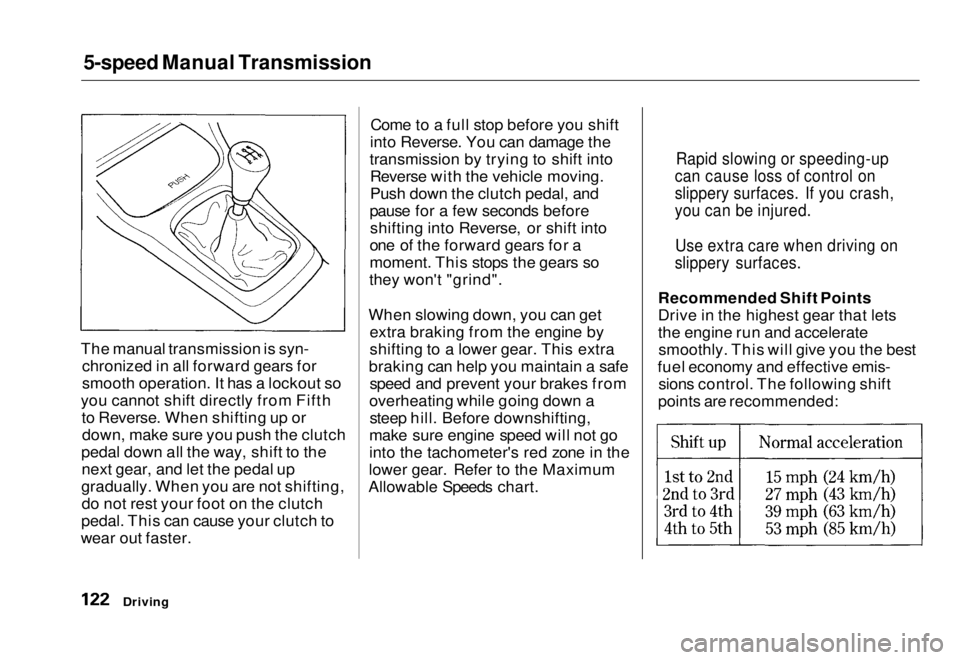
Allowable Speeds chart. Recommended Shift Points
Drive in the highest gear that lets
the engine run and accelerate
smoothly. This will give you the best
fuel economy and effective emis- sions control. The following shift
points are recommended:
Driving
Rapid slowing or speeding-up
can cause loss of control on
slippery surfaces. If you crash,
you can be injured.
Use extra care when driving on
slippery surfaces.Main Menu Table of Contents s t