maintenance HONDA CIVIC COUPE 1998 Repair Manual
[x] Cancel search | Manufacturer: HONDA, Model Year: 1998, Model line: CIVIC COUPE, Model: HONDA CIVIC COUPE 1998Pages: 251, PDF Size: 2.04 MB
Page 190 of 251
Lights
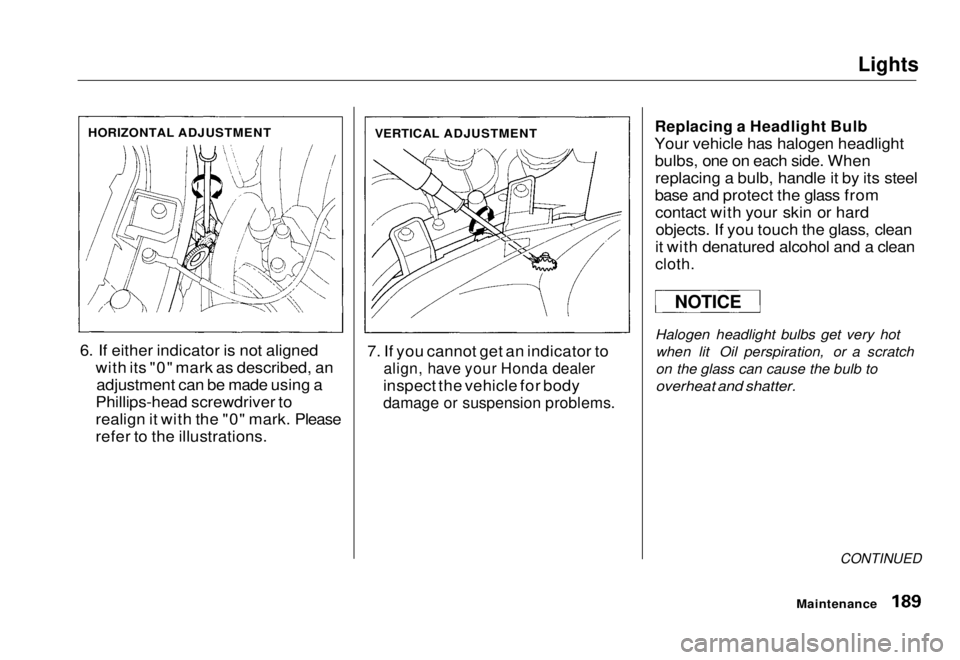
6. If either indicator is not aligned with its "0" mark as described, anadjustment can be made using a
Phillips-head screwdriver to
realign it with the "0" mark. Please
refer to the illustrations. 7. If you cannot get an indicator to
align, have your Honda dealer
inspect the vehicle for body
damage or suspension problems.
Replacing a Headlight Bulb
Your vehicle has halogen headlight bulbs, one on each side. Whenreplacing a bulb, handle it by its steel
base and protect the glass from contact with your skin or hardobjects. If you touch the glass, clean
it with denatured alcohol and a clean
cloth.
Halogen headlight bulbs get very hot when lit Oil perspiration, or a scratch
on the glass can cause the bulb to
overheat and shatter.
CONTINUED
Maintenance
HORIZONTAL ADJUSTMENT
VERTICAL ADJUSTMENT
NOTICEMain Menu Table of Contents s t
Page 191 of 251
Lights
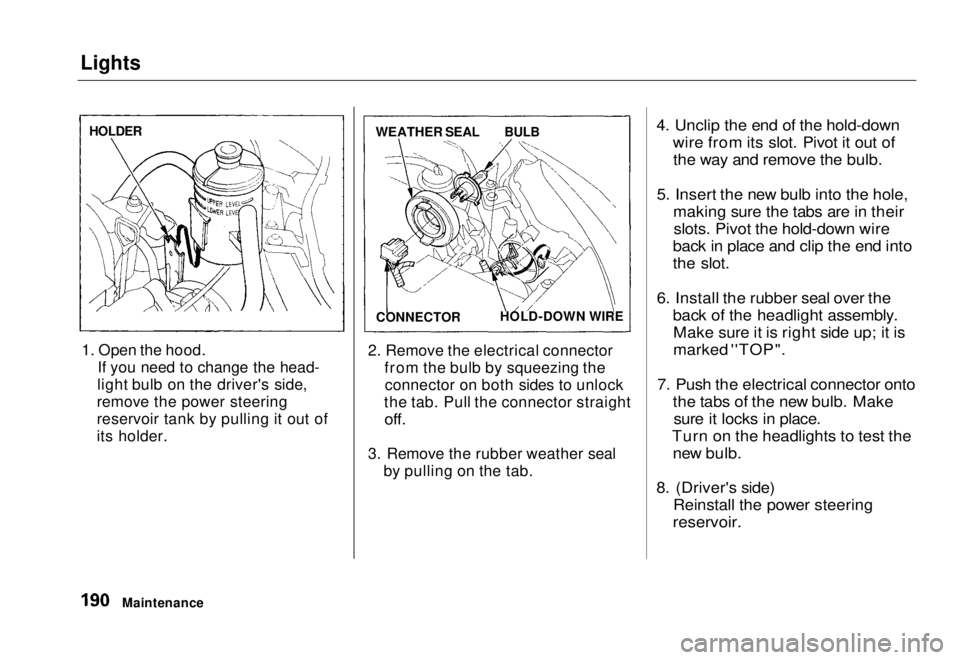
1. Open the hood. If you need to change the head-
light bulb on the driver's side,
remove the power steering
reservoir tank by pulling it out of
its holder. 2. Remove the electrical connector
from the bulb by squeezing theconnector on both sides to unlock
the tab. Pull the connector straight
off.
3. Remove the rubber weather seal by pulling on the tab.
4. Unclip the end of the hold-down
wire from its slot. Pivot it out ofthe way and remove the bulb.
5. Insert the new bulb into the hole, making sure the tabs are in theirslots. Pivot the hold-down wire
back in place and clip the end into
the slot.
6. Install the rubber seal over the back of the headlight assembly.Make sure it is right side up; it is
marked ''TOP".
7. Push the electrical connector onto the tabs of the new bulb. Makesure it locks in place.
Turn on the headlights to test the new bulb.
8. (Driver's side) Reinstall the power steering
reservoir.
Maintenance
HOLDER
WEATHER SEAL
BULB
CONNECTOR HOLD-DOWN WIREMain Menu Table of Contents s t
Page 192 of 251
Lights
Replacing the Front Side Marker/
Turn Signal and Parking Light Bulb
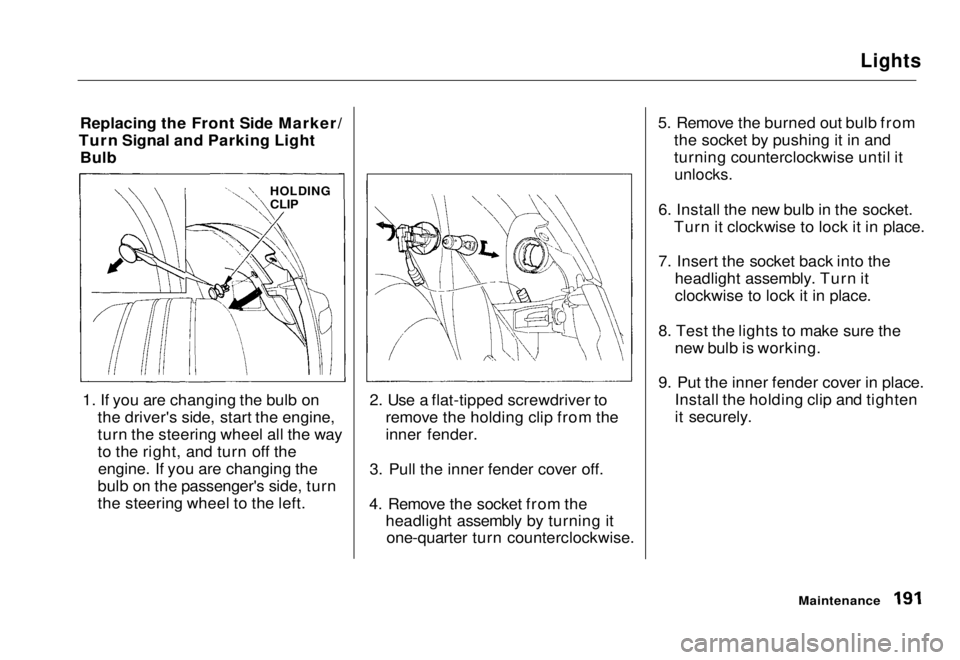
1. If you are changing the bulb on the driver's side, start the engine,
turn the steering wheel all the way
to the right, and turn off theengine. If you are changing the
bulb on the passenger's side, turn
the steering wheel to the left. 2. Use a flat-tipped screwdriver to
remove the holding clip from the
inner fender.
3. Pull the inner fender cover off.
4. Remove the socket from the headlight assembly by turning itone-quarter turn counterclockwise. 5. Remove the burned out bulb from
the socket by pushing it in and
turning counterclockwise until it
unlocks.
6. Install the new bulb in the socket. Turn it clockwise to lock it in place.
7. Insert the socket back into the headlight assembly. Turn it
clockwise to lock it in place.
8. Test the lights to make sure the new bulb is working.
9. Put the inner fender cover in place. Install the holding clip and tighten
it securely.
Maintenance
HOLDING
CLIPMain Menu Table of Contents s t
Page 193 of 251
Lights
Replacing Rear Bulbs (in Fenders)
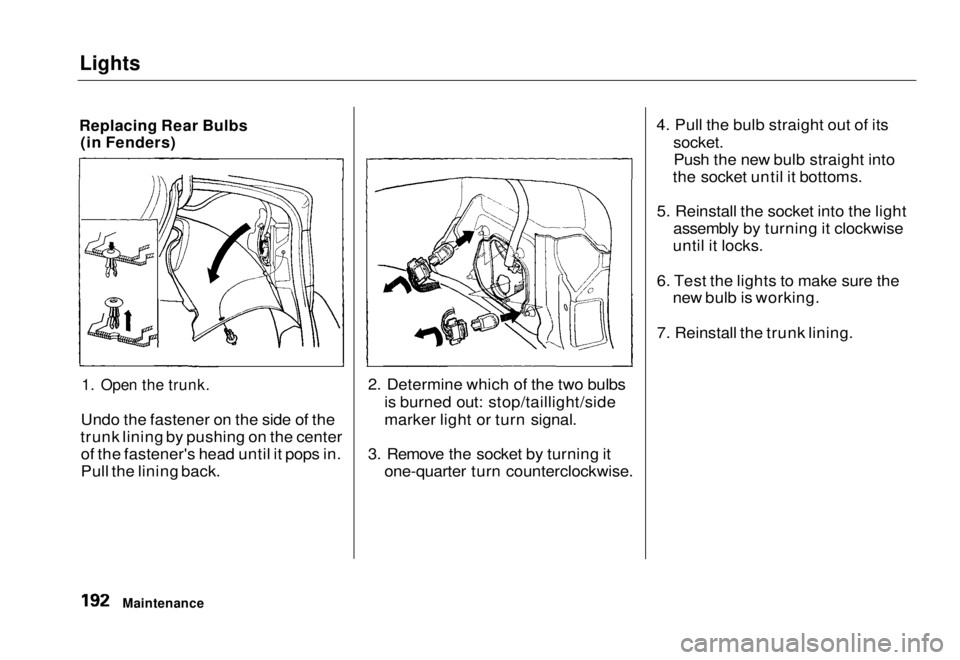
1. Open the trunk.
Undo the fastener on the side of the
trunk lining by pushing on the center of the fastener's head until it pops in.
Pull the lining back. 2. Determine which of the two bulbs
is burned out: stop/taillight/side
marker light or turn signal.
3. Remove the socket by turning it one-quarter turn counterclockwise. 4. Pull the bulb straight out of its
socket.
Push the new bulb straight into
the socket until it bottoms.
5. Reinstall the socket into the light assembly by turning it clockwise
until it locks.
6. Test the lights to make sure the new bulb is working.
7. Reinstall the trunk lining.
MaintenanceMain Menu Table of Contents s t
Page 194 of 251
Lights
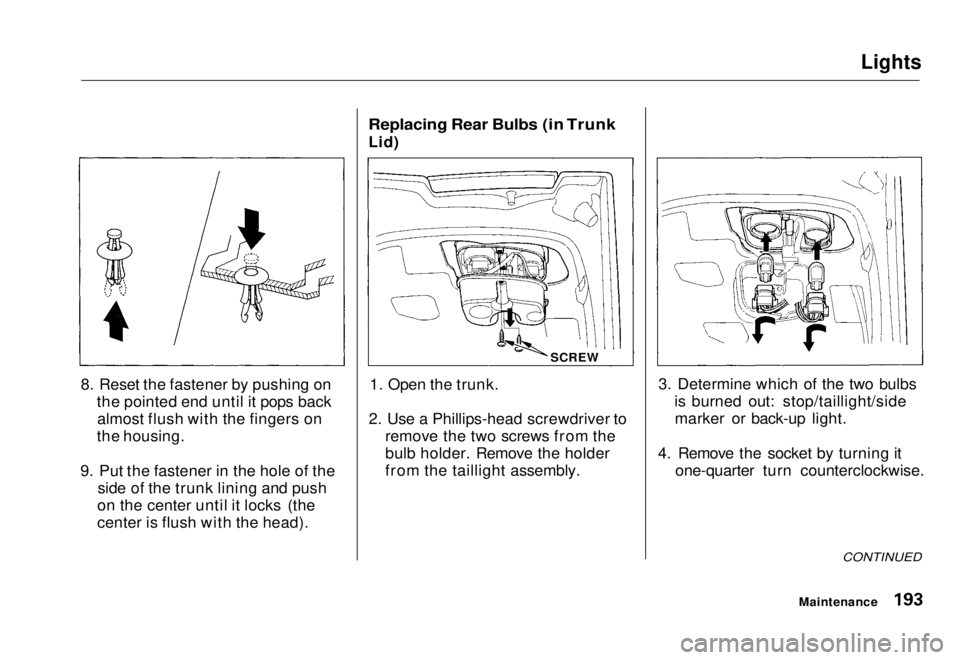
8. Reset the fastener by pushing on the pointed end until it pops backalmost flush with the fingers on
the housing.
9. Put the fastener in the hole of the side of the trunk lining and push
on the center until it locks (the
center is flush with the head).
Replacing Rear Bulbs (in Trunk
Lid)
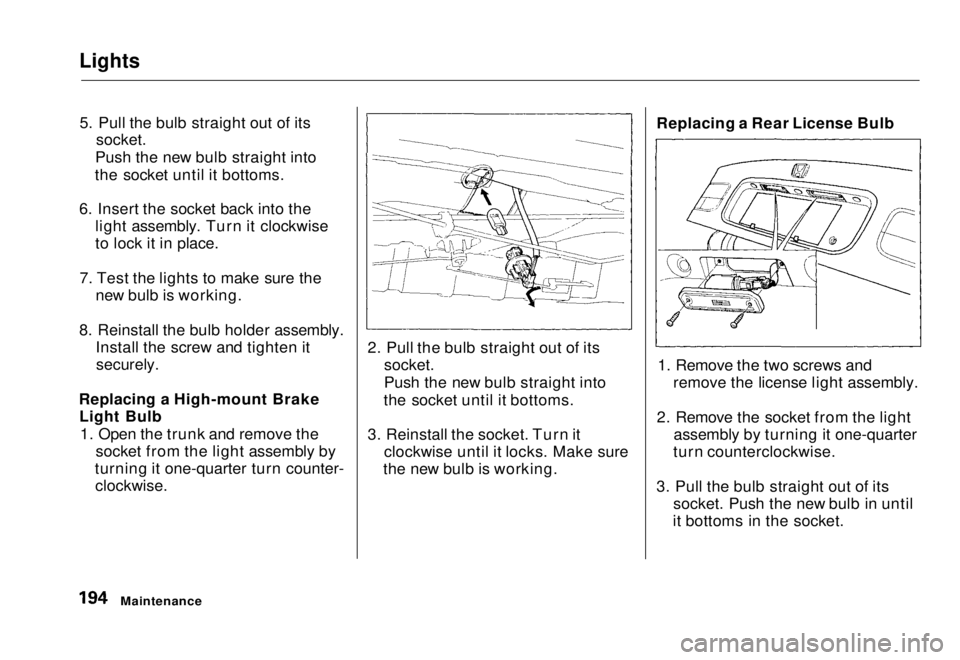
1. Open the trunk.
2. Use a Phillips-head screwdriver to remove the two screws from the
bulb holder. Remove the holder
from the taillight assembly. 3. Determine which of the two bulbs
is burned out: stop/taillight/sidemarker or back-up light.
4. Remove the socket by turning it one-quarter turn counterclockwise.
CONTINUED
Maintenance
SCREWMain Menu Table of Contents s t
Page 195 of 251
Lights
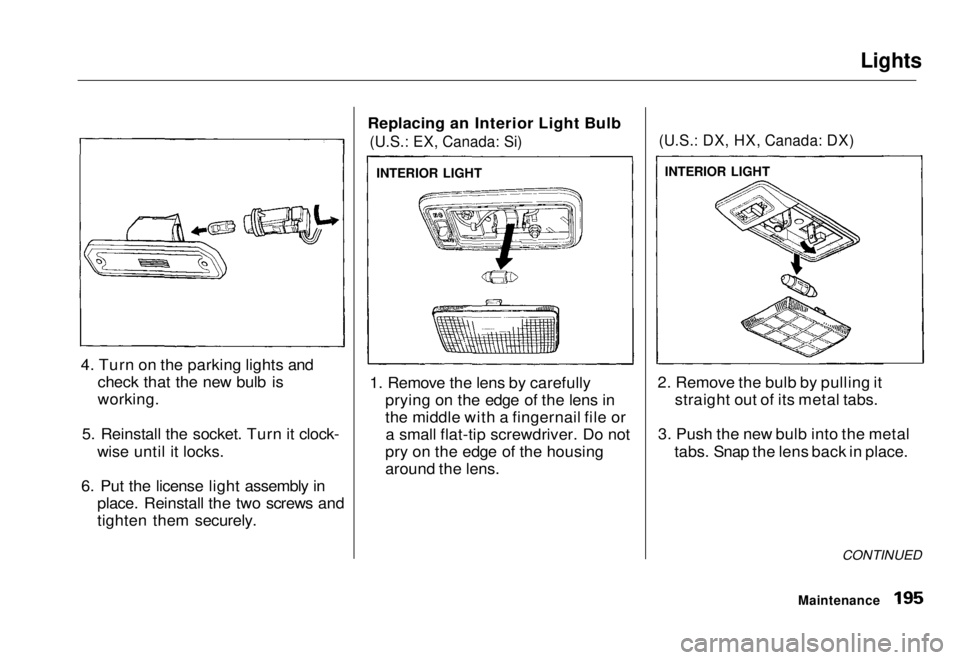
5. Pull the bulb straight out of its
socket.
Push the new bulb straight into
the socket until it bottoms.
6. Insert the socket back into the light assembly. Turn it clockwise
to lock it in place.
7. Test the lights to make sure the new bulb is working.
8. Reinstall the bulb holder assembly. Install the screw and tighten it
securely.
Replacing a High-mount Brake Light Bulb
1. Open the trunk and remove the socket from the light assembly by
turning it one-quarter turn counter-
clockwise.
2. Pull the bulb straight out of its
socket.
Push the new bulb straight into
the socket until it bottoms.
3. Reinstall the socket. Turn it clockwise until it locks. Make sure
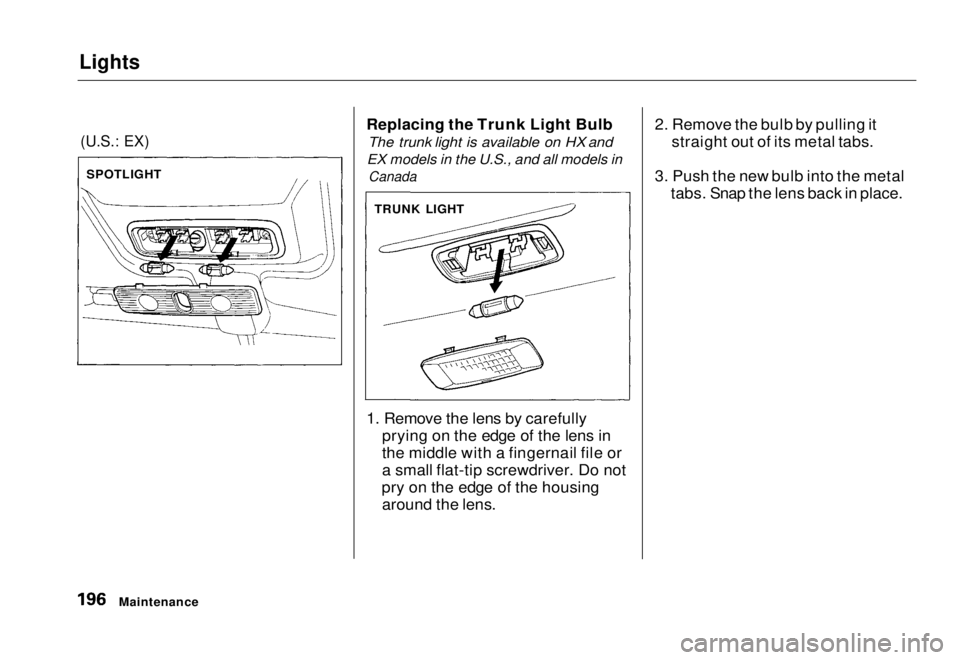
the new bulb is working. Replacing a Rear License Bulb
1. Remove the two screws and remove the license light assembly.
2. Remove the socket from the light assembly by turning it one-quarter
turn counterclockwise.
3. Pull the bulb straight out of its socket. Push the new bulb in until
it bottoms in the socket.
MaintenanceMain Menu Table of Contents s t
Page 196 of 251
Lights
4. Turn on the parking lights and check that the new bulb is
working.
5. Reinstall the socket. Turn it clock- wise until it locks.
6. Put the license light assembly in place. Reinstall the two screws and
tighten them securely. Replacing an Interior Light Bulb
(U.S.: EX, Canada: Si)
1. Remove the lens by carefully prying on the edge of the lens in
the middle with a fingernail file ora small flat-tip screwdriver. Do not
pry on the edge of the housing
around the lens.
(U.S.: DX, HX, Canada: DX)
2. Remove the bulb by pulling it straight out of its metal tabs.
3. Push the new bulb into the metal tabs. Snap the lens back in place.
CONTINUED
Maintenance
INTERIOR LIGHT
INTERIOR LIGHTMain Menu Table of Contents s t
Page 197 of 251
Lights
(U.S.: EX)
Replacing the Trunk Light Bulb
The trunk light is available on HX and
EX models in the U.S., and all models in
Canada
1. Remove the lens by carefully prying on the edge of the lens in
the middle with a fingernail file or
a small flat-tip screwdriver. Do not
pry on the edge of the housing around the lens. 2. Remove the bulb by pulling it
straight out of its metal tabs.
3. Push the new bulb into the metal tabs. Snap the lens back in place.
Maintenance
SPOTLIGHT
TRUNK LIGHTMain Menu Table of Contents s t
Page 198 of 251
Storing Your Vehicle
If you need to park your vehicle for
an extended period (more than one
month), there are several things you should do to prepare it for storage.
Proper preparation helps prevent deterioration and makes it easier to
get your vehicle back on the road. If
possible, store your vehicle indoors.
Fill the fuel tank.Change the engine oil and filter (see page 157).
Wash and dry the exterior
completely.
Clean the interior. Make sure the
carpeting, floor mats, etc. are
completely dry.
Leave the parking brake off. Put
the transmission in Reverse (5- speed manual) or Park (automatic). Block the rear wheels.
If the vehicle is to be stored for a
longer period, it should be supported on jackstands so the
tires are off the ground.
Leave one window open slightly (if
the vehicle is being stored
indoors).
Disconnect the battery.
Support the front wiper bladearms with a folded towel or rag so
they do not touch the windshield.
To minimize sticking, apply a silicone spray lubricant to all door
and trunk seals. Also, apply a
vehicle body wax to the painted surfaces that mate with the door
and trunk seals. Cover the vehicle with a
"breathable" vehicle cover, one
made from a porous material such
as cotton. Nonporous materials, such as plastic sheeting, trap
moisture, which can damage the
paint.
If possible, run the engine for a
while periodically (preferably once a month).
If you store your vehicle for 12
months or longer, have your Honda dealer perform the inspections called
for in the 24 months/30,000 miles (48,000 km) maintenance schedule
(Normal Conditions) as soon as you
take it out of storage (see page 146).
The replacements called for in the maintenance schedule are riot
needed unless the vehicle has actually reached that time or mileage.
MaintenanceMain Menu Table of Contents s t
Page 203 of 251
Interior Care, Corrosion Protection
Windows Clean the windows, inside and out,
with a commercially-available glass cleaner. You can also use a mixture
of one part white vinegar to ten parts
water. This will remove the haze that builds up on the inside of the
windows. Use a soft cloth or paper towels to clean all glass and clear
plastic surfaces.
The rear window defogger wires are
bonded to the inside of the glass. Wiping vigorously up-and-down can
dislodge and break the defogger wires. When cleaning the rear window, use
gentle pressure and wipe side-to-side. Air Fresheners
If you want to use an air freshener/deodorizer in the interior of your
vehicle, it is best to use a solid type. Some liquid air fresheners contain
chemicals that may cause parts of
the interior trim and fabric to crackor discolor.
If you use a liquid air freshener,
make sure you fasten it securely so itdoes not spill as you drive. Corrosion Protection
Two factors normally contribute to causing corrosion in your vehicle:
1. Moisture trapped in body cavities. Dirt and road salt that collects in
hollows on the underside of the
vehicle stays damp, promoting corrosion in that area.
2. Removal of paint and protective coatings from the exterior and
underside of the vehicle.
Many corrosion-preventive measures
are built into your Honda. You can
help keep your vehicle from
corroding by performing some simple periodic maintenance:
Repair chips and scratches in the
paint as soon as you discover them.
CONTINUED
Appearance Care
NOTICEMain Menu Table of Contents s t