Brake HONDA CIVIC COUPE 2007 8.G User Guide
[x] Cancel search | Manufacturer: HONDA, Model Year: 2007, Model line: CIVIC COUPE, Model: HONDA CIVIC COUPE 2007 8.GPages: 311, PDF Size: 5.36 MB
Page 86 of 311
The driver’s door or all doors can be
set to unlock automatically in two
CONT INUED
Door L ocks
A uto Door Unlock Modes
Inst rument s and Cont rols
83
modes for automatic transmissionvehicles (Park Unlock mode or
Ignition Switch Unlock mode) and
one mode for manual transmission
vehicles (Ignition Switch Unlock
mode). The default setting from the
factory is the driver’s door unlocks in
Park Unlock mode (A/T) or IgnitionSwitch Unlock mode (M/T). To
program modes, refer to the following
instructions.
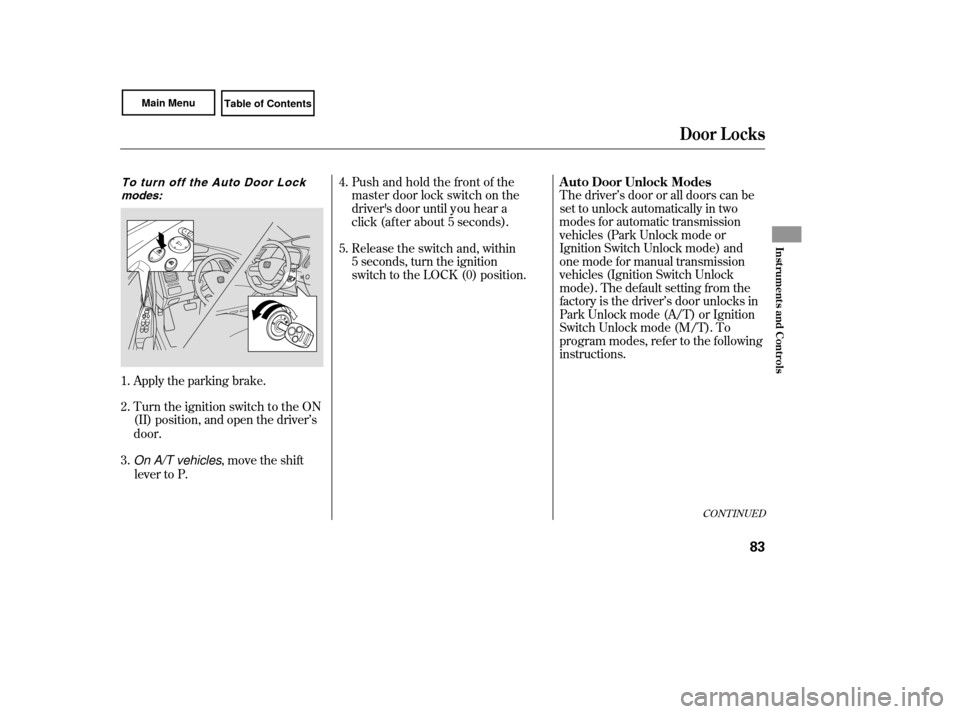
Apply the parking brake.
Turn the ignition switch to the ON
(II) position, and open the driver’s
door.
On A/T vehicles, move the shift
lever to P.
1.
2.
3.
To turn off the Auto Door Lock
modes:Push and hold the front of the
master door lock switch on the
driver' s door until you hear a
click (af ter about 5 seconds).
Release the switch and, within
5 seconds, turn the ignition
switch to the LOCK (0) position.
4.
5.
Page 87 of 311
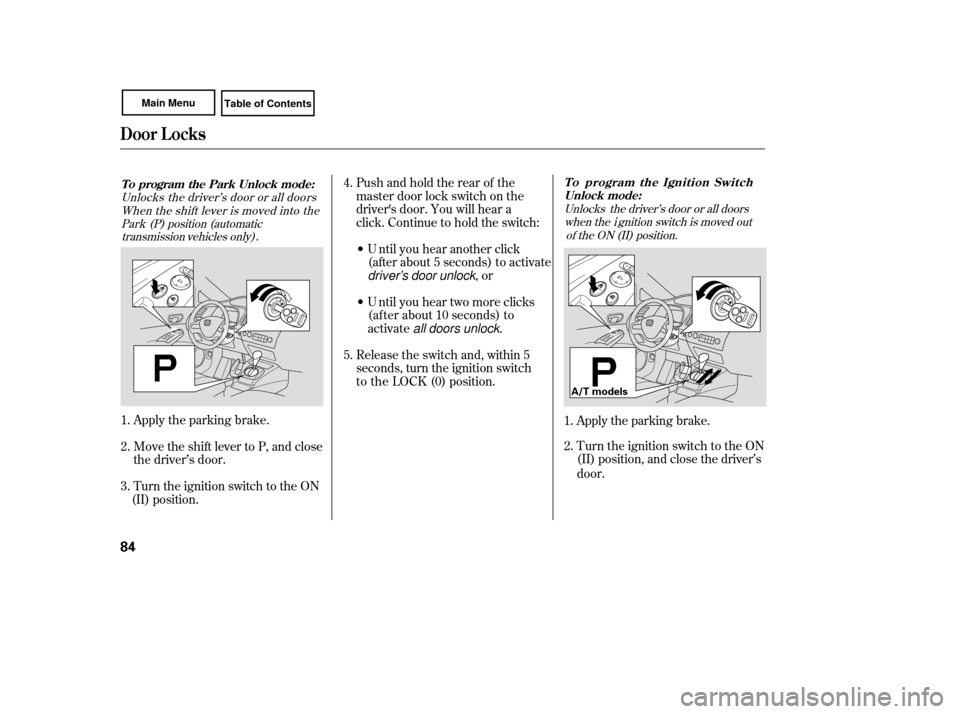
Apply the parking brake.
Turn the ignition switch to the ON
(II) position, and close the driver’s
door.
1.
2.
Unlocks the driver’s door or all doors
when the i gnition switch is moved out of the ON (II) position.
Door L ocks
To program the Ignition SwitchUnlock mode:
84
A/T models
Move the shift lever to P, and close
the driver’s door.
Turn the ignition switch to the ON
(II) position. Apply the parking brake.
1.
2.
3.
To program the Park Unlock mode:
Unlocks the driver’s door or all doorsWhen the shift lever is moved into thePark (P) position (automatic
transmission vehicles only).
• U ntil you hear another click (after about 5 seconds) to activate
driver's door unlock, or
• U ntil you hear two more clicks
(af ter about 10 seconds) to
activate all doors unlock .
Release the switch and, within 5
seconds, turn the ignition switch
to the LOCK (0) position. Pushandholdtherearof the
master door lock switch on the
driver' s door. You will hear a
click. Continue to hold the switch:
4.
5.
Page 88 of 311
CONT INUED
Door L ocks
Inst rument s and Cont rols
85
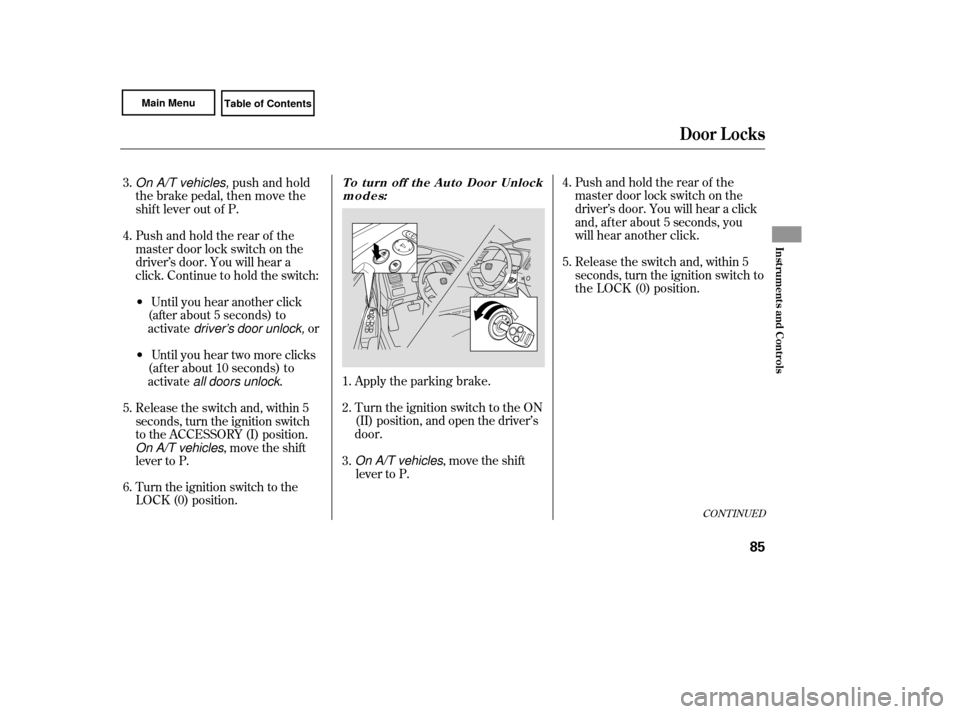
On A/T vehicles, push and hold
the brake pedal, then move the
shift lever out of P.
Pushandholdtherearof the
master door lock switch on the
driver’ s door. You will hear a
click. Continue to hold the switch:
• Until you hear another click
(after about 5 seconds) to
activate driver's door unlock, or
• U ntil you hear two more clicks
(af ter about 10 seconds) to
activate all doors unlock .
Release the switch and, within 5
seconds, turn the ignition switch
to the ACCESSORY (I) position.
On A/T vehicles, move the shift
lever to P.
3.
4.
5.
Turn the ignition switch to the
LOCK (0) position.
6.
Turn the ignition switch to the ON
(II) position, and open the driver’s
door.
On A/T vehicles, move the shift
lever to P. Apply the parking brake.
1.
2.
3.
To turn off the Auto Door Unlock
modes:
Release the switch and, within 5
seconds, turn the ignition switch to
the LOCK (0) position. P ush
a
ndholdtherearof the
master door lock switch on the
driver’ s door. You will hear a click
and, af ter about 5 seconds, you
will hear another click.
4.
5.
Page 98 of 311
Make sure all items in the trunk, or
items extending through the opening
into the back seat, are secured.
Looseitemscanflyforwardand
cause injury if you have to brake
hard. See on page
.
Never drive with the seat-back
folded down and the trunk lid open.
See on
page .
Make
sure that the folded seat-back
does not interfere with the front
passenger’s seat-back. This will
cause the front passenger’s weight
sensors to work improperly (see
page ). Also check the passenger
airbag of f indicator to assure proper
operation of the passenger’s
advanced front airbag.
Make sure all rear shoulder belts are
positioned in f ront of the rear seat-
back, and the center shoulder belt is
re-positioned in the guide whenever
the seat-back is in its upright position.
Be sure there are no twists in the
center shoulder belt.
Do not put any heavy items on the
seat-back when it is folded down. 26
184
51Carrying Cargo
Carbon Monoxide Hazard
Seats
Inst rument s and Cont rols
95
Page 103 of 311
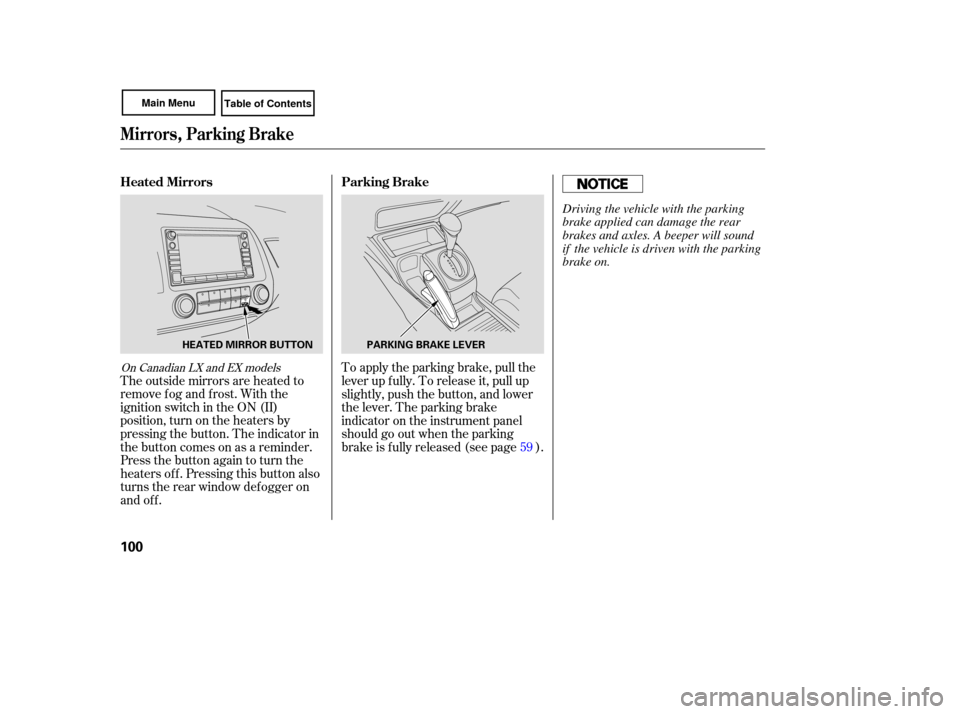
The outside mirrors are heated to
remove fog and frost. With the
ignition switch in the ON (II)
position, turn on the heaters by
pressing the button. The indicator in
the button comes on as a reminder.
Press the button again to turn the
heaters off. Pressing this button also
turns the rear window defogger on
and off. To
apply the parking brake, pull the
lever up fully. To release it, pull up
slightly, push the button, and lower
the lever. The parking brake
indicator on the instrument panel
should go out when the parking
brake is f ully released (see page ). 59
On Canadian LX and EX models
Parking Brake
Heated Mirrors
Mirrors, Parking Brake
100
PARKING BRAKE LEVER
HEATED MIRROR BUTTON
Driving the vehicle with the parking
brake applied can damage the rear
brakes and axles. A beeper will sound
if the vehicle is driven with the parking
brake on.
Page 174 of 311
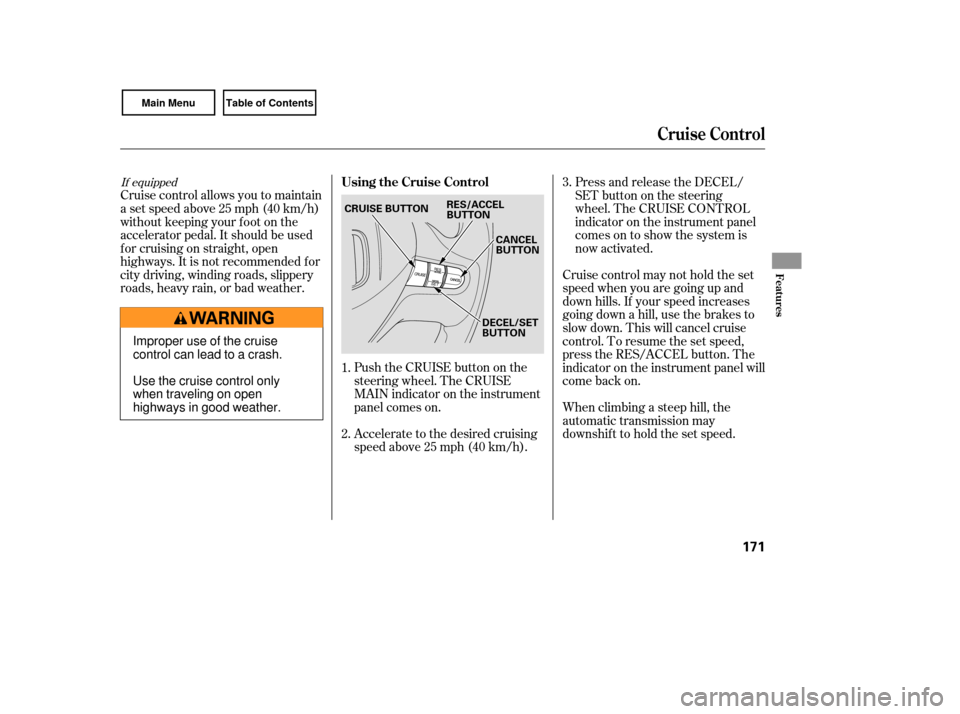
Push the CRUISE button on the
steering wheel. The CRUISE
MAIN indicator on the instrument
panel comes on.
Accelerate to the desired cruising
speedabove25mph(40km/h).
Cruise control allows you to maintain
asetspeedabove25mph(40km/h)
without keeping your f oot on the
accelerator pedal. It should be used
f or cruising on straight, open
highways. It is not recommended f or
city driving, winding roads, slippery
roads, heavy rain, or bad weather.
Cruise control may not hold the set
speed when you are going up and
down hills. If your speed increases
going down a hill, use the brakes to
slow down. This will cancel cruise
control. To resume the set speed,
press the RES/ACCEL button. The
indicator on the instrument panel will
come back on.
When climbing a steep hill, the
automatic transmission may
downshifttoholdthesetspeed.Press and release the DECEL/
SET
buttononthesteering
wheel. The CRUISE CONTROL
indicator on the instrument panel
comes on to show the system is
now activated.
1.
2. 3.
If equipped
Cruise Control
Using the Cruise Control
Features
171
CANCEL
BUTTON
CRUISE BUTTON
RES/ACCEL
BUTTON
DECEL/SET
BUTTON
Improper use of the cruise
control can lead to a crash.
Use the cruise control only
when traveling on open
highways in good weather.
Page 175 of 311

You can increase the set cruising
speed in any of these ways:Press and hold the RES/ACCEL
button. When you reach the
desired cruising speed, release the
button. Press and hold the DECEL/SET
button. Release the button when
you reach the desired speed.
To slow down in very small
amounts, tap the DECEL/SET
button. Each time you do this,
your vehicle will slow down about
1 mph (1.6 km/h).
You can decrease the set cruising
speed in any of these ways:
Even with the cruise control turned
on, you can still use the accelerator
pedal to speed up f or passing. Af ter
completing the pass, take your foot
of f the accelerator pedal. The vehicle
will return to the set cruising speed.
Resting your f oot on the brake or
clutch pedal causes the cruise
control to cancel.
To increase the speed in very
small amounts, tap the RES/
ACCEL button. Each time you do
this, your vehicle will speed up
about 1 mph (1.6 km/h).Tap the brake or clutch pedal
lightly with your f oot. The
CRUISE CONTROL indicator on
the instrument panel goes out.
When the vehicle slows to the
desired speed, press the DECEL/
SETbutton.
Push on the accelerator pedal until
you reach the desired cruising
speed, then press the DECEL/
SET
button.
Cruise Control
Changing the Set Speed
172
Page 176 of 311
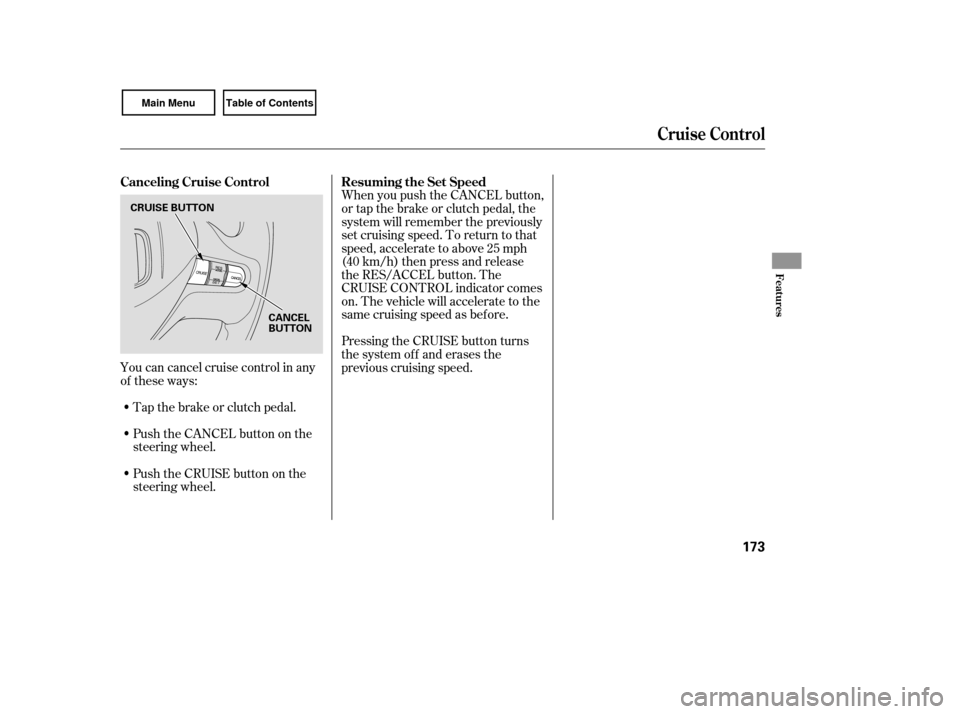
You can cancel cruise control in any
of these ways:Tap the brake or clutch pedal.
Push the CANCEL button on the
steering wheel. When you push the CANCEL button,
or tap the brake or clutch pedal, the
system will remember the previously
set cruising speed. To return to that
speed, accelerate to above 25 mph
(40 km/h) then press and release
the RES/ACCEL button. The
CRUISE CONTROL indicator comes
on. The vehicle will accelerate to the
same cruising speed as bef ore.
Pressing the CRUISE button turns
the system off and erases the
previous cruising speed.
Push the CRUISE button on the
steering wheel.
Cruise Control
Canceling Cruise Control Resuming the Set Speed
Features
173
CRUISE BUTTON
CANCEL
BUTTON
Page 179 of 311

Help assure your vehicle’s f uture
reliability and perf ormance by paying
extra attention to how you drive
during the f irst 600 miles (1,000 km).
During this period:Avoid full-throttle starts and rapid
acceleration.
Avoidhardbrakingforthefirst
200 miles (300 km). Do not change the oil until the
scheduled maintenance time. We recommend using quality
gasolines containing detergent
additives that help prevent fuel
system and engine deposits.
In addition, in order to maintain good
perf ormance, f uel economy, and
emissions control, we strongly
recommend, in areas where it is
available, the use of gasoline that
does NOT contain manganese-based
f uel additives such as MMT.
Use of gasoline with these additives
may adversely af f ect perf ormance,
and cause the malfunction indicator
lamp on your instrument panel to
come on. If this happens, contact
your authorized dealer f or service.
Your vehicle is designed to operate
on unleaded gasoline with a pump
octane number of 87 or higher. Use
of a lower octane gasoline can cause
a persistent, heavy, metallic rapping
noise that can lead to engine damage.
Your vehicle is designed to operate
on premium unleaded gasoline with a
pump octane number of 91 or higher.
Useof aloweroctanegasolinecan
cause occasional metallic knocking
noises in the engine and will result in
decreased engine perf ormance. Use
of a gasoline with a pump octane
number less than 87 can lead to
engine damage.
You should also f ollow these
recommendations with an
overhauled or exchanged engine, or
when the brakes are replaced. Do not tow a trailer.
Break-in Period Fuel Recommendation
Break-in Period, Fuel Recommendation
A ll models except U.S. Si
U.S. Si model only
176
Page 181 of 311
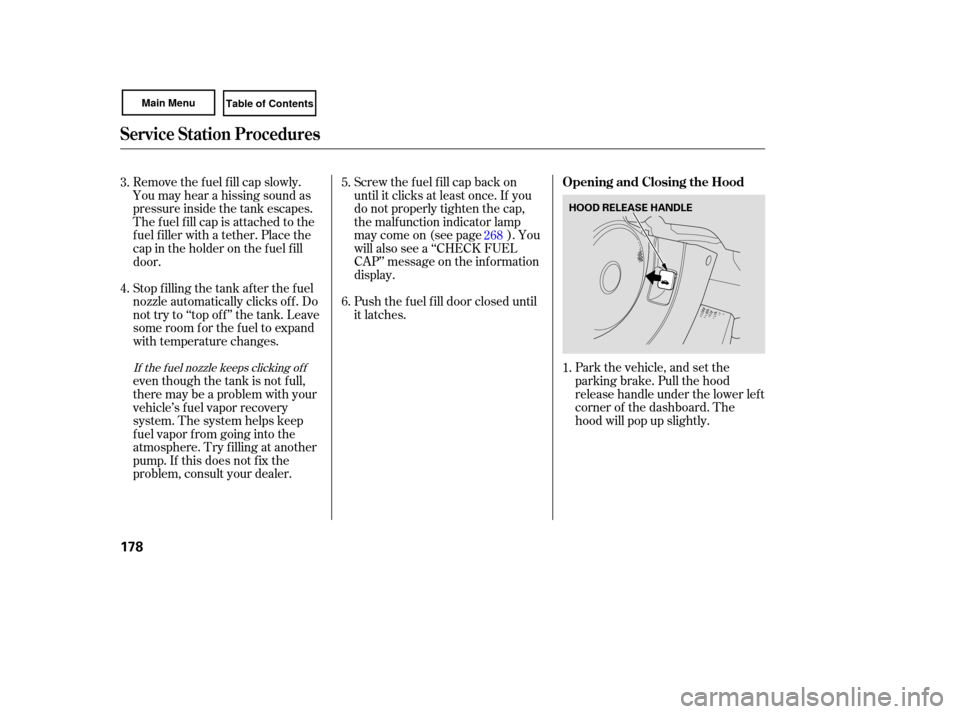
Park the vehicle, and set the
parking brake. Pull the hood
release handle under the lower left
corner of the dashboard. The
hood will pop up slightly.
Screw
the fuel fill cap back on
until it clicks at least once. If you
do not properly tighten the cap,
the malfunction indicator lamp
maycomeon(seepage ).You
will also see a ‘‘CHECK FUEL
CAP’’ message on the inf ormation
display.
Push the f uel f ill door closed until
it latches.
Remove the f uel f ill cap slowly.
You may hear a hissing sound as
pressure inside the tank escapes.
The fuel fill cap is attached to the
f uel f iller with a tether. Place the
cap in the holder on the f uel f ill
door.
Stop f illing the tank af ter the f uel
nozzle automatically clicks of f . Do
not try to ‘‘top off’’ the tank. Leave
some room f or the f uel to expand
with temperature changes.
even though the tank is not f ull,
there may be a problem with your
vehicle’s fuel vapor recovery
system. The system helps keep
f uel vapor f rom going into the
atmosphere. Try f illing at another
pump. If this does not f ix the
problem, consult your dealer.
1.
5.
6.
4. 3.
268If the f uel nozzle keeps clicking of f
Service Station Procedures
Opening and Closing the Hood
178
HOOD RELEASE HANDLE