lock HONDA CIVIC COUPE 2007 8.G Repair Manual
[x] Cancel search | Manufacturer: HONDA, Model Year: 2007, Model line: CIVIC COUPE, Model: HONDA CIVIC COUPE 2007 8.GPages: 311, PDF Size: 5.36 MB
Page 241 of 311
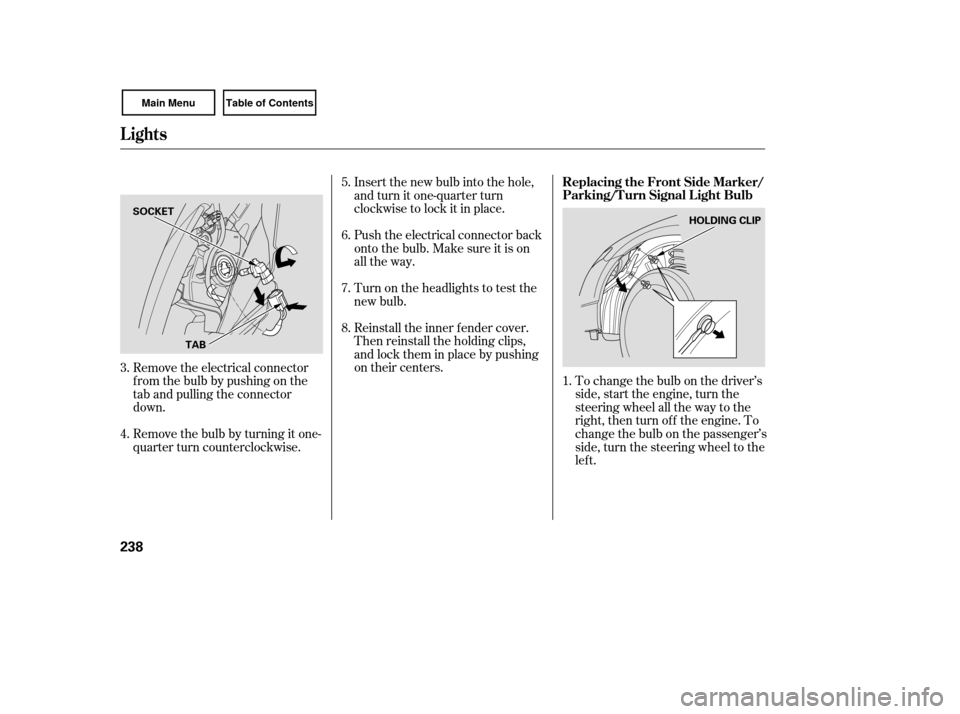
To change the bulb on the driver’s
side, start the engine, turn the
steering wheel all the way to the
right, then turn off the engine. To
change the bulb on the passenger’s
side, turn the steering wheel to the
lef t.
Reinstall the inner f ender cover.
Then reinstall the holding clips,
andlocktheminplacebypushing
on their centers. Insert the new bulb into the hole,
and turn it one-quarter turn
clockwise to lock it in place.
Push the electrical connector back
onto the bulb. Make sure it is on
all the way.
Turn on the headlights to test the
new bulb.
Remove the electrical connector
f rom the bulb by pushing on the
tab and pulling the connector
down.
Remove the bulb by turning it one-
quarter turn counterclockwise. 5.
6.
1.
7.
8.
3.
4.
Lights
Replacing the Front Side Marker/
Parking/Turn Signal Light Bulb
238
TAB HOLDING CLIP
SOCKET
Page 242 of 311
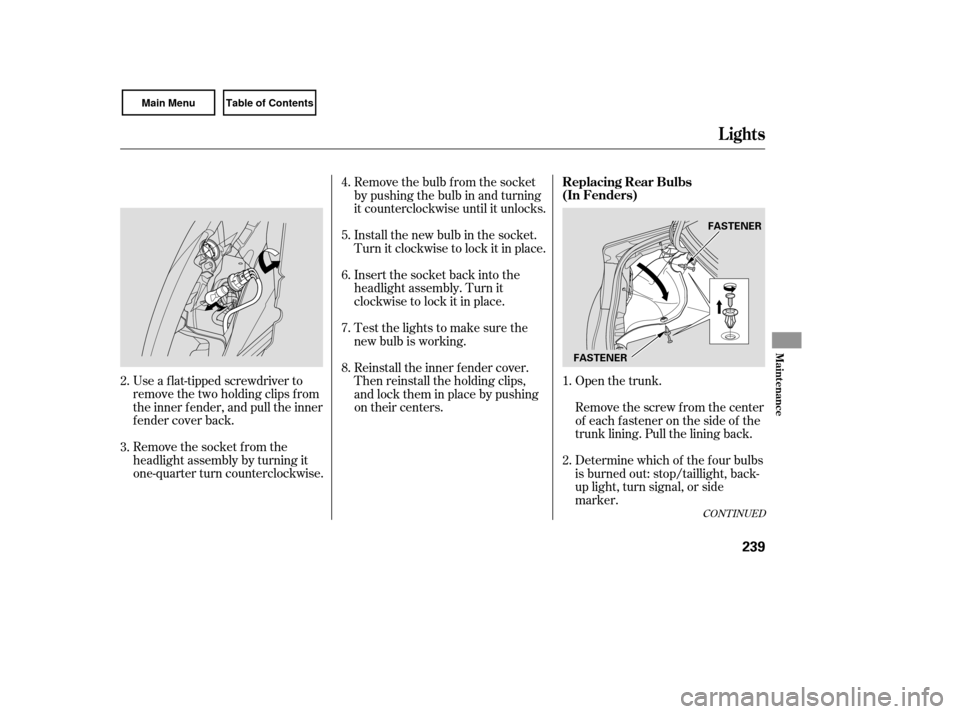
Open the trunk.
Remove the socket from the
headlight assembly by turning it
one-quarter turn counterclockwise. Use a f lat-tipped screwdriver to
remove the two holding clips f rom
the inner f ender, and pull the inner
f ender cover back. Remove the bulb f rom the socket
by pushing the bulb in and turning
it counterclockwise until it unlocks.
Remove the screw from the center
of each f astener on the side of the
trunk lining. Pull the lining back.
Determine which of the f our bulbs
is burned out: stop/taillight, back-
up light, turn signal, or side
marker.
Install the new bulb in the socket.
Turn it clockwise to lock it in place.
Insert the socket back into the
headlight assembly. Turn it
clockwise to lock it in place.
Test the lights to make sure the
new bulb is working.
Reinstall the inner f ender cover.
Then reinstall the holding clips,
andlocktheminplacebypushing
on their centers.
1.
4.
5.
6.
7.
8.
3. 2. 2.
CONT INUED
Replacing Rear Bulbs
(In Fenders)
Lights
Maint enance
239
FASTENERFASTENER
Page 243 of 311
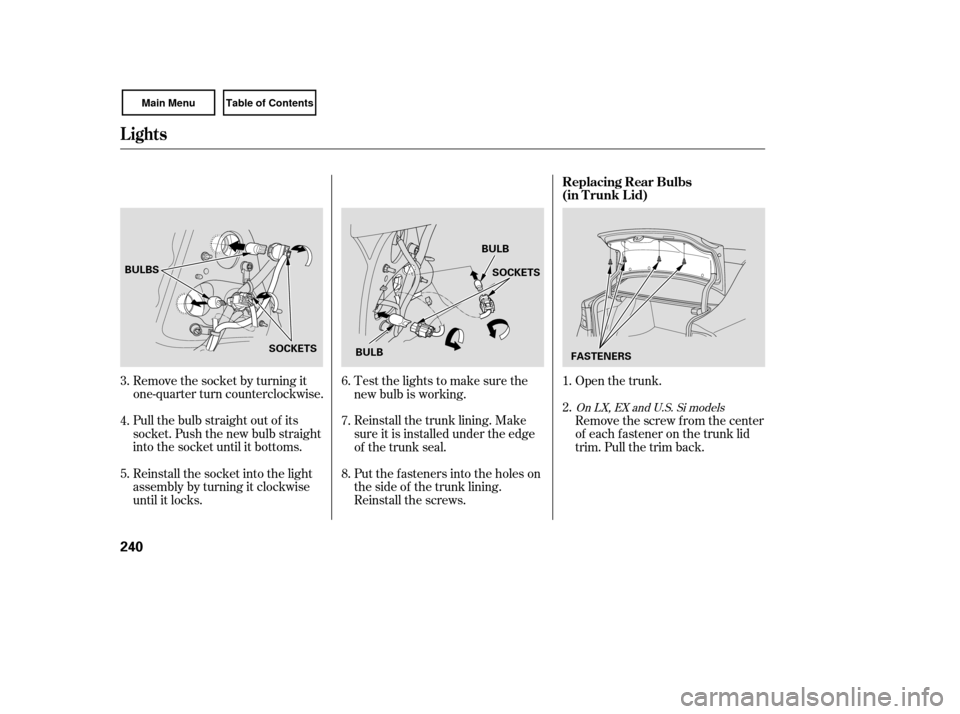
Open the trunk.
Remove the socket by turning it
one-quarter turn counterclockwise.
Pull the bulb straight out of its
socket. Push the new bulb straight
into the socket until it bottoms.
Reinstall the socket into the light
assembly by turning it clockwise
until it locks. Put the f asteners into the holes on
the side of the trunk lining.
Reinstall the screws. Reinstall the trunk lining. Make
sure it is installed under the edge
of the trunk seal. Test the lights to make sure the
new bulb is working.
Remove the screw from the center
of each f astener on the trunk lid
trim. Pull the trim back.
1.
2.
4.
5. 6.
7.
8.
3.
On LX, EX and U.S. Si models
Lights
Replacing Rear Bulbs
(in T runk L id)
240
BULBS
SOCKETS SOCKETS
BULB
BULB FASTENERS
Page 244 of 311
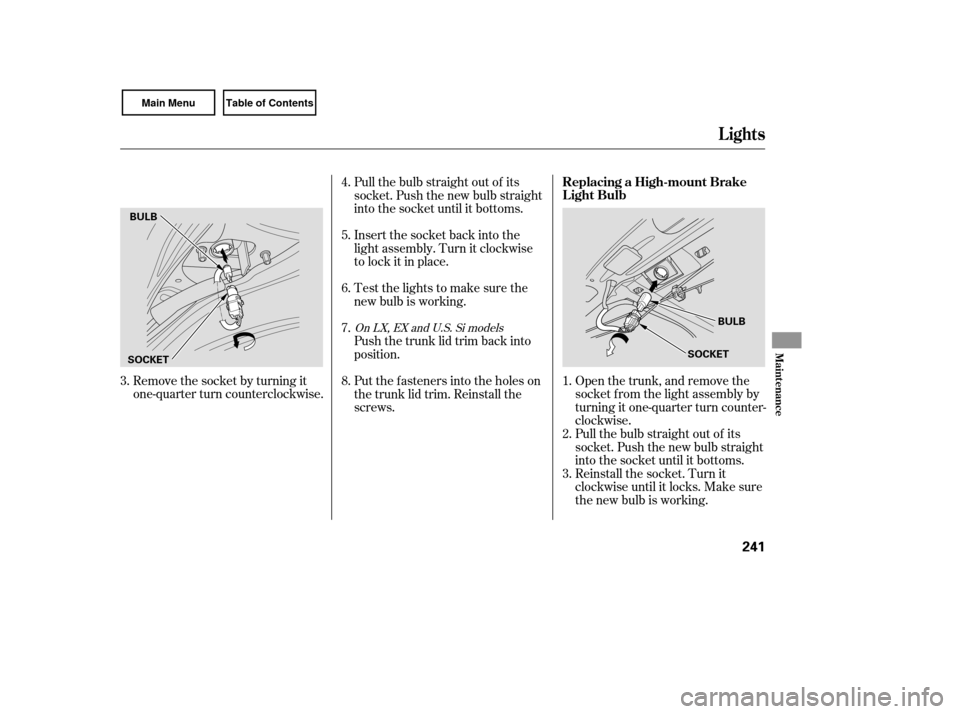
Remove the socket by turning it
one-quarter turn counterclockwise.Open the trunk, and remove the
socket f rom the light assembly by
turning it one-quarter turn counter-
clockwise.
Pull the bulb straight out of its
socket. Push the new bulb straight
into the socket until it bottoms.
Reinstall the socket. Turn it
clockwise until it locks. Make sure
the new bulb is working.
Pull the bulb straight out of its
socket. Push the new bulb straight
into the socket until it bottoms.
Insert the socket back into the
light assembly. Turn it clockwise
to lock it in place.
Test the lights to make sure the
new bulb is working.
Push the trunk lid trim back into
position.
Put the f asteners into the holes on
the trunk lid trim. Reinstall the
screws.
2. 1.
3.
4.
5.
6.
7.
8.
3.
On LX, EX and U.S. Si models
Lights
Replacing a High-mount Brake
Light Bulb
Maint enance
241
BULB
SOCKET
BULB
SOCKET
Page 247 of 311
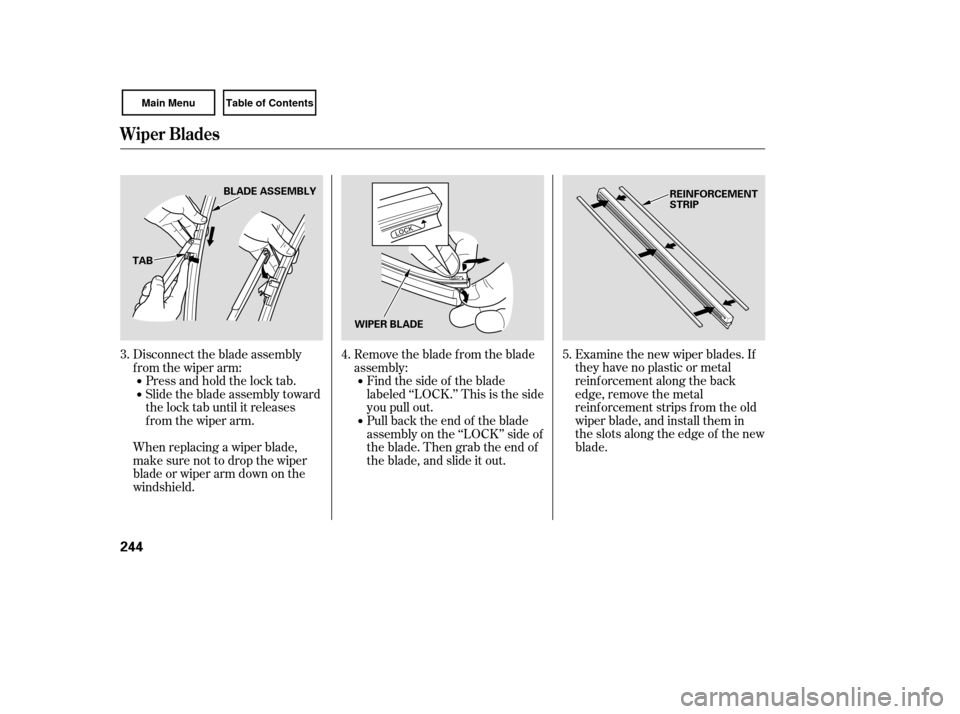
Examine the new wiper blades. If
they have no plastic or metal
reinf orcement along the back
edge, remove the metal
reinf orcement strips f rom the old
wiper blade, and install them in
the slots along the edge of the new
blade.
Disconnect the blade assembly
from the wiper arm:
Press and hold the lock tab.
Slide the blade assembly toward
the lock tab until it releases
from the wiper arm.
When replacing a wiper blade,
make sure not to drop the wiper
blade or wiper arm down on the
windshield. Remove the blade from the blade
assembly:
Findthesideof theblade
labeled ‘‘LOCK.’’ This is the side
you pull out.
Pull back the end of the blade
assembly on the ‘‘LOCK’’ side of
theblade.Thengrabtheendof
the blade, and slide it out.
3. 4. 5.
Wiper Blades
244
BLADE ASSEMBLY
TAB WIPER BLADE REINFORCEMENT
STRIP
Page 248 of 311
To saf ely operate your vehicle, your
tires must be the proper type and
size, in good condition with adequate
tread, and correctly inf lated.
The f ollowing pages give more
detailed inf ormation on how to take
care of your tires and what to do
when they need to be replaced.Keeping the tires properly inf lated
provides the best combination of
handling, tread lif e, and riding
comf ort.
Underinf lated tires wear unevenly,
adversely affect handling and fuel
economy, and are more likely to
fail from being overheated.
Overinf lated tires can make your
vehicleridemoreharshly,are
more prone to damage f rom road
hazards, and wear unevenly.
We recommend that you visually
check your tires every day. If you
think a tire might be low, check it
immediately with a tire gauge.
Install the new blade onto the
blade assembly:
Pull back either end of the blade
assembly.
Place the side of the blade not
labeled‘‘LOCK’’ontheendof
the blade assembly, and slide
the blade onto the assembly
until it is f ully installed.
Slide the wiper blade assembly
onto the wiper arm. Make sure it
locks in place.
Reinstall the cover onto the blade
assembly.
Lower the wiper arm down against
the windshield, the passenger’s
side first, then the driver’s side. Make sure the blade is completely
installed and that its edge is not
bunched up.
6.
7.
8.
9.
10.
CONT INUED
Wiper Blades, Tires
T ires Inf lation Guidelines
Maint enance
245
Using tires that are excessively
worn or improperly inflated can
cause a crash in which you can
be seriously hurt or killed.
Follow all instructions in this
owner’s manual regarding tire
inflation and maintenance.
Page 257 of 311

Fill the f uel tank.
Change the engine oil and f ilter.Block the rear wheels.
If the vehicle is to be stored f or a
longer period, it should be
supported on jackstands so the
tires are of f the ground.
Wash and dry the exterior
completely.
Cleantheinterior.Makesurethe
carpeting, floor mats, etc., are
completely dry.
If you need to park your vehicle f or
an extended period (more than 1
month), there are several things you
should do to prepare it f or storage.
Proper preparation helps prevent
deterioration and makes it easier to
get your vehicle back on the road. If
possible, store your vehicle indoors. Leave one window open slightly (if
the vehicle is being stored
indoors).Cover the vehicle with a
‘‘breathable’’ cover, one made
f rom a porous material such as
cotton. Non-porous materials, such
as plastic sheeting, trap moisture,
which can damage the paint.
To minimize sticking, apply a
silicone spray lubricant to all door
and trunk seals. Also, apply a
vehiclebodywaxtothepainted
surfaces that mate with the door
and trunk seals. Support the f ront wiper blade
arms with a f olded towel or rag so
they do not touch the windshield. Disconnect the battery. If possible, periodically run the
engine until it reaches f ull
operating temperature (the
cooling f an cycles twice).
Pref erably, do this once a month.
Leave the parking brake off. Put
the transmission in reverse
(manual) or Park (automatic).
Vehicle Storage
254
Page 260 of 311
Turn on the hazard warning lights,
and turn the ignition switch to the
LOCK (0) position. Have all
passengers get out of the vehicle
while you change the tire. Park the vehicle on f irm, level, and
non-slippery ground. Put the
transmission in Park (automatic)
or reverse (manual). Apply the
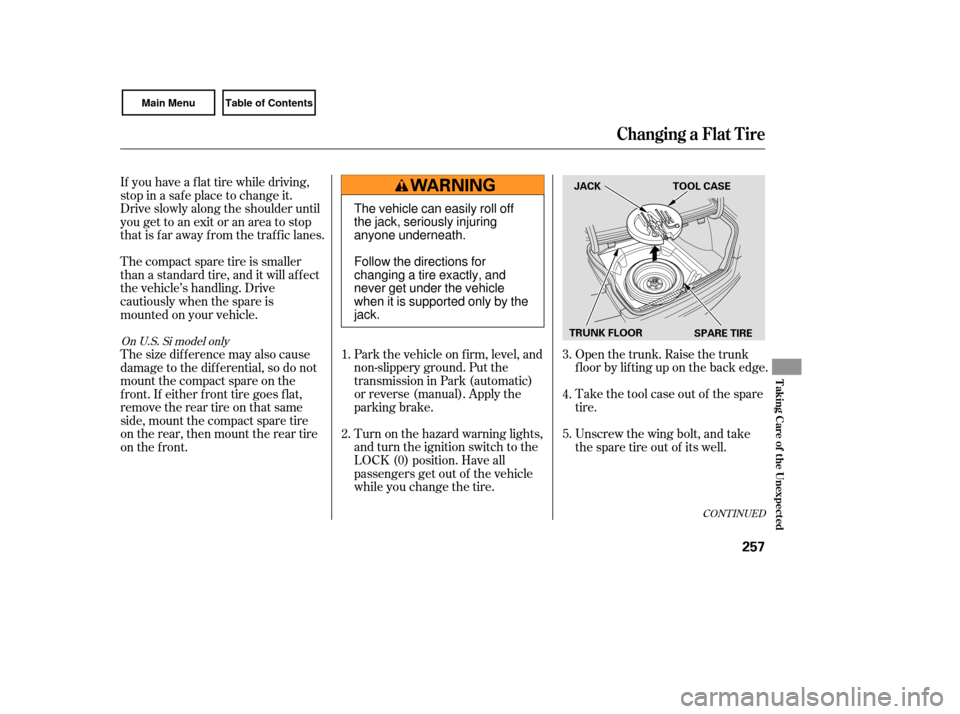
parking brake.Open the trunk. Raise the trunk
f loor by lif ting up on the back edge.
Take the tool case out of the spare
tire.
Unscrew the wing bolt, and take
the spare tire out of its well.
If you have a f lat tire while driving,
stop in a saf e place to change it.
Drive slowly along the shoulder until
you get to an exit or an area to stop
that is far away from the traffic lanes.
Thecompactsparetireissmaller
than a standard tire, and it will affect
the vehicle’s handling. Drive
cautiously when the spare is
mounted on your vehicle.
Thesizedifferencemayalsocause
damage to the dif f erential, so do not
mount the compact spare on the
f ront. If either f ront tire goes f lat,
removethereartireonthatsame
side, mount the compact spare tire
on the rear, then mount the rear tire
on the f ront.
5. 4.
3.
2. 1.
CONT INUED
On U.S. Si model only
Changing a Flat Tire
T aking Care of t he Unexpect ed
257
SPARE TIRE
TRUNK FLOOR JACK TOOL CASE
The vehicle can easily roll off
the jack, seriously injuring
anyone underneath.
Follow the directions for
changing a tire exactly, and
never get under the vehicle
when it is supported only by the
jack.
Page 261 of 311
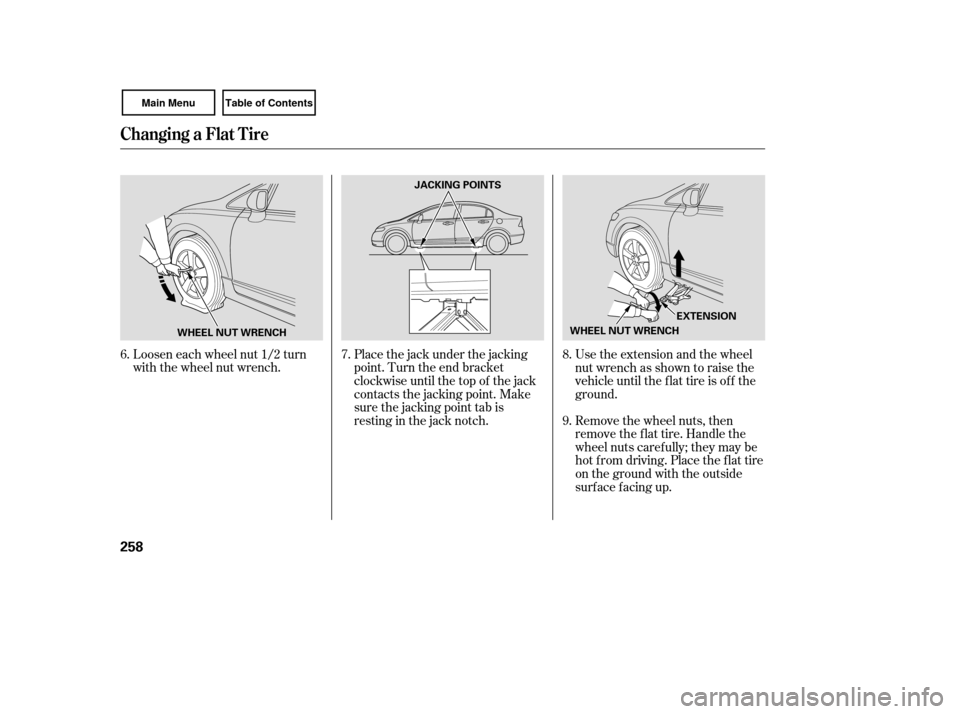
Loosen each wheel nut 1/2 turn
with the wheel nut wrench.Place the jack under the jacking
point. Turn the end bracket
clockwise until the top of the jack
contacts the jacking point. Make
sure the jacking point tab is
restinginthejacknotch.Use the extension and the wheel
nut wrench as shown to raise the
vehicle until the f lat tire is of f the
ground.
Remove the wheel nuts, then
remove the f lat tire. Handle the
wheel nuts caref ully; they may be
hot from driving. Place the flat tire
on the ground with the outside
surface facing up.
6. 7. 8.
9.
Changing a Flat Tire
258
JACKING POINTS
WHEEL NUT WRENCH EXTENSION
WHEEL NUT WRENCH
Page 264 of 311

Diagnosing why the engine won’t
start falls into two areas, depending
on what you hear when you turn the
ignition switch to the START (III)
position: Wh
en you turn the ignition switch to
the START (III) position, you do not
hear the normal noise of the engine
trying to start. You may hear a
clicking sound, a series of clicks, or
nothing at all. Turn
the ignition switch to the
START (III) position. If the
headlights do not dim, check the
condition of the fuses. If the fuses
areOK,thereisprobably
something wrong with the
electrical circuit for the ignition
switch or starter motor. You will
need a qualified technician to
determine the problem. See
on page .
If the headlights dim noticeably or
go out when you try to start the
engine, either the battery is
discharged or the connections are
corroded. Check the condition of
the battery and terminal connec-
tions (see page ). You can
then try jump starting the vehicle
from a booster battery (see page
).
You
can hear the starter motor
operating normally, or the starter
motor sounds like it is spinning
faster than normal, but the engine
does not start up and run.
You
hear nothing, or almost
nothing. The engine’s starter
motor does not operate at all, or
operates very slowly.
Turn the ignition switch to the ON
(II) position. Turn on the
headlights, and check their
brightness. If the headlights are
very dim or do not come on at all,
the battery is discharged. See
on page .
Check the transmission interlock.
If you have a manual transmission,
the clutch pedal must be pushed
all the way to the f loor or the
starter will not operate. With an
automatic transmission, it must be
in Park or neutral.
Check these things:
263 276
252
263
Nothing Happens or the Starter
Motor Operates Very Slowly
Emergency T owing
Jump Starting
If theEngineWon’tStart
T aking Care of t he Unexpect ed
261