check engine light HONDA CIVIC COUPE 2015 9.G User Guide
[x] Cancel search | Manufacturer: HONDA, Model Year: 2015, Model line: CIVIC COUPE, Model: HONDA CIVIC COUPE 2015 9.GPages: 441, PDF Size: 18.4 MB
Page 338 of 441
337
Maintenance
This chapter discusses basic maintenance.
Before Performing MaintenanceInspection and Maintenance ............ 338Safety When Performing Maintenance..... 339Parts and Fluids Used in Maintenance Service ........................................... 340
Maintenance Minder
TM..................... 341
Maintenance Under the Hood
Maintenance Items Under the Hood ..... 345Opening the Hood ........................... 347
Recommended Engine Oil ................ 348
Oil Check ......................................... 349
Adding Engine Oil ............................ 351Changing the Engine Oil and Oil Filter ..... 352
Engine Coolant ................................ 355
Transmission Fluid ............................ 357
Brake/Clutch Fluid ............................ 358
Refilling Window Washer Fluid......... 359
Replacing Light Bulbs ....................... 360Checking and Maintaining Wiper
Blades .......................................... 370Checking and Maintaining Tires
Checking Tires ................................. 372Tire and Loading Information Label ...... 373Tire Labeling .................................... 373DOT Tire Quality Grading (U.S. Vehicles)....... 375Wear Indicators................................ 377 Tire Service Life ................................ 377
Tire and Wheel Replacement ........... 378
Tire Rotation .................................... 379
Winter Tires ..................................... 380
Battery ............................................... 381
Remote Transmitter Care
Replacing the Button Battery ........... 382
Heating and Cooling System
*/Climate
Control System
* Maintenance ....... 384
Cleaning
Interior Care .................................... 385
Exterior Care.................................... 387
* Not available on all models
Page 355 of 441
uuMaintenance Under the Hood uChanging the Engine Oil and Oil Filter
354Maintenance
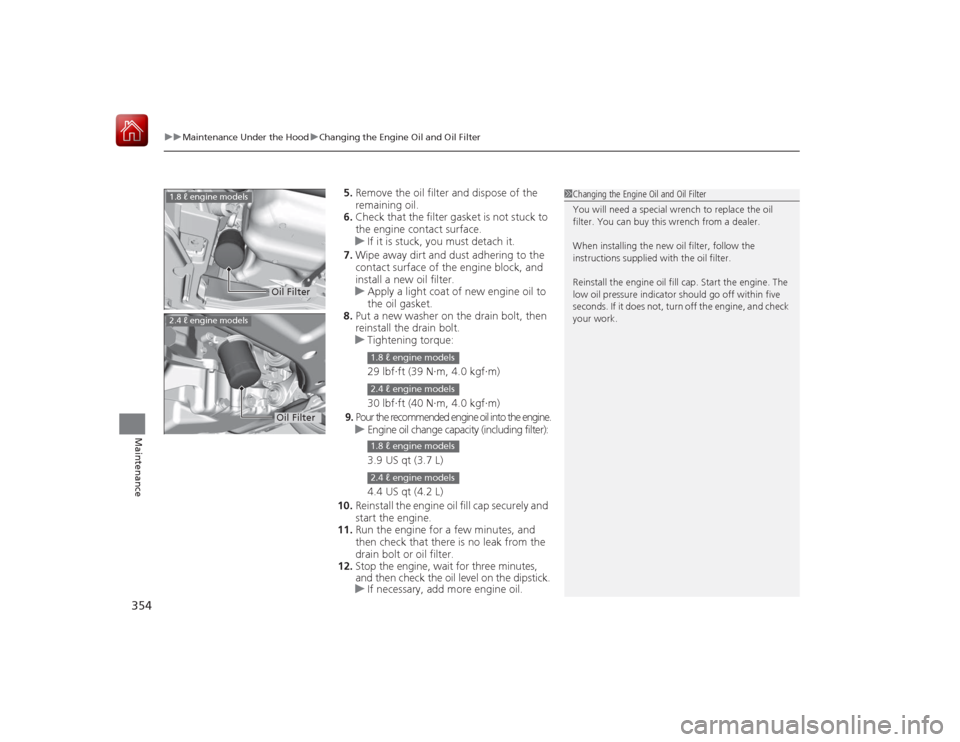
5. Remove the oil filter and dispose of the
remaining oil.
6. Check that the filter gasket is not stuck to
the engine contact surface.
u If it is stuck, you must detach it.
7. Wipe away dirt and dust adhering to the
contact surface of the engine block, and
install a new oil filter.
u Apply a light coat of new engine oil to
the oil gasket.
8. Put a new washer on the drain bolt, then
reinstall the drain bolt.
u Tightening torque:
29 lbf∙ft (39 N∙m, 4.0 kgf∙m)
30 lbf∙ft (40 N∙m, 4.0 kgf∙m)
9. Pour the recommended engine oil into the engine.
u Engine oil change capacity (including filter):
3.9 US qt (3.7 L)
4.4 US qt (4.2 L)
10. Reinstall the engine oil fill cap securely and
start the engine.
11. Run the engine for a few minutes, and
then check that there is no leak from the
drain bolt or oil filter.
12. Stop the engine, wait for three minutes,
and then check the oil level on the dipstick.
u If necessary, add more engine oil.
1Changing the Engine Oil and Oil Filter
You will need a special wrench to replace the oil
filter. You can buy this wrench from a dealer.
When installing the new oil filter, follow the
instructions supplied with the oil filter.
Reinstall the engine oil fill cap. Start the engine. The
low oil pressure indicator should go off within five
seconds. If it does not, turn off the engine, and check
your work.
2.4 ℓ engine models
Oil Filter
1.8 ℓ engine models
Oil Filter
1.8 ℓ engine models2.4 ℓ engine models1.8 ℓ engine models2.4 ℓ engine models
Page 394 of 441
393
Continued
Handling the Unexpected
If a Tire Goes FlatChanging a Flat TireIf a tire goes flat while driving, grasp the steering wheel firmly, and brake gradually
to reduce speed. Then, stop in a safe place. Replace the flat tire with a compact
spare tire. Go to a dealer as soon as possible to have the full-size tire repaired or
replaced.
1.Park the vehicle on firm, level, and non-slippery surface, and apply the parking
brake.
2. Put the shift lever in
(P
.
2. Put the shift lever in
(R
.
3. Turn on the hazard warning lights and turn the ignition switch to LOCK
(0
*1.
*1: Models with the smart entry system have an ENGINE START/STOP button instead of an
ignition switch.
1 Changing a Flat Tire
Periodically check the tire pressure of the compact
spare. It should be set to the specified pressure.
Specified Pressure: 60 psi (420 kPa, 4.2 kgf/cm
2)
When driving with the compact spare tire, keep the
vehicle speed under 50 mph (80 km/h). Replace with
a full-size tire as soon as possible.
The compact spare tire and wheel in your vehicle are
specifically for this model. Do not use them with
another vehicle. Do not use another type of compact
spare tire or wheel with your vehicle.
Do not mount tire chains on a compact spare tire.
If a chain-mounted front tire goes flat, remove one of
the full-size rear tires and replace it with the compact
spare tire. Remove the flat front tire and replace it
with the full-size tire th at was removed from the rear.
Mount the tire chains on the front tire.
Continuously variable transmission modelsManual transmission modelsAll models
Page 401 of 441
400Handling the Unexpected
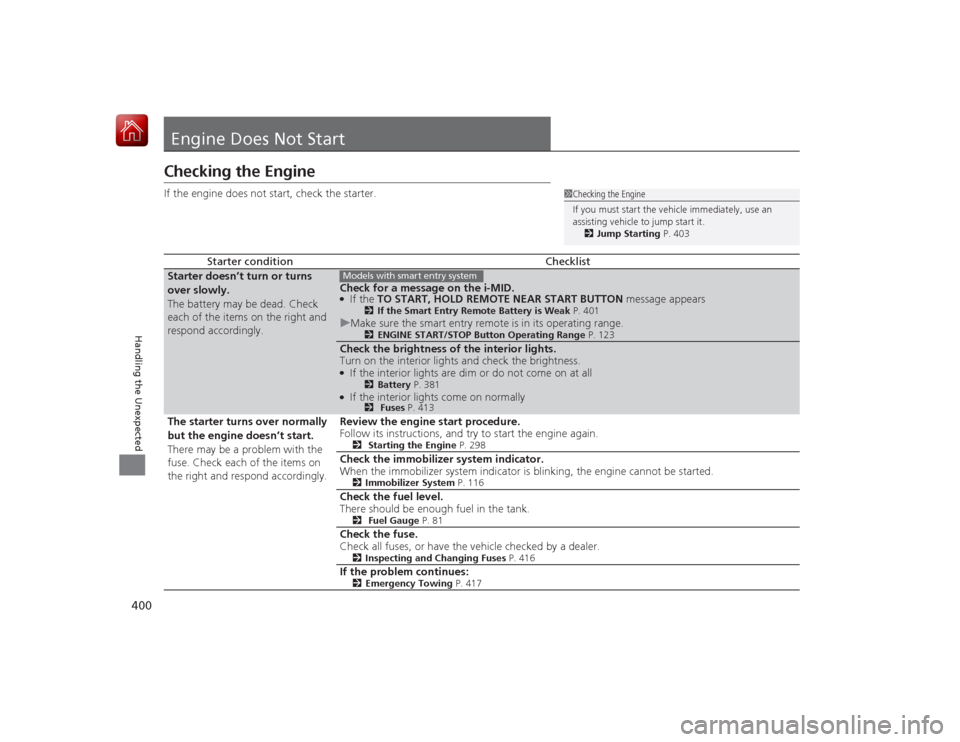
Engine Does Not StartChecking the EngineIf the engine does not start, check the starter.
Starter condition
Checklist
Starter doesn’t turn or turns
over slowly.
The battery may be dead. Check
each of the items on the right and
respond accordingly.
Check for a message on the i-MID.●If the TO START, HOLD REMOTE NEAR START BUTTON message appears
2If the Smart Entry Remote Battery is Weak P. 401
uMake sure the smart entry remote is in its operating range.
2 ENGINE START/STOP Button Operating Range P. 123
Check the brightness of the interior lights.
Turn on the interior lights and check the brightness.●If the interior lights are dim or do not come on at all
2Battery P. 381
●If the interior lights come on normally
2 Fuses P. 413
The starter turns over normally
but the engine doesn’t start.
There may be a problem with the
fuse. Check each of the items on
the right and respond accordingly. Review the engine start procedure.
Follow its instructions, and try to start the engine again.
2
Starting the Engine P. 298
Check the immobilizer system indicator.
When the immobilizer system indicator is blinking, the engine cannot be started.
2Immobilizer System P. 116
Check the fuel level.
There should be enough fuel in the tank.
2 Fuel Gauge P. 81
Check the fuse.
Check all fuses, or have the vehicle checked by a dealer.
2Inspecting and Changing Fuses P. 416
If the problem continues:
2Emergency Towing P. 417
1Checking the Engine
If you must start the vehicle immediately, use an
assisting vehicle to jump start it.
2 Jump Starting P. 403
Models with smart entry system
Page 404 of 441
403
Continued
Handling the Unexpected
Jump StartingTurn off the power to electric devices, such as audio and lights. Turn off the engine,
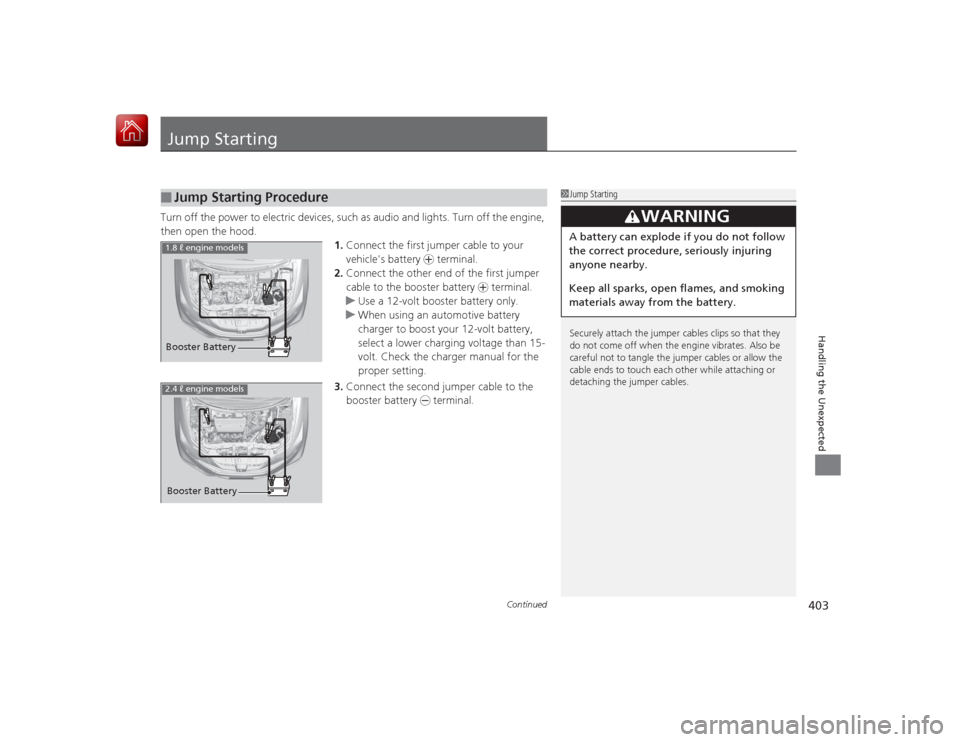
then open the hood. 1.Connect the first jumper cable to your
vehicle's battery + terminal.
2. Connect the other end of the first jumper
cable to the booster battery + terminal.
u Use a 12-volt booster battery only.
u When using an automotive battery
charger to boost your 12-volt battery,
select a lower charging voltage than 15-
volt. Check the charger manual for the
proper setting.
3. Connect the second jumper cable to the
booster battery - terminal.■
Jump Starting Procedure
1Jump Starting
Securely attach the jumper cables clips so that they
do not come off when the engine vibrates. Also be
careful not to tangle the jumper cables or allow the
cable ends to touch each other while attaching or
detaching the jumper cables.
3
WARNING
A battery can explode if you do not follow
the correct procedure, seriously injuring
anyone nearby.
Keep all sparks, open flames, and smoking
materials away from the battery.
Booster Battery1.8 ℓ engine models2.4 ℓ engine modelsBooster Battery
Page 405 of 441
uuJump Starting u
404Handling the Unexpected
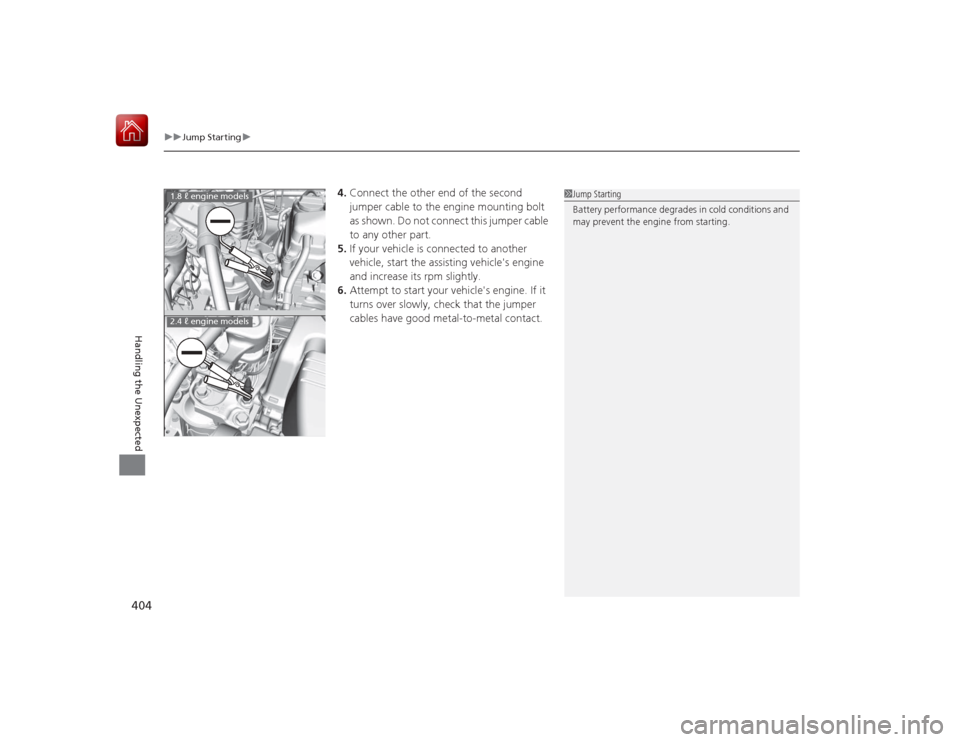
4.Connect the other end of the second
jumper cable to the engine mounting bolt
as shown. Do not connect this jumper cable
to any other part.
5. If your vehicle is connected to another
vehicle, start the assisting vehicle's engine
and increase its rpm slightly.
6. Attempt to start your vehicle's engine. If it
turns over slowly, check that the jumper
cables have good metal-to-metal contact.
1Jump Starting
Battery performance degrades in cold conditions and
may prevent the engine from starting.
1.8 ℓ engine models2.4 ℓ engine models
Page 410 of 441
409Handling the Unexpected
Indicator, Coming On/BlinkingIf the Low Oil Pressure Indicator Comes On
■Reasons for the indicator to come on
Comes on when the engine oil pressure is low.■What to do as soon as the indicator comes on
1. Immediately park the vehicle in a safe place.
2. If necessary, turn the hazard warning lights on.■What to do after parking the vehicle
1. Stop the engine and let it sit for about one minute.
2. Open the hood and check the oil level.
u Add oil as necessary.
3. Start the engine and check the low oil pressure indicator.
u The indicator goes off: Start driving again.
u The indicator does not go off within 10 seconds: Stop the engine
and contact a dealer for repairs immediately.
If the Charging System Indicator Comes On
■Reasons for the indicator to come on
Comes on when the battery is not being charged.■What to do when the indicator comes on
Turn off the heating and cooling system
*/climate control system
*, rear
defogger, and other electrical systems, and immediately contact a dealer
for repairs.
1 If the Low Oil Pressure Indicator Comes OnNOTICERunning the engine with low oil pressure can cause
serious mechanical damage almost immediately.1If the Charging System Indicator Comes On
If you need to stop temporarily, do not turn off the
engine. Restarting the engine may rapidly discharge
the battery.
* Not available on all models
Page 412 of 441
411
uuIndicator, Coming On/Blinking uIf the Brake System Indicator (Red) Comes On
Handling the Unexpected
If the Brake System Indicator (Red) Comes On
■Reasons for the indicator to come on
• The brake fluid is low.
• There is a malfunction in the brake system.■What to do when the indicator comes on while driving
Press the brake pedal lightly to check pedal pressure.
• If normal, check the brake fluid level the next time you stop.
• If abnormal, take immediate action. If necessary, downshift the
transmission to slow the vehic le using engine braking.
If the Electric Power Steering (EPS) System Indicator Comes On
■Reasons for the indicator to come on
• Comes on if there is a problem with the EPS system.
• If you depress the accelerator pedal repeatedly to increase the engine
speed while the engine is idling, the indicator comes on, and
sometimes the steering wheel becomes harder to operate.■What to do when the indicator comes on
Stop the vehicle in a safe place and restart the engine.
If the indicator comes on and stays on, immediately have your vehicle
inspected by a dealer.
1 If the Brake System Indicator (Red) Comes On
Have your vehicle repaired immediately.
It is dangerous to drive with low brake fluid. If there
is no resistance from the brake pedal, stop
immediately in a safe place. If necessary downshift
the gears.
If the brake system indicator and ABS indicator come
on simultaneously, the electronic brake distribution
system is not working. This can result in vehicle
instability under sudden braking.
Have your vehicle inspected by a dealer immediately.
U.S.
Canada
Page 414 of 441
413
Continued
Handling the Unexpected
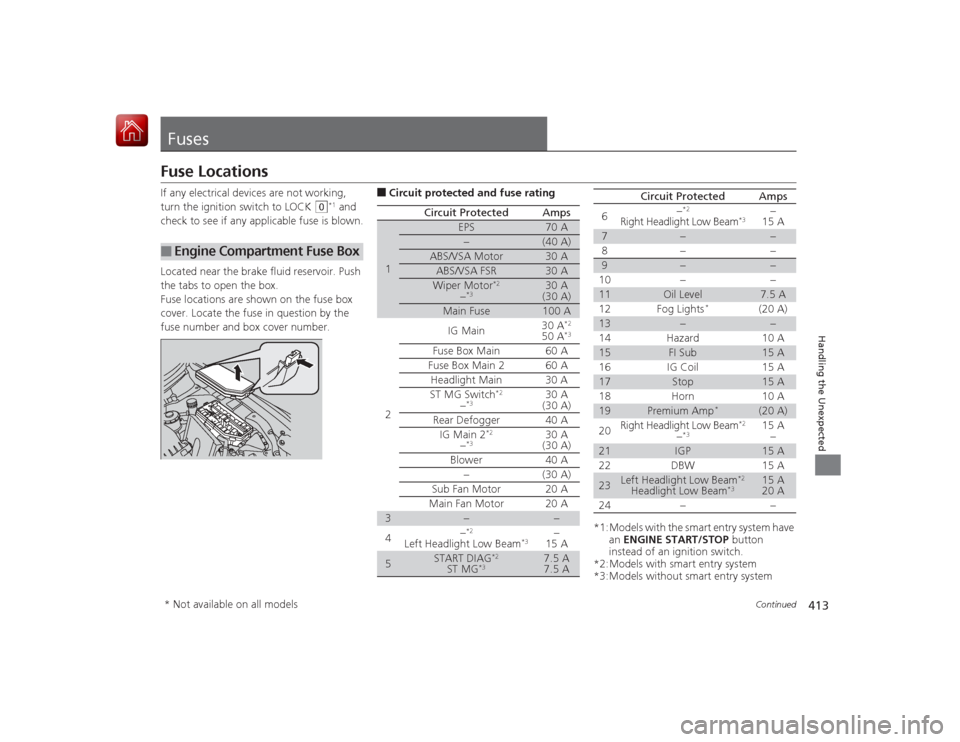
FusesFuse LocationsIf any electrical devices are not working,
turn the ignition switch to LOCK
(0
*1 and
check to see if any applicable fuse is blown.
Located near the brake fluid reservoir. Push
the tabs to open the box.
Fuse locations are shown on the fuse box
cover. Locate the fuse in question by the
fuse number and box cover number.
■
Engine Compartmen t Fuse Box
■Circuit protected and fuse rating
Circuit Protected
Amps
1
EPS
70 A
−
(40 A)
ABS/VSA Motor
30 A
ABS/VSA FSR
30 A
Wiper Motor
*2
−*3
30 A
(30 A)
Main Fuse
100 A
2
IG Main
30 A
*2
50 A
*3
Fuse Box Main 60 AFuse Box Main 2
60 A
Headlight Main 30 A
ST MG Switch
*2
−*3
30 A
(30 A)
Rear Defogger 40 A IG Main 2
*2
−*3
30 A
(30 A)
Blower 40 A −(30 A)
Sub Fan Motor 20 A
Main Fan Motor 20 A
3
−
−
4 −
*2
Left Headlight Low Beam
*3
−
15 A
5
START DIAG
*2
ST MG
*3
7.5 A
7.5 A
*1:Models with the smart entry system have
an ENGINE START/STOP button
instead of an ignition switch.
*2:Models with smart entry system
*3:Models without smart entry system 6
−
*2
Right Headlight Low Beam
*3
−
15 A
7
−
−
8− −
9
−
−
10 − −
11
Oil Level
7.5 A
12 Fog Lights
*
(20 A)
13
−
−
14 Hazard 10 A
15
FI Sub
15 A
16 IG Coil 15 A
17
Stop
15 A
18 Horn 10 A
19
Premium Amp
*
(20 A)
20 Right Headlight Low Beam
*2
−*3
15 A
−
21
IGP
15 A
22 DBW 15 A
23
Left Headlight Low Beam
*2
Headlight Low Beam
*3
15 A
20 A
24 − −
Circuit Protected
Amps
* Not available on all models
Page 417 of 441
416
uuFuses uInspecting and Changing Fuses
Handling the Unexpected
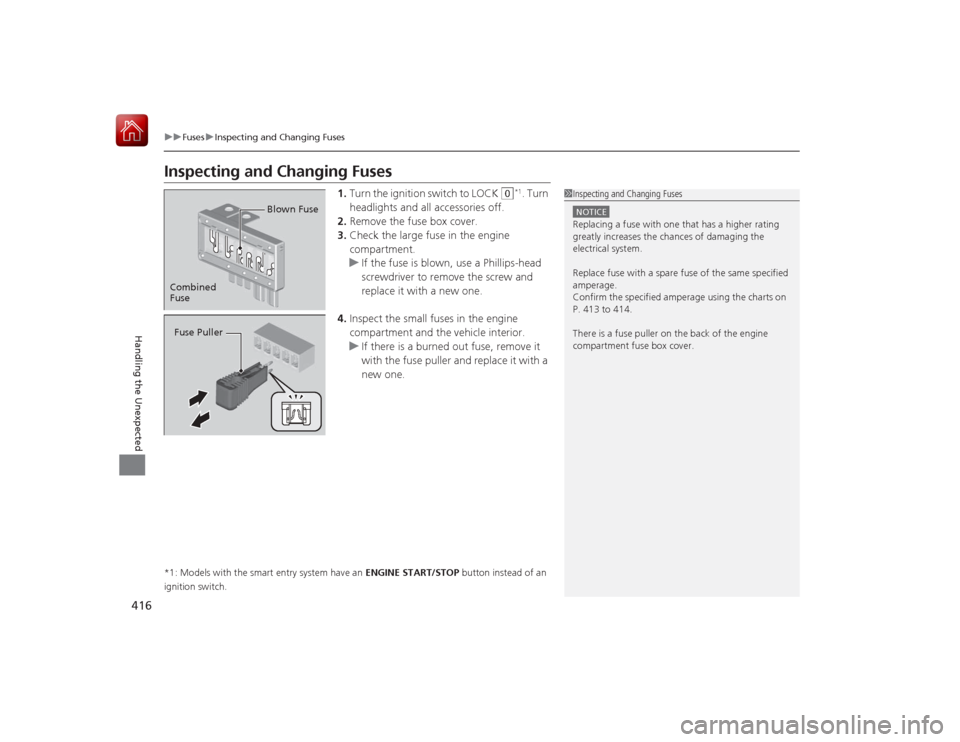
Inspecting and Changing Fuses
1. Turn the ignition switch to LOCK
(0
*1. Turn
headlights and all accessories off.
2. Remove the fuse box cover.
3. Check the large fuse in the engine
compartment.
u If the fuse is blown, use a Phillips-head
screwdriver to remove the screw and
replace it with a new one.
4. Inspect the small fuses in the engine
compartment and the vehicle interior.
u If there is a burned out fuse, remove it
with the fuse puller and replace it with a
new one.
*1: Models with the smart entry system have an ENGINE START/STOP button instead of an
ignition switch.
1 Inspecting and Changing FusesNOTICEReplacing a fuse with one that has a higher rating
greatly increases the chances of damaging the
electrical system.
Replace fuse with a spare fuse of the same specified
amperage.
Confirm the specified amperage using the charts on
P. 413 to 414.
There is a fuse puller on the back of the engine
compartment fuse box cover.
Combined
Fuse Blown FuseFuse Puller