ignition HONDA CIVIC COUPE 2015 9.G Workshop Manual
[x] Cancel search | Manufacturer: HONDA, Model Year: 2015, Model line: CIVIC COUPE, Model: HONDA CIVIC COUPE 2015 9.GPages: 441, PDF Size: 18.4 MB
Page 308 of 441
307
uuWhen Driving uShifting
Continued
Driving
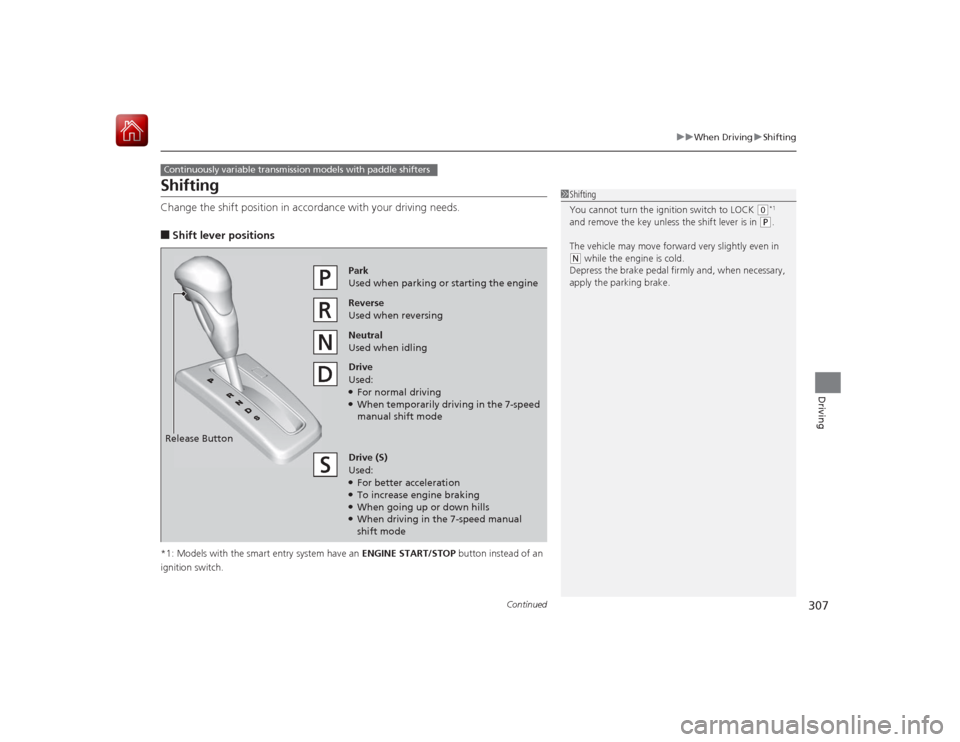
ShiftingChange the shift position in acco rdance with your driving needs.■Shift lever positions*1: Models with the smart entry system have an ENGINE START/STOP button instead of an
ignition switch.Continuously variable transmission models with paddle shifters
1 Shifting
You cannot turn the ignition switch to LOCK
(0*1
and remove the key unless the shift lever is in
( P.
The vehicle may move forward very slightly even in
( N while the engine is cold.
Depress the brake pedal firmly and, when necessary,
apply the parking brake.
Reverse
Used when reversingDrive
Used:●For normal driving●When temporarily driving in the 7-speed
manual shift modePark
Used when parking or starting the engine
Neutral
Used when idling
Release ButtonDrive (S)
Used:●For better acceleration●To increase engine braking●When going up or down hills●When driving in the 7-speed manual
shift mode
Page 314 of 441
313
uuWhen Driving uShifting
Driving
The manual transmission has a lockout mechanism that stops you from accidentally
shifting into
(R
from a forward gear while the vehicle is moving above a certain
speed.
If you cannot shift to
(R
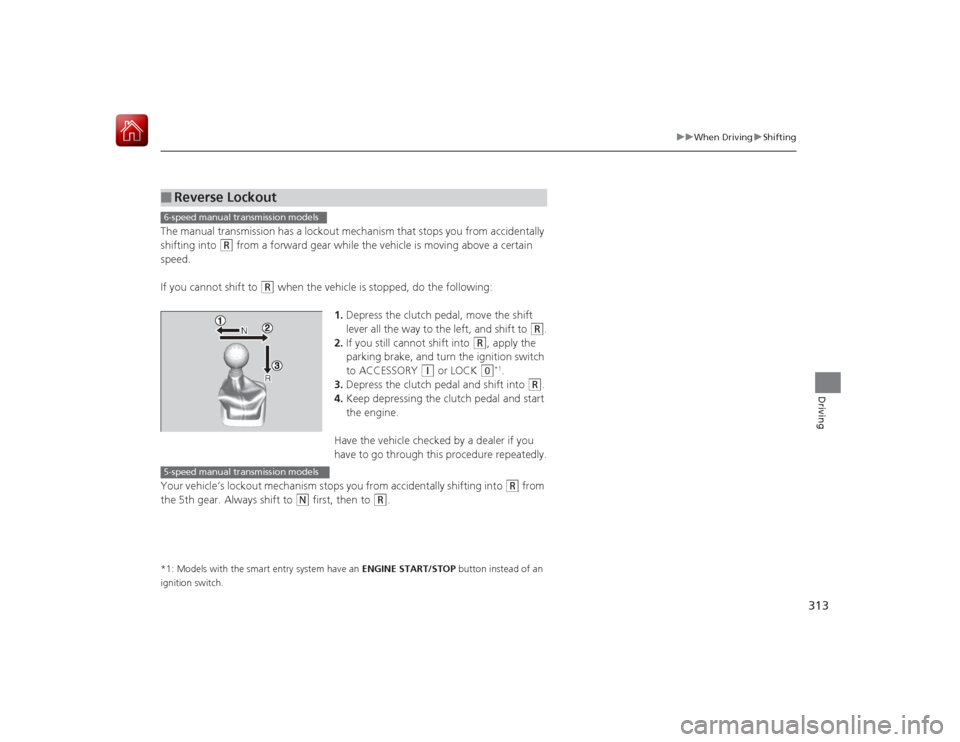
when the vehicle is stopped, do the following:
1.Depress the clutch pedal, move the shift
lever all the way to the left, and shift to
(R
.
2. If you still cannot shift into
(R
, apply the
parking brake, and turn the ignition switch
to ACCESSORY
(q
or LOCK
(0
*1.
3. Depress the clutch pedal and shift into
(R
.
4. Keep depressing the clutch pedal and start
the engine.
Have the vehicle checked by a dealer if you
have to go through this procedure repeatedly.
Your vehicle’s lockout mechanism stops you from accidentally shifting into
(R
from
the 5th gear. Always shift to
(N
first, then to
(R
.
*1: Models with the smart entry system have an ENGINE START/STOP button instead of an
ignition switch.■
Reverse Lockout6-speed manual transmission models5-speed manual transmission models
Page 323 of 441
322
uuWhen Driving uTire Pressure Monitoring System (TPMS)
Driving
Tire Pressure Monitoring System (TPMS)Instead of directly measuring the pressure in each tire, the TPMS on this vehicle
monitors and compares the rolling radius and rotational characteristics of each
wheel and tire while you are driving to determine if one or more tires are
significantly under-inflated. This will cause the low tire pressure/TPMS indicator to
come on and a message to appear on the i-MID.
You must start TPMS calibration every time you:
• Adjust the pressure in one or more tires.
• Rotate the tires.
• Replace one or more tires.
Before calibrating the TPMS:
• Set the cold tire pressure in all four tires.
2 Checking Tires P. 372
Make sure:
•The vehicle is at a complete stop.
• The shift lever is in
(N
.
• The shift lever is in
(P
.
• The ignition switch is in ON
(w
*1.
*1: Models with the smart entry system have an ENGINE START/STOP button instead of an
ignition switch.■
TPMS CalibrationU.S. models
1 Tire Pressure Monitoring System (TPMS)
The system does not monitor the tires when driving
at low speed.
Conditions such as low ambient temperature and
altitude change directly affect tire pressure and can
trigger the low tire pressure/TPMS indicator to come on.
Tire pressure checked and inflated in:•Warm weather can become under-inflated in
colder weather.•Cold weather can become over-inflated in warmer
weather.
The low tire pressure i ndicator will not come on as a
result of over inflation.
The TPMS may not function properly if tire type and
size are mixed. Make sure to use the same size and
type of tire. 2 Checking and Maintaining Tires P. 372
The low tire pressure/TP MS indicator may come on
with a delay or may not come on at all when:•You rapidly accele rate, decelerate, or turn the
steering wheel.•You drive on snowy or slippery roads.•Snow chains are used.
The low tire pressure/TP MS indicator may come on
under the following conditions:•A compact spare tire is used.•There is a heavier and uneven load on the tires,
such as when towing a trailer, than the condition at
calibration.•Snow chains are used.
Manual transmission modelsContinuously variable transmission modelsAll models
Page 324 of 441
323
uuWhen Driving uTire Pressure Monitoring System (TPMS)
Driving
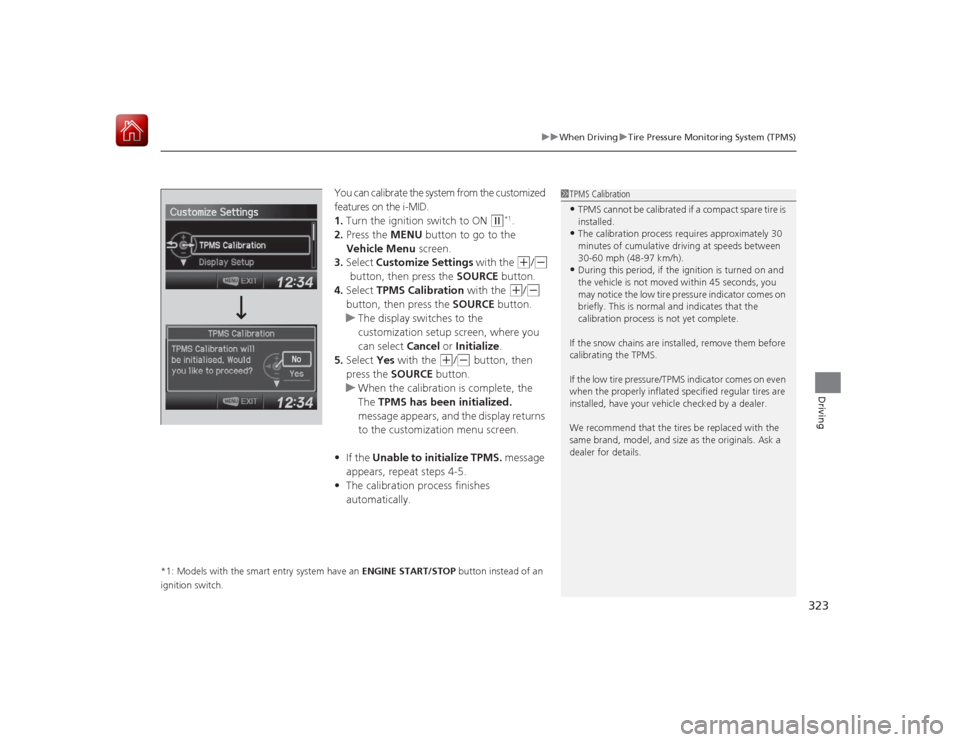
You can calibrate the system from the customized
features on the i-MID.
1. Turn the ignition switch to ON
(w
*1.
2. Press the MENU button to go to the
Vehicle Menu screen.
3. Select Customize Settings with the (+
/(-
button, then press the SOURCE button.
4. Select TPMS Calibration with the
(+
/(-
button, then press the SOURCE button.
u The display switches to the
customization setup screen, where you
can select Cancel or Initialize .
5. Select Yes with the
(+
/(-
button, then
press the SOURCE button.
u When the calibration is complete, the
The TPMS has been initialized.
message appears, and the display returns
to the customization menu screen.
• If the Unable to initialize TPMS. message
appears, repeat steps 4-5.
• The calibration process finishes
automatically.
*1: Models with the smart entry system have an ENGINE START/STOP button instead of an
ignition switch.
1 TPMS Calibration•TPMS cannot be calibrated if a compact spare tire is
installed.•The calibration process requires approximately 30
minutes of cumulative driving at speeds between
30-60 mph (48-97 km/h).•During this period, if the ignition is turned on and
the vehicle is not moved within 45 seconds, you
may notice the low tire pressure indicator comes on
briefly. This is normal and indicates that the
calibration process is not yet complete.
If the snow chains are installed, remove them before
calibrating the TPMS.
If the low tire pressure/TPMS indicator comes on even
when the properly inflated specified regular tires are
installed, have your vehicle checked by a dealer.
We recommend that the tires be replaced with the
same brand, model, and size as the originals. Ask a
dealer for details.
Page 342 of 441
341
Continued
Maintenance
Maintenance Minder
TM
If the engine oil life is less than 15%, you will see the Maintenance Minder messages
appear on the i-MID every time you turn the ignition switch to ON
(w
*1. The
messages notify you when to change the engine oil, or when to bring your vehicle
to a dealer for indicated maintenance services.
To Use Maintenance Minder
TM
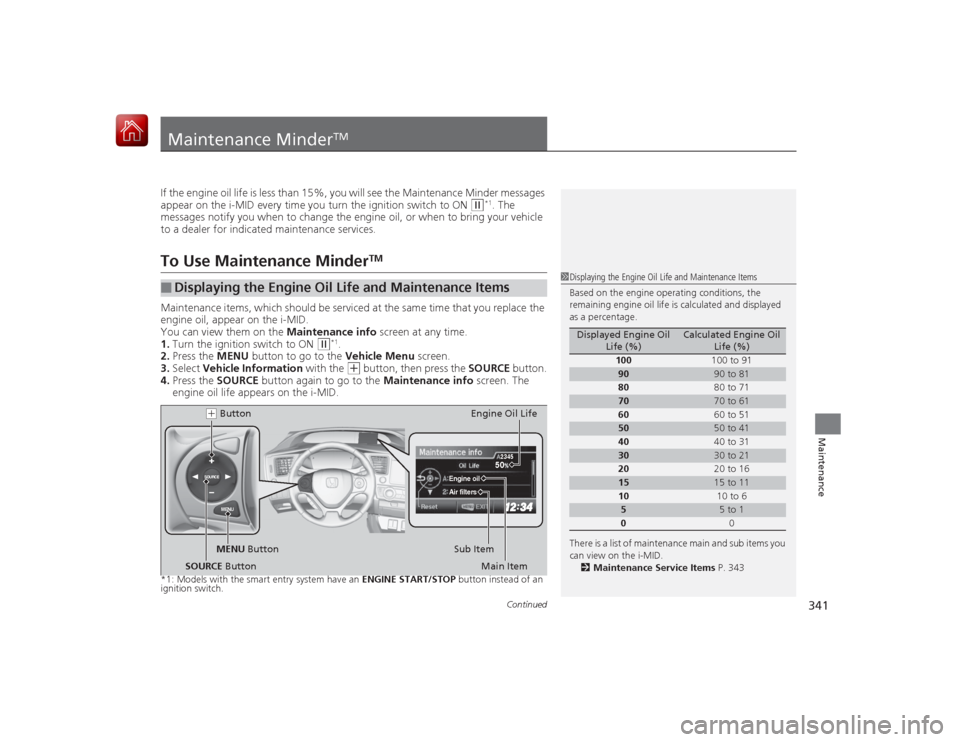
Maintenance items, which should be serviced at the same time that you replace the
engine oil, appear on the i-MID.
You can view them on the Maintenance info screen at any time.
1. Turn the ignition switch to ON
(w
*1.
2. Press the MENU button to go to the Vehicle Menu screen.
3. Select Vehicle Information with the (+
button, then press the SOURCE button.
4. Press the SOURCE button again to go to the Maintenance info screen. The
engine oil life appears on the i-MID.
*1: Models with the smart entry system have an ENGINE START/STOP button instead of an
ignition switch.■
Displaying the Engine Oil Life and Maintenance Items
1 Displaying the Engine Oil Life and Maintenance Items
Based on the engine operating conditions, the
remaining engine oil life is calculated and displayed
as a percentage.
There is a list of maintenance main and sub items you
can view on the i-MID.
2 Maintenance Service Items P. 343
Displayed Engine Oil
Life (%)
Calculated Engine Oil Life (%)
100 100 to 91
90
90 to 81
80 80 to 71
70
70 to 61
60 60 to 51
50
50 to 41
40 40 to 31
30
30 to 21
20 20 to 16
15
15 to 11
10 10 to 6
5
5 to 1
0 0
MENU
SOURCE
50
Engine oilAir filters
2345
MENU Button(+ Button
Sub ItemEngine Oil Life
Main Item
SOURCE Button
Page 345 of 441
uuMaintenance Minder
TMuTo Use Maintenance Minder
TM
344Maintenance
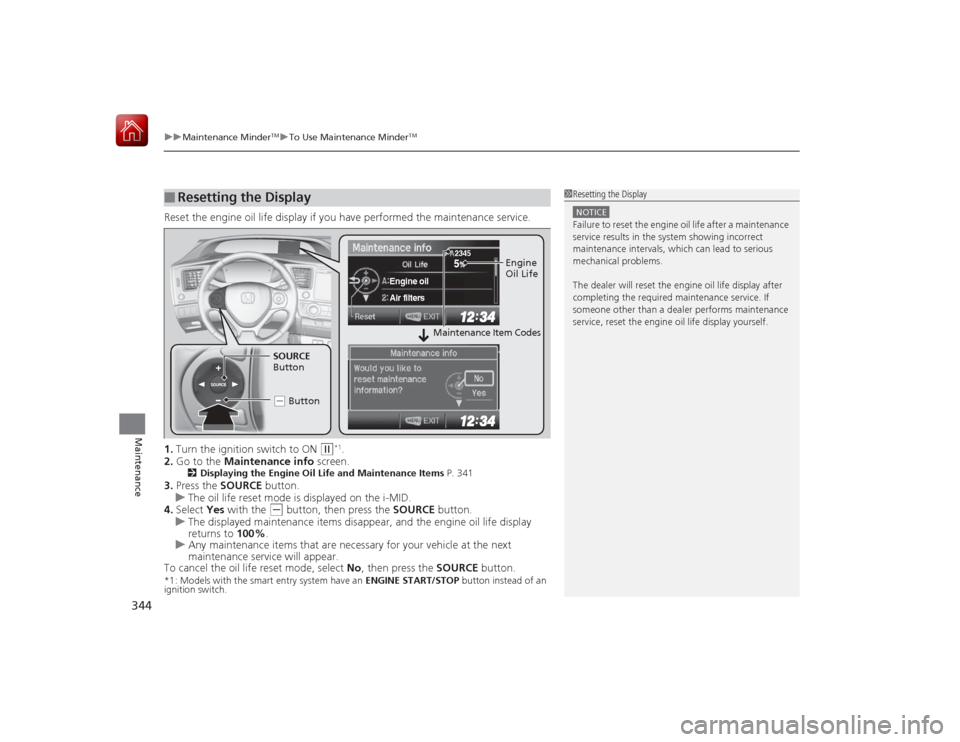
Reset the engine oil life display if you have performed the maintenance service.
1. Turn the ignition switch to ON
(w
*1.
2. Go to the Maintenance info screen.
2Displaying the Engine Oil Lif e and Maintenance Items P. 341
3.Press the SOURCE button.
u The oil life reset mode is displayed on the i-MID.
4. Select Yes with the
(-
button, then press the SOURCE button.
u The displayed maintenance items disappear, and the engine oil life display
returns to 100%.
u Any maintenance items that are necessary for your vehicle at the next
maintenance service will appear.
To cancel the oil life reset mode, select No, then press the SOURCE button.
*1: Models with the smart entry system have an ENGINE START/STOP button instead of an
ignition switch.■
Resetting the Display
1 Resetting the DisplayNOTICEFailure to reset the engine oil life after a maintenance
service results in the system showing incorrect
maintenance intervals, which can lead to serious
mechanical problems.
The dealer will reset th e engine oil life display after
completing the required maintenance service. If
someone other than a dealer performs maintenance
service, reset the engine oil life display yourself.
SOURCE
5
Engine oilAir filters
2345
Engine
Oil Life
SOURCE
Button
( - Button
Maintenance Item Codes
Page 394 of 441
393
Continued
Handling the Unexpected
If a Tire Goes FlatChanging a Flat TireIf a tire goes flat while driving, grasp the steering wheel firmly, and brake gradually
to reduce speed. Then, stop in a safe place. Replace the flat tire with a compact
spare tire. Go to a dealer as soon as possible to have the full-size tire repaired or
replaced.
1.Park the vehicle on firm, level, and non-slippery surface, and apply the parking
brake.
2. Put the shift lever in
(P
.
2. Put the shift lever in
(R
.
3. Turn on the hazard warning lights and turn the ignition switch to LOCK
(0
*1.
*1: Models with the smart entry system have an ENGINE START/STOP button instead of an
ignition switch.
1 Changing a Flat Tire
Periodically check the tire pressure of the compact
spare. It should be set to the specified pressure.
Specified Pressure: 60 psi (420 kPa, 4.2 kgf/cm
2)
When driving with the compact spare tire, keep the
vehicle speed under 50 mph (80 km/h). Replace with
a full-size tire as soon as possible.
The compact spare tire and wheel in your vehicle are
specifically for this model. Do not use them with
another vehicle. Do not use another type of compact
spare tire or wheel with your vehicle.
Do not mount tire chains on a compact spare tire.
If a chain-mounted front tire goes flat, remove one of
the full-size rear tires and replace it with the compact
spare tire. Remove the flat front tire and replace it
with the full-size tire th at was removed from the rear.
Mount the tire chains on the front tire.
Continuously variable transmission modelsManual transmission modelsAll models
Page 407 of 441
406Handling the Unexpected
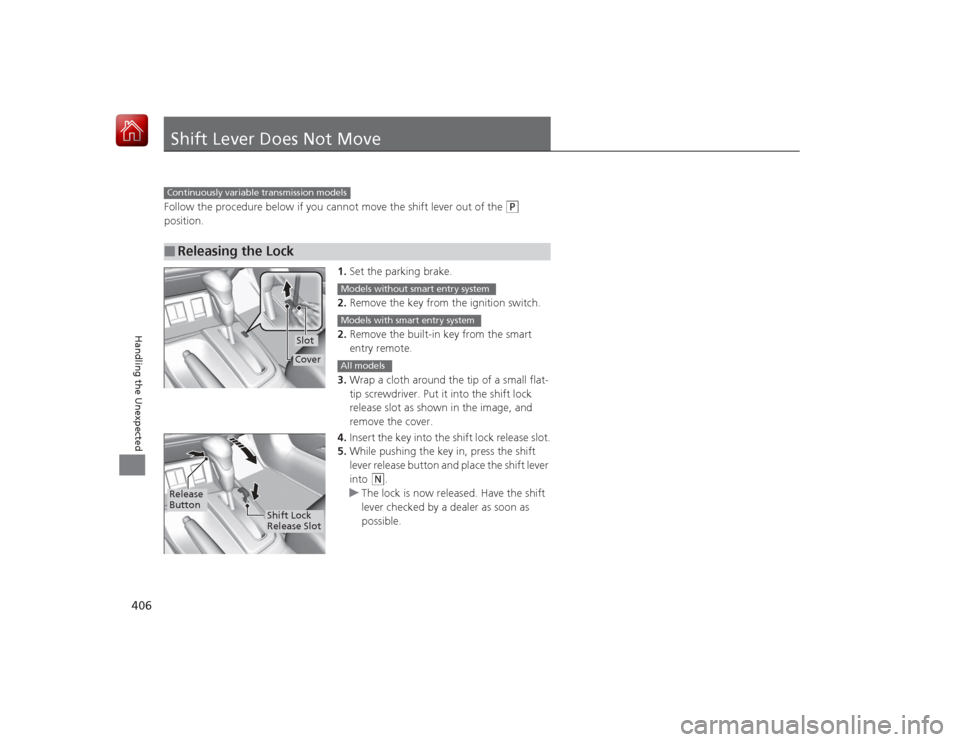
Shift Lever Does Not MoveFollow the procedure below if you cannot move the shift lever out of the
(P
position.
1.Set the parking brake.
2. Remove the key from the ignition switch.
2. Remove the built-in key from the smart
entry remote.
3. Wrap a cloth around the tip of a small flat-
tip screwdriver. Put it into the shift lock
release slot as shown in the image, and
remove the cover.
4. Insert the key into the shift lock release slot.
5. While pushing the key in, press the shift
lever release button and place the shift lever
into
(N
.
u The lock is now released. Have the shift
lever checked by a dealer as soon as
possible.
■
Releasing the LockContinuously variable transmission models
SlotCover
Models without smart entry systemModels with smart entry systemAll models
Release
Button
Shift Lock
Release Slot
Page 414 of 441
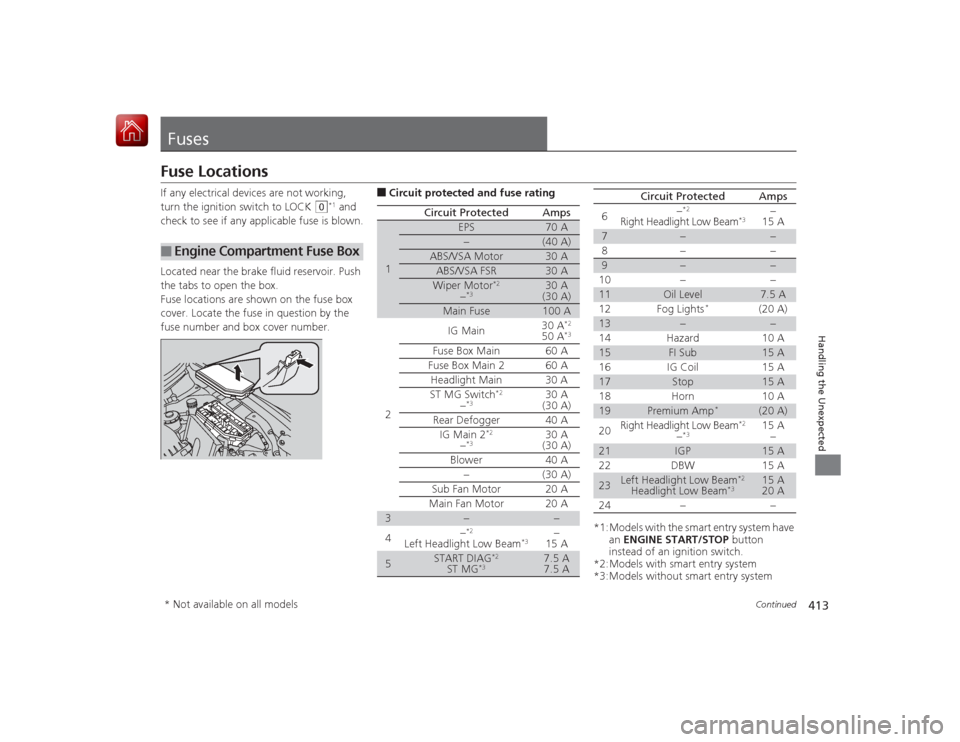
413
Continued
Handling the Unexpected
FusesFuse LocationsIf any electrical devices are not working,
turn the ignition switch to LOCK
(0
*1 and
check to see if any applicable fuse is blown.
Located near the brake fluid reservoir. Push
the tabs to open the box.
Fuse locations are shown on the fuse box
cover. Locate the fuse in question by the
fuse number and box cover number.
■
Engine Compartmen t Fuse Box
■Circuit protected and fuse rating
Circuit Protected
Amps
1
EPS
70 A
−
(40 A)
ABS/VSA Motor
30 A
ABS/VSA FSR
30 A
Wiper Motor
*2
−*3
30 A
(30 A)
Main Fuse
100 A
2
IG Main
30 A
*2
50 A
*3
Fuse Box Main 60 AFuse Box Main 2
60 A
Headlight Main 30 A
ST MG Switch
*2
−*3
30 A
(30 A)
Rear Defogger 40 A IG Main 2
*2
−*3
30 A
(30 A)
Blower 40 A −(30 A)
Sub Fan Motor 20 A
Main Fan Motor 20 A
3
−
−
4 −
*2
Left Headlight Low Beam
*3
−
15 A
5
START DIAG
*2
ST MG
*3
7.5 A
7.5 A
*1:Models with the smart entry system have
an ENGINE START/STOP button
instead of an ignition switch.
*2:Models with smart entry system
*3:Models without smart entry system 6
−
*2
Right Headlight Low Beam
*3
−
15 A
7
−
−
8− −
9
−
−
10 − −
11
Oil Level
7.5 A
12 Fog Lights
*
(20 A)
13
−
−
14 Hazard 10 A
15
FI Sub
15 A
16 IG Coil 15 A
17
Stop
15 A
18 Horn 10 A
19
Premium Amp
*
(20 A)
20 Right Headlight Low Beam
*2
−*3
15 A
−
21
IGP
15 A
22 DBW 15 A
23
Left Headlight Low Beam
*2
Headlight Low Beam
*3
15 A
20 A
24 − −
Circuit Protected
Amps
* Not available on all models
Page 417 of 441
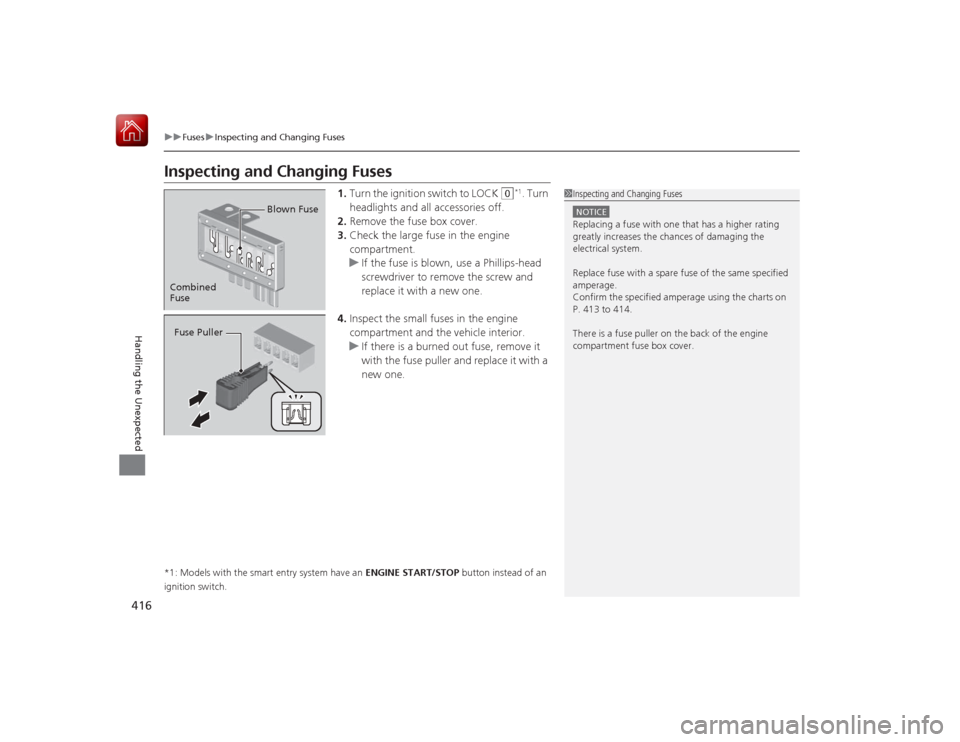
416
uuFuses uInspecting and Changing Fuses
Handling the Unexpected
Inspecting and Changing Fuses
1. Turn the ignition switch to LOCK
(0
*1. Turn
headlights and all accessories off.
2. Remove the fuse box cover.
3. Check the large fuse in the engine
compartment.
u If the fuse is blown, use a Phillips-head
screwdriver to remove the screw and
replace it with a new one.
4. Inspect the small fuses in the engine
compartment and the vehicle interior.
u If there is a burned out fuse, remove it
with the fuse puller and replace it with a
new one.
*1: Models with the smart entry system have an ENGINE START/STOP button instead of an
ignition switch.
1 Inspecting and Changing FusesNOTICEReplacing a fuse with one that has a higher rating
greatly increases the chances of damaging the
electrical system.
Replace fuse with a spare fuse of the same specified
amperage.
Confirm the specified amperage using the charts on
P. 413 to 414.
There is a fuse puller on the back of the engine
compartment fuse box cover.
Combined
Fuse Blown FuseFuse Puller