ABS HONDA CIVIC COUPE 2015 9.G Owners Manual
[x] Cancel search | Manufacturer: HONDA, Model Year: 2015, Model line: CIVIC COUPE, Model: HONDA CIVIC COUPE 2015 9.GPages: 441, PDF Size: 18.4 MB
Page 12 of 441
11Quick Reference Guide
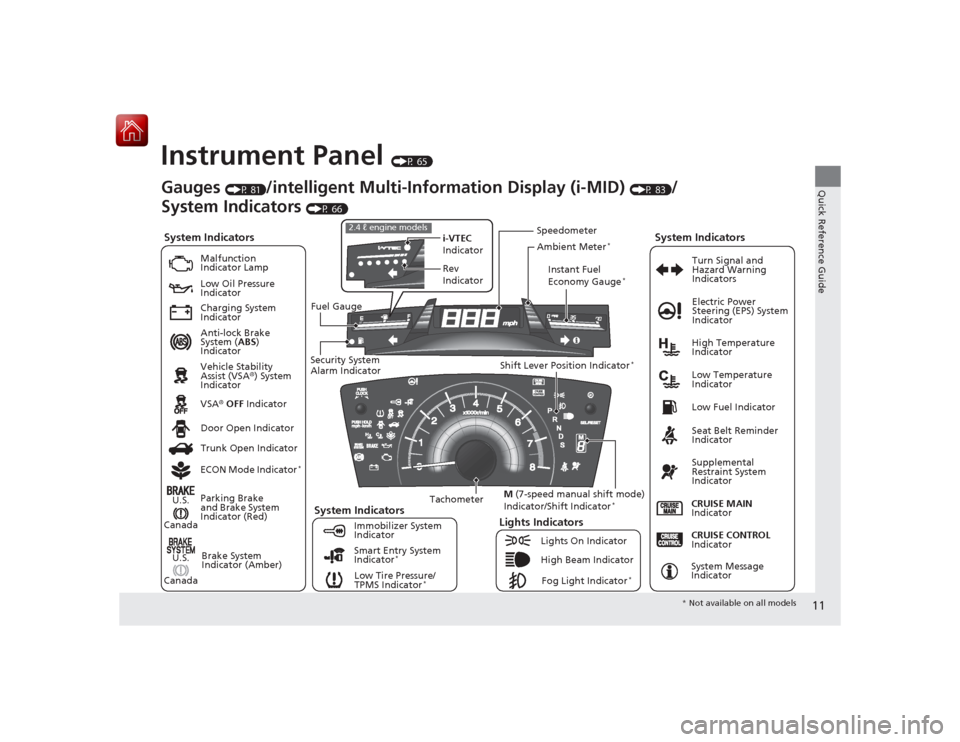
Instrument Panel
(P 65)
System Indicators
Malfunction
Indicator Lamp
Low Oil Pressure
Indicator
Charging System
Indicator
Anti-lock Brake
System (ABS)
Indicator
Vehicle Stability
Assist (VSA ®) System
Indicator
VSA ® OFF Indicator
Low Tire Pressure/
TPMS Indicator
*
Electric Power
Steering (EPS) System
Indicator
Lights Indicators
Lights On Indicator
High Beam IndicatorFog Light Indicator
*
Immobilizer System
Indicator Seat Belt Reminder
Indicator
System Indicators
CRUISE CONTROL
Indicator
System Message
Indicator
Parking Brake
and Brake System
Indicator (Red)
Supplemental
Restraint System
Indicator
Door Open Indicator
CRUISE MAIN
Indicator
Tachometer Instant Fuel
Economy Gauge
*
Speedometer
Fuel Gauge
Security System
Alarm Indicator Shift Lever Position Indicator
*
Low Fuel Indicator
Gauges
(P 81)
/intelligent Multi-Information Display (i-MID)
(P 83)
/
System Indicators
(P 66)
Trunk Open Indicator
ECON Mode Indicator*
Turn Signal and
Hazard Warning
Indicators
High Temperature
Indicator
Low Temperature
Indicator
i-VTEC
Indicator
Rev
Indicator
2.4 ℓ engine models
Ambient Meter
*
Smart Entry System
Indicator
*
Brake System
Indicator (Amber)
System Indicators
U.S.
Canada
U.S.
Canada M
(7-speed manual shift mode)
Indicator/Shift Indicator
*
* Not available on all models
Page 23 of 441
22Quick Reference Guide
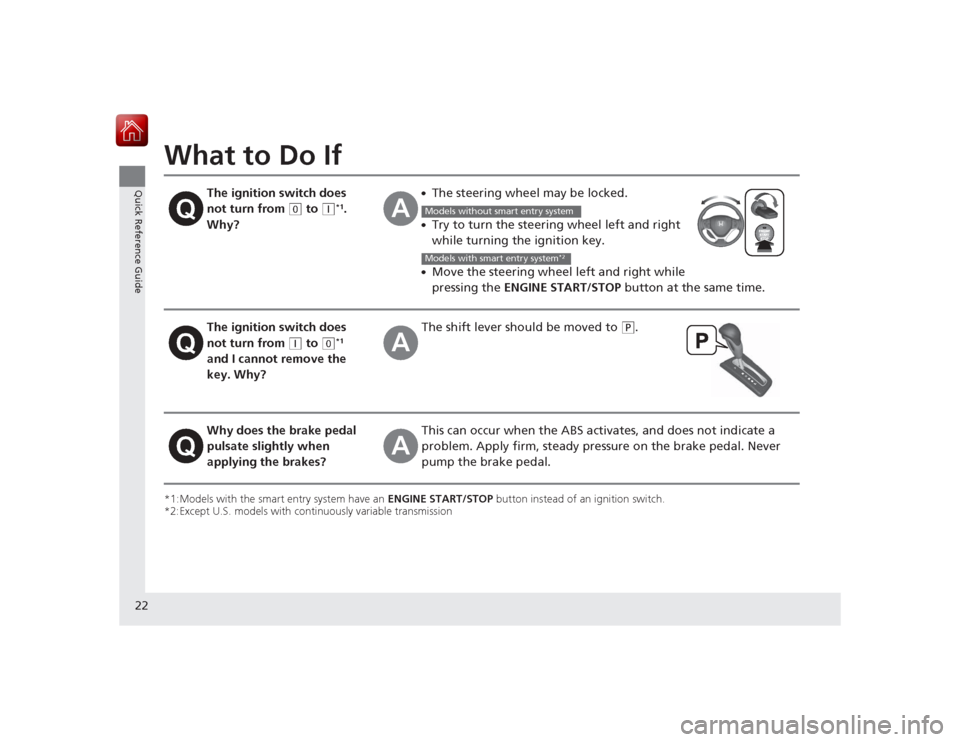
What to Do If*1:Models with the smart entry system have an ENGINE START/STOP button instead of an ignition switch.
*2:Except U.S. models with continuously variable transmission
The ignition switch does
not turn from
(0
to
(q
*1.
Why?
●The steering wheel may be locked.●Try to turn the steering wheel left and right
while turning the ignition key.●Move the steering wheel left and right while
pressing the ENGINE START/STOP button at the same time.
The ignition switch does
not turn from
(q
to
(0
*1
and I cannot remove the
key. Why?
The shift lever s hould be moved to
(P
.
Why does the brake pedal
pulsate slightly when
applying the brakes?
This can occur when the ABS act ivates, and does not indicate a
problem. Apply firm, steady pressure on the brake pedal. Never
pump the brake pedal.Models without smart entry systemModels with smart entry system
*2
Page 43 of 441
42
uuAirbags uFront Airbags (SRS)
Safe Driving
■When front airbags sh ould not deploy
Minor frontal crashes: Front airbags were designed to supplement seat belts and
help save lives, not to prevent minor scrapes, or even broken bones that might occur
during a less than moderate-to-severe frontal crash.
Side impacts: Front airbags can provide protection when a sudden deceleration
causes a driver or fro nt passenger to move towards the front of the vehicle. Side
airbags and side curtain airbags have been specifically designed to help reduce the
severity of injuries that can occur during a moderate-to-severe side impact which
can cause the driver or passenger to move towards the side of the vehicle.
Rear impacts: Head restraints and seat belts are your best protection during a rear
impact. Front airbags cannot provide any significant protection and are not designed
to deploy in such collisions.
Rollovers: Seat belts and, in vehicles equipped with a rollover sensor, side airbags
and side curtain airbags offer the best protection in a rollover. Because front airbags
could provide little if any protection, they are not designed to deploy during a
rollover.■When front airbags deploy with little or no visible damage
Because the airbag system senses s udden deceleration, a strong impact to the
vehicle framework or suspension might cause one or more of the airbags to deploy.
Examples include running into a curb, the edge of a hole, or other low fixed object
that causes a sudden deceleration in the vehicle chassis. Since the impact is
underneath the vehicle, damage may not be readily apparent.■When front airbags may not deploy, even though exterior damage
appears severe
Since crushable body parts absorb crash energy during an impact, the amount of
visible damage does not always indicate proper airbag operation. In fact, some
collisions can result in severe damage but no airbag deployment because the airbags
would not have been needed or would not have provided protection even if they
had deployed.
Page 46 of 441
45
uuAirbags uSide Airbags
Safe Driving
■When a side airbag deploys with little or no visible damage
Because the airbag systems senses sudden acceleration, a strong impact to the side
of the vehicle's framework can cause a side airbag to deploy. In such cases, there
may be little or no damage, but the side impact sensors detected a severe enough
impact to deploy the airbag.■When a side airbag may not deploy, even though visible damage appears
severe
It is possible for a side airbag to not deploy during an impact that results in
apparently severe damage. This can occur when the point of impact was towards
the far front or rear of the vehicle, or wh en the vehicle's crushable body parts
absorbed most of the crash energy. In ei ther case, the side airbag would not have
been needed nor provided protection even if it had deployed.
Page 67 of 441
66Instrument Panel
Indicators*1:Models with the smart entry system have an ENGINE START/STOP button instead of an ignition switch.Indicator
Name
On/Blinking
Explanation
Message
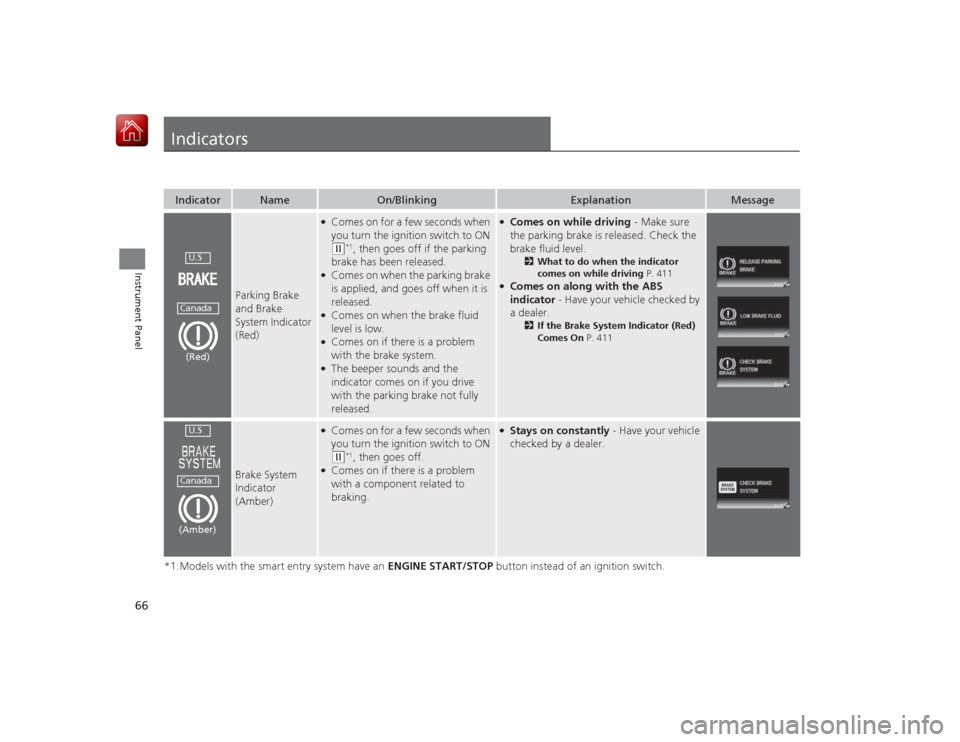
Parking Brake
and Brake
System Indicator
(Red)
●Comes on for a few seconds when
you turn the ignition switch to ON (w
*1, then goes off if the parking
brake has been released.
●Comes on when the parking brake
is applied, and goes off when it is
released.●Comes on when the brake fluid
level is low.●Comes on if there is a problem
with the brake system.●The beeper sounds and the
indicator comes on if you drive
with the parking brake not fully
released.
●Comes on while driving - Make sure
the parking brake is released. Check the
brake fluid level.
2 What to do when the indicator
comes on while driving P. 411
●Comes on along with the ABS
indicator - Have your vehicle checked by
a dealer.
2 If the Brake System Indicator (Red)
Comes On P. 411
Brake System
Indicator
(Amber)
●Comes on for a few seconds when
you turn the ignition switch to ON (w
*1, then goes off.
●Comes on if there is a problem
with a component related to
braking.
●Stays on constantly - Have your vehicle
checked by a dealer.
U.SCanada(Red)U.SCanada(Amber)
Page 70 of 441
69
uuIndicators u
Continued
Instrument Panel
*1:Models with the smart entry system have an ENGINE START/STOP button instead of an ignition switch.Indicator
Name
On/Blinking
Explanation
Message
Seat Belt
Reminder
Indicator
●Comes on and the beeper sounds if
you are not wearing a seat belt when
you turn the ignition switch to ON (w
*1.
●If the front passenger is not wearing
a seat belt, the indicator comes on a
few seconds later.●Blinks while driving if either you or
the front passenger has not fastened
a seat belt. The beeper sounds and
the indicator blinks at regular
intervals.
●The beeper stops and the indicator
goes off when you and the front
passenger fasten their seat belts.●Stays on after you or the front
passenger has fastened the seat
belt - A detection error may have
occurred in the sensor. Have your
vehicle checked by a dealer.
2 Seat Belt Reminder P. 31
Low Fuel Indicator
●Comes on when the fuel reserve is
running low (approximately 1.9 U.S.
gal./7.5 Liter left).●Blinks if there is a problem with the
fuel gauge.
●Comes on - Refuel your vehicle as
soon as possible.●Blinks - Have your vehicle checked by
a dealer.
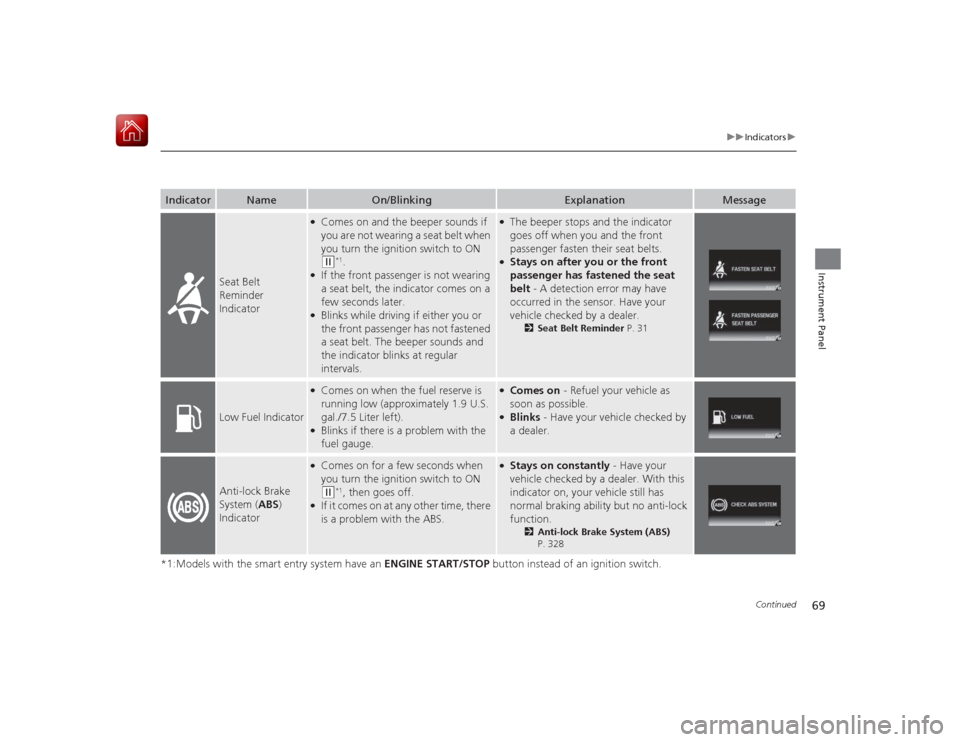
Anti-lock Brake
System ( ABS)
Indicator
●Comes on for a few seconds when
you turn the ignition switch to ON (w
*1, then goes off.
●If it comes on at any other time, there
is a problem with the ABS.
●Stays on constantly - Have your
vehicle checked by a dealer. With this
indicator on, your vehicle still has
normal braking ability but no anti-lock
function.
2 Anti-lock Brake System (ABS)
P. 328
Page 190 of 441
189
uuAudio System Basic Operation uAdjusting the Sound
Features
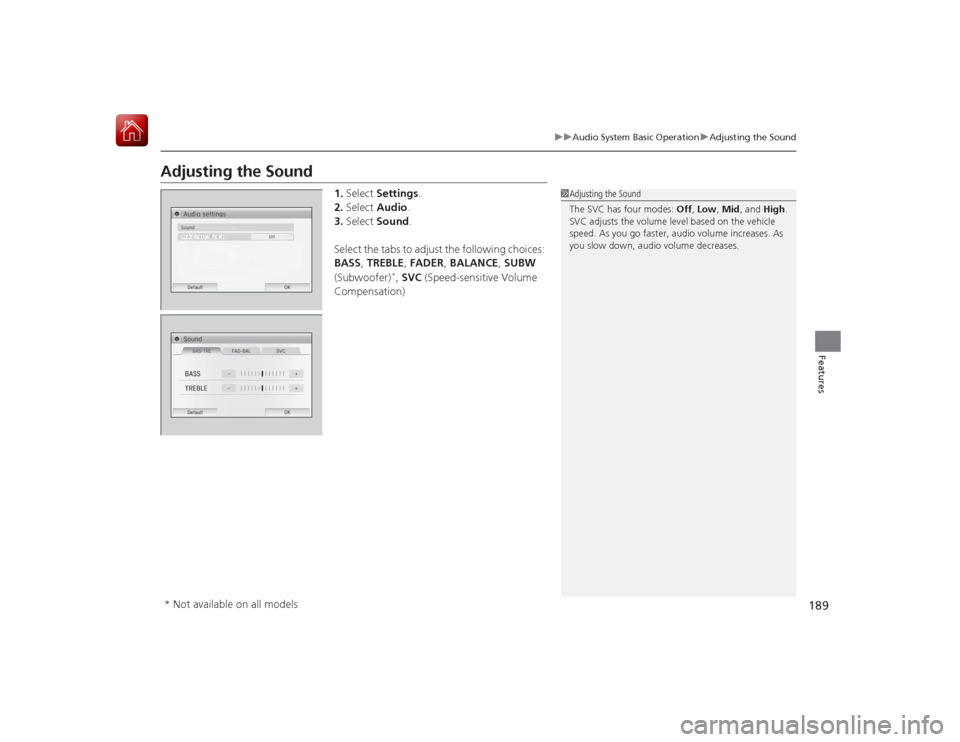
Adjusting the Sound
1. Select Settings .
2. Select Audio .
3. Select Sound .
Select the tabs to adjust the following choices:
BASS , TREBLE , FADER , BALANCE , SUBW
(Subwoofer)
*, SVC (Speed-sensitive Volume
Compensation)
1 Adjusting the Sound
The SVC has four modes: Off, Low , Mid, and High.
SVC adjusts the volume level based on the vehicle
speed. As you go faster, audio volume increases. As
you slow down, audio volume decreases.
* Not available on all models
Page 292 of 441
291
Driving
This chapter discusses driving, refueling, and information on items such as accessories.
Before DrivingDriving Preparation .......................... 292
Maximum Load Limit........................ 295
Towing a Trailer
Towing Your Vehicle ........................ 297
When Driving Starting the Engine .................. 298, 300
Precautions While Driving................. 303
Continuously Variable Transmission.. 304
Shifting ............................ 305, 307, 311
ECON Button
*................................. 314 Cruise Control ................................. 315
Vehicle Stability Assist (VSA
®), aka Electronic
Stability Control (ESC), System ............... 318
LaneWatch
TM*.......................................... 320
Tire Pressure Monitoring System (TPMS) ... 322
Tire Pressure Monitoring System (TPMS) - Required Federal Explanation ............. 324Braking
Brake System ................................... 326
Anti-lock Brake System (ABS) ........... 328
Brake Assist System.......................... 329 Parking Your Vehicle
When Stopped ................................ 330
Rearview Camera
*............................ 331
Refueling Fuel Information .............................. 332
How to Refuel ................................. 333
Fuel Economy Improving Fuel Economy .................. 335
Accessories and Modifications Accessories ...................................... 336
Modifications................................... 336
* Not available on all models
Page 328 of 441
327
uuBraking uBrake System
Driving
Your vehicle is equipped with front disc brakes. The brakes on the rear wheels may
be disc or drum, depending on the model. A vacuum power assist helps reduce the
effort needed on the brake pedal. The brake assist system increases the stopping
force when you depress the brake pedal hard in an emergency situation. The anti-
lock brake system (ABS) helps you retain steering control when braking very hard.2 Brake Assist System P. 329
2 Anti-lock Brake System (ABS) P. 328■
Foot Brake
1Foot Brake
Check the brakes after driving through deep water,
or if there is a buildup of road surface water. If
necessary, dry the brakes by lightly depressing the
pedal several times.
If you hear a continuous metallic friction sound when
applying the brakes, the brake pads need to be
replaced. Have your vehicle checked by a dealer.
Constantly using the brake pedal while going down a
long hill builds up heat, which reduces the brake
effectiveness. Apply engine braking by taking your
foot off the accelerator pedal and downshifting to a
lower gear. With manual transmission use a lower
gear for greater engine braking.
Do not rest your foot on the brake pedal while
driving, as it will lightly apply the brakes and cause
them to lose effectiveness over time and reduce pad
life. It will also confuse drivers behind you.
Page 329 of 441
328
uuBraking uAnti-lock Brake System (ABS)
Driving
Anti-lock Brake System (ABS)Helps prevent the wheels from locking up, and helps you retain steering control by
pumping the brakes rapidly, much faster than you.
The electronic brake distribution (EBD) system, which is part of the ABS, also
balances the front-to-rear braking distribution according to vehicle loading.
You should never pump the brake pedal. Let the ABS work for you by always
keeping firm, steady pressure on the brake pedal. This is sometimes referred to as
“stomp and steer.”■ABS operation
The brake pedal may pulsate slightly when the ABS is working. Keep holding the
pedal firmly down. On dry pavement, you will need to press on the brake pedal very
hard before the ABS activates. However, you may feel the ABS activate immediately
if you are trying to stop on snow or ice.
When the vehicle speed goes under 6 mph (10 km/h), the ABS stops.■
ABS
1 Anti-lock Brake System (ABS)NOTICEThe ABS may not function correctly if you use an
incorrect tire type and size.
When the ABS indicator comes on while driving,
there may be a problem with the system.
While normal braking is not affected, there is a
possibility of the ABS not operating. Have the vehicle
checked by a dealer immediately.
The ABS does not reduce the time or distance it takes
to stop the vehicle. It only helps with steering control
during hard braking.
In the following cases, your vehicle may need more
stopping distance than a vehicle without the ABS:•When driving on rough road surfaces, including
when driving on uneven surfaces, such as gravel or
snow.•When snow chains are installed.
You may hear a motor sound coming from the
engine compartment while system checks are being
performed immediatel y after starting the engine or
while driving. This is normal.