USB HONDA CIVIC COUPE 2015 9.G Owners Manual
[x] Cancel search | Manufacturer: HONDA, Model Year: 2015, Model line: CIVIC COUPE, Model: HONDA CIVIC COUPE 2015 9.GPages: 441, PDF Size: 18.4 MB
Page 7 of 441
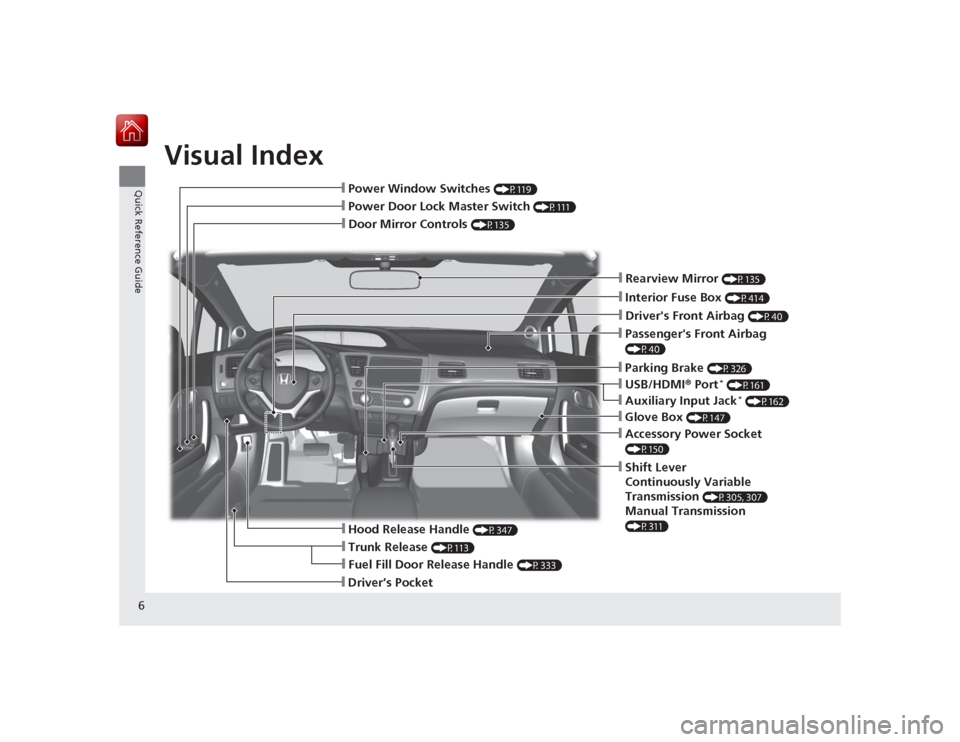
Visual Index
6Quick Reference Guide
❙Passenger's Front Airbag (P40)❙Glove Box
(P147)
❙Shift Lever
Continuously Variable
Transmission
(P305, 307)
Manual Transmission (P311)
❙Hood Release Handle
(P347)
❙Fuel Fill Door Release Handle
(P333)
❙Driver’s Pocket❙Trunk Release
(P113)
❙Driver's Front Airbag
(P40)
❙Door Mirror Controls
(P135)
❙Power Door Lock Master Switch
(P111)
❙Power Window Switches
(P119)
❙Parking Brake
(P326)
❙Interior Fuse Box
(P414)
❙Rearview Mirror
(P135)
❙Accessory Power Socket (P150)❙Auxiliary Input Jack
* (P162)
❙USB/HDMI® Port
* (P161)
Page 8 of 441
7Quick Reference Guide
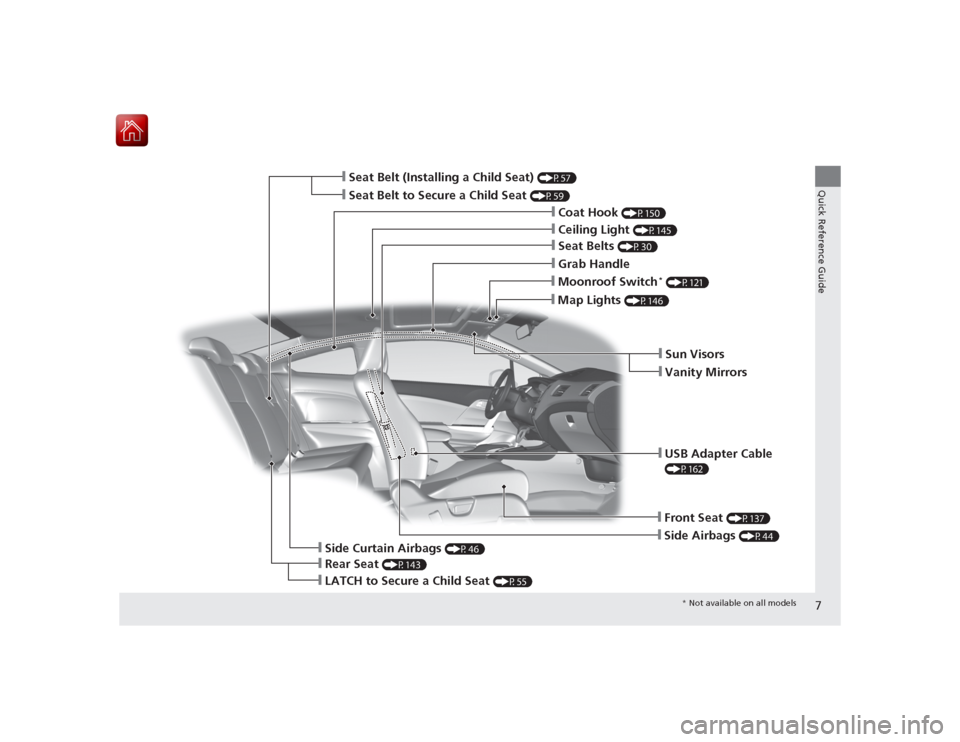
❙Front Seat
(P137)
❙Side Airbags
(P44)
❙Seat Belt (Installing a Child Seat)
(P57)
❙Side Curtain Airbags
(P46)
❙Ceiling Light
(P145)
❙Grab Handle❙Seat Belts
(P30)
❙Moonroof Switch
* (P121)
❙Map Lights
(P146)
❙Sun Visors❙Vanity Mirrors
❙Rear Seat
(P143)
❙Seat Belt to Secure a Child Seat
(P59)
❙LATCH to Secure a Child Seat
(P55)
❙USB Adapter Cable (P162)
❙Coat Hook
(P150)
* Not available on all models
Page 17 of 441
16Quick Reference Guide
Features
(P159)
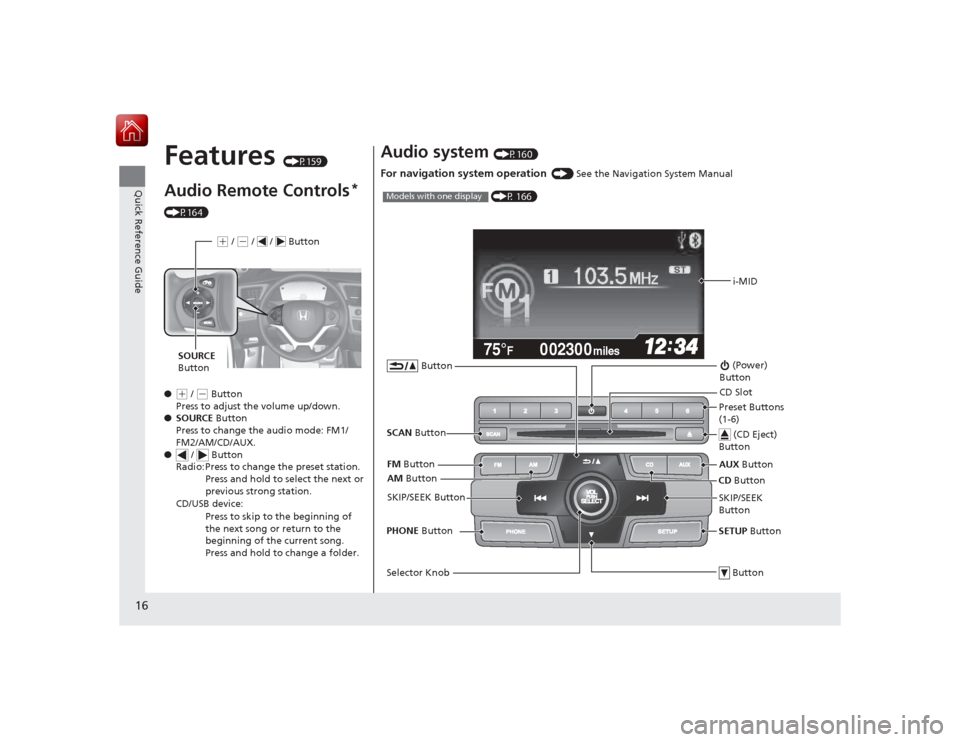
Audio Remote Controls
*
(P164)
●
(+ / ( - Button
Press to adjust the volume up/down.
● SOURCE Button
Press to change the audio mode: FM1/
FM2/AM/CD/AUX.
● / Button
Radio: Press to change the preset station.
Press and hold to select the next or
previous strong station.
CD/USB device: Press to skip to the beginning of
the next song or return to the
beginning of the current song.
Press and hold to change a folder.(+ / (- / / Button
SOURCE
Button
Audio system
(P160)
For navigation system operation
() See the Navigation System Manual002300
75°
F miles
i-MID
AM Button
FM
Button
SCAN Button
SKIP/SEEK Button
Selector Knob Button (Power)
ButtonCD Button
AUX
Button
CD Slot
(CD Eject)
ButtonPreset Buttons
(1-6)
ButtonSETUP Button
SKIP/SEEK
Button
PHONE
Button
(P 166)
Models with one display
Page 92 of 441
91
uuGauges and Multi-Information Display uintelligent Multi-Information Display (i-MID)
Continued
Instrument Panel
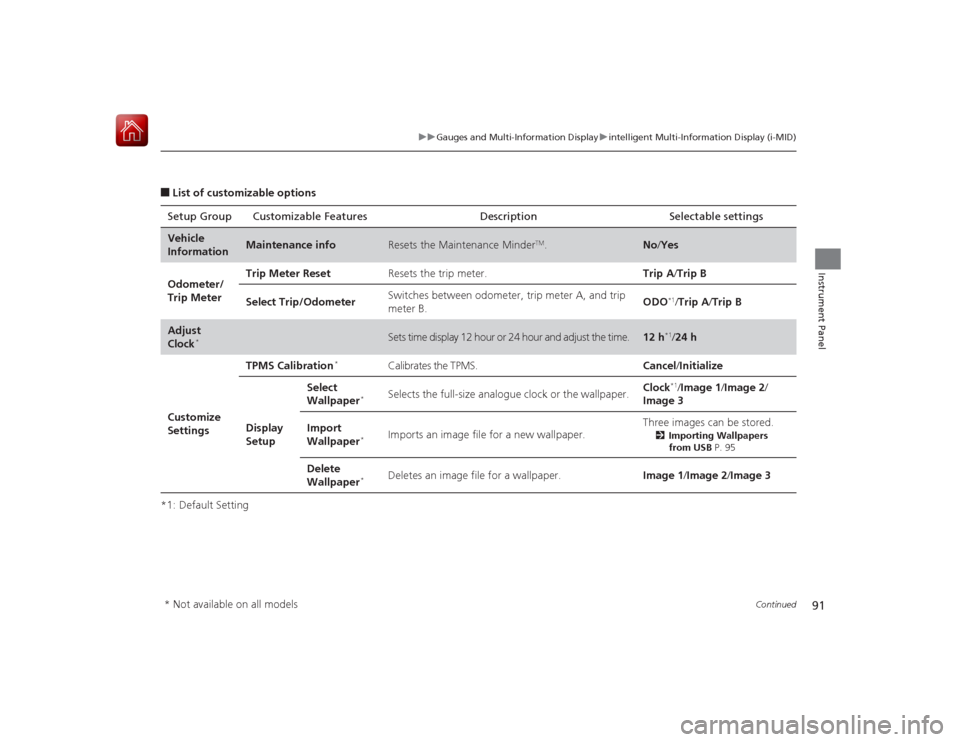
■List of customizable options
*1: Default Setting Setup Group Customizable Features Description Selectable settingsVehicle
Information
Maintenance info
Resets the Maintenance Minder
TM.
No
/Yes
Odometer/
Trip Meter Trip Meter Reset
Resets the trip meter. Trip A/Trip B
Select Trip/Odometer Switches between odometer, trip meter A, and trip
meter B. ODO
*1/
Trip A /Trip B
Adjust
Clock
*
Sets time display 12 hour or 24 hour and adjust the time.
12 h
*1/24 h
Customize
Settings TPMS Calibration
*
Calibrates the TPMS.
Cancel/Initialize
Display
Setup Select
Wallpaper
*
Selects the full-size analogue clock or the wallpaper.
Clock
*1/
Image 1/ Image 2/
Image 3
Import
Wallpaper
*
Imports an image file for a new wallpaper. Three images can be stored.
2
Importing Wallpapers
from USB P. 95
Delete
Wallpaper
*
Deletes an image file for a wallpaper. Image 1/Image 2/Image 3
* Not available on all models
Page 96 of 441
Continued
95
uuGauges and Multi-Information Display uintelligent Multi-Information Display (i-MID)
Instrument Panel
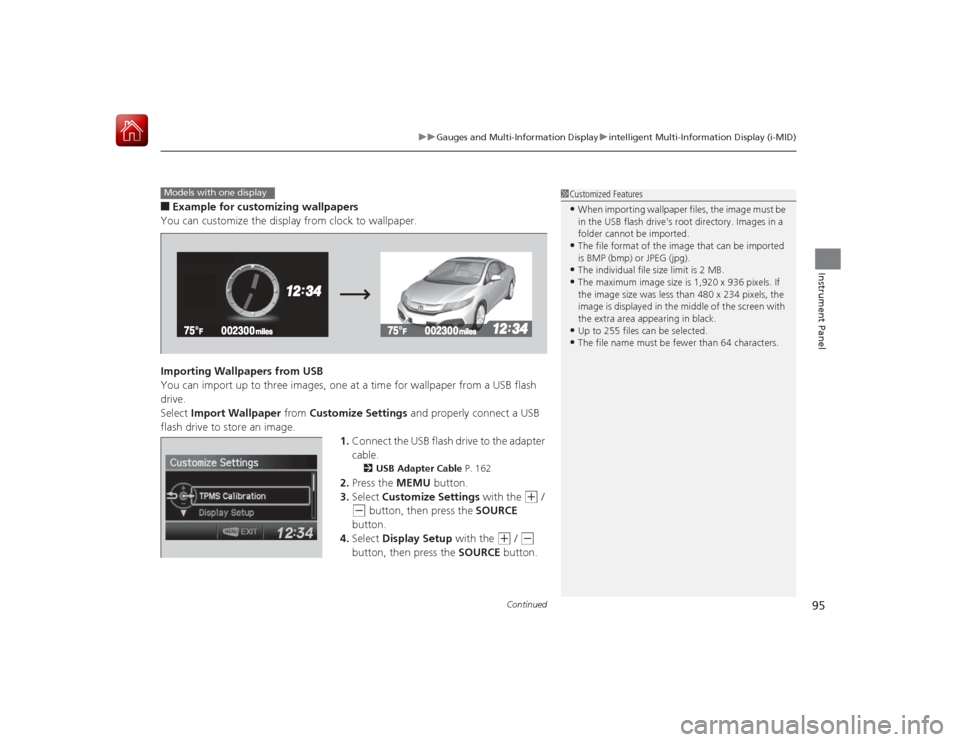
■Example for customizing wallpapers
You can customize the display from clock to wallpaper.
Importing Wallpapers from USB
You can import up to three images, one at a time for wallpaper from a USB flash
drive.
Select Import Wallpaper from Customize Settings and properly connect a USB
flash drive to store an image.
1.Connect the USB flash drive to the adapter
cable.
2 USB Adapter Cable P. 162
2.Press the MEMU button.
3. Select Customize Settings with the
(+
/
(-
button, then press the SOURCE
button.
4. Select Display Setup with the
(+
/ (-
button, then press the SOURCE button.
1Customized Features•When importing wallpaper files, the image must be
in the USB flash drive’s root directory. Images in a
folder cannot be imported.•The file format of the image that can be imported
is BMP (bmp) or JPEG (jpg).•The individual file size limit is 2 MB.•The maximum image size is 1,920 x 936 pixels. If
the image size was less than 480 x 234 pixels, the
image is displayed in the middle of the screen with
the extra area appearing in black.•Up to 255 files can be selected.•The file name must be fewer than 64 characters.
Models with one display
Page 160 of 441
159
Features
This chapter describes how to operate technology features.
Audio SystemAbout Your Audio System ................ 160
USB/HDMI ® Port
*............................. 161
USB Adapter Cable .......................... 162
Auxiliary Input Jack*........................ 162
Audio System Theft Protection
*....... 163
Audio Remote Controls .................... 164
Audio System Basic Operation ........ 166
Adjusting the Sound ........................ 167
Playing AM/FM Radio ....................... 168
Playing a CD .................................... 171
Models with one display
Playing an iPod ................................ 174
Playing Internet Radio ...................... 177
Playing a USB Flash Drive ................. 179
Playing Bluetooth® Audio................. 182
Audio System Basic Operation ........ 184
Audio/Information Screen ................ 185
Adjusting the Sound ........................ 189
Display Setup ................................... 190
Playing AM/FM Radio ....................... 191
Playing a CD .................................... 194
Playing an iPod ................................ 197Models with display audio system
Playing Internet Radio ...................... 200
Playing a USB Flash Drive ................. 202
Playing Bluetooth ® Audio ................ 205
Playing a Video Using the HDMI® ..... 207
Smartphone Apps ............................ 209
Siri Eyes Free .................................... 210
Audio Error Messages ...................... 211
General Information on the Audio System ............................................. 217
Customized Features
*...................... 220
Bluetooth ® HandsFreeLink ®..... 233 , 264
* Not available on all models
Page 161 of 441
160Features
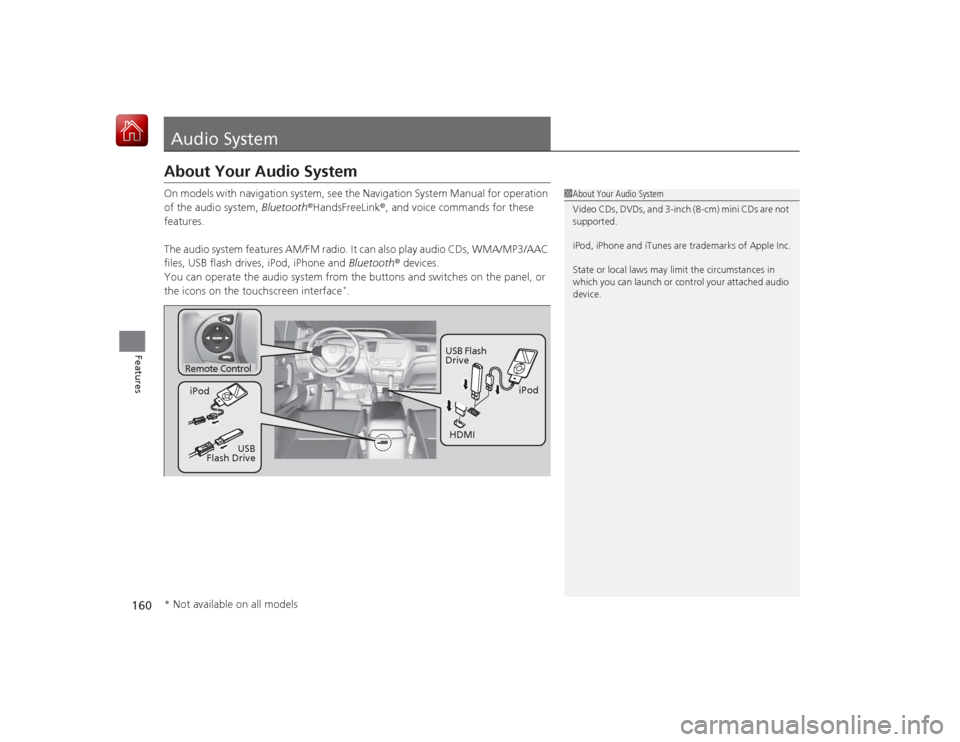
Audio SystemAbout Your Audio SystemOn models with navigation system, see the Navigation System Manual for operation
of the audio system, Bluetooth®HandsFreeLink ®, and voice commands for these
features.
The audio system features AM/FM radio. It can also play audio CDs, WMA/MP3/AAC
files, USB flash drives, iPod, iPhone and Bluetooth® devices.
You can operate the audio system from the buttons and switches on the panel, or
the icons on the touchscreen interface
*.
1 About Your Audio System
Video CDs, DVDs, and 3-inch (8-cm) mini CDs are not
supported.
iPod, iPhone and iTunes are trademarks of Apple Inc.
State or local laws may limit the circumstances in
which you can launch or control your attached audio
device.
Remote Control
iPod
USB Flash
Drive
iPod
HDMI
USB
Flash Drive
* Not available on all models
Page 162 of 441
161
uuAudio System uUSB/HDMI ® Port
*
Features
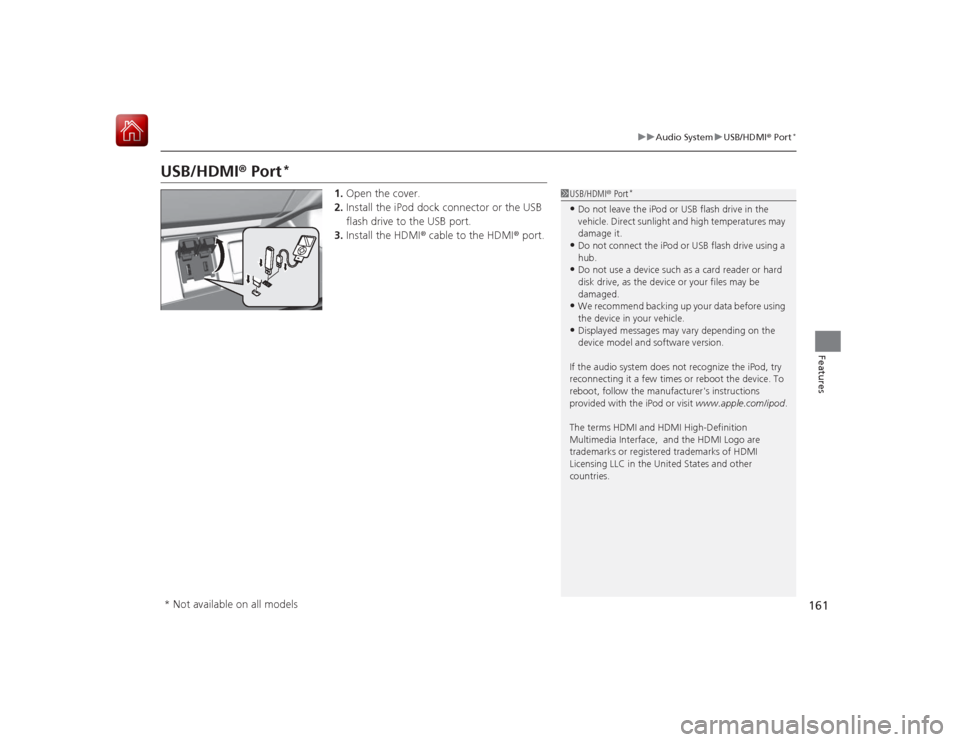
USB/HDMI ® Port
*
1. Open the cover.
2. Install the iPod dock connector or the USB
flash drive to the USB port.
3. Install the HDMI ® cable to the HDMI ® port.
1USB/HDMI ® Port
*
•Do not leave the iPod or USB flash drive in the
vehicle. Direct sunlight and high temperatures may
damage it.•Do not connect the iPod or USB flash drive using a
hub.•Do not use a device such as a card reader or hard
disk drive, as the device or your files may be
damaged.•We recommend backing up your data before using
the device in your vehicle.•Displayed messages may vary depending on the
device model and software version.
If the audio system does not recognize the iPod, try
reconnecting it a few times or reboot the device. To
reboot, follow the manufacturer's instructions
provided with the iPod or visit www.apple.com/ipod.
The terms HDMI and HDMI High-Definition
Multimedia Interface, and the HDMI Logo are
trademarks or registered trademarks of HDMI
Licensing LLC in the Unit ed States and other
countries.
* Not available on all models
Page 163 of 441
162
uuAudio System uUSB Adapter Cable
Features
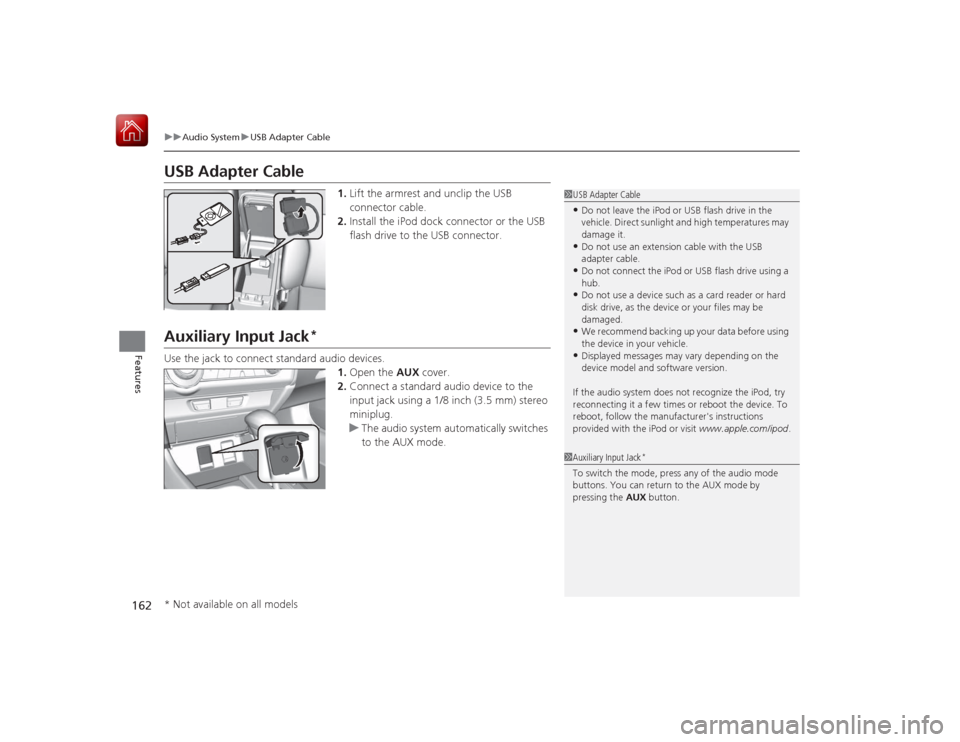
USB Adapter Cable
1. Lift the armrest and unclip the USB
connector cable.
2. Install the iPod dock connector or the USB
flash drive to the USB connector.
Auxiliary Input Jack
*
Use the jack to connect standard audio devices.
1.Open the AUX cover.
2. Connect a standard audio device to the
input jack using a 1/8 inch (3.5 mm) stereo
miniplug.
u The audio system automatically switches
to the AUX mode.
1USB Adapter Cable•Do not leave the iPod or USB flash drive in the
vehicle. Direct sunlight and high temperatures may
damage it.•Do not use an extension cable with the USB
adapter cable.•Do not connect the iPod or USB flash drive using a
hub.•Do not use a device such as a card reader or hard
disk drive, as the device or your files may be
damaged.•We recommend backing up your data before using
the device in your vehicle.•Displayed messages may vary depending on the
device model and software version.
If the audio system does not recognize the iPod, try
reconnecting it a few times or reboot the device. To
reboot, follow the manufacturer's instructions
provided with the iPod or visit www.apple.com/ipod.
1Auxiliary Input Jack
*
To switch the mode, press any of the audio mode
buttons. You can return to the AUX mode by
pressing the AUX button.
* Not available on all models
Page 165 of 441
164
uuAudio System uAudio Remote Controls
Features
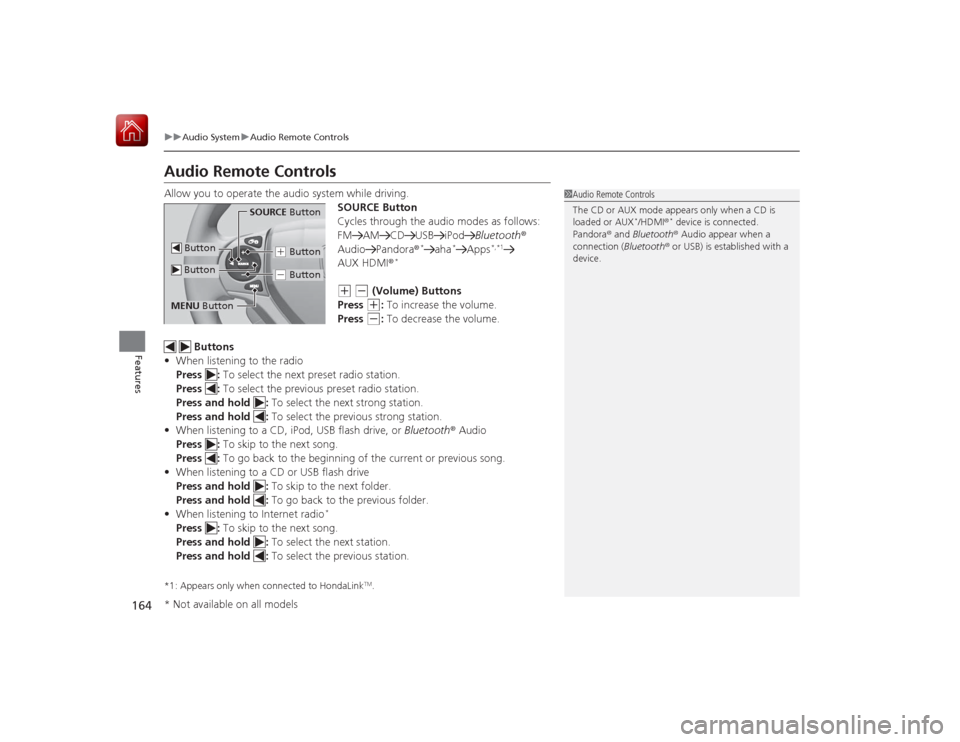
Audio Remote ControlsAllow you to operate the audio system while driving.
SOURCE Button
Cycles through the audio modes as follows:
FM AM CD USB iPodBluetooth®
Audio Pandora ®
*
aha
*
Apps
*,*1
AUX HDMI®
*
(+
(-
(Volume) Buttons
Press (+
: To increase the volume.
Press
(-
: To decrease the volume.
Buttons
• When listening to the radio
Press : To select the next preset radio station.
Press : To select the previous preset radio station.
Press and hold : To select the next strong station.
Press and hold : To select the previous strong station.
• When listening to a CD, iPod, USB flash drive, or Bluetooth® Audio
Press : To skip to the next song.
Press : To go back to the begi nning of the current or previous song.
• When listening to a CD or USB flash drive
Press and hold : To skip to the next folder.
Press and hold : To go back to the previous folder.
• When listening to Internet radio
*
Press : To skip to the next song.
Press and hold : To select the next station.
Press and hold : To select the previous station.*1: Appears only when connected to HondaLink
TM.
1Audio Remote Controls
The CD or AUX mode appears only when a CD is
loaded or AUX
*/HDMI ®
* device is connected.
Pandora ® and Bluetooth® Audio appear when a
connection (Bluetooth ® or USB) is established with a
device.
SOURCE Button
(+ Button(- Button
Button ButtonMENU Button* Not available on all models