steering HONDA CIVIC COUPE 2015 9.G Quick Guide
[x] Cancel search | Manufacturer: HONDA, Model Year: 2015, Model line: CIVIC COUPE, Model: HONDA CIVIC COUPE 2015 9.GPages: 79, PDF Size: 19.07 MB
Page 42 of 79
76 || 77
BLUETOOTH® HANDSFREELINK®BLUETOOTH® HANDSFREELINK®
Models with touchscreen
SMS Text Messaging and E-Mail*
Receive and send messages from your paired and connected phone. Visit
handsfreelink.honda.com (U.S.) or www.handsfreelink.ca (Canada) to check phone
compatibility. Standard message rates apply. This feature is limited while the vehicle
is moving.
Receiving and Responding to Messages
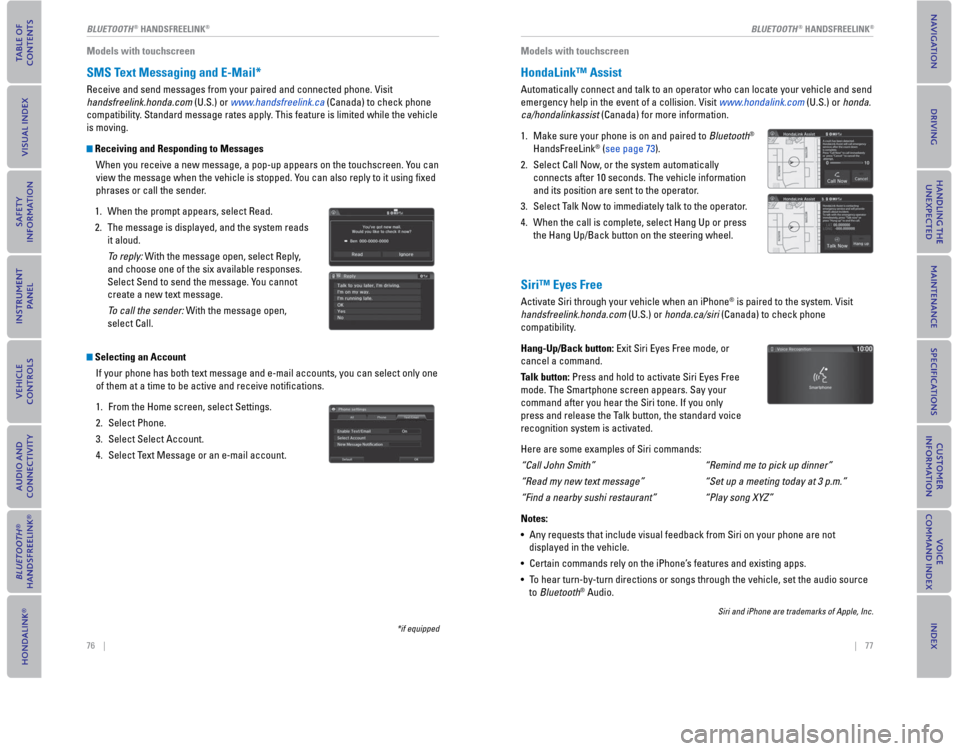
When you receive a new message, a pop-up appears on the touchscreen. You can
view the message when the vehicle is stopped. You can also reply to it using fi xed
phrases or call the sender.
1. When the prompt appears, select Read.
2. The message is displayed, and the system reads
it aloud.
To reply: With the message open, select Reply,
and choose one of the six available responses.
Select Send to send the message. You cannot
create a new text message.
To call the sender: With the message open,
select Call.
Selecting an Account
If your phone has both text message and e-mail accounts, you can select only one
of them at a time to be active and receive notifi cations.
1. From the Home screen, select Settings.
2. Select Phone.
3. Select Select Account.
4. Select Text Message or an e-mail account.
*if equipped
Models with touchscreen
HondaLink™ Assist
Automatically connect and talk to an operator who can locate your vehicle and send
emergency help in the event of a collision. Visit www.hondalink.com (U.S.) or honda.
ca/hondalinkassist (Canada) for more information.
1. Make sure your phone is on and paired to Bluetooth®
HandsFreeLink (®see page 73).
2. Select Call Now, or the system automatically
connects after 10 seconds. The vehicle information
and its position are sent to the operator.
3. Select Talk Now to immediately talk to the operator.
4. When the call is complete, select Hang Up or press
the Hang Up/Back button on the steering wheel.
Siri™ Eyes Free
Activate Siri through your vehicle when an iPhone® is paired to the system. Visit
handsfreelink.honda.com (U.S.) or honda.ca/siri (Canada) to check phone
compatibility.
Hang-Up/Back button: Exit Siri Eyes Free mode, or
cancel a command.
Talk button: Press and hold to activate Siri Eyes Free
mode. The Smartphone screen appears. Say your
command after you hear the Siri tone. If you only
press and release the Talk button, the standard voice
recognition system is activated.
Here are some examples of Siri commands:
“Call John Smith”
“Read my new text message”
“Find a nearby sushi restaurant”
Notes:
• Any requests that include visual feedback from Siri on your phone are not
displayed in the vehicle.
• Certain commands rely on the iPhone’s features and existing apps.
• To hear turn-by-turn directions or songs through the vehicle, set the audio source
to Bluetooth® Audio.
Siri and iPhone are trademarks of Apple, Inc.
“Remind me to pick up dinner”
“Set up a meeting today at 3 p.m.”
“Play song XYZ”
Page 43 of 79
78 || 79
NAVIGATION
NAVIGATION
Learn how to enter a destination and operate the navigation system.
Basic Navigation Operation
A real-time navigation system uses GPS and a map database to show your c\
urrent
location and help guide you to a desired destination. You can operate the system
using voice commands or the touchscreen.
To reduce the potential for driver distraction, certain manual functions \
may be
inoperable or grayed out while the vehicle is moving. Voice commands are always
available.
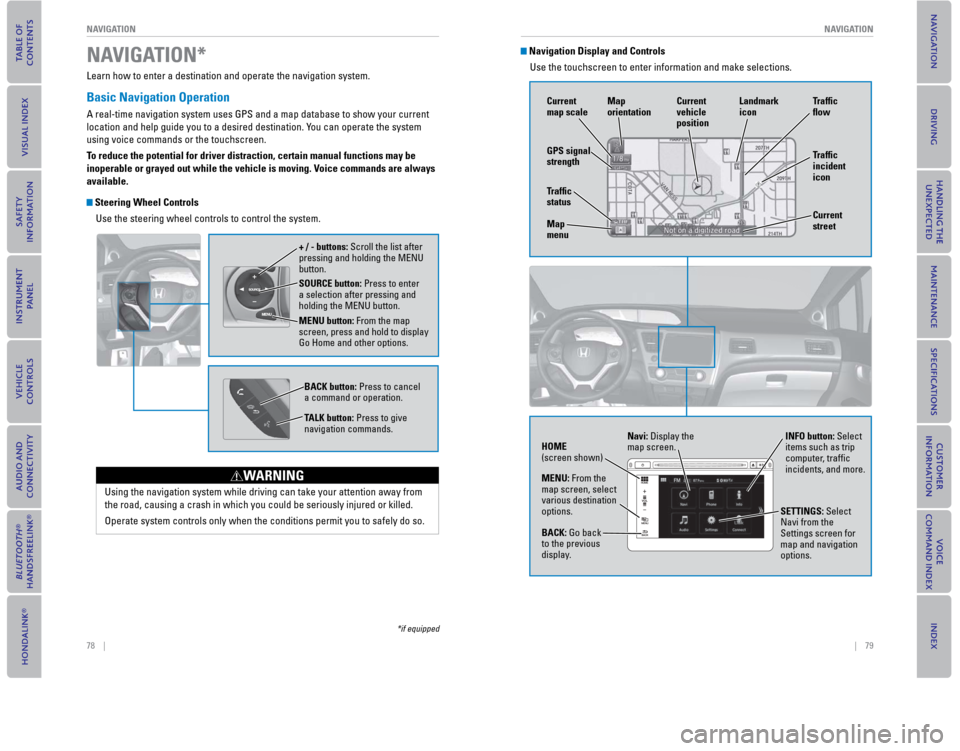
Steering Wheel Controls
Use the steering wheel controls to control the system.
SOURCE button: Press to enter
a selection after pressing and
holding the MENU button.
MENU button: From the map
screen, press and hold to display
Go Home and other options. + / - buttons: Scroll the list after
pressing and holding the MENU
button.
BACK button: Press to cancel
a command or operation.
TALK button: Press to give
navigation commands.
Using the navigation system while driving can take your attention away f\
rom
the road, causing a crash in which you could be seriously injured or kil\
led.
Operate system controls only when the conditions permit you to safely do\
so.
WARNING
NAVIGATION*
*if equipped
Navigation Display and ControlsUse the touchscreen to enter information and make selections.
GPS signal
strength Traf c
incident
icon Traf c
o w
Current
map scale Current
vehicle
position
Map
orientation
Current
street
Traf c
status
Map
menu Landmark
icon
Navi: Display the
map screen.
HOME
(screen shown) INFO button: Select
items such as trip
computer, traffi c
incidents, and more.
BACK: Go back
to the previous
display. SETTINGS: Select
Navi from the
Settings screen for
map and navigation
options.
MENU: From the
map screen, select
various destination
options.
Page 46 of 79

84 || 85
DRIVING
NAVIGATION
Taking a Detour
You can calculate a detour route manually if you encounter a road closure\
or other
obstacle.
1.
When en route, press MENU from the map
screen.
2. Select Detour. The system attempts to calculate a new route by avoiding the next 5 miles (8 km)
while on a freeway or 1 mile (1 km) while on a
surface street.
Traffic
View traffi c fl ow, incidents, and construction in major metro areas. You can also
route around congestion or incidents using voice commands. Press the T
alk
button before saying each command. Available on U.S. models only.
1. When en route, say “Display traf c incidents.” A list of incidents on your route appears.
2. Say the number of the incident you want to avoid.
3. Say “Avoid” and the incident list returns.
4. Say “Recalculate route” to set the new route.
Canceling Your Route
You can cancel your route at any time.
1.
When en route, press MENU from the map
screen.
2. Select Cancel Route. The route is cleared and the map screen returns. You can also press the Talk
button and say “Cancel route.”
DRIVING
Learn about preparation for driving, as well as other features.
Before Driving
Check the following items before you begin driving.
Exterior Checks
• Make sure there are no obstructions on the windows, door mirrors, exteri\
or lights, or other parts of the vehicle.
•
Remove any frost, snow, or ice.
• Make sure the hood is securely closed.
• Heat from the engine and exhaust can ignite fl ammable materials left under the hood, causing a fi re. If you’ve parked your vehicle for an extended period,
inspect and remove any debris that may have collected, such as dried gra\
ss
and leaves that have fallen or have been carried in for use as a nest by\
a small
animal. Also check under the hood for leftover fl ammable materials after you or
someone else has performed maintenance on your vehicle.
• Make sure the tires are in good condition.
• Make sure there are no people or objects behind or around the vehicle.
Interior Checks • Store or secure all items on board properly.
•
Do not pile items higher than the seat height.
• Do not place anything in the front seat footwells. Make sure to secure t\
he fl oor mats.
• If you have any animals on board, do not let them move freely around in \
the vehicle.
• Securely close and lock all doors and the trunk.
• Adjust your seating position, mirrors, and steering wheel properly.
• Make sure items placed on the fl oor behind the front seats cannot roll under the seats.
• Everyone in the vehicle must fasten their seat belt.
• Make sure that the indicators in the instrument panel come on when you s\
tart the vehicle, and go off soon after.
If the doors are frozen shut, use warm water around the door edges to me\
lt any
ice. Do not try to force them open, as this can damage the rubber trim a\
round the
doors. When done, wipe dry to avoid further freezing.
NOTICE
Page 48 of 79
88 || 89
DRIVINGDRIVING
Towing a Trailer
Your vehicle can tow a trailer if you carefully observe the load limits, use the proper
equipment, and follow the towing guidelines. Check the load limits before driving
(see page 87).
Civic HF, Coupe, and Natural Gas (CNG) models are not designed to tow a trailer.
Attempting to do so can void your warranties.
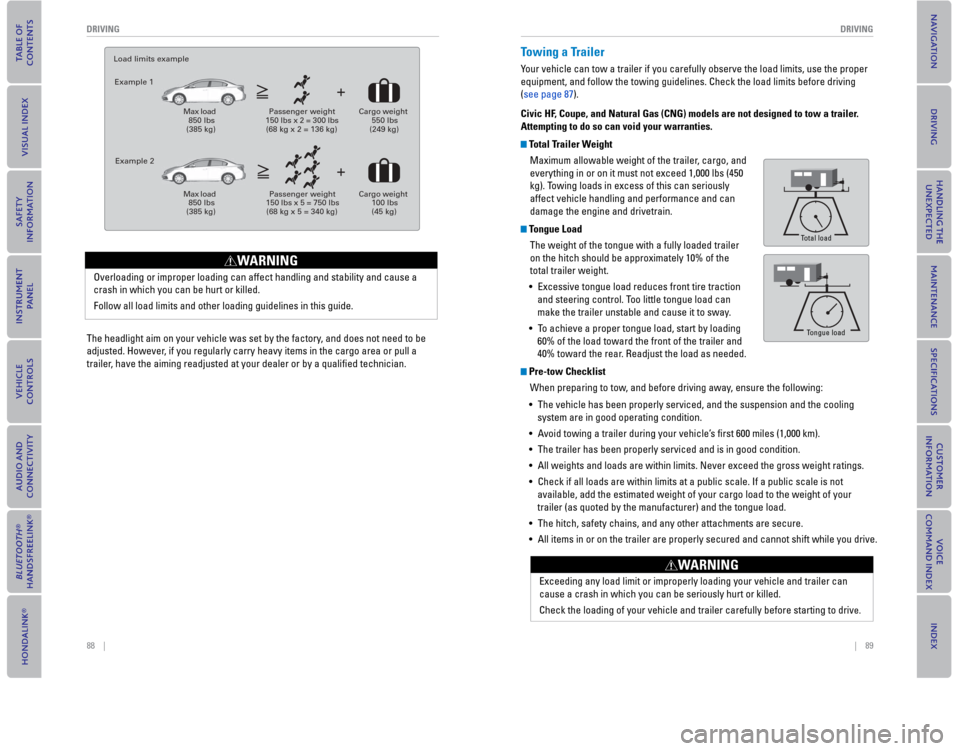
Total Trailer Weight
Maximum allowable weight of the trailer, cargo, and
everything in or on it must not exceed 1,000 lbs (450
kg). Towing loads in excess of this can seriously
affect vehicle handling and performance and can
damage the engine and drivetrain.
Tongue Load
The weight of the tongue with a fully loaded trailer
on the hitch should be approximately 10% of the
total trailer weight.
• Excessive tongue load reduces front tire traction
and steering control. Too little tongue load can
make the trailer unstable and cause it to sway.
• To achieve a proper tongue load, start by loading
60% of the load toward the front of the trailer and
40% toward the rear. Readjust the load as needed.
Pre-tow Checklist
When preparing to tow, and before driving away, ensure the following:
• The vehicle has been properly serviced, and the suspension and the cooling
system are in good operating condition.
• Avoid towing a trailer during your vehicle’s fi rst 600 miles (1,000 km).
• The trailer has been properly serviced and is in good condition.
• All weights and loads are within limits. Never exceed the gross weight ratings.
• Check if all loads are within limits at a public scale. If a public scale is not
available, add the estimated weight of your cargo load to the weight of your
trailer (as quoted by the manufacturer) and the tongue load.
• The hitch, safety chains, and any other attachments are secure.
• All items in or on the trailer are properly secured and cannot shift while you drive.
Tongue Load
Total load
Tongue load
Exceeding any load limit or improperly loading your vehicle and trailer can
cause a crash in which you can be seriously hurt or killed.
Check the loading of your vehicle and trailer carefully before starting to drive.
WARNING
The headlight aim on your vehicle was set by the factory, and does not need to be
adjusted. However, if you regularly carry heavy items in the cargo area or pull a
trailer, have the aiming readjusted at your dealer or by a qualifi ed technician.
Load limits example
Example 1
Max load 850 lbs (385 kg)
Passenger weight 150 lbs x 2 = 300 lbs (68 kg x 2 = 136 kg)
Cargo weight 550 lbs (249 kg)
Example 2
Max load 850 lbs (385 kg)
Passenger weight 150 lbs x 5 = 750 lbs (68 kg x 5 = 340 kg)
Cargo weight 100 lbs (45 kg)
Overloading or improper loading can affect handling and stability and cause a
crash in which you can be hurt or killed.
Follow all load limits and other loading guidelines in this guide.
WARNING
Page 50 of 79

92 || 93
DRIVING
DRIVING
Paddle Shifters*
Use the paddle shifters to change between 1st and 7th gears without remo\
ving
your hands from the steering wheel.
When the shift lever is in D: The vehicle goes into manual shift mode temporarily
,
and the gear number appears. When you start traveling at a constant spee\
d,
manual shift mode automatically switches off, and the gear number goes o\
ff.
When the shift lever is in S: The vehicle goes into manual shift mode, and the
M indicator and gear number come on. When the vehicle comes to a stop, i\
t
automatically shifts down into 1st gear. You can pull away only in 1st gear. If the
vehicle speed increases and the engine speed approaches the tachometer’\
s red
zone, the transmission automatically shifts up.
To cancel manual shift mode, move the shift lever from S to D. The M indi\
cator and
gear number go off.
Manual Transmission*
Fully press the clutch pedal to operate the shift lever and change gears\
.
– Paddle shifter (shift down) + Paddle shifter
(shift up) Recommended shift points
Shift up 1 to 2
2 to 3
3 to 4
4 to 5
5 to 6
6 to 7 Normal acceleration
15 mph (24 km/h)
25 mph (40 km/h)
40 mph (64 km/h)
45 mph (72 km/h)
50 mph (80 km/h)
55 mph (89 km/h)
5-speed manual transmission*
6-speed manual transmission* Recommended shift points
Shift Up 1 to 2
2 to 3
3 to 4
4 to 5 Normal Acceleration
15 mph (24 km/h)
27 mph (43 km/h)
39 mph (63 km/h)
53 mph (85 km/h)
Shift Up 1 to 2
2 to 3
3 to 4
4 to 5
5 to 6 Normal Acceleration
17 mph (27 km/h)
29 mph (46 km/h)
37 mph (59 km/h)
43 mph (69 km/h)
49 mph (79 km/h)
Recommended shift points
*if equipped
Braking
Slow down or stop your vehicle, and keep it from moving when parked.
Foot Brake
Press the brake pedal to slow down or stop your
vehicle from moving.
Brake Assist System During hard or emergency braking, the system
increases braking force. The brake pedal may move
slightly or make a noise; this is normal. Continue to
hold the brake pedal fi
rmly down.
Anti-Lock Brake System (ABS) During hard or emergency braking, the system
rapidly pumps the brakes to prevent wheel lockup and
help you maintain steering control. The brake pedal
may pulsate slightly during ABS operation; this is
normal. Do not pump the brake pedal, and continue to
hold it fi
rmly down.
Parking BrakeKeep the vehicle from moving when it is parked.
T
o apply: Pull the lever up fully without pressing the
release button.
To release: Press and hold the release button, then
lower the lever down all the way.
Before downshifting, make sure the engine will not go into the tachomete\
r’s red
zone. This can severely damage your engine.
NOTICE
Do not shift to Reverse (R) before the vehicle comes to a complete sto\
p. This can
damage the transmission.
NOTICE
Brake pedal
Clutch pedal
Brake
pedal
The ABS may not function correctly if you use an incorrect tire type and\
size.
NOTICE
Release the parking brake fully before driving. The rear brakes and axle\
can be
damaged if you drive with the parking brake applied.
NOTICE
Page 52 of 79
96 || 97
DRIVING
DRIVING
LaneWatch™*
Check the passenger-side rear areas in the upper display when the right turn signal
is activated.
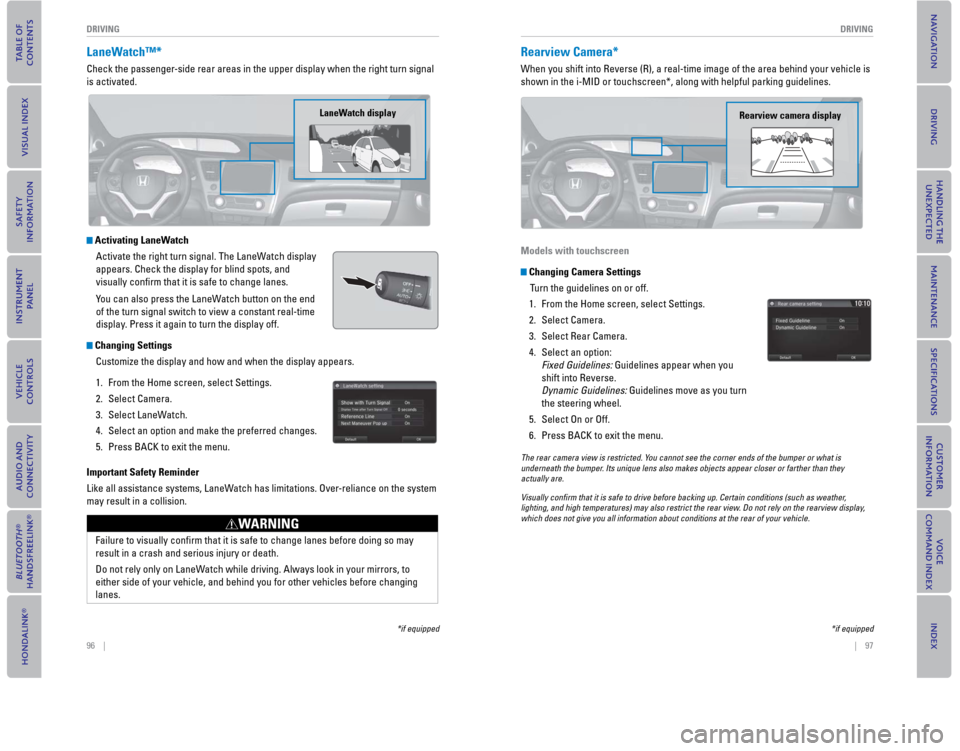
Activating LaneWatch
Activate the right turn signal. The LaneWatch display
appears. Check the display for blind spots, and
visually confi
rm that it is safe to change lanes.
You can also press the LaneWatch button on the end
of the turn signal switch to view a constant real-time
display. Press it again to turn the display off.
Changing Settings Customize the display and how and when the display appears.
1.
From the Home screen, select Settings.
2. Select Camera.
3. Select LaneWatch.
4. Select an option and make the preferred changes.
5. Press BACK to exit the menu.
Important Safety Reminder
Like all assistance systems, LaneWatch has limitations. Over-reliance on the system
may result in a collision.
LaneWatch display
Failure to visually confi rm that it is safe to change lanes before doing so may
result in a crash and serious injury or death.
Do not rely only on LaneWatch while driving. Always look in your mirrors, to
either side of your vehicle, and behind you for other vehicles before ch\
anging
lanes.
WARNING
*if equipped
Rearview Camera*
When you shift into Reverse (R), a real-time image of the area behind \
your vehicle is
shown in the i-MID or touchscreen*, along with helpful parking guideline\
s.
Models with touchscreen
Changing Camera Settings Turn the guidelines on or off.
1.
From the Home screen, select Settings.
2. Select Camera.
3. Select Rear Camera.
4. Select an option: Fixed Guidelines: Guidelines appear when you
shift into Reverse.
Dynamic Guidelines: Guidelines move as you turn
the steering wheel.
5. Select On or Off.
6. Press BACK to exit the menu.
Rearview camera display
The rear camera view is restricted. You cannot see the corner ends of the bumper or what is
underneath the bumper. Its unique lens also makes objects appear closer or farther than they \
actually are.
Visually con rm that it is safe to drive before backing up. Certain conditions (such\
as weather,
lighting, and high temperatures) may also restrict the rear view. Do not rely on the rearview display,
which does not give you all information about conditions at the rear of \
your vehicle.
*if equipped
Page 53 of 79
, a real-time image of the area behind \
your vehicle is
shown in the display, along with helpful parking")
98 || 99
DRIVING
DRIVING
Multi-View Rear Camera*
When you shift into Reverse (R), a real-time image of the area behind \
your vehicle is
shown in the display, along with helpful parking guidelines.
Changing Camera Settings
Turn the guidelines on or off.
1.
From the Home screen, select Settings.
2. Select Camera.
3. Select an option: Fixed Guidelines: Guidelines appear when you
shift into Reverse.
Dynamic Guidelines: Guidelines move as you turn
the steering wheel.
4. Select On or Off.
5. Press BACK to exit the menu.
Wide view
Press icons on the screen to change views.
Normal view Top down view
The rear camera view is restricted. You cannot see the corner ends of the bumper or what is
underneath the bumper. Its unique lens also makes objects appear closer or farther than they \
actually are.
Visually con rm that it is safe to drive before backing up. Certain conditions (such\
as weather,
lighting, and high temperatures) may also restrict the rear view. Do not rely on the rearview display,
which does not give you all information about conditions at the rear of \
your vehicle.
*if equipped
Refueling
Use the proper fuel and refueling procedure to ensure the best performan\
ce and
safety of your vehicle.
Sedan, Coupe, and Si models
Fuel InformationUse of unleaded gasoline of 87 octane or higher is recommended.
For Civic Si models, 91 octane or higher is recommended.
•
Honda recommends TOP TIER Detergent Gasoline where available.
• Do NOT use gasoline containing more than 15% ethanol.
• Do NOT use gasoline containing methanol.
• Do NOT use gasoline containing MMT.
How to Refuel
1. The fuel fi ll door is located at the left rear of the vehicle. Park next to the service pump that is
most accessible.
2.
Turn off the engine.
3. Push the fuel fi ll door release handle near the bottom of the driver’s seat. The fuel fi ll door
opens.
4. Turn the fuel fi ll cap slowly to open. Place the fuel fi ll cap in the holder.
5. Insert the fi ller nozzle fully. When the tank is full, the fuel nozzle clicks off automatically.
6. Replace the fuel fi ll cap. Tighten it until you hear at least one click. Close the fuel fi ll door.
We recommend quality gasoline containing detergent additives that help
prevent fuel system and engine deposits. In addition, in order to mainta\
in good
performance, fuel economy, and emissions control, we strongly recommend the
use of gasoline that does NOT contain harmful manganese-based fuel addit\
ives
such as MMT, if such gasoline is available.
NOTICE
Push
Cap
Holder
Gasoline is highly fl ammable and explosive. You can be burned or seriously
injured when handling fuel.
• Stop the engine, and keep heat, sparks, and fl ame away.
• Handle fuel only outdoors.
• Wipe up spills immediately.
WARNING
Page 57 of 79
106 || 107
HANDLING THE UNEXPECTEDHANDLING THE UNEXPECTED
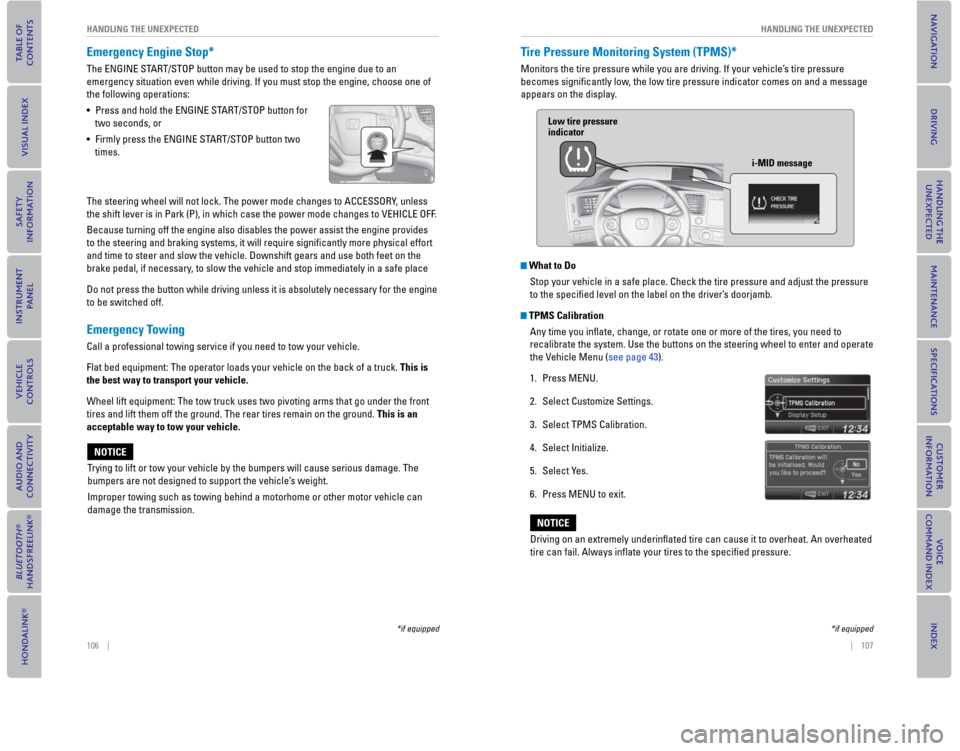
Emergency Engine Stop*
The ENGINE START/STOP button may be used to stop the engine due to an
emergency situation even while driving. If you must stop the engine, choose one of
the following operations:
• Press and hold the ENGINE START/STOP button for
two seconds, or
• Firmly press the ENGINE START/STOP button two
times.
The steering wheel will not lock. The power mode changes to ACCESSORY, unless
the shift lever is in Park (P), in which case the power mode changes to VEHICLE OFF.
Because turning off the engine also disables the power assist the engine provides
to the steering and braking systems, it will require signifi cantly more physical effort
and time to steer and slow the vehicle. Downshift gears and use both feet on the
brake pedal, if necessary, to slow the vehicle and stop immediately in a safe place
Do not press the button while driving unless it is absolutely necessary for the engine
to be switched off.
Emergency Towing
Call a professional towing service if you need to tow your vehicle.
Flat bed equipment: The operator loads your vehicle on the back of a truck. This is
the best way to transport your vehicle.
Wheel lift equipment: The tow truck uses two pivoting arms that go under the front
tires and lift them off the ground. The rear tires remain on the ground. This is an
acceptable way to tow your vehicle.
Trying to lift or tow your vehicle by the bumpers will cause serious damage. The
bumpers are not designed to support the vehicle’s weight.
Improper towing such as towing behind a motorhome or other motor vehicle can
damage the transmission.
NOTICE
*if equipped
Tire Pressure Monitoring System ( TPMS)*
Monitors the tire pressure while you are driving. If your vehicle’s tire pressure
becomes signifi cantly low, the low tire pressure indicator comes on and a message
appears on the display.
What to Do
Stop your vehicle in a safe place. Check the tire pressure and adjust the pressure
to the specifi ed level on the label on the driver’s doorjamb.
TPMS Calibration
Any time you infl ate, change, or rotate one or more of the tires, you need to
recalibrate the system. Use the buttons on the steering wheel to enter and operate
the Vehicle Menu (see page 43).
1. Press MENU.
2. Select Customize Settings.
3. Select TPMS Calibration.
4. Select Initialize.
5. Select Yes.
6. Press MENU to exit.
Low tire pressure indicator
i-MID message
Driving on an extremely underinfl ated tire can cause it to overheat. An overheated
tire can fail. Always infl ate your tires to the specifi ed pressure.
NOTICE
*if equipped
Page 58 of 79
108 || 109
HANDLING THE UNEXPECTED
HANDLING THE UNEXPECTED
*if equipped
Changing a Flat Tire
If a tire goes fl at while driving, grasp the steering wheel fi rmly, and brake gradually
to reduce speed. Then, stop in a safe place. Replace the fl at tire with the compact
spare tire*. Go to a dealer as soon as possible to have the full-size ti\
re repaired or
replaced.
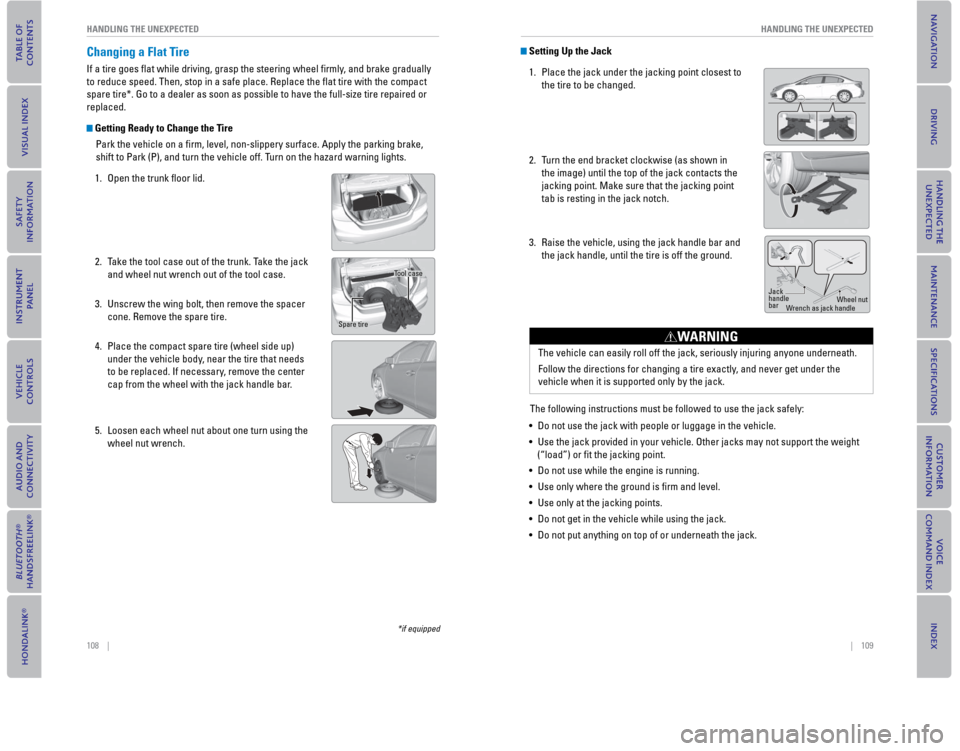
Getting Ready to Change the Tire
Park the vehicle on a fi rm, level, non-slippery surface. Apply the parking brake,
shift to Park (P), and turn the vehicle off. T
urn on the hazard warning lights.
1. Open the trunk fl oor lid.
2. Take the tool case out of the trunk. Take the jack and wheel nut wrench out of the tool case.
3. Unscrew the wing bolt, then remove the spacer cone. Remove the spare tire.
4. Place the compact spare tire (wheel side up) under the vehicle body, near the tire that needs
to be replaced. If necessary, remove the center
cap from the wheel with the jack handle bar.
5. Loosen each wheel nut about one turn using the wheel nut wrench.
Tool case
Spare tire
Setting Up the Jack
1. Place the jack under the jacking point closest to the tire to be changed.
2.
Turn the end bracket clockwise (as shown in
the image) until the top of the jack contacts the
jacking point. Make sure that the jacking point
tab is resting in the jack notch.
3. Raise the vehicle, using the jack handle bar and the jack handle, until the tire is off the ground.
The following instructions must be followed to use the jack safely:
• Do not use the jack with people or luggage in the vehicle.
• Use the jack provided in your vehicle. Other jacks may not support the w\
eight (“load”) or fi t the jacking point.
• Do not use while the engine is running.
• Use only where the ground is fi rm and level.
• Use only at the jacking points.
• Do not get in the vehicle while using the jack.
• Do not put anything on top of or underneath the jack.
Jack
handle
bar Wheel nut
Wrench as jack handle
The vehicle can easily roll off the jack, seriously injuring anyone unde\
rneath.
Follow the directions for changing a tire exactly, and never get under the
vehicle when it is supported only by the jack.
WARNING
Page 62 of 79
116 || 117
MAINTENANCE
MAINTENANCE
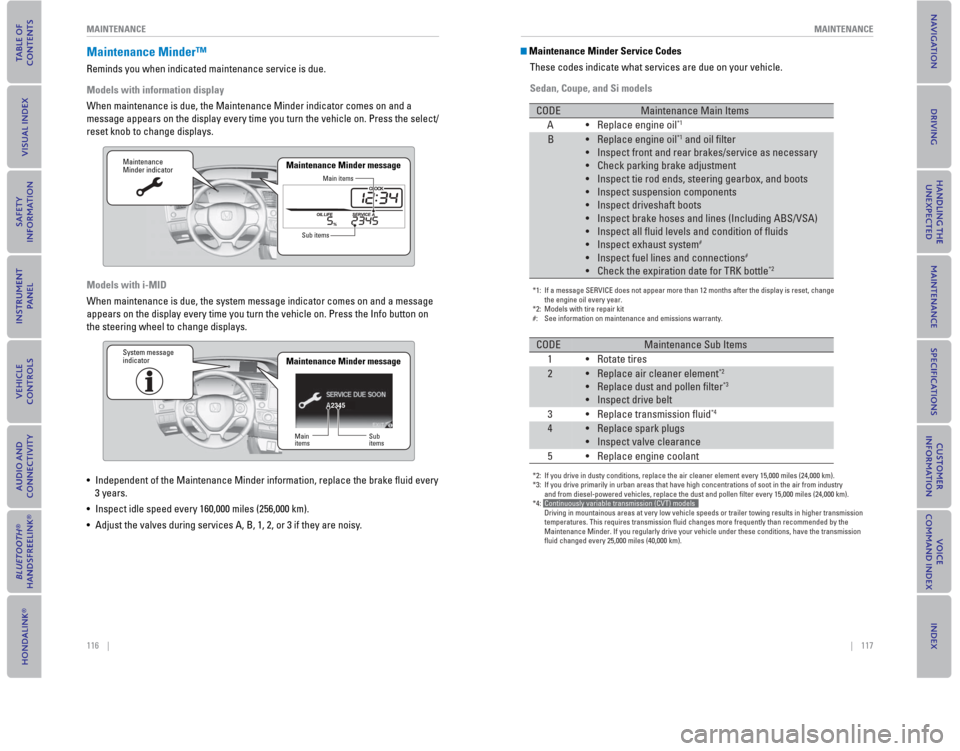
Maintenance Minder™
Reminds you when indicated maintenance service is due.
Models with information display
When maintenance is due, the Maintenance Minder indicator comes on and a\
message appears on the display every time you turn the vehicle on. Press\
the select/
reset knob to change displays.
Models with i-MID
When maintenance is due, the system message indicator comes on and a mes\
sage
appears on the display every time you turn the vehicle on. Press the Inf\
o button on
the steering wheel to change displays.
• Independent of the Maintenance Minder information, replace the brake fl\
uid every
3 years.
• Inspect idle speed every 160,000 miles (256,000 km).
• Adjust the valves during services A, B, 1, 2, or 3 if they are noisy.
Maintenance
Minder indicator
Main items
Sub items
Maintenance Minder message
2345
Maintenance
Minder indicator
Main
items Sub
items
Maintenance Minder messageSystem message
indicator
Maintenance Minder Service Codes
These codes indicate what services are due on your vehicle.
Sedan, Coupe, and Si models
*1: If a message SERVICE does not appear more than 12 months after the displ\
ay is reset, change the engine oil every year.
*2: Models with tire repair kit
#: See information on maintenance and emissions warranty.
CODEMaintenance Main Items
A• Replace engine oil*1
B•Replace engine oil*1 and oil filter
•
Inspect front and rear brakes/service as necessary
•
Check parking brake adjustment
•
Inspect tie rod ends, steering gearbox, and boots
•
Inspect suspension components
•
Inspect driveshaft boots
•
Inspect brake hoses and lines (Including ABS/VSA)
•
Inspect all fluid levels and condition of fluids
•
Inspect exhaust system
#
•Inspect fuel lines and connections#
•Check the expiration date for TRK bottle*2
*2: If you drive in dusty conditions, replace the air cleaner element every \
15,000 miles (24,000 km).
*3: If you drive primarily in urban areas that have high concentrations of s\
oot in the air from industry and from diesel-powered vehicles, replace the dust and pollen filter e\
very 15,000 miles (24,000 km).
*4: Continuously variable transmission (CVT) models
Driving in mountainous areas at very low vehicle speeds or trailer towin\
g results in higher transmission
temperatures. This requires transmission fluid changes more frequently\
than recommended by the
Maintenance Minder. If you regularly drive your vehicle under these cond\
itions, have the transmission
fluid changed every 25,000 miles (40,000 km).
CODEMaintenance Sub Items
1• Rotate tires
2•Replace air cleaner element*2
•Replace dust and pollen filter*3
•Inspect drive belt
3
• Replace transmission fluid*4
4•Replace spark plugs
•
Inspect valve clearance
5 •
Replace
engine coolant