warning light HONDA CIVIC COUPE 2015 9.G Quick Guide
[x] Cancel search | Manufacturer: HONDA, Model Year: 2015, Model line: CIVIC COUPE, Model: HONDA CIVIC COUPE 2015 9.GPages: 79, PDF Size: 19.07 MB
Page 5 of 79
2 || 3
SAFETY
VISUAL INDEX
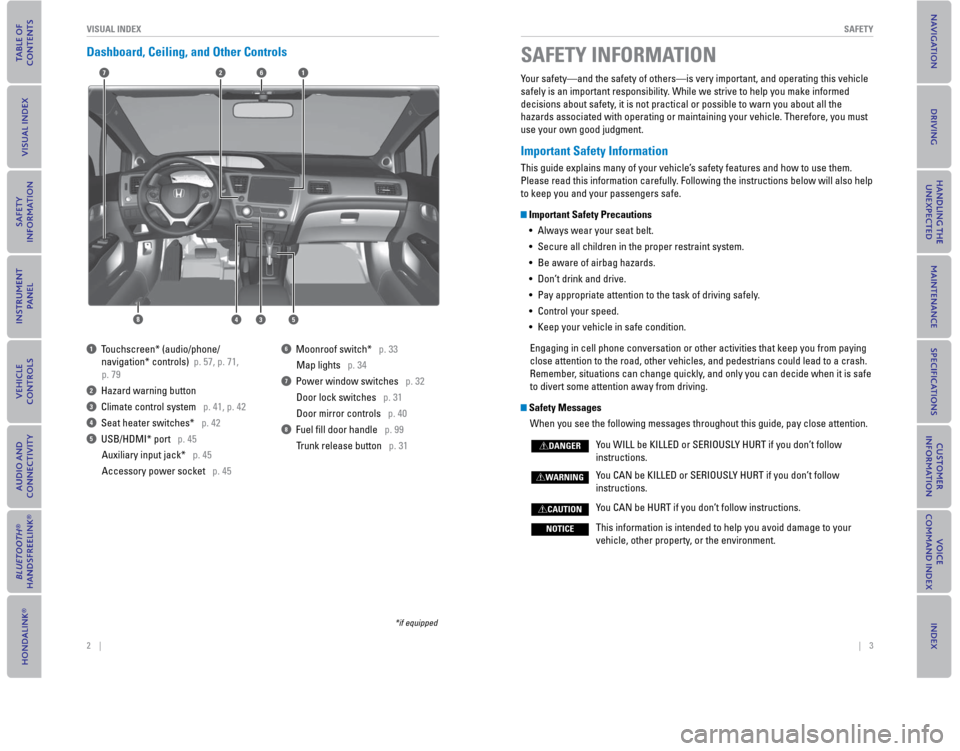
Dashboard, Ceiling, and Other Controls
2
53
71
8
6
4
1 Touchscreen* (audio/phone/
navigation* controls) p. 57, p. 71,
p. 79
2 Hazard warning button
3 Climate control system p. 41, p. 42
4 Seat heater switches* p. 42
5 USB/HDMI* port p. 45
Auxiliary input jack* p. 45
Accessory power socket p. 45
6 Moonroof switch* p. 33Map lights p. 34
7 Power window switches p. 32Door lock switches p. 31
Door mirror controls p. 40
8 Fuel fi ll door handle p. 99 Trunk release button p. 31
*if equipped
SAFETY INFORMATION
Your safety—and the safety of others—is very important, and operati\
ng this vehicle
safely is an important responsibility. While we strive to help you make informed
decisions about safety, it is not practical or possible to warn you about all the
hazards associated with operating or maintaining your vehicle. Therefore\
, you must
use your own good judgment.
Important Safety Information
This guide explains many of your vehicle’s safety features and how to use them.
Please read this information carefully. Following the instructions below will also help
to keep you and your passengers safe.
Important Safety Precautions• Always wear your seat belt.
• Secure all children in the proper restraint system.
• Be aware of airbag hazards.
•
Don’t drink and drive.
• Pay appropriate attention to the task of driving safely.
• Control your speed.
• Keep your vehicle in safe condition.
Engaging in cell phone conversation or other activities that keep you fr\
om paying
close attention to the road, other vehicles, and pedestrians could lead \
to a crash.
Remember, situations can change quickly, and only you can decide when it is safe
to divert some attention away from driving.
Safety Messages When you see the following messages throughout this guide, pay close att\
ention.
Y
ou WILL be KILLED or SERIOUSLY HURT if you don’t follow
instructions.
You CAN be KILLED or SERIOUSLY HURT if you don’t follow instructions.
You CAN be HURT if you don’t follow instructions.
This information is intended to help you avoid damage to your vehicle, other property, or the environment.
DANGER
WARNING
CAUTION
NOTICE
Page 20 of 79

32 || 33
VEHICLE CONTROLS
VEHICLE CONTROLS
Power Window Operation
The power windows can be opened and closed when the vehicle is on by usi\
ng the
switches on the doors. The switches on the driver’s side can be used to open and
close all the windows.
Automatic Operation*
To open: Push the switch down fi rmly .
T
o close: Pull the switch up fi rmly.
The window opens or closes completely. To
stop the window at any time, push or pull the
switch again briefl y.
Manual Operation To open: Push the switch down lightly.
To close: Pull the switch up lightly
.
Release the switch when the windows reach the desired position.
Power Window Lock Push in the power window lock button so only the driver’s window can be
operated. The driver can operate all other windows using the specifi c switches.
OFF
Power window
lock button
Driver’s
window
switch
Front passenger’s
window switch ON
Indicator
Closing a power window on someone’s hands or fi ngers can cause serious
injury.
Make sure your passengers are away from the windows before closing them.\
WARNING
*if equipped
Power Moonroof Operation*
The moonroof can be opened and closed when the vehicle is on by using th\
e switch
on the ceiling.
Automatic Operation
To open: Push the switch back fi rmly to the
second detent, then release.
T o close:
Push the switch forward fi rmly to the
second detent, then release.
The moonroof opens or closes completely. To
stop the moonroof at any time, push the switch
briefl y.
Manual Operation
To open: Push and hold the switch back to the fi rst detent until the desired position
is reached.
T o close:
Push and hold the switch forward to the fi rst detent until the desired
position is reached.
Moonroof Tilt
To tilt: Push the center of the switch.
To close: Push the switch forward fi
rmly, then release.
CloseOpen
Tilt
Opening the moonroof in below freezing temperatures or when it is covere\
d with
snow or ice can damage the moonroof panel or motor.
NOTICE
Closing the moonroof on someone’s hands or fi ngers can cause serious
injury.
Make sure your passengers are away from the moonroof before closing it.
WARNING
*if equipped
Page 24 of 79

40 || 41
VEHICLE CONTROLS
VEHICLE CONTROLS
Adjusting the Steering Wheel
The steering wheel height and distance from your body can be adjusted so\
that you
can comfortably grip the steering wheel in an appropriate driving postur\
e.
1. Pull up the steering wheel adjustment lever.
2. Move the steering wheel up or down, and in
or out.
3. Push down the steering wheel adjustment lever to lock the steering wheel in position.
Adjusting the Mirrors
Adjust the angle of the mirrors for the best visibility when you are sit\
ting in the
correct driving position.
Rearview Mirror with Day/Night Positions
Manually adjust the position to reduce headlight
glare from vehicles behind you. Flip the tab to
switch between day and night positions.
Power Door MirrorsAdjust the power door mirrors when the vehicle is on.
L/R selector switch: Select the left or right mirror.
After adjusting the mirror, return the switch to the
center position.
Mirror position adjustment switch: Press the switch
left, right, up, or down to move the mirror
.
To adjust
To lockLever
Adjusting the steering wheel position while driving may cause you to los\
e
control of the vehicle and be seriously injured in a crash.
Adjust the steering wheel only when the vehicle is stopped.
WARNING
DownNight positionTa b
Day
position
Up
Adjustment switchSelector
switch
Air Conditioning System*
Manually control the front and rear heating and cooling in your vehicle’\
s interior
using the buttons on the dashboard.
Fan control
dial A/C
button*
MAX A/C*
button Windshield
defroster buttonTemperature
control dial
Recirculation and/or Fresh
Air button:
Recirculation mode
(indicator on): Recirculates
air from the vehicle’s
interior.
Fresh Air mode (indicator
off): Maintains outside
ventilation. Rear defogger/
heated door
mirrors button*Vent mode
buttons
*if equipped
Page 48 of 79
88 || 89
DRIVINGDRIVING
Towing a Trailer
Your vehicle can tow a trailer if you carefully observe the load limits, use the proper
equipment, and follow the towing guidelines. Check the load limits before driving
(see page 87).
Civic HF, Coupe, and Natural Gas (CNG) models are not designed to tow a trailer.
Attempting to do so can void your warranties.
Total Trailer Weight
Maximum allowable weight of the trailer, cargo, and
everything in or on it must not exceed 1,000 lbs (450
kg). Towing loads in excess of this can seriously
affect vehicle handling and performance and can
damage the engine and drivetrain.
Tongue Load
The weight of the tongue with a fully loaded trailer
on the hitch should be approximately 10% of the
total trailer weight.
• Excessive tongue load reduces front tire traction
and steering control. Too little tongue load can
make the trailer unstable and cause it to sway.
• To achieve a proper tongue load, start by loading
60% of the load toward the front of the trailer and
40% toward the rear. Readjust the load as needed.
Pre-tow Checklist
When preparing to tow, and before driving away, ensure the following:
• The vehicle has been properly serviced, and the suspension and the cooling
system are in good operating condition.
• Avoid towing a trailer during your vehicle’s fi rst 600 miles (1,000 km).
• The trailer has been properly serviced and is in good condition.
• All weights and loads are within limits. Never exceed the gross weight ratings.
• Check if all loads are within limits at a public scale. If a public scale is not
available, add the estimated weight of your cargo load to the weight of your
trailer (as quoted by the manufacturer) and the tongue load.
• The hitch, safety chains, and any other attachments are secure.
• All items in or on the trailer are properly secured and cannot shift while you drive.
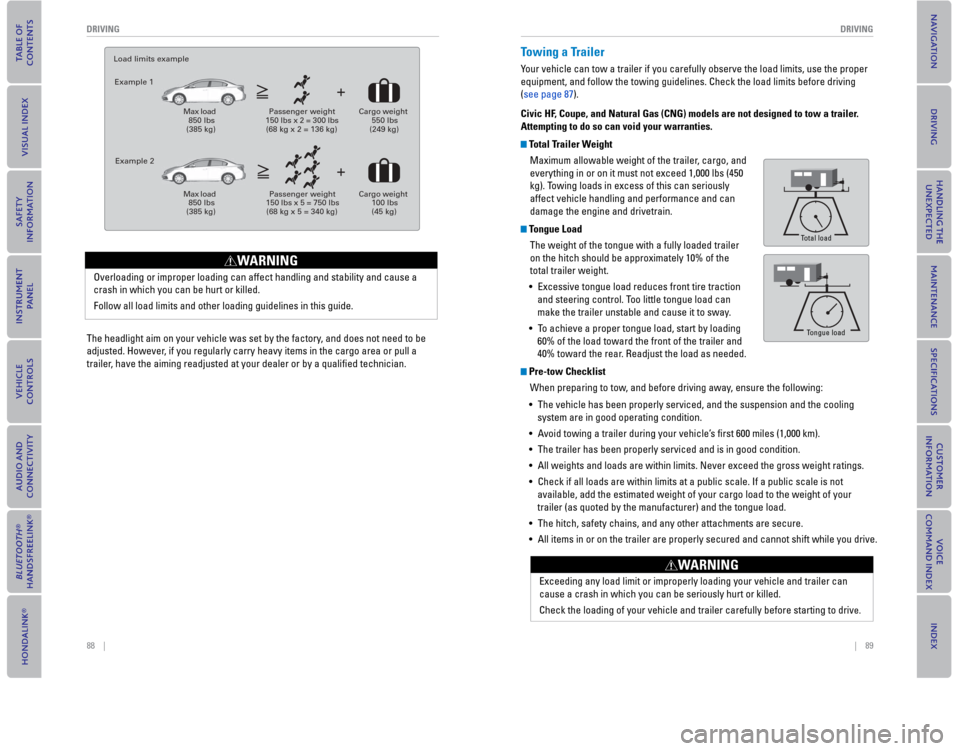
Tongue Load
Total load
Tongue load
Exceeding any load limit or improperly loading your vehicle and trailer can
cause a crash in which you can be seriously hurt or killed.
Check the loading of your vehicle and trailer carefully before starting to drive.
WARNING
The headlight aim on your vehicle was set by the factory, and does not need to be
adjusted. However, if you regularly carry heavy items in the cargo area or pull a
trailer, have the aiming readjusted at your dealer or by a qualifi ed technician.
Load limits example
Example 1
Max load 850 lbs (385 kg)
Passenger weight 150 lbs x 2 = 300 lbs (68 kg x 2 = 136 kg)
Cargo weight 550 lbs (249 kg)
Example 2
Max load 850 lbs (385 kg)
Passenger weight 150 lbs x 5 = 750 lbs (68 kg x 5 = 340 kg)
Cargo weight 100 lbs (45 kg)
Overloading or improper loading can affect handling and stability and cause a
crash in which you can be hurt or killed.
Follow all load limits and other loading guidelines in this guide.
WARNING
Page 49 of 79
90 || 91
DRIVING
DRIVING
Starting to Drive
Turn on the vehicle and start the engine to begin driving.
Before Starting the Engine
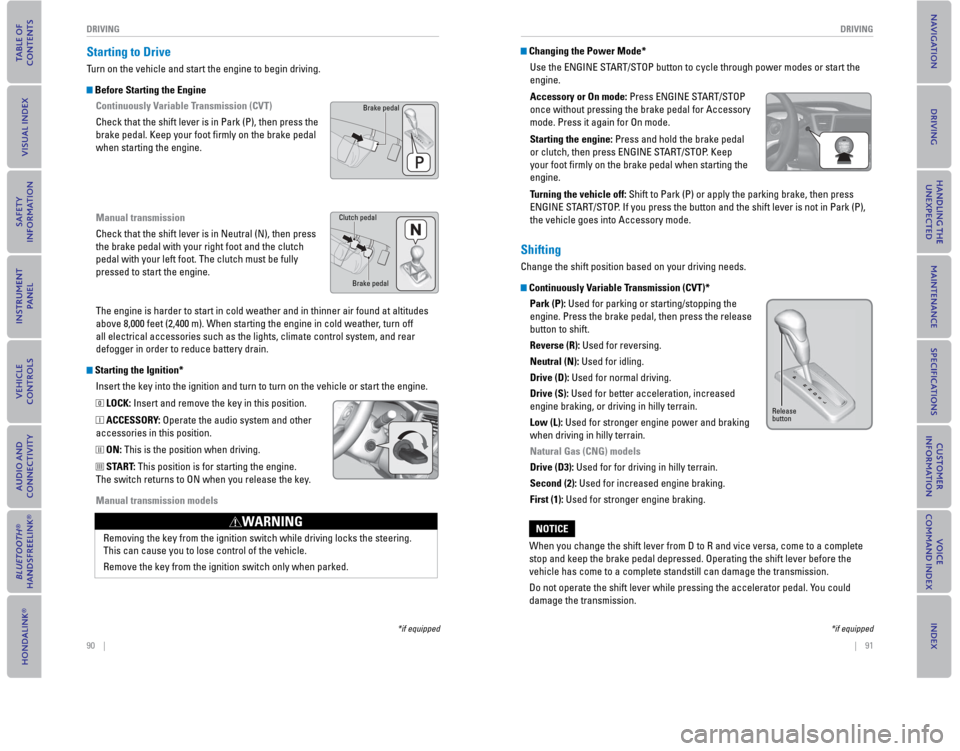
Continuously Variable Transmission (CVT)
Check that the shift lever is in Park (P), then press the
brake pedal. Keep your foot fi
rmly on the brake pedal
when starting the engine.
Manual transmission
Check that the shift lever is in Neutral (N), then press
the brake pedal with your right foot and the clutch
pedal with your left foot. The clutch must be fully
pressed to start the engine.
The engine is harder to start in cold weather and in thinner air found a\
t altitudes
above 8,000 feet (2,400 m). When starting the engine in cold weather, turn off
all electrical accessories such as the lights, climate control system, a\
nd rear
defogger in order to reduce battery drain.
Starting the Ignition*
Insert the key into the ignition and turn to turn on the vehicle or star\
t the engine.
0 LOCK: Insert and remove the key in this position.
I ACCESSORY: Operate the audio system and other
accessories in this position.
II ON: This is the position when driving.
III START: This position is for starting the engine.
The switch returns to ON when you release the key.
Manual transmission models
Brake pedal
Brake pedal
Clutch pedal
Removing the key from the ignition switch while driving locks the steeri\
ng.
This can cause you to lose control of the vehicle.
Remove the key from the ignition switch only when parked.
WARNING
*if equipped
Changing the Power Mode*
Use the ENGINE START/STOP button to cycle through power modes or start the
engine.
Accessory or On mode: Press ENGINE ST
ART/STOP
once without pressing the brake pedal for Accessory
mode. Press it again for On mode.
Starting the engine: Press and hold the brake pedal
or clutch, then press ENGINE START/STOP. Keep
your foot fi rmly on the brake pedal when starting the
engine.
Turning the vehicle off: Shift to Park (P) or apply the parking brake, then press
ENGINE START/STOP. If you press the button and the shift lever is not in Park (P),
the vehicle goes into Accessory mode.
Shifting
Change the shift position based on your driving needs.
Continuously Variable Transmission (CVT)*
Park (P): Used for parking or starting/stopping the
engine. Press the brake pedal, then press the release
button to shift.
Reverse (R): Used for reversing.
Neutral (N): Used for idling.
Drive (D): Used for normal driving.
Drive (S): Used for better acceleration, increased
engine braking, or driving in hilly terrain.
Low (L): Used for stronger engine power and braking
when driving in hilly terrain.
Natural Gas (CNG) models
Drive (D3): Used for for driving in hilly terrain.
Second (2): Used for increased engine braking.
First (1): Used for stronger engine braking.
Release
button
When you change the shift lever from D to R and vice versa, come to a co\
mplete
stop and keep the brake pedal depressed. Operating the shift lever befor\
e the
vehicle has come to a complete standstill can damage the transmission.
Do not operate the shift lever while pressing the accelerator pedal. You could
damage the transmission.
NOTICE
*if equipped
Page 52 of 79
96 || 97
DRIVING
DRIVING
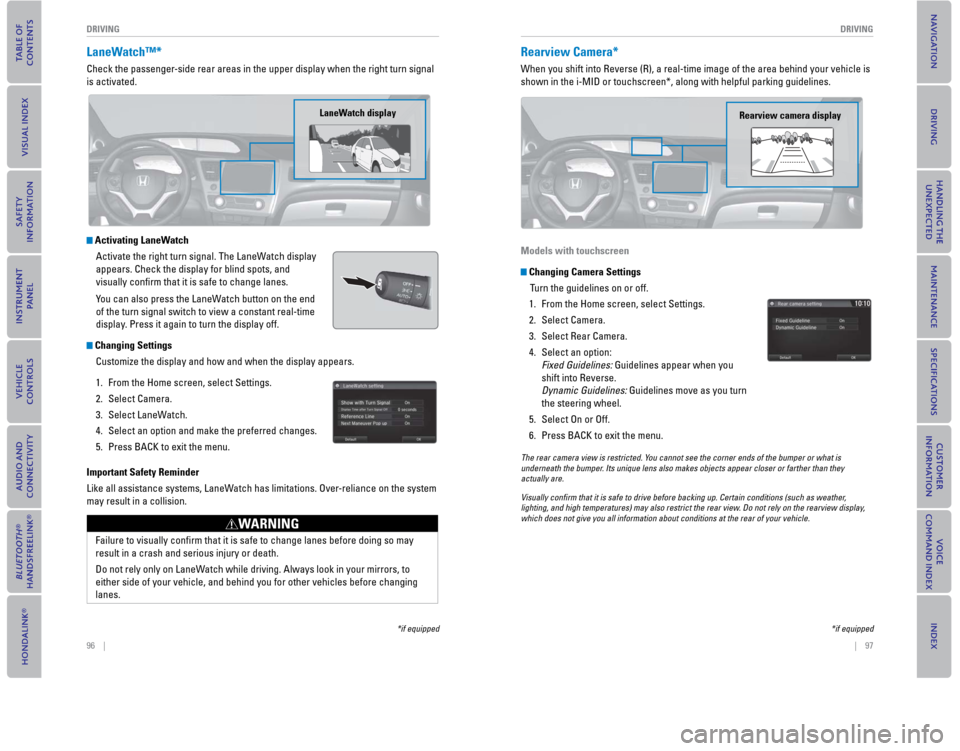
LaneWatch™*
Check the passenger-side rear areas in the upper display when the right turn signal
is activated.
Activating LaneWatch
Activate the right turn signal. The LaneWatch display
appears. Check the display for blind spots, and
visually confi
rm that it is safe to change lanes.
You can also press the LaneWatch button on the end
of the turn signal switch to view a constant real-time
display. Press it again to turn the display off.
Changing Settings Customize the display and how and when the display appears.
1.
From the Home screen, select Settings.
2. Select Camera.
3. Select LaneWatch.
4. Select an option and make the preferred changes.
5. Press BACK to exit the menu.
Important Safety Reminder
Like all assistance systems, LaneWatch has limitations. Over-reliance on the system
may result in a collision.
LaneWatch display
Failure to visually confi rm that it is safe to change lanes before doing so may
result in a crash and serious injury or death.
Do not rely only on LaneWatch while driving. Always look in your mirrors, to
either side of your vehicle, and behind you for other vehicles before ch\
anging
lanes.
WARNING
*if equipped
Rearview Camera*
When you shift into Reverse (R), a real-time image of the area behind \
your vehicle is
shown in the i-MID or touchscreen*, along with helpful parking guideline\
s.
Models with touchscreen
Changing Camera Settings Turn the guidelines on or off.
1.
From the Home screen, select Settings.
2. Select Camera.
3. Select Rear Camera.
4. Select an option: Fixed Guidelines: Guidelines appear when you
shift into Reverse.
Dynamic Guidelines: Guidelines move as you turn
the steering wheel.
5. Select On or Off.
6. Press BACK to exit the menu.
Rearview camera display
The rear camera view is restricted. You cannot see the corner ends of the bumper or what is
underneath the bumper. Its unique lens also makes objects appear closer or farther than they \
actually are.
Visually con rm that it is safe to drive before backing up. Certain conditions (such\
as weather,
lighting, and high temperatures) may also restrict the rear view. Do not rely on the rearview display,
which does not give you all information about conditions at the rear of \
your vehicle.
*if equipped
Page 53 of 79
, a real-time image of the area behind \
your vehicle is
shown in the display, along with helpful parking")
98 || 99
DRIVING
DRIVING
Multi-View Rear Camera*
When you shift into Reverse (R), a real-time image of the area behind \
your vehicle is
shown in the display, along with helpful parking guidelines.
Changing Camera Settings
Turn the guidelines on or off.
1.
From the Home screen, select Settings.
2. Select Camera.
3. Select an option: Fixed Guidelines: Guidelines appear when you
shift into Reverse.
Dynamic Guidelines: Guidelines move as you turn
the steering wheel.
4. Select On or Off.
5. Press BACK to exit the menu.
Wide view
Press icons on the screen to change views.
Normal view Top down view
The rear camera view is restricted. You cannot see the corner ends of the bumper or what is
underneath the bumper. Its unique lens also makes objects appear closer or farther than they \
actually are.
Visually con rm that it is safe to drive before backing up. Certain conditions (such\
as weather,
lighting, and high temperatures) may also restrict the rear view. Do not rely on the rearview display,
which does not give you all information about conditions at the rear of \
your vehicle.
*if equipped
Refueling
Use the proper fuel and refueling procedure to ensure the best performan\
ce and
safety of your vehicle.
Sedan, Coupe, and Si models
Fuel InformationUse of unleaded gasoline of 87 octane or higher is recommended.
For Civic Si models, 91 octane or higher is recommended.
•
Honda recommends TOP TIER Detergent Gasoline where available.
• Do NOT use gasoline containing more than 15% ethanol.
• Do NOT use gasoline containing methanol.
• Do NOT use gasoline containing MMT.
How to Refuel
1. The fuel fi ll door is located at the left rear of the vehicle. Park next to the service pump that is
most accessible.
2.
Turn off the engine.
3. Push the fuel fi ll door release handle near the bottom of the driver’s seat. The fuel fi ll door
opens.
4. Turn the fuel fi ll cap slowly to open. Place the fuel fi ll cap in the holder.
5. Insert the fi ller nozzle fully. When the tank is full, the fuel nozzle clicks off automatically.
6. Replace the fuel fi ll cap. Tighten it until you hear at least one click. Close the fuel fi ll door.
We recommend quality gasoline containing detergent additives that help
prevent fuel system and engine deposits. In addition, in order to mainta\
in good
performance, fuel economy, and emissions control, we strongly recommend the
use of gasoline that does NOT contain harmful manganese-based fuel addit\
ives
such as MMT, if such gasoline is available.
NOTICE
Push
Cap
Holder
Gasoline is highly fl ammable and explosive. You can be burned or seriously
injured when handling fuel.
• Stop the engine, and keep heat, sparks, and fl ame away.
• Handle fuel only outdoors.
• Wipe up spills immediately.
WARNING
Page 54 of 79
100 || 101
DRIVINGDRIVING
Natural Gas (CNG) models
Fuel Information
Compressed natural gas that meets NFPA-52 and SAE J1616 standards is
required.
Slow filling
• 6.96 gasoline gallon equivalent (3,000 psi)
• 7.77 gasoline gallon equivalent (3,600 psi)
Fast filling
• 5.84 gasoline gallon equivalent (3,000 psi)
• 6.51 gasoline gallon equivalent (3,600 psi)
Your vehicle runs on compressed natural gas (CNG). The CNG in your vehicle is
stored under high pressure. The system is designed to hold gas at the maximum
of 3,600 psi/24,800 kPa, and you should never smell gas or hear a hissing sound
unless you are refueling. If you smell gas or hear a hissing sound at any other
time, shut down the CNG system immediately.
Your vehicle’s fuel tank meets the safety standards of NGV-2/NFPA-52/DOT NHTSA
FMVSS 304.
To ensure that your Civic Natural Gas vehicle receives CNG fuel with quality equal
to or above the NFPA-52 and SAE J1616 fuel standards, Honda only recommends
that your vehicle be refueled at a public commercial-grade CNG refueling
station. Public stations offer an approximately fi ve minute refueling time, and the
assurance of natural gas quality meeting NFPA and SAE standards.
For information on the locations of the CNG fuel stations, visit either www.afdc.
energy.gov/afdc/fuels/natural_gas_locations.html or www.cngprices.com, or call
NGVAmerica at (202) 824-7360. In California, visit www.cngvc.org.
The location of the CNG pump can vary from station to station, may not be clearly
marked, or be readily accessible during certain hours. It is recommended that you
call the station (the number should be displayed with the address information) to
verify the location and availability of the CNG pump before you arrive.
Have an authorized dealer or certifi ed NGV technician inspect the fuel tank every
three years, or 36,000 miles, whichever comes fi rst, and replace it 15 years from
its production date. Do not use an expired tank or reuse the old tank for other
purposes. After a collision, have the fuel tank inspected by an authorized dealer or
certifi ed NGV technician.
Compressed natural gas is highly fl ammable and explosive. You can be burned
or seriously injured if leaking natural gas is ignited.
If you suspect a leak, have your vehicle immediately inspected and repaired by
an authorized Honda Civic Natural Gas dealer.
WARNING
How to Refuel
Slow filling
It takes about an hour and a half per GGE (Gasoline Gallon Equivalent) to fi ll up the
fuel tank. This method can be done using a vehicle refueling appliance.
Fast filling
It takes about 3–5 minutes to fi ll up the fuel tank. This method is usually available
at stations designed to refuel natural gas vehicles. During fast fi lling, the natural
gas is warmed, causing the pressure in the tank to rise and reduces the amount of
fuel you can put in. The steps for fast fi lling are described below.
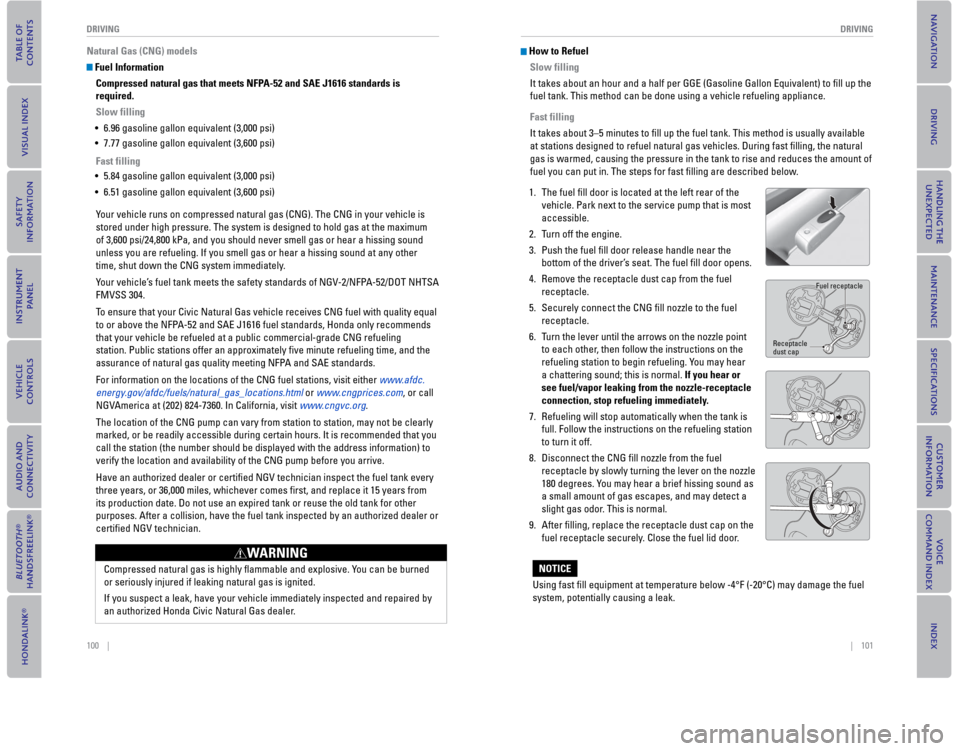
1. The fuel fi ll door is located at the left rear of the
vehicle. Park next to the service pump that is most
accessible.
2. Turn off the engine.
3. Push the fuel fi ll door release handle near the
bottom of the driver’s seat. The fuel fi ll door opens.
4. Remove the receptacle dust cap from the fuel
receptacle.
5. Securely connect the CNG fi ll nozzle to the fuel
receptacle.
6. Turn the lever until the arrows on the nozzle point
to each other, then follow the instructions on the
refueling station to begin refueling. You may hear
a chattering sound; this is normal. If you hear or
see fuel/vapor leaking from the nozzle-receptacle
connection, stop refueling immediately.
7. Refueling will stop automatically when the tank is
full. Follow the instructions on the refueling station
to turn it off.
8. Disconnect the CNG fi ll nozzle from the fuel
receptacle by slowly turning the lever on the nozzle
180 degrees. You may hear a brief hissing sound as
a small amount of gas escapes, and may detect a
slight gas odor. This is normal.
9. After fi lling, replace the receptacle dust cap on the
fuel receptacle securely. Close the fuel lid door.
Using fast fi ll equipment at temperature below -4°F (-20°C) may damage the fuel
system, potentially causing a leak.
NOTICE
Fuel receptacle
Receptacle dust cap
Page 56 of 79

104 || 105
HANDLING THE UNEXPECTED
HANDLING THE UNEXPECTED
WARNING: Battery posts, terminals, and related accessories contain lead and lead\
compounds. Wash your hands after handling.
After the Engine Starts
Once your vehicle’s engine has started, remove the jumper cables in the following
order:
1.
Disconnect the jumper cable from your engine hanger.
2. Disconnect the other end of the jumper cable from the assisting vehicle’\
s (-) terminal.
3. Disconnect the jumper cable from your vehicle’s (+) terminal.
4. Disconnect the other end of the jumper cable from the assisting vehicle’\
s (+) terminal.
5. Have your vehicle inspected by a nearby service station or a dealer.
Shift Lever Does Not Move*
Follow the procedure below if you cannot move the shift lever out of Par\
k (P).
1. Set the parking brake.
2. Remove the key from the ignition, or remove the built-in key from the remote transmitter.
3. Wrap a cloth around the tip of a small fl at-tip screwdriver to remove the cover of the shift lock
release slot. Put the tip of the fl at-tip screwdriver
into the slot and remove it as shown in the image.
4. Insert the key into the shift lock release slot.
5. While pushing the key down, press the shift lever release button and place the shift lever into Neutral
(N). The lock is now released. Have the shift lever
checked by a dealer as soon as possible.
A battery can explode if you do not follow the correct procedure, seriou\
sly
injuring anyone nearby.
Keep all sparks, open fl ames, and smoking materials away from the battery.
WARNING
Slot
Cover
Release
button Shift lock
release slot
*if equipped
Overheating
If the temperature gauge needle is at the H mark, the engine suddenly lo\
ses power,
or steam or spray comes out from under the hood, your engine is overheat\
ing.
1. Immediately park the vehicle in a safe place. Turn
off all accessories and turn on the hazard warning
lights.
2. If steam or spray is not present: Keep the engine
running and open the hood.
If steam or spray is present: Turn off the engine and
wait until it subsides. Then, open the hood.
3. Check that the cooling fan is operating and stop the engine once the tem\
perature gauge needle comes down. If the cooling fan is not operating, immediatel\
y stop
the engine.
4. Once the engine has cooled down, inspect the coolant level and check the\
cooling system components for leaks. If the coolant level in the reserve\
tank
is low, add coolant until it reaches the MAX mark. If there is no coolant in t\
he
reserve tank, make sure the radiator is cool, then cover the radiator ca\
p with a
heavy cloth and open the cap. If necessary, add coolant up to the base of the
fi ller neck, and put the cap back on.
Once the engine has cooled suffi ciently, restart it and check the temperature gauge.
If the temperature needle has gone down, resume driving. If it has not g\
one down,
contact a dealer for repairs.
Reserve tank
MAX MIN
Steam and spray from an overheated engine can seriously scald you.
Do not open the hood if steam is coming out.
WARNING
Removing the radiator cap while the engine is hot can cause the coolant \
to
spray out, seriously scalding you.
Always let the engine and radiator cool down before removing the radiato\
r cap.
WARNING
Continuing to drive with the temperature gauge needle at the H mark may \
damage
the engine.
NOTICE
Page 58 of 79
108 || 109
HANDLING THE UNEXPECTED
HANDLING THE UNEXPECTED
*if equipped
Changing a Flat Tire
If a tire goes fl at while driving, grasp the steering wheel fi rmly, and brake gradually
to reduce speed. Then, stop in a safe place. Replace the fl at tire with the compact
spare tire*. Go to a dealer as soon as possible to have the full-size ti\
re repaired or
replaced.
Getting Ready to Change the Tire
Park the vehicle on a fi rm, level, non-slippery surface. Apply the parking brake,
shift to Park (P), and turn the vehicle off. T
urn on the hazard warning lights.
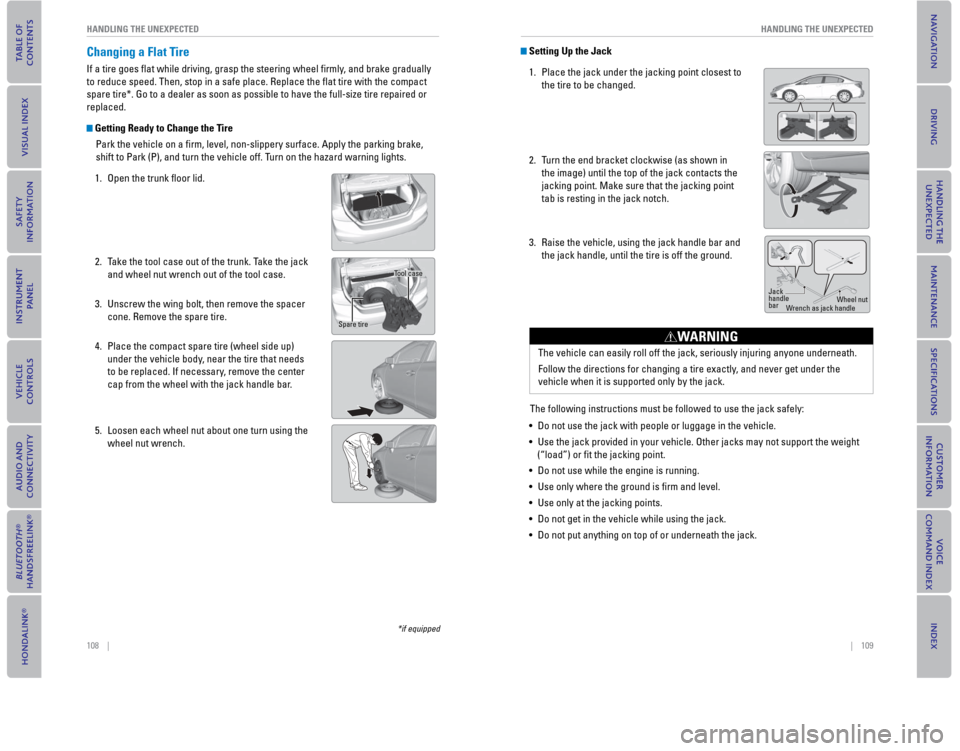
1. Open the trunk fl oor lid.
2. Take the tool case out of the trunk. Take the jack and wheel nut wrench out of the tool case.
3. Unscrew the wing bolt, then remove the spacer cone. Remove the spare tire.
4. Place the compact spare tire (wheel side up) under the vehicle body, near the tire that needs
to be replaced. If necessary, remove the center
cap from the wheel with the jack handle bar.
5. Loosen each wheel nut about one turn using the wheel nut wrench.
Tool case
Spare tire
Setting Up the Jack
1. Place the jack under the jacking point closest to the tire to be changed.
2.
Turn the end bracket clockwise (as shown in
the image) until the top of the jack contacts the
jacking point. Make sure that the jacking point
tab is resting in the jack notch.
3. Raise the vehicle, using the jack handle bar and the jack handle, until the tire is off the ground.
The following instructions must be followed to use the jack safely:
• Do not use the jack with people or luggage in the vehicle.
• Use the jack provided in your vehicle. Other jacks may not support the w\
eight (“load”) or fi t the jacking point.
• Do not use while the engine is running.
• Use only where the ground is fi rm and level.
• Use only at the jacking points.
• Do not get in the vehicle while using the jack.
• Do not put anything on top of or underneath the jack.
Jack
handle
bar Wheel nut
Wrench as jack handle
The vehicle can easily roll off the jack, seriously injuring anyone unde\
rneath.
Follow the directions for changing a tire exactly, and never get under the
vehicle when it is supported only by the jack.
WARNING