reset HONDA CIVIC COUPE 2017 10.G Owner's Manual
[x] Cancel search | Manufacturer: HONDA, Model Year: 2017, Model line: CIVIC COUPE, Model: HONDA CIVIC COUPE 2017 10.GPages: 595
Page 255 of 595
uuAudio System Basic Operation uPlaying SiriusXM ® Radio*
254
Features
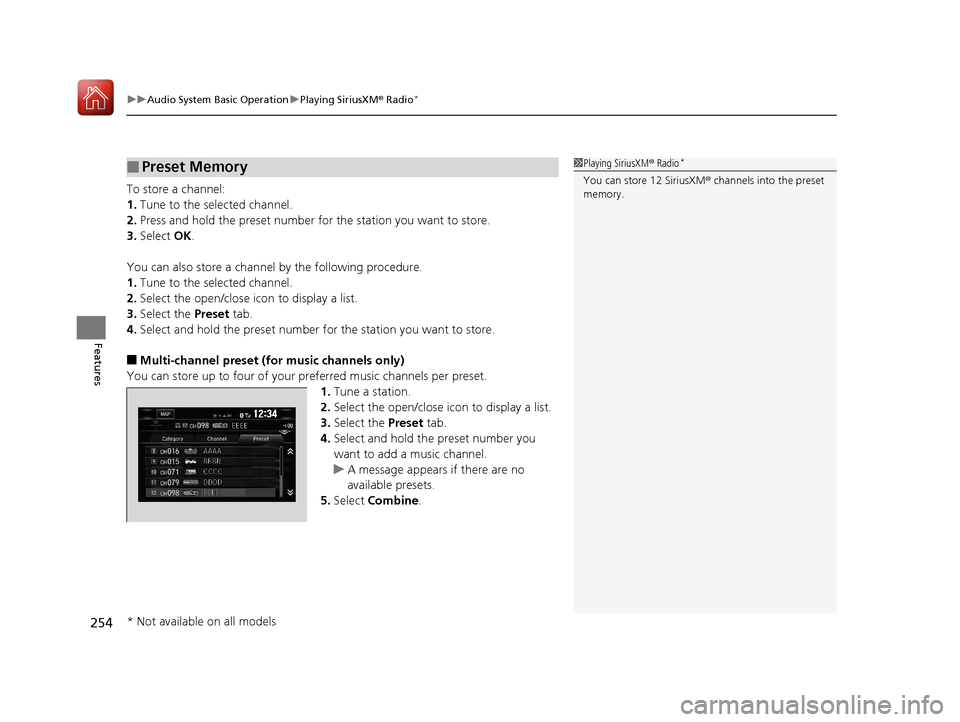
To store a channel:
1. Tune to the selected channel.
2. Press and hold the preset number for the station you want to store.
3. Select OK.
You can also store a channel by the following procedure.
1. Tune to the selected channel.
2. Select the open/close ic on to display a list.
3. Select the Preset tab.
4. Select and hold the preset number fo r the station you want to store.
■Multi-channel preset (for music channels only)
You can store up to four of your pr eferred music channels per preset.
1. Tune a station.
2. Select the open/close ic on to display a list.
3. Select the Preset tab.
4. Select and hold the preset number you
want to add a music channel.
u A message appears if there are no
available presets.
5. Select Combine .
■Preset Memory1Playing SiriusXM ® Radio*
You can store 12 SiriusXM ® channels into the preset
memory.
* Not available on all models
17 CIVIC 2D HCM (KA KC KL)-31TBG6100.book 254 ページ 2016年8月31日 水曜日 午後5時43分
Page 257 of 595
uuAudio System Basic Operation uPlaying SiriusXM ® Radio*
256
Features
The system can record up to the last 60 minutes of your currently tuned channel’s
broadcast, as well as the last 30 minutes of your preset channel’s broadcast, starting
from the moment you turn the vehicle on. If you tuned to a preset channel, the
system records up to 60 minutes of a broadcast instead of up to 30 minutes. You
can rewind and replay the last 30 or 60 minutes of a broadcast.
1. Select .
2. Select Playback .
3. Move the time marker to the position you want to replay.
The following items are avai lable on the pop-up screen:
(Skip Down): Skips to th e previously stored channel. Select and hold to
fastrewind the current selection. (Skip Up): Skips to the next channel. Select and hold to fast-forward the
current selection.
(15sec Back): Select to skip back 15 se conds in the current selection. Select and
hold to fast-rewind the current selection. (15sec Skip): Select to skip forward 15 seconds in the current selection. Select
and hold to fast-forward the current selection. u Select OK to close the pop-up menu. Replay in playback mode continues.
To play or pause on playback mode:
1. Select .
2. Select Play/Pause .
■Replay Function1Replay Function
The system starts storing broadcast in memory when
the power mode is turned ON. You can go back to
the program from that point.
You can no longer repl ay any program once the
power mode is turned off as it erases memory.
You can check how long the program has been
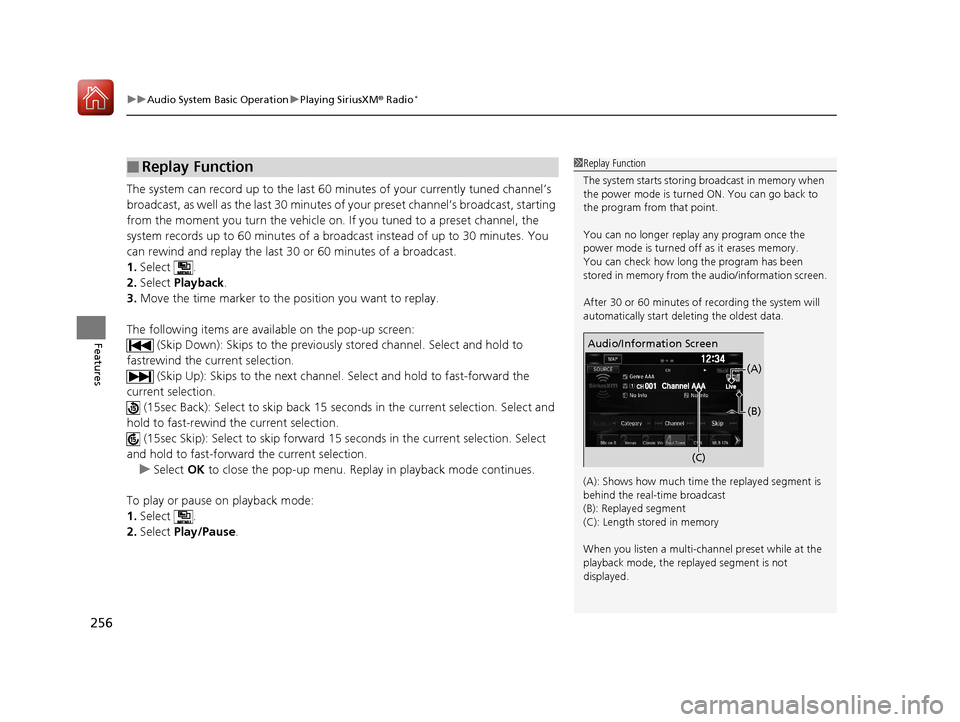
stored in memory from th e audio/information screen.
After 30 or 60 minutes of recording the system will
automatically start deleting the oldest data.
(A): Shows how much time the replayed segment is
behind the real-time broadcast
(B): Replayed segment
(C): Length stored in memory
When you listen a multi-channel preset while at the
playback mode, the repl ayed segment is not
displayed.
Genre AAA
Audio/Information Screen
(C)(B)
(A)
17 CIVIC 2D HCM (KA KC KL)-31TBG6100.book 256 ページ 2016年8月31日 水曜日 午後5時43分
Page 260 of 595
259
uuAudio System Basic Operation uPlaying SiriusXM ® Radio*
Features
You can receive traffic and weather information.
■To set up a traffic & weather information
1. Select .
2. Select Settings .
3. Select Audio .
4. Select Traffic & Weather Setup.
5. Select the region.
u When you do not want to receive the information, select Unregistered .
■Listening a traffic and weather information
1. Select .
2. Select Traffic & Weather .
u Play mode can also use the any items same as playback mode.
2 Replay Function P. 256
To go back to the previous screen, select OK.
Sample each channel on the selected mode for 10 seconds.
1. Select Scan.
2. Select Scan Channels.
u You can select the desired channel by songs using Scan Songs in Preset.
To turn off scan, select Cancel Scan.
■Traffic and Weather Information
■Scan
1Traffic and Weather Information
The traffic and weather information function at
SiriusXM ® mode only.
You can also set up th e traffic and weather
information by the following procedure.
1. Select Audio.
2. Select .
3. Select Setting.
4. Select Traffic & Weather Setup .
Traffic & Weather Now are registered trademarks of
SiriusXM ® Radio, Inc.
1 Scan
The “Scan Songs in Preset” function is based on
TuneScan
TM technology of SiriusXM ®.
The “Featured Channels ” function is based on
Featured Favorites
TM technology of SiriusXM ®.
TuneScan
TM and Featured FavoritesTM are registered
trademarks of SiriusXM ® Radio, Inc.
17 CIVIC 2D HCM (KA KC KL)-31TBG6100.book 259 ページ 2016年8月31日 水曜日 午後5時43分
Page 292 of 595
291
uuAudio Error Messages uAndroid/Apps
Features
Android/Apps
If an error occurs while using the audio system or apps, you may see the following
error messages. If you cannot clear the error message, contact a dealer.
*1:****part is variable characters, and will change depending upon where an error
occurs.
Error Message*1Solution
Unfortunately, **** has
stopped.Error has occurred within app, select OK on the screen to close the app.
**** is not responding.
Would you like to close it?
App is not responding.
Select Wait if you can wait for a response from app a little longer. If it does not respond even if you keep
waiting, select OK to close the app and start it up. If the error message continues, perform Factory Data
Reset .
2Defaulting All the Settings P. 328
Models with Display Audio
17 CIVIC 2D HCM (KA KC KL)-31TBG6100.book 291 ページ 2016年8月31日 水曜日 午後5時43分
Page 305 of 595
304
uuCustomized Features u
Features
*1:Default Setting
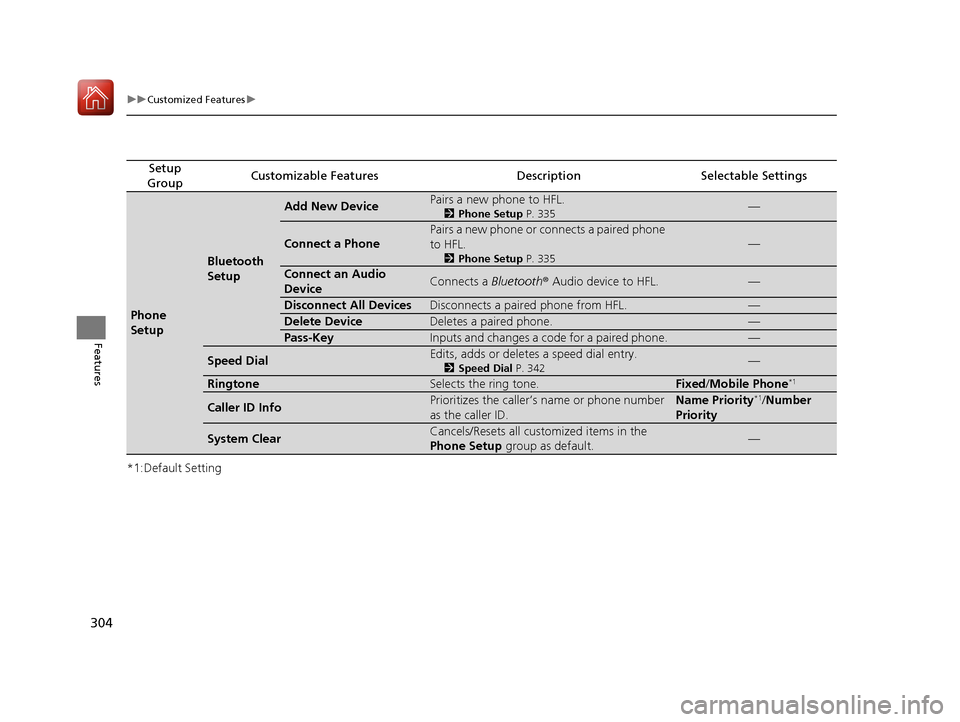
Setup
GroupCustomizable FeaturesDescriptionSelectable Settings
Phone
Setup
Bluetooth
Setup
Add New DevicePairs a new phone to HFL.
2 Phone Setup P. 335—
Connect a Phone
Pairs a new phone or connects a paired phone
to HFL.
2Phone Setup P. 335
—
Connect an Audio
DeviceConnects a Bluetooth® Audio device to HFL.—
Disconnect All DevicesDisconnects a paired phone from HFL.—
Delete DeviceDeletes a paired phone.—
Pass-KeyInputs and changes a code for a paired phone.—
Speed DialEdits, adds or deletes a speed dial entry.
2Speed Dial P. 342—
RingtoneSelects the ring tone.Fixed/Mobile Phone*1
Caller ID InfoPrioritizes the caller’s name or phone number
as the caller ID.Name Priority*1/Number
Priority
System ClearCancels/Resets all customized items in the
Phone Setup group as default.—
17 CIVIC 2D HCM (KA KC KL)-31TBG6100.book 304 ページ 2016年8月31日 水曜日 午後5時43分
Page 307 of 595
306
uuCustomized Features u
Features
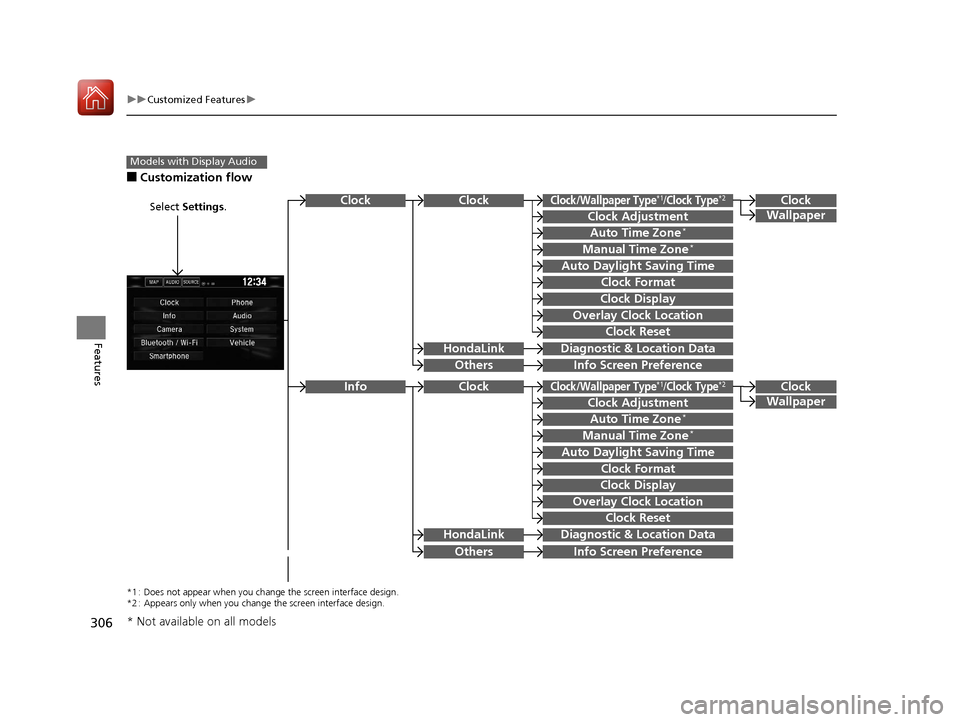
■Customization flow
Models with Display Audio
Select Settings.Clock
Wallpaper
Others
Clock/Wallpaper Type*1/Clock Type*2
Clock Adjustment
Clock Format
ClockClock
Auto Time Zone*
Manual Time Zone*
Auto Daylight Saving Time
Clock Display
Overlay Clock Location
Clock Reset
Info Screen Preference
Clock
Wallpaper
Others
Clock/Wallpaper Type*1/Clock Type*2
Clock Adjustment
Clock Format
Clock
Auto Time Zone*
Manual Time Zone*
Auto Daylight Saving Time
Clock Display
Overlay Clock Location
Clock Reset
Info Screen Preference
Info
HondaLinkDiagnostic & Location Data
HondaLinkDiagnostic & Location Data
*1 : Does not appear when you chang e the screen interface design.
*2 : Appears only when you change the screen interface design.
* Not available on all models
17 CIVIC 2D HCM (KA KC KL)-31TBG6100.book 306 ページ 2016年8月31日 水曜日 午後5時43分
Page 309 of 595
308
uuCustomized Features u
Features
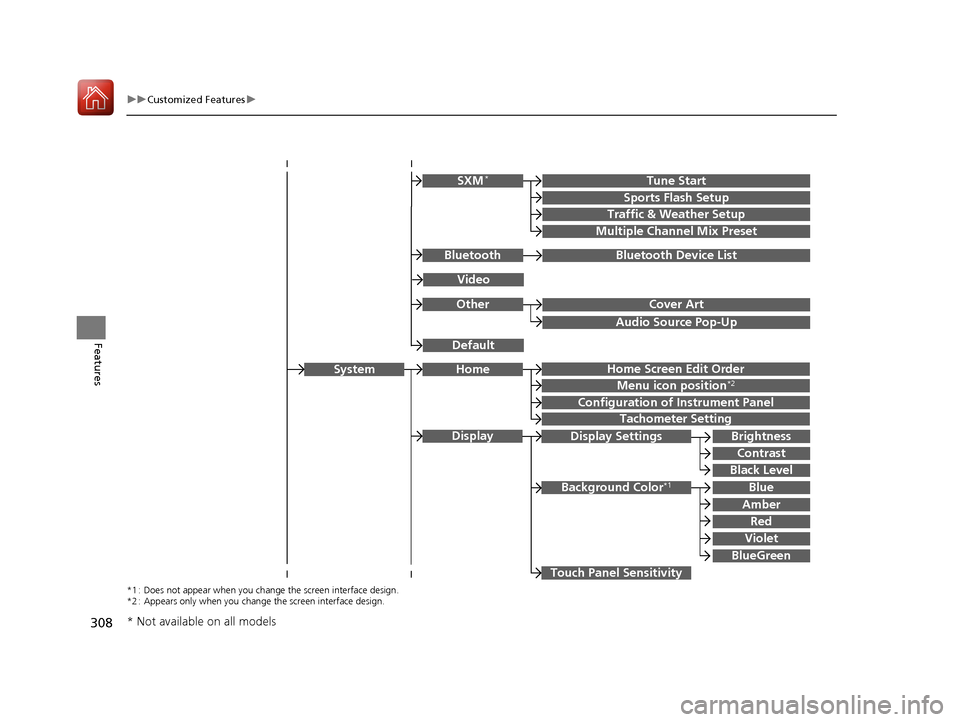
Audio Source Pop-Up
Cover Art
Tune Start
Sports Flash Setup
Traffic & Weather Setup
Other
SXM*
Default
Bluetooth Device ListBluetooth
Video
Multiple Channel Mix Preset
Home Screen Edit Order
Configuration of Instrument Panel
Tachometer Setting
Display Settings
Background Color*1
Display
System
Touch Panel Sensitivity
Brightness
Contrast
Black Level
Blue
Amber
Red
Violet
BlueGreen
Home
Menu icon position*2
*1 : Does not appear when you chang e the screen interface design.
*2 : Appears only when you change the screen interface design.
* Not available on all models
17 CIVIC 2D HCM (KA KC KL)-31TBG6100.book 308 ページ 2016年8月31日 水曜日 午後5時43分
Page 311 of 595
310
uuCustomized Features u
Features
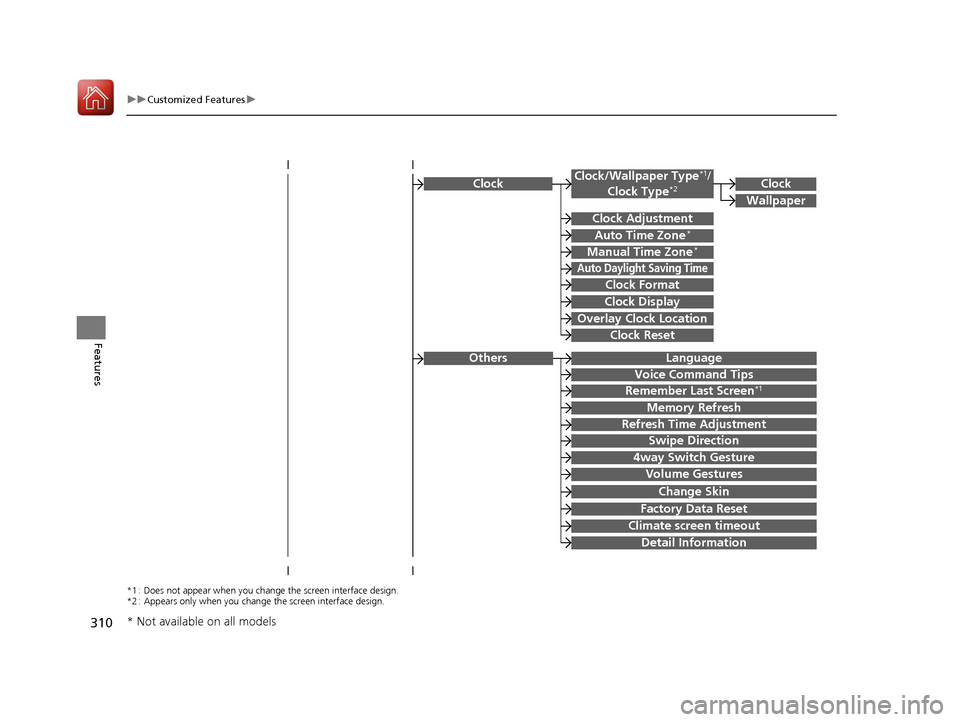
ClockClock/Wallpaper Type*1/
Clock Type*2
Clock Adjustment
Clock Format
Auto Time Zone*
Manual Time Zone*
Auto Daylight Saving Time
Clock Display
Overlay Clock Location
Clock Reset
Clock
Wallpaper
*1 : Does not appear when you chang e the screen interface design.
*2 : Appears only when you change the screen interface design.
Language
Voice Command Tips
Remember Last Screen*1
Memory Refresh
Refresh Time Adjustment
Swipe Direction
Change Skin
Factory Data Reset
Climate screen timeout
4way Switch Gesture
Volume Gestures
Detail Information
Others
* Not available on all models
17 CIVIC 2D HCM (KA KC KL)-31TBG6100.book 310 ページ 2016年8月31日 水曜日 午後5時43分
Page 312 of 595
311
uuCustomized Features u
Continued
Features
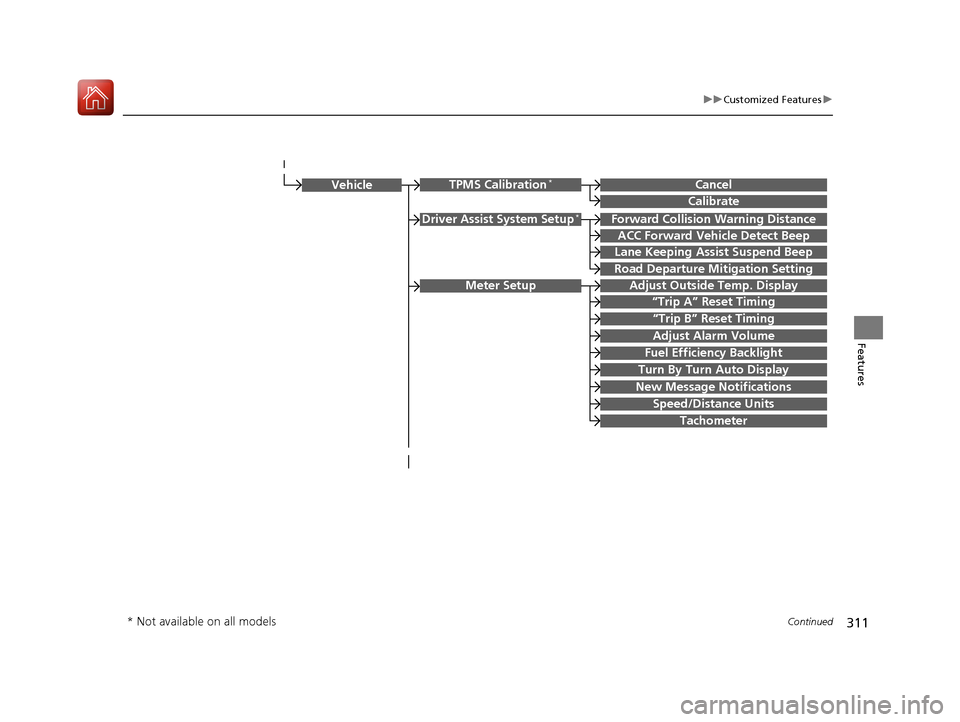
Driver Assist System Setup*Forward Collision Warning Distance
ACC Forward Vehicle Detect Beep
Lane Keeping Assist Suspend Beep
Road Departure Mi tigation Setting
Adjust Outside Temp. Display
“Trip A” Reset Timing
“Trip B” Reset Timing
Vehicle
Meter Setup
Adjust Alarm Volume
Speed/Distance Units
Fuel Efficiency Backlight
New Message Notifications
Tachometer
CancelTPMS Calibration*
Calibrate
Turn By Turn Auto Display
* Not available on all models
17 CIVIC 2D HCM (KA KC KL)-31TBG6100.book 311 ページ 2016年8月31日 水曜日 午後5時43分
Page 314 of 595
313
uuCustomized Features u
Continued
Features
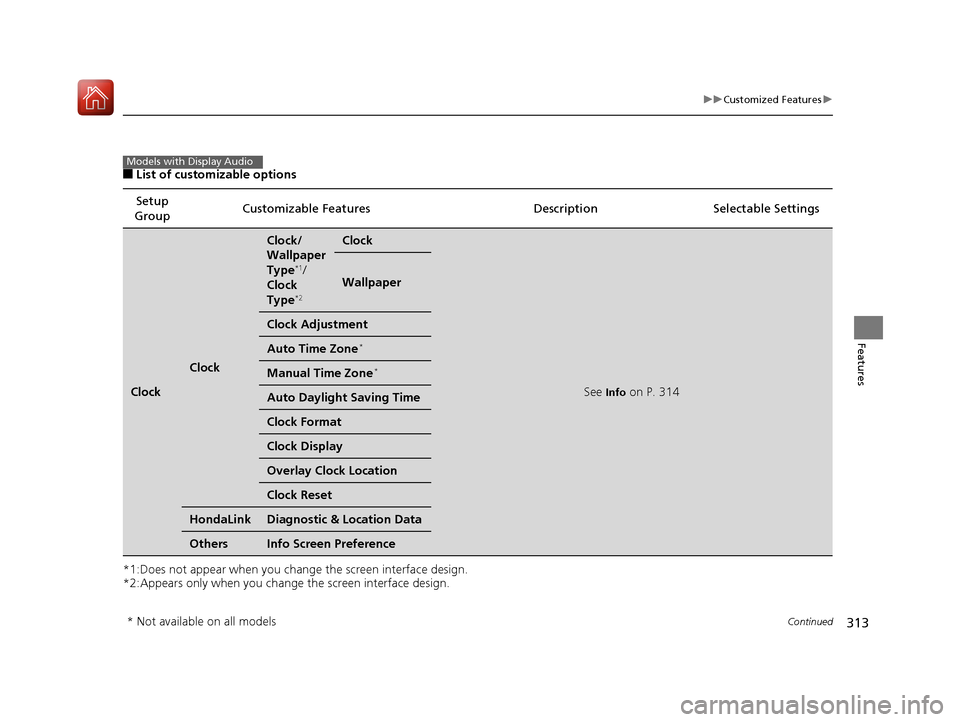
■List of customizable options
*1:Does not appear when you chan ge the screen interface design.
*2:Appears only when you change the screen interface design. Setup
Group Customizable Features
Description Selectable Settings
Clock
Clock
Clock/
Wallpaper
Type
*1/
Clock
Type
*2
Clock
See Info on P. 314
Wallpaper
Clock Adjustment
Auto Time Zone*
Manual Time Zone*
Auto Daylight Saving Time
Clock Format
Clock Display
Overlay Clock Location
Clock Reset
HondaLinkDiagnostic & Location Data
OthersInfo Screen Preference
Models with Display Audio
* Not available on all models
17 CIVIC 2D HCM (KA KC KL)-31TBG6100.book 313 ページ 2016年8月31日 水曜日 午後5時43分