steering HONDA CIVIC COUPE 2017 10.G Manual PDF
[x] Cancel search | Manufacturer: HONDA, Model Year: 2017, Model line: CIVIC COUPE, Model: HONDA CIVIC COUPE 2017 10.GPages: 595
Page 482 of 595
481
uuMaintenance MinderTMuTo Use Maintenance MinderTM
Continued
Maintenance
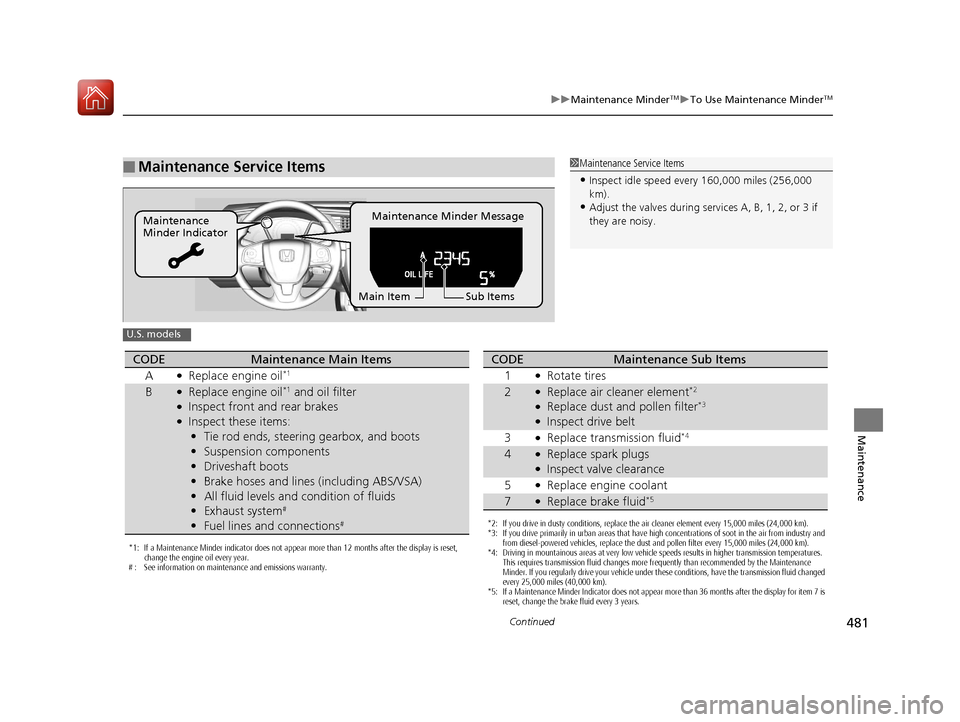
■Maintenance Service Items1Maintenance Service Items
•Inspect idle speed every 160,000 miles (256,000
km).
•Adjust the valves during services A, B, 1, 2, or 3 if
they are noisy.Maintenance Minder Message
Maintenance
Minder Indicator
Sub Items
Main Item
U.S. models
*1: If a Maintenance Minder indicator does not appear more than 12 months after the display is reset,
change the engine oil every year.
# : See information on maintenance and emissions warranty.
CODEMaintenance Main Items
A
●Replace engine oil*1
B●Replace engine oil*1 and oil filter●Inspect front and rear brakes●Inspect these items: • Tie rod ends, steering gearbox, and boots
• Suspension components
• Driveshaft boots
• Brake hoses and lines (including ABS/VSA)
• All fluid levels and condition of fluids
• Exhaust system
#
•Fuel lines and connections#*2: If you drive in dusty conditions, replace the air cleaner element every 15,000 miles (24,000 km).
*3: If you drive primarily in urban areas that have high concentrations of soot in the air from industry and
from diesel-powered vehicles, replace the dust and pollen filter every 15,000 miles (24,000 km).
*4: Driving in mountainous areas at very low vehicle speeds results in higher transmission temperatures. This requires transmission fluid changes more frequently than recommended by the Maintenance
Minder. If you regularly drive your vehicle under these conditions, have the transmission fluid changed
every 25,000 miles (40,000 km).
*5: If a Maintenance Minder Indicator does not appear more than 36 months after the display for item 7 is reset, change the brake fluid every 3 years.
CODEMaintenance Sub Items
1
●Rotate tires
2●Replace air cleaner element*2
●Replace dust and pollen filter*3
●Inspect drive belt
3
●Replace transmission fluid*4
4●Replace spark plugs●Inspect valve clearance
5
●Replace engine coolant
7●Replace brake fluid*5
17 CIVIC 2D HCM (KA KC KL)-31TBG6100.book 481 ページ 2016年8月31日 水曜日 午後5時43分
Page 483 of 595
482
uuMaintenance MinderTMuTo Use Maintenance MinderTM
Maintenance
1Maintenance Service Items
•Inspect idle speed every 256,000 km (160,000
miles).
•Adjust the valves during services A, 0, 9, 1, 2, or 3
if they are noisy.
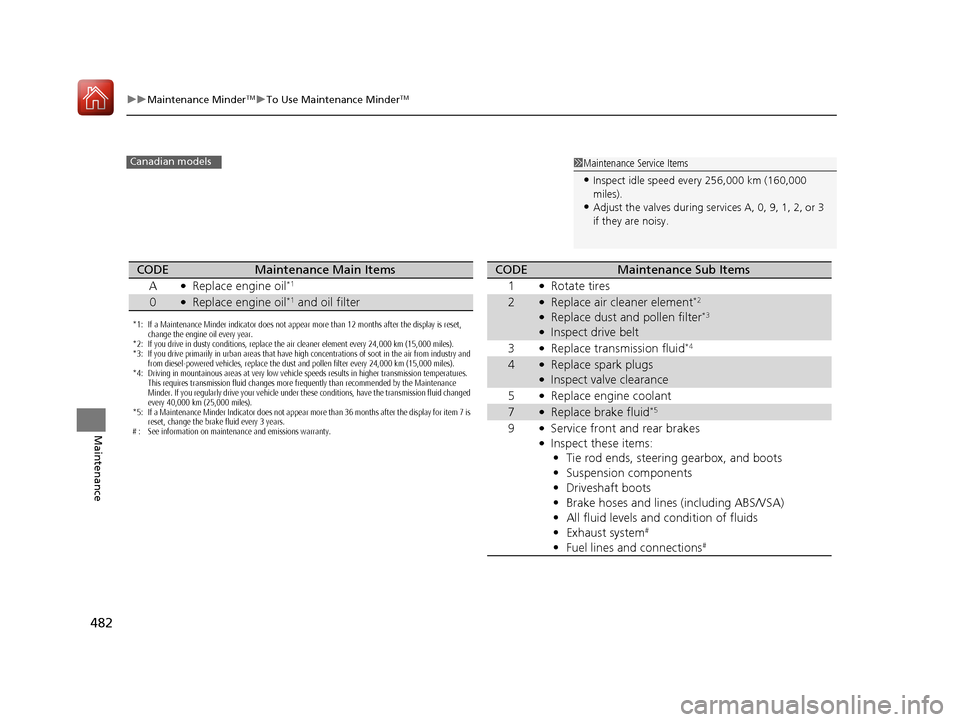
Canadian models
*1: If a Maintenance Minder indicator does not appear more than 12 months after the display is reset,
change the engine oil every year.
*2: If you drive in dusty conditions, replace the air cleaner element every 24,000 km (15,000 miles).
*3: If you drive primarily in urban areas that have high concentrations of soot in the air from industry and from diesel-powered vehicles, replace the dust and pollen filter every 24,000 km (15,000 miles).
*4: Driving in mountainous areas at very low vehicle speeds results in higher transmission temperatures. This requires transmission fluid changes more frequently than recommended by the Maintenance
Minder. If you regularly drive your vehicle under these conditions, have the transmission fluid changed
every 40,000 km (25,000 miles).
*5: If a Maintenance Minder Indicator does not appear more than 36 months after the display for item 7 is reset, change the brake fluid every 3 years.
# : See information on maintenance and emissions warranty.
CODEMaintenance Main Items
A
●Replace engine oil*1
0●Replace engine oil*1 and oil filter
CODEMaintenance Sub Items
1
●Rotate tires
2●Replace air cleaner element*2
●Replace dust and pollen filter*3
●Inspect drive belt
3
●Replace transmission fluid*4
4●Replace spark plugs●Inspect valve clearance
5
●Replace engine coolant
7●Replace brake fluid*5
9●Service front and rear brakes●Inspect these items: • Tie rod ends, steering gearbox, and boots
• Suspension components
• Driveshaft boots
• Brake hoses and lines (including ABS/VSA)
• All fluid levels and condition of fluids
• Exhaust system
#
•Fuel lines and connections#
17 CIVIC 2D HCM (KA KC KL)-31TBG6100.book 482 ページ 2016年8月31日 水曜日 午後5時43分
Page 487 of 595
486
uuMaintenance MinderTMuTo Use Maintenance MinderTM
Maintenance
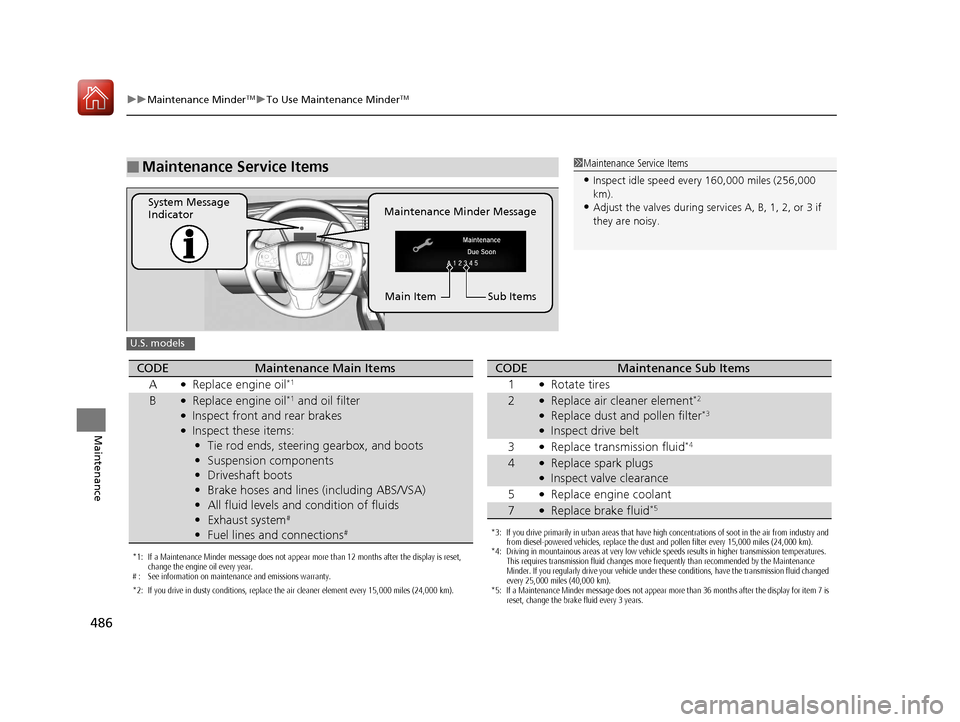
■Maintenance Service Items1Maintenance Service Items
•Inspect idle speed every 160,000 miles (256,000
km).
•Adjust the valves during services A, B, 1, 2, or 3 if
they are noisy.Maintenance Minder Message
System Message
Indicator
Sub Items
Main Item
U.S. models
*1: If a Maintenance Minder message does not appear more than 12 months after the display is reset,
change the engine oil every year.
# : See information on maintenance and emissions warranty.
*2: If you drive in dusty conditions, replace the air cleaner element every 15,000 miles (24,000 km).
CODEMaintenance Main Items
A
●Replace engine oil*1
B●Replace engine oil*1 and oil filter●Inspect front and rear brakes●Inspect these items: • Tie rod ends, steering gearbox, and boots
• Suspension components
• Driveshaft boots
• Brake hoses and lines (including ABS/VSA)
• All fluid levels and condition of fluids
• Exhaust system
#
•Fuel lines and connections#*3: If you drive primarily in urban areas that have high concentrations of soot in the air from industry and
from diesel-powered vehicles, replace the dust and pollen filter every 15,000 miles (24,000 km).
*4: Driving in mountainous areas at very low vehicle speeds results in higher transmission temperatures.
This requires transmission fluid changes more frequently than recommended by the Maintenance
Minder. If you regularly drive your vehicle under these conditions, have the transmission fluid changed
every 25,000 miles (40,000 km).
*5: If a Maintenance Minder message does not appear more than 36 months after the display for item 7 is reset, change the brake fluid every 3 years.
CODEMaintenance Sub Items
1
●Rotate tires
2●Replace air cleaner element*2
●Replace dust and pollen filter*3
●Inspect drive belt
3
●Replace transmission fluid*4
4●Replace spark plugs●Inspect valve clearance
5
●Replace engine coolant
7●Replace brake fluid*5
17 CIVIC 2D HCM (KA KC KL)-31TBG6100.book 486 ページ 2016年8月31日 水曜日 午後5時43分
Page 488 of 595
487
uuMaintenance MinderTMuTo Use Maintenance MinderTM
Continued
Maintenance
1Maintenance Service Items
•Inspect idle speed every 256,000 km (160,000
miles).
•Adjust the valves during services A, 0, 9, 1, 2, or 3
if they are noisy.
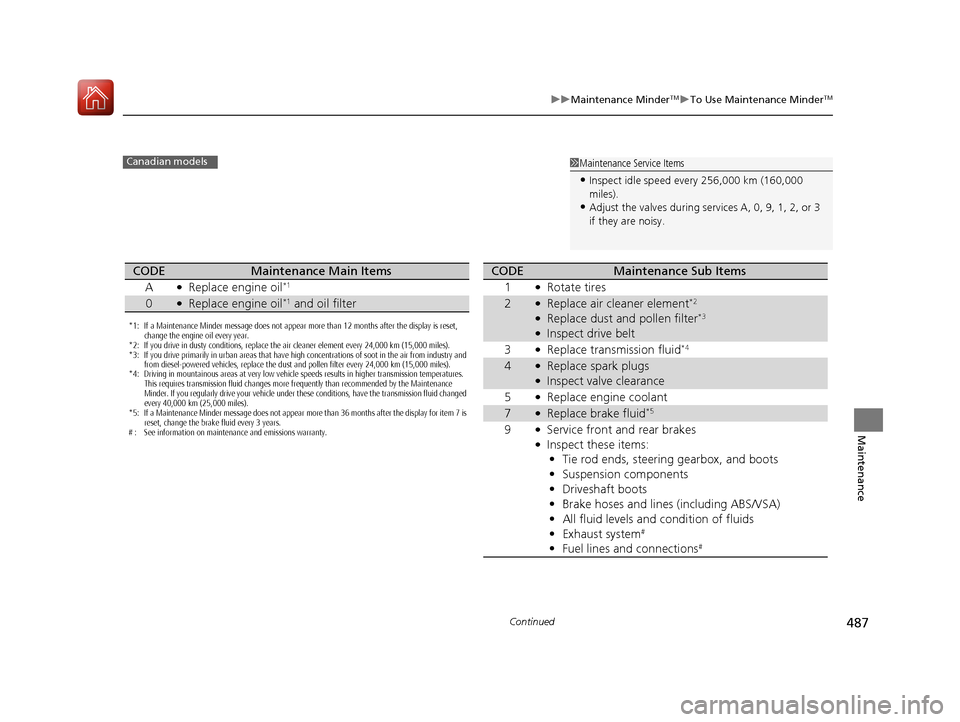
Canadian models
*1: If a Maintenance Minder message does not appear more than 12 months after the display is reset,
change the engine oil every year.
*2: If you drive in dusty conditions, replace the air cleaner element every 24,000 km (15,000 miles).
*3: If you drive primarily in urban areas that have high concentrations of soot in the air from industry and from diesel-powered vehicles, replace the dust and pollen filter every 24,000 km (15,000 miles).
*4: Driving in mountainous areas at very low vehicle speeds results in higher transmission temperatures.
This requires transmission fluid changes more frequently than recommended by the Maintenance
Minder. If you regularly drive your vehicle under these conditions, have the transmission fluid changed
every 40,000 km (25,000 miles).
*5: If a Maintenance Minder message does not appear more than 36 months after the display for item 7 is reset, change the brake fluid every 3 years.
# : See information on maintenance and emissions warranty.
CODEMaintenance Main Items
A
●Replace engine oil*1
0●Replace engine oil*1 and oil filter
CODEMaintenance Sub Items
1
●Rotate tires
2●Replace air cleaner element*2
●Replace dust and pollen filter*3
●Inspect drive belt
3
●Replace transmission fluid*4
4●Replace spark plugs●Inspect valve clearance
5
●Replace engine coolant
7●Replace brake fluid*5
9●Service front and rear brakes●Inspect these items: • Tie rod ends, steering gearbox, and boots
• Suspension components
• Driveshaft boots
• Brake hoses and lines (including ABS/VSA)
• All fluid levels and condition of fluids
• Exhaust system
#
•Fuel lines and connections#
17 CIVIC 2D HCM (KA KC KL)-31TBG6100.book 487 ページ 2016年8月31日 水曜日 午後5時43分
Page 525 of 595
524
uuChecking and Maintaining Tires uWinter Tires
Maintenance
Winter Tires
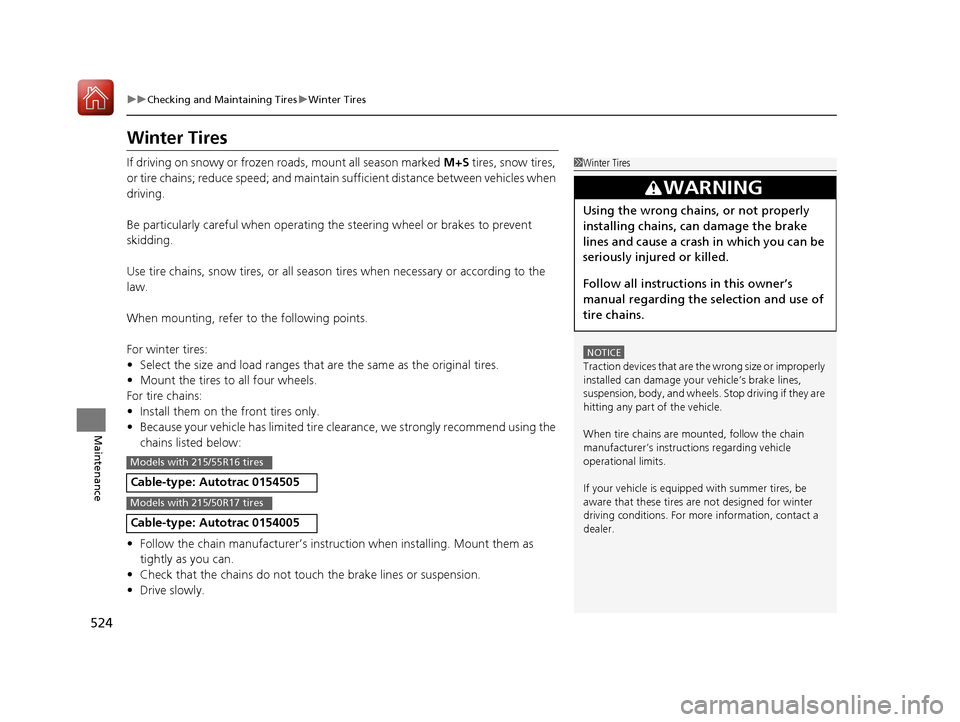
If driving on snowy or frozen roads, mount all season marked M+S tires, snow tires,
or tire chains; reduce speed; and maintain su fficient distance between vehicles when
driving.
Be particularly careful when operating the steering wheel or brakes to prevent
skidding.
Use tire chains, snow tires, or all season tires when necessary or according to the
law.
When mounting, refer to the following points.
For winter tires:
• Select the size and load ranges that are the same as the original tires.
• Mount the tires to all four wheels.
For tire chains:
• Install them on the front tires only.
• Because your vehicle has limited tire cl earance, we strongly recommend using the
chains listed below:
• Follow the chain manufacturer’s instruction when installing. Mount them as
tightly as you can.
• Check that the chains do not to uch the brake lines or suspension.
• Drive slowly.
Cable-type: Autotrac 0154505
Cable-type: Autotrac 0154005
1Winter Tires
NOTICE
Traction devices that are th e wrong size or improperly
installed can damage your vehicle’s brake lines,
suspension, body, and wheels. Stop driving if they are
hitting any part of the vehicle.
When tire chains are mounted, follow the chain
manufacturer’s instructi ons regarding vehicle
operational limits.
If your vehicle is equipp ed with summer tires, be
aware that these tires are not designed for winter
driving conditions. For more information, contact a
dealer.
3WARNING
Using the wrong chains, or not properly
installing chains, can damage the brake
lines and cause a crash in which you can be
seriously injured or killed.
Follow all instruction s in this owner’s
manual regarding the selection and use of
tire chains.
Models with 215/55R16 tires
Models with 215/50R17 tires
17 CIVIC 2D HCM (KA KC KL)-31TBG6100.book 524 ページ 2016年8月31日 水曜日 午後5時43分
Page 538 of 595
537
Handling the Unexpected
This chapter explains how to handle unexpected troubles.
ToolsTypes of Tools .................................. 538
If a Tire Goes Flat
Changing a Flat Tire ......................... 539
Engine Does Not Start Checking the Engine ........................ 546
If the Smart Entry Remote Battery is Weak .......................................... 547
Emergency Engine Stop ................... 548
Jump Starting .................................... 549
Shift Lever Does Not Move .............. 552
Overheating
How to Handle Overheating ............. 553 Indicator, Coming On/Blinking
If the Low Oil Pressure Indicator Comes
On ............................................. 555
If the Charging System Indicator Comes
On ................................................. 555
If the Malfunction Indicator Lamp Comes
On or Blinks ................................... 556
If the Brake System Indicator (Red) Comes On or Blinks ................................... 557
If the Brake System Indicator (Red) Comes On or Blinks at the Same Time When the
Brake System Indicator (Amber) Comes
On ................................................. 558 If the Electric Power Steering (EPS) System
Indicator Comes On ....................... 559
If the Low Tire Pressure/TPMS Indicator Comes On or Blinks ....................... 560
Fuses Fuse Locations ................................. 561
Inspecting and Changing Fuses ........ 564
Emergency Towing ........................... 565
When You Cannot Unlock the Fuel Fill Door ................................................. 566
When You Cannot Open the Trunk.....567
Refueling ........................................... 568
17 CIVIC 2D HCM (KA KC KL)-31TBG6100.book 537 ページ 2016年8月31日 水曜日 午後5時43分
Page 540 of 595
539Continued
Handling the Unexpected
If a Tire Goes Flat
Changing a Flat Tire
If a tire goes flat while driving, grasp the steering wheel firmly, and brake gradually
to reduce speed. Then, stop in a safe plac e. Replace the flat tire with a compact
spare tire. Go to a dealer as soon as possib le to have the full-size tire repaired or
replaced.
1. Park the vehicle on firm, level, and non-slippery surface, and apply the parking
brake.
2. Move the shift lever to
(P.
2. Move the shift lever to
(R.
3. Turn on the hazard warning lights an d turn the ignition switch to LOCK
(0*1.
*1: Models with the smart entry system have an ENGINE START/STOP button instead of an
ignition switch.
1 Changing a Flat Tire
Follow compact spare precautions:
Periodically check the tire pressure of the compact
spare. It should be set to the specified pressure.
Specified Pressure: 60 psi (420 kPa, 4.2 kgf/cm
2)
When driving with the compact spare tire, keep the
vehicle speed under 50 mph (80 km/h). Replace with
a full-size tire as soon as possible.
The compact spare tire and wheel in your vehicle are
specifically for this model. Do not use them with
another vehicle. Do not us e another type of compact
spare tire or wheel with your vehicle.
Do not mount tire chains on a compact spare tire.
If a chain-mounted front tire goes flat, remove one of
the full-size rear tires and replace it with the compact
spare tire. Remove the flat front tire and replace it
with the full-size tire that was removed from the rear.
Mount the tire chains on the front tire.
NOTICE
Do not use the jack if it doesn’t work properly. Call
your dealer or a prof essional towing service.
Continuously variable transmission models
Manual transmission models
All models
17 CIVIC 2D HCM (KA KC KL)-31TBG6100.book 539 ページ 2016年8月31日 水曜日 午後5時43分
Page 549 of 595
548
uuEngine Does Not StartuEmergency Engine Stop
Handling the Unexpected
Emergency Engine Stop
The ENGINE START/STOP button may be used to stop the engine due to an
emergency situation even while driving. If you must stop the engine, do either of the
following operations:
• Press and hold the ENGINE START/STOP button for about two seconds.
• Firmly press the ENGINE START/STOP button twice.
The steering wheel will not lock. However, because turning off the engine disables
the power assist the engine provides to the steering and braking systems, it will
require significantly more physical effort an d time to steer and slow the vehicle. Use
both feet on the brake pedal to slow down the vehicle and stop immediately in a
safe place. With manual transmission models you can also downshift the
transmission to utilize engine braking.
The power mode is in ACCESSORY when the engine is stopped.
To change the mode to VEHICLE OFF, move the shift lever to
(P after the vehicle
comes to a complete stop.
Then press the ENGINE START/STOP button twice without depressing the brake
pedal.
The power mode changes to VEHICLE OFF.
Models with smart entry system
1 Emergency Engine Stop
Do not press the button while driving unless it is
absolutely necessary for th e engine to be switched
off.
Continuously variable transmission models
Canadian continuously variable transmission models
Manual transmission models
17 CIVIC 2D HCM (KA KC KL)-31TBG6100.book 548 ページ 2016年8月31日 水曜日 午後5時43分
Page 560 of 595
559
uuIndicator, Coming On/Blinking uIf the Electric Power Steering (EPS) System Indicator Comes On
Handling the Unexpected
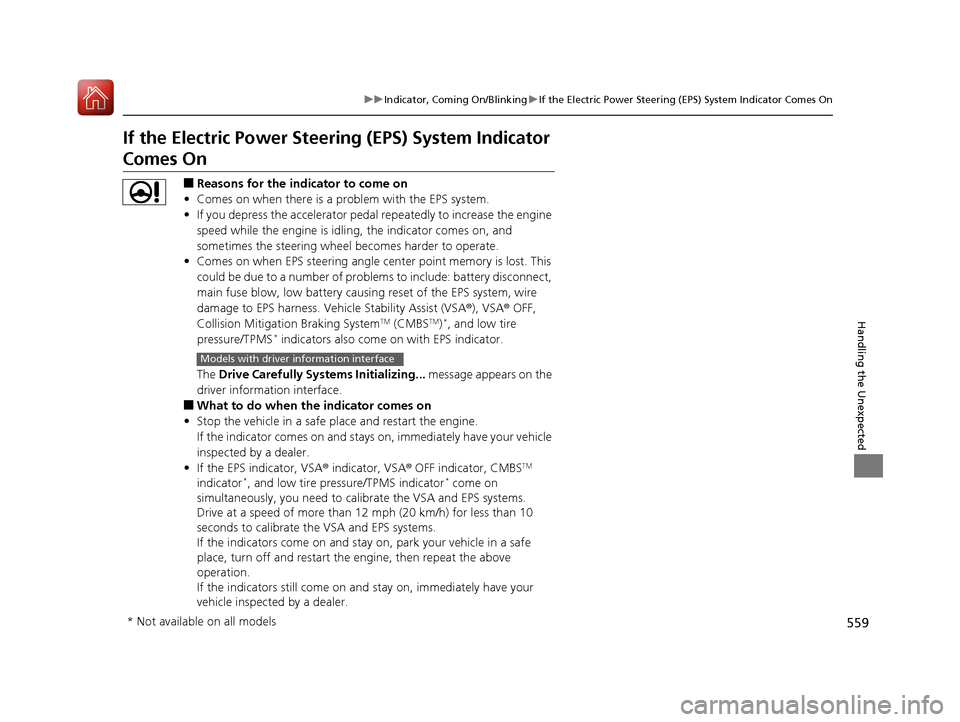
If the Electric Power Steeri ng (EPS) System Indicator
Comes On
■Reasons for the indicator to come on
• Comes on when there is a problem with the EPS system.
• If you depress the accelerator pedal repeatedly to increase the engine
speed while the engine is idling, the indicator comes on, and
sometimes the steering wheel becomes harder to operate.
• Comes on when EPS steering angle cent er point memory is lost. This
could be due to a number of problems to include: battery disconnect,
main fuse blow, low battery causing reset of the EPS system, wire
damage to EPS harness. Vehicle Stability Assist (VSA ®), VSA® OFF,
Collision Mitigation Braking System
TM (CMBSTM)*, and low tire
pressure/TPMS* indicators also come on with EPS indicator.
The Drive Carefully Systems Initializing... message appears on the
driver information interface.
■What to do when th e indicator comes on
• Stop the vehicle in a safe place and restart the engine.
If the indicator comes on and stays on, immediately have your vehicle
inspected by a dealer.
• If the EPS indicator, VSA ® indicator, VSA® OFF indicator, CMBS
TM
indicator*, and low tire pressure/TPMS indicator* come on
simultaneously, you need to ca librate the VSA and EPS systems.
Drive at a speed of more than 12 mph (20 km/h) for less than 10
seconds to calibrate the VSA and EPS systems.
If the indicators come on and stay on, park your vehicle in a safe
place, turn off and restart the engine, then repeat the above
operation.
If the indicators still come on an d stay on, immediately have your
vehicle inspected by a dealer.
Models with driver information interface
* Not available on all models
17 CIVIC 2D HCM (KA KC KL)-31TBG6100.book 559 ページ 2016年8月31日 水曜日 午後5時43分
Page 584 of 595
Index
583
Index
Index
Numbers
7-Speed Manual Shift Mode................... 405
Operation ............................................... 406
A
ABS (Anti-lock Brake System) .................. 457
Accessories and Modifications ................ 535
Accessory Power Socket ........................... 180
Adaptive Cruise Control (ACC) with Low
Speed Follow (LSF) ........................... 90, 416
Adding the Coolant ................................. 500
Additives
Coolant .................................................. 499
Engine Oil ............................................... 492
Washer ................................................... 503
Additives, Engine Oil ............................... 492
Adjusting
Armrest .................................................. 173
Clock ...................................................... 120
Front Head Restraints .............................. 168
Front Seats.............................................. 166
Mirrors.................................................... 163
Rear Seats ............................................... 172
Steering Wheel ....................................... 162
Temperature ................................... 113, 117
Adjusting the Clock ................................. 120
Adjusting the Sound ........................ 206, 241
Agile Handling Assist ............................... 443 Air Conditioning System (Climate Control
System) .................................................... 185
Changing the Mode ................................ 187
Defrosting the Windshield and Windows ............................................... 188
Dust and Pollen Filter ............................... 529
Recirculation/Fresh Air Mode ................... 187
Sensor ..................................................... 191
Synchronized Mode ................................. 190
Using Automatic Climate Control ............ 185
Air Pressure ............................... 517, 571, 573
Airbags ........................................................ 46
Advanced Airbags ..................................... 52
After a Collision ......................................... 49
Airbag Care ............................................... 59
Event Data Recorder .................................... 0
Front Airbags (SRS) .................................... 49
Indicator .............................................. 57, 81
Passenger Front Airbag Off Indicator ......... 58
Sensors ...................................................... 46
Side Airbags .............................................. 53
Side Curtain Airbags .................................. 55
AM/FM Radio .................................... 208, 248
Android Auto ............................................ 285
Anti-lock Brake System (ABS) .................. 457
Indicator .................................................... 81
Apple CarPlay ........................................... 282
Armrest ..................................................... 173
Audio Remote Controls ............................ 197 Audio System
............................ 194, 201, 219
Adjusting the Sound........................ 206, 241
Audio/Information Screen................ 202, 220
Changing the Home Screen Icon Layout ................................................... 224
Changing the Screen Interface ................ 238
Closing Apps ........................................... 240
Customizing the Meter............................ 225
Display Setup .................................. 207, 242
Error Messages ........................................ 289
General Information ................................ 292
Home Screen........................................... 231
iPod ................................................ 210, 260
Limitations for Manual Operation ............ 243
Menu Customize ..................................... 239
MP3/WMA/AAC .............................. 213, 269
Reactivating ............................................ 196
Recommended Devices............................ 293
Remote Controls ..................................... 197
Security Code .......................................... 196
Selecting an Audio Source ....................... 243
Status Area ............................................. 237
Theft Protection ...................................... 196
USB Flash Drives ...................................... 293
USB Port(s) .............................................. 195
Wallpaper Setup.............................. 204, 229
Audio/Information Screen ............... 202, 220
Authorized Manuals ................................ 581
Auto Door Locking/Unlocking ................. 135
Customize ....................................... 136, 298
17 CIVIC 2D HCM (KA KC KL)-31TBG6100.book 583 ページ 2016年8月31日 水曜日 午後5時43分