height HONDA CIVIC COUPE 2017 10.G Owners Manual
[x] Cancel search | Manufacturer: HONDA, Model Year: 2017, Model line: CIVIC COUPE, Model: HONDA CIVIC COUPE 2017 10.GPages: 595
Page 38 of 595
37
uuFor Safe Driving uSafety Checklist
Safe Driving
Safety Checklist
For the safety of you and your passengers, make a habit of checking these items
each time before you drive.
• After everyone has entered the vehicle, be sure both doors are closed and locked.
Locking the doors helps prevent an occupant from being ejected and an outsider
from unexpectedly opening a door.
2 Locking/Unlocking the Doors from the Inside P. 132
•Adjust your seat to a position suitable for driving. Be sure the front seats are
adjusted as far to the rear as possible while allowing the driver to control the
vehicle. Sitting too close to a front airbag can result in serious or fatal injury in a
crash.
2 Adjusting the Seats P. 165
•Adjust head restraints to the proper position. Head restraints are most effective
when the center of the head restraint aligns with the center of your head. Taller
persons should adjust their head restraint to the highest position.
2 Adjusting the Front Head Restraints P. 168
•Always wear your seat belt, and make sure you wear it properly. Confirm that any
passengers are properly belted as well.
2 Fastening a Seat Belt P. 42
•Protect children by using seat belts or chil d seats according to a child’s age, height
and weight.
2 Child Safety P. 60
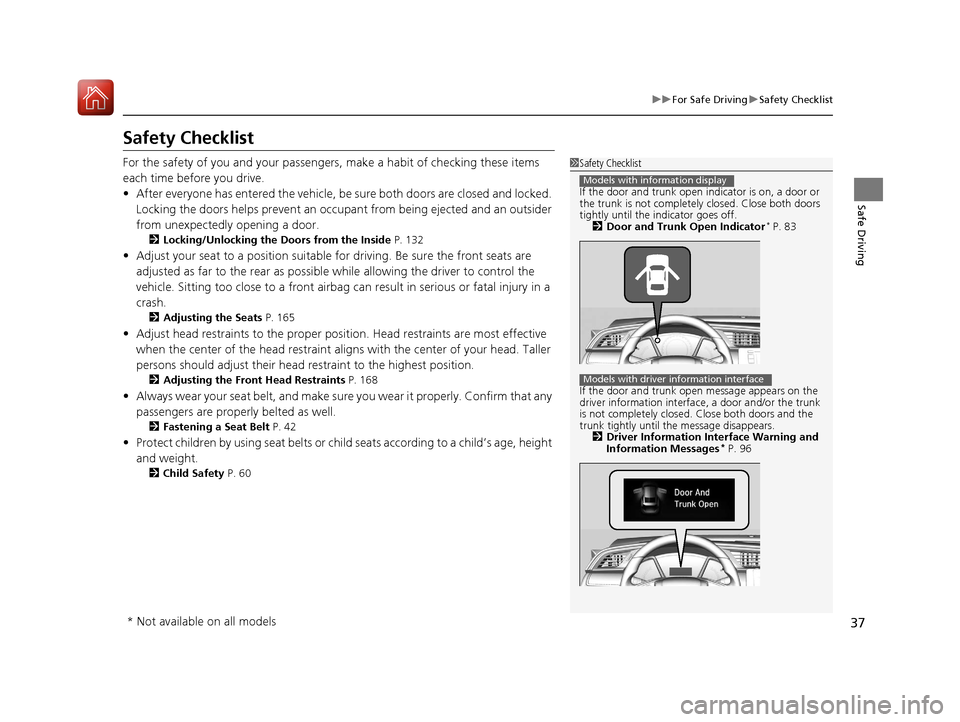
1Safety Checklist
If the door and trunk open indicator is on, a door or
the trunk is not completely closed. Close both doors
tightly until the indicator goes off. 2 Door and Trunk Open Indicator
* P. 83
If the door and trunk open message appears on the
driver information interface , a door and/or the trunk
is not completely closed. Close both doors and the
trunk tightly until the message disappears. 2 Driver Information Interface Warning and
Information Messages
* P. 96
Models with information display
Models with driver information interface
* Not available on all models
17 CIVIC 2D HCM (KA KC KL)-31TBG6100.book 37 ページ 2016年8月31日 水曜日 午後5時43分
Page 63 of 595
62
uuChild Safety uSafety of Infants and Small Children
Safe Driving
Safety of Infants and Small Children
An infant must be properly restrained in a rear-facing, reclining child seat until the
infant reaches the seat manufacturer’s weig ht or height limit for the seat, and the
infant is at least one year old. Many expe rts recommend use of a rear-facing seat for
a child up to two years old if the child’s he ight and weight are appropriate for a rear-
facing seat.
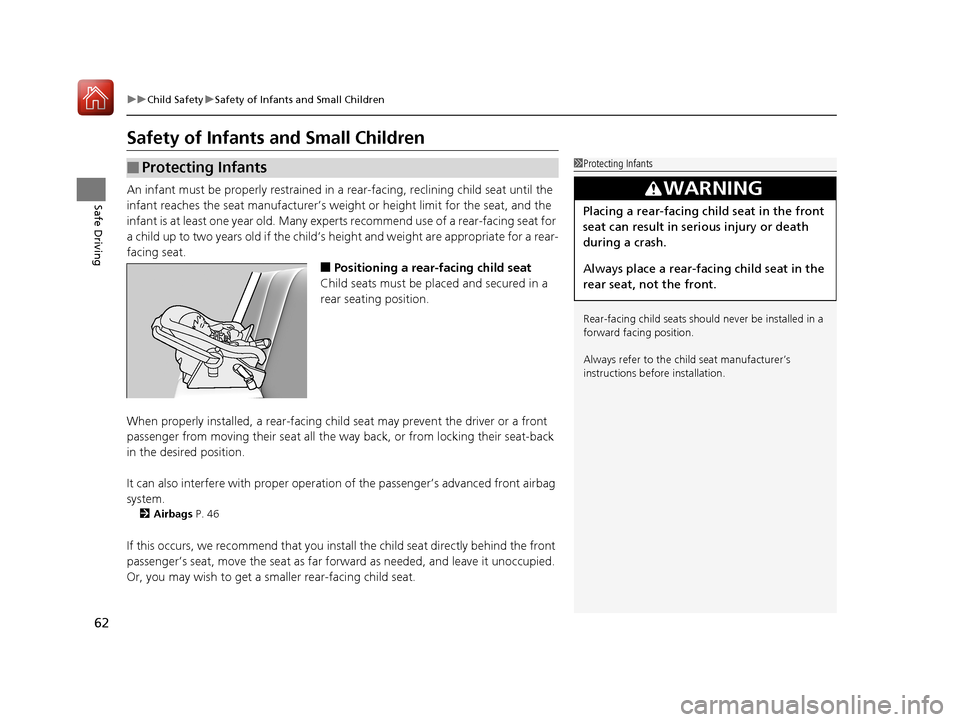
■Positioning a rear-facing child seat
Child seats must be placed and secured in a
rear seating position.
When properly installed, a rear-facing child seat may prevent the driver or a front
passenger from moving their seat all the way back, or from locking their seat-back
in the desired position.
It can also interfere with pr oper operation of the passenger’s advanced front airbag
system.
2 Airbags P. 46
If this occurs, we recommend that you install the child seat directly behind the front
passenger’s seat, move the seat as far fo rward as needed, and leave it unoccupied.
Or, you may wish to get a sm aller rear-facing child seat.
■Protecting Infants1Protecting Infants
Rear-facing child seats should never be installed in a
forward facing position.
Always refer to the child seat manufacturer’s
instructions before installation.
3WARNING
Placing a rear-facing child seat in the front
seat can result in serious injury or death
during a crash.
Always place a rear-fac ing child seat in the
rear seat, not the front.
17 CIVIC 2D HCM (KA KC KL)-31TBG6100.book 62 ページ 2016年8月31日 水曜日 午後5時43分
Page 64 of 595
Continued63
uuChild Safety uSafety of Infants and Small Children
Safe DrivingIf a child is at least one year old and within the weight range indicated by the child
seat manufacturer, the child should be properly restrained in a firmly secured
forward-facing child seat.
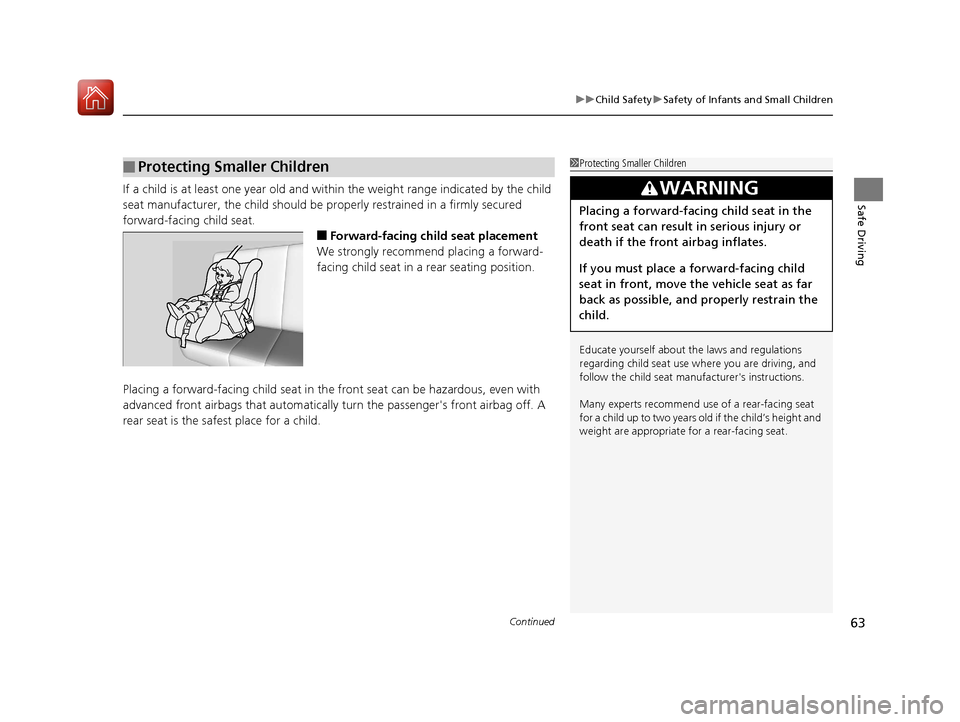
■Forward-facing child seat placement
We strongly recommend placing a forward-
facing child seat in a rear seating position.
Placing a forward-facing child seat in th e front seat can be hazardous, even with
advanced front airbags that automatically turn the passeng er's front airbag off. A
rear seat is the safest place for a child.
■Protecting Smaller Children1 Protecting Smaller Children
Educate yourself about th e laws and regulations
regarding child seat use wh ere you are driving, and
follow the child seat manufacturer's instructions.
Many experts recommend us e of a rear-facing seat
for a child up to two years old if the child’s height and
weight are appropriate for a rear-facing seat.
3WARNING
Placing a forward-facing child seat in the
front seat can result in serious injury or
death if the front airbag inflates.
If you must place a forward-facing child
seat in front, move the vehicle seat as far
back as possible, and properly restrain the
child.
17 CIVIC 2D HCM (KA KC KL)-31TBG6100.book 63 ページ 2016年8月31日 水曜日 午後5時43分
Page 163 of 595
162
uuOperating the Switches Around the Steering Wheel uAdjusting the Steering Wheel
Controls
Adjusting the Steering Wheel
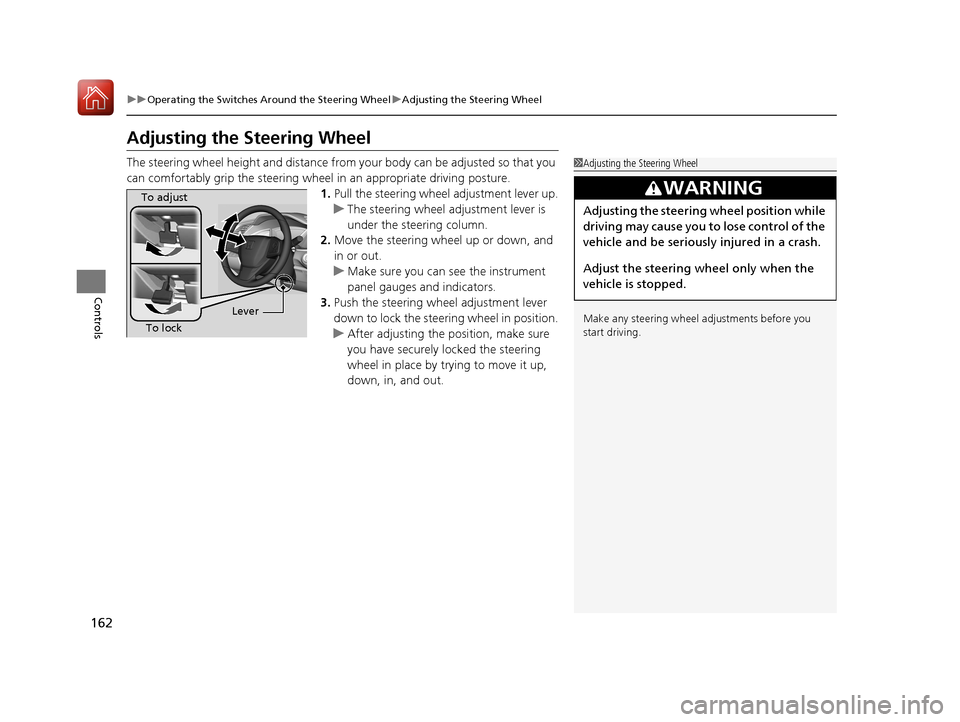
The steering wheel height and distance from your body can be adjusted so that you
can comfortably grip the steering wheel in an appropriate driving posture.
1.Pull the steering wheel adjustment lever up.
u The steering wheel adjustment lever is
under the steering column.
2. Move the steering wheel up or down, and
in or out.
u Make sure you can see the instrument
panel gauges and indicators.
3. Push the steering wheel adjustment lever
down to lock the steering wheel in position.
u After adjusting the position, make sure
you have securely locked the steering
wheel in place by trying to move it up,
down, in, and out.1Adjusting the Steering Wheel
Make any steering wheel adjustments before you
start driving.
3WARNING
Adjusting the steering wheel position while
driving may cause you to lose control of the
vehicle and be seriously injured in a crash.
Adjust the steering wheel only when the
vehicle is stopped.
To adjust
To lock Lever
17 CIVIC 2D HCM (KA KC KL)-31TBG6100.book 162 ページ 2016年8月31日 水曜日 午後5時43分
Page 167 of 595
uuAdjusting the Seats uFront Seats
166
Controls
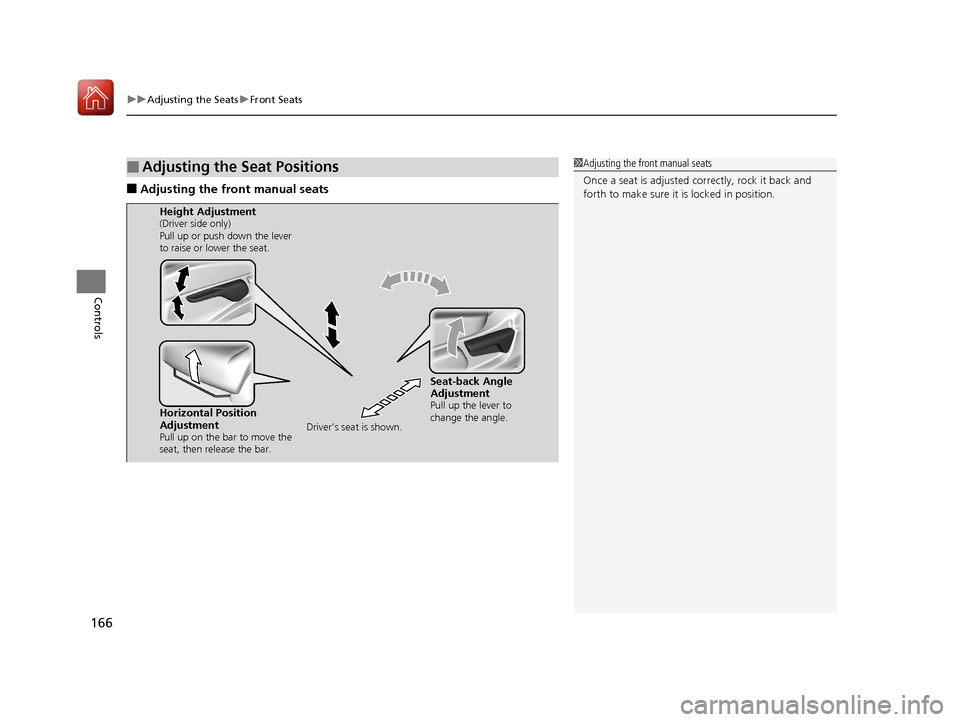
■Adjusting the front manual seats
■Adjusting the Seat Positions1Adjusting the front manual seats
Once a seat is adjusted co rrectly, rock it back and
forth to make sure it is locked in position.
Horizontal Position
Adjustment
Pull up on the bar to move the
seat, then release the bar.
Height Adjustment(Driver side only)
Pull up or push down the lever
to raise or lower the seat.
Seat-back Angle
Adjustment
Pull up the lever to
change the angle.
Driver’s seat is shown.
17 CIVIC 2D HCM (KA KC KL)-31TBG6100.book 166 ページ 2016年8月31日 水曜日 午後5時43分
Page 169 of 595
168
uuAdjusting the Seats uHead Restraints
Controls
Head Restraints
Your vehicle is equipped with head restraints in all seating positions.
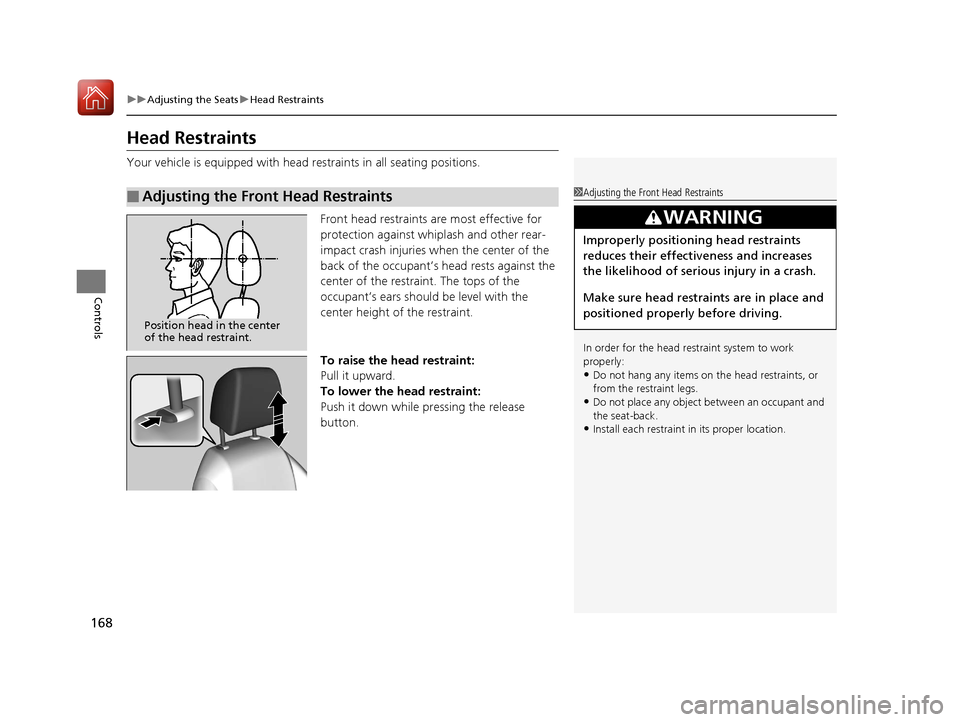
Front head restraints are most effective for
protection against whiplash and other rear-
impact crash injuries when the center of the
back of the occupant’s head rests against the
center of the restraint. The tops of the
occupant’s ears should be level with the
center height of the restraint.
To raise the head restraint:
Pull it upward.
To lower the head restraint:
Push it down while pressing the release
button.
■Adjusting the Front Head Restraints1Adjusting the Front Head Restraints
In order for the head restraint system to work
properly:
•Do not hang any items on the head restraints, or
from the restraint legs.
•Do not place any object be tween an occupant and
the seat-back.
•Install each restraint in its proper location.
3WARNING
Improperly positioning head restraints
reduces their effectiveness and increases
the likelihood of serious injury in a crash.
Make sure head restraints are in place and
positioned properly before driving.
Position head in the center
of the head restraint.
17 CIVIC 2D HCM (KA KC KL)-31TBG6100.book 168 ページ 2016年8月31日 水曜日 午後5時43分
Page 170 of 595
169
uuAdjusting the Seats uHead Restraints
Controls
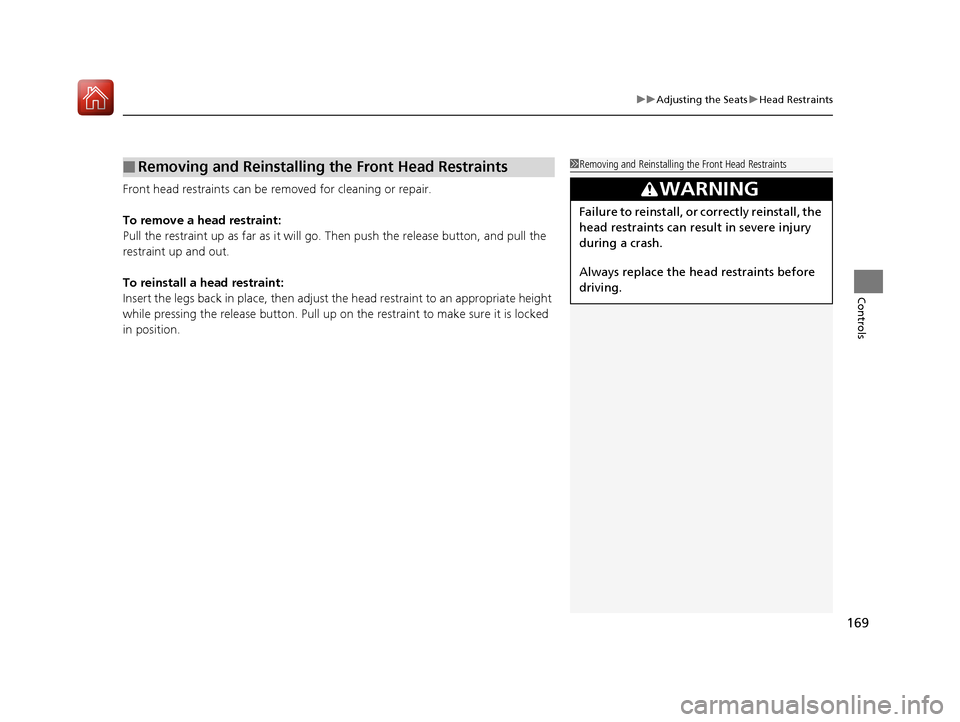
Front head restraints can be removed for cleaning or repair.
To remove a head restraint:
Pull the restraint up as far as it will go. Then push the release button, and pull the
restraint up and out.
To reinstall a head restraint:
Insert the legs back in place, then adjust the head restraint to an appropriate height
while pressing the release button. Pull up on the restraint to make sure it is locked
in position.
■Removing and Reinstalling the Front Head Restraints1 Removing and Reinstalling the Front Head Restraints
3WARNING
Failure to reinstall, or correctly reinstall, the
head restraints can result in severe injury
during a crash.
Always replace the he ad restraints before
driving.
17 CIVIC 2D HCM (KA KC KL)-31TBG6100.book 169 ページ 2016年8月31日 水曜日 午後5時43分
Page 388 of 595
Continued387
uuBefore Driving uDriving Preparation
Driving
• Store or secure all items on board properly.
u Carrying too much cargo, or improperly storing it, can affect your vehicle’s
handling, stability, sto pping distance, and tires, and make it unsafe.
2Maximum Load Limit P. 389
•Do not pile items higher than the seat height.
u They can block your view and may be thrown forward in the event of sudden
braking.
• Do not place anything in the front seat footwells. Make sure to secure the floor
mat.
u An object or unsecured floor mat can in terfere with your brake and accelerator
pedal operation while driving.
• If you have any animals on board, do not let them move around in the vehicle.
u They may interfere with driving and a crash could occur.
• Securely close and lock both doors and the trunk.
2 Locking/Unlocking the Doors from the Inside P. 132
•Adjust your seating position properly.
u Adjust the front h ead restraint, too.
2Adjusting the Seats P. 165
2 Adjusting the Front Head Restraints P. 168
•Adjust the mirrors and steering wh eel properly for your driving.
u Adjust them while sitting in the proper driving position.
2 Adjusting the Mirrors P. 163
2 Adjusting the Steering Wheel P. 162
■Interior Checks1Interior Checks
The headlight aim is set by the factory, and does not
need to be adjusted. Howeve r, if you regularly carry
heavy items in the trunk, have the aiming readjusted
at a dealer or by a qualified technician.
17 CIVIC 2D HCM (KA KC KL)-31TBG6100.book 387 ページ 2016年8月31日 水曜日 午後5時43分
Page 445 of 595
444
uuWhen Driving uLaneWatchTM*
Driving
LaneWatchTM*
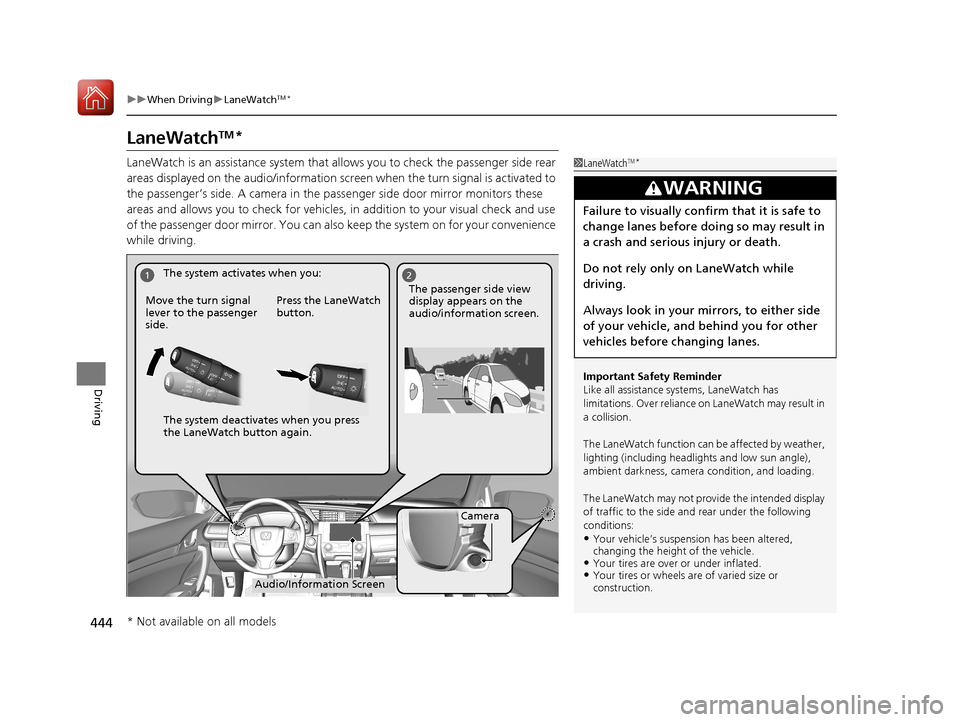
LaneWatch is an assistance system that allows you to check the passenger side rear
areas displayed on the audio/information screen when the turn signal is activated to
the passenger’s side. A camera in the pass enger side door mirror monitors these
areas and allows you to chec k for vehicles, in addition to your visual check and use
of the passenger door mirror. You can also keep the system on for your convenience
while driving.1 LaneWatchTM*
Important Safety Reminder
Like all assistance systems, LaneWatch has
limitations. Over reliance on LaneWatch may result in
a collision.
The LaneWatch function can be affected by weather,
lighting (including headli ghts and low sun angle),
ambient darkness, camera condition, and loading.
The LaneWatch may not prov ide the intended display
of traffic to the side and rear under the following
conditions:
•Your vehicle’s suspensi on has been altered,
changing the height of the vehicle.
•Your tires are over or under inflated.•Your tires or wheels are of varied size or
construction.
3WARNING
Failure to visually confirm that it is safe to
change lanes before doing so may result in
a crash and serious injury or death.
Do not rely only on LaneWatch while
driving.
Always look in your mi rrors, to either side
of your vehicle, and behind you for other
vehicles before changing lanes.
12
Camera
Audio/Information Screen
Move the turn signal
lever to the passenger
side.
Press the LaneWatch
button.
The passenger side view
display appears on the
audio/information screen.
The system activates when you:
The system deactivates when you press
the LaneWatch button again.
* Not available on all models
17 CIVIC 2D HCM (KA KC KL)-31TBG6100.book 444 ページ 2016年8月31日 水曜日 午後5時43分
Page 466 of 595
465
uuBraking uCollision Mitigation Braking SystemTM (CMBSTM)*
Continued
Driving
• When there is a group of people in front of your vehicle walking together side by
side.
• Surrounding conditions or belongings of the pedestrian alter the pedestrian’s
shape, preventing the system from recogn izing that the person is a pedestrian.
• When the pedestrian is shorte r than about 3.3 feet (1 meter) or taller than about
6.6 feet (2 meters) in height.
• When a pedestrian blends in with the background.
• When a pedestrian is bent over or squatting, or when their hands are raised or
they are running.
• When several pedestrians are walking ahead in a group.
• When the camera cannot correctly identify that a pedestrian is present due to an
unusual shape (holding luggage, body position, size).
■Automatic shutoff
The CMBS may automatically shut itself o ff and the CMBS indicator comes and stays
on when:
• The temperature inside the system is high.
• You drive off-road or on a mountain road, or curved and winding road for an
extended period.
• An abnormal tire condition is detected (wrong tire size, flat tire, etc.).
• The camera behind the rearview mirror, or the area around the camera, including
the windshield, gets dirty.
Once the conditions that caused the CMBS to shut off improve or are addressed
(e.g., cleaning), the system comes back on.
Limitations applicable to pedestrian detection only
17 CIVIC 2D HCM (KA KC KL)-31TBG6100.book 465 ページ 2016年8月31日 水曜日 午後5時43分