tire pressure HONDA CIVIC COUPE 2017 10.G Owners Manual
[x] Cancel search | Manufacturer: HONDA, Model Year: 2017, Model line: CIVIC COUPE, Model: HONDA CIVIC COUPE 2017 10.GPages: 595
Page 5 of 595
4
Quick Reference Guide
Quick Reference Guide
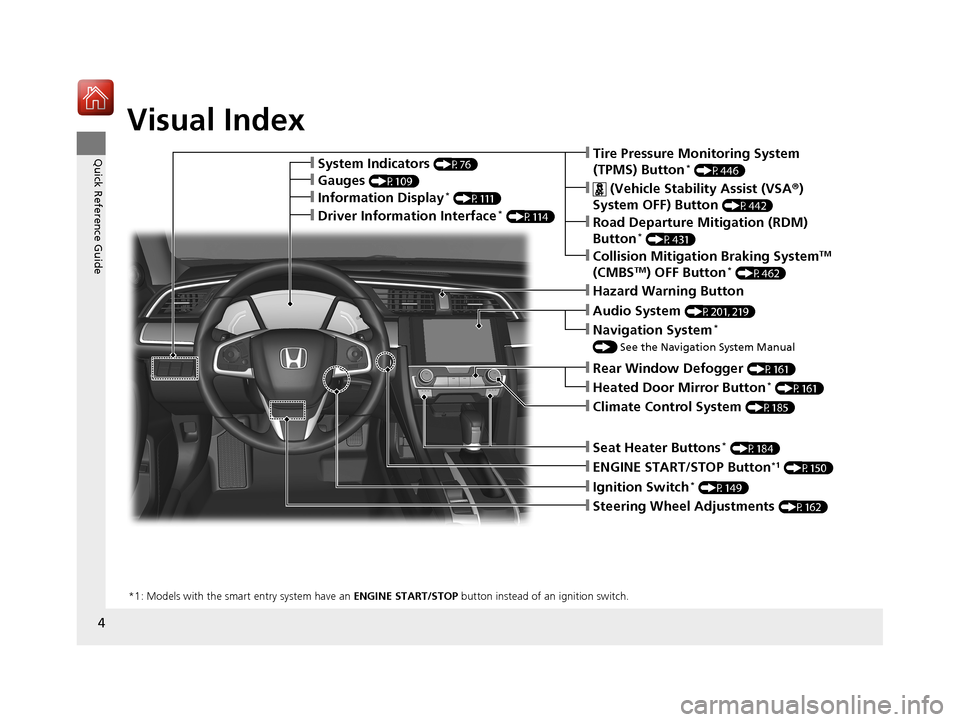
Visual Index
❙Ignition Switch* (P149)
❙ENGINE START/STOP Button*1 (P150)
*1: Models with the smart entry system have an ENGINE START/STOP button instead of an ignition switch.
❙Tire Pressure Monitoring System
(TPMS) Button* (P446)
❙Information Display* (P111)
❙System Indicators (P76)
❙Gauges (P109)
❙Collision Mitigation Braking SystemTM
(CMBSTM) OFF Button* (P462)
❙ (Vehicle Stability Assist (VSA ®)
System OFF) Button
(P442)
❙Road Departure Mitigation (RDM)
Button* (P431)
❙Navigation System*
() See the Navigation System Manual
❙Audio System (P201, 219)
❙Hazard Warning Button
❙Rear Window Defogger (P161)
❙Heated Door Mirror Button* (P161)
❙Climate Control System (P185)
❙Seat Heater Buttons* (P184)
❙Steering Wheel Adjustments (P162)
❙Driver Information Interface* (P114)
17 CIVIC 2D HCM (KA KC KL)-31TBG6100.book 4 ページ 2016年8月31日 水曜日 午後5時43分
Page 12 of 595
11
Quick Reference Guide
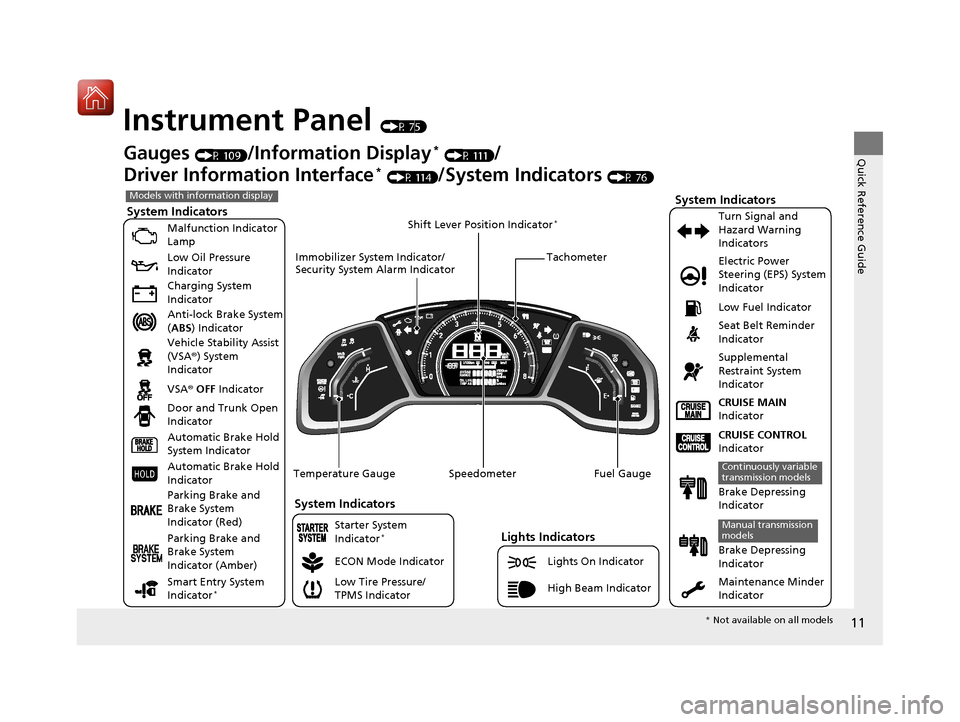
Instrument Panel (P 75)
System Indicators
Malfunction Indicator
Lamp
Low Oil Pressure
Indicator
Charging System
Indicator
Anti-lock Brake System
(ABS ) Indicator
Vehicle Stability Assist
(VSA ®) System
Indicator
VSA ® OFF Indicator
Low Tire Pressure/
TPMS Indicator Electric Power
Steering (EPS) System
Indicator
Lights Indicators
Lights On Indicator
High Beam Indicator
Seat Belt Reminder
Indicator
System Indicators
CRUISE CONTROL
Indicator
Parking Brake and
Brake System
Indicator (Red) Supplemental
Restraint System
Indicator
Door and Trunk Open
Indicator CRUISE MAIN
Indicator
Tachometer
Speedometer Fuel Gauge
Immobilizer System Indicator/
Security System Alarm Indicator
Shift Lever Position Indicator
*
Low Fuel Indicator
Gauges (P 109)/Information Display* (P 111)/
Driver Information Interface
* (P 114)/System Indicators (P 76)
ECON Mode Indicator Turn Signal and
Hazard Warning
Indicators
Maintenance Minder
Indicator
Models with information display
Parking Brake and
Brake System
Indicator (Amber)
System Indicators
Automatic Brake Hold
System Indicator
Automatic Brake Hold
Indicator
Temperature Gauge
Brake Depressing
Indicator
Continuously variable
transmission models
Brake Depressing
Indicator
Manual transmission
models
Smart Entry System
Indicator*
Starter System
Indicator*
*
Not available on all models
17 CIVIC 2D HCM (KA KC KL)-31TBG6100.book 11 ページ 2016年8月31日 水曜日 午後5時43分
Page 13 of 595
12
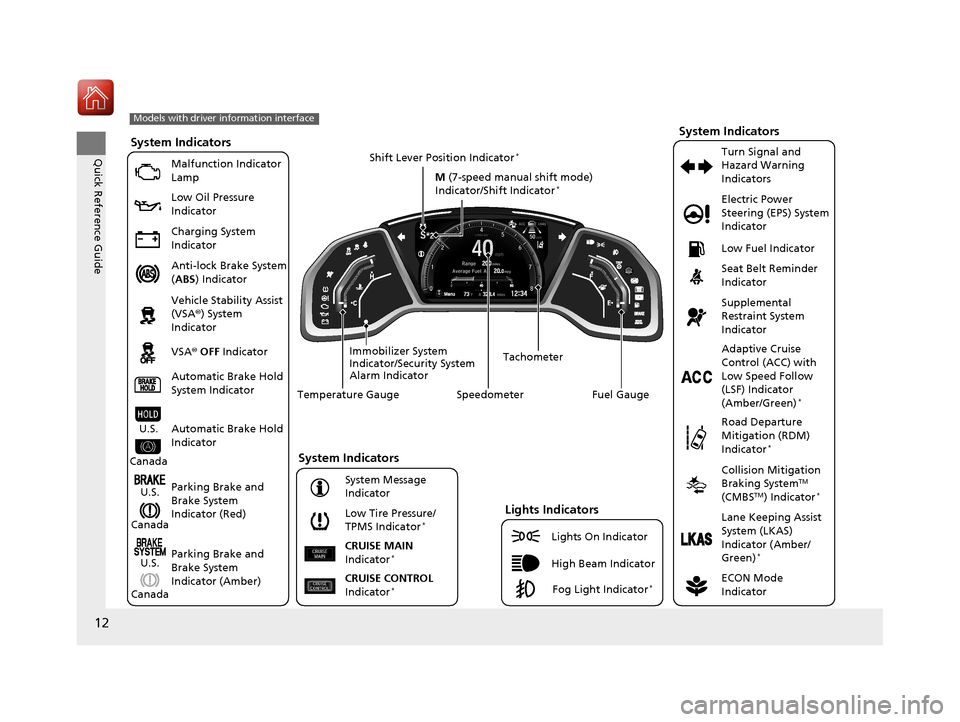
Quick Reference GuideSystem Indicators
Malfunction Indicator
Lamp
Low Oil Pressure
Indicator
Charging System
Indicator
Anti-lock Brake System
(ABS ) Indicator
Vehicle Stability Assist
(VSA ®) System
Indicator
VSA ® OFF Indicator
Low Tire Pressure/
TPMS Indicator
*
Electric Power
Steering (EPS) System
Indicator
Seat Belt Reminder
Indicator
System Indicators
Parking Brake and
Brake System
Indicator (Red) Supplemental
Restraint System
Indicator
Tachometer
Speedometer Fuel Gauge
Immobilizer System
Indicator/Security System
Alarm Indicator Shift Lever Position Indicator
*
Low Fuel Indicator
ECON Mode
Indicator Turn Signal and
Hazard Warning
Indicators
Models with driver information interface
Parking Brake and
Brake System
Indicator (Amber)
System Indicators
U.S.
Canada
U.S.
Canada Automatic Brake Hold
System Indicator
Automatic Brake Hold
IndicatorU.S.
Canada Temperature Gauge
Lights Indicators
Lights On Indicator
High Beam Indicator
Fog Light Indicator*
Adaptive Cruise
Control (ACC) with
Low Speed Follow
(LSF) Indicator
(Amber/Green)
*
System Message
Indicator
Collision Mitigation
Braking SystemTM
(CMBSTM) Indicator*
Road Departure
Mitigation (RDM)
Indicator
*
Lane Keeping Assist
System (LKAS)
Indicator (Amber/
Green)
*
CRUISE CONTROL
Indicator*
CRUISE MAIN
Indicator*
M (7-speed manual shift mode)
Indicator/Shift Indicator*
17 CIVIC 2D HCM (KA KC KL)-31TBG6100.book 12 ページ 2016年8月31日 水曜日 午後5時43分
Page 25 of 595
24
Quick Reference Guide
VSA® On and Off (P 442)
● The vehicle stability assist (VSA® ) system
helps stabilize the vehicle during
cornering, and helps maintain traction
while accelerating on loose or slippery
road surfaces.
● VSA ® comes on automatically every time
you start the engine.
● To partially disable or fully restore VSA ®
function, press and ho ld the button until
you hear a beep.
Cruise Control* (P 411)
● Cruise control allows you to maintain a
set speed without keeping your foot on
the accelerator pedal.
● To use cruise control, press the CRUISE
button, then press the –/SET button once
you have achieved the desired speed
(above 25 mph or 40 km/h).
Collision Mitigation
Braking System
TM
(CMBS
TM) OFF Button*
(P 459)
● When a possible collision is likely
unavoidable, the CMBS
TM can help you to
reduce the vehicle speed and the severity
of the collision.
● To turn the CMBS
TM on or off, press and
hold the button until you hear a beep.
Tire Pressure Monitoring
System (TPMS)
(P 446)
● Detects a change in tire conditions and
overall dimensions due to decrease in tire
pressures.
● The TPMS is turned on automatically
every time you start the engine.
● A calibration procedure must be
performed when certain conditions arise.
U.S. models
17 CIVIC 2D HCM (KA KC KL)-31TBG6100.book 24 ページ 2016年8月31日 水曜日 午後5時43分
Page 28 of 595
27
Quick Reference Guide
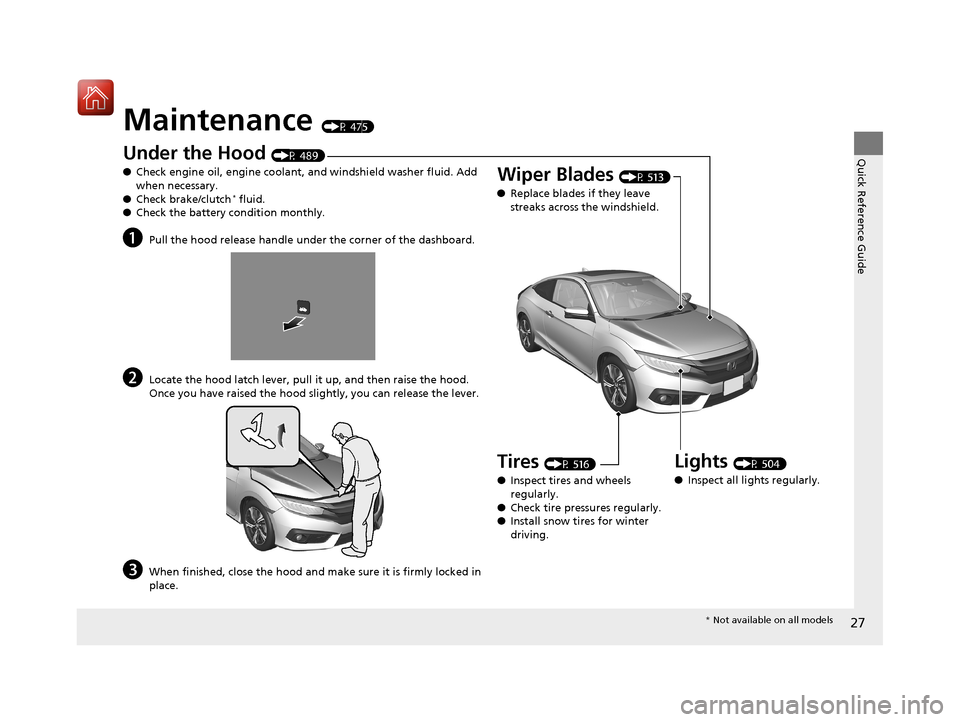
Maintenance (P 475)
Under the Hood (P 489)
● Check engine oil, engine coolant, and windshield washer fluid. Add
when necessary.
● Check brake/clutch
* fluid.
● Check the battery condition monthly.
aPull the hood release handle under the corner of the dashboard.
bLocate the hood latch lever, pull it up, and then raise the hood.
Once you have raised the hood slightly, you can release the lever.
cWhen finished, close the hood and make sure it is firmly locked in
place.
Lights (P 504)
● Inspect all lights regularly.
Wiper Blades (P 513)
● Replace blades if they leave
streaks across the windshield.
Tires (P 516)
● Inspect tires and wheels
regularly.
● Check tire pressures regularly.
● Install snow tires for winter
driving.
* Not available on all models
17 CIVIC 2D HCM (KA KC KL)-31TBG6100.book 27 ページ 2016年8月31日 水曜日 午後5時43分
Page 36 of 595
35
uuFor Safe Driving uImportant Safety Precautions
Safe Driving
■Pay appropriate attention to the task of driving safely
Engaging in cell phone conversation or other activities that keep you from paying
close attention to the road, other vehicles, and pedestrians could lead to a crash.
Remember, situations can change quickly, and only you can decide when it is safe to
divert some attention away from driving.
■Control your speed
Excessive speed is a major factor in crash injuries and deaths. Generally, the higher
the speed, the greater the risk, but serious injuries can also occur at lower speeds.
Never drive faster than is safe for current conditions, regardless of the maximum
speed posted.
■Keep your vehicle in safe condition
Having a tire blowout or a mechanical failure can be extremely hazardous.
To reduce the possibility of such problems, check your tire pressures and condition
frequently, and perform all regul arly scheduled maintenance.
17 CIVIC 2D HCM (KA KC KL)-31TBG6100.book 35 ページ 2016年8月31日 水曜日 午後5時43分
Page 85 of 595
84
uuIndicators u
Instrument Panel
*1:Models with the smart entry system have an ENGINE START/STOP button instead of an ignition switch.
IndicatorNameOn/BlinkingExplanationMessage*
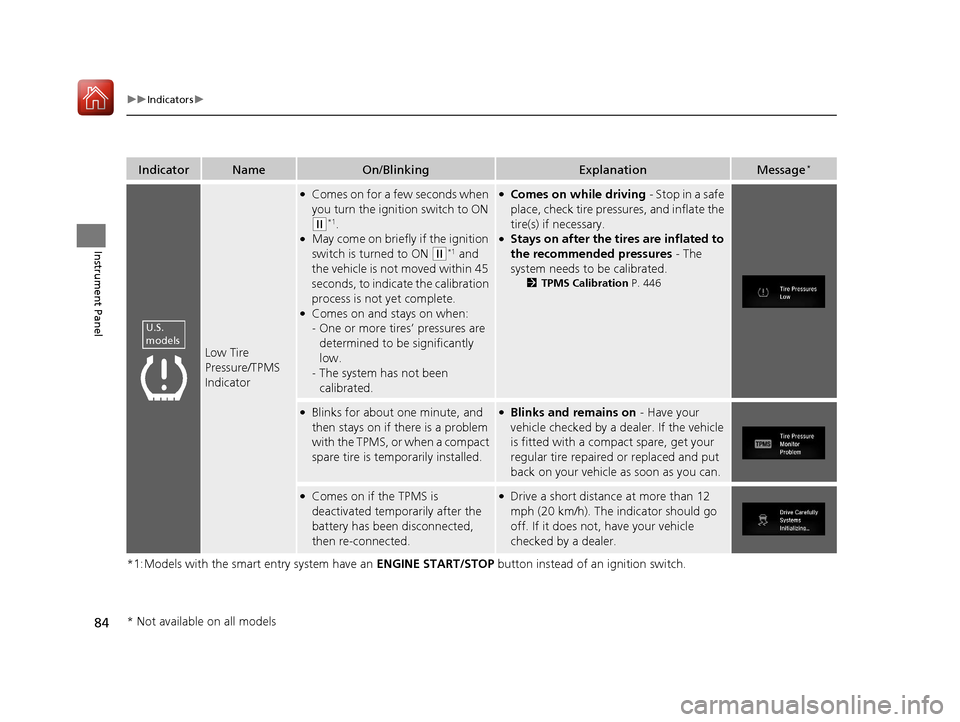
Low Tire
Pressure/TPMS
Indicator
●Comes on for a few seconds when
you turn the ignition switch to ON
(w*1.●May come on briefly if the ignition
switch is turned to ON
(w*1 and
the vehicle is not moved within 45
seconds, to indicate the calibration
process is not yet complete.
●Comes on and stays on when:
- One or more tires’ pressures are
determined to be significantly
low.
- The system has not been
calibrated.
●Comes on while driving - Stop in a safe
place, check tire pressures, and inflate the
tire(s) if necessary.
●Stays on after the tires are inflated to
the recommended pressures - The
system needs to be calibrated.
2 TPMS Calibration P. 446
●Blinks for about one minute, and
then stays on if there is a problem
with the TPMS, or when a compact
spare tire is temporarily installed.●Blinks and remains on - Have your
vehicle checked by a dealer. If the vehicle
is fitted with a compact spare, get your
regular tire repaired or replaced and put
back on your vehicle as soon as you can.
●Comes on if the TPMS is
deactivated temporarily after the
battery has been disconnected,
then re-connected.●Drive a short distance at more than 12
mph (20 km/h). The indicator should go
off. If it does not, have your vehicle
checked by a dealer.
U.S.
models
* Not available on all models
17 CIVIC 2D HCM (KA KC KL)-31TBG6100.book 84 ページ 2016年8月31日 水曜日 午後5時43分
Page 386 of 595
385
Driving
This chapter discusses driving, refueling, and information on items such as accessories.
Before Driving
Driving Preparation .......................... 386
Maximum Load Limit........................ 389
Towing a Trailer ................................ 391
When Driving Starting the Engine .................. 392, 394
Precautions While Driving................. 399
Continuously Variable Transmission*... 400
Shifting ............................ 401, 403, 407
ECON Button ................................... 410
Cruise Control
*................................ 411
Front Sensor Camera*...................... 414 Adaptive Cruise Control (ACC) with Low
Speed Follow (LSF)
*....................... 416Road Departure Mitigation (RDM) System*...... 430Lane Keeping Assist System (LKAS)*.... 434
Vehicle Stabilit y Assist (VSA®), aka Electronic
Stability Control (ESC), System........... 441
Agile Handling Assist ....................... 443
LaneWatchTM*.................................. 444Tire Pressure Monitoring System (TPMS) ...... 446Tire Pressure Monitoring System (TPMS) - Required Federal Explanation ......... 449
Braking Brake System ................................... 451
Anti-lock Brake System (ABS) ........... 457 Brake Assist System ......................... 458
Collision Mitigation Braking System
TM
(CMBSTM)*..................................... 459
Parking Your Vehicle When Stopped ................................ 467
Multi-View Rear Camera .................. 468
Refueling Fuel Information .............................. 470
How to Refuel ................................. 471
Fuel Economy and CO
2 Emissions
Improving Fuel Economy and Reducing
CO
2 Emissions ................................ 473
Turbo Engine Vehicle*
Handling Precautions ....................... 474
* Not available on all models
17 CIVIC 2D HCM (KA KC KL)-31TBG6100.book 385 ページ 2016年8月31日 水曜日 午後5時43分
Page 387 of 595
386
Driving
Before Driving
Driving Preparation
Check the following items before you start driving.
• Make sure there are no obstructions on the windows, door mirrors, exterior
lights, or other parts of the vehicle.
u Remove any frost, snow, or ice.
u Remove any snow on the roof, as this can slip down and obstruct your field of
vision while driving. If frozen solid , remove ice once it has softened.
u When removing ice from around the wheels, be sure not to damage the wheel
or wheel components.
• Make sure the hood is securely closed.
u If the hood opens while driving, your front view will be blocked.
• Make sure the tires are in good condition.
u Check air pressure, check for damage and excessive wear.
2 Checking and Maintaining Tires P. 516
•Make sure there are no people or ob jects behind or around the vehicle.
u There are blind spots from the inside.
■Exterior Checks1Exterior Checks
NOTICE
When doors are frozen s hut, use warm water around
the door edges to melt any ice. Do not try to force
them open, as this can damage the rubber trim
around the doors. When done, wipe dry to avoid
further freezing.
Do not pour warm water into the key cylinder.
You will be unable to insert key if the water freezes in
the hole.
Heat from the engine and exhaust can ignite
flammable material s left under the hood, causing a
fire. If you've parked y our vehicle for an extended
period, inspect and remove any debris that may have
collected, such as dried grass and leaves that have
fallen or have been carried in for use as a nest by a
small animal. Also check under the hood for leftover
flammable materials after you or someone else has
performed maintenance on your vehicle.
17 CIVIC 2D HCM (KA KC KL)-31TBG6100.book 386 ページ 2016年8月31日 水曜日 午後5時43分
Page 442 of 595
441
uuWhen Driving uVehicle Stability Assist (VSA ®), aka Electronic Stability Control (ESC), System
Continued
Driving
Vehicle Stability Assist (VSA ®), aka Electronic
Stability Control (ESC), System
Helps to stabilize the vehicl e during cornering if the vehicle turns more or less than
what was intended. It also assists in main taining traction on slippery surfaces. It does
so by regulating engine output and selectively applying the brakes.
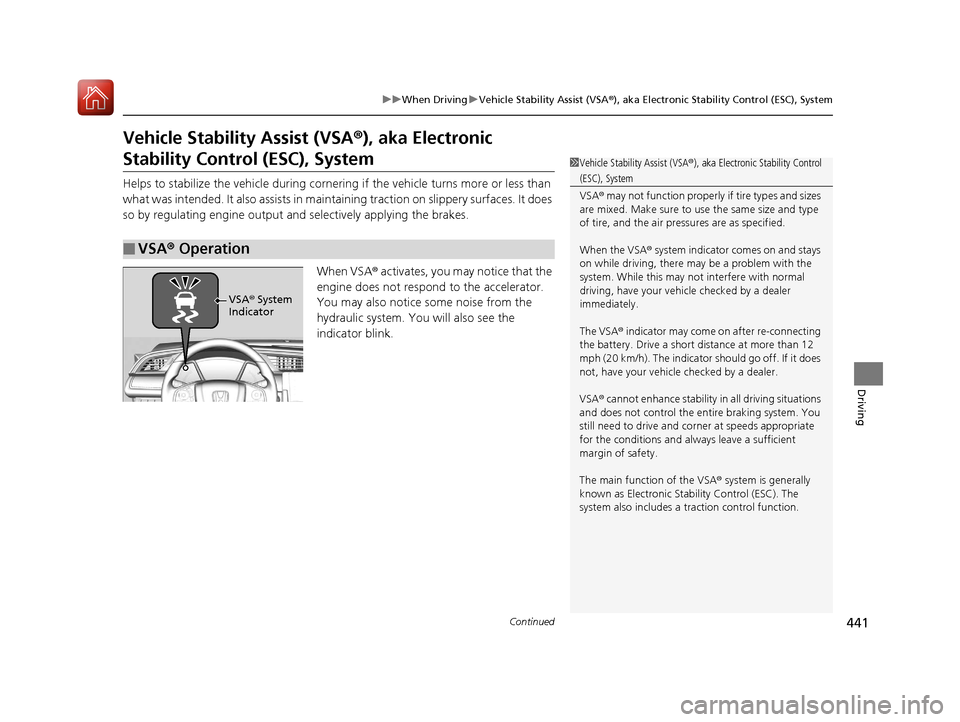
When VSA® activates, you may notice that the
engine does not respond to the accelerator.
You may also notice some noise from the
hydraulic system. You will also see the
indicator blink.
■VSA ® Operation
1 Vehicle Stability Assist (VSA ®), aka Electronic Stability Control
(ESC), System
VSA ® may not function properly if tire types and sizes
are mixed. Make sure to use the same size and type
of tire, and the air pressures are as specified.
When the VSA ® system indicator comes on and stays
on while driving, there ma y be a problem with the
system. While this may not interfere with normal
driving, have your vehi cle checked by a dealer
immediately.
The VSA ® indicator may come on after re-connecting
the battery. Drive a short distance at more than 12
mph (20 km/h). The indicator should go off. If it does
not, have your vehicle checked by a dealer.
VSA ® cannot enhance stability in all driving situations
and does not control the entire braking system. You
still need to drive and corner at speeds appropriate
for the conditions and always leave a sufficient
margin of safety.
The main function of the VSA ® system is generally
known as Electronic Stability Control (ESC). The
system also includes a traction control function.
VSA® System
Indicator
17 CIVIC 2D HCM (KA KC KL)-31TBG6100.book 441 ページ 2016年8月31日 水曜日 午後5時43分