wipers HONDA CIVIC COUPE 2017 10.G Owners Manual
[x] Cancel search | Manufacturer: HONDA, Model Year: 2017, Model line: CIVIC COUPE, Model: HONDA CIVIC COUPE 2017 10.GPages: 595
Page 6 of 595
5
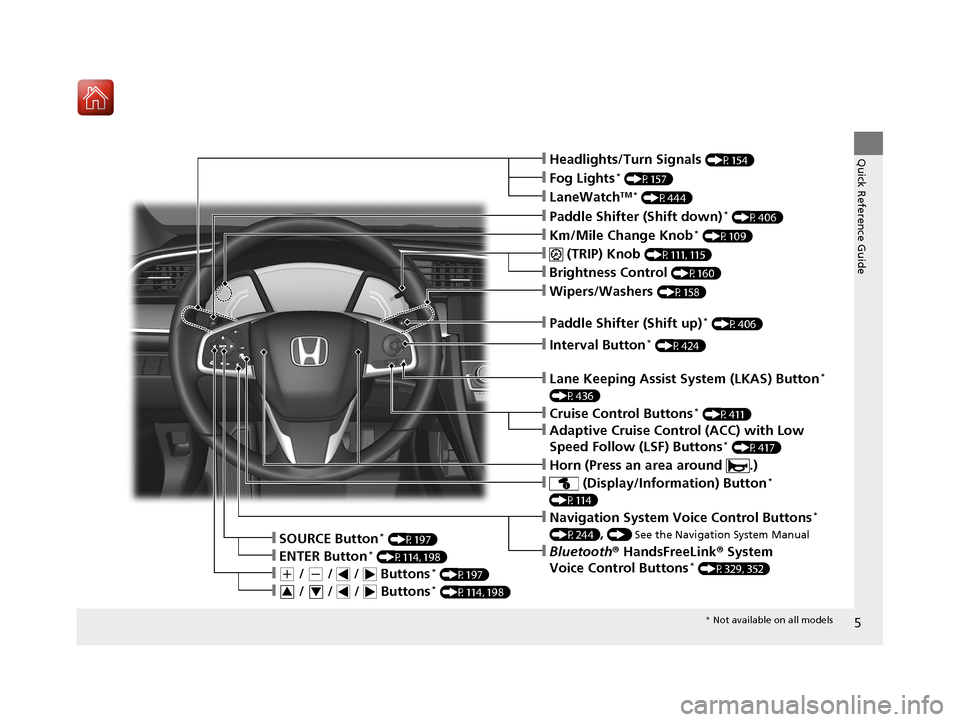
Quick Reference Guide❙Headlights/Turn Signals (P154)
❙Km/Mile Change Knob* (P109)
❙ (TRIP) Knob (P111, 115)
❙SOURCE Button* (P197)
❙Brightness Control (P160)
❙LaneWatchTM * (P444)
❙Fog Lights* (P157)
❙Wipers/Washers (P158)
❙Lane Keeping Assist System (LKAS) Button*
(P436)
❙ (Display/Information) Button*
(P114)
❙Navigation System Voice Control Buttons*
(P244), () See the Navigation System Manual
❙Bluetooth® HandsFreeLink ® System
Voice Control Buttons* (P329, 352)❙ENTER Button* (P114, 198)
❙(+ / (- / / Buttons* (P197)
❙ / / / Buttons* (P114, 198)34
❙Paddle Shifter (Shift down)* (P406)
❙Paddle Shifter (Shift up)* (P406)
❙Interval Button* (P424)
❙Horn (Press an area around .)
❙Cruise Control Buttons* (P411)
❙Adaptive Cruise Control (ACC) with Low
Speed Follow (LSF) Buttons* (P417)
* Not available on all models
17 CIVIC 2D HCM (KA KC KL)-31TBG6100.book 5 ページ 2016年8月31日 水曜日 午後5時43分
Page 9 of 595
Visual Index
8
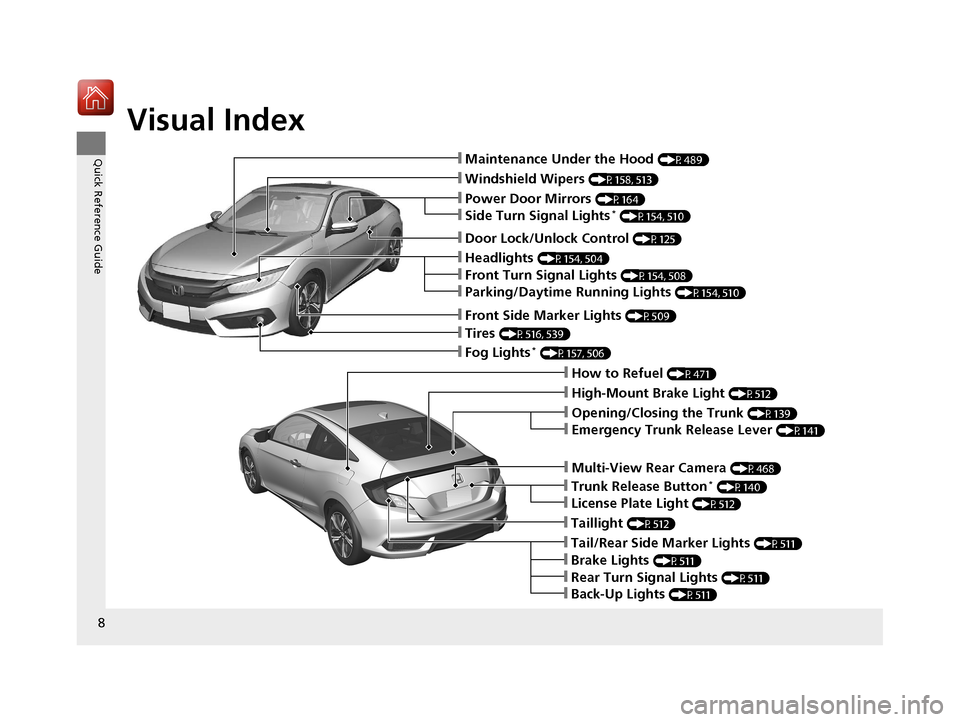
Quick Reference Guide❙Maintenance Under the Hood (P489)
❙Windshield Wipers (P158, 513)
❙Tires (P516, 539)
❙Fog Lights* (P157, 506)
❙Power Door Mirrors (P164)
❙How to Refuel (P471)
❙High-Mount Brake Light (P512)
❙Emergency Trunk Release Lever (P141)
❙Opening/Closing the Trunk (P139)
❙Multi-View Rear Camera (P468)
❙Door Lock/Unlock Control (P125)
❙Side Turn Signal Lights* (P154, 510)
❙Headlights (P154, 504)
❙Front Turn Signal Lights (P154, 508)
❙Parking/Daytime Running Lights (P154, 510)
❙Front Side Marker Lights (P509)
❙Taillight (P512)
❙Back-Up Lights (P511)
❙Brake Lights (P511)
❙Rear Turn Signal Lights (P511)
❙Tail/Rear Side Marker Lights (P511)
❙Trunk Release Button* (P140)
❙License Plate Light (P512)
17 CIVIC 2D HCM (KA KC KL)-31TBG6100.book 8 ページ 2016年8月31日 水曜日 午後5時43分
Page 15 of 595
14
Quick Reference Guide
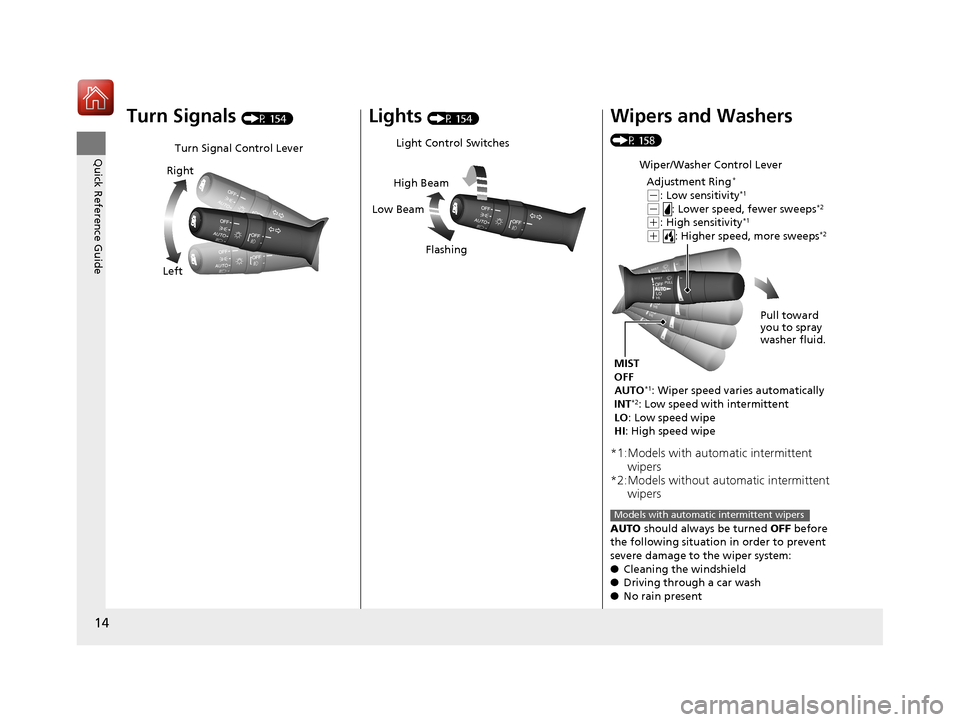
Turn Signals (P 154)
Turn Signal Control Lever
Right
Left
Lights (P 154)
Light Control Switches
Low Beam High Beam
Flashing
Wipers and Washers
(P 158)
*1:Models with automatic intermittent wipers
*2:Models without automatic intermittent wipers
AUTO should always be turned OFF before
the following situation in order to prevent
severe damage to the wiper system:
● Cleaning the windshield
● Driving through a car wash
● No rain present
Wiper/Washer Control Lever
Adjustment Ring
*
(-: Low sensitivity*1
(- : Lower speed, fewer sweeps*2
(+: High sensitivity*1
(+ : Higher speed, more sweeps*2
MIST
OFF
AUTO
*1: Wiper speed varies automatically
INT*2: Low speed with intermittent
LO: Low speed wipe
HI : High speed wipe Pull toward
you to spray
washer fluid.
Models with automatic intermittent wipers
17 CIVIC 2D HCM (KA KC KL)-31TBG6100.book 14 ページ 2016年8月31日 水曜日 午後5時43分
Page 120 of 595
119
Controls
This chapter explains how to operate the various controls necessary for driving.
Clock.................................................. 120
Locking and Unlocking the Doors Key Types and Functions .................. 122
Low Smart Entry Remote Signal Strength*... 124Locking/Unlocking the Doors from the Outside .......................................... 125
Locking/Unlocking the Doors from the Inside ............................................. 132
Auto Door Locking/Unlocking .......... 135
Opening and Closing the Trunk ....... 139
Security System Immobilizer System .......................... 142
Security System Alarm ...................... 142
Opening and Closing the Windows ..... 145Opening and Closing the Moonroof*..... 148
Operating the Switches Around the
Steering Wheel
Ignition Switch
*............................... 149
ENGINE START/STOP Button*........... 150
Ignition Switch and Power Mode Comparison ................................... 153
Turn Signals ..................................... 154
Light Switches.................................. 154
Fog Lights
*...................................... 157
Daytime Running Lights ................... 157
Wipers and Washers ........................ 158
Brightness Control ........................... 160
Rear Defogger/Heat ed Door Mirror
*
Button ........................................... 161
Adjusting the Steering Wheel........... 162 Adjusting the Mirrors
Interior Rearview Mirror ................... 163
Power Door Mirrors ......................... 164
Adjusting the Seats .......................... 165
Interior Lights/Interior Convenience Items ................................................ 174
Climate Control System Using Automatic Climate Control .... 185
Automatic Climate Control Sensors......191
* Not available on all models
17 CIVIC 2D HCM (KA KC KL)-31TBG6100.book 119 ページ 2016年8月31日 水曜日 午後5時43分
Page 157 of 595
uuOperating the Switches Around the Steering Wheel uLight Switches
156
Controls
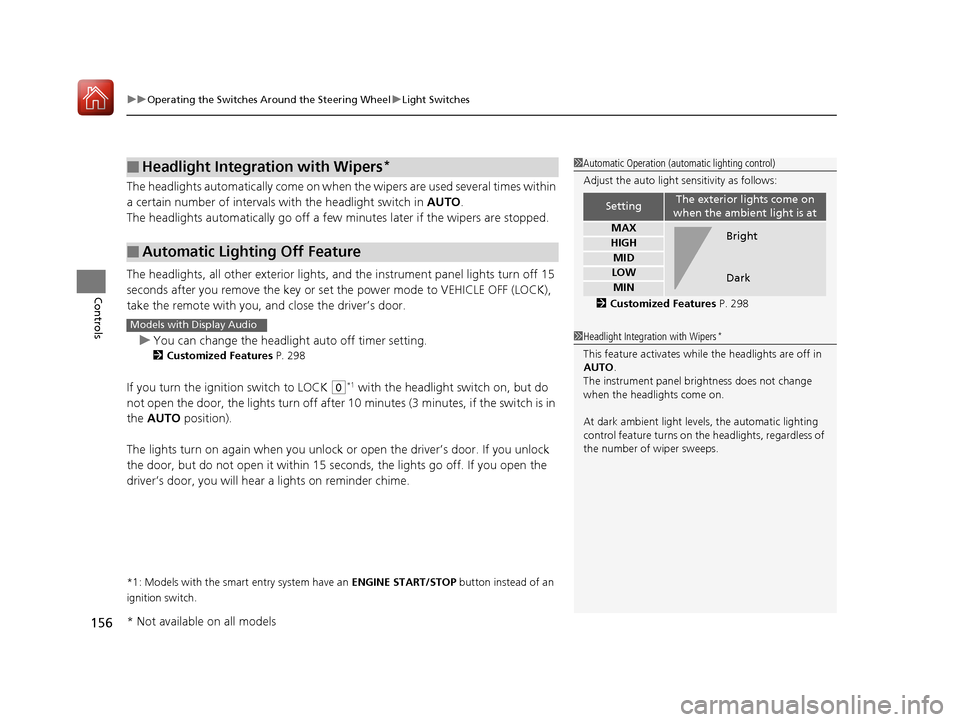
The headlights automatically co me on when the wipers are used several times within
a certain number of intervals wi th the headlight switch in AUTO.
The headlights automatically go off a few minutes later if the wipers are stopped.
The headlights, all other exterior lights, an d the instrument panel lights turn off 15
seconds after you remove the key or set the power mode to VEHICLE OFF (LOCK),
take the remote with you, and close the driver’s door.
u You can change the headlight auto off timer setting.
2 Customized Features P. 298
If you turn the ignition switch to LOCK (0*1 with the headlight switch on, but do
not open the door, the lights turn off after 10 minutes (3 minutes, if the switch is in
the AUTO position).
The lights turn on again when you unlock or open the driver’s door. If you unlock
the door, but do not open it within 15 seconds, the lights go off. If you open the
driver’s door, you will hear a lights on reminder chime.
*1: Models with the smart entry system have an ENGINE START/STOP button instead of an
ignition switch.
■Headlight Integration with Wipers*
■Automatic Lighting Off Feature
1 Automatic Operation (aut omatic lighting control)
Adjust the auto light sensitivity as follows:
2 Customized Features P. 298
SettingThe exterior lights come on
when the ambient light is at
MAX
HIGH
MID
LOW
MIN
Bright
Dark
1 Headlight Integration with Wipers*
This feature activates while the headlights are off in
AUTO .
The instrument panel br ightness does not change
when the headlights come on.
At dark ambient light leve ls, the automatic lighting
control feature turns on the headlights, regardless of
the number of wiper sweeps.
Models with Display Audio
* Not available on all models
17 CIVIC 2D HCM (KA KC KL)-31TBG6100.book 156 ページ 2016年8月31日 水曜日 午後5時43分
Page 159 of 595
158
uuOperating the Switches Around the Steering Wheel uWipers and Washers
Controls
Wipers and Washers
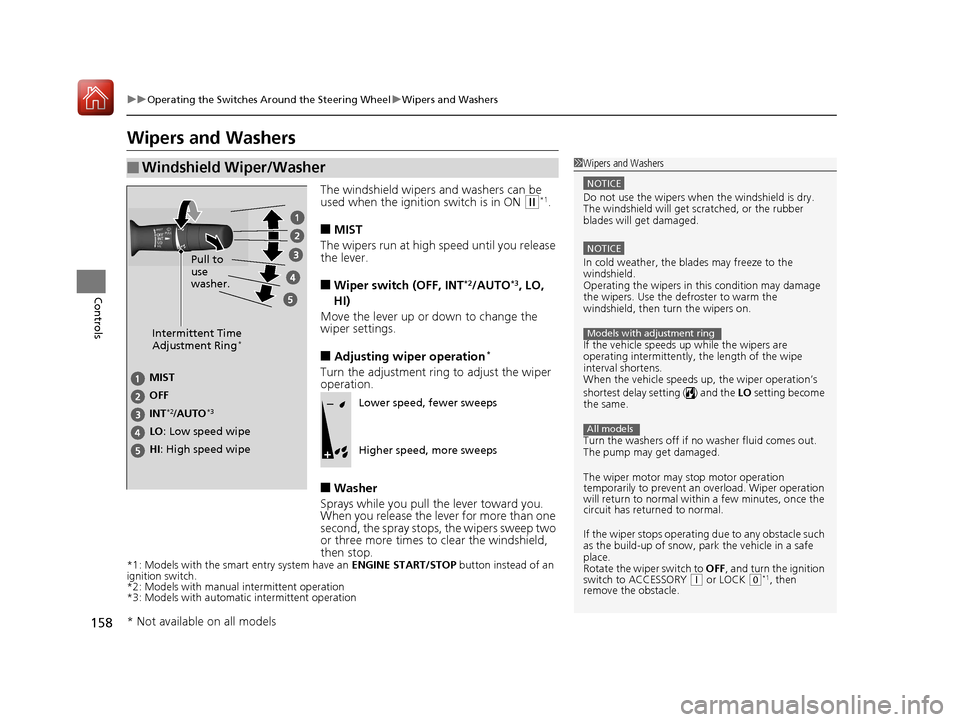
The windshield wipers and washers can be
used when the ignition switch is in ON (w*1.
■MIST
The wipers run at high speed until you release
the lever.
■Wiper switch (OFF, INT*2/AUTO*3, LO,
HI)
Move the lever up or down to change the
wiper settings.
■Adjusting wiper operation*
Turn the adjustment ring to adjust the wiper
operation.
■Washer
Sprays while you pull the lever toward you.
When you release the lever for more than one
second, the spray stops, the wipers sweep two
or three more times to clear the windshield,
then stop.
*1: Models with the smart entry system have an ENGINE START/STOP button instead of an
ignition switch.
*2: Models with manual intermittent operation
*3: Models with automati c intermittent operation
■Windshield Wiper/Washer1Wipers and Washers
NOTICE
Do not use the wipers when the windshield is dry.
The windshield will get sc ratched, or the rubber
blades will get damaged.
NOTICE
In cold weather, the blades may freeze to the
windshield.
Operating the wipers in th is condition may damage
the wipers. Use the defroster to warm the
windshield, then turn the wipers on.
If the vehicle speeds up while the wipers are
operating intermittently, the length of the wipe
interval shortens.
When the vehicle speeds up, the wiper operation’s
shortest delay setting ( ) and the LO setting become
the same.
Turn the washers off if no washer fluid comes out.
The pump may get damaged.
The wiper motor may stop motor operation
temporarily to prevent an overload. Wiper operation
will return to normal within a few minutes, once the
circuit has returned to normal.
If the wiper stops operating due to any obstacle such
as the build-up of snow, pa rk the vehicle in a safe
place.
Rotate the wiper switch to OFF, and turn the ignition
switch to ACCESSORY
( q or LOCK (0*1, then
remove the obstacle.
Models with adjustment ring
All models
Intermittent Time
Adjustment Ring*
MIST
INT
*2/AUTO*3
OFF
LO: Low speed wipe
HI: High speed wipe Pull to
use
washer.Lower speed, fewer sweeps
Higher speed, more sweeps
* Not available on all models
17 CIVIC 2D HCM (KA KC KL)-31TBG6100.book 158 ページ 2016年8月31日 水曜日 午後5時43分
Page 160 of 595
159
uuOperating the Switches Around the Steering Wheel uWipers and Washers
Controls
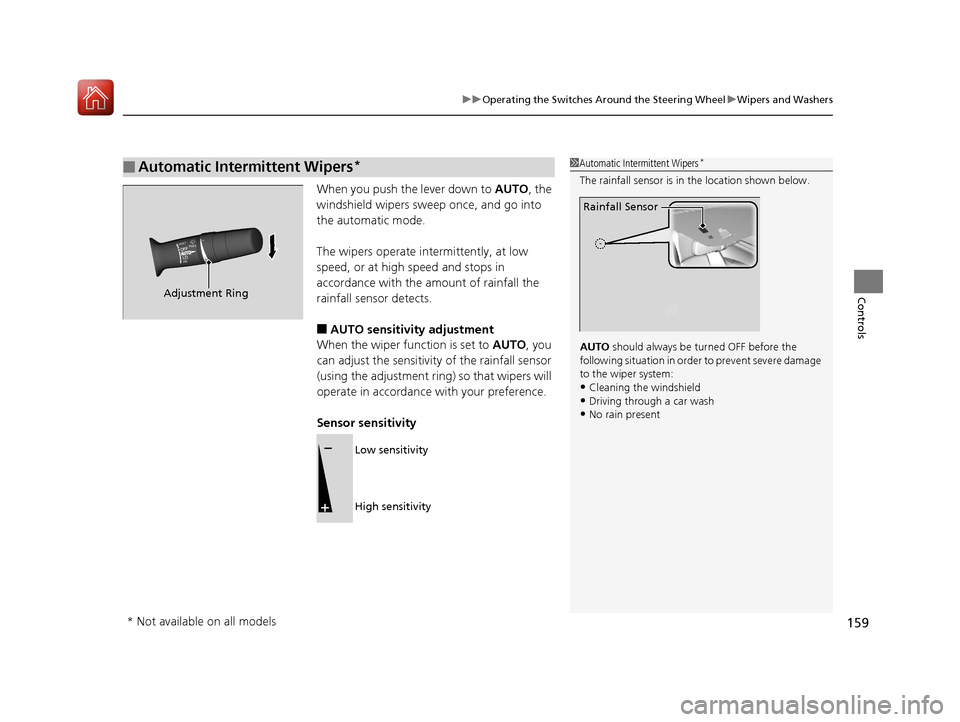
When you push the lever down to AUTO, the
windshield wipers sweep once, and go into
the automatic mode.
The wipers operate intermittently, at low
speed, or at high speed and stops in
accordance with the amount of rainfall the
rainfall sensor detects.
■AUTO sensitivity adjustment
When the wiper function is set to AUTO, you
can adjust the sensitivity of the rainfall sensor
(using the adjustment ring) so that wipers will
operate in accordance with your preference.
Sensor sensitivity
■Automatic Intermittent Wipers*1 Automatic Intermittent Wipers*
The rainfall sensor is in the location shown below.
AUTO should always be turned OFF before the
following situation in order to prevent severe damage
to the wiper system:
•Cleaning the windshield
•Driving through a car wash•No rain present
Rainfall Sensor
Adjustment Ring
Low sensitivity
High sensitivity
* Not available on all models
17 CIVIC 2D HCM (KA KC KL)-31TBG6100.book 159 ページ 2016年8月31日 水曜日 午後5時43分
Page 432 of 595
Continued431
uuWhen Driving uRoad Departure Mitigation (RDM) System*
Driving
The system becomes ready to start sear ching for lane markings when all the
following conditions are met:
• The vehicle is traveling between about 45 and 90 mph (72 and 145 km/h).
• The vehicle is on a straight or slightly curved road.
• The turn signals are off.
• The brake pedal is not depressed.
• The wipers are not in continuous operation.
• The system makes a determination that th e driver is not actively accelerating,
braking or steering.
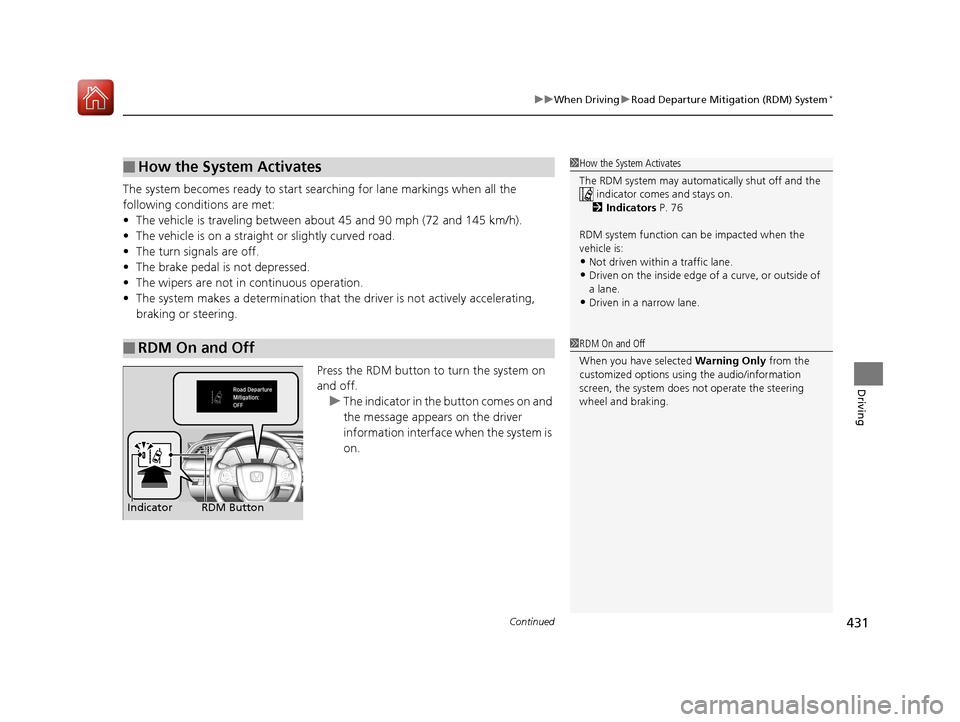
Press the RDM button to turn the system on
and off.u The indicator in the button comes on and
the message appears on the driver
information interface when the system is
on.
■How the System Activates
■RDM On and Off
1 How the System Activates
The RDM system may automa tically shut off and the
indicator comes and stays on.
2 Indicators P. 76
RDM system function can be impacted when the
vehicle is:
•Not driven within a traffic lane.•Driven on the inside edge of a curve, or outside of
a lane.
•Driven in a narrow lane.
1 RDM On and Off
When you have selected Warning Only from the
customized options using the audio/information
screen, the system does not operate the steering
wheel and braking.
RDM Button
Indicator
17 CIVIC 2D HCM (KA KC KL)-31TBG6100.book 431 ページ 2016年8月31日 水曜日 午後5時43分
Page 437 of 595
uuWhen Driving uLane Keeping Assist System (LKAS)*
436
Driving
The system can be used when the following conditions are met.
• The lane in which you are driving has dete ctable lane markers on both sides, and
your vehicle is in the center of the lane.
• The vehicle speed is between 45 and 90 mph (72 and 145 km/h).
• You are driving on a straight or slightly curved road.
• The turn signals are off.
• The brake pedal is not depressed.
• The wipers are not in continuous operation.
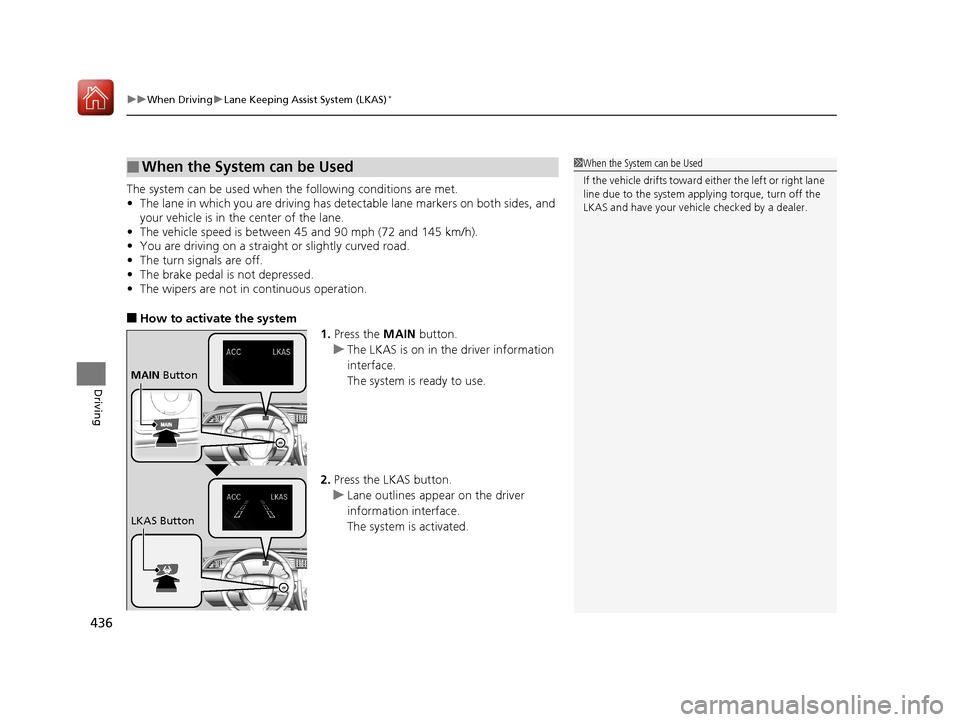
■How to activate the system
1.Press the MAIN button.
u The LKAS is on in the driver information
interface.
The system is ready to use.
2. Press the LKAS button.
u Lane outlines appear on the driver
information interface.
The system is activated.
■When the System can be Used1When the System can be Used
If the vehicle drifts toward either the left or right lane
line due to the system appl ying torque, turn off the
LKAS and have your vehi cle checked by a dealer.
MAIN Button
LKAS Button
17 CIVIC 2D HCM (KA KC KL)-31TBG6100.book 436 ページ 2016年8月31日 水曜日 午後5時43分
Page 439 of 595
438
uuWhen Driving uLane Keeping Assist System (LKAS)*
Driving
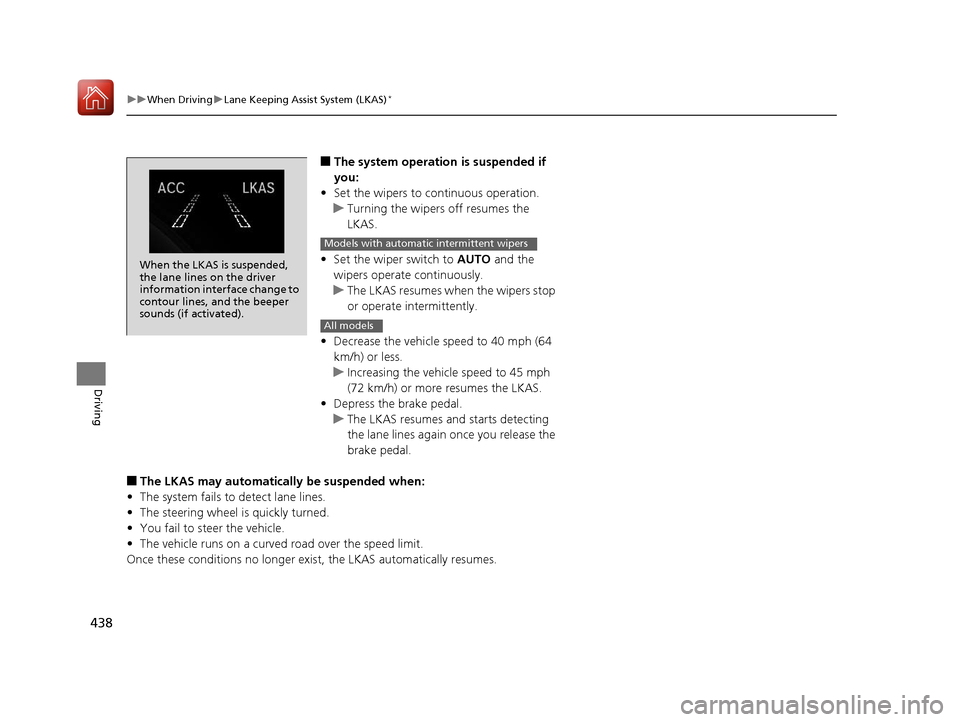
■The system operation is suspended if
you:
• Set the wipers to continuous operation.
u Turning the wipers off resumes the
LKAS.
• Set the wiper switch to AUTO and the
wipers operate continuously.
u The LKAS resumes when the wipers stop
or operate intermittently.
• Decrease the vehicle speed to 40 mph (64
km/h) or less.
u Increasing the vehicle speed to 45 mph
(72 km/h) or more resumes the LKAS.
• Depress the brake pedal.
u The LKAS resumes and starts detecting
the lane lines again once you release the
brake pedal.
■The LKAS may automatically be suspended when:
• The system fails to detect lane lines.
• The steering wheel is quickly turned.
• You fail to steer the vehicle.
• The vehicle runs on a curved road over the speed limit.
Once these conditions no longer exis t, the LKAS automatically resumes.
When the LKAS is suspended,
the lane lines on the driver
information interface change to
contour lines, and the beeper
sounds (if activated).
Models with automatic intermittent wipers
All models
17 CIVIC 2D HCM (KA KC KL)-31TBG6100.book 438 ページ 2016年8月31日 水曜日 午後5時43分