brake light HONDA CIVIC COUPE 2018 Owner's Manual (in English)
[x] Cancel search | Manufacturer: HONDA, Model Year: 2018, Model line: CIVIC COUPE, Model: HONDA CIVIC COUPE 2018Pages: 631, PDF Size: 39.09 MB
Page 10 of 631
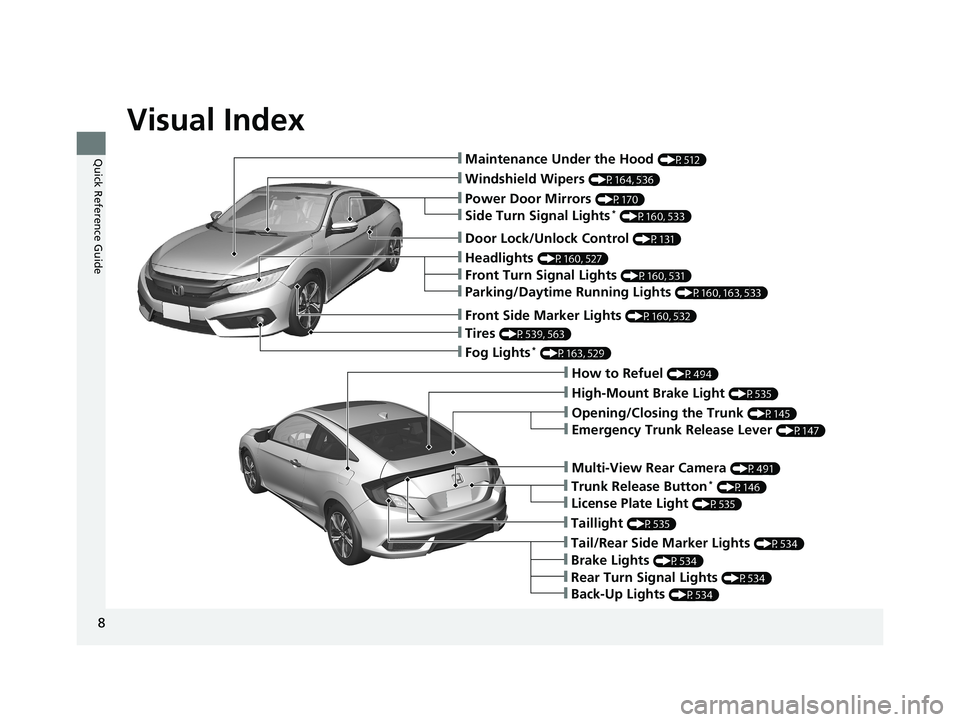
Visual Index
8
Quick Reference Guide❙Maintenance Under the Hood (P512)
❙Windshield Wipers (P164, 536)
❙Tires (P539, 563)
❙Fog Lights* (P163, 529)
❙Power Door Mirrors (P170)
❙How to Refuel (P494)
❙High-Mount Brake Light (P535)
❙Emergency Trunk Release Lever (P147)
❙Opening/Closing the Trunk (P145)
❙Multi-View Rear Camera (P491)
❙Door Lock/Unlock Control (P131)
❙Side Turn Signal Lights* (P160, 533)
❙Headlights (P160, 527)
❙Front Turn Signal Lights (P160, 531)
❙Parking/Daytime Running Lights (P160, 163, 533)
❙Front Side Marker Lights (P160, 532)
❙Taillight (P535)
❙Back-Up Lights (P534)
❙Brake Lights (P534)
❙Rear Turn Signal Lights (P534)
❙Tail/Rear Side Marker Lights (P534)
❙Trunk Release Button* (P146)
❙License Plate Light (P535)
18 CIVIC 2D HCM (KA KC KL)-31TBG6201.book 8 ページ 2018年10月26日 金曜日 午前9時10分
Page 13 of 631
11
Quick Reference Guide
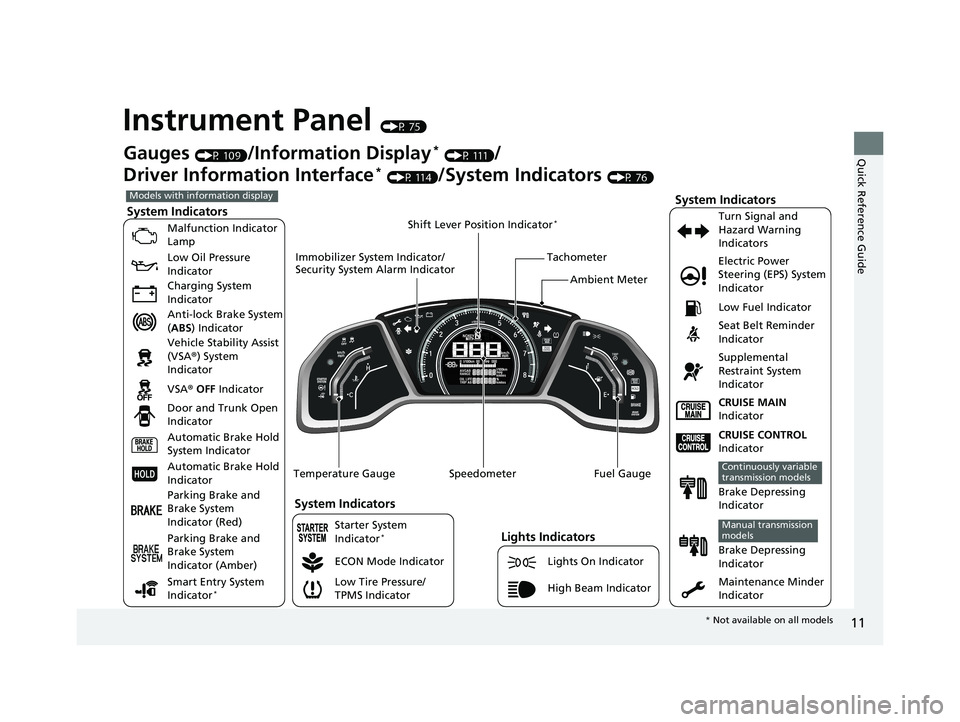
Instrument Panel (P 75)
System Indicators
Malfunction Indicator
Lamp
Low Oil Pressure
Indicator
Charging System
Indicator
Anti-lock Brake System
(ABS ) Indicator
Vehicle Stability Assist
(VSA ®) System
Indicator
VSA ® OFF Indicator
Low Tire Pressure/
TPMS Indicator Electric Power
Steering (EPS) System
Indicator
Lights Indicators
Lights On Indicator
High Beam Indicator
Seat Belt Reminder
Indicator
System Indicators
CRUISE CONTROL
Indicator
Parking Brake and
Brake System
Indicator (Red) Supplemental
Restraint System
Indicator
Door and Trunk Open
Indicator CRUISE MAIN
Indicator
Tachometer
Speedometer Fuel Gauge
Immobilizer System Indicator/
Security System Alarm Indicator
Shift Lever Position Indicator
*
Low Fuel Indicator
Gauges (P 109)/Information Display* (P 111)/
Driver Information Interface
* (P 114)/System Indicators (P 76)
ECON Mode Indicator Turn Signal and
Hazard Warning
Indicators
Maintenance Minder
Indicator
Models with information display
Parking Brake and
Brake System
Indicator (Amber)
System Indicators
Automatic Brake Hold
System Indicator
Automatic Brake Hold
Indicator
Temperature Gauge
Brake Depressing
Indicator
Continuously variable
transmission models
Brake Depressing
Indicator
Manual transmission
models
Smart Entry System
Indicator*
Starter System
Indicator*
Ambient Meter
*
Not available on all models
18 CIVIC 2D HCM (KA KC KL)-31TBG6201.book 11 ページ 2018年10月26日 金曜日 午前9時10分
Page 14 of 631
12
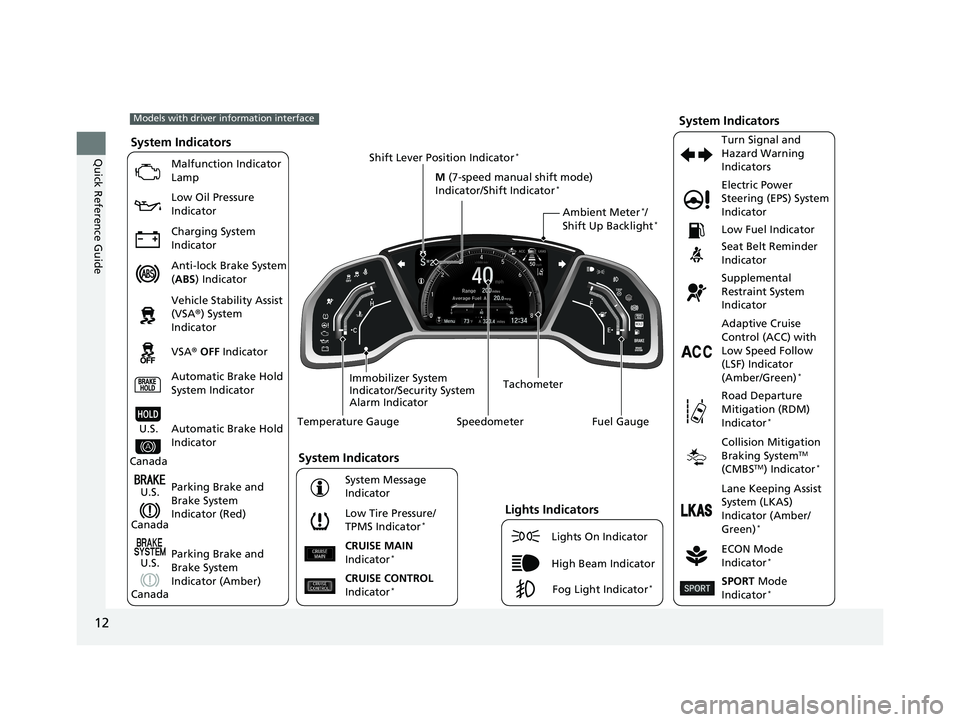
Quick Reference GuideSystem Indicators
Malfunction Indicator
Lamp
Low Oil Pressure
Indicator
Charging System
Indicator
Anti-lock Brake System
(ABS ) Indicator
Vehicle Stability Assist
(VSA ®) System
Indicator
VSA ® OFF Indicator
Low Tire Pressure/
TPMS Indicator
*
Electric Power
Steering (EPS) System
Indicator
Seat Belt Reminder
Indicator
System Indicators
Parking Brake and
Brake System
Indicator (Red) Supplemental
Restraint System
Indicator
Tachometer
Speedometer Fuel Gauge
Immobilizer System
Indicator/Security System
Alarm Indicator Shift Lever Position Indicator
*
Low Fuel Indicator
ECON Mode
Indicator
*
Turn Signal and
Hazard Warning
Indicators
Models with driver information interface
Parking Brake and
Brake System
Indicator (Amber)
System Indicators
U.S.
Canada
U.S.
Canada Automatic Brake Hold
System Indicator
Automatic Brake Hold
IndicatorU.S.
Canada Temperature Gauge
Lights Indicators
Lights On Indicator
High Beam Indicator
Fog Light Indicator*
Adaptive Cruise
Control (ACC) with
Low Speed Follow
(LSF) Indicator
(Amber/Green)
*
System Message
Indicator Collision Mitigation
Braking System
TM
(CMBSTM) Indicator*
Road Departure
Mitigation (RDM)
Indicator
*
Lane Keeping Assist
System (LKAS)
Indicator (Amber/
Green)
*
CRUISE CONTROL
Indicator*
CRUISE MAIN
Indicator*
M (7-speed manual shift mode)
Indicator/Shift Indicator*
SPORT Mode
Indicator*
Ambient Meter*/
Shift Up Backlight*
18 CIVIC 2D HCM (KA KC KL)-31TBG6201.book 12 ページ 2018年10月26日 金曜日 午前9時10分
Page 28 of 631
26
Quick Reference Guide
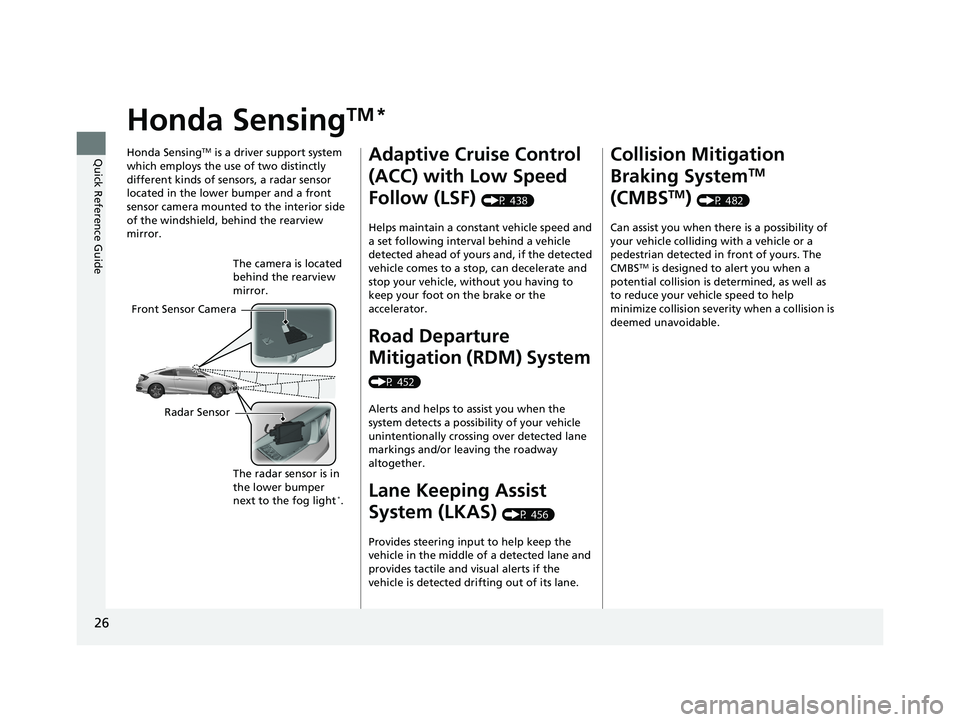
Honda SensingTM *
Honda SensingTM is a driver support system
which employs the use of two distinctly
different kinds of sensors, a radar sensor
located in the lower bumper and a front
sensor camera mounted to the interior side
of the windshield, behind the rearview
mirror.
Front Sensor Camera The camera is located
behind the rearview
mirror.
Radar Sensor The radar sensor is in
the lower bumper
next to the fog light
*.
Adaptive Cruise Control
(ACC) with Low Speed
Follow (LSF)
(P 438)
Helps maintain a constant vehicle speed and
a set following interval behind a vehicle
detected ahead of yours and, if the detected
vehicle comes to a stop, can decelerate and
stop your vehicle, wi thout you having to
keep your foot on the brake or the
accelerator.
Road Departure
Mitigation (RDM) System
(P 452)
Alerts and helps to assist you when the
system detects a possibility of your vehicle
unintentionally crossing over detected lane
markings and/or leaving the roadway
altogether.
Lane Keeping Assist
System (LKAS)
(P 456)
Provides steering input to help keep the
vehicle in the middle of a detected lane and
provides tactile and visual alerts if the
vehicle is detected drifting out of its lane.
Collision Mitigation
Braking System
TM
(CMBS
TM) (P 482)
Can assist you when there is a possibility of
your vehicle colliding with a vehicle or a
pedestrian detected in front of yours. The
CMBS
TM is designed to alert you when a
potential collision is determined, as well as
to reduce your vehicle speed to help
minimize collision severity when a collision is
deemed unavoidable.
18 CIVIC 2D HCM (KA KC KL)-31TBG6201.book 26 ページ 2018年10月26日 金曜日 午前9時10分
Page 29 of 631
27
Quick Reference Guide
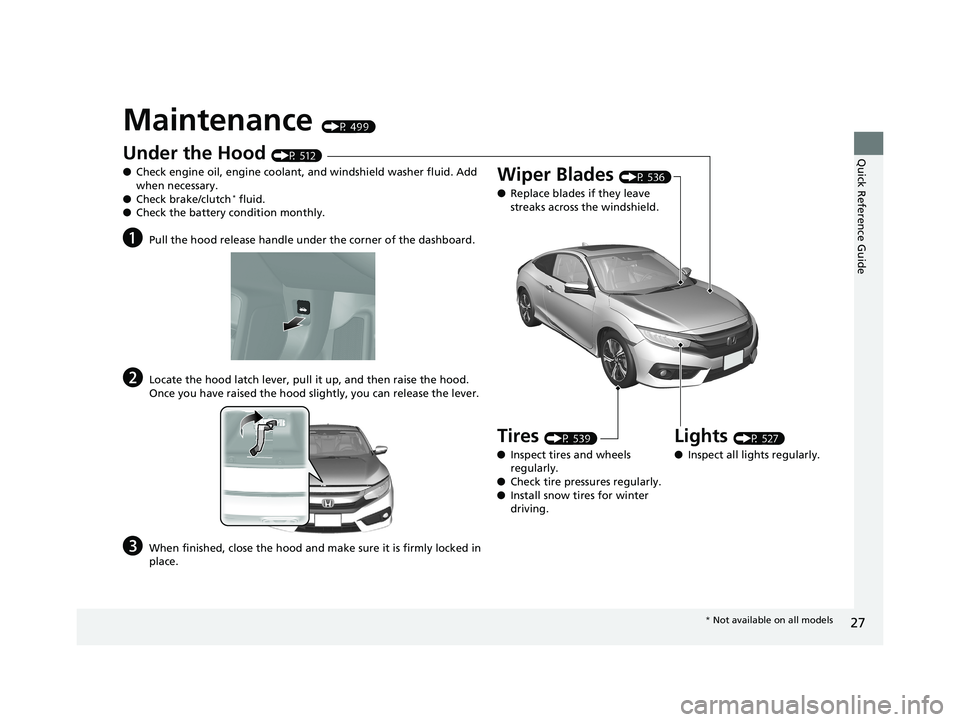
Maintenance (P 499)
Under the Hood (P 512)
● Check engine oil, engine coolant, and windshield washer fluid. Add
when necessary.
● Check brake/clutch
* fluid.
● Check the battery condition monthly.
aPull the hood release handle under the corner of the dashboard.
bLocate the hood latch lever, pull it up, and then raise the hood.
Once you have raised the hood slightly, you can release the lever.
cWhen finished, close the hood and make sure it is firmly locked in
place.
Lights (P 527)
● Inspect all lights regularly.
Wiper Blades (P 536)
● Replace blades if they leave
streaks across the windshield.
Tires (P 539)
● Inspect tires and wheels
regularly.
● Check tire pressures regularly.
● Install snow tires for winter
driving.
* Not available on all models
18 CIVIC 2D HCM (KA KC KL)-31TBG6201.book 27 ページ 2018年10月26日 金曜日 午前9時10分
Page 32 of 631
30
Quick Reference Guide
Why does the brake pedal
pulsate slightly when
applying the brakes?This can occur when the ABS activates and does not indicate a
problem. Apply firm, steady pressure on the brake pedal. Never
pump the brake pedal.
2Anti-lock Brake System (ABS) (P 480)
Why do the doors lock
after I unlocked the doors
using a remote
transmitter?If you do not open the doors within 30 seconds, the doors are
relocked automatically for security.
Why does the beeper
sound when I open the
driver’s door?The beeper sounds when:
●The key is left in the ignition switch*.
●The power mode* is in ACCESSORY.
●The exterior lights are left on.
Why does a buzzer sound
when I walk away from the
vehicle after I close the
door?
The buzzer sounds if you move outside the walk away auto
door lock operating range before the door completely closes.
2To lock (Walk Away Auto Door Lock) (P 132)
Models with smart entry system and
Display Audio
18 CIVIC 2D HCM (KA KC KL)-31TBG6201.book 30 ページ 2018年10月26日 金曜日 午前9時10分
Page 105 of 631
103
uuIndicators uDriver Information Interface Wa rning and Information Messages*
Continued
Instrument Panel
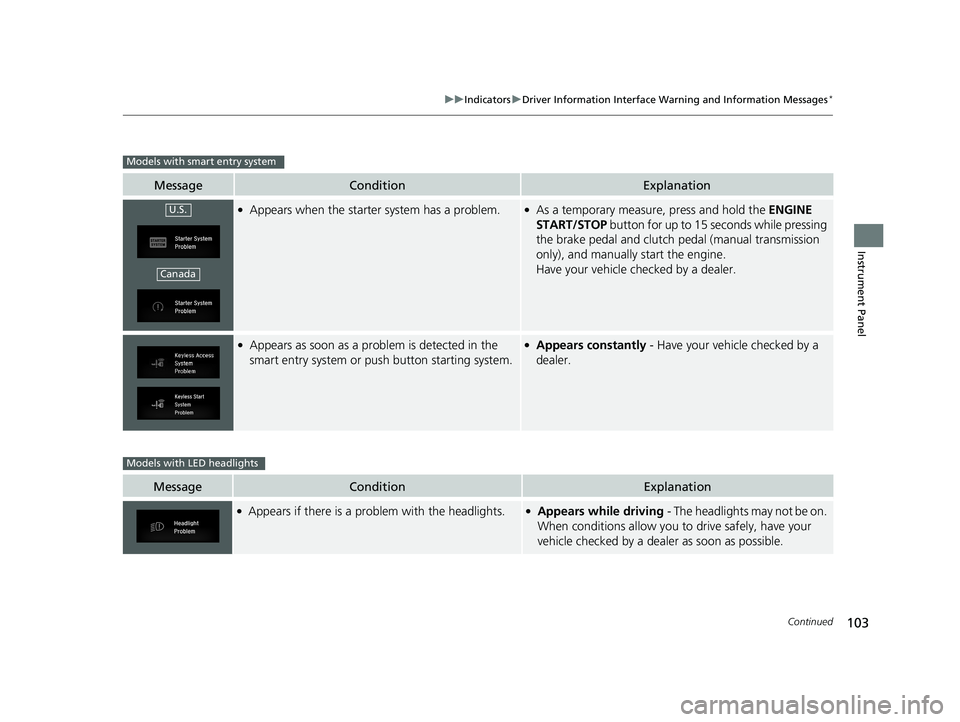
MessageConditionExplanation
●Appears when the starter system has a problem.●As a temporary measure, press and hold the ENGINE
START/STOP button for up to 15 seconds while pressing
the brake pedal and clutch pedal (manual transmission
only), and manually start the engine.
Have your vehicle checked by a dealer.
●Appears as soon as a problem is detected in the
smart entry system or push button starting system.●Appears constantly - Have your vehicle checked by a
dealer.
MessageConditionExplanation
●Appears if there is a problem with the headlights.●Appears while driving - The headlights may not be on.
When conditions allow you to drive safely, have your
vehicle checked by a deal er as soon as possible.
Models with smart entry system
U.S.
Canada
Models with LED headlights
18 CIVIC 2D HCM (KA KC KL)-31TBG6201.book 103 ページ 2018年10月26日 金曜日 午前9時10分
Page 150 of 631
148
Controls
Security System
Immobilizer System
The immobilizer system prevents a key that has not been pre-registered from
starting the engine. Each key contains electronic transmitters that use electronic
signals to verify the key.
Pay attention to the following when inserti ng the key into the ignition switch or
pressing the ENGINE START/STOP button:
• Do not allow objects that emit strong radio waves near the ignition switch or the
ENGINE START/STOP button.
• Make sure the key is not covered by or touching a metal object.
• Do not bring a key from another vehicle’s immobilizer system near the ignition
switch or the ENGINE START/STOP button.
• Do not put the key near magnetic items. Electronic devices, such as televisions
and audio systems emit strong magnetic fields. Note that even a key chain can
become magnetic.
Security System Alarm
The security system alarm activates when the trunk, hood or doors are forcibly
opened. The alarm does not activate if th e trunk or doors are opened with the key,
remote transmitter or smart entry system
*.
However, the alarm activates if a door is opened with the key and then the
transmission is taken out of
(P (continuously variable transmission models) or the
hood is opened before the ignition switch is turned to ON (w*1.
■When the security sy stem alarm activates
The horn sounds intermittently, and some exterior lights flash.
■To deactivate the security system alarm
Unlock the vehicle using the remote transmitter, or smart entry system*, or the
ignition switch is turned to ON (w*1. The system, along with the horn and flashing
lights, is deactivated.
*1: Models with the smart entry system have an ENGINE START/STOP button instead of an
ignition switch.
1 Immobilizer System
NOTICE
Leaving the key in the vehicl e can result in theft or
accidental movement of the vehicle.
Always take the key with you whenever you leave the
vehicle unattended.
Do not alter the system or add other devices to it.
Doing so may damage the system and make your
vehicle inoperable.
Canadian models only: Apply and hold the brake
pedal before turning the vehicle on the first time after
the battery has been disconnected.
1 Security System Alarm
The security alarm continues for a maximum of two
minutes until the security system deactivates.
* Not available on all models
18 CIVIC 2D HCM (KA KC KL)-31TBG6201.book 148 ページ 2018年10月26日 金曜日 午前9時10分
Page 165 of 631
163
uuOperating the Switches Around the Steering Wheel uFog Lights*
Controls
Fog Lights*
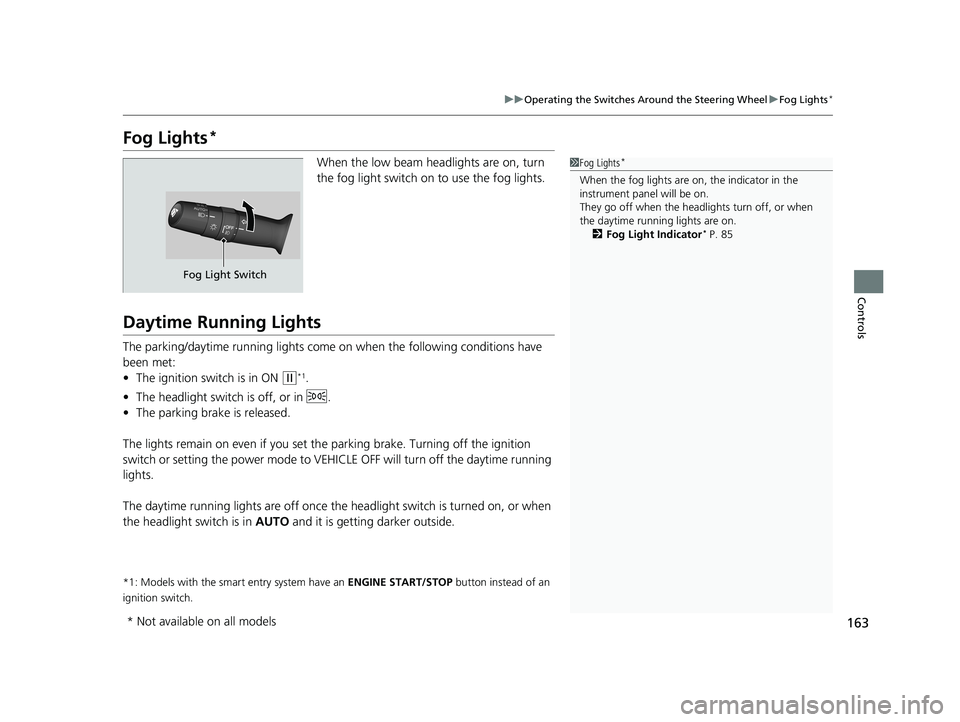
When the low beam headlights are on, turn
the fog light switch on to use the fog lights.
Daytime Running Lights
The parking/daytime running lights come on when the following conditions have
been met:
• The ignition switch is in ON
(w*1.
• The headlight switch is off, or in .
• The parking brake is released.
The lights remain on even if you set th e parking brake. Turning off the ignition
switch or setting the power mode to VEHI CLE OFF will turn off the daytime running
lights.
The daytime running lights are off once the h eadlight switch is turned on, or when
the headlight switch is in AUTO and it is getting darker outside.
*1: Models with the smart entry system have an ENGINE START/STOP button instead of an
ignition switch.
1 Fog Lights*
When the fog lights are on, the indicator in the
instrument pane l will be on.
They go off when the headlights turn off, or when
the daytime running lights are on. 2 Fog Light Indicator
* P. 85
Fog Light Switch
* Not available on all models
18 CIVIC 2D HCM (KA KC KL)-31TBG6201.book 163 ページ 2018年10月26日 金曜日 午前9時10分
Page 409 of 631
Continued407
uuBefore Driving uDriving Preparation
Driving
• Store or secure all items on board properly.
u Carrying too much cargo, or improperly storing it, can affect your vehicle’s
handling, stability, sto pping distance, and tires, and make it unsafe.
2Maximum Load Limit P. 409
•Do not pile items higher than the seat height.
u They can block your view and may be thrown forward in the event of sudden
braking.
• Do not place anything in the front seat footwells. Make sure to secure the floor
mat.
u An object or unsecured floor mat can in terfere with your brake and accelerator
pedal operation while driving.
• If you have any animals on board, do not let them move around in the vehicle.
u They may interfere with driv ing and a crash could occur.
• Securely close and lock both doors and the trunk.
2 Locking/Unlocking the Doors from the Inside P. 138
•Adjust your seating position properly.
u Adjust the front head restraint*1, too.
2 Adjusting the Seats P. 171
2 Adjusting the Front Head Restraints P. 174
•Adjust the mirrors and steering wh eel properly for your driving.
u Adjust them while sitting in the proper driving position.
2 Adjusting the Mirrors P. 169
2 Adjusting the Steering Wheel P. 168
*1: Models without SPORT mode
■Interior Checks1 Interior Checks
The headlight aim is set by the factory, and does not
need to be adjusted. Howeve r, if you regularly carry
heavy items in the trunk, have the aiming readjusted
at a dealer or by a qualified technician.
18 CIVIC 2D HCM (KA KC KL)-31TBG6201.book 407 ページ 2018年10月26日 金曜日 午前9時10分