TPMS HONDA CIVIC COUPE 2019 Owner's Manual (in English)
[x] Cancel search | Manufacturer: HONDA, Model Year: 2019, Model line: CIVIC COUPE, Model: HONDA CIVIC COUPE 2019Pages: 675, PDF Size: 37.28 MB
Page 13 of 675
11
Quick Reference Guide
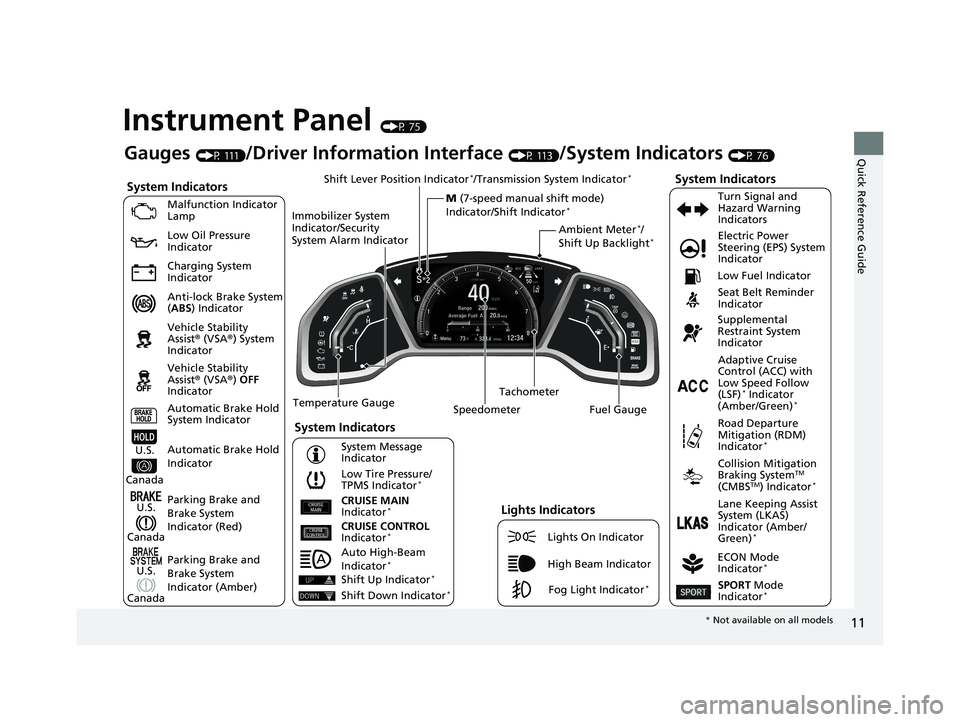
Instrument Panel (P 75)
System Indicators
Malfunction Indicator
Lamp
Low Oil Pressure
Indicator
Charging System
Indicator
Anti-lock Brake System
(ABS ) Indicator
Vehicle Stability
Assist® (VSA®) System
Indicator
Vehicle Stability
Assist® (VSA®) OFF
Indicator
Low Tire Pressure/
TPMS Indicator
*
Electric Power
Steering (EPS) System
Indicator
Seat Belt Reminder
Indicator
System Indicators
Parking Brake and
Brake System
Indicator (Red) Supplemental
Restraint System
Indicator
Tachometer
Speedometer Fuel Gauge Low Fuel Indicator
ECON Mode
Indicator
*
Turn Signal and
Hazard Warning
Indicators
Parking Brake and
Brake System
Indicator (Amber)
System Indicators
U.S.
Canada
U.S.
Canada Automatic Brake Hold
System Indicator
Automatic Brake Hold
IndicatorU.S.
Canada Temperature Gauge
Lights Indicators
Lights On Indicator
High Beam Indicator
Fog Light Indicator*
Adaptive Cruise
Control (ACC) with
Low Speed Follow
(LSF)
* Indicator
(Amber/Green)*
System Message
Indicator Collision Mitigation
Braking System
TM
(CMBSTM) Indicator*
Road Departure
Mitigation (RDM)
Indicator
*
Lane Keeping Assist
System (LKAS)
Indicator (Amber/
Green)
*CRUISE CONTROL
Indicator*
CRUISE MAIN
Indicator*
SPORT Mode
Indicator*
Ambient Meter*/
Shift Up Backlight*
Gauges (P 111)/Driver Information Interface (P 113)/System Indicators (P 76)
Shift Lever Position Indicator
*/Transmission System Indicator*
M (7-speed manual shift mode)
Indicator/Shift Indicator*
Auto High-Beam
Indicator*
Immobilizer System
Indicator/Security
System Alarm Indicator
Shift Up Indicator*
Shift Down Indicator*
* Not available on all models
19 CIVIC 2D HCM (KA KL KC)-31TBG6300.book 11 ページ 2018年9月4日 火曜 日 午後1時38分
Page 25 of 675
23
Quick Reference Guide
VSA® On and Off (P 458)
● The Vehicle Stability Assist ® (VSA® ) system
helps stabilize the vehicle during
cornering, and helps maintain traction
while accelerating on loose or slippery
road surfaces.
● VSA ® comes on automatically every time
you start the engine.
● To partially disable or fully restore VSA ®
function, press and ho ld the button until
you hear a beep.
Cruise Control* (P 454)
● Cruise control allows you to maintain a
set speed without keeping your foot on
the accelerator pedal.
● To use cruise control, press the CRUISE
button, then press the –/SET button once
you have achieved the desired speed
(above 25 mph or 40 km/h).
CMBSTM On and Off*
(P 475)
● When a possible collision is likely
unavoidable, the CMBS
TM can help you to
reduce the vehicle speed and the severity
of the collision.
● The CMBS
TM is turned on every time you
start the engine.
● To turn the CMBS
TM on or off, press and
hold the button until you hear a beep.
Tire Pressure Monitoring
System (TPMS)
(P 461)
● Detects a change in tire conditions and
overall dimensions due to decrease in tire
pressures.
● The TPMS is turned on automatically
every time you start the engine.
● A calibration procedure must be
performed when certain conditions arise.
U.S. models
* Not available on all models
19 CIVIC 2D HCM (KA KL KC)-31TBG6300.book 23 ページ 2018年9月4日 火曜 日 午後1時38分
Page 32 of 675
30
Quick Reference Guide
Why does the beeper
sound when I start driving?The beeper sounds when the driver and/or front passenger are
not wearing their seat belts.
Why do I hear a screeching
sound when I apply the
brake pedal?The brake pads may need to be replaced. Have your vehicle
inspected by a dealer.
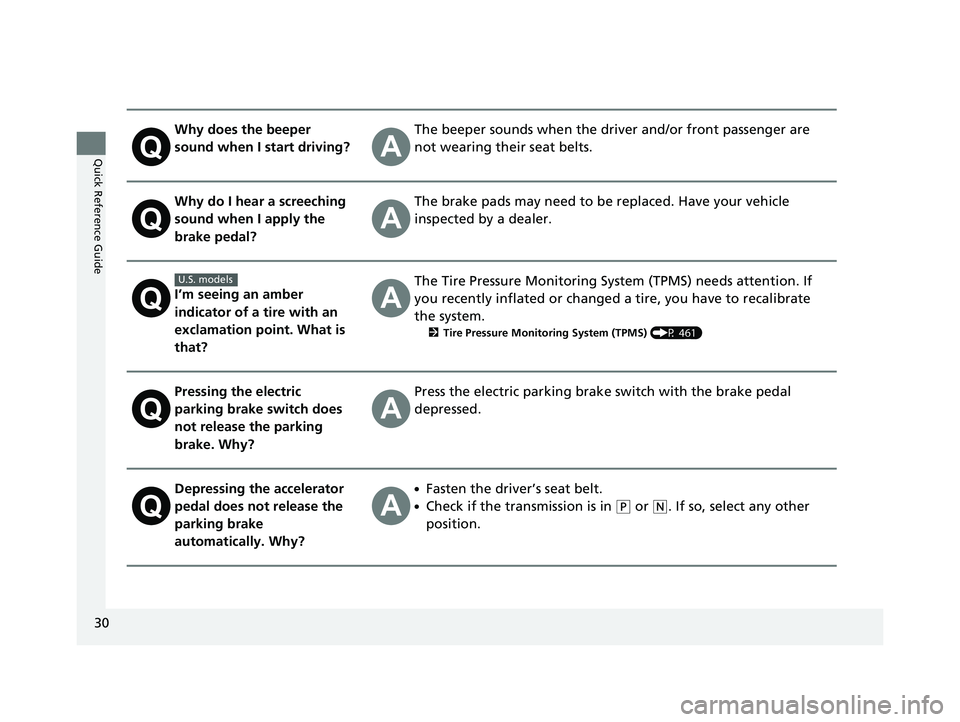
I’m seeing an amber
indicator of a tire with an
exclamation point. What is
that?
The Tire Pressure Monitoring System (TPMS) needs attention. If
you recently inflated or changed a tire, you have to recalibrate
the system.
2 Tire Pressure Monitoring System (TPMS) (P 461)
Pressing the electric
parking brake switch does
not release the parking
brake. Why?Press the electric parking brake switch with the brake pedal
depressed.
Depressing the accelerator
pedal does not release the
parking brake
automatically. Why?●Fasten the driver’s seat belt.
●Check if the transmission is in (P or (N. If so, select any other
position.
U.S. models
19 CIVIC 2D HCM (KA KL KC)-31TBG6300.book 30 ページ 2018年9月4日 火曜 日 午後1時38分
Page 87 of 675
85
uuIndicators u
Continued
Instrument Panel
*1:Models with the smart entry system have an ENGINE START/STOP button instead of an ignition switch.
IndicatorNameOn/BlinkingExplanationMessage
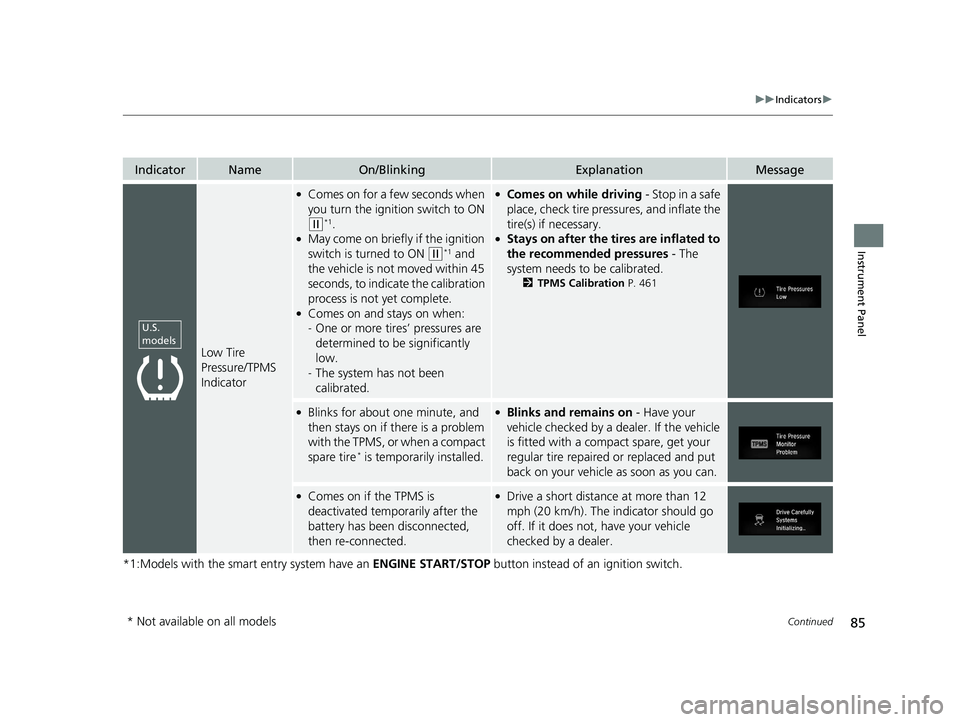
Low Tire
Pressure/TPMS
Indicator
●Comes on for a few seconds when
you turn the ignition switch to ON
(w*1.●May come on briefly if the ignition
switch is turned to ON
(w*1 and
the vehicle is not moved within 45
seconds, to indicate the calibration
process is not yet complete.
●Comes on and stays on when:
- One or more tires’ pressures are
determined to be significantly
low.
- The system has not been
calibrated.
●Comes on while driving - Stop in a safe
place, check tire pressures, and inflate the
tire(s) if necessary.
●Stays on after the tires are inflated to
the recommended pressures - The
system needs to be calibrated.
2 TPMS Calibration P. 461
●Blinks for about one minute, and
then stays on if there is a problem
with the TPMS, or when a compact
spare tire
* is temporarily installed.
●Blinks and remains on - Have your
vehicle checked by a dealer. If the vehicle
is fitted with a compact spare, get your
regular tire repaired or replaced and put
back on your vehicle as soon as you can.
●Comes on if the TPMS is
deactivated temporarily after the
battery has been disconnected,
then re-connected.●Drive a short distance at more than 12
mph (20 km/h). The in dicator should go
off. If it does not, have your vehicle
checked by a dealer.
U.S.
models
* Not available on all models
19 CIVIC 2D HCM (KA KL KC)-31TBG6300.book 85 ページ 2018年9月4日 火曜 日 午後1時38分
Page 127 of 675
125
uuGauges and Driver Information Interface uDriver Information Interface
Continued
Instrument Panel
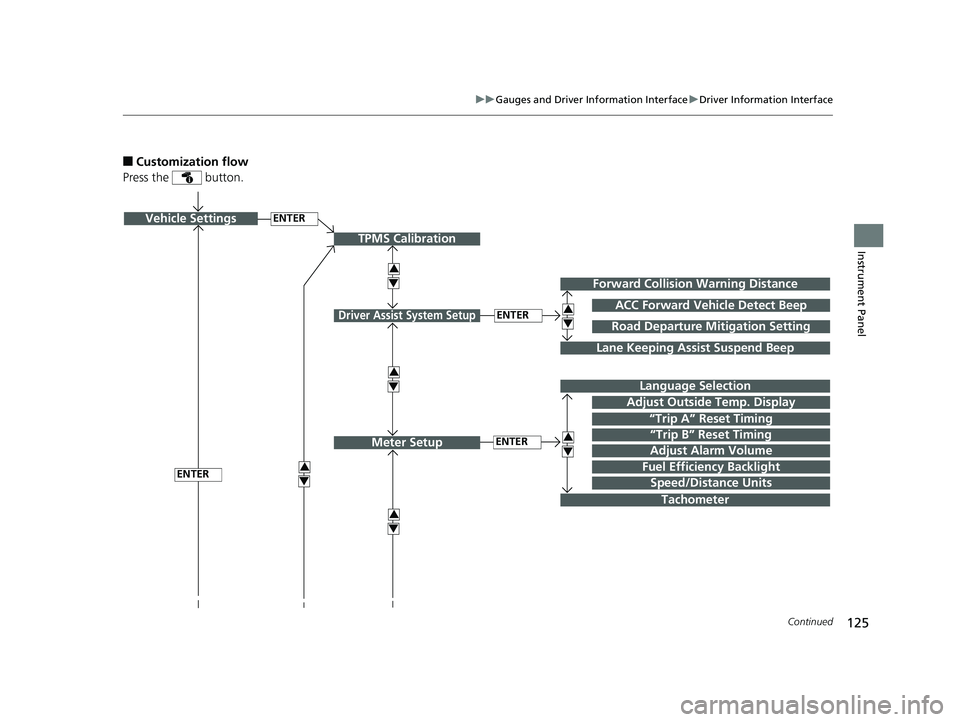
■Customization flow
Press the button.
ENTERVehicle Settings
“Trip A” Reset Timing
Language Selection
Adjust Outside Temp. Display
3
4
TPMS Calibration
ENTER
“Trip B” Reset Timing
Fuel Efficiency Backlight3
4
ACC Forward Vehicle Detect Beep
3
4
Tachometer
ENTER
Forward Collision Warning Distance
3
4
3
4
Lane Keeping Assist Suspend Beep
Road Departure Mi tigation Setting
Adjust Alarm Volume
Speed/Distance Units
3
4
ENTER
Driver Assist System Setup
Meter Setup
19 CIVIC 2D HCM (KA KL KC)-31TBG6300.book 125 ページ 2018年9月4日 火 曜日 午後1時38分
Page 129 of 675
127
uuGauges and Driver Information Interface uDriver Information Interface
Continued
Instrument Panel
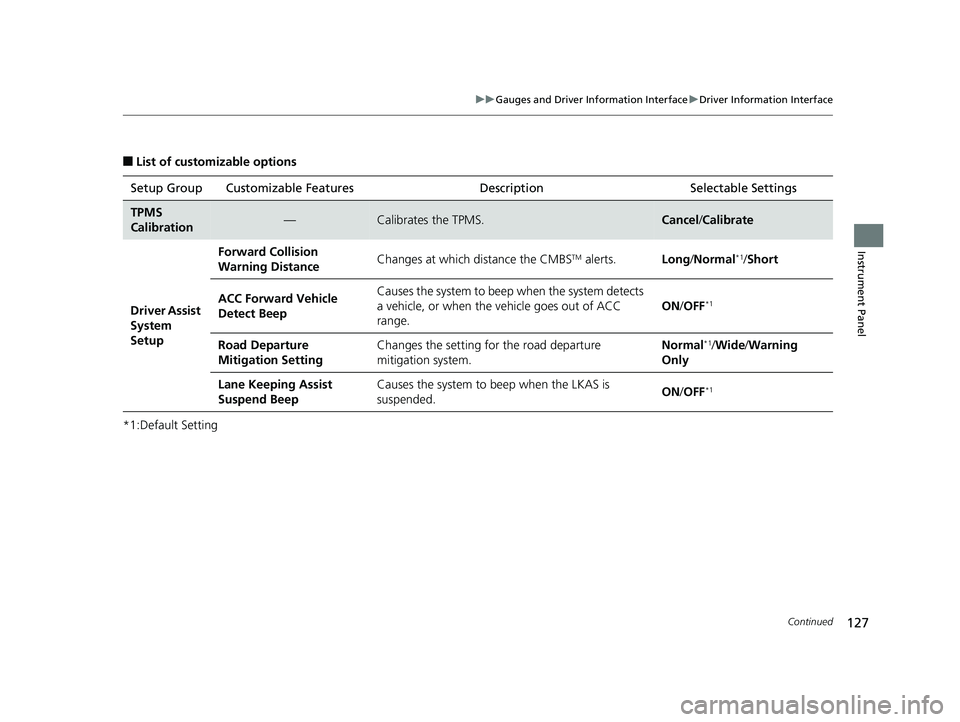
■List of customizable options
*1:Default Setting Setup Group Customizable Features
Description Selectable Settings
TPMS
Calibration—Calibrates the TPMS.Cancel/Calibrate
Driver Assist
System
Setup Forward Collision
Warning Distance
Changes at which distance the CMBS
TM alerts.
Long/Normal*1/ Short
ACC Forward Vehicle
Detect Beep Causes the system to beep
when the system detects
a vehicle, or when the vehicle goes out of ACC
range. ON
/OFF
*1
Road Departure
Mitigation Setting Changes the setting fo
r the road departure
mitigation system. Normal*1/
Wide /Warning
Only
Lane Keeping Assist
Suspend Beep Causes the system to b
eep when the LKAS is
suspended. ON
/OFF
*1
19 CIVIC 2D HCM (KA KL KC)-31TBG6300.book 127 ページ 2018年9月4日 火 曜日 午後1時38分
Page 343 of 675
341
uuCustomized Features u
Continued
Features
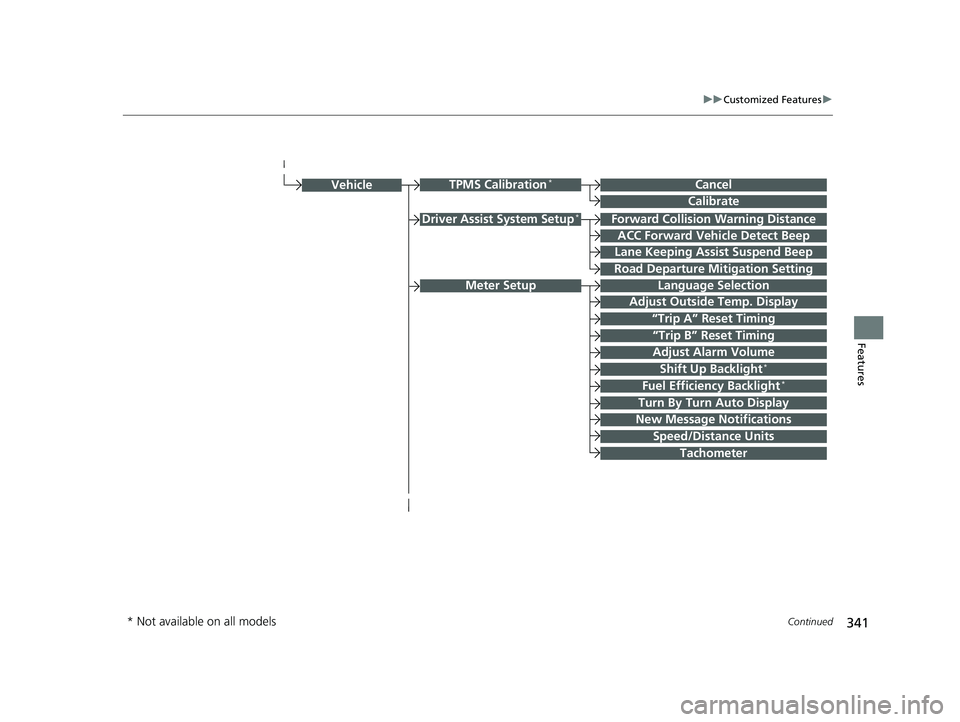
Driver Assist System Setup*Forward Collision Warning Distance
ACC Forward Vehicle Detect Beep
Lane Keeping Assist Suspend Beep
Road Departure Mi tigation Setting
Adjust Outside Temp. Display
“Trip A” Reset Timing
“Trip B” Reset Timing
Vehicle
Meter Setup
Adjust Alarm Volume
Speed/Distance Units
Fuel Efficiency Backlight*
New Message Notifications
Tachometer
CancelTPMS Calibration*
Calibrate
Turn By Turn Auto Display
Shift Up Backlight*
Language Selection
* Not available on all models
19 CIVIC 2D HCM (KA KL KC)-31TBG6300.book 341 ページ 2018年9月4日 火 曜日 午後1時38分
Page 358 of 675
356
uuCustomized Features u
Features
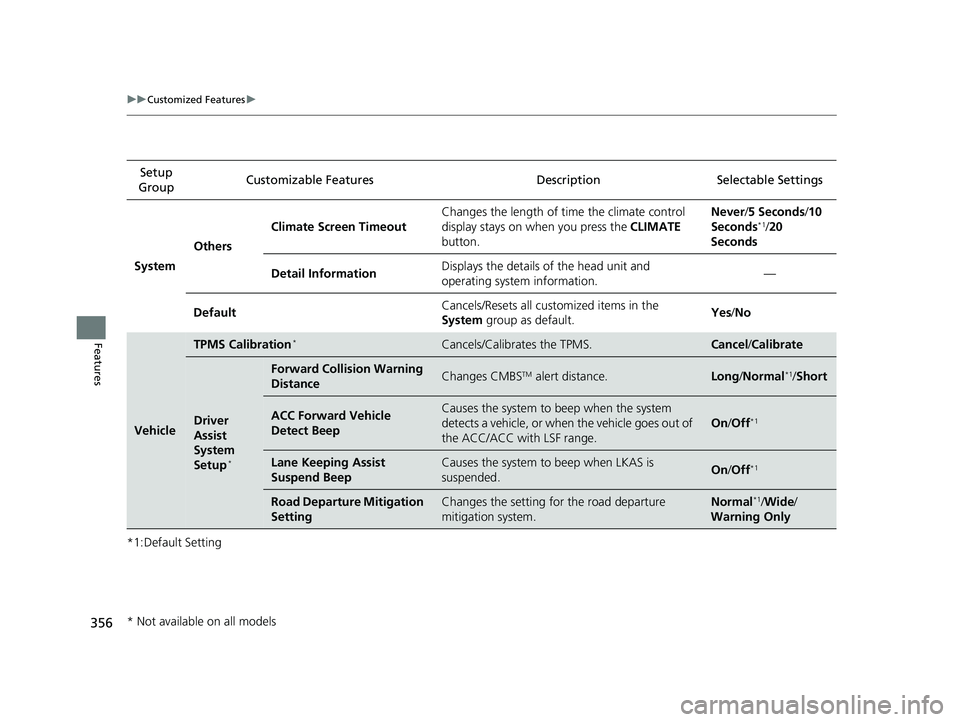
*1:Default SettingSetup
Group Customizable Features Description Selectable Settings
System Others Climate Screen Timeout
Changes the length of time the climate control
display stays on when you press the
CLIMATE
button. Never/
5 Seconds /10
Seconds
*1/ 20
Seconds
Detail Information Displays the details of the head unit and
operating system information. —
Default Cancels/Resets all customized items in the
System
group as default. Yes
/No
Vehicle
TPMS Calibration*Cancels/Calibrates the TPMS.Cancel /Calibrate
Driver
Assist
System
Setup
*
Forward Collision Warning
DistanceChanges CMBSTM alert distance.Long /Normal*1/Short
ACC Forward Vehicle
Detect BeepCauses the system to beep when the system
detects a vehicle, or when the vehicle goes out of
the ACC/ACC with LSF range.
On /Off*1
Lane Keeping Assist
Suspend BeepCauses the system to beep when LKAS is
suspended.On /Off*1
Road Departure Mitigation
SettingChanges the setting for the road departure
mitigation system.Normal*1/Wide /
Warning Only
* Not available on all models
19 CIVIC 2D HCM (KA KL KC)-31TBG6300.book 356 ページ 2018年9月4日 火 曜日 午後1時38分
Page 427 of 675
425
Driving
This chapter discusses driving and refueling.
Before Driving................................... 426
Towing a Trailer ................................ 431
When Driving Starting the Engine .................. 432, 435
Precautions While Driving................. 440
Continuously Variable Transmission*... 441
Shifting ............................ 442, 444, 448
SPORT Mode*.................................. 451
ECON Mode*................................... 452
Adaptive Damper System*............... 453
Cruise Control*................................ 454
Vehicle Stability Assist® (VSA®), aka Electronic
Stability Control (ESC), System .............. 457
Agile Handling Assist ....................... 459
Limited Slip Differential (LSD)*.......... 460Tire Pressure Monitoring System (TPMS) ...... 461Tire Pressure Monitoring System (TPMS) - Required Federal Explanation ......... 464
LaneWatch
TM*.................................. 466
Honda Sensing ®*.............................. 468
Collision Mitigati on Braking SystemTM
(CMBSTM) ....................................... 471
Adaptive Cruise Control (ACC) with Low Speed Follow (LSF)
*....................... 481
Adaptive Cruise Control (ACC)*....... 497
Lane Keeping Assist System (LKAS) .. 512
Road Departure Mitigation (RDM) System.... 520
Front Sensor Camera ....................... 524
Radar Sensor ................................... 526
Braking Brake System ................................... 527
Anti-lock Brake System (ABS) ........... 533
Brake Assist System ......................... 534
Parking Your Vehicle ........................ 535
Multi-View Rear Camera .................. 537
Refueling ........................................... 539
Fuel Economy and CO
2 Emissions .... 542
Turbo Engine Vehicle*...................... 543
* Not available on all models
19 CIVIC 2D HCM (KA KL KC)-31TBG6300.book 425 ページ 2018年9月4日 火 曜日 午後1時38分
Page 459 of 675
457
uuWhen Driving uVehicle Stability Assist ® (VSA ®), aka Electronic Stability Control (ESC), System
Continued
Driving
Vehicle Stability Assist ® (VSA ®), aka Electronic
Stability Control (ESC), System
VSA ® helps to stabilize the vehicle during corn ering if the vehicle turns more or less
than what was intended. It also assists in maintaining traction on slippery surfaces.
It does so by regulating engine outp ut and selectively applying the brakes.
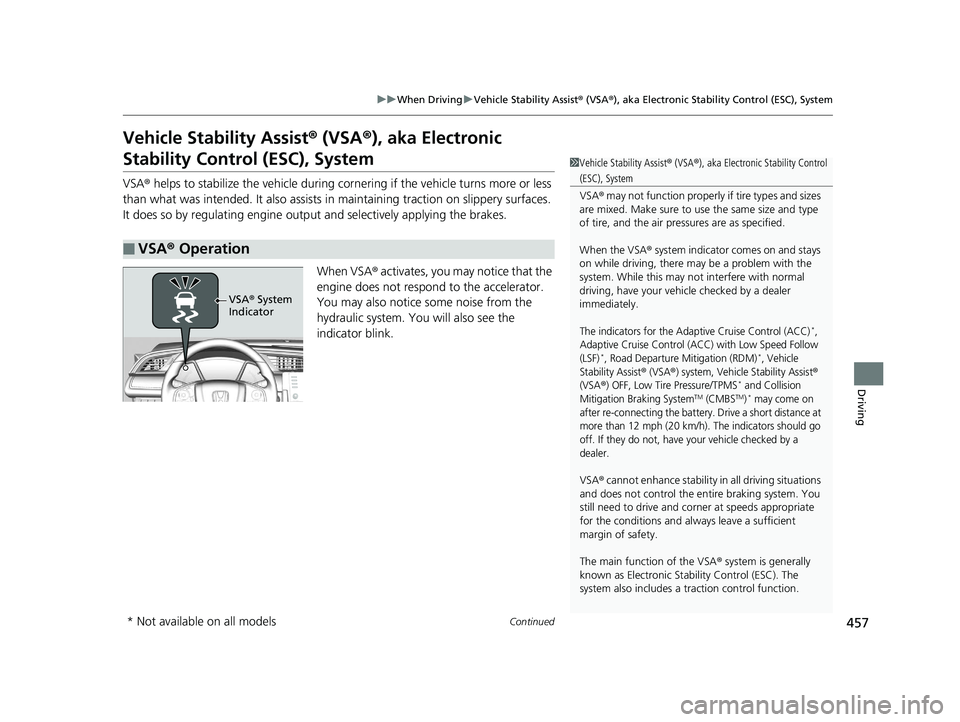
When VSA ® activates, you may notice that the
engine does not respond to the accelerator.
You may also notice some noise from the
hydraulic system. You will also see the
indicator blink.
■VSA ® Operation
1 Vehicle Stability Assist ® (VSA ®), aka Electronic Stability Control
(ESC), System
VSA ® may not function properly if tire types and sizes
are mixed. Make sure to use the same size and type
of tire, and the air pressures are as specified.
When the VSA ® system indicator comes on and stays
on while driving, there ma y be a problem with the
system. While this may not interfere with normal
driving, have your vehi cle checked by a dealer
immediately.
The indicators for the Adaptive Cruise Control (ACC)*,
Adaptive Cruise Control (ACC) with Low Speed Follow
(LSF)
*, Road Departure Mitigation (RDM)*, Vehicle
Stability Assist
® (VSA®) system, Vehicle Stability Assist®
(VSA®) OFF, Low Tire Pressure/TPMS* and Collision
Mitigation Braking SystemTM (CMBSTM)* may come on
after re-connecting the battery. Drive a short distance at
more than 12 mph (20 km/h). The indicators should go
off. If they do not, have your vehicle checked by a
dealer.
VSA ® cannot enhance stability in all driving situations
and does not control the entire braking system. You
still need to drive and corner at speeds appropriate
for the conditions and alwa ys leave a sufficient
margin of safety.
The main function of the VSA ® system is generally
known as Electronic Stability Control (ESC). The
system also includes a traction control function.
VSA® System
Indicator
* Not available on all models
19 CIVIC 2D HCM (KA KL KC)-31TBG6300.book 457 ページ 2018年9月4日 火 曜日 午後1時38分