buttons HONDA CIVIC COUPE 2020 Owner's Manual (in English)
[x] Cancel search | Manufacturer: HONDA, Model Year: 2020, Model line: CIVIC COUPE, Model: HONDA CIVIC COUPE 2020Pages: 675, PDF Size: 37.35 MB
Page 6 of 675
4
Quick Reference Guide
Quick Reference Guide
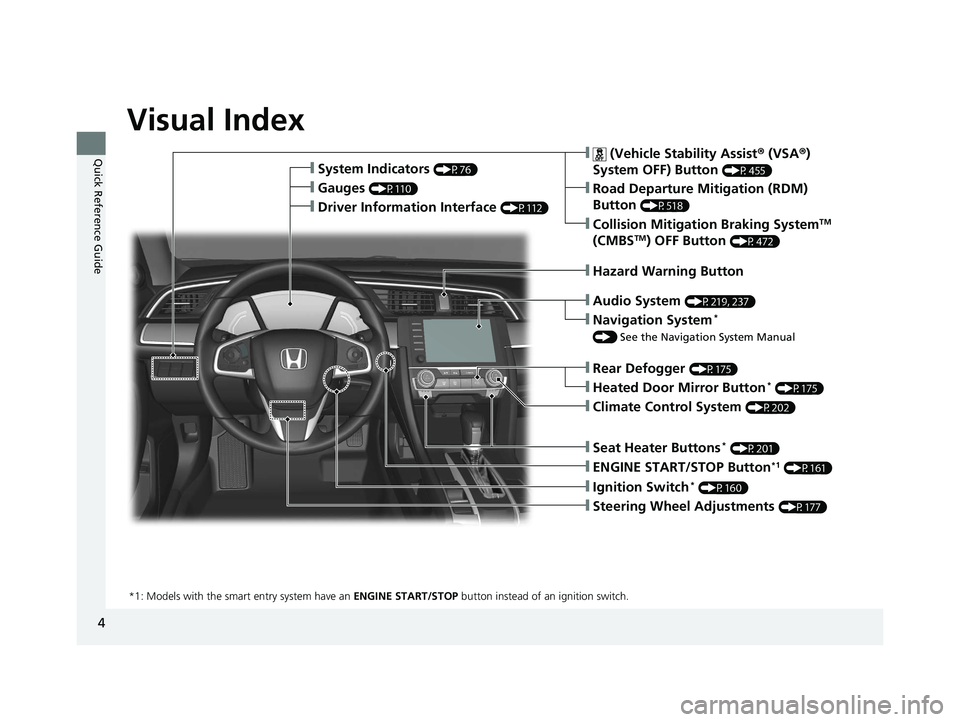
Visual Index
❙Ignition Switch* (P160)
❙ENGINE START/STOP Button*1 (P161)
*1: Models with the smart entry system have an ENGINE START/STOP button instead of an ignition switch.
❙System Indicators (P76)
❙Gauges (P110)
❙Navigation System*
() See the Navigation System Manual
❙Audio System (P219, 237)
❙Hazard Warning Button
❙Rear Defogger (P175)
❙Heated Door Mirror Button* (P175)
❙Climate Control System (P202)
❙Seat Heater Buttons* (P201)
❙Steering Wheel Adjustments (P177)
❙Driver Information Interface (P112)
❙Collision Mitigation Braking SystemTM
(CMBSTM) OFF Button (P472)
❙ (Vehicle Stability Assist ® (VSA ®)
System OFF) Button
(P455)
❙Road Departure Mitigation (RDM)
Button
(P518)
20 CIVIC 2D HCM (KA KL KC)-31TBG6400.book 4 ページ 2019年6月4日 火曜日 午前8時32分
Page 7 of 675
5
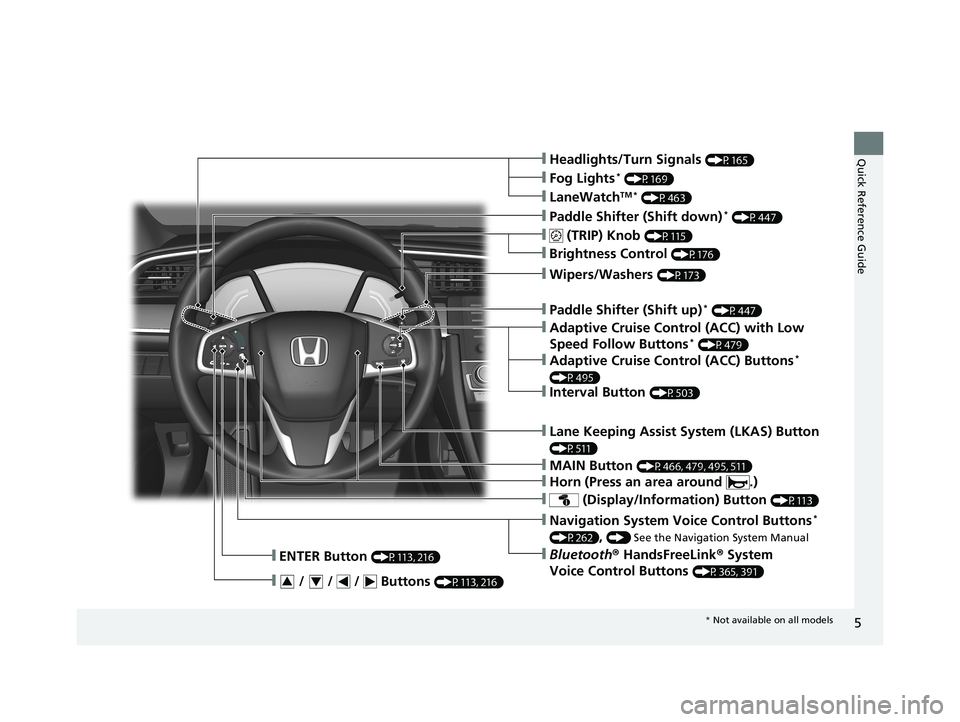
Quick Reference Guide❙Headlights/Turn Signals (P165)
❙ (TRIP) Knob (P115)
❙Brightness Control (P176)
❙LaneWatchTM * (P463)
❙Fog Lights* (P169)
❙Wipers/Washers (P173)
❙ (Display/Information) Button (P113)
❙Navigation System Voice Control Buttons*
(P262), () See the Navigation System Manual
❙Bluetooth® HandsFreeLink ® System
Voice Control Buttons
(P365, 391)
❙ENTER Button (P113, 216)
❙ / / / Buttons (P113, 216)34
❙Paddle Shifter (Shift down)* (P447)
❙MAIN Button (P466, 479, 495, 511)
❙Paddle Shifter (Shift up)* (P447)
❙Adaptive Cruise Control (ACC) with Low
Speed Follow Buttons* (P479)
❙Horn (Press an area around .)
❙Lane Keeping Assist System (LKAS) Button
(P511)
❙Interval Button (P503)
❙Adaptive Cruise Control (ACC) Buttons*
(P495)
* Not available on all models
20 CIVIC 2D HCM (KA KL KC)-31TBG6400.book 5 ページ 2019年6月4日 火曜日 午前8時32分
Page 8 of 675
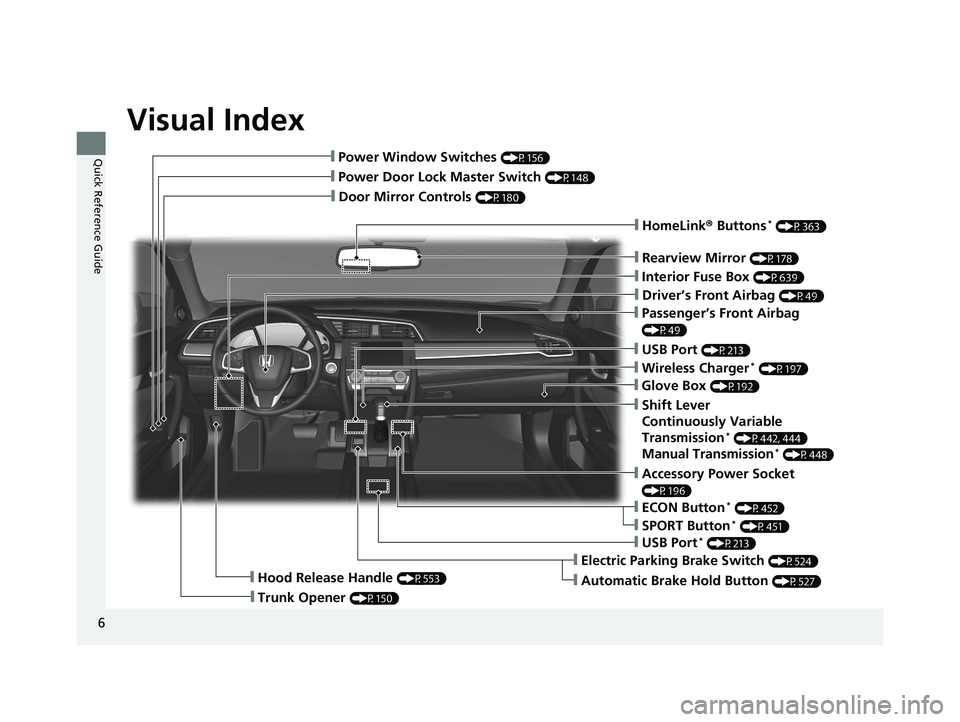
Visual Index
6
Quick Reference Guide
❙Door Mirror Controls (P180)
❙Passenger’s Front Airbag
(P49)
❙Rearview Mirror (P178)
❙Accessory Power Socket
(P196)
❙Hood Release Handle (P553)
❙Trunk Opener (P150)
❙Power Door Lock Master Switch (P148)
❙Power Window Switches (P156)
❙Interior Fuse Box (P639)
❙Driver’s Front Airbag (P49)
❙USB Port (P213)
❙ECON Button* (P452)
❙Electric Parking Brake Switch (P524)
❙Automatic Brake Hold Button (P527)
❙USB Port* (P213)
❙Wireless Charger* (P197)
❙Glove Box (P192)
❙SPORT Button* (P451)
❙Shift Lever
Continuously Variable
Transmission
* (P442, 444)
Manual Transmission* (P448)
❙HomeLink® Buttons* (P363)
20 CIVIC 2D HCM (KA KL KC)-31TBG6400.book 6 ページ 2019年6月4日 火曜日 午前8時32分
Page 19 of 675
17
Quick Reference Guide
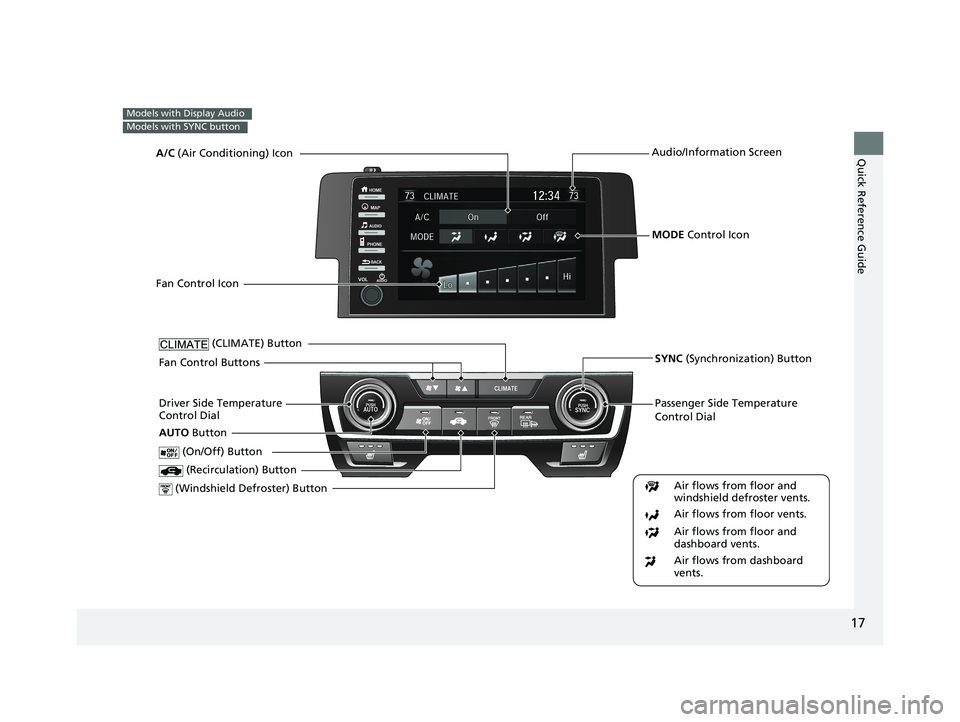
Models with Display Audio
Models with SYNC button
Passenger Side Temperature
Control Dial
(Windshield Defroster) ButtonDriver Side Temperature
Control Dial (Recirculation) Button
(CLIMATE) Button
(On/Off) Button
AUTO Button
Audio/Information Screen
SYNC (Synchronization) Button
Air flows from floor and
windshield defroster vents.
Air flows from floor vents.
Air flows from floor and
dashboard vents.
Air flows from dashboard
vents.
MODE Control Icon
A/C
(Air Conditioning) Icon
Fan Control Icon
Fan Control Buttons
20 CIVIC 2D HCM (KA KL KC)-31TBG6400.book 17 ページ 2019年6月4日 火曜 日 午前8時32分
Page 20 of 675
18
Quick Reference Guide
Features (P 211)
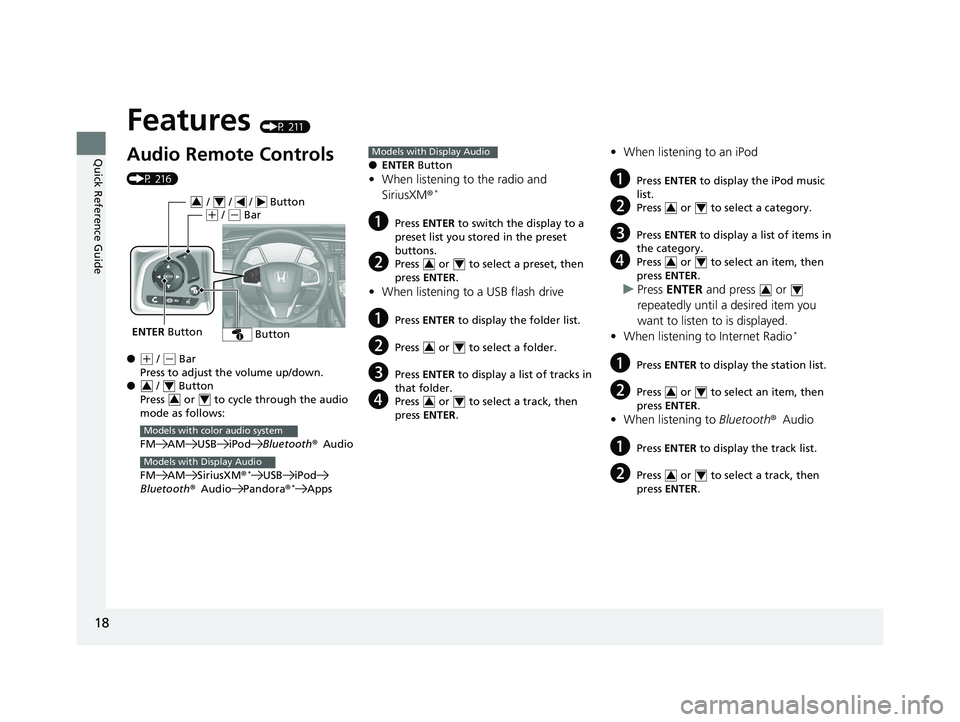
Audio Remote Controls
(P 216)
●
(+ / ( - Bar
Press to adjust the volume up/down.
● / Button
Press or to cycle through the audio
mode as follows:
FM AM USB iPod Bluetooth®Audio
FM AM SiriusXM ®
*USB iPod
Bluetooth ®Audio Pandora®*Apps
ENTER Button
/ / / Button34(+ / (- Bar
Button
34
34
Models with color audio system
Models with Display Audio
● ENTER Button
•When listening to the radio and
SiriusXM ®*
aPress ENTER to switch the display to a
preset list you stored in the preset
buttons.
bPress or to select a preset, then
press ENTER .
•When listening to a USB flash drive
aPress ENTER to display the folder list.
bPress or to select a folder.
cPress ENTER to display a list of tracks in
that folder.
dPress or to select a track, then
press ENTER .
Models with Display Audio
34
34
34
•When listening to an iPod
aPress ENTER to display the iPod music
list.
bPress or to select a category.
cPress ENTER to display a list of items in
the category.
dPress or to select an item, then
press ENTER .
uPress ENTER and press or
repeatedly until a desired item you
want to listen to is displayed.
• When listening to Internet Radio
*
aPress ENTER to display the station list.
bPress or to select an item, then
press ENTER .
•When listening to Bluetooth®Audio
aPress ENTER to display the track list.
bPress or to select a track, then
press ENTER .
34
34
34
34
34
20 CIVIC 2D HCM (KA KL KC)-31TBG6400.book 18 ページ 2019年6月4日 火曜 日 午前8時32分
Page 22 of 675
20
Quick Reference Guide
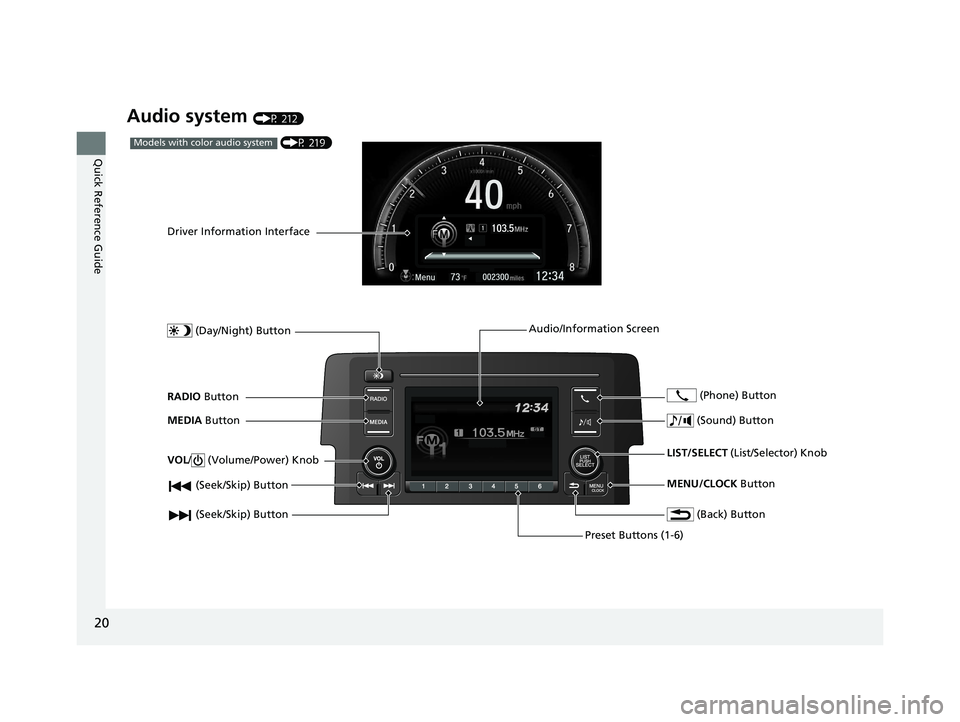
Audio system (P 212)
(P 219)Models with color audio system
(Seek/Skip) Button
RADIO Button
Driver Information Interface
(Day/Night) Button
MEDIA Button
Preset Buttons (1-6)
(Seek/Skip) Button
VOL
/ (Volume/Power) Knob
Audio/Information Screen
(Back) Button
(Sound) Button
MENU/CLOCK Button
LIST/SELECT
(List/Selector) Knob
(Phone) Button
20 CIVIC 2D HCM (KA KL KC)-31TBG6400.book 20 ページ 2019年6月4日 火曜
日 午前8時32分
Page 77 of 675
75
Instrument Panel
This chapter describes the buttons, indicators, and gauges that are used while driving.
Indicators............................................ 76
Driver Information Interface Warning and Information Messages ...................... 94
Gauges and Driver Information Interface Gauges ............................................ 110
Driver Information Interface ............. 112
20 CIVIC 2D HCM (KA KL KC)-31TBG6400.book 75 ページ 2019年6月4日 火曜 日 午前8時32分
Page 180 of 675
178
Controls
Adjusting the Mirrors
Interior Rearview Mirror
Adjust the angle of the rearview mirror when you are sitting in the correct driving
position.
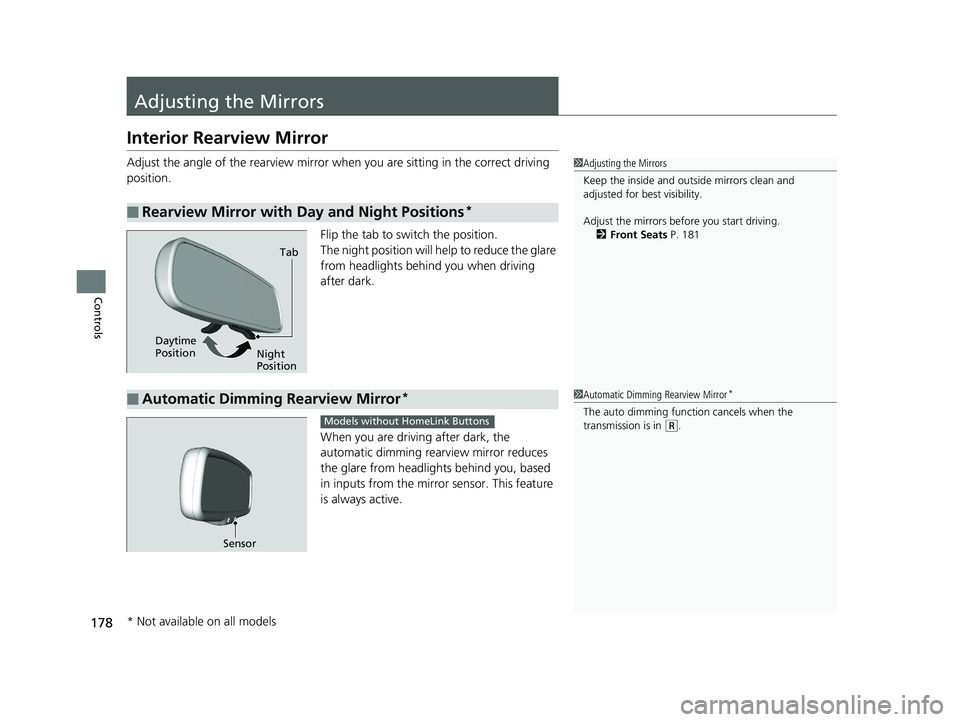
Flip the tab to switch the position.
The night position will help to reduce the glare
from headlights behind you when driving
after dark.
When you are driving after dark, the
automatic dimming rearview mirror reduces
the glare from headlights behind you, based
in inputs from the mirror sensor. This feature
is always active.
■Rearview Mirror with Day and Night Positions*
1Adjusting the Mirrors
Keep the inside and out side mirrors clean and
adjusted for best visibility.
Adjust the mirrors befo re you start driving.
2 Front Seats P. 181
Tab
Daytime
Position Night
Position
■Automatic Dimming Rearview Mirror*1Automatic Dimming Rearview Mirror*
The auto dimming function cancels when the
transmission is in
(R.
Sensor
Models without HomeLink Buttons
* Not available on all models
20 CIVIC 2D HCM (KA KL KC)-31TBG6400.book 178 ページ 2019年6月4日 火 曜日 午前8時32分
Page 181 of 675
179
uuAdjusting the Mirrors uInterior Rearview Mirror
Controls
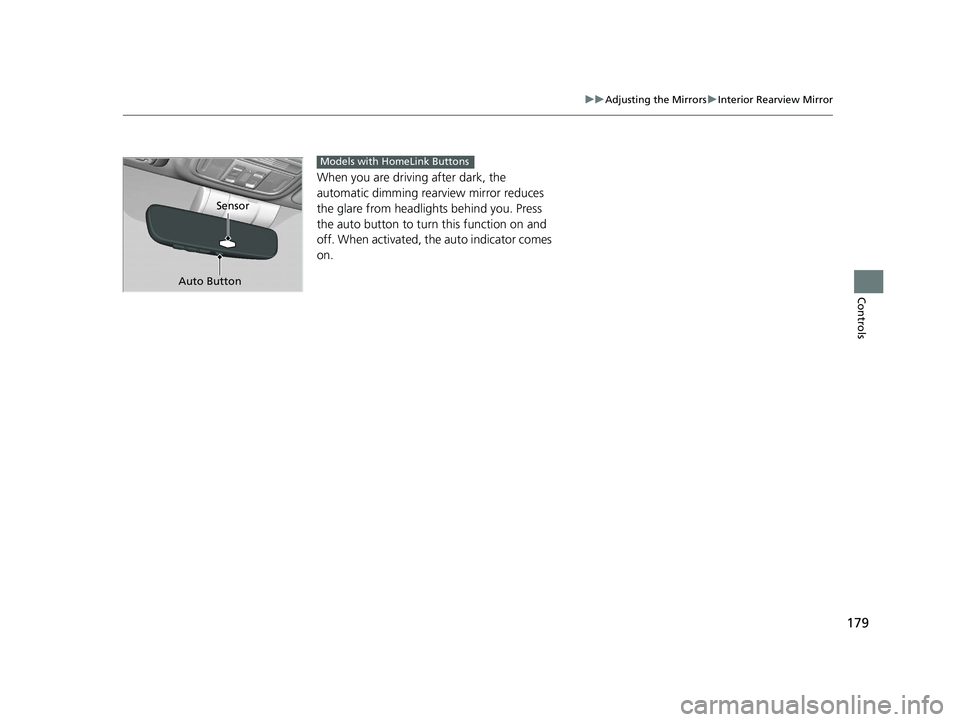
When you are driving after dark, the
automatic dimming rear view mirror reduces
the glare from headligh ts behind you. Press
the auto button to turn this function on and
off. When activated, th e auto indicator comes
on.
Sensor
Auto Button
Models with HomeLink Buttons
20 CIVIC 2D HCM (KA KL KC)-31TBG6400.book 179 ページ 2019年6月4日 火 曜日 午前8時32分
Page 204 of 675
202
Controls
Climate Control System
Using Automatic Climate Control
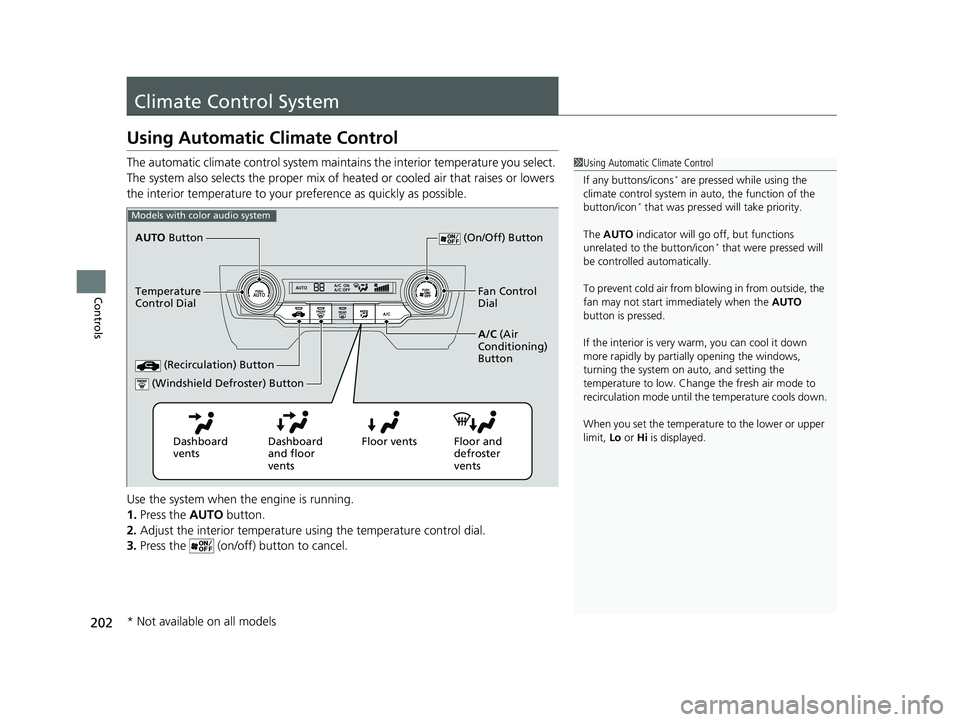
The automatic climate control system maintains the interior temperature you select.
The system also selects the proper mix of heated or cooled air that raises or lowers
the interior temperature to your pr eference as quickly as possible.
Use the system when the engine is running.
1. Press the AUTO button.
2. Adjust the interior temperature us ing the temperature control dial.
3. Press the (on/off) button to cancel.1Using Automatic Climate Control
If any buttons/icons
* are pressed while using the
climate control system in auto, the function of the
button/icon
* that was pressed will take priority.
The AUTO indicator will go off, but functions
unrelated to the button/icon
* that were pressed will
be controlled automatically.
To prevent cold air from bl owing in from outside, the
fan may not start i mmediately when the AUTO
button is pressed.
If the interior is very warm, you can cool it down
more rapidly by partial ly opening the windows,
turning the system on auto, and setting the
temperature to low. Change the fresh air mode to
recirculation mode until the temperature cools down.
When you set the temperat ure to the lower or upper
limit, Lo or Hi is displayed.
Models with color audio system
Dashboard
vents Dashboard
and floor
ventsFloor vents Floor and
defroster
vents
AUTO
Button
Temperature
Control Dial A/C (Air
Conditioning)
Button
(Recirculation) Button
(On/Off) Button
Fan Control
Dial
(Windshield Defroster) Button
* Not available on all models
20 CIVIC 2D HCM (KA KL KC)-31TBG6400.book 202 ページ 2019年6月4日 火 曜日 午前8時32分