lights HONDA CIVIC COUPE 2020 Owner's Manual (in English)
[x] Cancel search | Manufacturer: HONDA, Model Year: 2020, Model line: CIVIC COUPE, Model: HONDA CIVIC COUPE 2020Pages: 675, PDF Size: 37.35 MB
Page 5 of 675
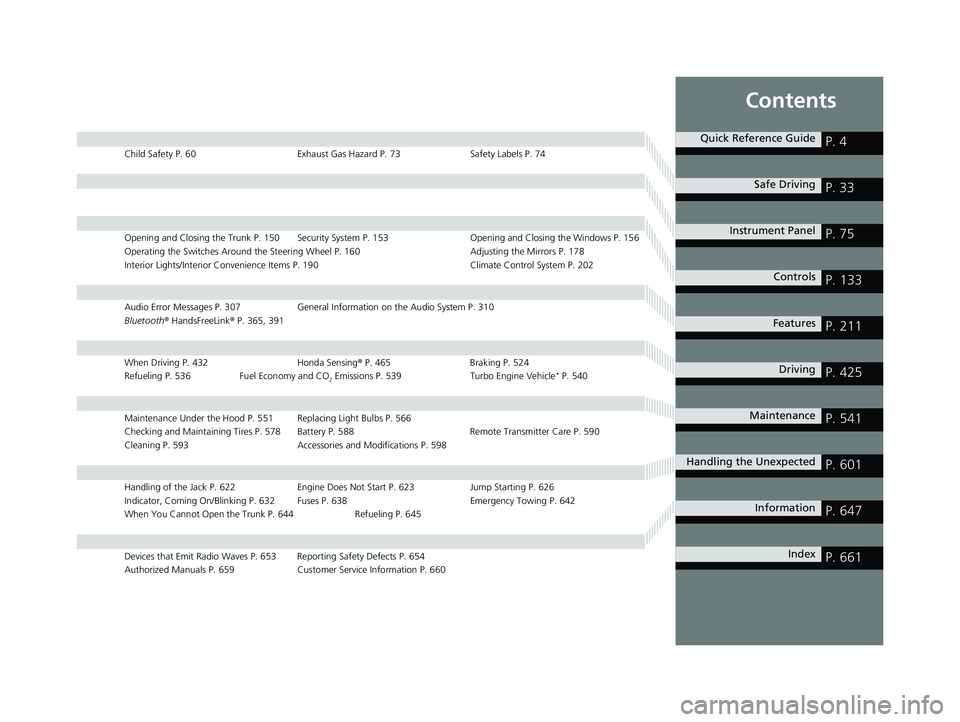
Contents
Child Safety P. 60Exhaust Gas Hazard P. 73Safety Labels P. 74
Opening and Closing the Trunk P. 150 Security System P. 153 Opening and Closing the Windows P. 156
Operating the Switches Around the Steering Wheel P. 160 Adjusting the Mirrors P. 178
Interior Lights/Interior Convenience It ems P. 190 Climate Control System P. 202
Audio Error Messages P. 307General Information on the Audio System P. 310
Bluetooth ® HandsFreeLink ® P. 365, 391
When Driving P. 432 Honda Sensing® P. 465 Braking P. 524
Refueling P. 536 Fuel Economy and CO
2 Emissions P. 539 Turbo Engine Vehicle* P. 540
Maintenance Under the Hood P. 551 Replacing Light Bulbs P. 566
Checking and Maintaining Tires P. 578 Battery P. 588 Remote Transmitter Care P. 590
Cleaning P. 593 Accessories and Modifications P. 598
Handling of the Jack P. 622 Engine Does Not Start P. 623 Jump Starting P. 626
Indicator, Coming On/Blinking P. 632 Fuses P. 638 Emergency Towing P. 642
When You Cannot Open the Trunk P. 644 Refueling P. 645
Devices that Emit Radio Waves P. 653 Reporting Safety Defects P. 654
Authorized Manuals P. 659 Customer Service Information P. 660
Quick Reference GuideP. 4
Safe DrivingP. 33
Instrument PanelP. 75
ControlsP. 133
FeaturesP. 211
DrivingP. 425
MaintenanceP. 541
Handling the UnexpectedP. 601
InformationP. 647
IndexP. 661
20 CIVIC 2D HCM (KA KL KC)-31TBG6400.book 3 ページ 2019年6月4日 火曜日 午前8時32分
Page 7 of 675
5
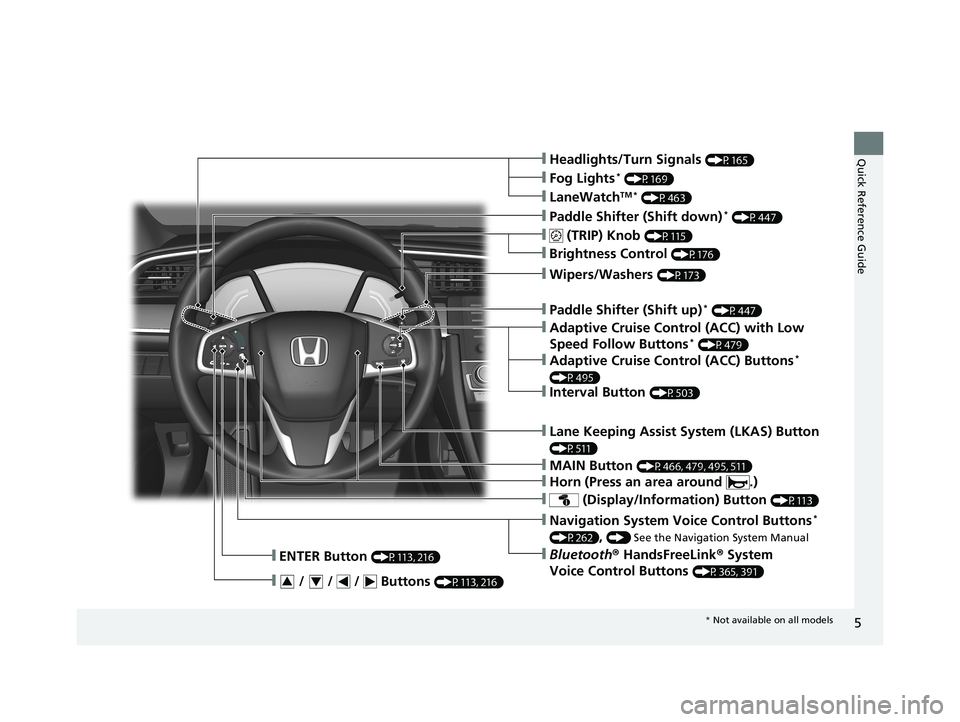
Quick Reference Guide❙Headlights/Turn Signals (P165)
❙ (TRIP) Knob (P115)
❙Brightness Control (P176)
❙LaneWatchTM * (P463)
❙Fog Lights* (P169)
❙Wipers/Washers (P173)
❙ (Display/Information) Button (P113)
❙Navigation System Voice Control Buttons*
(P262), () See the Navigation System Manual
❙Bluetooth® HandsFreeLink ® System
Voice Control Buttons
(P365, 391)
❙ENTER Button (P113, 216)
❙ / / / Buttons (P113, 216)34
❙Paddle Shifter (Shift down)* (P447)
❙MAIN Button (P466, 479, 495, 511)
❙Paddle Shifter (Shift up)* (P447)
❙Adaptive Cruise Control (ACC) with Low
Speed Follow Buttons* (P479)
❙Horn (Press an area around .)
❙Lane Keeping Assist System (LKAS) Button
(P511)
❙Interval Button (P503)
❙Adaptive Cruise Control (ACC) Buttons*
(P495)
* Not available on all models
20 CIVIC 2D HCM (KA KL KC)-31TBG6400.book 5 ページ 2019年6月4日 火曜日 午前8時32分
Page 9 of 675
7
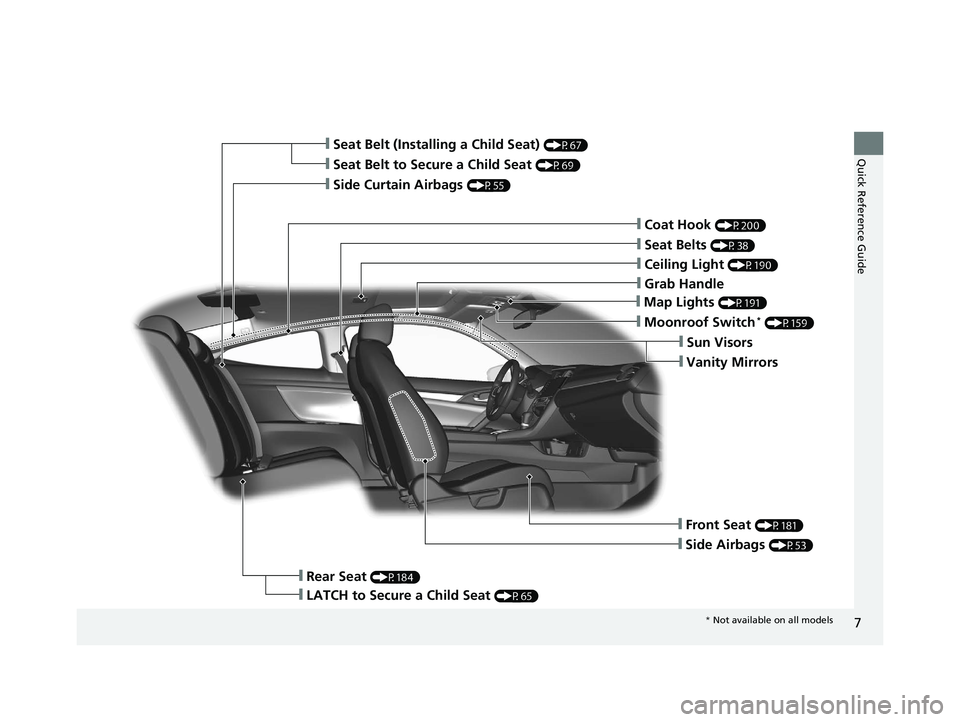
Quick Reference Guide❙Seat Belt to Secure a Child Seat (P69)
❙Seat Belt (Installing a Child Seat) (P67)
❙Moonroof Switch* (P159)
❙Front Seat (P181)
❙Seat Belts (P38)
❙Side Airbags (P53)
❙Rear Seat (P184)
❙LATCH to Secure a Child Seat (P65)
❙Side Curtain Airbags (P55)
❙Coat Hook (P200)
❙Sun Visors
❙Vanity Mirrors
❙Map Lights (P191)
❙Grab Handle
❙Ceiling Light (P190)
* Not available on all models
20 CIVIC 2D HCM (KA KL KC)-31TBG6400.book 7 ページ 2019年6月4日 火曜日 午前8時32分
Page 10 of 675
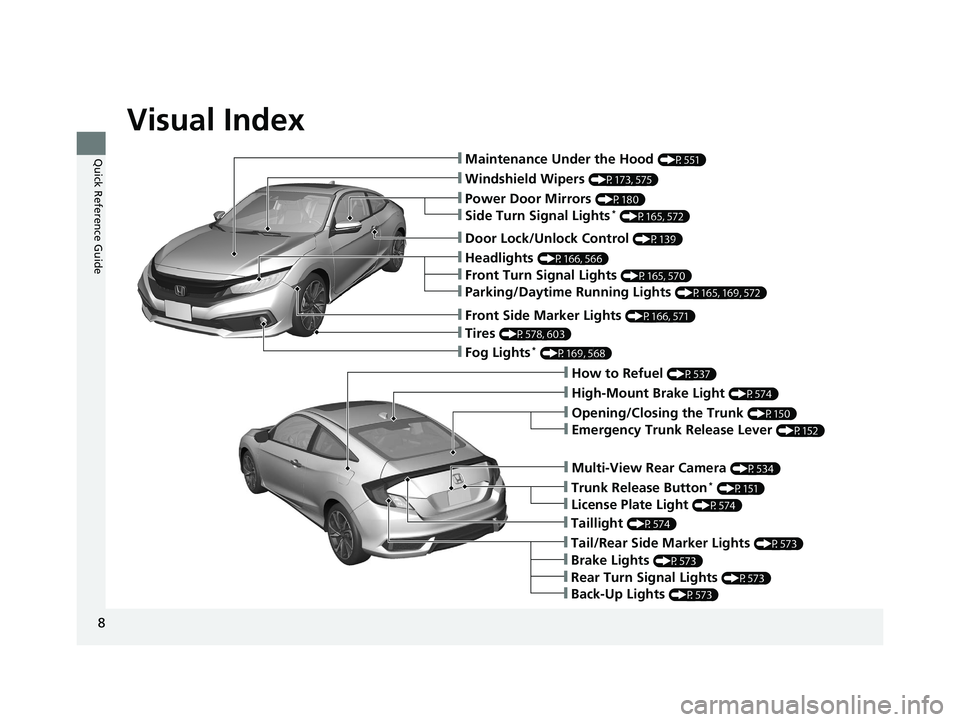
Visual Index
8
Quick Reference Guide❙Maintenance Under the Hood (P551)
❙Windshield Wipers (P173, 575)
❙Tires (P578, 603)
❙Fog Lights* (P169, 568)
❙Power Door Mirrors (P180)
❙How to Refuel (P537)
❙High-Mount Brake Light (P574)
❙Emergency Trunk Release Lever (P152)
❙Opening/Closing the Trunk (P150)
❙Multi-View Rear Camera (P534)
❙Door Lock/Unlock Control (P139)
❙Side Turn Signal Lights* (P165, 572)
❙Headlights (P166, 566)
❙Front Turn Signal Lights (P165, 570)
❙Parking/Daytime Running Lights (P165, 169, 572)
❙Front Side Marker Lights (P166, 571)
❙Taillight (P574)
❙Back-Up Lights (P573)
❙Brake Lights (P573)
❙Rear Turn Signal Lights (P573)
❙Tail/Rear Side Marker Lights (P573)
❙Trunk Release Button* (P151)
❙License Plate Light (P574)
20 CIVIC 2D HCM (KA KL KC)-31TBG6400.book 8 ページ 2019年6月4日 火曜日 午前8時32分
Page 13 of 675
11
Quick Reference Guide
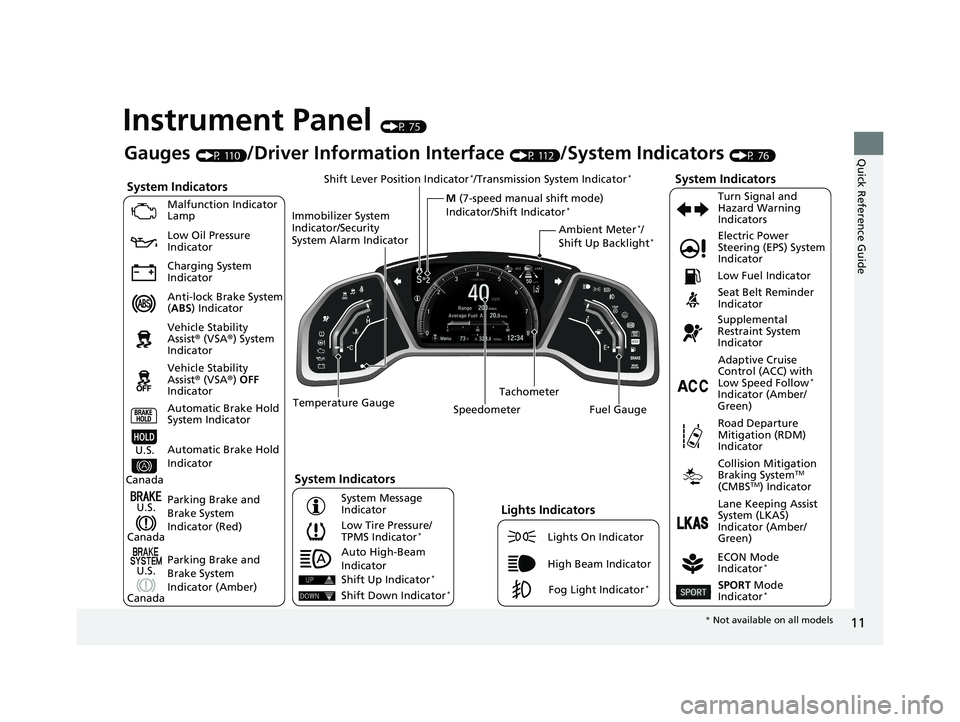
Instrument Panel (P 75)
System Indicators
Malfunction Indicator
Lamp
Low Oil Pressure
Indicator
Charging System
Indicator
Anti-lock Brake System
(ABS ) Indicator
Vehicle Stability
Assist® (VSA®) System
Indicator
Vehicle Stability
Assist® (VSA®) OFF
Indicator
Low Tire Pressure/
TPMS Indicator
*
Electric Power
Steering (EPS) System
Indicator
Seat Belt Reminder
Indicator
System Indicators
Parking Brake and
Brake System
Indicator (Red) Supplemental
Restraint System
Indicator
Tachometer
Speedometer Fuel Gauge Low Fuel Indicator
ECON Mode
Indicator
*
Turn Signal and
Hazard Warning
Indicators
Parking Brake and
Brake System
Indicator (Amber)
System Indicators
U.S.
Canada
U.S.
Canada Automatic Brake Hold
System Indicator
Automatic Brake Hold
IndicatorU.S.
Canada Temperature Gauge
Lights Indicators
Lights On Indicator
High Beam Indicator
Fog Light Indicator*
Adaptive Cruise
Control (ACC) with
Low Speed Follow
*
Indicator (Amber/
Green)
System Message
Indicator Collision Mitigation
Braking System
TM
(CMBSTM) Indicator
Road Departure
Mitigation (RDM)
Indicator
Lane Keeping Assist
System (LKAS)
Indicator (Amber/
Green)
SPORT Mode
Indicator*
Ambient Meter*/
Shift Up Backlight*
Gauges (P 110)/Driver Information Interface (P 112)/System Indicators (P 76)
Shift Lever Position Indicator
*/Transmission System Indicator*
M (7-speed manual shift mode)
Indicator/Shift Indicator*
Auto High-Beam
Indicator
Immobilizer System
Indicator/Security
System Alarm Indicator
Shift Up Indicator*
Shift Down Indicator*
*
Not available on all models
20 CIVIC 2D HCM (KA KL KC)-31TBG6400.book 11 ページ 2019年6月4日 火曜 日 午前8時32分
Page 15 of 675
13
Quick Reference Guide
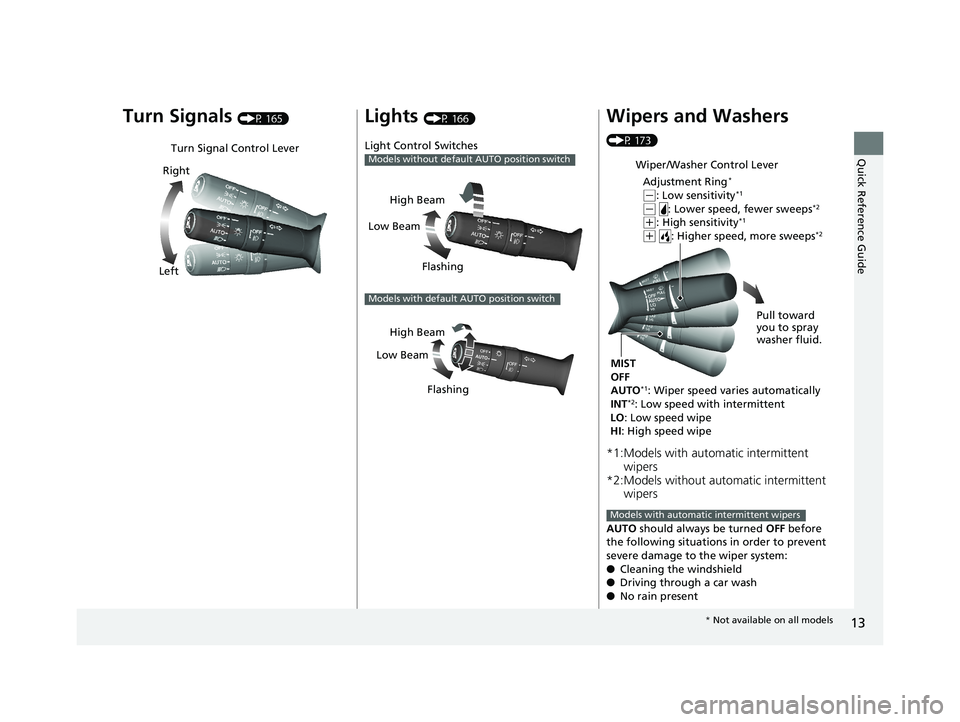
Turn Signals (P 165)
Turn Signal Control Lever
Right
Left
Lights (P 166)
Light Control Switches
Models without default AUTO position switch
Low Beam High Beam
Flashing
Models with default AUTO position switch
Low BeamHigh Beam
Flashing
Wipers and Washers
(P 173)
*1:Models with automatic intermittent wipers
*2:Models without automatic intermittent wipers
AUTO should always be turned OFF before
the following situations in order to prevent
severe damage to the wiper system:
● Cleaning the windshield
● Driving through a car wash
● No rain present
Wiper/Washer Control Lever
Adjustment Ring
*
(-: Low sensitivity*1
(- : Lower speed, fewer sweeps*2
(+: High sensitivity*1
(+ : Higher speed, more sweeps*2
MIST
OFF
AUTO
*1: Wiper speed varies automatically
INT*2: Low speed with intermittent
LO : Low speed wipe
HI : High speed wipe Pull toward
you to spray
washer fluid.
Models with automatic intermittent wipers
*
Not available on all models
20 CIVIC 2D HCM (KA KL KC)-31TBG6400.book 13 ページ 2019年6月4日 火曜 日 午前8時32分
Page 28 of 675
26
Quick Reference Guide
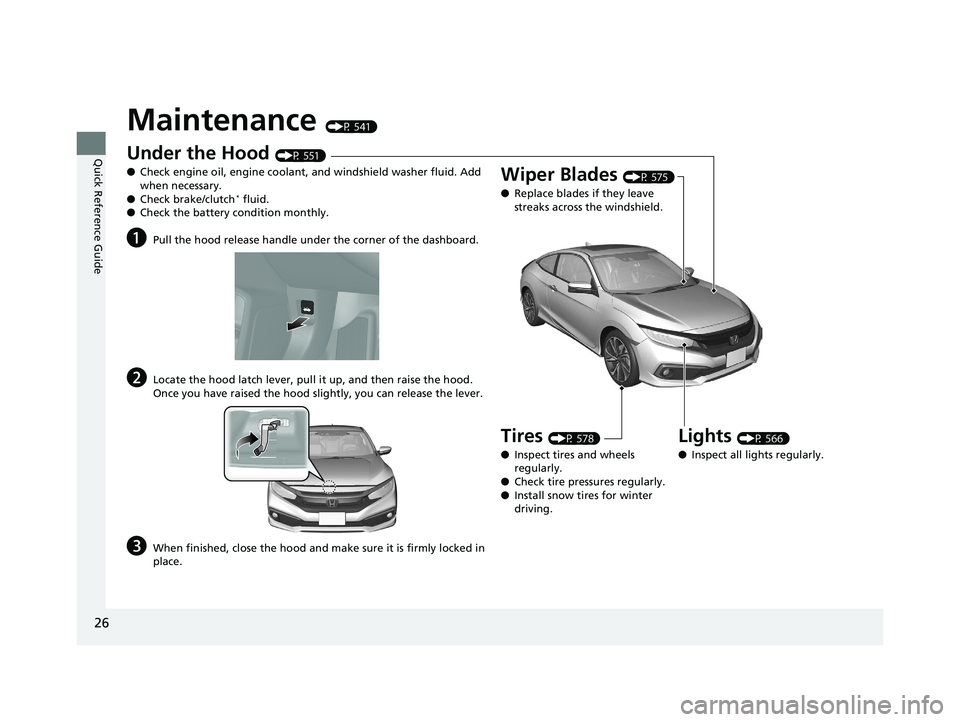
Maintenance (P 541)
Under the Hood (P 551)
● Check engine oil, engine coolant, and windshield washer fluid. Add
when necessary.
● Check brake/clutch
* fluid.
● Check the battery condition monthly.
aPull the hood release handle under the corner of the dashboard.
bLocate the hood latch lever, pull it up, and then raise the hood.
Once you have raised the hood slightly, you can release the lever.
cWhen finished, close the hood and make sure it is firmly locked in
place.
Lights (P 566)
● Inspect all lights regularly.
Wiper Blades (P 575)
● Replace blades if they leave
streaks across the windshield.
Tires (P 578)
● Inspect tires and wheels
regularly.
● Check tire pressures regularly.
● Install snow tires for winter
driving.
20 CIVIC 2D HCM (KA KL KC)-31TBG6400.book 26 ページ 2019年6月4日 火曜 日 午前8時32分
Page 31 of 675
29
Quick Reference Guide
Why does the brake pedal
pulsate slightly when
applying the brakes?This can occur when the ABS activates and does not indicate a
problem. Apply firm, steady pressure on the brake pedal. Never
pump the brake pedal.
2Anti-lock Brake System (ABS) (P 530)
Why do the doors lock
after I unlocked the doors?If you do not open the doors within 30 seconds, the doors are
relocked automatically for security.
Why does the beeper
sound when I open the
driver’s door?The beeper sounds when:
●The exterior lights are left on.
●The key is left in the ignition switch.
●The power mode is in ACCESSORY.
Why does a beeper sound
when I walk away from the
vehicle after I close the
door?The beeper sounds if you move outside the walk away auto
door lock operating range before the door completely closes.
2Locking the doors and trunk (Walk away auto lock ®) (P 141)
Models without smart entry system
Models with smart entry system
Models with smart entry system
20 CIVIC 2D HCM (KA KL KC)-31TBG6400.book 29 ページ 2019年6月4日 火曜 日 午前8時32分
Page 88 of 675
86
uuIndicators u
Instrument Panel
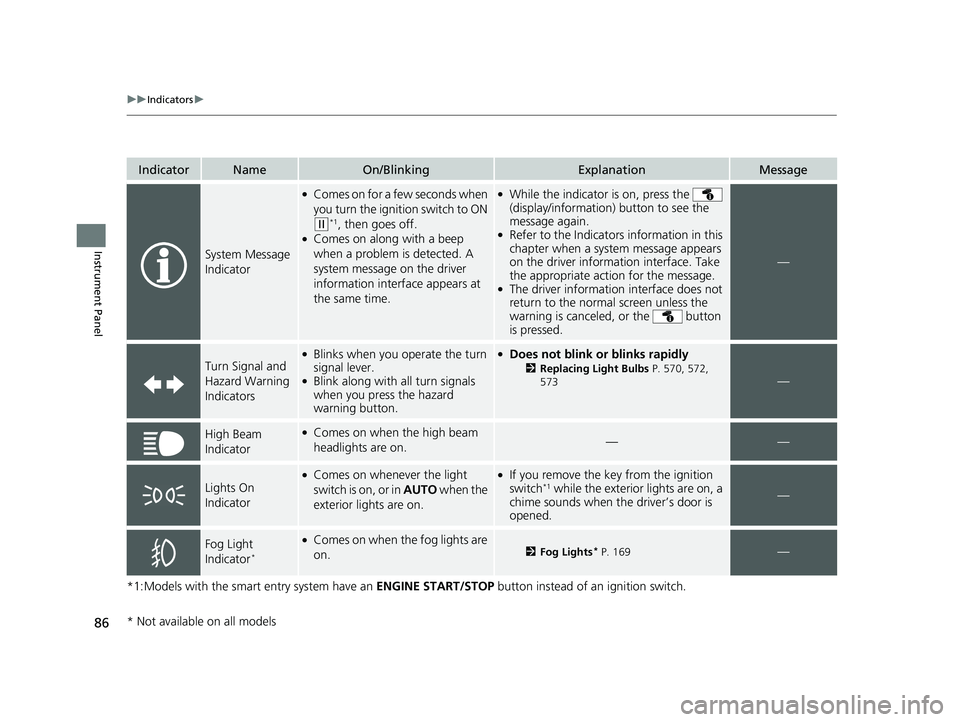
*1:Models with the smart entry system have an ENGINE START/STOP button instead of an ignition switch.
IndicatorNameOn/BlinkingExplanationMessage
System Message
Indicator
●Comes on for a few seconds when
you turn the ignition switch to ON
(w*1, then goes off.●Comes on along with a beep
when a problem is detected. A
system message on the driver
information interface appears at
the same time.
●While the indicator is on, press the
(display/information ) button to see the
message again.
●Refer to the Indicators information in this
chapter when a system message appears
on the driver information interface. Take
the appropriate action for the message.
●The driver information interface does not
return to the normal screen unless the
warning is canceled, or the button
is pressed.
—
Turn Signal and
Hazard Warning
Indicators
●Blinks when you operate the turn
signal lever.
●Blink along with all turn signals
when you press the hazard
warning button.
●Does not blink or blinks rapidly
2 Replacing Light Bulbs P. 570, 572,
573—
High Beam
Indicator●Comes on when the high beam
headlights are on.——
Lights On
Indicator
●Comes on whenever the light
switch is on, or in AUTO when the
exterior lights are on.●If you remove the key from the ignition
switch*1 while the exterior lights are on, a
chime sounds when the driver’s door is
opened.—
Fog Light
Indicator*
●Comes on when the fog lights are
on.2 Fog Lights* P. 169—
* Not available on all models
20 CIVIC 2D HCM (KA KL KC)-31TBG6400.book 86 ページ 2019年6月4日 火曜 日 午前8時32分
Page 106 of 675
104
uuIndicators uDriver Information Interface Wa rning and Information Messages
Instrument Panel
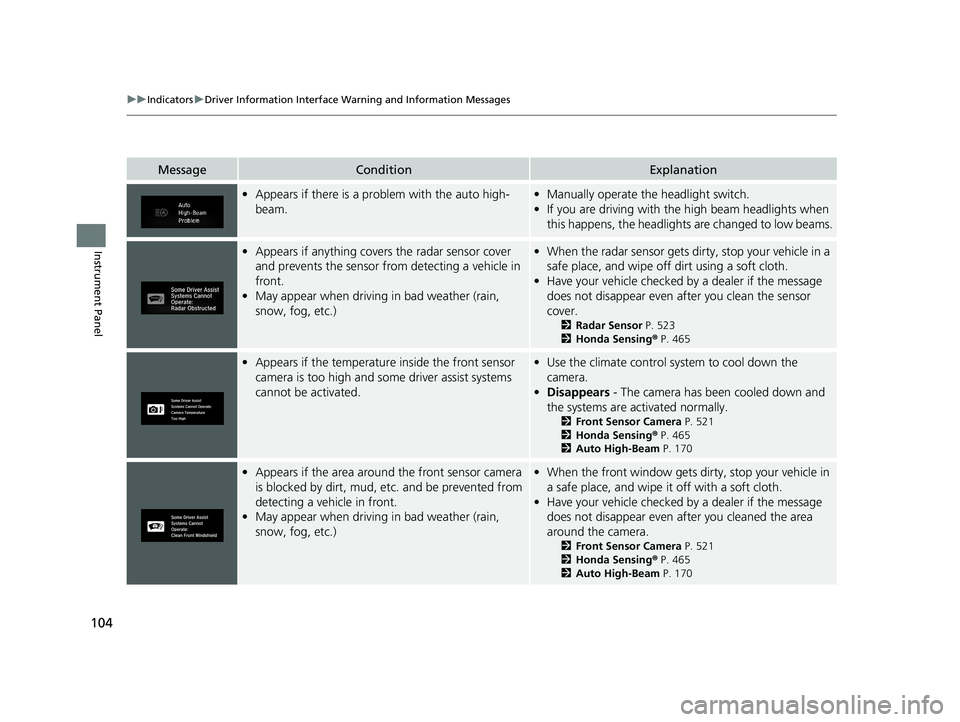
MessageConditionExplanation
•Appears if there is a prob lem with the auto high-
beam.• Manually operate the headlight switch.
• If you are driving with the high beam headlights when
this happens, the headlights are changed to low beams.
•Appears if anything covers the radar sensor cover
and prevents the sensor from detecting a vehicle in
front.
• May appear when driving in bad weather (rain,
snow, fog, etc.)•When the radar sensor gets dirty, stop your vehicle in a
safe place, and wipe off dirt using a soft cloth.
• Have your vehicle checked by a dealer if the message
does not disappear even a fter you clean the sensor
cover.
2 Radar Sensor P. 523
2 Honda Sensing ® P. 465
• Appears if the temperature inside the front sensor
camera is too high and some driver assist systems
cannot be activated.•Use the climate control sy stem to cool down the
camera.
• Disappears - The camera has been cooled down and
the systems are activated normally.
2 Front Sensor Camera P. 521
2 Honda Sensing ® P. 465
2 Auto High-Beam P. 170
•Appears if the area around the front sensor camera
is blocked by dirt, mud, etc. and be prevented from
detecting a vehicle in front.
• May appear when driving in bad weather (rain,
snow, fog, etc.)•When the front window gets dirty, stop your vehicle in
a safe place, and wipe it off with a soft cloth.
• Have your vehicle checked by a dealer if the message
does not disappear even a fter you cleaned the area
around the camera.
2 Front Sensor Camera P. 521
2 Honda Sensing ® P. 465
2 Auto High-Beam P. 170
20 CIVIC 2D HCM (KA KL KC)-31TBG6400.book 104 ページ 2019年6月4日 火 曜日 午前8時32分