parking brake HONDA CIVIC COUPE 2020 Owner's Manual (in English)
[x] Cancel search | Manufacturer: HONDA, Model Year: 2020, Model line: CIVIC COUPE, Model: HONDA CIVIC COUPE 2020Pages: 675, PDF Size: 37.35 MB
Page 8 of 675
Visual Index
6
Quick Reference Guide
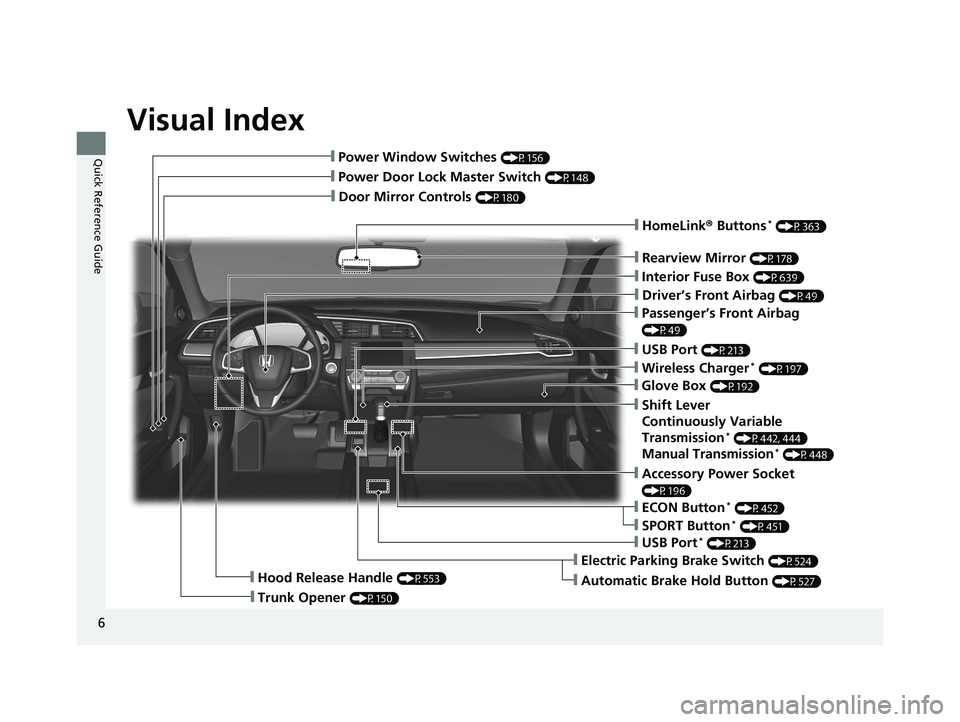
❙Door Mirror Controls (P180)
❙Passenger’s Front Airbag
(P49)
❙Rearview Mirror (P178)
❙Accessory Power Socket
(P196)
❙Hood Release Handle (P553)
❙Trunk Opener (P150)
❙Power Door Lock Master Switch (P148)
❙Power Window Switches (P156)
❙Interior Fuse Box (P639)
❙Driver’s Front Airbag (P49)
❙USB Port (P213)
❙ECON Button* (P452)
❙Electric Parking Brake Switch (P524)
❙Automatic Brake Hold Button (P527)
❙USB Port* (P213)
❙Wireless Charger* (P197)
❙Glove Box (P192)
❙SPORT Button* (P451)
❙Shift Lever
Continuously Variable
Transmission
* (P442, 444)
Manual Transmission* (P448)
❙HomeLink® Buttons* (P363)
20 CIVIC 2D HCM (KA KL KC)-31TBG6400.book 6 ページ 2019年6月4日 火曜日 午前8時32分
Page 10 of 675
Visual Index
8
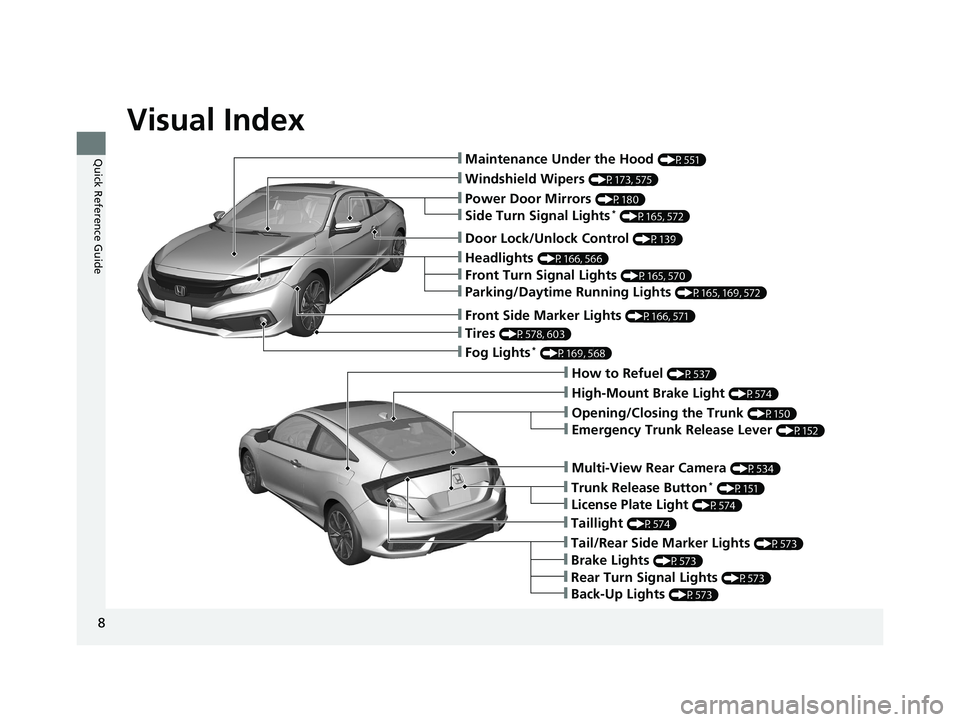
Quick Reference Guide❙Maintenance Under the Hood (P551)
❙Windshield Wipers (P173, 575)
❙Tires (P578, 603)
❙Fog Lights* (P169, 568)
❙Power Door Mirrors (P180)
❙How to Refuel (P537)
❙High-Mount Brake Light (P574)
❙Emergency Trunk Release Lever (P152)
❙Opening/Closing the Trunk (P150)
❙Multi-View Rear Camera (P534)
❙Door Lock/Unlock Control (P139)
❙Side Turn Signal Lights* (P165, 572)
❙Headlights (P166, 566)
❙Front Turn Signal Lights (P165, 570)
❙Parking/Daytime Running Lights (P165, 169, 572)
❙Front Side Marker Lights (P166, 571)
❙Taillight (P574)
❙Back-Up Lights (P573)
❙Brake Lights (P573)
❙Rear Turn Signal Lights (P573)
❙Tail/Rear Side Marker Lights (P573)
❙Trunk Release Button* (P151)
❙License Plate Light (P574)
20 CIVIC 2D HCM (KA KL KC)-31TBG6400.book 8 ページ 2019年6月4日 火曜日 午前8時32分
Page 13 of 675
11
Quick Reference Guide
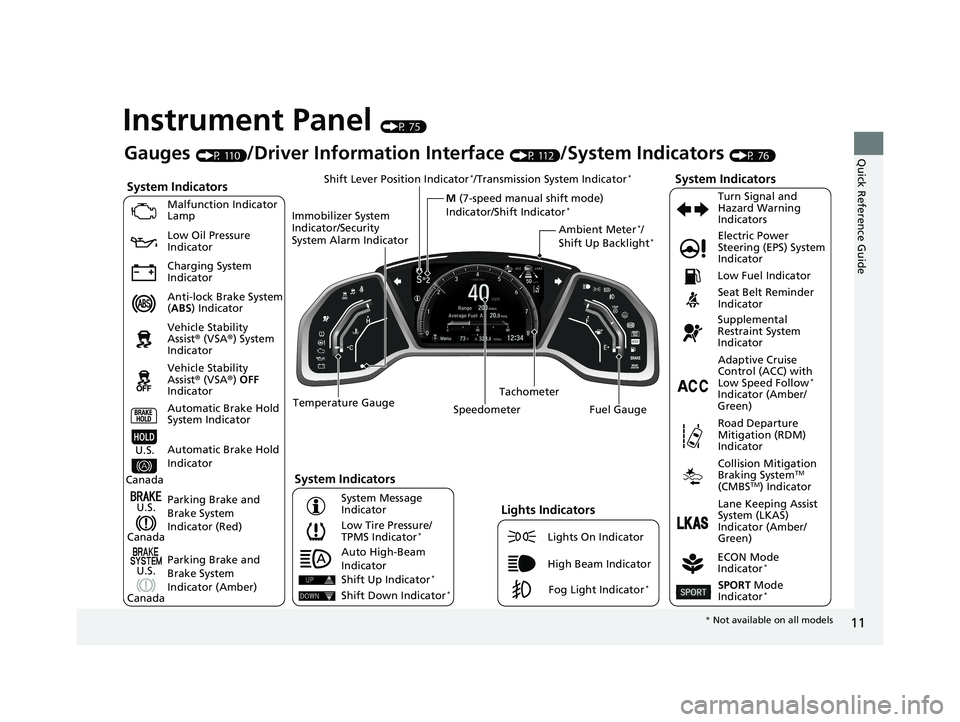
Instrument Panel (P 75)
System Indicators
Malfunction Indicator
Lamp
Low Oil Pressure
Indicator
Charging System
Indicator
Anti-lock Brake System
(ABS ) Indicator
Vehicle Stability
Assist® (VSA®) System
Indicator
Vehicle Stability
Assist® (VSA®) OFF
Indicator
Low Tire Pressure/
TPMS Indicator
*
Electric Power
Steering (EPS) System
Indicator
Seat Belt Reminder
Indicator
System Indicators
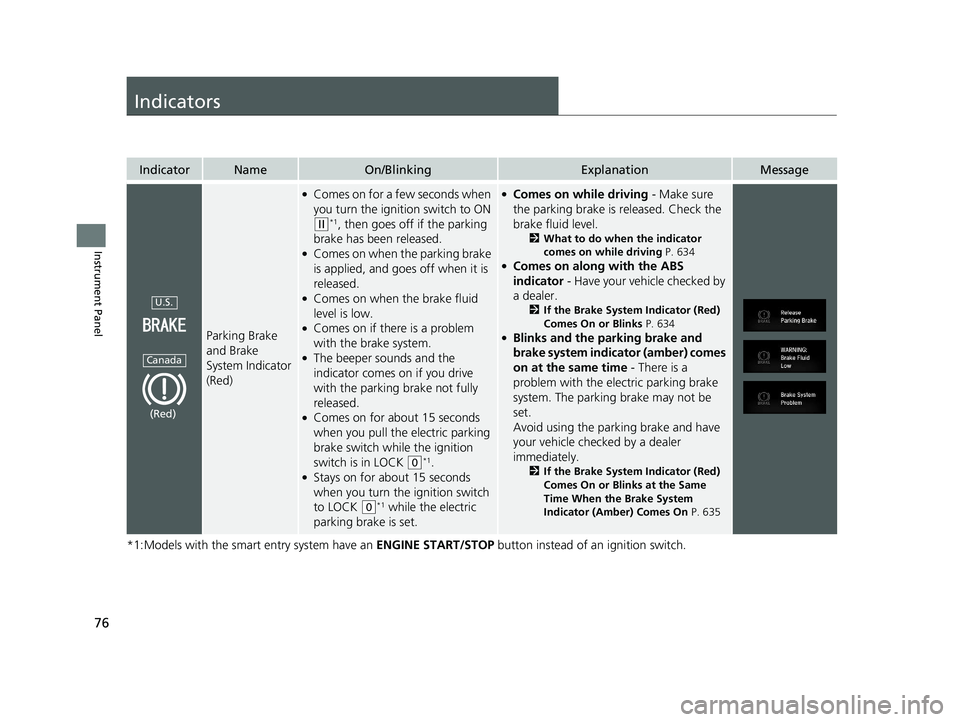
Parking Brake and
Brake System
Indicator (Red) Supplemental
Restraint System
Indicator
Tachometer
Speedometer Fuel Gauge Low Fuel Indicator
ECON Mode
Indicator
*
Turn Signal and
Hazard Warning
Indicators
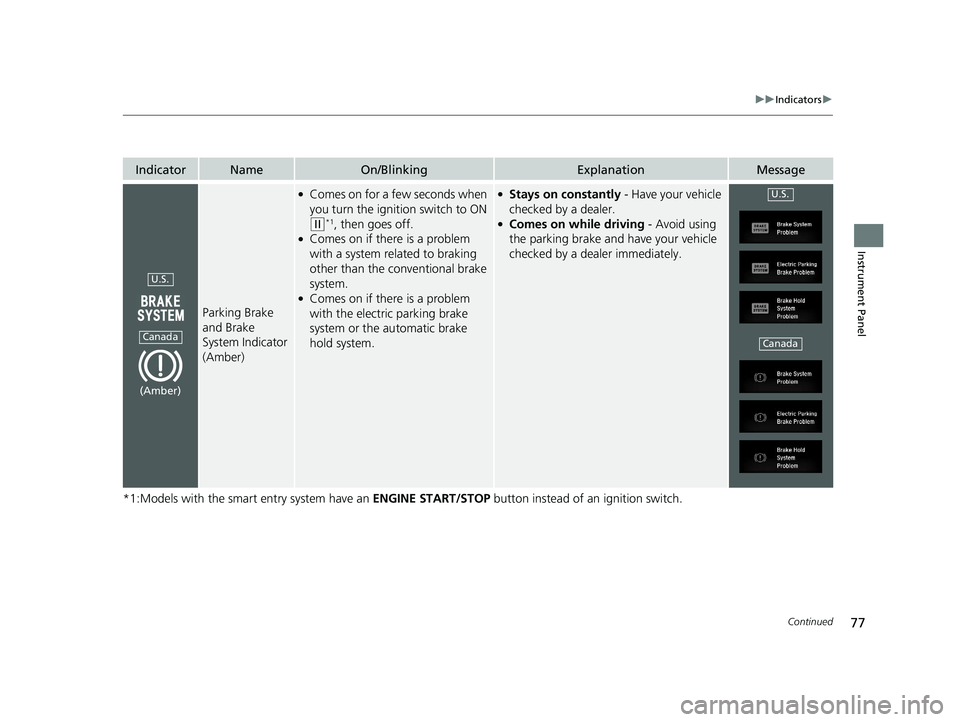
Parking Brake and
Brake System
Indicator (Amber)
System Indicators
U.S.
Canada
U.S.
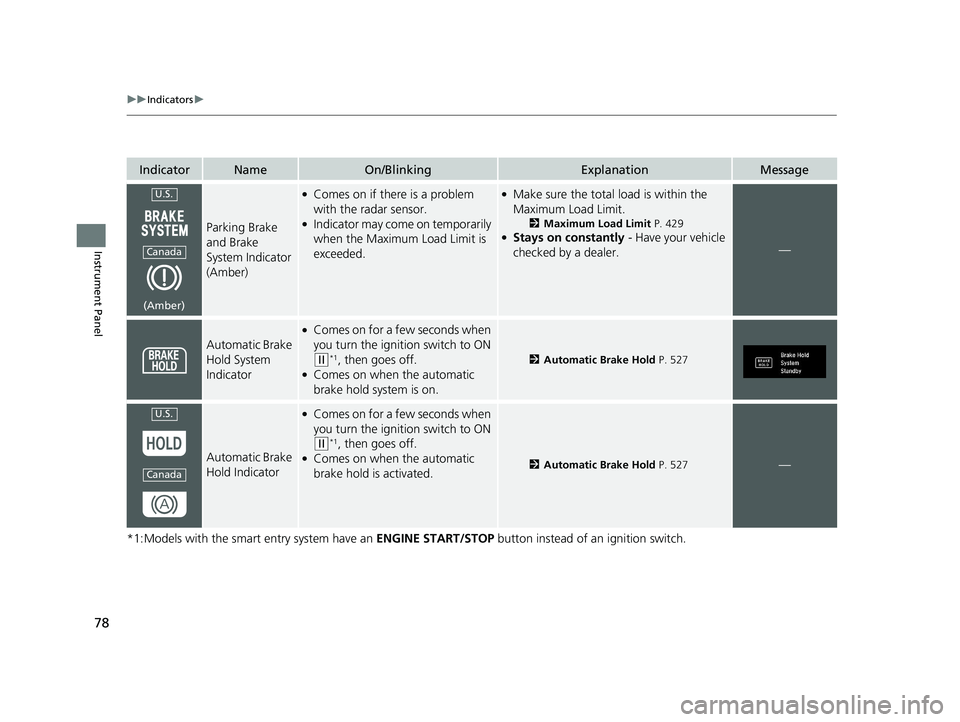
Canada Automatic Brake Hold
System Indicator
Automatic Brake Hold
IndicatorU.S.
Canada Temperature Gauge
Lights Indicators
Lights On Indicator
High Beam Indicator
Fog Light Indicator*
Adaptive Cruise
Control (ACC) with
Low Speed Follow
*
Indicator (Amber/
Green)
System Message
Indicator Collision Mitigation
Braking System
TM
(CMBSTM) Indicator
Road Departure
Mitigation (RDM)
Indicator
Lane Keeping Assist
System (LKAS)
Indicator (Amber/
Green)
SPORT Mode
Indicator*
Ambient Meter*/
Shift Up Backlight*
Gauges (P 110)/Driver Information Interface (P 112)/System Indicators (P 76)
Shift Lever Position Indicator
*/Transmission System Indicator*
M (7-speed manual shift mode)
Indicator/Shift Indicator*
Auto High-Beam
Indicator
Immobilizer System
Indicator/Security
System Alarm Indicator
Shift Up Indicator*
Shift Down Indicator*
*
Not available on all models
20 CIVIC 2D HCM (KA KL KC)-31TBG6400.book 11 ページ 2019年6月4日 火曜 日 午前8時32分
Page 32 of 675
30
Quick Reference Guide
Why does the beeper
sound when I start driving?The beeper sounds when the driver and/or front passenger are
not wearing their seat belts.
Why do I hear a screeching
sound when I apply the
brake pedal?The brake pads may need to be replaced. Have your vehicle
inspected by a dealer.
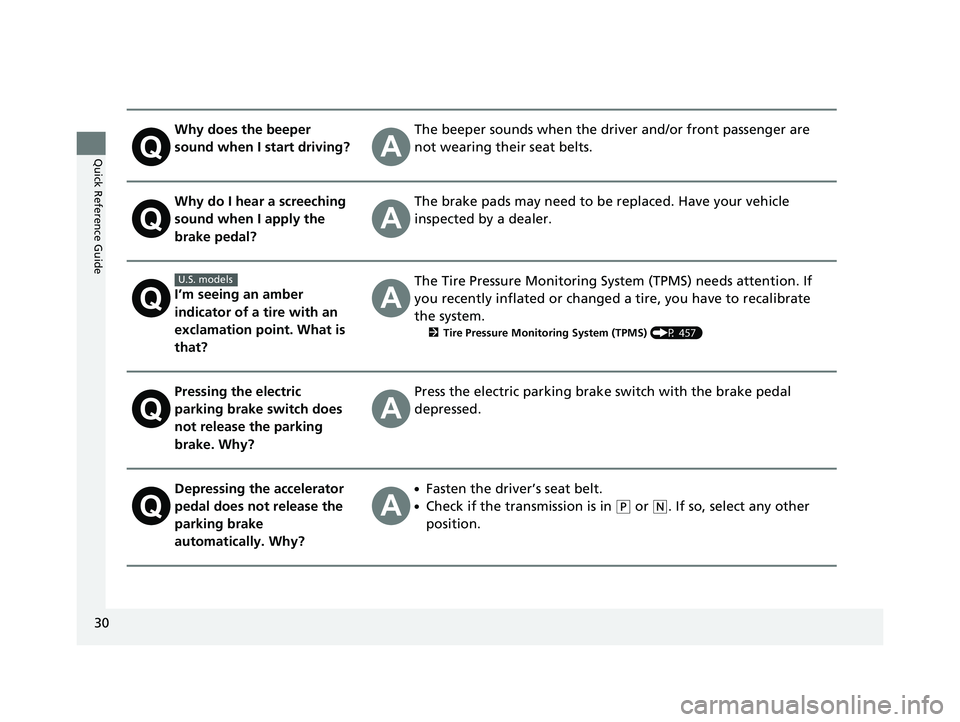
I’m seeing an amber
indicator of a tire with an
exclamation point. What is
that?
The Tire Pressure Monitoring System (TPMS) needs attention. If
you recently inflated or changed a tire, you have to recalibrate
the system.
2 Tire Pressure Monitoring System (TPMS) (P 457)
Pressing the electric
parking brake switch does
not release the parking
brake. Why?Press the electric parking brake switch with the brake pedal
depressed.
Depressing the accelerator
pedal does not release the
parking brake
automatically. Why?●Fasten the driver’s seat belt.
●Check if the transmission is in (P or (N. If so, select any other
position.
U.S. models
20 CIVIC 2D HCM (KA KL KC)-31TBG6400.book 30 ページ 2019年6月4日 火曜 日 午前8時32分
Page 78 of 675
76
Instrument Panel
Indicators
*1:Models with the smart entry system have an ENGINE START/STOP button instead of an ignition switch.
IndicatorNameOn/BlinkingExplanationMessage
Parking Brake
and Brake
System Indicator
(Red)
●Comes on for a few seconds when
you turn the ignition switch to ON
(w*1, then goes off if the parking
brake has been released.
●Comes on when the parking brake
is applied, and goes off when it is
released.
●Comes on when the brake fluid
level is low.
●Comes on if there is a problem
with the brake system.
●The beeper sounds and the
indicator comes on if you drive
with the parking brake not fully
released.
●Comes on for about 15 seconds
when you pull the electric parking
brake switch while the ignition
switch is in LOCK
(0*1.●Stays on for about 15 seconds
when you turn the ignition switch
to LOCK
(0*1 while the electric
parking brake is set.
●Comes on while driving - Make sure
the parking brake is released. Check the
brake fluid level.
2 What to do when the indicator
comes on while driving P. 634
●Comes on along with the ABS
indicator - Have your vehicle checked by
a dealer.
2 If the Brake System Indicator (Red)
Comes On or Blinks P. 634
●Blinks and the parking brake and
brake system indicator (amber) comes
on at the same time - There is a
problem with the electric parking brake
system. The parking brake may not be
set.
Avoid using the parking brake and have
your vehicle checked by a dealer
immediately.
2 If the Brake System Indicator (Red)
Comes On or Blinks at the Same
Time When the Brake System
Indicator (Amber) Comes On P. 635
U.S.
Canada
(Red)
20 CIVIC 2D HCM (KA KL KC)-31TBG6400.book 76 ページ 2019年6月4日 火曜 日 午前8時32分
Page 79 of 675
77
uuIndicators u
Continued
Instrument Panel
*1:Models with the smart entry system have an ENGINE START/STOP button instead of an ignition switch.
IndicatorNameOn/BlinkingExplanationMessage
Parking Brake
and Brake
System Indicator
(Amber)
●Comes on for a few seconds when
you turn the ignition switch to ON
(w*1, then goes off.●Comes on if there is a problem
with a system related to braking
other than the conventional brake
system.
●Comes on if there is a problem
with the electric parking brake
system or the automatic brake
hold system.
●Stays on constantly - Have your vehicle
checked by a dealer.
●Comes on while driving - Avoid using
the parking brake and have your vehicle
checked by a dealer immediately.
U.S.
Canada
(Amber)
U.S.
Canada
20 CIVIC 2D HCM (KA KL KC)-31TBG6400.book 77 ページ 2019年6月4日 火曜 日 午前8時32分
Page 80 of 675
78
uuIndicators u
Instrument Panel
*1:Models with the smart entry system have an ENGINE START/STOP button instead of an ignition switch.
IndicatorNameOn/BlinkingExplanationMessage
Parking Brake
and Brake
System Indicator
(Amber)
●Comes on if there is a problem
with the radar sensor.
●Indicator may come on temporarily
when the Maximum Load Limit is
exceeded.
●Make sure the total load is within the
Maximum Load Limit.
2Maximum Load Limit P. 429●Stays on constantly - Have your vehicle
checked by a dealer.—
Automatic Brake
Hold System
Indicator
●Comes on for a few seconds when
you turn the igniti on switch to ON
(w*1, then goes off.●Comes on when the automatic
brake hold system is on.
2Automatic Brake Hold P. 527
Automatic Brake
Hold Indicator
●Comes on for a few seconds when
you turn the ignition switch to ON
(w*1, then goes off.●Comes on when the automatic
brake hold is activated.2Automatic Brake Hold P. 527—
U.S.
Canada
(Amber)
U.S.
Canada
20 CIVIC 2D HCM (KA KL KC)-31TBG6400.book 78 ページ 2019年6月4日 火曜 日 午前8時32分
Page 98 of 675
96
uuIndicators uDriver Information Interface Wa rning and Information Messages
Instrument Panel
MessageConditionExplanation
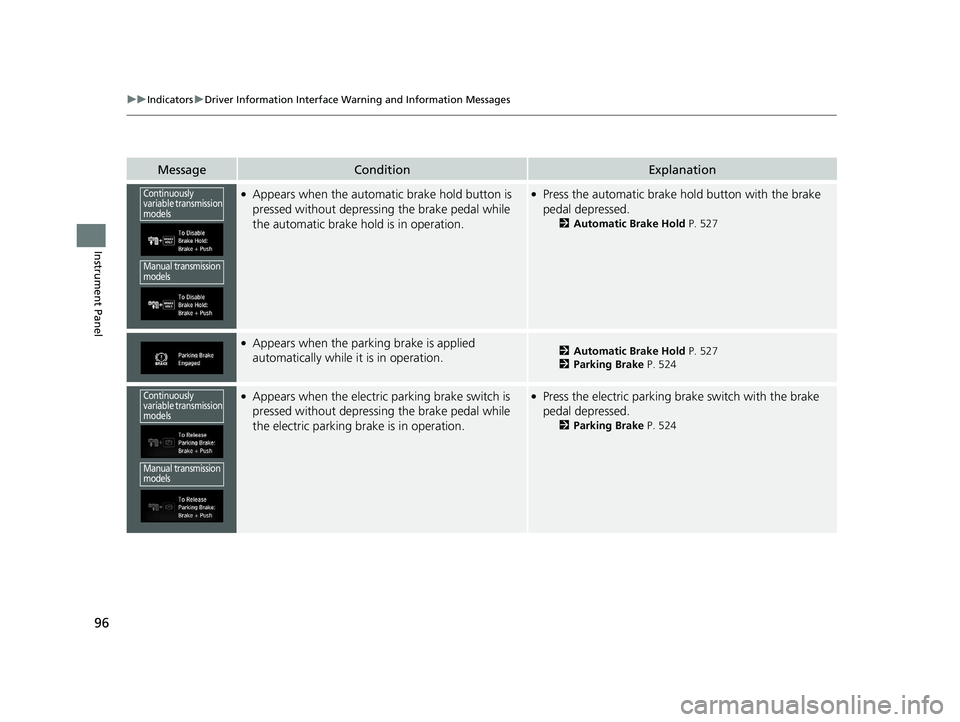
●Appears when the automatic brake hold button is
pressed without depressing the brake pedal while
the automatic brake hold is in operation.●Press the automatic brake hold button with the brake
pedal depressed.
2 Automatic Brake Hold P. 527
●Appears when the parking brake is applied
automatically while it is in operation.2Automatic Brake Hold P. 527
2 Parking Brake P. 524
●Appears when the electric parking brake switch is
pressed without depressing the brake pedal while
the electric parking brake is in operation.●Press the electric parking brake switch with the brake
pedal depressed.
2 Parking Brake P. 524
Continuously
variable transmission
models
Manual transmission
models
Continuously
variable transmission
models
Manual transmission
models
20 CIVIC 2D HCM (KA KL KC)-31TBG6400.book 96 ページ 2019年6月4日 火曜 日 午前8時32分
Page 103 of 675
101
uuIndicators uDriver Information Interface Wa rning and Information Messages
Continued
Instrument Panel
MessageConditionExplanation
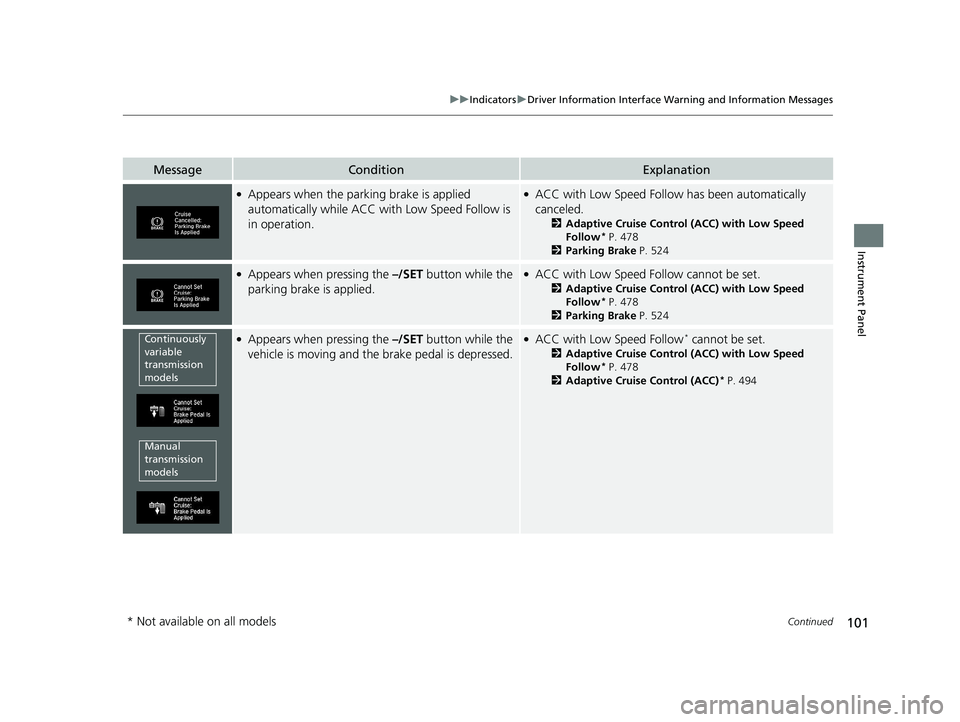
●Appears when the parking brake is applied
automatically while ACC with Low Speed Follow is
in operation.●ACC with Low Speed Follow has been automatically
canceled.
2 Adaptive Cruise Control (ACC) with Low Speed
Follow* P. 478
2 Parking Brake P. 524
●Appears when pressing the –/SET button while the
parking brake is applied.●ACC with Low Speed Follow cannot be set.
2 Adaptive Cruise Control (ACC) with Low Speed
Follow* P. 478
2 Parking Brake P. 524
●Appears when pressing the –/SET button while the
vehicle is moving and the brake pedal is depressed.●ACC with Low Speed Follow* cannot be set.
2 Adaptive Cruise Control (ACC) with Low Speed
Follow* P. 478
2 Adaptive Cruise Control (ACC)* P. 494
Continuously
variable
transmission
models
Manual
transmission
models
* Not available on all models
20 CIVIC 2D HCM (KA KL KC)-31TBG6400.book 101 ページ 2019年6月4日 火 曜日 午前8時32分
Page 168 of 675
166
uuOperating the Switches Around the Steering Wheel uLight Switches
Controls
Light Switches
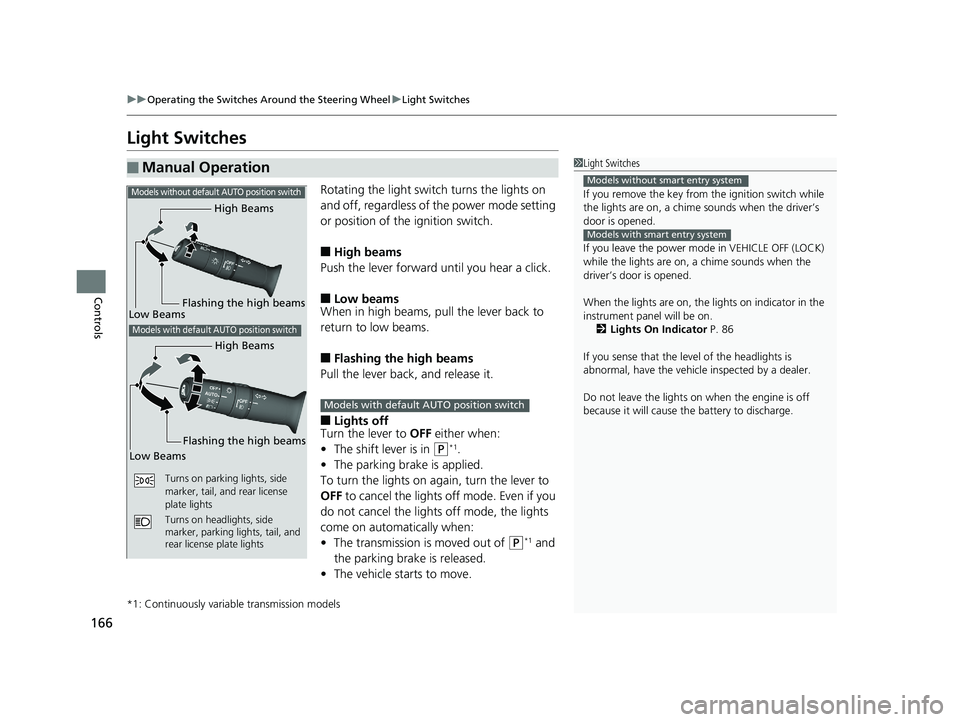
Rotating the light switch turns the lights on
and off, regardless of the power mode setting
or position of the ignition switch.
■High beams
Push the lever forward until you hear a click.
■Low beams
When in high beams, pull the lever back to
return to low beams.
■Flashing the high beams
Pull the lever back, and release it.
■Lights off
Turn the lever to OFF either when:
• The shift lever is in
(P*1.
• The parking brake is applied.
To turn the lights on ag ain, turn the lever to
OFF to cancel the lights off mode. Even if you
do not cancel the lights off mode, the lights
come on automatically when:
• The transmission is moved out of
(P*1 and
the parking brake is released.
• The vehicle starts to move.
*1: Continuously variable transmission models
■Manual Operation1Light Switches
If you remove the key from the ignition switch while
the lights are on, a chime sounds when the driver’s
door is opened.
If you leave the power mode in VEHICLE OFF (LOCK)
while the lights are on, a chime sounds when the
driver’s door is opened.
When the lights are on, the lights on indicator in the
instrument pane l will be on.
2 Lights On Indicator P. 86
If you sense that the le vel of the headlights is
abnormal, have the vehicl e inspected by a dealer.
Do not leave the lights on when the engine is off
because it will cause the battery to discharge.
Models without smart entry system
Models with smart entry system
High Beams
Flashing the high beams
Low Beams
Turns on parking lights, side
marker, tail, and rear license
plate lights
Turns on headlights, side
marker, parking lights, tail, and
rear license plate lights
Models without defaul t AUTO position switch
Models with default AUTO position switch
High Beams
Flashing the high beams
Low Beams
Models with default AUTO position switch
20 CIVIC 2D HCM (KA KL KC)-31TBG6400.book 166 ページ 2019年6月4日 火 曜日 午前8時32分