ignition HONDA CIVIC HATCHBACK 2003 7.G Owner's Manual
[x] Cancel search | Manufacturer: HONDA, Model Year: 2003, Model line: CIVIC HATCHBACK, Model: HONDA CIVIC HATCHBACK 2003 7.GPages: 275, PDF Size: 6.75 MB
Page 73 of 275

The Immobilizer System protects
your car f rom thef t. A properly-
coded master or valet key must be
used in the ignition switch f or the
engine to start. If an improperly-
coded key (or other device) is used,
the engine’s f uel system is disabled.
When you turn the ignition switch to
ON (II), the Immobilizer System
indicator should come on f or a f ew
seconds, then go out. If the indicator
starts to blink, it means the system
does not recognize the coding of the
key. Turn the ignition switch to
LOCK (0), remove the key, reinsert
it, and turn the switch to ON (II)
again.
The system may not recognize your
key’s coding if another immobilizer
key or other metal object is near the
ignition switch when you insert the
key. To make sure the system
recognizes the key code:If you have lost your key and you
cannot start the engine, contact your
Honda dealer.
Do not keep other immobilizer
keys on the same key ring.
Use a plastic or leather key f ob,
not metal.
Keep other keys away f rom your
car’s key and the ignition switch
while trying to start the engine.
If the system repeatedly does not
recognize the coding of your key,
contact your Honda dealer.
The Immobilizer System indicator
will also blink several times when
you turn the ignition switch f rom ON
(II) to ACCESSORY (I) or LOCK (0).
Do not attempt to alter this system
or add other devices to it. Electrical
problems could result that may make
your car undriveable.
This device complies with Industry Canada Standard RSS-210.Operation is subject to the f ollowing twoconditions: (1) this device may not causeinterf erence, and (2) this device mustaccept any interf erence that may causeundesired operation of the device.
Changes or modif ications not expressly
approved by the party responsible f orcompliance could void the user’s
authority to operate the equipment.
As required by the FCC:
This device complies with Part 15 of theFCC rules. Operation is subject to thef ollowing two conditions: (1) This devicemay not cause harmf ul interf erence, and(2) this device must accept anyinterf erence received, includinginterf erence that may cause undesiredoperation.
Immobilizer System
Keys and Locks
Inst rument s and Cont rols
74
Page 74 of 275
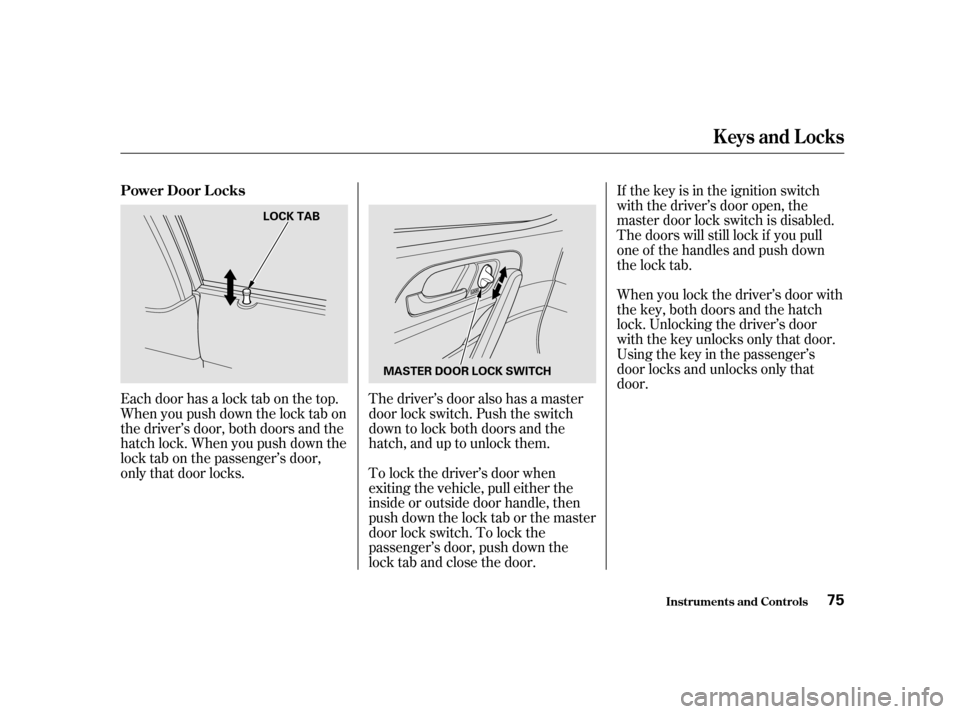
Each door has a lock tab on the top.
Whenyoupushdownthelocktabon
the driver’s door, both doors and the
hatch lock. When you push down the
lock tab on the passenger’s door,
only that door locks.The driver’s door also has a master
door lock switch. Push the switch
down to lock both doors and the
hatch, and up to unlock them.
To lock the driver’s door when
exiting the vehicle, pull either the
inside or outside door handle, then
push down the lock tab or the master
door lock switch. To lock the
passenger’s door, push down the
lock tab and close the door.If the key is in the ignition switch
with the driver’s door open, the
master door lock switch is disabled.
The doors will still lock if you pull
one of the handles and push down
the lock tab.
When you lock the driver’s door with
the key, both doors and the hatch
lock. Unlocking the driver’s door
with the key unlocks only that door.
Usingthekeyinthepassenger’s
door locks and unlocks only that
door.
Keys and Locks
Inst rument s and Cont rols
Power Door L ocks
75
LOCK TAB
MASTER DOOR LOCK SWITCH
Page 76 of 275

The ceiling lights (if the ceiling light
switches are in the center position)
will come on when you press the
UNLOCK button. If you do not open
any door, the lights stay on f or about
30 seconds, then f ades out. If you
relock the doors with the remote
transmitter before 30 seconds have
elapsed, the lights will go of f
immediately.You cannot lock the doors with the
remote transmitter if any door is not
f ully closed or the key is in the
ignition switch.
If you unlock the doors with the
remote transmitter, but do not open
any of the doors within 30 seconds,
the doors automatically relock.
To cancel PANIC mode bef ore 30
seconds, press any button on the
remote transmitter. You can also
turn the ignition switch to
ACCESSORY (I) or ON (II).
Panic mode will not activate if the
ignition switch is in the
ACCESSORY (I) or ON (II) position.
Panic mode allows you to remotely
activate your car’s horn and exterior
lights to attract attention. When
activated, the horn will sound, and
the exterior lights will f lash, f or
about 30 seconds. To activate panic
mode,pressandholdthePANIC
button f or about one second.
CONT INUED
Panic Mode
Keys and Locks
Inst rument s and Cont rols
77
Page 84 of 275
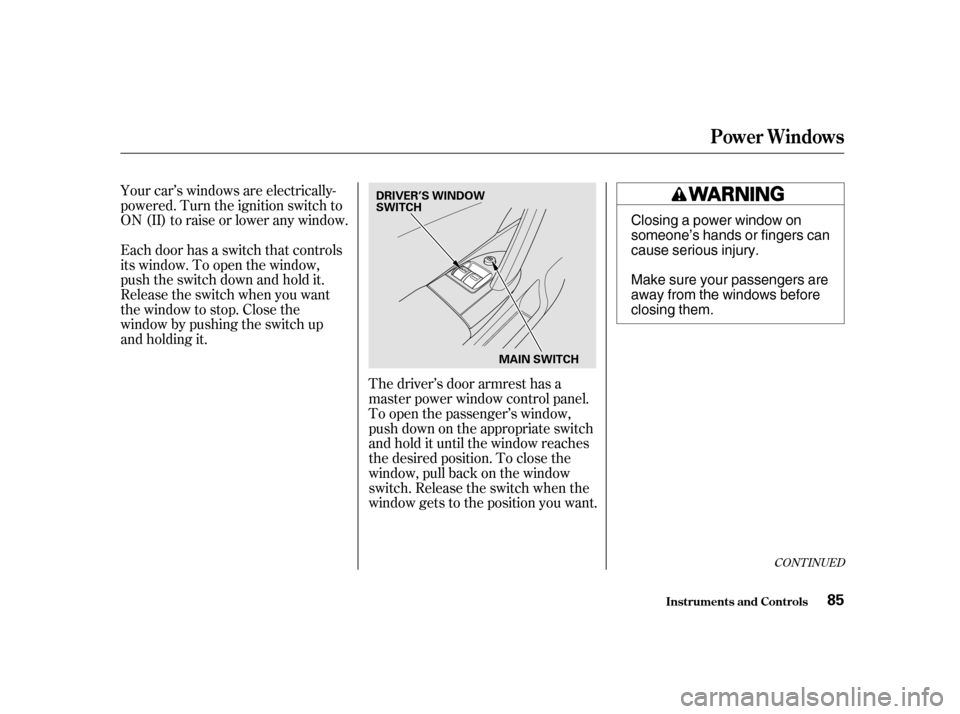
Your car’s windows are electrically-
powered. Turn the ignition switch to
ON(II)toraiseorloweranywindow.
Each door has a switch that controls
its window. To open the window,
push the switch down and hold it.
Release the switch when you want
the window to stop. Close the
window by pushing the switch up
and holding it.The driver’s door armrest has a
master power window control panel.
To open the passenger’s window,
push down on the appropriate switch
and hold it until the window reaches
the desired position. To close the
window, pull back on the window
switch. Release the switch when the
window gets to the position you want.
CONT INUED
Power Windows
Inst rument s and Cont rols85
DRIVER’S WINDOW
SWITCH
MAIN SWITCH Closing a power window on
someone’s hands or fingers can
cause serious injury.
Make sure your passengers are
away from the windows before
closing them.
Page 86 of 275
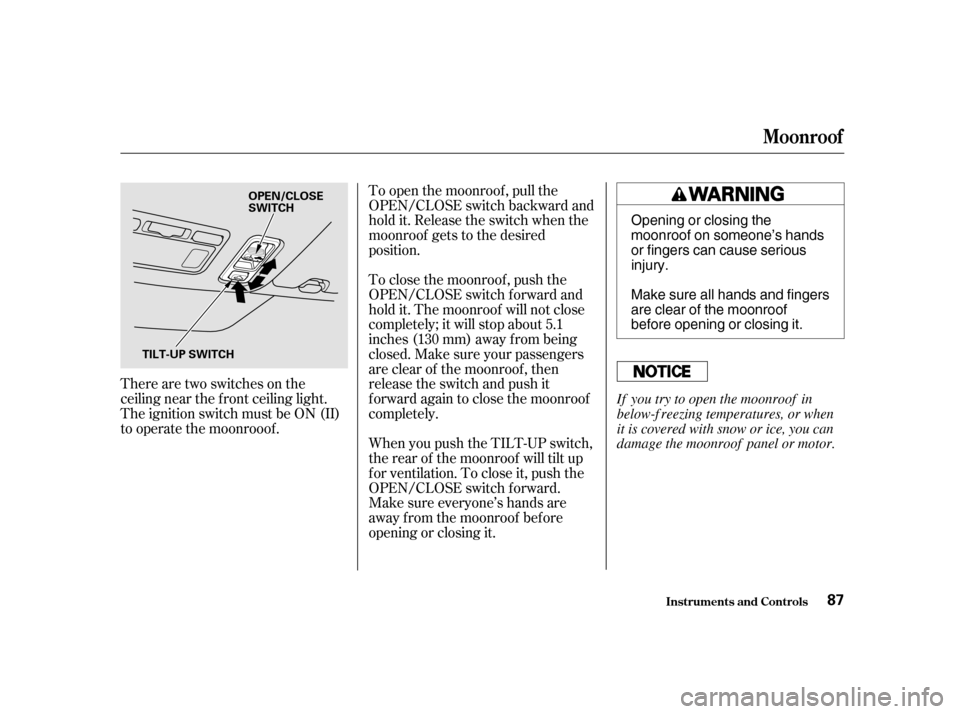
There are two switches on the
ceiling near the f ront ceiling light.
The ignition switch must be ON (II)
to operate the moonrooof .To open the moonroof , pull the
OPEN/CLOSE switch backward and
hold it. Release the switch when the
moonroof gets to the desired
position.
To close the moonroof , push the
OPEN/CLOSE switch f orward and
hold it. The moonroof will not close
completely; it will stop about 5.1
inches (130 mm) away f rom being
closed. Make sure your passengers
are clear of the moonroof , then
release the switch and push it
f orward again to close the moonroof
completely.
When you push the TILT-UP switch,
the rear of the moonroof will tilt up
f or ventilation. To close it, push the
OPEN/CLOSE switch f orward.
Make sure everyone’s hands are
away f rom the moonroof bef ore
opening or closing it.
Moonroof
Inst rument s and Cont rols
87
OPEN/CLOSE
SWITCH
TILT-UP SWITCH Opening or closing the
moonroof on someone’s hands
or fingers can cause seriousinjury.
Make sure all hands and fingers
are clear of the moonroof
before opening or closing it.
If you try to open the moonroof in
below-f reezing temperatures, or when
it is covered with snow or ice, you can
damage the moonroof panel or motor.
Page 87 of 275
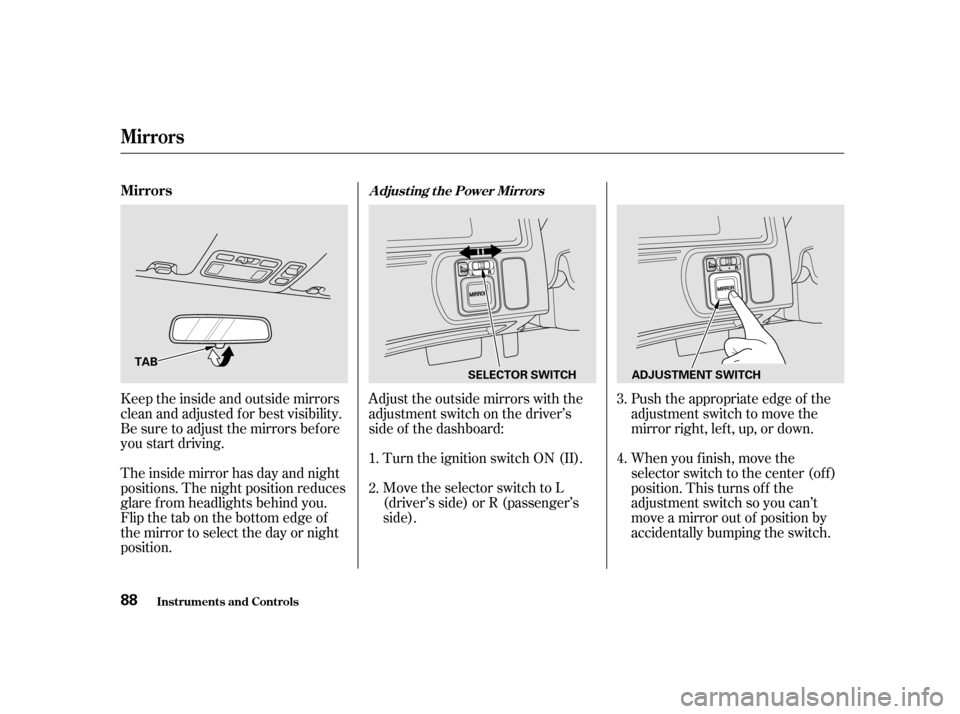
Adjust the outside mirrors with the
adjustment switch on the driver’s
side of the dashboard:Turn the ignition switch ON (II).
Move the selector switch to L
(driver’s side) or R (passenger’s
side). Push the appropriate edge of the
adjustment switch to move the
mirrorright,left,up,ordown.
When you f inish, move the
selector switch to the center (off)
position. This turns of f the
adjustment switch so you can’t
move a mirror out of position by
accidentally bumping the switch.
Keeptheinsideandoutsidemirrors
clean and adjusted f or best visibility.
Be sure to adjust the mirrors bef ore
you start driving.
The inside mirror has day and night
positions. The night position reduces
glare f rom headlights behind you.
Flip the tab on the bottom edge of
the mirror to select the day or night
position. 3.
1. 2. 4.
Adjusting the Power MirrorsMirrors
Mirrors
Inst rument s and Cont rols
88 TAB
SELECTOR SWITCHADJUSTMENT SWITCH
Page 88 of 275
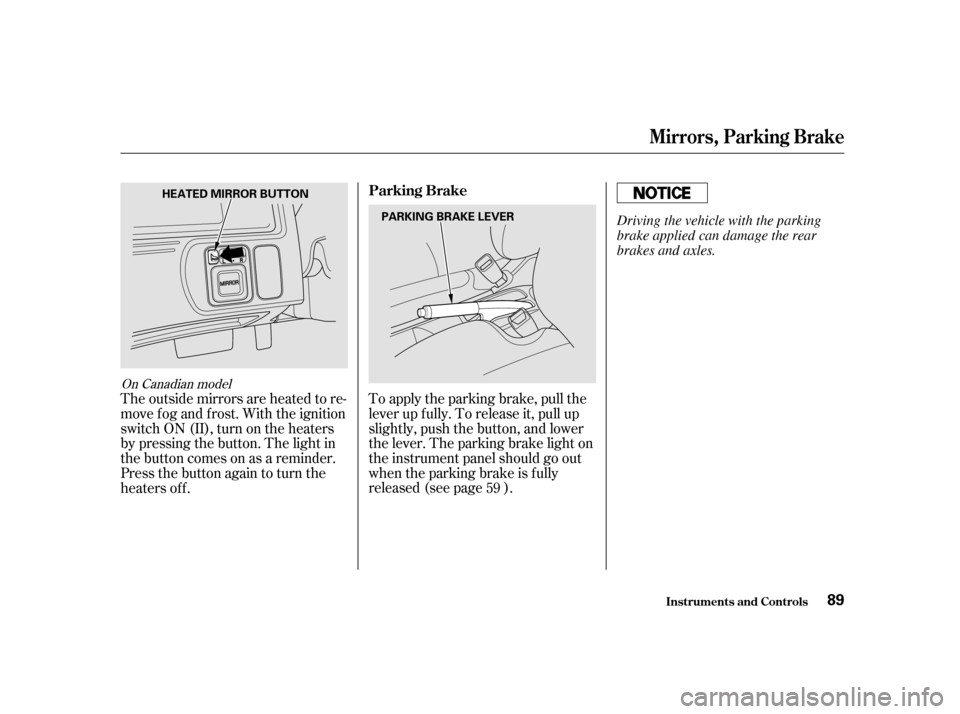
To apply the parking brake, pull the
lever up f ully. To release it, pull up
slightly, push the button, and lower
the lever. The parking brake light on
the instrument panel should go out
when the parking brake is f ully
released (see page ).
The outside mirrors are heated to re-
move fog and frost. With the ignition
switchON(II),turnontheheaters
by pressing the button. The light in
the button comes on as a reminder.
Press the button again to turn the
heaters of f .
59
On Canadian model
Mirrors, Parking Brake
Inst rument s and Cont rols
Parking Brake
89
HEATED MIRROR BUTTON
PARKING BRAKE LEVER Driving the vehicle with the parking
brake applied can damage the rear
brakes and axles.
Page 91 of 275
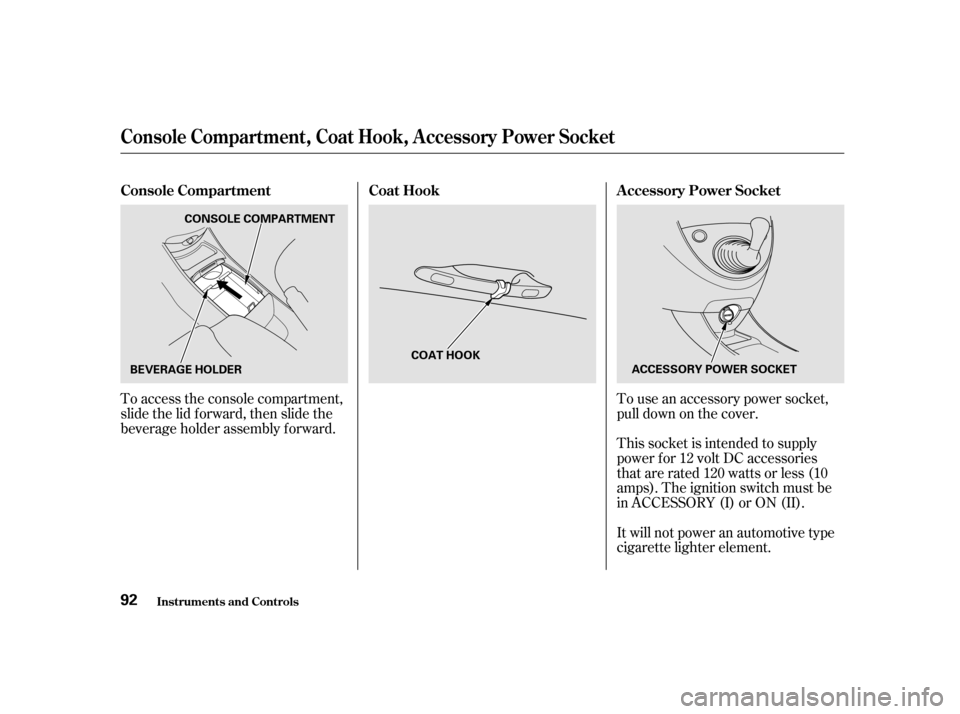
To use an accessory power socket,
pull down on the cover.
This socket is intended to supply
power f or 12 volt DC accessories
that are rated 120 watts or less (10
amps). The ignition switch must be
in ACCESSORY (I) or ON (II).
It will not power an automotive type
cigarette lighter element.
To access the console compartment,
slide the lid f orward, then slide the
beverage holder assembly f orward.
Inst rument s and Cont rols Coat Hook A ccessory Power Socket
Console Compartment
Console Compart ment , Coat Hook, A ccessory Power Socket
92 CONSOLE COMPARTMENT
BEVERAGE HOLDER COAT HOOK
ACCESSORY POWER SOCKET
Page 93 of 275
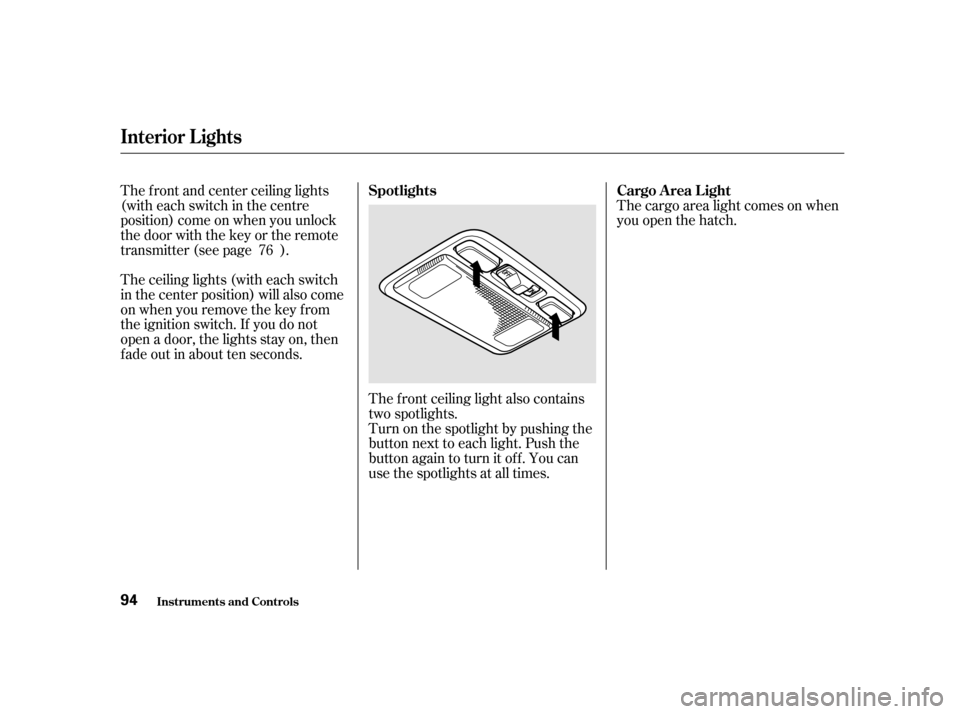
The ceiling lights (with each switch
in the center position) will also come
on when you remove the key f rom
the ignition switch. If you do not
open a door, the lights stay on, then
f ade out in about ten seconds.The f ront ceiling light also contains
two spotlights.
Turn on the spotlight by pushing the
button next to each light. Push the
button again to turn it off. You can
use the spotlights at all times.The cargo area light comes on when
you open the hatch.
The f ront and center ceiling lights
(witheachswitchinthecentre
position) come on when you unlock
the door with the key or the remote
transmitter (see page ).
76
Interior Lights
Inst rument s and Cont rols Spotlights Cargo Area Light
94
Page 103 of 275
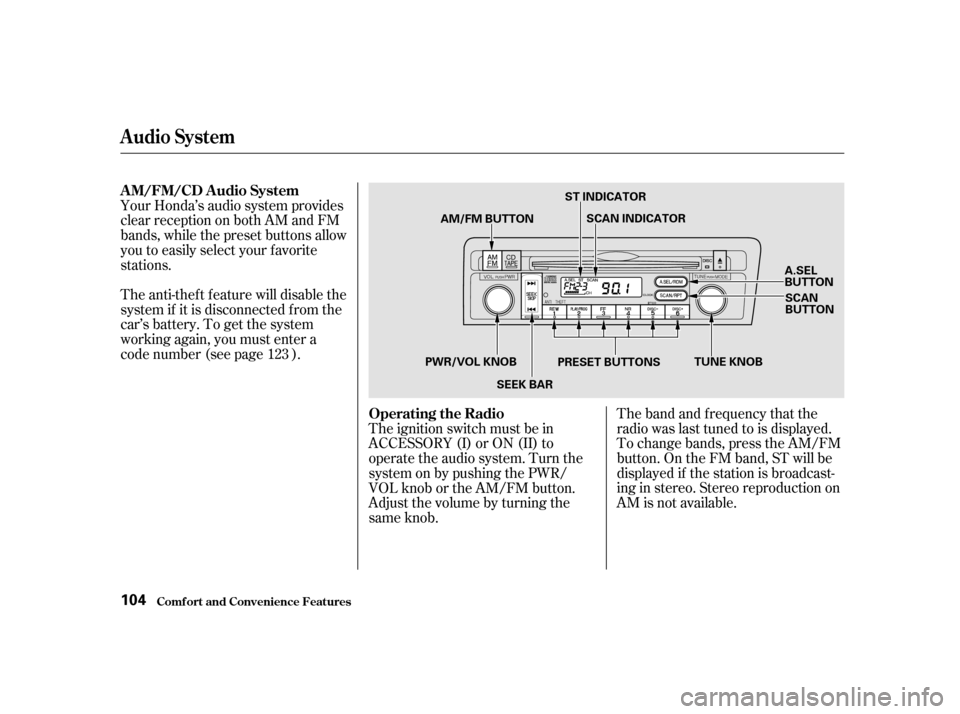
The band and f requency that the
radio was last tuned to is displayed.
To change bands, press the AM/FM
button. On the FM band, ST will be
displayed if the station is broadcast-
ing in stereo. Stereo reproduction on
AM is not available.
Your Honda’s audio system provides
clear reception on both AM and FM
bands, while the preset buttons allow
you to easily select your f avorite
stations.
The anti-thef t f eature will disable the
system if it is disconnected f rom the
car’s battery. To get the system
working again, you must enter a
code number (see page ).
The ignition switch must be in
ACCESSORY (I) or ON (II) to
operate the audio system. Turn the
system on by pushing the PWR/
VOL knob or the AM/FM button.
Adjust the volume by turning the
same knob.
123
Audio System
Comf ort and Convenience Feat ures
AM/FM/CD Audio System
Operating the Radio
104 AM/FM BUTTON
SCAN INDICATOR
A.SEL
BUTTONSCAN
BUTTON
PRESET BUTTONS TUNE KNOB
SEEK BAR
PWR/VOL KNOB ST INDICATOR