ECO mode HONDA CIVIC HATCHBACK 2017 10.G Owners Manual
[x] Cancel search | Manufacturer: HONDA, Model Year: 2017, Model line: CIVIC HATCHBACK, Model: HONDA CIVIC HATCHBACK 2017 10.GPages: 641
Page 524 of 641
523
Maintenance
This chapter discusses basic maintenance.
Before Performing MaintenanceInspection and Maintenance ............ 524
Safety When Performing Maintenance .... 525Parts and Fluids Used in Maintenance Service ........................................... 526
Maintenance Minder
TM..................... 527
Maintenance Under the Hood
Maintenance Items Un der the Hood .... 536Opening the Hood ........................... 537
Recommended Engine Oil ................ 538
Oil Check ......................................... 539
Adding Engine Oil ............................ 540
Changing the Engine Oil and Oil Filter..... 541
Engine Coolant ................................ 543
Transmission Fluid ............................ 545
Brake/Clutch
* Fluid .......................... 546
Refilling Window Washer Fluid......... 547
Replacing Light Bulbs ....................... 548
Checking and Maintaining Wiper
Blades .......................................... 556
Checking and Maintaining Tires
Checking Tires ................................. 561
Tire and Loading Information Label ..... 562Tire Labeling .................................... 562DOT Tire Quality Grading (U.S. Vehicles) ...... 564Wear Indicators................................ 566 Tire Service Life ................................ 566
Tire and Wheel Replacement ........... 567
Tire Rotation .................................... 568
Winter Tires ..................................... 569
Battery ............................................... 571
Remote Transmitter Care
Replacing the Button Battery ........... 573
Climate Control System Maintenance .. 575Cleaning
Interior Care .................................... 576
Exterior Care.................................... 579
Accessories and Modifications ........ 582
* Not available on all models
17 CIVIC 5D (KA KC KL)-31TGG6000.book 523 ページ 2016年6月8日 水曜日 午 後2時8分
Page 525 of 641
524
Maintenance
Before Performing Maintenance
Inspection and Maintenance
For your safety, perform all listed inspections and maintenance to keep your vehicle
in good condition. If you become aware of any abnormality (noise, smell, insufficient
brake fluid, oil residue on the ground, etc.), have your vehicle inspected by a dealer.
(Note, however, that service at a dealer is not mandatory to keep your warranties in
effect.)
■Daily inspections
Perform inspections before long distance trips, when washing the vehicle, or when
refueling.
■Periodic inspections
• Check the brake/clutch* fluid level monthly.
2 Brake/Clutch* Fluid P. 546
•Check the tire pressure monthly. Examin e the tread for wear and foreign objects.
2Checking and Maintaining Tires P. 561
•Check the operation of the exterior lights monthly.
2 Replacing Light Bulbs P. 548
•Check the condition of the wiper bl ades at least every six months.
2Checking and Maintaining Wiper Blades P. 556
■Types of Inspection and Maintenance
1Inspection and Maintenance
Maintenance, replacement, or repair of
emissions control devices and systems may be
done by any automotive repair establishment or
individuals using parts that are “certified” to
EPA standards.
According to state and fede ral regulations, failure to
perform maintenance on the maintenance main
items marked with # will not void your emissions
warranties. However, all maintenance services should
be performed in accordan ce with the intervals
indicated by the information display
*/driver
information interface*.
2 Maintenance Service Items P. 529, 533
If you want to perform complex maintenance tasks
that require more skills a nd tools, you can purchase a
subscription to the Service Express website at
www.techinfo.honda.com .
2 Authorized Manuals P. 627
If you want to perform ma intenance yourself, make
sure that you have the necessary tools and skills first.
After performing ma intenance, update the records in
the separate maintenance booklet.
U.S. models
* Not available on all models
17 CIVIC 5D (KA KC KL)-31TGG6000.book 524 ページ 2016年6月8日 水曜日 午 後2時8分
Page 528 of 641
527Continued
Maintenance
Maintenance MinderTM
Select the Maintenance Minder to see maintenance items that are due soon and to
see the percentage of life remaining in the engine oil.
When the engine oil life is less than 15%, a Maintenance Minder message will
appear every time you turn the ignition switch to ON
(w*1, reminding you to bring
your vehicle to a dealer for service.
To Use Maintenance MinderTM
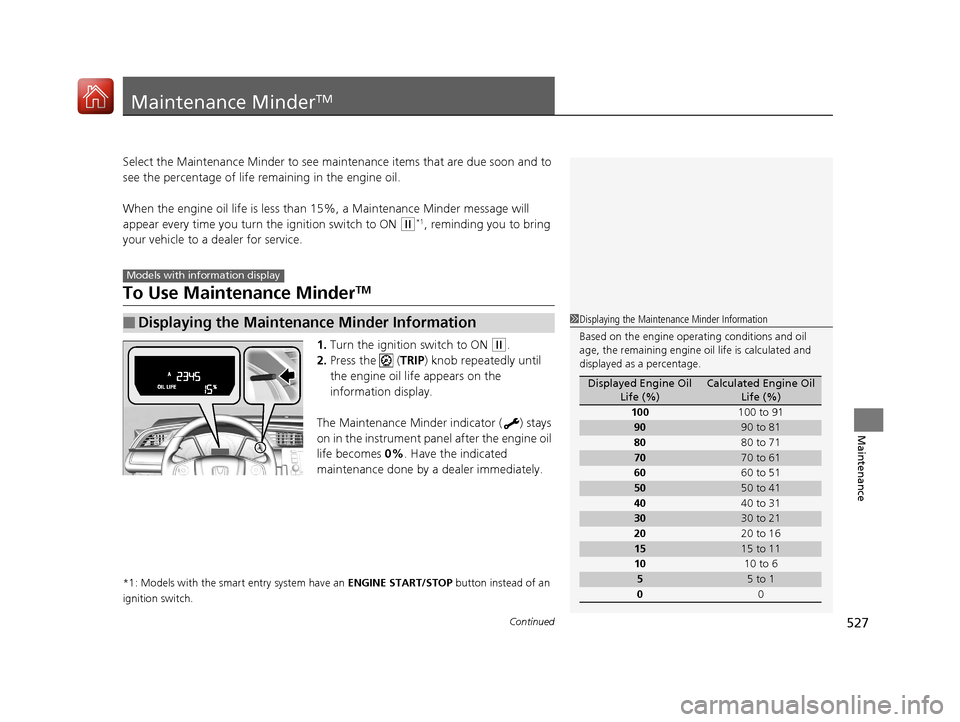
1. Turn the ignition switch to ON (w.
2. Press the ( TRIP) knob repeatedly until
the engine oil life appears on the
information display.
The Maintenance Minder indicator ( ) stays
on in the instrument panel after the engine oil
life becomes 0% . Have the indicated
maintenance done by a dealer immediately.
*1: Models with the smart entry system have an ENGINE START/STOP button instead of an
ignition switch.
■Displaying the Maintenance Minder Information
Models with info rmation display
1Displaying the Maintena nce Minder Information
Based on the engine opera ting conditions and oil
age, the remaining engine oi l life is calculated and
displayed as a percentage.
Displayed Engine Oil Life (%)Calculated Engine Oil Life (%)
100 100 to 91
9090 to 81
80 80 to 71
7070 to 61
60 60 to 51
5050 to 41
40 40 to 31
3030 to 21
20 20 to 16
1515 to 11
10 10 to 6
55 to 1
0 0
17 CIVIC 5D (KA KC KL)-31TGG6000.book 527 ページ 2016年6月8日 水曜日 午 後2時8分
Page 531 of 641
uuMaintenance MinderTMuTo Use Maintenance MinderTM
530
Maintenance
Reset the Maintenance Minder display if you have performed the maintenance
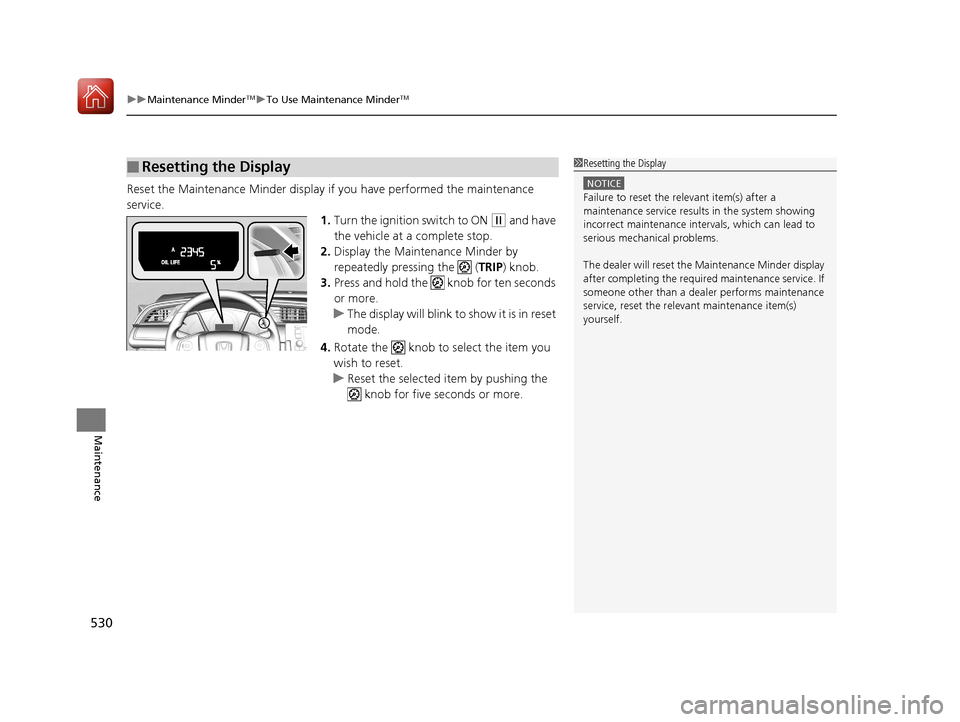
service. 1.Turn the ignition switch to ON
(w and have
the vehicle at a complete stop.
2. Display the Maintenance Minder by
repeatedly pressing the ( TRIP) knob.
3. Press and hold the knob for ten seconds
or more.
u The display will blink to show it is in reset
mode.
4. Rotate the knob to select the item you
wish to reset.
u Reset the selected item by pushing the
knob for five seconds or more.
■Resetting the Display1Resetting the Display
NOTICE
Failure to reset the relevant item(s) after a
maintenance service results in the system showing
incorrect maintenance interv als, which can lead to
serious mechanical problems.
The dealer will reset the Maintenance Minder display
after completing the required maintenance service. If
someone other than a deal er performs maintenance
service, reset the relevant maintenance item(s)
yourself.
17 CIVIC 5D (KA KC KL)-31TGG6000.book 530 ページ 2016年6月8日 水曜日 午 後2時8分
Page 534 of 641
533
uuMaintenance MinderTMuTo Use Maintenance MinderTM
Continued
Maintenance
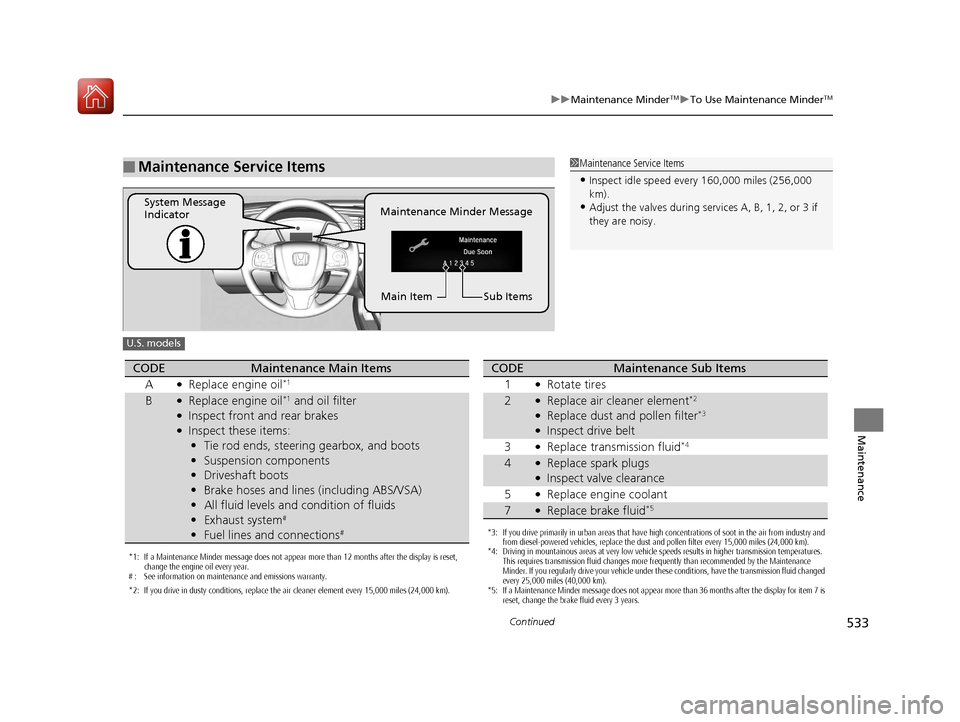
■Maintenance Service Items1Maintenance Service Items
•Inspect idle speed every 160,000 miles (256,000
km).
•Adjust the valves during services A, B, 1, 2, or 3 if
they are noisy.Maintenance Minder Message
System Message
Indicator
Sub Items
Main Item
U.S. models
*1: If a Maintenance Minder message does not appear more than 12 months after the display is reset,
change the engine oil every year.
# : See information on maintenance and emissions warranty.
*2: If you drive in dusty conditions, replace the air cleaner element every 15,000 miles (24,000 km).
CODEMaintenance Main Items
A
●Replace engine oil*1
B●Replace engine oil*1 and oil filter●Inspect front and rear brakes●Inspect these items: • Tie rod ends, steering gearbox, and boots
• Suspension components
• Driveshaft boots
• Brake hoses and lines (including ABS/VSA)
• All fluid levels and condition of fluids
• Exhaust system
#
•Fuel lines and connections#*3: If you drive primarily in urban areas that have high concentrations of soot in the air from industry and
from diesel-powered vehicles, replace the dust and pollen filter every 15,000 miles (24,000 km).
*4: Driving in mountainous areas at very low vehicle speeds results in higher transmission temperatures.
This requires transmission fluid changes more frequently than recommended by the Maintenance
Minder. If you regularly drive your vehicle under these conditions, have the transmission fluid changed
every 25,000 miles (40,000 km).
*5: If a Maintenance Minder message does not appear more than 36 months after the display for item 7 is reset, change the brake fluid every 3 years.
CODEMaintenance Sub Items
1
●Rotate tires
2●Replace air cleaner element*2
●Replace dust and pollen filter*3
●Inspect drive belt
3
●Replace transmission fluid*4
4●Replace spark plugs●Inspect valve clearance
5
●Replace engine coolant
7●Replace brake fluid*5
17 CIVIC 5D (KA KC KL)-31TGG6000.book 533 ページ 2016年6月8日 水曜日 午 後2時8分
Page 535 of 641
534
uuMaintenance MinderTMuTo Use Maintenance MinderTM
Maintenance
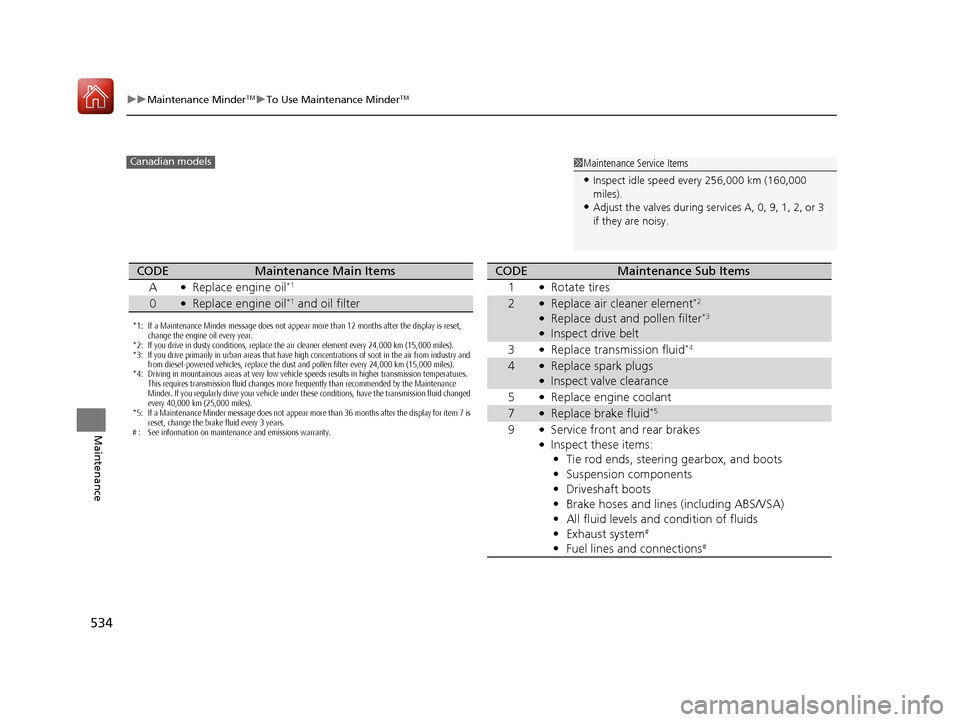
1Maintenance Service Items
•Inspect idle speed every 256,000 km (160,000
miles).
•Adjust the valves during services A, 0, 9, 1, 2, or 3
if they are noisy.
Canadian models
*1: If a Maintenance Minder message does not appear more than 12 months after the display is reset,
change the engine oil every year.
*2: If you drive in dusty conditions, replace the air cleaner element every 24,000 km (15,000 miles).
*3: If you drive primarily in urban areas that have high concentrations of soot in the air from industry and from diesel-powered vehicles, replace the dust and pollen filter every 24,000 km (15,000 miles).
*4: Driving in mountainous areas at very low vehicle speeds results in higher transmission temperatures.
This requires transmission fluid changes more frequently than recommended by the Maintenance
Minder. If you regularly drive your vehicle under these conditions, have the transmission fluid changed
every 40,000 km (25,000 miles).
*5: If a Maintenance Minder message does not appear more than 36 months after the display for item 7 is reset, change the brake fluid every 3 years.
# : See information on maintenance and emissions warranty.
CODEMaintenance Main Items
A
●Replace engine oil*1
0●Replace engine oil*1 and oil filter
CODEMaintenance Sub Items
1
●Rotate tires
2●Replace air cleaner element*2
●Replace dust and pollen filter*3
●Inspect drive belt
3
●Replace transmission fluid*4
4●Replace spark plugs●Inspect valve clearance
5
●Replace engine coolant
7●Replace brake fluid*5
9●Service front and rear brakes●Inspect these items: • Tie rod ends, steering gearbox, and boots
• Suspension components
• Driveshaft boots
• Brake hoses and lines (including ABS/VSA)
• All fluid levels and condition of fluids
• Exhaust system
#
•Fuel lines and connections#
17 CIVIC 5D (KA KC KL)-31TGG6000.book 534 ページ 2016年6月8日 水曜日 午 後2時8分
Page 536 of 641
535
uuMaintenance MinderTMuTo Use Maintenance MinderTM
Maintenance
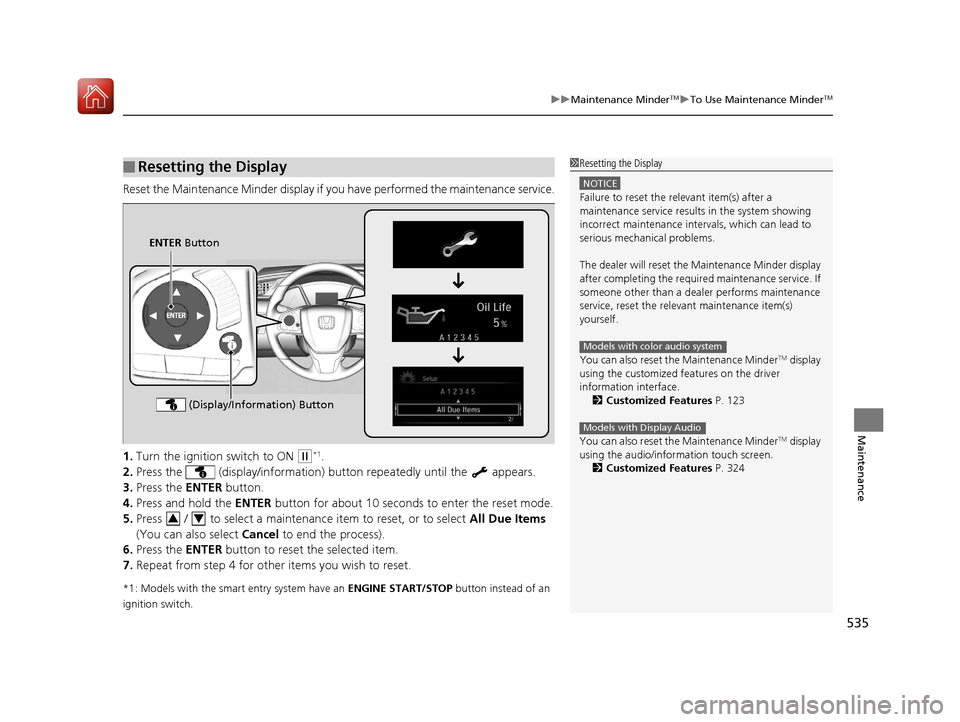
Reset the Maintenance Minder display if y ou have performed the maintenance service.
1. Turn the ignition switch to ON
(w*1.
2. Press the (display/information) bu tton repeatedly until the appears.
3. Press the ENTER button.
4. Press and hold the ENTER button for about 10 second s to enter the reset mode.
5. Press / to select a maintenance item to reset, or to select All Due Items
(You can also select Cancel to end the process).
6. Press the ENTER button to reset the selected item.
7. Repeat from step 4 for other items you wish to reset.
*1: Models with the smart entry system have an ENGINE START/STOP button instead of an
ignition switch.
■Resetting the Display1 Resetting the Display
NOTICE
Failure to reset the relevant item(s) after a
maintenance service results in the system showing
incorrect maintenance interv als, which can lead to
serious mechanical problems.
The dealer will reset the Maintenance Minder display
after completing the required maintenance service. If
someone other than a deal er performs maintenance
service, reset the relevant maintenance item(s)
yourself.
You can also reset the Maintenance Minder
TM display
using the customized features on the driver
information interface.
2 Customized Features P. 123
You can also reset the Maintenance Minder
TM display
using the audio/information touch screen.
2 Customized Features P. 324
Models with color audio system
Models with Display Audio
ENTER Button
(Display/Information) Button
34
17 CIVIC 5D (KA KC KL)-31TGG6000.book 535 ページ 2016年6月8日 水曜日 午 後2時8分
Page 562 of 641
561
Maintenance
Checking and Maintaining Tires
Checking Tires
To safely operate your vehicle, your tires must be of the proper type and size, in
good condition with adequate tread, and properly inflated.
■Inflation guidelines
Properly inflated tires provid e the best combination of hand ling, tread life, and comfort.
Refer to the driver’s doorjamb label or spec ifications page for the specified pressure.
Underinflated tires wear unev enly, adversely affect handling and fuel economy, and
are more likely to fail from overheating.
Overinflated tires make your vehicle ride ha rshly, are more prone to road hazards,
and wear unevenly.
Every day before you drive, look at each of the tires. If one looks lower than the
others, check the pressure with a tire gauge.
At least once a month or before long trips , use a gauge to measure the pressure in
all tires, including the spare. Even tires in good condition can lose 1–2 psi (10–20
kPa, 0.1–0.2 kgf/cm
2) per month.
■Inspection guidelines
Every time you check inflation, also examine the tires and valve stems.
Look for:
• Bumps or bulges on the side or in the tr ead. Replace the tire if you find any cuts,
splits, or cracks in the side of the tire . Replace it if you see fabric or cord.
• Remove any foreign objects and inspect for air leaks.
• Uneven tread wear. Have a deal er check the wheel alignment.
• Excessive tread wear.
2 Wear Indicators P. 566
•Cracks or other damage around valve stem.
1Checking Tires
Measure the air pressure when tires are cold. This
means the vehicle has been parked for at least three
hours, or driven less than 1 mile (1.6 km). If
necessary, add or releas e air until the specified
pressure is reached.
If checked when hot, tire pressure can be as much as
4–6 psi (30–40 kPa, 0.3–0.4 kgf/cm
2) higher than if
checked when cold.
Whenever tire pressure is adjusted, you must
calibrate the TPMS. 2 TPMS Calibration P. 492
Have a dealer check the tires if you feel a consistent
vibration while driving. Ne w tires and any that have
been removed and reinst alled should be properly
balanced.
Check the spare tire pressu re once a month or before
long trips.
3WARNING
Using tires that are excessively worn or
improperly inflated can cause a crash in
which you can be seriously hurt or killed.
Follow all instruction s in this owner’s
manual regarding tire inflation and
maintenance.
U.S. models
17 CIVIC 5D (KA KC KL)-31TGG6000.book 561 ページ 2016年6月8日 水曜日 午 後2時8分
Page 571 of 641
570
uuChecking and Maintaining Tires uWinter Tires
Maintenance
For winter tires:
• Select the size and load ranges that are the same as the original tires.
• Mount the tires to all four wheels.
For tire chains:
• Install them on the front tires only.
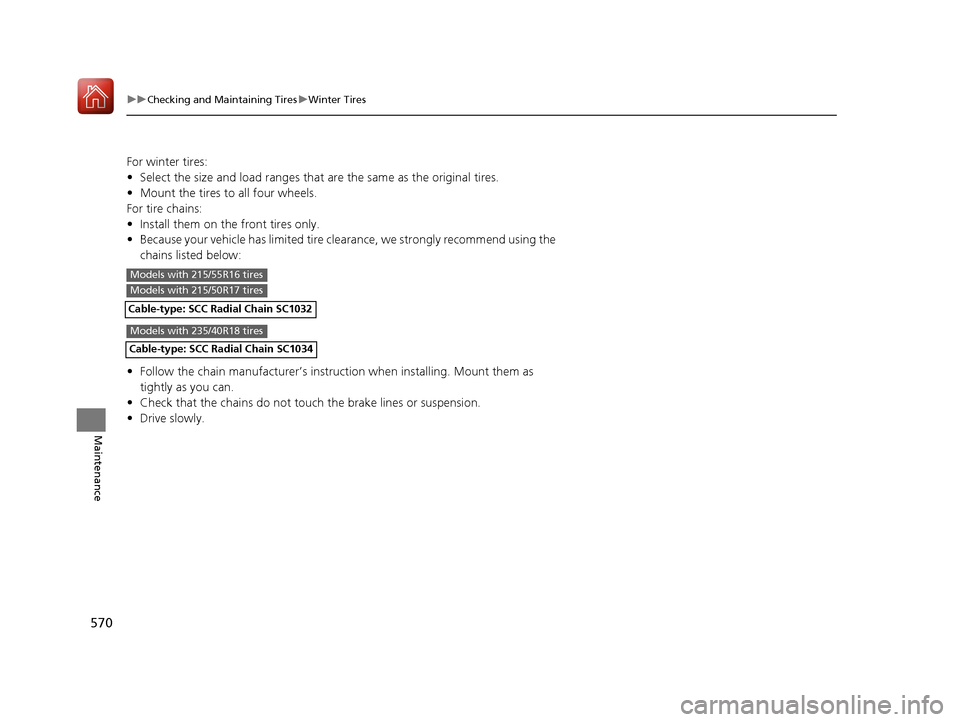
• Because your vehicle has limited tire clearance, we strongly recommend using the
chains listed below:
• Follow the chain manufacturer’s instruction when installing. Mount them as
tightly as you can.
• Check that the chains do not to uch the brake lines or suspension.
• Drive slowly.
Models with 215/55R16 tires
Models with 215/50R17 tires
Models with 235/40R18 tires
17 CIVIC 5D (KA KC KL)-31TGG6000.book 570 ページ 2016年6月8日 水曜日 午 後2時8分
Cable-type: SCC Radial Chain SC1034
Cable-type: SCC Radial Chain SC1032
Page 573 of 641
572
uuBattery uCharging the Battery
Maintenance
Charging the Battery
Disconnect both battery cables to prevent da maging your vehicle’s electrical system.
Always disconnect the negative (–) cable first, and reconnect it last.
*1: Models with the smart entry system have an ENGINE START/STOP button instead of an
ignition switch.
1 Battery
When you find corrosion, cl ean the battery terminals
by applying a baking powder and water solution.
Clean the terminals with a damp towel. Cloth/towel
dry the battery. Coat the terminals with grease to
help prevent future corrosion.
When replacing the battery, the replacement must be
of the same specifications.
Consult a dealer for more information.
The VSA ® system, VSA ® OFF, low tire pressure/TPMS
*
and CMBSTM * indicators may come on when your
turn the ignition switch to ON ( w*1 after re-
connecting a battery.
Drive straight for a short distance at more than 12
mph (20 km/h). Each indicato r should go off. If none
of them do, have your ve hicle checked by a dealer.
* Not available on all models
17 CIVIC 5D (KA KC KL)-31TGG6000.book 572 ページ 2016年6月8日 水曜日 午 後2時8分