clutch HONDA CIVIC HATCHBACK 2017 10.G User Guide
[x] Cancel search | Manufacturer: HONDA, Model Year: 2017, Model line: CIVIC HATCHBACK, Model: HONDA CIVIC HATCHBACK 2017 10.GPages: 641
Page 441 of 641
440
uuWhen Driving uShifting
Driving
The manual transmission has a lockout mech anism that stops you from accidentally
shifting into
(R from a forward gear while the ve hicle is moving above a certain
speed.
If you cannot shift to
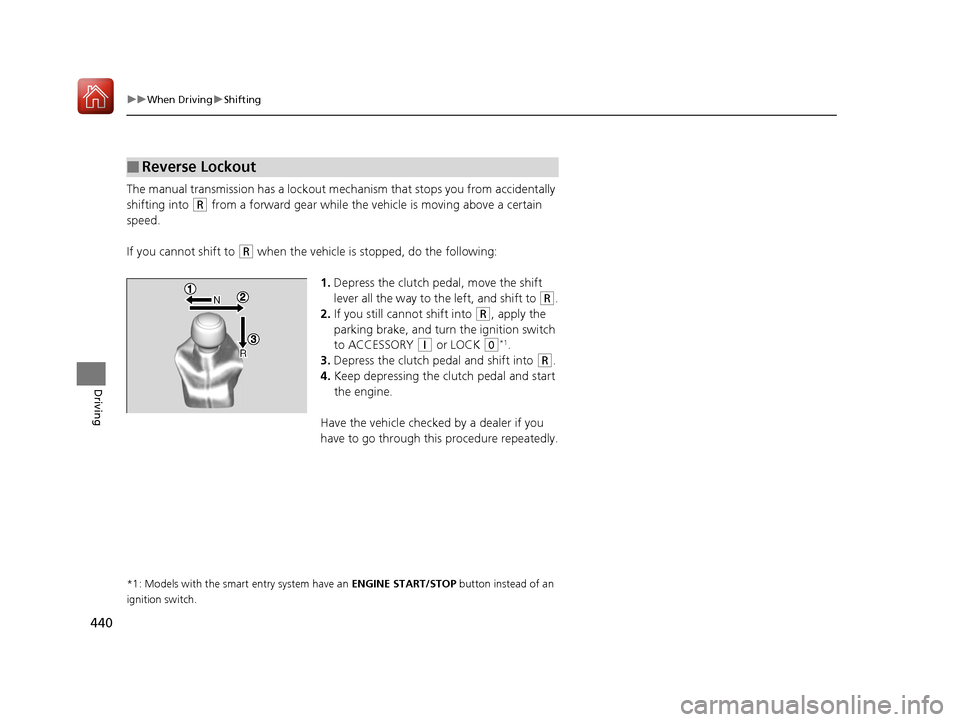
(R when the vehicle is stopped, do the following:
1.Depress the clutch pedal, move the shift
lever all the way to the left, and shift to
(R.
2. If you still cannot shift into
(R, apply the
parking brake, and turn the ignition switch
to ACCESSORY
(q or LOCK (0*1.
3. Depress the clutch pedal and shift into
(R.
4. Keep depressing the clutch pedal and start
the engine.
Have the vehicle checked by a dealer if you
have to go through this procedure repeatedly.
*1: Models with the smart entry system have an ENGINE START/STOP button instead of an
ignition switch.
■Reverse Lockout
17 CIVIC 5D (KA KC KL)-31TGG6000.book 440 ページ 2016年6月8日 水曜日 午 後2時8分
Page 446 of 641
445
uuWhen Driving uCruise Control*
Driving
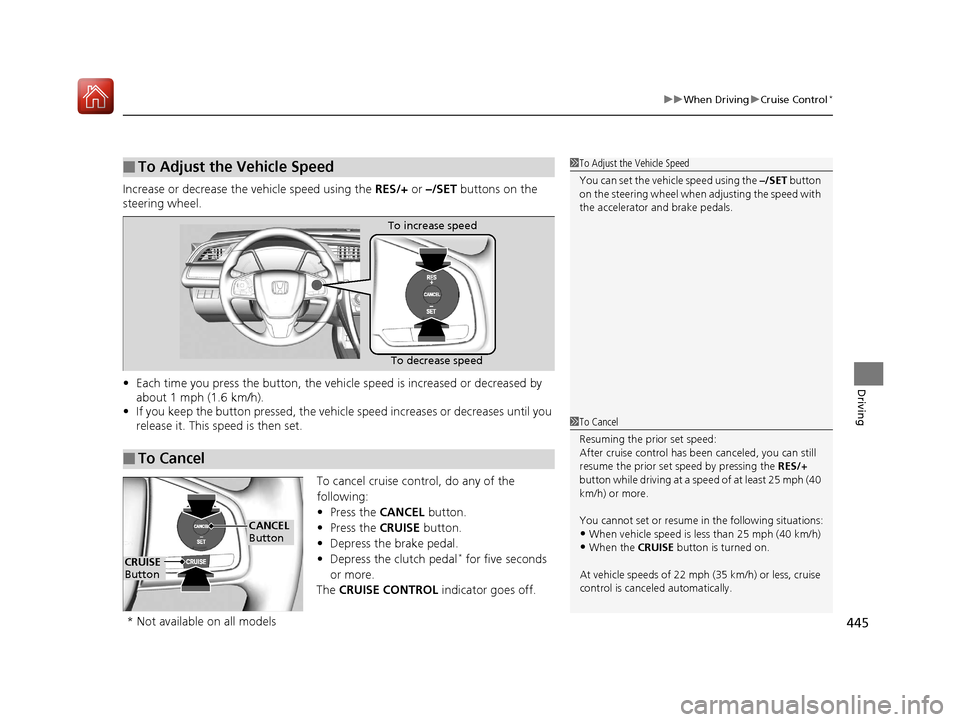
Increase or decrease the vehicle speed using the RES/+ or –/SET buttons on the
steering wheel.
• Each time you press the button, the vehicl e speed is increased or decreased by
about 1 mph (1.6 km/h).
• If you keep the button pressed, the vehicl e speed increases or decreases until you
release it. This speed is then set.
To cancel cruise control, do any of the
following:
• Press the CANCEL button.
• Press the CRUISE button.
• Depress the brake pedal.
• Depress the clutch pedal
* for five seconds
or more.
The CRUISE CONTROL indicator goes off.
■To Adjust the Vehicle Speed1To Adjust the Vehicle Speed
You can set the vehicle speed using the –/SET button
on the steering wheel when adjusting the speed with
the accelerator and brake pedals.
■To Cancel
To decrease speed
To increase speed
1
To Cancel
Resuming the prior set speed:
After cruise control has be en canceled, you can still
resume the prior set speed by pressing the RES/+
button while driving at a speed of at least 25 mph (40
km/h) or more.
You cannot set or resume in the following situations:
•When vehicle speed is less than 25 mph (40 km/h)•When the CRUISE button is turned on.
At vehicle speeds of 22 m ph (35 km/h) or less, cruise
control is canceled automatically.
CRUISE
Button
CANCEL
Button
* Not available on all models
17 CIVIC 5D (KA KC KL)-31TGG6000.book 445 ページ 2016年6月8日 水曜日 午 後2時8分
Page 473 of 641
uuWhen Driving uAdaptive Cruise Control (ACC)*
472
Driving
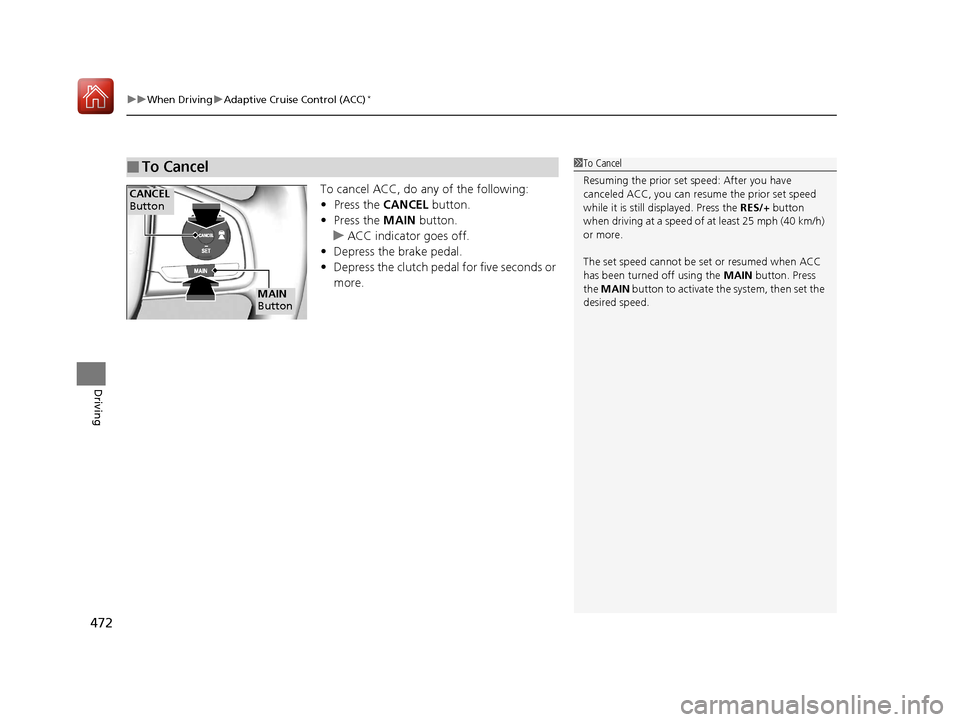
To cancel ACC, do any of the following:
• Press the CANCEL button.
• Press the MAIN button.
u ACC indicator goes off.
• Depress the brake pedal.
• Depress the clutch pedal for five seconds or
more.
■To Cancel1To Cancel
Resuming the prior set speed: After you have
canceled ACC, you can resume the prior set speed
while it is still displayed. Press the RES/+ button
when driving at a speed of at least 25 mph (40 km/h)
or more.
The set speed cannot be set or resumed when ACC
has been turned off using the MAIN button. Press
the MAIN button to activate the system, then set the
desired speed.
CANCEL
Button
MAIN
Button
17 CIVIC 5D (KA KC KL)-31TGG6000.book 472 ページ 2016年6月8日 水曜日 午 後2時8分
Page 499 of 641
uuBraking uBrake System
498
Driving
■To release automatically
Use the accelerator pedal to release the parking brake when you are starting the
vehicle facing uphill, or in a traffic jam.
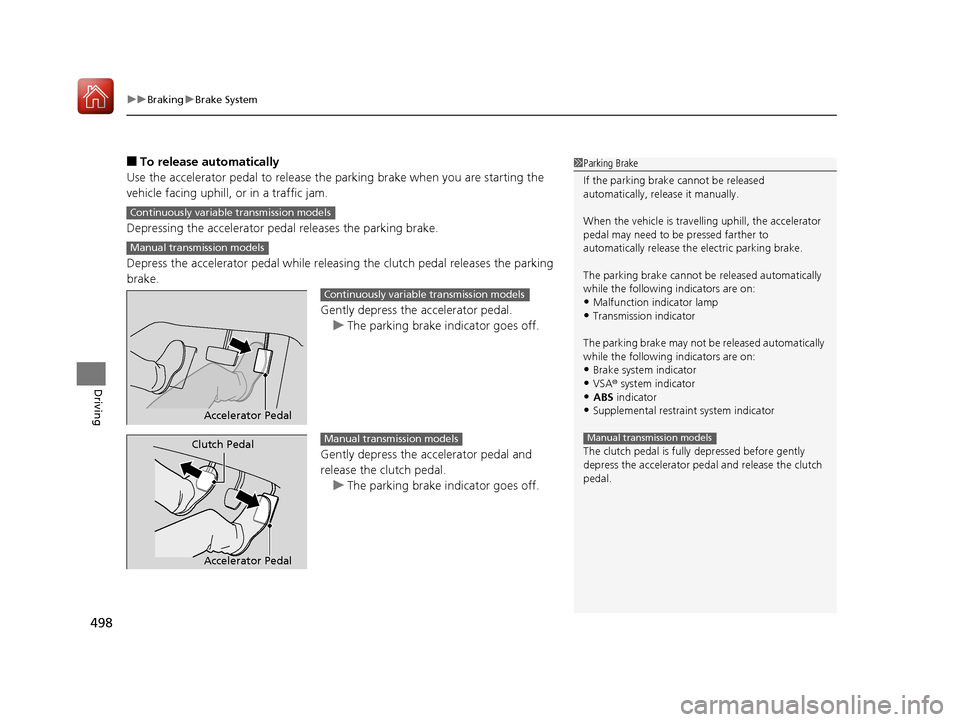
Depressing the accelerator pedal releases the parking brake.
Depress the accelerator pedal while releasi ng the clutch pedal releases the parking
brake.
Gently depress the accelerator pedal.u The parking brake indicator goes off.
Gently depress the accelerator pedal and
release the clutch pedal. u The parking brake indicator goes off.1Parking Brake
If the parking brake cannot be released
automatically, release it manually.
When the vehicle is travelling uphill, the accelerator
pedal may need to be pressed farther to
automatically release the electric parking brake.
The parking brake cannot be released automatically
while the following indicators are on:
•Malfunction indicator lamp•Transmission indicator
The parking brake may not be released automatically
while the following indicators are on:
•Brake system indicator
•VSA® system indicator•ABS indicator
•Supplemental restraint system indicator
The clutch pedal is fully depressed before gently
depress the accelerator peda l and release the clutch
pedal.
Manual transmission models
Continuously variable transmission models
Manual transmission models
Accelerator Pedal
Continuously variable transmission models
Accelerator Pedal
Clutch PedalManual transmission models
17 CIVIC 5D (KA KC KL)-31TGG6000.book 498 ページ 2016年6月8日 水曜日 午 後2時8分
Page 503 of 641
502
uuBraking uBrake System
Driving
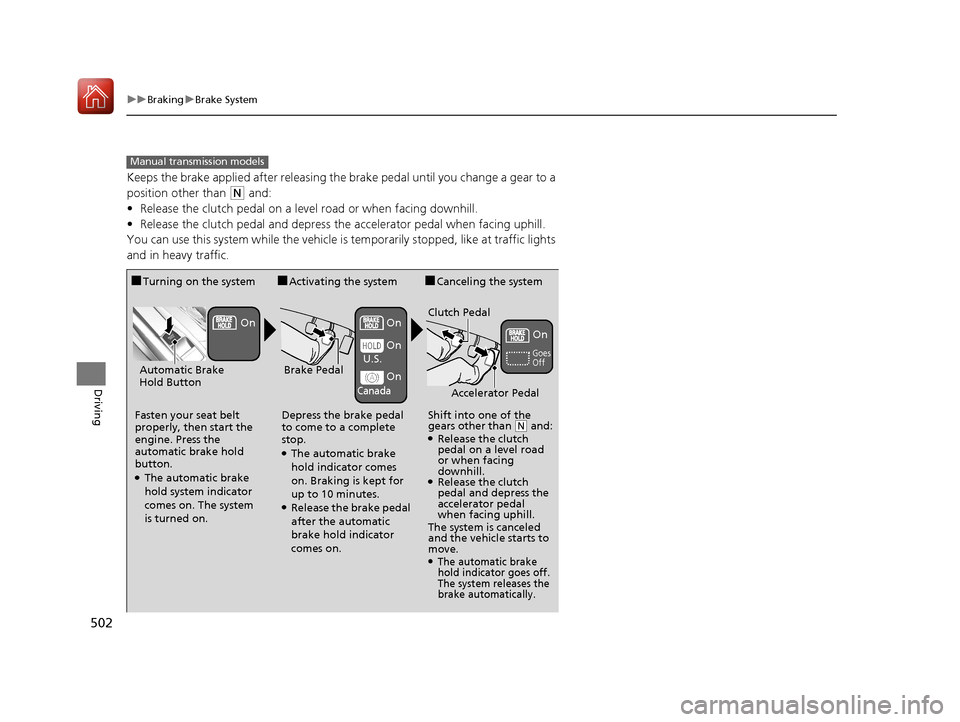
Keeps the brake applied after releasing the brake pedal until you change a gear to a
position other than
(N and:
• Release the clutch pedal on a level road or when facing downhill.
• Release the clutch pedal and depress the accelerator pedal when facing uphill.
You can use this system while the vehicle is temporarily stopped, like at traffic lights
and in heavy traffic.
Manual transmission models
■Turning on the system
Fasten your seat belt
properly, then start the
engine. Press the
automatic brake hold
button.
●The automatic brake
hold system indicator
comes on. The system
is turned on.
■Activating the system
Depress the brake pedal
to come to a complete
stop.
●The automatic brake
hold indicator comes
on. Braking is kept for
up to 10 minutes.
●Release the brake pedal
after the automatic
brake hold indicator
comes on.
■Canceling the system
Shift into one of the
gears other than
( N and: ●Release the clutch
pedal on a level road
or when facing
downhill.
●Release the clutch
pedal and depress the
accelerator pedal
when facing uphill.
The system is canceled
and the vehicle starts to
move.
●The automatic brake
hold indicator goes off.
The system releases the
brake automatically.
Accelerator Pedal
Brake PedalAutomatic Brake
Hold Button
Goes
Off
On On
On
On
On
U.S.
Canada
Clutch Pedal
17 CIVIC 5D (KA KC KL)-31TGG6000.book 502 ページ 2016年6月8日 水曜日 午
後2時8分
Page 524 of 641
523
Maintenance
This chapter discusses basic maintenance.
Before Performing MaintenanceInspection and Maintenance ............ 524
Safety When Performing Maintenance .... 525Parts and Fluids Used in Maintenance Service ........................................... 526
Maintenance Minder
TM..................... 527
Maintenance Under the Hood
Maintenance Items Un der the Hood .... 536Opening the Hood ........................... 537
Recommended Engine Oil ................ 538
Oil Check ......................................... 539
Adding Engine Oil ............................ 540
Changing the Engine Oil and Oil Filter..... 541
Engine Coolant ................................ 543
Transmission Fluid ............................ 545
Brake/Clutch
* Fluid .......................... 546
Refilling Window Washer Fluid......... 547
Replacing Light Bulbs ....................... 548
Checking and Maintaining Wiper
Blades .......................................... 556
Checking and Maintaining Tires
Checking Tires ................................. 561
Tire and Loading Information Label ..... 562Tire Labeling .................................... 562DOT Tire Quality Grading (U.S. Vehicles) ...... 564Wear Indicators................................ 566 Tire Service Life ................................ 566
Tire and Wheel Replacement ........... 567
Tire Rotation .................................... 568
Winter Tires ..................................... 569
Battery ............................................... 571
Remote Transmitter Care
Replacing the Button Battery ........... 573
Climate Control System Maintenance .. 575Cleaning
Interior Care .................................... 576
Exterior Care.................................... 579
Accessories and Modifications ........ 582
* Not available on all models
17 CIVIC 5D (KA KC KL)-31TGG6000.book 523 ページ 2016年6月8日 水曜日 午 後2時8分
Page 525 of 641
524
Maintenance
Before Performing Maintenance
Inspection and Maintenance
For your safety, perform all listed inspections and maintenance to keep your vehicle
in good condition. If you become aware of any abnormality (noise, smell, insufficient
brake fluid, oil residue on the ground, etc.), have your vehicle inspected by a dealer.
(Note, however, that service at a dealer is not mandatory to keep your warranties in
effect.)
■Daily inspections
Perform inspections before long distance trips, when washing the vehicle, or when
refueling.
■Periodic inspections
• Check the brake/clutch* fluid level monthly.
2 Brake/Clutch* Fluid P. 546
•Check the tire pressure monthly. Examin e the tread for wear and foreign objects.
2Checking and Maintaining Tires P. 561
•Check the operation of the exterior lights monthly.
2 Replacing Light Bulbs P. 548
•Check the condition of the wiper bl ades at least every six months.
2Checking and Maintaining Wiper Blades P. 556
■Types of Inspection and Maintenance
1Inspection and Maintenance
Maintenance, replacement, or repair of
emissions control devices and systems may be
done by any automotive repair establishment or
individuals using parts that are “certified” to
EPA standards.
According to state and fede ral regulations, failure to
perform maintenance on the maintenance main
items marked with # will not void your emissions
warranties. However, all maintenance services should
be performed in accordan ce with the intervals
indicated by the information display
*/driver
information interface*.
2 Maintenance Service Items P. 529, 533
If you want to perform complex maintenance tasks
that require more skills a nd tools, you can purchase a
subscription to the Service Express website at
www.techinfo.honda.com .
2 Authorized Manuals P. 627
If you want to perform ma intenance yourself, make
sure that you have the necessary tools and skills first.
After performing ma intenance, update the records in
the separate maintenance booklet.
U.S. models
* Not available on all models
17 CIVIC 5D (KA KC KL)-31TGG6000.book 524 ページ 2016年6月8日 水曜日 午 後2時8分
Page 537 of 641
536
Maintenance
Maintenance Under the Hood
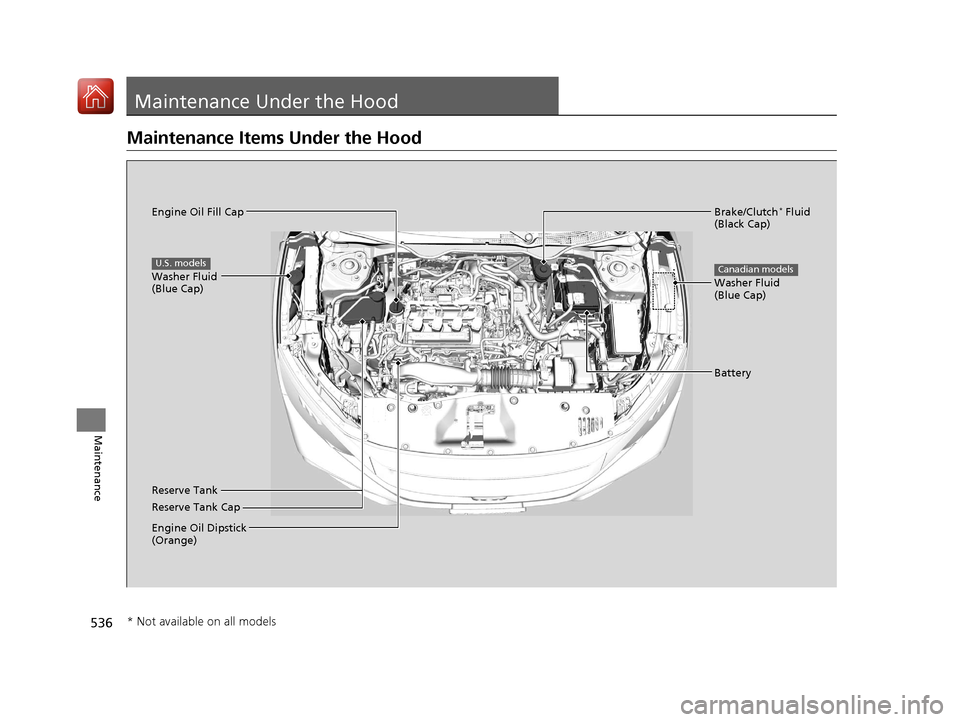
Maintenance Items Under the Hood
Brake/Clutch* Fluid
(Black Cap)
Reserve Tank Washer Fluid
(Blue Cap)
Engine Oil Dipstick
(Orange) Engine Oil Fill Cap Battery
Reserve Tank Cap
U.S. models
Washer Fluid
(Blue Cap)
Canadian models
* Not available on all models
17 CIVIC 5D (KA KC KL)-31TGG6000.book 536 ページ 2016年6月8日 水曜日 午 後2時8分
Page 547 of 641
546
uuMaintenance Under the Hood uBrake/Clutch* Fluid
Maintenance
Brake/Clutch* Fluid
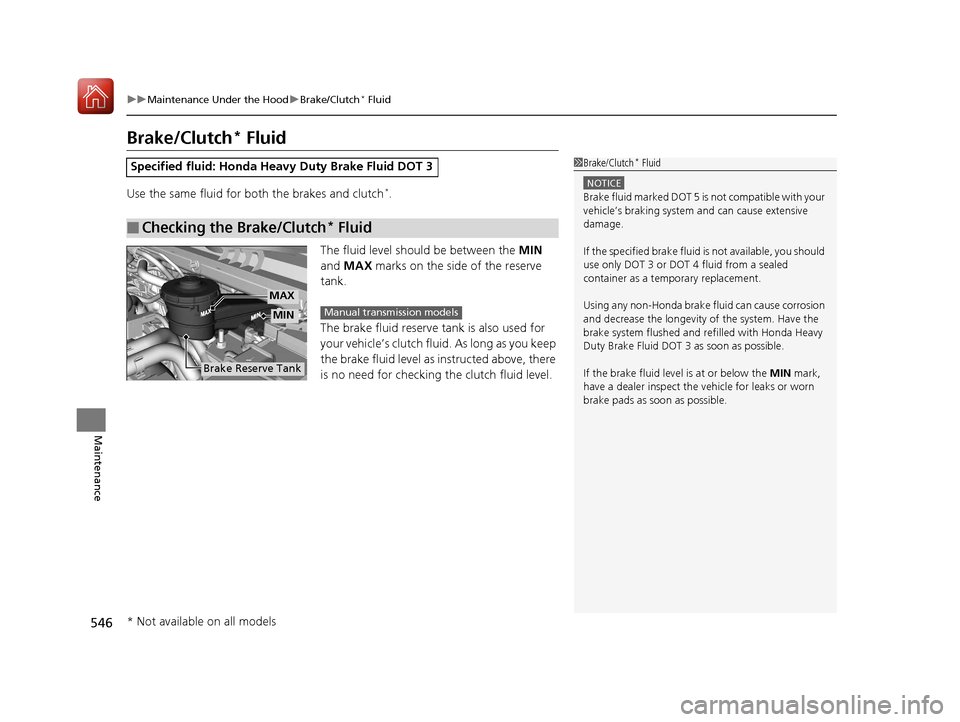
Use the same fluid for both the brakes and clutch*.
The fluid level should be between the MIN
and MAX marks on the side of the reserve
tank.
The brake fluid reserve tank is also used for
your vehicle’s clutch flui d. As long as you keep
the brake fluid level as in structed above, there
is no need for checking the clutch fluid level.
Specified fluid: Honda Heavy Duty Brake Fluid DOT 3
■Checking the Brake/Clutch* Fluid
1Brake/Clutch* Fluid
NOTICE
Brake fluid marked DOT 5 is not compatible with your
vehicle’s braking system and can cause extensive
damage.
If the specified brake fluid is not available, you should
use only DOT 3 or DOT 4 fluid from a sealed
container as a temporary replacement.
Using any non-Honda brake fluid can cause corrosion
and decrease the longevity of the system. Have the
brake system flushed and re filled with Honda Heavy
Duty Brake Fluid DOT 3 as soon as possible.
If the brake fluid level is at or below the MIN mark,
have a dealer inspect the vehicle for leaks or worn
brake pads as soon as possible.
Brake Reserve Tank
MIN
MAX
Manual transmission models
* Not available on all models
17 CIVIC 5D (KA KC KL)-31TGG6000.book 546 ページ 2016年6月8日 水曜日 午 後2時8分
Page 595 of 641
594
uuEngine Does Not Start uIf the Smart Entry Remote Battery is Weak
Handling the Unexpected
If the Smart Entry Remote Battery is Weak
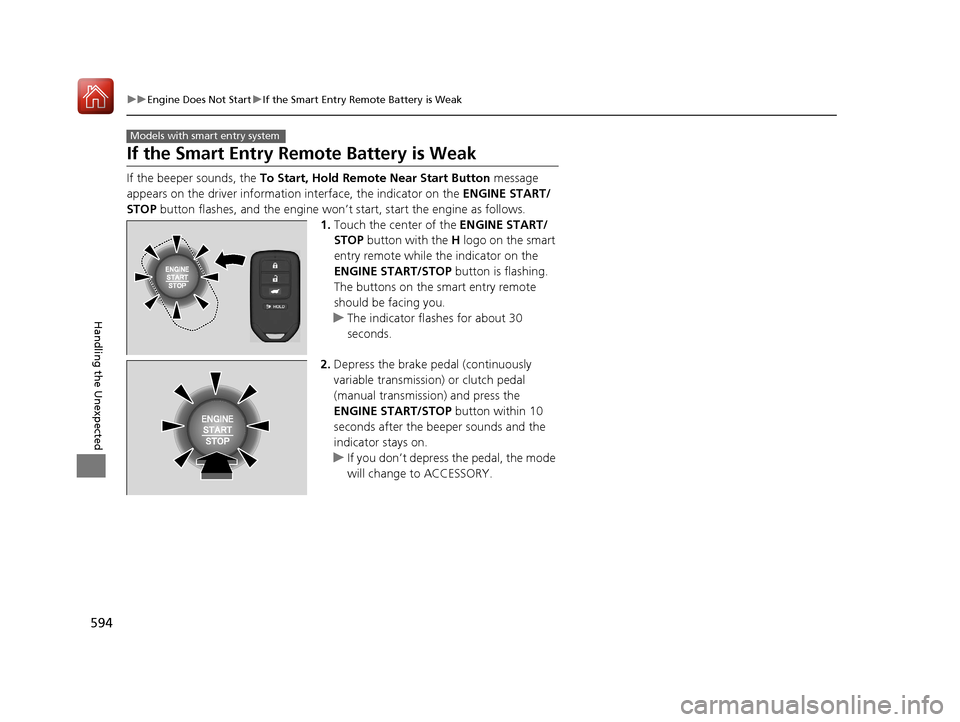
If the beeper sounds, the To Start, Hold Remote Near Start Button message
appears on the driver informati on interface, the indicator on the ENGINE START/
STOP button flashes, and the engine won’t start, start the engine as follows.
1.Touch the center of the ENGINE START/
STOP button with the H logo on the smart
entry remote while the indicator on the
ENGINE START/STOP button is flashing.
The buttons on the smart entry remote
should be facing you.
u The indicator flashes for about 30
seconds.
2. Depress the brake pedal (continuously
variable transmission) or clutch pedal
(manual transmission) and press the
ENGINE START/STOP button within 10
seconds after the beeper sounds and the
indicator stays on.
u If you don’t depress the pedal, the mode
will change to ACCESSORY.
Models with smart entry system
17 CIVIC 5D (KA KC KL)-31TGG6000.book 594 ページ 2016年6月8日 水曜日 午 後2時8分