cruise control HONDA CIVIC HATCHBACK 2017 10.G User Guide
[x] Cancel search | Manufacturer: HONDA, Model Year: 2017, Model line: CIVIC HATCHBACK, Model: HONDA CIVIC HATCHBACK 2017 10.GPages: 641
Page 416 of 641
415
Driving
This chapter discusses driving, refueling, and information on items such as accessories.
Before Driving
Towing a Trailer................................ 421
When Driving
Starting the Engine .................. 422, 424
Precautions While Driving................. 429
Continuously Variable Transmission
*... 430
Shifting ............................ 431, 433, 438
ECON Button ................................... 441
Cruise Control
*................................ 442
Front Sensor Camera*...................... 446
Adaptive Cruise Control (ACC) with Low Speed Follow (LSF)
*........................ 448
Adaptive Cruise Control (ACC)*....... 462
Road Departure Mitigation (RDM) System*.. 476Lane Keeping Assist System (LKAS)*.... 480
Vehicle Stability Assist (VSA®), aka Electronic
Stability Control (ESC), System............. 487
Agile Handling Assist ....................... 489
LaneWatchTM*.................................. 490Tire Pressure Monitoring System (TPMS) ..492Tire Pressure Monitoring System (TPMS) - Required Federal Explanation ........... 495
Braking Brake System ................................... 497
Anti-lock Brake System (ABS) ........... 504
Brake Assist System.......................... 505 Collision Mitigation Braking System
TM
(CMBSTM)*..................................... 506
Parking Your Vehicle
Multi-View Rear Camera .................. 515
Refueling Fuel Information .............................. 517
How to Refuel ................................. 518
Fuel Economy and CO
2 Emissions
Improving Fuel Economy and Reducing
CO
2 Emissions ................................ 521
Turbo Engine Vehicle ....................... 522
* Not available on all models
17 CIVIC 5D (KA KC KL)-31TGG6000.book 415 ページ 2016年6月8日 水曜日 午 後2時8分
Page 442 of 641
441
uuWhen Driving uECON Button
Driving
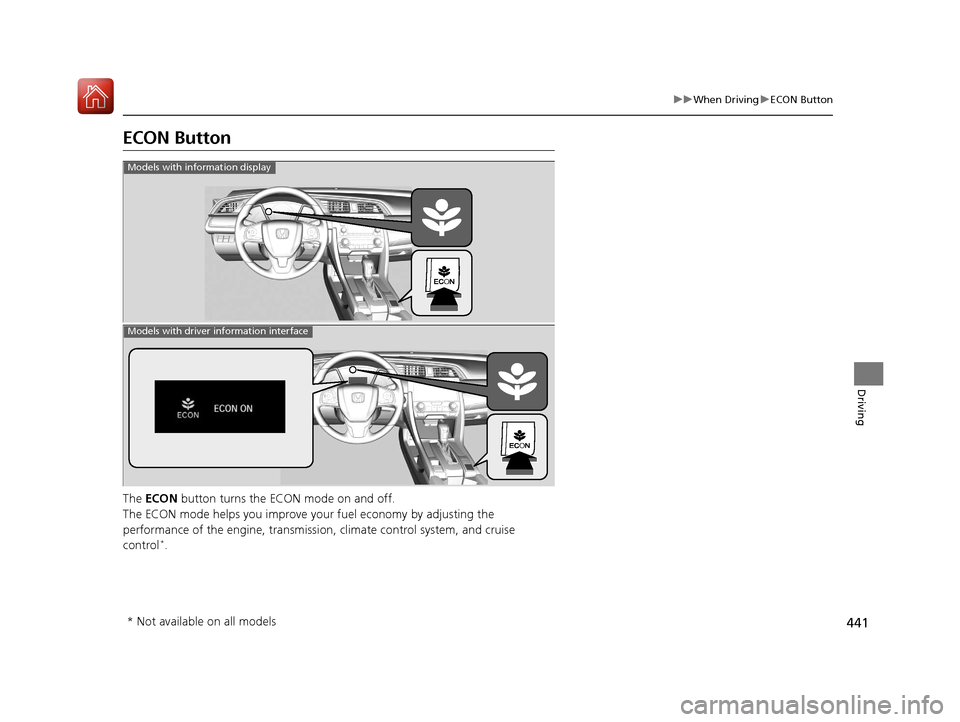
ECON Button
The ECON button turns the ECON mode on and off.
The ECON mode helps you improve yo ur fuel economy by adjusting the
performance of the engine, transmission, climate control system, and cruise
control
*.
Models with information display
Models with driver information interface
* Not available on all models
17 CIVIC 5D (KA KC KL)-31TGG6000.book 441 ページ 2016年6月8日 水曜日 午 後2時8分
Page 443 of 641
442
uuWhen Driving uCruise Control*
Driving
Cruise Control*
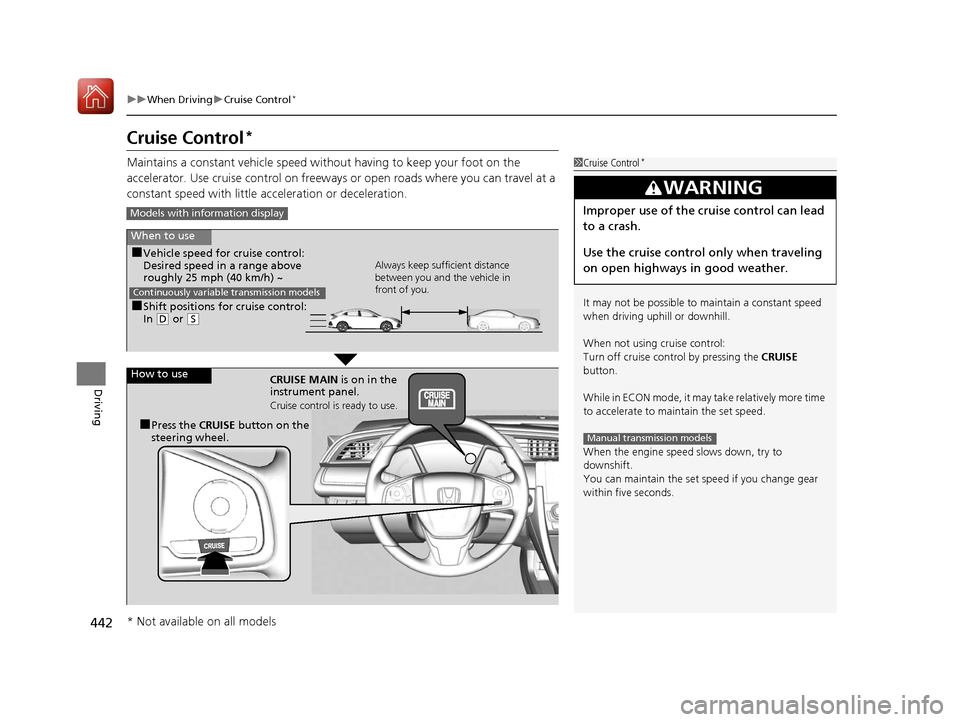
Maintains a constant vehicle speed without having to keep your foot on the
accelerator. Use cruise control on freeways or open roads where you can travel at a
constant speed with little acceleration or deceleration.1Cruise Control*
It may not be possible to maintain a constant speed
when driving uphill or downhill.
When not using cruise control:
Turn off cruise control by pressing the CRUISE
button.
While in ECON mode, it may take relatively more time
to accelerate to maintain the set speed.
When the engine speed slows down, try to
downshift.
You can maintain the set speed if you change gear
within five seconds.
3WARNING
Improper use of the cruise control can lead
to a crash.
Use the cruise control only when traveling
on open highways in good weather.
Manual transmission models
Models with info rmation display
When to use
■Shift positions for cruise control:
In (D or (S Always keep sufficient distance
between you and the vehicle in
front of you.
Continuously variable transmission models
■Vehicle speed for cruise control:
Desired speed in a range above
roughly 25 mph (40 km/h) ~
How to use CRUISE MAIN is on in the
instrument panel.
Cruise control is ready to use.
■Press the CRUISE button on the
steering wheel.
* Not available on all models
17 CIVIC 5D (KA KC KL)-31TGG6000.book 442 ページ 2016年6月8日 水曜日 午 後2時8分
Page 444 of 641
443
uuWhen Driving uCruise Control*
Continued
Driving
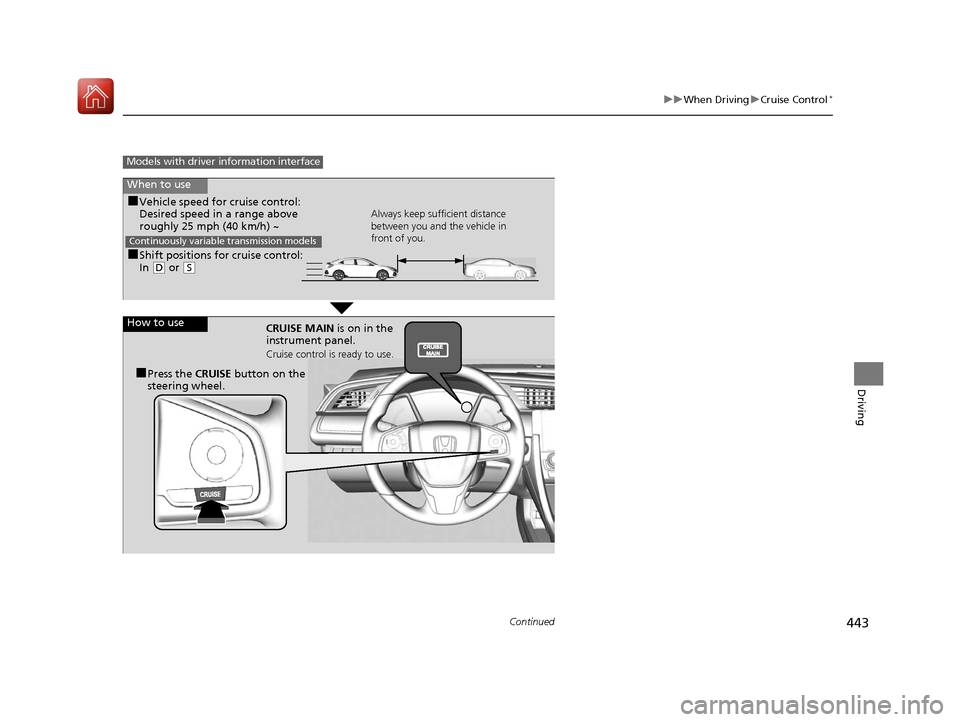
Models with driver information interface
When to use
■Shift positions for cruise control:
In (D or (S Always keep sufficient distance
between you and the vehicle in
front of you.
Continuously variable transmission models
■Vehicle speed for cruise control:
Desired speed in a range above
roughly 25 mph (40 km/h) ~
How to use CRUISE MAIN is on in the
instrument panel.
Cruise control is ready to use.
■Press the CRUISE button on the
steering wheel.
17 CIVIC 5D (KA KC KL)-31TGG6000.book 443 ページ 2016年6月8日 水曜日 午 後2時8分
Page 445 of 641
444
uuWhen Driving uCruise Control*
Driving
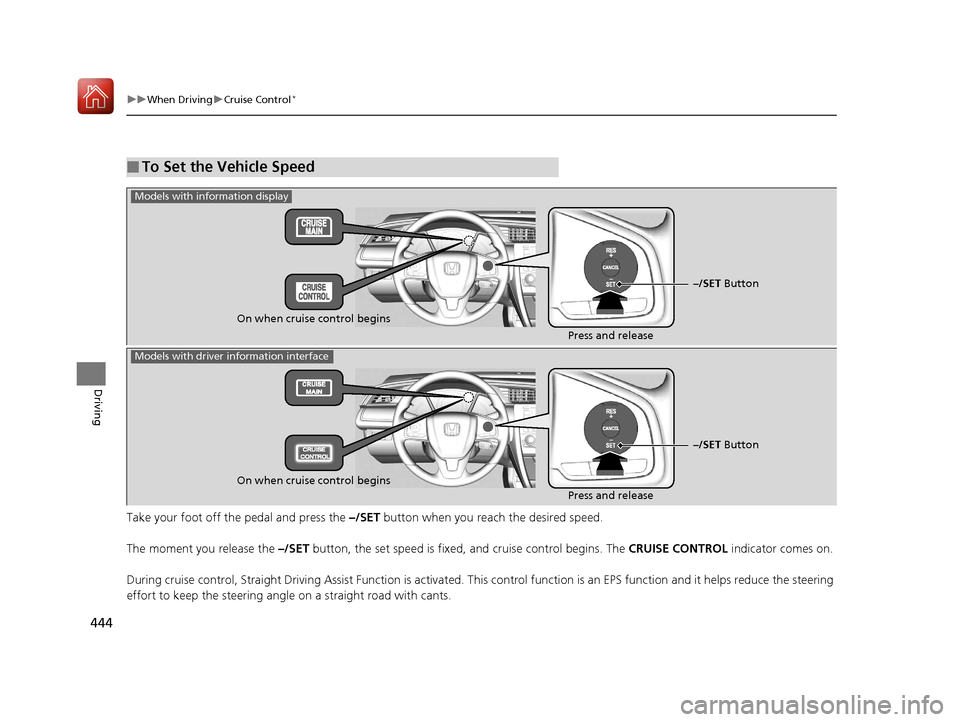
Take your foot off the pedal and press the –/SET button when you reach the desired speed.
The moment you release the –/SET button, the set speed is fixed, and cruise control begins. The CRUISE CONTROL indicator comes on.
During cruise control, Straight Driving Assist Function is activa ted. This control function is an EPS function and it helps red uce the steering
effort to keep the steering angle on a straight road with cants.
■To Set the Vehicle Speed
–/SET Button
On when cruise control begins Press and release
Models with information display
Models with driver information interface
On when cruise control begins
Press and release–/SET Button
17 CIVIC 5D (KA KC KL)-31TGG6000.book 444 ページ 2016年6月8日 水曜日 午
後2時8分
Page 446 of 641
445
uuWhen Driving uCruise Control*
Driving
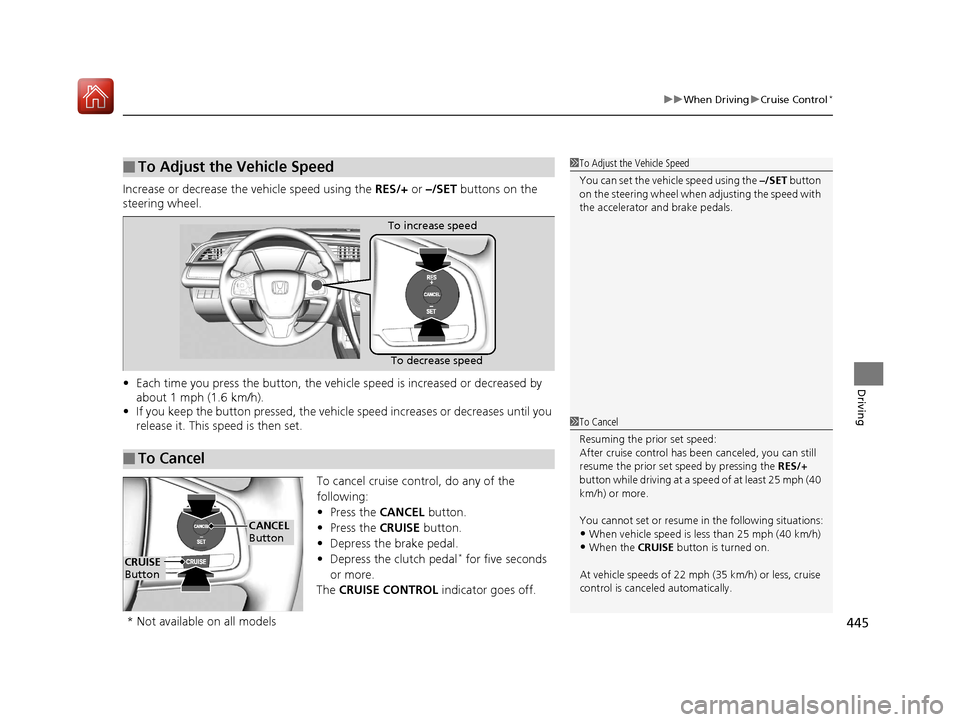
Increase or decrease the vehicle speed using the RES/+ or –/SET buttons on the
steering wheel.
• Each time you press the button, the vehicl e speed is increased or decreased by
about 1 mph (1.6 km/h).
• If you keep the button pressed, the vehicl e speed increases or decreases until you
release it. This speed is then set.
To cancel cruise control, do any of the
following:
• Press the CANCEL button.
• Press the CRUISE button.
• Depress the brake pedal.
• Depress the clutch pedal
* for five seconds
or more.
The CRUISE CONTROL indicator goes off.
■To Adjust the Vehicle Speed1To Adjust the Vehicle Speed
You can set the vehicle speed using the –/SET button
on the steering wheel when adjusting the speed with
the accelerator and brake pedals.
■To Cancel
To decrease speed
To increase speed
1
To Cancel
Resuming the prior set speed:
After cruise control has be en canceled, you can still
resume the prior set speed by pressing the RES/+
button while driving at a speed of at least 25 mph (40
km/h) or more.
You cannot set or resume in the following situations:
•When vehicle speed is less than 25 mph (40 km/h)•When the CRUISE button is turned on.
At vehicle speeds of 22 m ph (35 km/h) or less, cruise
control is canceled automatically.
CRUISE
Button
CANCEL
Button
* Not available on all models
17 CIVIC 5D (KA KC KL)-31TGG6000.book 445 ページ 2016年6月8日 水曜日 午 後2時8分
Page 449 of 641
448
uuWhen Driving uAdaptive Cruise Control (ACC) with Low Speed Follow (LSF)*
Driving
Adaptive Cruise Control (ACC) with Low Speed Follow (LSF)*
Helps maintain a constant vehicle speed an d a set following interval behind a vehicle
detected ahead of yours and, if the detect ed vehicle comes to a stop, can decelerate
and stop your vehicle, without you having to keep your foot on the brake or the
accelerator.
When ACC with LSF slows your vehicle by applying the brakes, your vehicle’s brake
lights will illuminate.1 Adaptive Cruise Control (ACC) with Low Speed Follow (LSF)*
Important Reminder
As with any system, there are limits to ACC with LSF.
Use the brake pedal whenever necessary, and always
keep a safe distance between your vehicle and other
vehicles.
3WARNING
Improper use of ACC wi th LSF can lead to a
crash.
Use ACC with LSF only when driving on
expressways or freeways and in good
weather conditions.
3WARNING
ACC with LSF has limited braking capability
and may not stop your vehicle in time to
avoid a collision with a vehicle that quickly
stops in front of you.
Always be prepared to apply the brake
pedal if the conditions require.
When to use
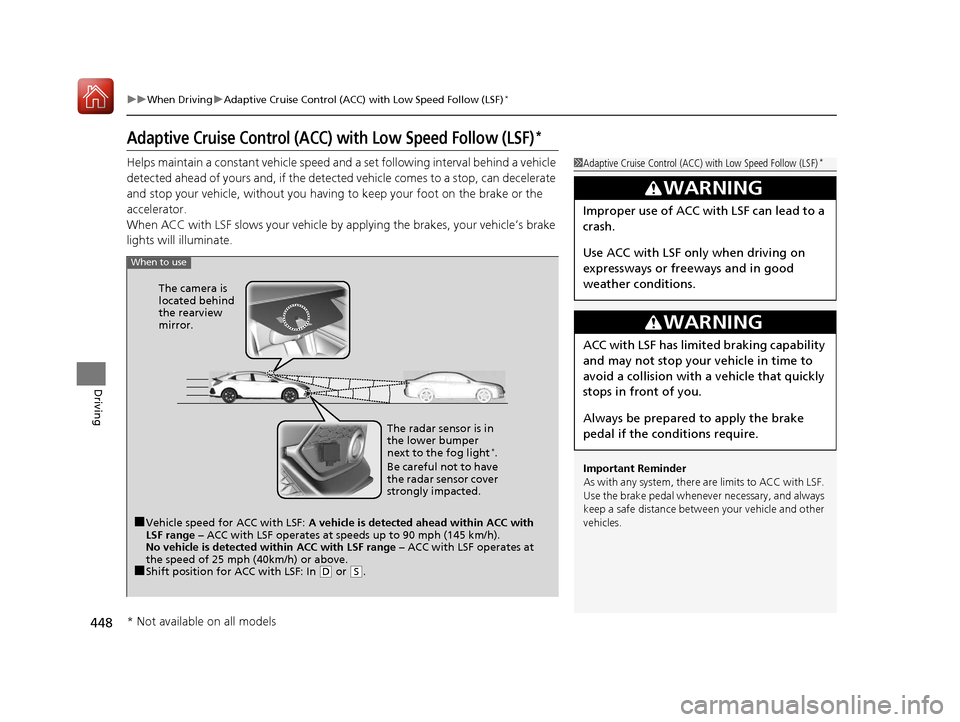
■Vehicle speed for ACC with LSF: A vehicle is detected ahead within ACC with
LSF range – ACC with LSF operates at speeds up to 90 mph (145 km/h).
No vehicle is detected within ACC with LSF range – ACC with LSF operates at
the speed of 25 mph (40km/h) or above.
■Shift position for ACC with LSF: In (D or (S. The radar sensor is in
the lower bumper
next to the fog light
*.
Be careful not to have
the radar sensor cover
strongly impacted.
The camera is
located behind
the rearview
mirror.
* Not available on all models
17 CIVIC 5D (KA KC KL)-31TGG6000.book 448 ページ 2016年6月8日 水曜日 午
後2時8分
Page 450 of 641
Continued449
uuWhen Driving uAdaptive Cruise Control (ACC) with Low Speed Follow (LSF)*
Driving
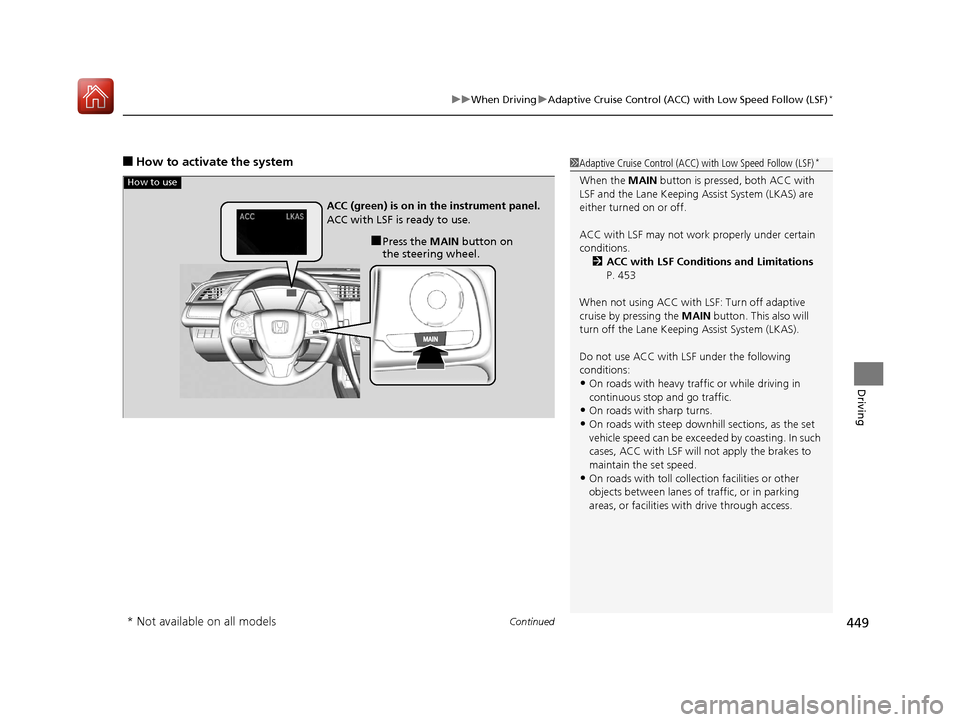
■How to activate the system1Adaptive Cruise Control (ACC) with Low Speed Follow (LSF)*
When the MAIN button is pressed, both ACC with
LSF and the Lane Keeping Assist System (LKAS) are
either turned on or off.
ACC with LSF may not work properly under certain
conditions. 2 ACC with LSF Conditions and Limitations
P. 453
When not using ACC with LSF: Turn off adaptive
cruise by pressing the MAIN button. This also will
turn off the Lane Keeping Assist System (LKAS).
Do not use ACC with LSF under the following
conditions:
•On roads with heavy traf fic or while driving in
continuous stop and go traffic.
•On roads with sharp turns.
•On roads with steep downhill sections, as the set
vehicle speed can be exceeded by coasting. In such
cases, ACC with LSF will not apply the brakes to
maintain the set speed.
•On roads with toll collection facilities or other
objects between lanes of traffic, or in parking
areas, or faci lities with driv e through access.
How to use
■Press the MAIN button on
the steering wheel.
ACC (green) is on in the instrument panel.
ACC with LSF is ready to use.
* Not available on all models
17 CIVIC 5D (KA KC KL)-31TGG6000.book 449 ページ 2016年6月8日 水曜日 午
後2時8分
Page 451 of 641
uuWhen Driving uAdaptive Cruise Control (ACC) with Low Speed Follow (LSF)*
450
Driving
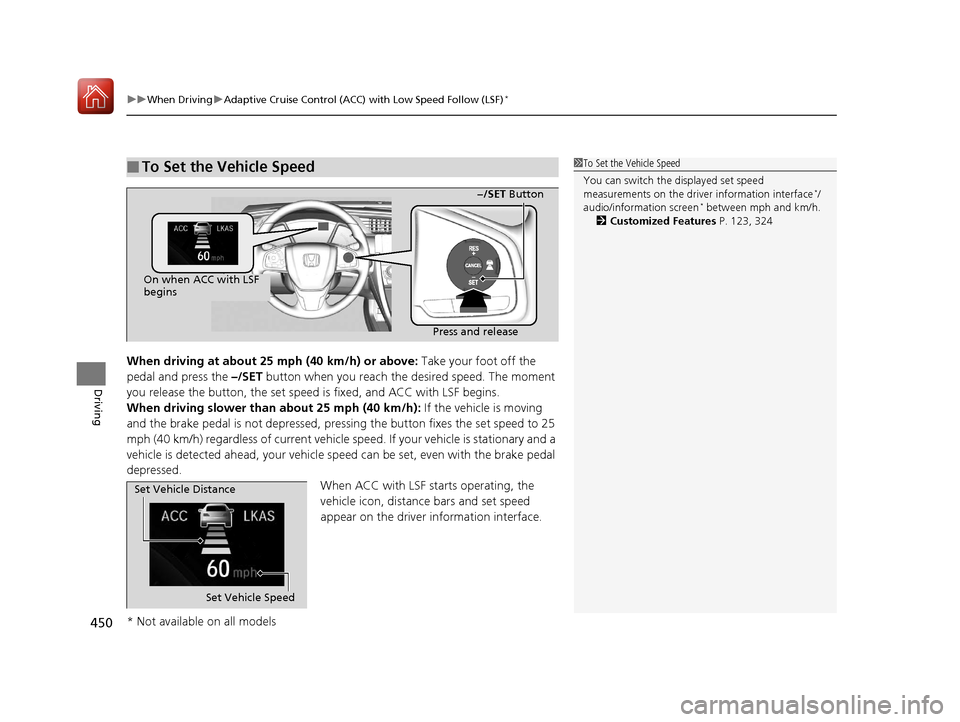
When driving at about 25 mph (40 km/h) or above: Take your foot off the
pedal and press the –/SET button when you reach the desired speed. The moment
you release the button, the set speed is fixed, and ACC with LSF begins.
When driving slower than about 25 mph (40 km/h): If the vehicle is moving
and the brake pedal is not depressed, pressing the button fixes the set speed to 25
mph (40 km/h) regardless of current vehicle sp eed. If your vehicle is stationary and a
vehicle is detected ahead, your vehicle sp eed can be set, even with the brake pedal
depressed.
When ACC with LSF starts operating, the
vehicle icon, distance bars and set speed
appear on the driver information interface.
■To Set the Vehicle Speed1 To Set the Vehicle Speed
You can switch the displayed set speed
measurements on the driver information interface
*/
audio/information screen* between mph and km/h.
2 Customized Features P. 123, 324
On when ACC with LSF
begins
Press and release−/SET Button
Set Vehicle Speed
Set Vehicle Distance
* Not available on all models
17 CIVIC 5D (KA KC KL)-31TGG6000.book 450 ページ 2016年6月8日 水曜日 午
後2時8分
Page 452 of 641
Continued451
uuWhen Driving uAdaptive Cruise Control (ACC) with Low Speed Follow (LSF)*
Driving
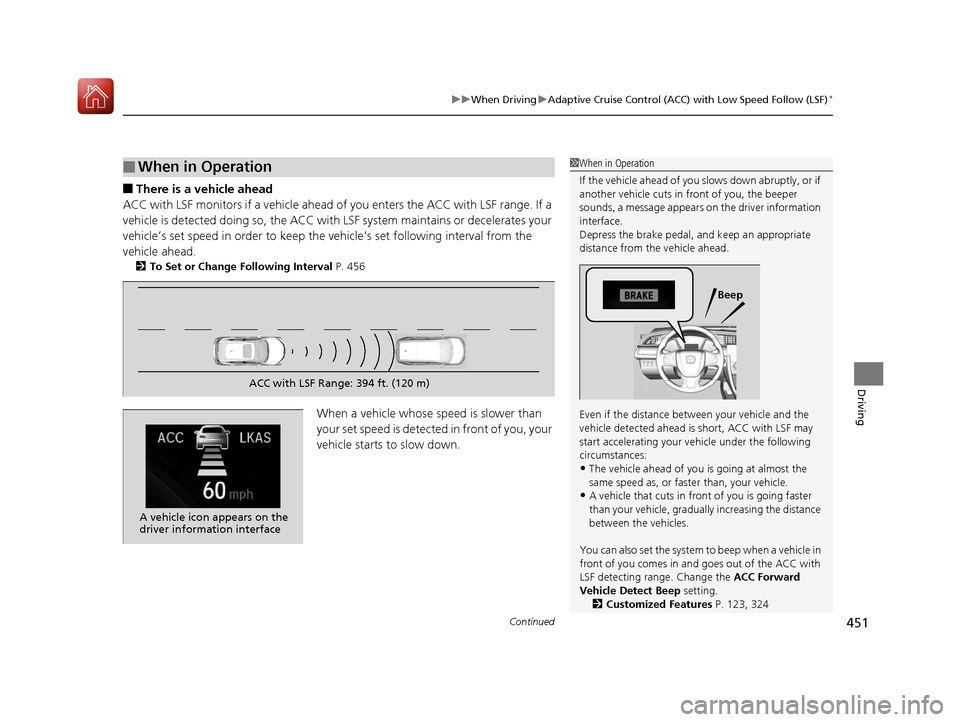
■There is a vehicle ahead
ACC with LSF monitors if a vehicle ahead of you enters the ACC with LSF range. If a
vehicle is detected doing so, the ACC with LSF system maintains or decelerates your
vehicle’s set speed in order to keep the vehicle’s set following interval from the
vehicle ahead.
2 To Set or Change Following Interval P. 456
When a vehicle whose speed is slower than
your set speed is detected in front of you, your
vehicle starts to slow down.
■When in Operation1 When in Operation
If the vehicle ahead of you slows down abruptly, or if
another vehicle cuts in front of you, the beeper
sounds, a message appears on the driver information
interface.
Depress the brake pedal, and keep an appropriate
distance from the vehicle ahead.
Even if the distance betw een your vehicle and the
vehicle detected ahead is short, ACC with LSF may
start accelerating your vehicle under the following
circumstances:
•The vehicle ahead of you is going at almost the
same speed as, or faster than, your vehicle.
•A vehicle that cuts in front of you is going faster
than your vehicle, gradually increasing the distance
between the vehicles.
You can also set the system to beep when a vehicle in
front of you comes in and goes out of the ACC with
LSF detecting range. Change the ACC Forward
Vehicle Detect Beep setting. 2 Customized Features P. 123, 324
Beep
ACC with LSF Range: 394 ft. (120 m)
A vehicle icon appears on the
driver information interface
17 CIVIC 5D (KA KC KL)-31TGG6000.book 451 ページ 2016年6月8日 水曜日 午 後2時8分