warning light HONDA CIVIC HATCHBACK 2017 10.G User Guide
[x] Cancel search | Manufacturer: HONDA, Model Year: 2017, Model line: CIVIC HATCHBACK, Model: HONDA CIVIC HATCHBACK 2017 10.GPages: 641
Page 338 of 641
337
uuCustomized Features u
Continued
Features
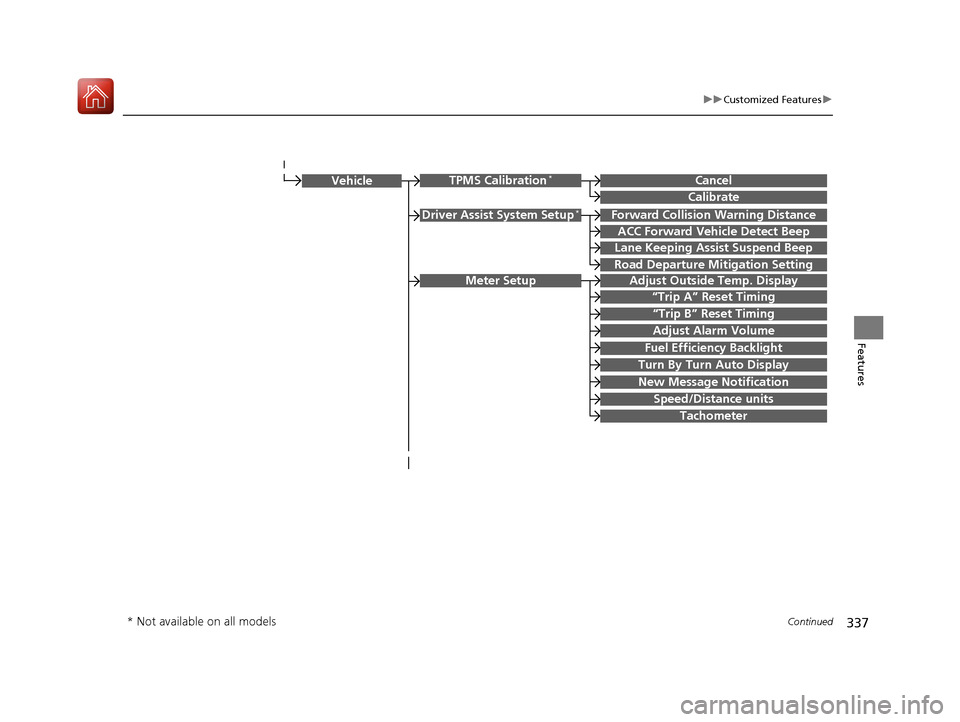
Driver Assist System Setup*Forward Collision Warning Distance
ACC Forward Vehicle Detect Beep
Lane Keeping Assist Suspend Beep
Road Departure Mi tigation Setting
Adjust Outside Temp. Display
“Trip A” Reset Timing
“Trip B” Reset Timing
Vehicle
Meter Setup
Adjust Alarm Volume
Speed/Distance units
Fuel Efficiency Backlight
New Message Notification
Tachometer
CancelTPMS Calibration*
Calibrate
Turn By Turn Auto Display
* Not available on all models
17 CIVIC 5D (KA KC KL)-31TGG6000.book 337 ページ 2016年6月8日 水曜日 午 後2時8分
Page 352 of 641
351
uuCustomized Features u
Continued
Features
*1:Default SettingSetup
Group Customizable Features Description Selectable Settings
VehicleMeter
Setup
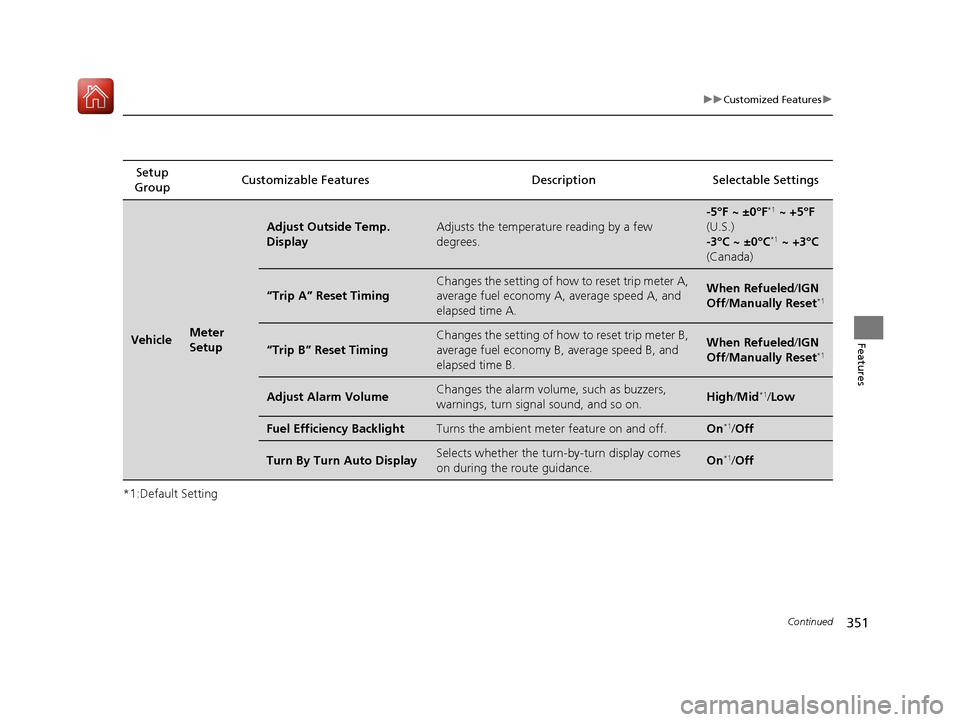
Adjust Outside Temp.
DisplayAdjusts the temperature reading by a few
degrees.
-5°F ~ ±0°F*1
~ +5°F
(U.S.)
-3°C ~ ±0°C
*1 ~ +3°C
(Canada)
“Trip A” Reset Timing
Changes the setting of how to reset trip meter A,
average fuel economy A, average speed A, and
elapsed time A.When Refueled /IGN
Off /Manually Reset*1
“Trip B” Reset Timing
Changes the setting of how to reset trip meter B,
average fuel economy B, average speed B, and
elapsed time B.When Refueled /IGN
Off /Manually Reset*1
Adjust Alarm VolumeChanges the alarm volu me, such as buzzers,
warnings, turn signal sound, and so on.High /Mid*1/ Low
Fuel Efficiency BacklightTurns the ambient meter feature on and off.On*1/Off
Turn By Turn Auto DisplaySelects whether the turn -by-turn display comes
on during the route guidance.On*1/ Off
17 CIVIC 5D (KA KC KL)-31TGG6000.book 351 ページ 2016年6月8日 水曜日 午 後2時8分
Page 427 of 641
uuWhen Driving uStarting the Engine
426
Driving
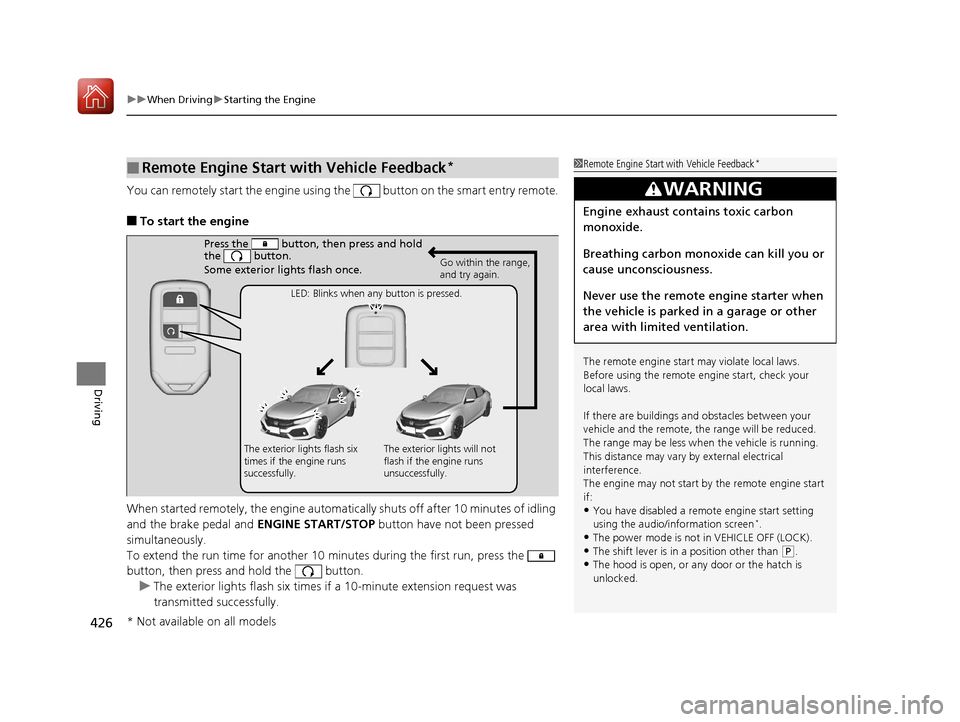
You can remotely start the engine using the button on the smart entry remote.
■To start the engine
When started remotely, the engine automati cally shuts off after 10 minutes of idling
and the brake pedal and ENGINE START/STOP button have not been pressed
simultaneously.
To extend the run time for another 10 minutes during the first run, press the
button, then press and hold the button. u The exterior lights flash six times if a 10-minute extension request was
transmitted successfully.
■Remote Engine Start with Vehicle Feedback*1Remote Engine Start with Vehicle Feedback*
The remote engine start may violate local laws.
Before using the remote e ngine start, check your
local laws.
If there are buildings an d obstacles between your
vehicle and the remote, th e range will be reduced.
The range may be less when the vehicle is running.
This distance may vary by external electrical
interference.
The engine may not start by the remote engine start
if:
•You have disabled a remo te engine start setting
using the audio/information screen*.
•The power mode is not in VEHICLE OFF (LOCK).
•The shift lever is in a position other than ( P.•The hood is open, or any door or the hatch is
unlocked.
3WARNING
Engine exhaust contains toxic carbon
monoxide.
Breathing carbon monoxide can kill you or
cause unconsciousness.
Never use the remote engine starter when
the vehicle is parked in a garage or other
area with limited ventilation.
Press the button, th en press and hold
the button.
Some exterior lights flash once.
Go within the range,
and try again.
LED: Blinks when any button is pressed.
The exterior lights flash six
times if the engine runs
successfully. The exterior lights will not
flash if the engine runs
unsuccessfully.
* Not available on all models
17 CIVIC 5D (KA KC KL)-31TGG6000.book 426 ページ 2016年6月8日 水曜日 午
後2時8分
Page 449 of 641
448
uuWhen Driving uAdaptive Cruise Control (ACC) with Low Speed Follow (LSF)*
Driving
Adaptive Cruise Control (ACC) with Low Speed Follow (LSF)*
Helps maintain a constant vehicle speed an d a set following interval behind a vehicle
detected ahead of yours and, if the detect ed vehicle comes to a stop, can decelerate
and stop your vehicle, without you having to keep your foot on the brake or the
accelerator.
When ACC with LSF slows your vehicle by applying the brakes, your vehicle’s brake
lights will illuminate.1 Adaptive Cruise Control (ACC) with Low Speed Follow (LSF)*
Important Reminder
As with any system, there are limits to ACC with LSF.
Use the brake pedal whenever necessary, and always
keep a safe distance between your vehicle and other
vehicles.
3WARNING
Improper use of ACC wi th LSF can lead to a
crash.
Use ACC with LSF only when driving on
expressways or freeways and in good
weather conditions.
3WARNING
ACC with LSF has limited braking capability
and may not stop your vehicle in time to
avoid a collision with a vehicle that quickly
stops in front of you.
Always be prepared to apply the brake
pedal if the conditions require.
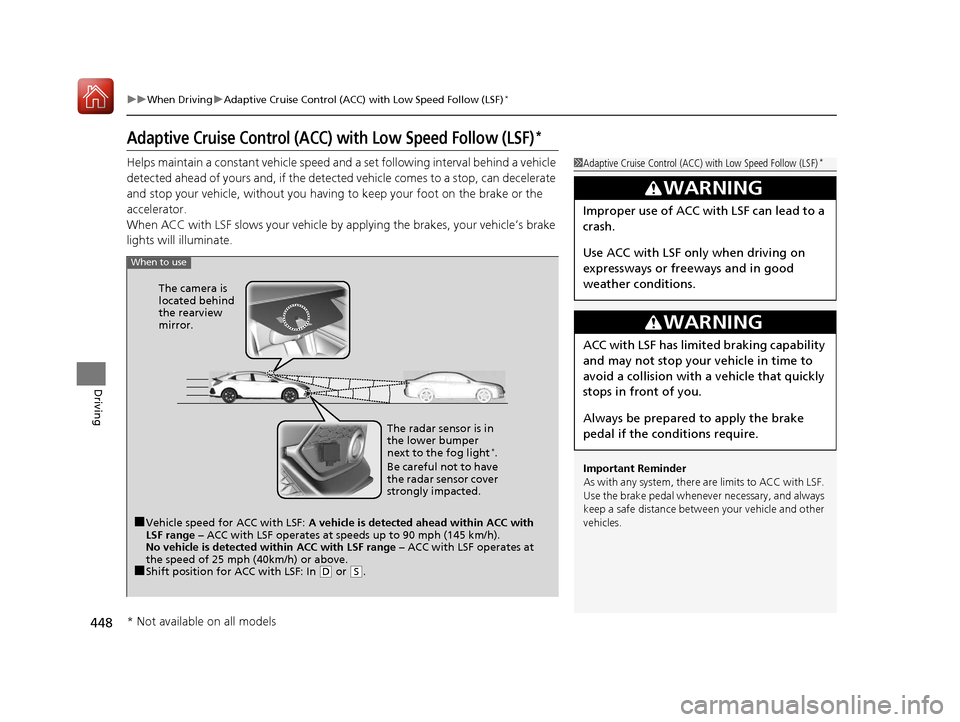
When to use
■Vehicle speed for ACC with LSF: A vehicle is detected ahead within ACC with
LSF range – ACC with LSF operates at speeds up to 90 mph (145 km/h).
No vehicle is detected within ACC with LSF range – ACC with LSF operates at
the speed of 25 mph (40km/h) or above.
■Shift position for ACC with LSF: In (D or (S. The radar sensor is in
the lower bumper
next to the fog light
*.
Be careful not to have
the radar sensor cover
strongly impacted.
The camera is
located behind
the rearview
mirror.
* Not available on all models
17 CIVIC 5D (KA KC KL)-31TGG6000.book 448 ページ 2016年6月8日 水曜日 午
後2時8分
Page 453 of 641
uuWhen Driving uAdaptive Cruise Control (ACC) with Low Speed Follow (LSF)*
452
Driving
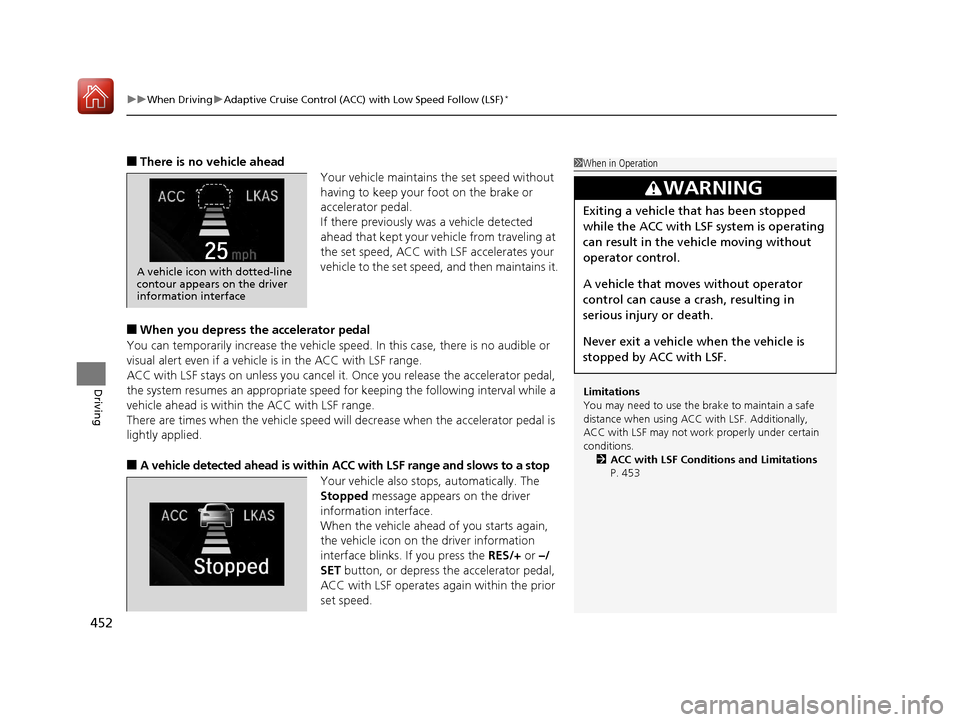
■There is no vehicle ahead
Your vehicle maintains the set speed without
having to keep your foot on the brake or
accelerator pedal.
If there previously was a vehicle detected
ahead that kept your vehicle from traveling at
the set speed, ACC with LSF accelerates your
vehicle to the set speed, and then maintains it.
■When you depress the accelerator pedal
You can temporarily increase th e vehicle speed. In this case, there is no audible or
visual alert even if a vehicle is in the ACC with LSF range.
ACC with LSF stays on unless you cancel it. Once you release the accelerator pedal,
the system resumes an appropriate speed for keeping the following interval while a
vehicle ahead is within the ACC with LSF range.
There are times when the vehicle speed will decrease when the accelerator pedal is
lightly applied.
■A vehicle detected ahead is within ACC with LSF range and slows to a stop
Your vehicle also stop s, automatically. The
Stopped message appears on the driver
information interface.
When the vehicle ahead of you starts again,
the vehicle icon on th e driver information
interface blinks. If you press the RES/+ or –/
SET button, or depress the accelerator pedal,
ACC with LSF operates again within the prior
set speed.
1 When in Operation
Limitations
You may need to use the brake to maintain a safe
distance when using ACC with LSF. Additionally,
ACC with LSF may not work properly under certain
conditions. 2 ACC with LSF Conditions and Limitations
P. 453
3WARNING
Exiting a vehicle that has been stopped
while the ACC with LSF system is operating
can result in the ve hicle moving without
operator control.
A vehicle that moves without operator
control can cause a crash, resulting in
serious injury or death.
Never exit a ve hicle when the vehicle is
stopped by ACC with LSF.
25
A vehicle icon with dotted-line
contour appears on the driver
information interface
17 CIVIC 5D (KA KC KL)-31TGG6000.book 452 ページ 2016年6月8日 水曜日 午 後2時8分
Page 454 of 641
Continued453
uuWhen Driving uAdaptive Cruise Control (ACC) with Low Speed Follow (LSF)*
Driving
The system may automatically shut off and the ACC indicator will come on under
certain conditions. Some examples of thes e conditions are listed below. Other
conditions may reduce some of the ACC functions.
2 Front Sensor Camera* P. 446
■Environmental conditions
• Driving in bad weather (rain, fog, snow, etc.).
■Roadway conditions
• Driving on a snowy or wet roadway (obs cured lane marking, vehicle tracks,
reflected lights, road spray, high contrast).
■Vehicle conditions
• The outside of the windshield is blocked by dirt, mud, leaves, wet snow, etc.
• An abnormal tire or wheel condition (Wro ng sized, varied size or construction,
improperly inflated, co mpact spare tire, etc.).
• The camera temperature gets too high.
• The parking brake is applied.
• When the lower bumper next to the fog light
* is dirty.
• When the front of the vehicle tilts up due to heavy cargo in the cargo area or rear
seats.
• When tire chains are installed.
■ACC with LSF Conditions and Limitations1ACC with LSF Conditions and Limitations
You can read about handling information for the
camera equipped with this system.
2 Front Sensor Camera
* P. 446
Do not put a sticker on the radar sensor cover or
replace the radar sensor cover.
Have your vehicle checked by a dealer if you find any
unusual behavior of the system (e.g., the warning
message appears too frequently).
If the front of the vehicle is impacted in any of the
following situations, the ra dar sensor may not work
properly. Have your vehi cle checked by a dealer:
•The vehicle mounted onto a bump, curb, chock,
embankment, etc.
•You drive the vehicle where the water is deep.
•Your vehicle has a frontal collision.
* Not available on all models
17 CIVIC 5D (KA KC KL)-31TGG6000.book 453 ページ 2016年6月8日 水曜日 午 後2時8分
Page 463 of 641
462
uuWhen Driving uAdaptive Cruise Control (ACC)*
Driving
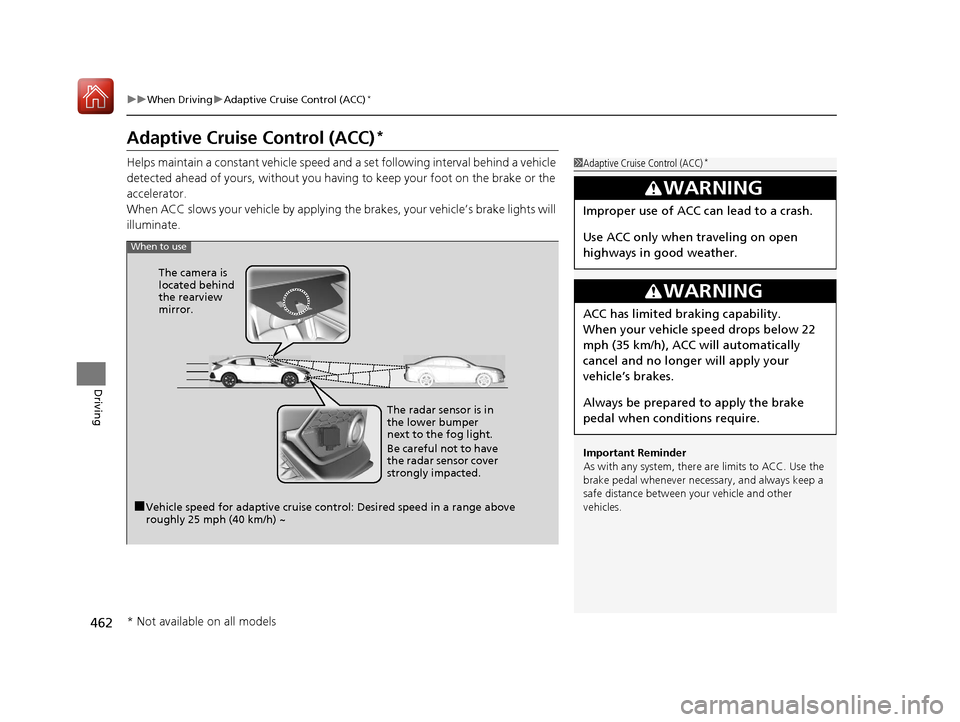
Adaptive Cruise Control (ACC)*
Helps maintain a constant vehicle speed an d a set following interval behind a vehicle
detected ahead of yours, without you havi ng to keep your foot on the brake or the
accelerator.
When ACC slows your vehicle by applying the brakes, your vehicle’s brake lights will
illuminate.1 Adaptive Cruise Control (ACC)*
Important Reminder
As with any system, there are limits to ACC. Use the
brake pedal whenever necessary, and always keep a
safe distance between your vehicle and other
vehicles.
3WARNING
Improper use of ACC can lead to a crash.
Use ACC only when traveling on open
highways in good weather.
3WARNING
ACC has limited braking capability.
When your vehicle speed drops below 22
mph (35 km/h), ACC will automatically
cancel and no longer will apply your
vehicle’s brakes.
Always be prepared to apply the brake
pedal when conditions require.
When to use
■Vehicle speed for adaptive cruise c ontrol: Desired speed in a range above
roughly 25 mph (40 km/h) ~ The radar sensor is in
the lower bumper
next to the fog light.
Be careful not to have
the radar sensor cover
strongly impacted.
The camera is
located behind
the rearview
mirror.
* Not available on all models
17 CIVIC 5D (KA KC KL)-31TGG6000.book 462 ページ 2016年6月8日 水曜日 午
後2時8分
Page 468 of 641
Continued467
uuWhen Driving uAdaptive Cruise Control (ACC)*
Driving
The system may automatically shut off and the ACC indicator will come on under
certain conditions. Some examples of thes e conditions are listed below. Other
conditions may reduce some of the ACC functions.
2 Front Sensor Camera* P. 446
■Environmental conditions
• Driving in bad weather (rain, fog, snow, etc.).
■Roadway conditions
• Driving on a snowy or wet roadway (obs cured lane marking, vehicle tracks,
reflected lights, road spray, high contrast).
■Vehicle conditions
• The outside of the windshield is blocked by dirt, mud, leaves, wet snow, etc.
• An abnormal tire or wheel condition (Wro ng sized, varied size or construction,
improperly inflated, co mpact spare tire, etc.).
• The camera temperature gets too high.
• The parking brake is applied.
• When the lower bumper next to the fog light is dirty.
• When the front of the vehicle tilts up due to heavy cargo in the cargo area or rear
seats.
• When tire chains are installed.
■ACC Conditions and Limitations1ACC Conditions and Limitations
You can read about handling information for the
camera equipped with this system.
2 Front Sensor Camera
* P. 446
Do not put a sticker on the radar sensor cover or
replace the radar sensor cover.
Have your vehicle checked by a dealer if you find any
unusual behavior of the system (e.g., the warning
message appears too frequently).
If the front of the vehicle is impacted in any of the
following situations, the ra dar sensor may not work
properly. Have your vehi cle checked by a dealer:
•The vehicle mounted onto a bump, curb, chock,
embankment, etc.
•You drive the vehicle where the water is deep.
•Your vehicle has a frontal collision.
* Not available on all models
17 CIVIC 5D (KA KC KL)-31TGG6000.book 467 ページ 2016年6月8日 水曜日 午 後2時8分
Page 478 of 641
Continued477
uuWhen Driving uRoad Departure Mitigation (RDM) System*
Driving
The system becomes ready to start sear ching for lane markings when all the
following conditions are met:
• The vehicle is traveling between about 45 and 90 mph (72 and 145 km/h).
• The vehicle is on a straight or slightly curved road.
• The turn signals are off.
• The brake pedal is not depressed.
• The wipers are not in continuous operation.
• The system makes a determination that th e driver is not actively accelerating,
braking or steering.
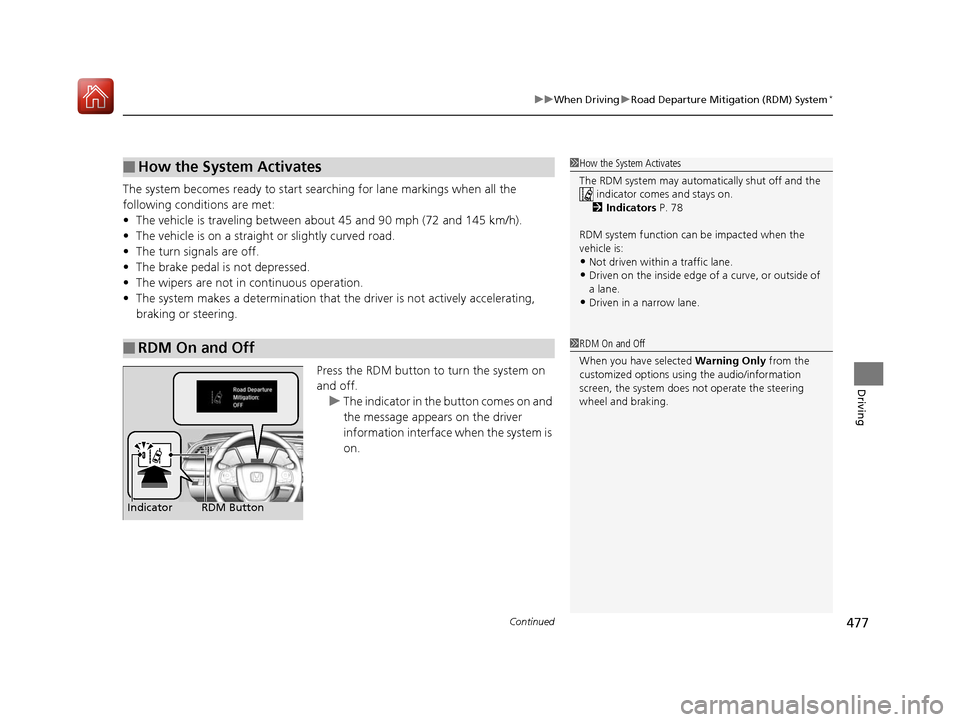
Press the RDM button to turn the system on
and off.u The indicator in the button comes on and
the message appears on the driver
information interface when the system is
on.
■How the System Activates
■RDM On and Off
1 How the System Activates
The RDM system may automa tically shut off and the
indicator comes and stays on.
2 Indicators P. 78
RDM system function can be impacted when the
vehicle is:
•Not driven within a traffic lane.•Driven on the inside edge of a curve, or outside of
a lane.
•Driven in a narrow lane.
1 RDM On and Off
When you have selected Warning Only from the
customized options using the audio/information
screen, the system does not operate the steering
wheel and braking.
RDM Button
Indicator
17 CIVIC 5D (KA KC KL)-31TGG6000.book 477 ページ 2016年6月8日 水曜日 午 後2時8分
Page 482 of 641
Continued481
uuWhen Driving uLane Keeping Assist System (LKAS)*
Driving
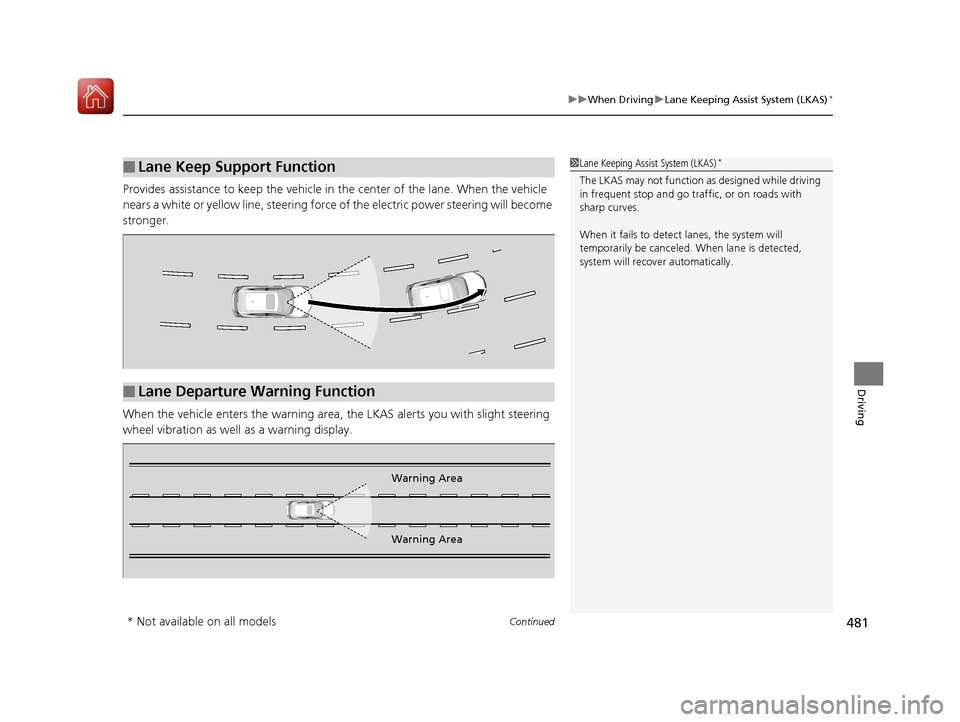
Provides assistance to keep the vehicle in the center of the lane. When the vehicle
nears a white or yellow line, steering force of the electric power steering will become
stronger.
When the vehicle enters the warning area, the LKAS alerts you with slight steering
wheel vibration as well as a warning display.
■Lane Keep Support Function1 Lane Keeping Assist System (LKAS)*
The LKAS may not function as designed while driving
in frequent stop and go traf fic, or on roads with
sharp curves.
When it fails to detect lanes, the system will
temporarily be canceled. When lane is detected,
system will recover automatically.
■Lane Departure Warning Function
Warning Area
Warning Area
* Not available on all models
17 CIVIC 5D (KA KC KL)-31TGG6000.book 481 ページ 2016年6月8日 水曜日 午 後2時8分