fog light HONDA CIVIC HATCHBACK 2017 10.G Owner's Manual
[x] Cancel search | Manufacturer: HONDA, Model Year: 2017, Model line: CIVIC HATCHBACK, Model: HONDA CIVIC HATCHBACK 2017 10.GPages: 641
Page 480 of 641
479
uuWhen Driving uRoad Departure Mitigation (RDM) System*
Driving
■Roadway conditions
• Driving on a snowy or wet roadway (obs cured lane marking, vehicle tracks,
reflected lights, road spray, high contrast).
• Driving on a road with temporary lane markings.
• Faint, multiple, or varied lane markings are visible on the roadway due to road
repairs or old lane markings.
• The roadway has merging, split, or crossing lines (e.g., such as at an intersection
or crosswalk).
• The lane markings are extremel y narrow, wide, or changing.
• The vehicle in front of you is driving near the lane lines.
• The road is hilly or the vehicle is approaching the crest of a hill.
• Driving on rough or unpaved roads, or over bumpy surfaces.
• When objects on the road (curb, guard rail, pylons, etc.) are recognized as white
lines (or yellow lines).
• Driving on roads with double lines.
■Vehicle conditions
• Headlight lenses are dirty or the h eadlights are not properly adjusted.
• The outside of the windshield is streaked or blocked by dirt, mud, leaves, wet
snow, etc.
• The inside of the windshield is fogged.
• The camera temperature gets too high.
• An abnormal tire or wheel condition (wro ng sized, varied size or construction,
improperly inflated, co mpact spare tire, etc.).
• The vehicle is tilted due to a heavy load or suspension modifications.
• When tire chains are installed.
17 CIVIC 5D (KA KC KL)-31TGG6000.book 479 ページ 2016年6月8日 水曜日 午 後2時8分
Page 486 of 641
485
uuWhen Driving uLane Keeping Assist System (LKAS)*
Continued
Driving
■The LKAS may automatically be canceled when:
• The camera temperature gets extremely high or low.
• The camera behind the rearview mirror, or the area around the camera, including
the windshield, gets dirty.
A beeper will sound if the LKAS is automatically canceled.
The system may not detect lane markings and therefore may not keep the vehicle in
the middle of a lane under certain conditions, including the following:
■Environmental conditions
• Driving in bad weather (rain, fog, snow, etc.).
• Sudden changes between light and dark, such as an entrance or exit of a tunnel.
• There is little contrast between lane lines and the roadway surface.
• Driving into low sunlight (e.g., at dawn or dusk).
• Strong light is reflec ted onto the roadway.
• Driving in the shadows of trees, buildings, etc.
• Shadows of adjacent objects are parallel to lane markings.
• Roadway objects or structures are misinterpreted as lane markers.
• Reflections on the interior of the front windshield.
■LKAS Conditions and Limitations
17 CIVIC 5D (KA KC KL)-31TGG6000.book 485 ページ 2016年6月8日 水曜日 午 後2時8分
Page 487 of 641
486
uuWhen Driving uLane Keeping Assist System (LKAS)*
Driving
■Roadway conditions
• Driving on a snowy or wet roadway (obscured lane marking, vehicle tracks,
reflected lights, road spray, high contrast).
• Driving on a road with temporary lane markings.
• Faint, multiple, or varied lane markings are visible on the roadway due to road
repairs or old lane markings.
• The roadway has merging, split, or crossing lines (e.g., such as at an intersection
or crosswalk).
• The lane markings are extremely narrow, wide, or changing.
• The vehicle in front of you is driving near the lane lines.
• The road is hilly or the vehicle is approaching the crest of a hill.
• Driving on rough or unpaved roads, or over bumpy surfaces.
• When objects on the road (c urb, guard rail, pylons, etc.) are recognized as white
lines (or yellow lines).
• When driving on roads with double lines.
■Vehicle conditions
• Headlight lenses are dirty or the headlights are not properly adjusted.
• The outside of the windshield is streake d or blocked by dirt, mud, leaves, wet
snow, etc.
• The inside of the windshield is fogged.
• The camera temperature gets too high.
• An abnormal tire or wheel condition (wrong size, varied size or construction,
improperly inflated, comp act spare tire, etc.).
• The vehicle is tilted due to a heav y load or suspension modifications.
17 CIVIC 5D (KA KC KL)-31TGG6000.book 486 ページ 2016年6月8日 水曜日 午 後2時8分
Page 507 of 641
506
uuBraking uCollision Mitigation Braking SystemTM (CMBSTM)*
Driving
Collision Mitigati on Braking SystemTM (CMBSTM)*
Can assist you when there is a possibility of your vehicle colliding with a vehicle or a
pedestrian detected in front of yours. The CMBSTM is designed to alert you when a
potential collision is determined, as well as to reduce your vehicle speed to help
minimize collision severity when a collision is deemed unavoidable.
■How the system works
1 Collision Mitigation Braking SystemTM (CMBSTM)*
Important Safety Reminder
The CMBSTM is designed to reduce the severity of an
unavoidable collision. It does not prevent collision nor
stop the vehicle automatically. It is still your
responsibility to operate the brake pedal and steering
wheel appropriately acco rding to the driving
conditions.
The CMBS
TM may not activate or may not detect a
vehicle in front of y our vehicle under certain
conditions:
2 CMBS
TM Conditions and Limitations P. 510
You can read about handling information for the
camera equipped with this system. 2 Front Sensor Camera
* P. 446
Be careful not to have the radar sensor cover strongly
impacted.
1 How the system works
When the CMBS
TM activates, it may automatically
apply the brake. It will be canceled when your vehicle
stops or a potential coll ision is not determined.
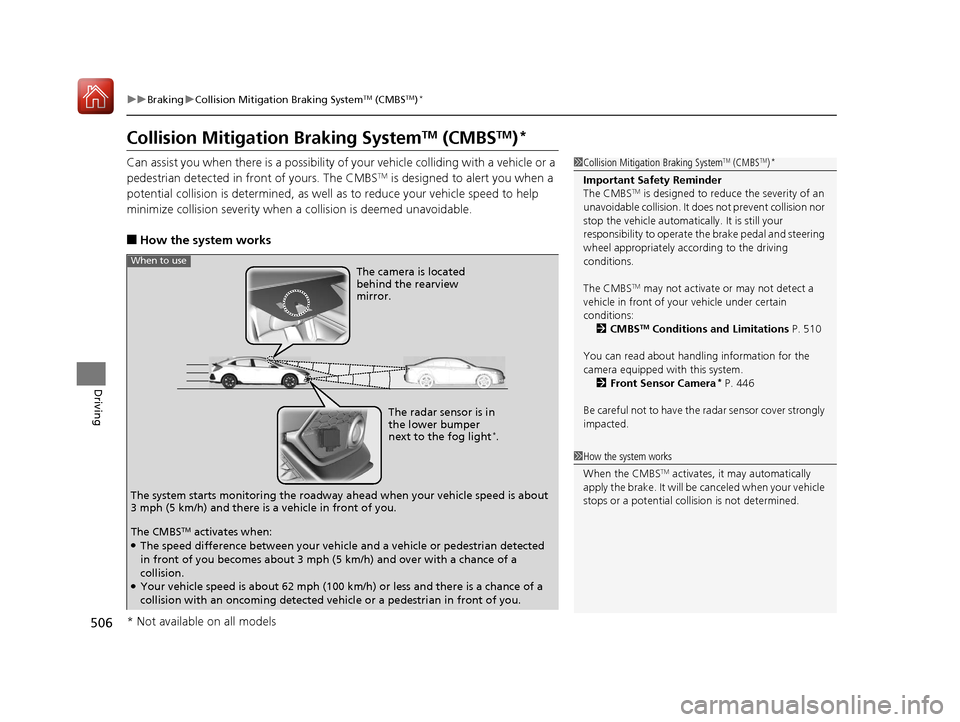
The radar sensor is in
the lower bumper
next to the fog light
*.
The camera is located
behind the rearview
mirror.
The system starts monitoring the roadway ah ead when your vehicle speed is about
3 mph (5 km/h) and there is a vehicle in front of you.
When to use
The CMBSTM activates when:●The speed difference between your vehicle and a vehicle or pedestrian detected
in front of you becomes about 3 mph (5 km/h) and over with a chance of a
collision.
●Your vehicle speed is about 62 mph (100 km/h) or less and there is a chance of a
collision with an oncoming detected vehicle or a pedestrian in front of you.
* Not available on all models
17 CIVIC 5D (KA KC KL)-31TGG6000.book 506 ページ 2016年6月8日 水曜日 午 後2時8分
Page 511 of 641
uuBraking uCollision Mitigation Braking SystemTM (CMBSTM)*
510
Driving
The system may automatically shut off and the CMBSTM indicator will come on under
certain conditions. Some examples of th ese conditions are listed below. Other
conditions may reduce some of the CMBS
TM functions.
2 Front Sensor Camera* P. 446
■Environmental conditions
• Driving in bad weather (rain, fog, snow, etc.).
• Sudden changes between light and dark, such as an entrance or exit of a tunnel.
• There is little contrast between objects and the background.
• Driving into low sunlight (e.g., at dawn or dusk).
• Strong light is reflected onto the roadway.
• Driving in the shadows of trees, buildings, etc.
• Roadway objects or structures are misint erpreted as vehicles and pedestrians.
• Reflections on the interi or of the windshield.
■Roadway conditions
• Driving on a snowy or wet roadway (obscured lane marking, vehicle tracks,
reflected lights, road spray, high co ntrast on a snowy or wet roadway).
• Driving on curvy, winding, or undulating roads.
• The road is hilly or the vehicle is approaching the crest of a hill.
■CMBSTM Conditions and Limitations1CMBSTM Conditions and Limitations
Do not put a sticker on the radar sensor cover or
replace the radar sensor cover.
If you need the radar sensor to be repaired, or
removed, or the radar se nsor cover is strongly
impacted, turn off the system by pressing the
CMBS
TM off button and take your vehicle to a dealer.
* Not available on all models
17 CIVIC 5D (KA KC KL)-31TGG6000.book 510 ページ 2016年6月8日 水曜日 午 後2時8分
Page 512 of 641
511
uuBraking uCollision Mitigation Braking SystemTM (CMBSTM)*
Continued
Driving
■Vehicle conditions
• Headlight lenses are dirty or the h eadlights are not properly adjusted.
• The outside of the windshield is blocked by dirt, mud, leaves, wet snow, etc.
• The inside of the windshield is fogged.
• An abnormal tire or wheel condition (wro ng size, varied size or construction,
improperly inflated, co mpact spare tire, etc.).
• When tire chains are installed.
• The vehicle is tilted due to a heavy load or suspension modifications.
• The camera temperature gets too high.
• Driving with the parking brake applied.
• When the radar sensor in the front grille gets dirty.
■Detection limitations
• A vehicle or pedestrian suddenly crosses in front of you.
• The distance between your vehicle and the vehicle or pedestrian ahead of you is
too short.
• A vehicle cuts in front of you at a slow speed, and it brakes suddenly.
• When you accelerate rapidly and approach the vehicle or pedestrian ahead of you
at high speed.
• The vehicle ahead of you is a motorcycle, bicycle, mobility scooter or other small
vehicle.
• When there are animals in front of your vehicle.
• When you drive on a curved, winding or und ulating road that makes it difficult for
the sensor to properly detect a vehicle in front of you.
• The speed difference between your vehicle an d a vehicle or pedestrian in front of
you is significantly large.
• An oncoming vehicle suddenly comes in front of you.
• Another vehicle suddenly comes in front of you at an intersection, etc.
• Your vehicle abruptly crosses over in front of an oncoming vehicle.
• When driving through a narrow iron bridge.
• When the lead vehicl e suddenly slows down.
17 CIVIC 5D (KA KC KL)-31TGG6000.book 511 ページ 2016年6月8日 水曜日 午 後2時8分
Page 551 of 641
550
uuReplacing Light Bulbs uFog Light Bulbs*
Maintenance
Fog Light Bulbs*
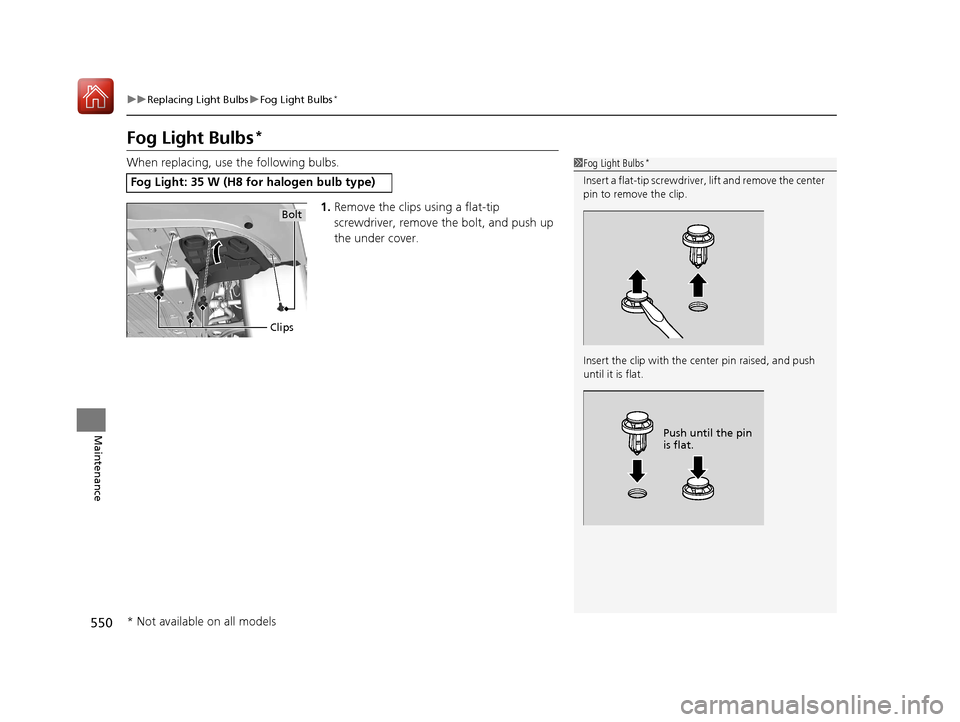
When replacing, use the following bulbs.
1.Remove the clips using a flat-tip
screwdriver, remove the bolt, and push up
the under cover.
Fog Light: 35 W (H8 fo r halogen bulb type)
1Fog Light Bulbs*
Insert a flat-tip screwdriver, lift and remove the center
pin to remove the clip.
Insert the clip with the center pin raised, and push
until it is flat.
Push until the pin
is flat.
Clips
Bolt
* Not available on all models
17 CIVIC 5D (KA KC KL)-31TGG6000.book 550 ページ 2016年6月8日 水曜日 午 後2時8分
Page 552 of 641
551
uuReplacing Light Bulbs uFront Turn Signal Light Bulbs
Maintenance
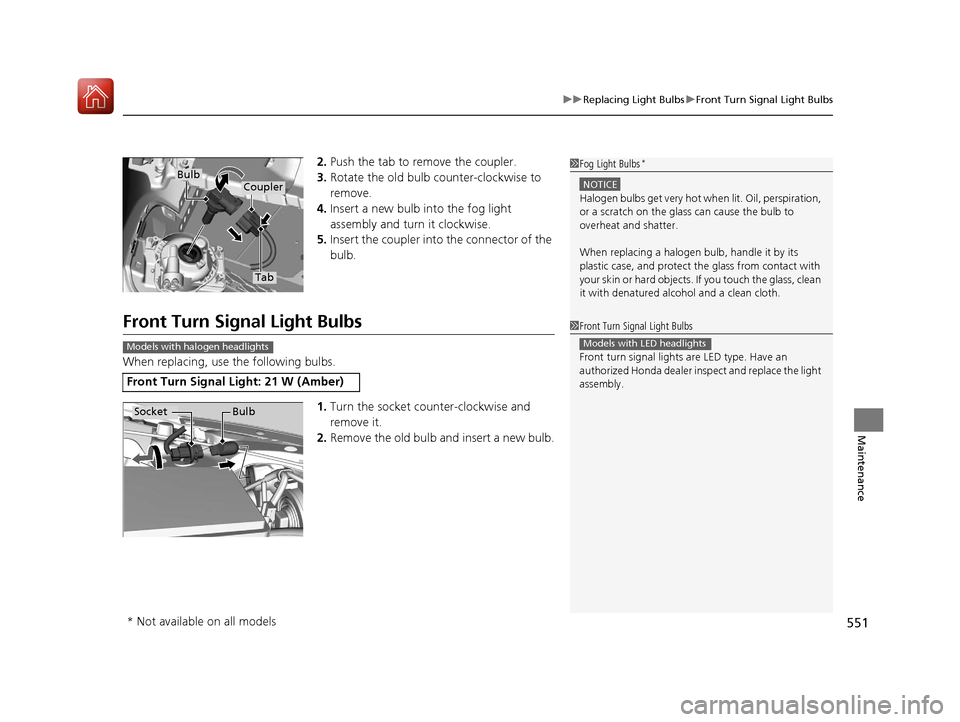
2. Push the tab to remove the coupler.
3. Rotate the old bulb counter-clockwise to
remove.
4. Insert a new bulb into the fog light
assembly and turn it clockwise.
5. Insert the coupler into the connector of the
bulb.
Front Turn Signal Light Bulbs
When replacing, use the following bulbs.
1.Turn the socket counter-clockwise and
remove it.
2. Remove the old bulb and insert a new bulb.
1Fog Light Bulbs*
NOTICE
Halogen bulbs get very hot wh en lit. Oil, perspiration,
or a scratch on the glass can cause the bulb to
overheat and shatter.
When replacing a halogen bulb, handle it by its
plastic case, and protect th e glass from contact with
your skin or hard objects. If you touch the glass, clean
it with denatured alc ohol and a clean cloth.
Tab
CouplerBulb
Front Turn Signal Light: 21 W (Amber)
1Front Turn Signal Light Bulbs
Front turn signal lights are LED type. Have an
authorized Honda dealer in spect and replace the light
assembly.
Models with LED headlightsModels with halogen headlights
Socket Bulb
* Not available on all models
17 CIVIC 5D (KA KC KL)-31TGG6000.book 551 ページ 2016年6月8日 水曜日 午 後2時8分
Page 582 of 641
581
uuCleaning uExterior Care
Maintenance
The inside lenses of exterior lights (headlights, brake light s, etc.) may fog temporarily
if you have driven in the rain, or after the vehicle has been run through a car wash.
Dew condensation also may build up inside the lenses when there is a significant
enough difference between the ambient and inside-lens temperatures (similar to
vehicle windows fogging up in rainy conditions). These conditions are natural
processes, not structural design problems in the exterior lights.
Lens design characteristics ma y result in moisture developing on the light lens frame
surfaces. This also is not a malfunction. Ho wever, if you see large amounts of water
accumulation, or large water drops building up inside the lenses, have your vehicle
inspected by a dealer.
■Fogged Exterior Light Lenses
17 CIVIC 5D (KA KC KL)-31TGG6000.book 581 ページ 2016年6月8日 水曜日 午 後2時8分
Page 603 of 641
602
Handling the Unexpected
Indicator, Coming On/Blinking
If the Low Oil Pressure Indicator Comes On
■Reasons for the indicator to come on
Comes on when the engine oil pressure is low.
■What to do as soon as the indicator comes on
1. Immediately park the vehicle on level ground in a safe place.
2. If necessary, turn the ha zard warning lights on.
■What to do after parking the vehicle
1. Stop the engine and let it sit for about three minute.
2. Open the hood and check the oil level.
2 Oil Check P. 539
3.Start the engine and check the low oil pressure indicator.
u The indicator goes off: Start driving again.
u The indicator does not go off within 10 seconds: Stop the engine
and contact a dealer for repairs immediately.
If the Charging System Indicator Comes On
■Reasons for the indicator to come on
Comes on when the battery is not being charged.
■What to do when the indicator comes on
Turn off the climate con trol system, rear defogger, and other electrical
systems, and immediately contact a dealer for repairs.
1 If the Low Oil Pressure Indicator Comes On
NOTICE
Running the engine with low oil pressure can cause
serious mechanical damage almost immediately.
1If the Charging System Indicator Comes On
If you need to stop temporarily, do not turn off the
engine. Restarting the engi ne may rapidly discharge
the battery.
17 CIVIC 5D (KA KC KL)-31TGG6000.book 602 ページ 2016年6月8日 水曜日 午 後2時8分