remote start HONDA CIVIC HATCHBACK 2017 10.G Owner's Manual
[x] Cancel search | Manufacturer: HONDA, Model Year: 2017, Model line: CIVIC HATCHBACK, Model: HONDA CIVIC HATCHBACK 2017 10.GPages: 641
Page 353 of 641
352
uuCustomized Features u
Features
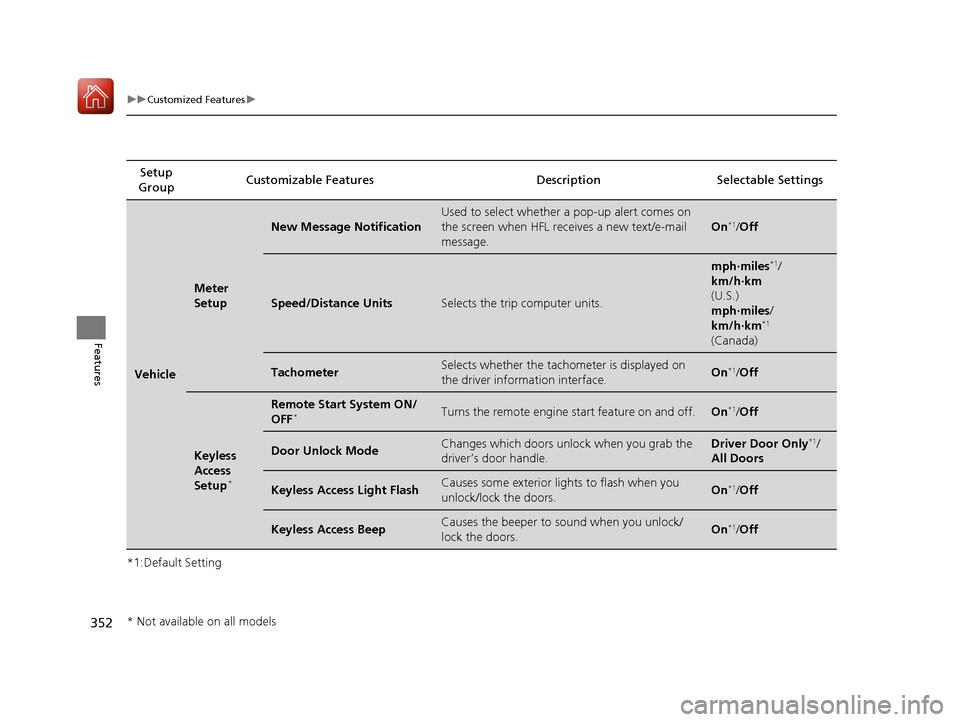
*1:Default SettingSetup
Group Customizable Features Desc
ription Selectable Settings
Vehicle
Meter
Setup
New Message Notification
Used to select whether a pop-up alert comes on
the screen when HFL receives a new text/e-mail
message.
On*1/Off
Speed/Distance UnitsSelects the trip computer units.
mph∙miles*1/
km/h∙km
(U.S.)
mph∙miles /
km/h∙km
*1
(Canada)
TachometerSelects whether the tachom eter is displayed on
the driver information interface.On*1/ Off
Keyless
Access
Setup
*
Remote Start System ON/
OFF*Turns the remote engine start feature on and off.On*1/Off
Door Unlock ModeChanges which doors unlock when you grab the
driver’s door handle.Driver Door Only*1/
All Doors
Keyless Access Light FlashCauses some exterior lig hts to flash when you
unlock/lock the doors.On*1/ Off
Keyless Access BeepCauses the beeper to sound when you unlock/
lock the doors.On*1/Off
* Not available on all models
17 CIVIC 5D (KA KC KL)-31TGG6000.book 352 ページ 2016年6月8日 水曜日 午 後2時8分
Page 405 of 641
uuBluetooth ® HandsFreeLink ®*uHFL Menus
404
Features
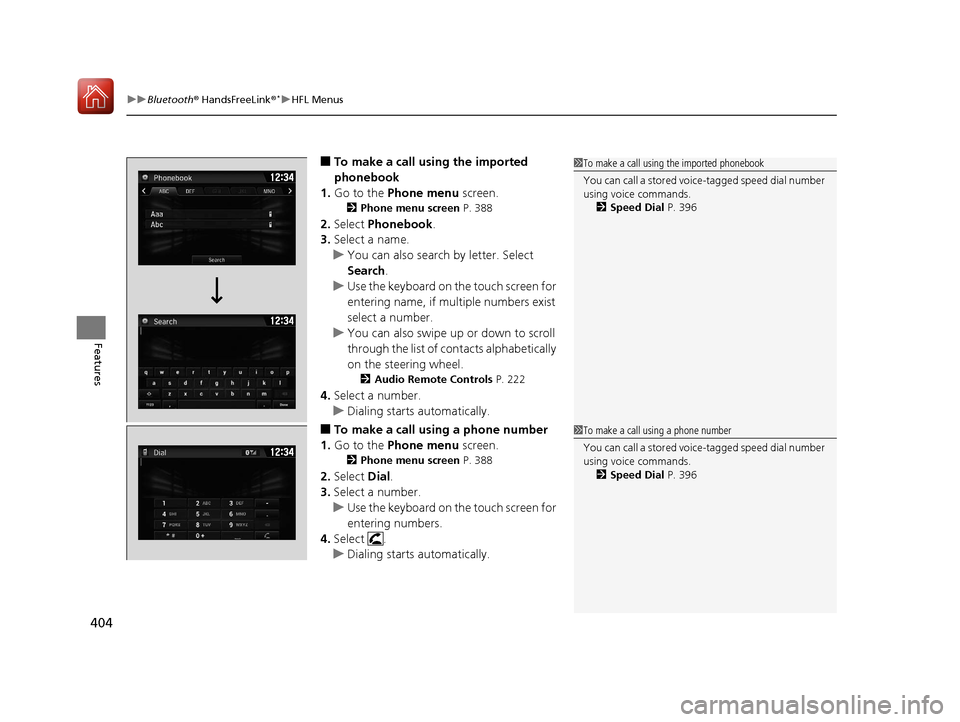
■To make a call using the imported
phonebook
1. Go to the Phone menu screen.
2Phone menu screen P. 388
2.Select Phonebook .
3. Select a name.
u You can also search by letter. Select
Search .
u Use the keyboard on the touch screen for
entering name, if multiple numbers exist
select a number.
u You can also swipe up or down to scroll
through the list of co ntacts alphabetically
on the steering wheel.
2 Audio Remote Controls P. 222
4.Select a number.
u Dialing starts automatically.
■To make a call using a phone number
1. Go to the Phone menu screen.
2Phone menu screen P. 388
2.Select Dial.
3. Select a number.
u Use the keyboard on the touch screen for
entering numbers.
4. Select .
u Dialing starts automatically.
1To make a call using the imported phonebook
You can call a stored voic e-tagged speed dial number
using voice commands.
2 Speed Dial P. 396
1To make a call using a phone number
You can call a stored voic e-tagged speed dial number
using voice commands.
2 Speed Dial P. 396
17 CIVIC 5D (KA KC KL)-31TGG6000.book 404 ページ 2016年6月8日 水曜日 午 後2時8分
Page 426 of 641
Continued425
uuWhen Driving uStarting the Engine
Driving
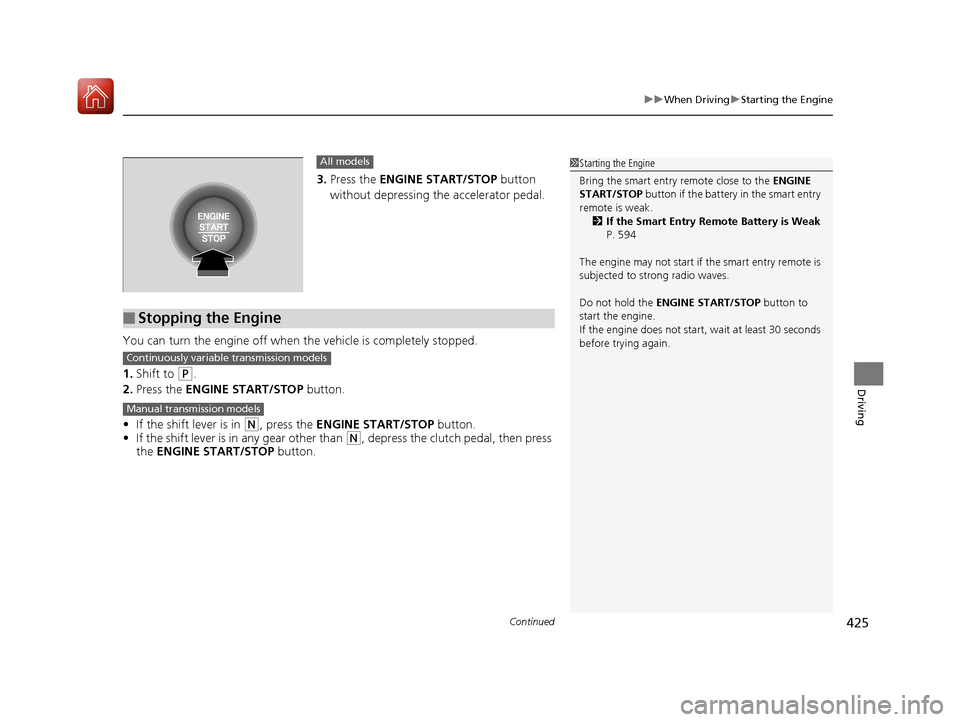
3. Press the ENGINE START/STOP button
without depressing the accelerator pedal.
You can turn the engine off when the vehicle is completely stopped.
1. Shift to
(P.
2. Press the ENGINE START/STOP button.
• If the shift lever is in
(N, press the ENGINE START/STOP button.
• If the shift lever is in any gear other than
(N, depress the clutch pedal, then press
the ENGINE START/STOP button.
All models
■Stopping the Engine
1Starting the Engine
Bring the smart entry remote close to the ENGINE
START/STOP button if the battery in the smart entry
remote is weak.
2 If the Smart Entry Remote Battery is Weak
P. 594
The engine may not start if the smart entry remote is
subjected to strong radio waves.
Do not hold the ENGINE START/STOP button to
start the engine.
If the engine does not start, wait at least 30 seconds
before trying again.
Continuously variable transmission models
Manual transmission models
17 CIVIC 5D (KA KC KL)-31TGG6000.book 425 ページ 2016年6月8日 水曜日 午 後2時8分
Page 427 of 641
uuWhen Driving uStarting the Engine
426
Driving
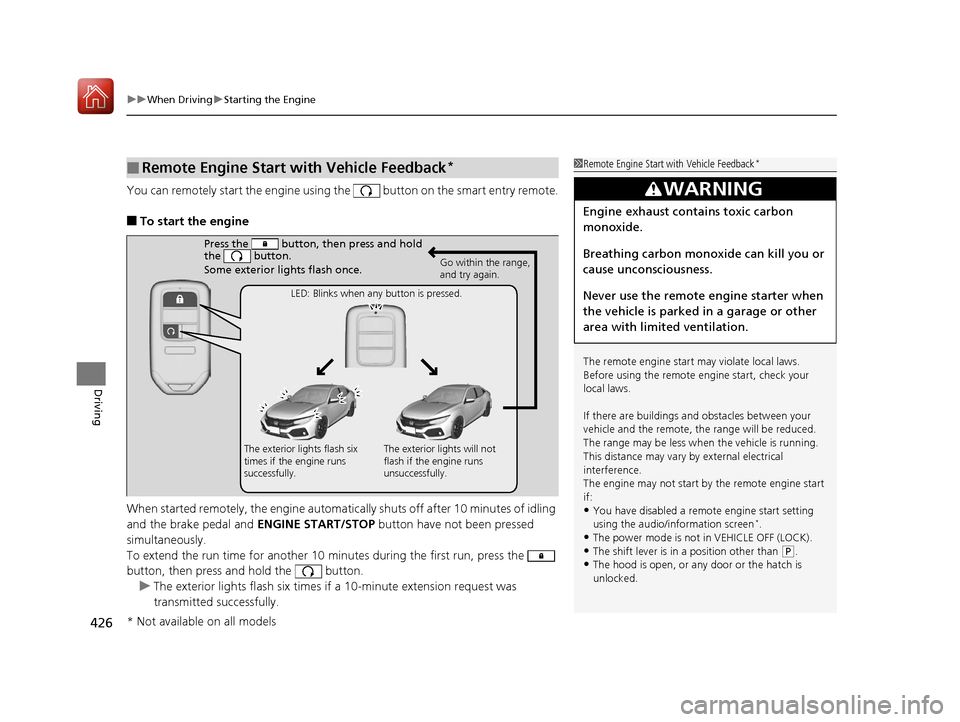
You can remotely start the engine using the button on the smart entry remote.
■To start the engine
When started remotely, the engine automati cally shuts off after 10 minutes of idling
and the brake pedal and ENGINE START/STOP button have not been pressed
simultaneously.
To extend the run time for another 10 minutes during the first run, press the
button, then press and hold the button. u The exterior lights flash six times if a 10-minute extension request was
transmitted successfully.
■Remote Engine Start with Vehicle Feedback*1Remote Engine Start with Vehicle Feedback*
The remote engine start may violate local laws.
Before using the remote e ngine start, check your
local laws.
If there are buildings an d obstacles between your
vehicle and the remote, th e range will be reduced.
The range may be less when the vehicle is running.
This distance may vary by external electrical
interference.
The engine may not start by the remote engine start
if:
•You have disabled a remo te engine start setting
using the audio/information screen*.
•The power mode is not in VEHICLE OFF (LOCK).
•The shift lever is in a position other than ( P.•The hood is open, or any door or the hatch is
unlocked.
3WARNING
Engine exhaust contains toxic carbon
monoxide.
Breathing carbon monoxide can kill you or
cause unconsciousness.
Never use the remote engine starter when
the vehicle is parked in a garage or other
area with limited ventilation.
Press the button, th en press and hold
the button.
Some exterior lights flash once.
Go within the range,
and try again.
LED: Blinks when any button is pressed.
The exterior lights flash six
times if the engine runs
successfully. The exterior lights will not
flash if the engine runs
unsuccessfully.
* Not available on all models
17 CIVIC 5D (KA KC KL)-31TGG6000.book 426 ページ 2016年6月8日 水曜日 午
後2時8分
Page 428 of 641
Continued427
uuWhen Driving uStarting the Engine
Driving
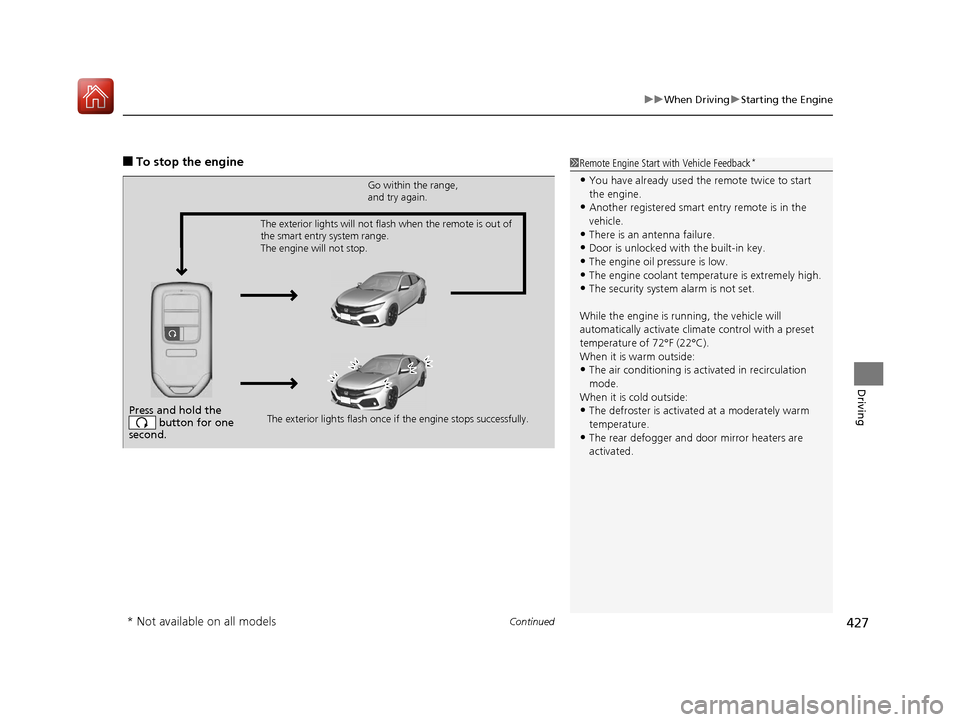
■To stop the engine1Remote Engine Start with Vehicle Feedback*
•You have already used the remote twice to start
the engine.
•Another registered smart entry remote is in the
vehicle.
•There is an antenna failure.
•Door is unlocked with the built-in key.
•The engine oil pressure is low.•The engine coolant temper ature is extremely high.
•The security system alarm is not set.
While the engine is running, the vehicle will
automatically activate climate control with a preset
temperature of 72°F (22°C).
When it is warm outside:
•The air conditioning is acti vated in recirculation
mode.
When it is cold outside:
•The defroster is activated at a moderately warm
temperature.
•The rear defogger and door mirror heaters are
activated.
Press and hold the button for one
second.
Go within the range,
and try again.
The exterior lights flash once if the engine stops successfully.
The exterior lights will not flash when the remote is out of
the smart entry system range.
The engine will not stop.
* Not available on all models
17 CIVIC 5D (KA KC KL)-31TGG6000.book 427 ページ 2016年6月8日 水曜日 午
後2時8分
Page 429 of 641
uuWhen Driving uStarting the Engine
428
Driving
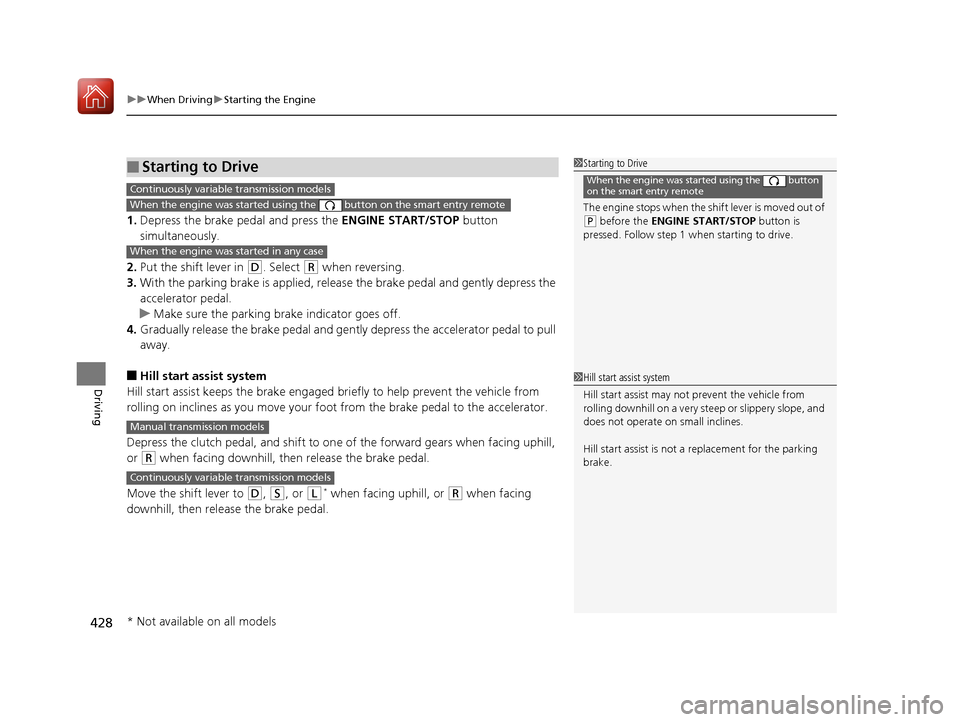
1. Depress the brake pedal and press the ENGINE START/STOP button
simultaneously.
2. Put the shift lever in
(D. Select (R when reversing.
3. With the parking brake is applied, releas e the brake pedal and gently depress the
accelerator pedal.
u Make sure the parking brake indicator goes off.
4. Gradually release the brake pedal and gently depress the accelerator pedal to pull
away.
■Hill start assist system
Hill start assist keeps the brake engaged br iefly to help prevent the vehicle from
rolling on inclines as you move your fo ot from the brake pedal to the accelerator.
Depress the clutch pedal, and shift to on e of the forward gears when facing uphill,
or
(R when facing downhill, then release the brake pedal.
Move the shift lever to
(D, (S, or (L* when facing uphill, or (R when facing
downhill, then release the brake pedal.
■Starting to Drive1 Starting to Drive
The engine stops when the sh ift lever is moved out of
(P before the ENGINE START/STOP button is
pressed. Follow step 1 when starting to drive.
When the engine was started using the button
on the smart entry remoteContinuously variable transmission models
When the engine was started using the button on the smart entry remote
When the engine was started in any case
1Hill start assist system
Hill start assist may not prevent the vehicle from
rolling downhill on a very steep or slippe ry slope, and
does not operate on small inclines.
Hill start assist is not a replacement for the parking
brake.
Manual transmission models
Continuously variable transmission models
* Not available on all models
17 CIVIC 5D (KA KC KL)-31TGG6000.book 428 ページ 2016年6月8日 水曜日 午 後2時8分
Page 584 of 641
583
Handling the Unexpected
This chapter explains how to handle unexpected troubles.
ToolsTypes of Tools .................................. 584
If a Tire Goes Flat
Changing a Flat Tire ......................... 585
Engine Does Not Start Checking the Engine ........................ 593
If the Smart Entry Remote Battery is Weak .......................................... 594
Emergency Engine Stop ................... 595
Jump Starting .................................... 596
Shift Lever Does Not Move .............. 599
Overheating
How to Handle Overheating ............. 600 Indicator, Coming On/Blinking
If the Low Oil Pressure Indicator Comes
On ............................................. 602
If the Charging System Indicator Comes
On ................................................. 602
If the Malfunction Indicator Lamp Comes
On or Blinks ................................... 603
If the Brake System Indicator (Red) Comes On or Blinks ................................... 604
If the Brake System Indicator (Red) Comes On or Blinks at the Same Time When the
Brake System Indicator (Amber) Comes
On ................................................. 605 If the Electric Power Steering (EPS) System
Indicator Comes On ....................... 606
If the Low Tire Pressure/TPMS Indicator Comes On or Blinks ....................... 607
Fuses Fuse Locations ................................. 608
Inspecting and Changing Fuses ........ 611
Emergency Towing ........................... 612
When You Cannot Unlock the Fuel Fill Door ................................................. 613
When You Cannot Open the Hatch.....614
Refueling ........................................... 615
17 CIVIC 5D (KA KC KL)-31TGG6000.book 583 ページ 2016年6月8日 水曜日 午 後2時8分
Page 594 of 641
593
Handling the Unexpected
Engine Does Not Start
Checking the Engine
If the engine does not start, check the starter.
Starter conditionChecklist
Starter doesn’t turn or turns
over slowly.
The battery may be dead. Check
each of the items on the right and
respond accordingly.
Check for a message on the driver information interface.●If the To Start, Hold Remote Near Start Button message appears2If the Smart Entry Remote Battery is Weak P. 594
uMake sure the smart entry remote is in its operating range.2 ENGINE START/STOP Button Operating Range P. 166
Check the brightness of the interior lights.
Turn on the interior lights and check the brightness.
●If the interior lights are dim or do not come on at all2 Battery P. 571●If the interior lights come on normally2 Fuses P. 608
The starter turns over normally
but the engine doesn’t start.
There may be a problem with the
fuse. Check each of the items on
the right and respond accordingly. Review the engine start procedure.
Follow its instructions, and try
to start the engine again.
2 Starting the Engine P. 422
Check the immobilize r system indicator.
When the immobilizer system indicator is blinking, the engine cannot be started.
2 Immobilizer System P. 157
Check the fuel level.
There should be enough fuel in the tank.
2 Fuel Gauge P. 114
Check the fuse.
Check all fuses, or have the vehicle checked by a dealer.
2Inspecting and Changing Fuses P. 611
If the problem continues:2Emergency Towing P. 612
1Checking the Engine
If you must start the vehi cle immediately, use an
assisting vehicle to jump start it.
2 Jump Starting P. 596
Models with smart entry system
17 CIVIC 5D (KA KC KL)-31TGG6000.book 593 ページ 2016年6月8日 水曜日 午 後2時8分
Page 595 of 641
594
uuEngine Does Not Start uIf the Smart Entry Remote Battery is Weak
Handling the Unexpected
If the Smart Entry Remote Battery is Weak
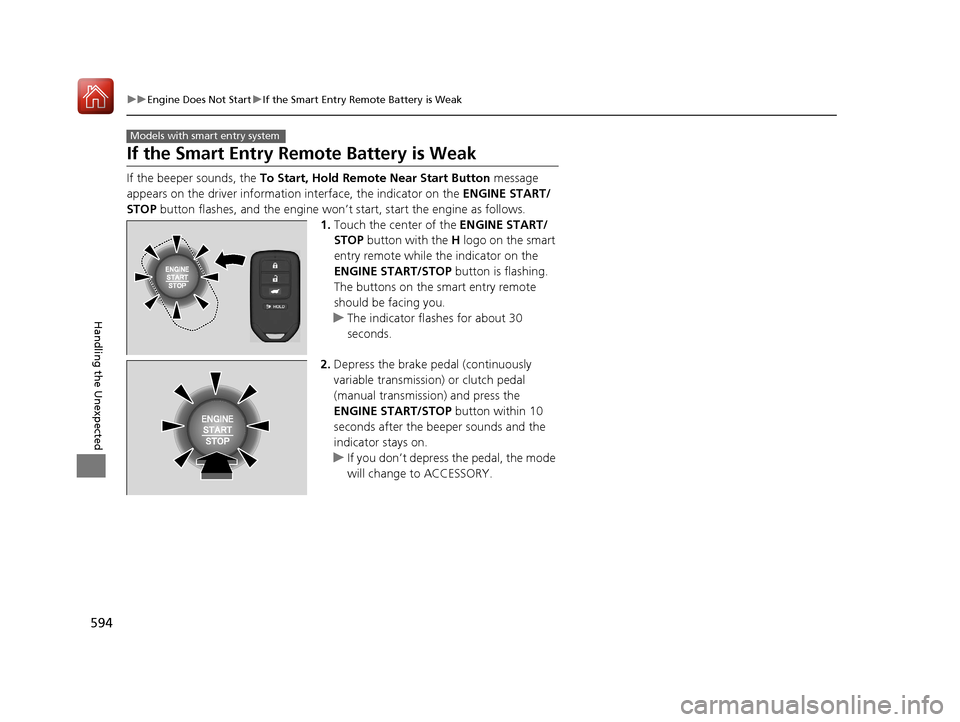
If the beeper sounds, the To Start, Hold Remote Near Start Button message
appears on the driver informati on interface, the indicator on the ENGINE START/
STOP button flashes, and the engine won’t start, start the engine as follows.
1.Touch the center of the ENGINE START/
STOP button with the H logo on the smart
entry remote while the indicator on the
ENGINE START/STOP button is flashing.
The buttons on the smart entry remote
should be facing you.
u The indicator flashes for about 30
seconds.
2. Depress the brake pedal (continuously
variable transmission) or clutch pedal
(manual transmission) and press the
ENGINE START/STOP button within 10
seconds after the beeper sounds and the
indicator stays on.
u If you don’t depress the pedal, the mode
will change to ACCESSORY.
Models with smart entry system
17 CIVIC 5D (KA KC KL)-31TGG6000.book 594 ページ 2016年6月8日 水曜日 午 後2時8分
Page 635 of 641
634
Index
Indicators..................................................... 78
Adaptive Cruise Control (ACC) with
Low Speed Follow (LSF) .................... 94, 448
Anti-lock Brake System (ABS) ..................... 84
Auto High-Beam ........................................ 88
Automatic Brake Hold........................ 80, 501
Automatic Brake Hold System ............ 80, 501
Brake Depressing ....................................... 91
Charging System ............................... 81, 602
Collision Mitigati on Braking System
TM
(CMBSTM) ........................................... 96, 97
CRUISE CONTROL .............................. 90, 444
CRUISE MAIN .................................... 90, 442
Door and Hatch Open.......................... 37, 85
ECON Mode ...................................... 90, 441
Electric Power Steering (EPS) System .. 85, 606
Fog Light ................................................... 88
High Beam................................................. 87
Immobilizer System .................................... 89
Lane Keeping Assist System (LKAS) .... 95, 482
Lights On ................................................... 87
Low Fuel .................................................... 83
Low Oil Pressure ................................ 80, 602
Low Tire Pressure/TPMS ............. 86, 492, 495
M (7-speed manual shift mode) Indicator/ Shift Indicator .......................................... 82
Maintenance Minder ......................... 91, 527
Malfunction Indicator Lamp ............... 81, 603
Parking Brake and Brake System (Amber) ... 79
Parking Brake and Brake System (Red) ........................................ 78, 604, 605 Road Departure Mitigation (RDM) ............. 92
Seat Belt Reminder .............................. 40, 83
Security System Alarm ............................... 90
Shift Down ................................................ 82
Shift Lever Position .................................... 81
Shift Up..................................................... 82
Supplemental Restraint System ............ 57, 84
System Message ........................................ 87
Transmission ............................................. 83
Turn Signal ................................................ 87
Vehicle Stability Assist (VSA
®)
System ............................................ 84, 487
VSA ® OFF .......................................... 85, 488
Information .............................................. 617
Information Display ................................. 115
Instant Fuel Economy ....................... 116, 121
Instrument Panel ........................................ 77
Brightness Control................................... 180
Interior Lights ........................................... 193
Interior Rearview Mirror .......................... 183
iPod ........................................................... 284
J
Jack (Wheel Nut Wrench) ........................ 589
Jump Starting ........................................... 596
K
Key Number Tag ....................................... 137 Keys
........................................................... 136
Number Tag............................................ 137
Rear Door Won’t Open ........................... 149
Remote Transmitter ................................ 143
Types and Functions................................ 136
Won’t Turn ............................................... 28
Kickdown (Continuously Variable Transmission) .......................................... 430
L
Lane Keeping Assist System (LKAS) ........ 480
LaneWatchTM............................................ 490
Language (HFL) ................................ 358, 384
LATCH (Child Seats) ................................... 65
Lights ................................................ 170, 548
Automatic............................................... 171
Bulb Replacement ................................... 548
Daytime Running Lights .......................... 173
Fog Lights ............................................... 173
High Beam Indicator ................................. 87
Interior.................................................... 193
Light Switches......................................... 170
Lights On Indicator.................................... 87
Turn Signals ............................................ 170
Load Limits ............................................... 419
Locking/Unlocking ................................... 136
Auto Door Locking/Unlocking ................. 150
Childproof Door Locks ............................ 149
From Inside ............................................. 147
From Outside .......................................... 138
17 CIVIC 5D (KA KC KL)-31TGG6000.book 634 ページ 2016年6月8日 水曜日 午 後2時8分