ECU HONDA CIVIC HATCHBACK 2017 10.G Service Manual
[x] Cancel search | Manufacturer: HONDA, Model Year: 2017, Model line: CIVIC HATCHBACK, Model: HONDA CIVIC HATCHBACK 2017 10.GPages: 641
Page 498 of 641
497Continued
Driving
Braking
Brake System
Use the parking brake to keep the vehicle stationary when parked. You can
manually apply and release, or automatically release it.
■Manual operations
Use the electric parking brake switch to a pply or release the parking brake. Manually
releasing the parking brake using the swit ch helps your vehicle start slowly and
smoothly when facing down hill on steep hills.
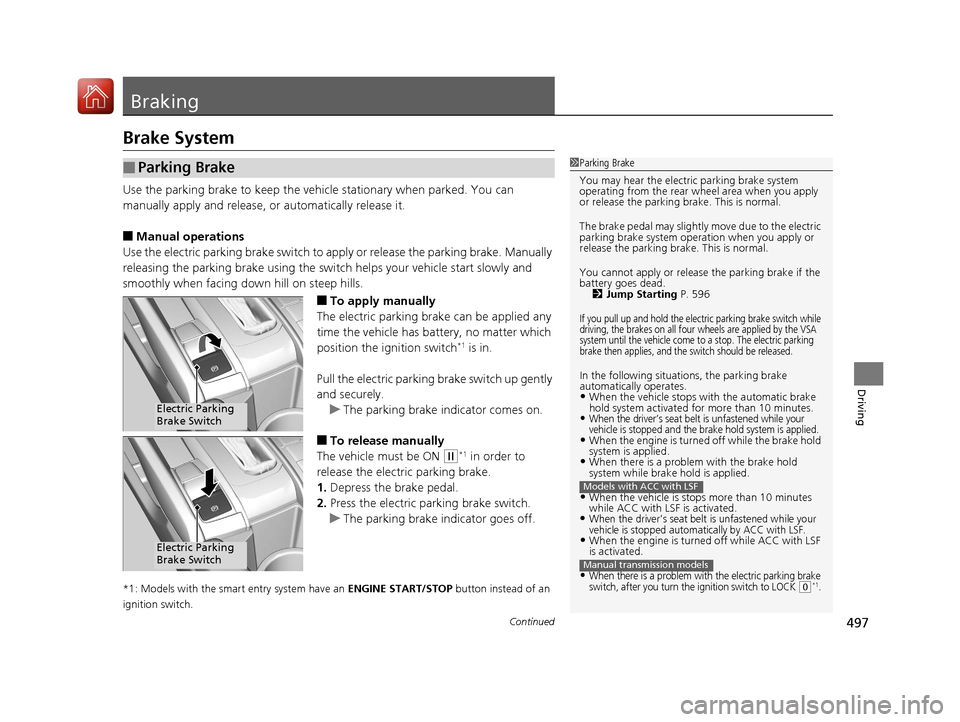
■To apply manually
The electric parking brake can be applied any
time the vehicle has battery, no matter which
position the ignition switch
*1 is in.
Pull the electric parking brake switch up gently
and securely. u The parking brake indicator comes on.
■To release manually
The vehicle must be ON
(w*1 in order to
release the electric parking brake.
1. Depress the brake pedal.
2. Press the electric parking brake switch.
u The parking brake indicator goes off.
*1: Models with the smart entry system have an ENGINE START/STOP button instead of an
ignition switch.
■Parking Brake1 Parking Brake
You may hear the electric parking brake system
operating from the rear wh eel area when you apply
or release the parking brake. This is normal.
The brake pedal may slightly move due to the electric
parking brake system opera tion when you apply or
release the parking br ake. This is normal.
You cannot apply or release the parking brake if the
battery goes dead.
2 Jump Starting P. 596
If you pull up and hold the electric parking brake switch while
driving, the brakes on all four wheels are applied by the VSA
system until the vehicle come to a stop. The electric parking
brake then applies, and the switch should be released.
In the following situations, the parking brake
automatically operates.
•When the vehicle stops with the automatic brake
hold system activated for more than 10 minutes.
•When the driver’s seat belt is unfastened while your
vehicle is stopped and the brake hold system is applied.
•When the engine is turned off while the brake hold
system is applied.
•When there is a problem with the brake hold
system while brake hold is applied.
•When the vehicle is stops more than 10 minutes
while ACC with LSF is activated.
•When the driver’s seat belt is unfastened while your
vehicle is stopped automatically by ACC with LSF.
•When the engine is turned off while ACC with LSF
is activated.
•When there is a problem with the electric parking brake
switch, after you turn the ignition switch to LOCK (0*1.
Models with ACC with LSF
Manual transmission models
Electric Parking
Brake Switch
Electric Parking
Brake Switch
17 CIVIC 5D (KA KC KL)-31TGG6000.book 497 ページ 2016年6月8日 水曜日 午 後2時8分
Page 538 of 641
537
uuMaintenance Under the Hood uOpening the Hood
Maintenance
Opening the Hood
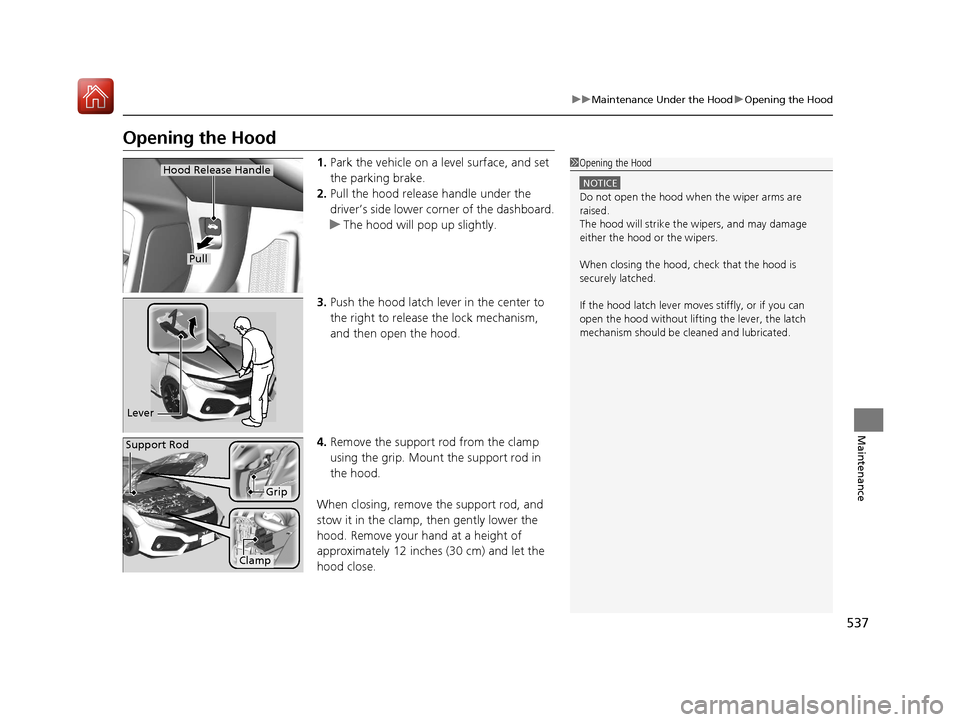
1. Park the vehicle on a level surface, and set
the parking brake.
2. Pull the hood release handle under the
driver’s side lower corner of the dashboard.
u The hood will pop up slightly.
3. Push the hood latch lever in the center to
the right to release the lock mechanism,
and then open the hood.
4. Remove the support rod from the clamp
using the grip. Mount the support rod in
the hood.
When closing, remove the support rod, and
stow it in the clamp, then gently lower the
hood. Remove your hand at a height of
approximately 12 inches (30 cm) and let the
hood close.1 Opening the Hood
NOTICE
Do not open the hood when the wiper arms are
raised.
The hood will strike the wipers, and may damage
either the hood or the wipers.
When closing the hood, check that the hood is
securely latched.
If the hood latch lever moves stiffly, or if you can
open the hood without lifti ng the lever, the latch
mechanism should be cleaned and lubricated.
Hood Release Handle
Pull
Lever
Support Rod
Grip
Clamp
17 CIVIC 5D (KA KC KL)-31TGG6000.book 537 ページ 2016年6月8日 水曜日 午 後2時8分
Page 541 of 641
540
uuMaintenance Under the Hood uAdding Engine Oil
Maintenance
Adding Engine Oil
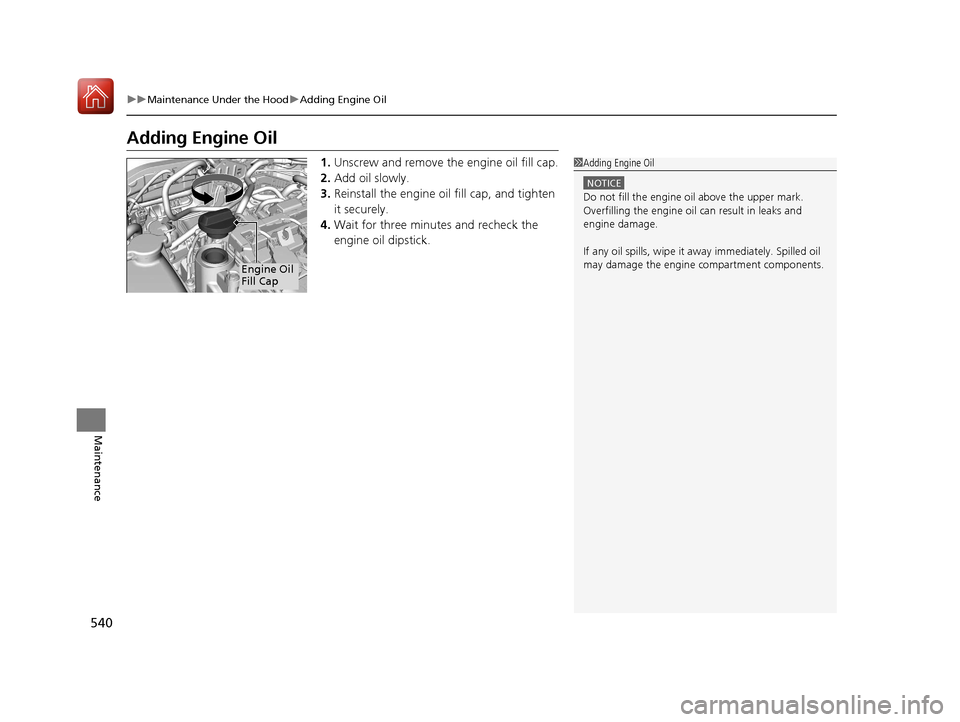
1. Unscrew and remove the engine oil fill cap.
2. Add oil slowly.
3. Reinstall the engine oil fill cap, and tighten
it securely.
4. Wait for three minutes and recheck the
engine oil dipstick.1Adding Engine Oil
NOTICE
Do not fill the engine oil above the upper mark.
Overfilling the engine oil can result in leaks and
engine damage.
If any oil spills, wipe it away immediately. Spilled oil
may damage the engine compartment components.
Engine Oil
Fill Cap
17 CIVIC 5D (KA KC KL)-31TGG6000.book 540 ページ 2016年6月8日 水曜日 午 後2時8分
Page 543 of 641
uuMaintenance Under the Hood uChanging the Engine Oil and Oil Filter
542
Maintenance
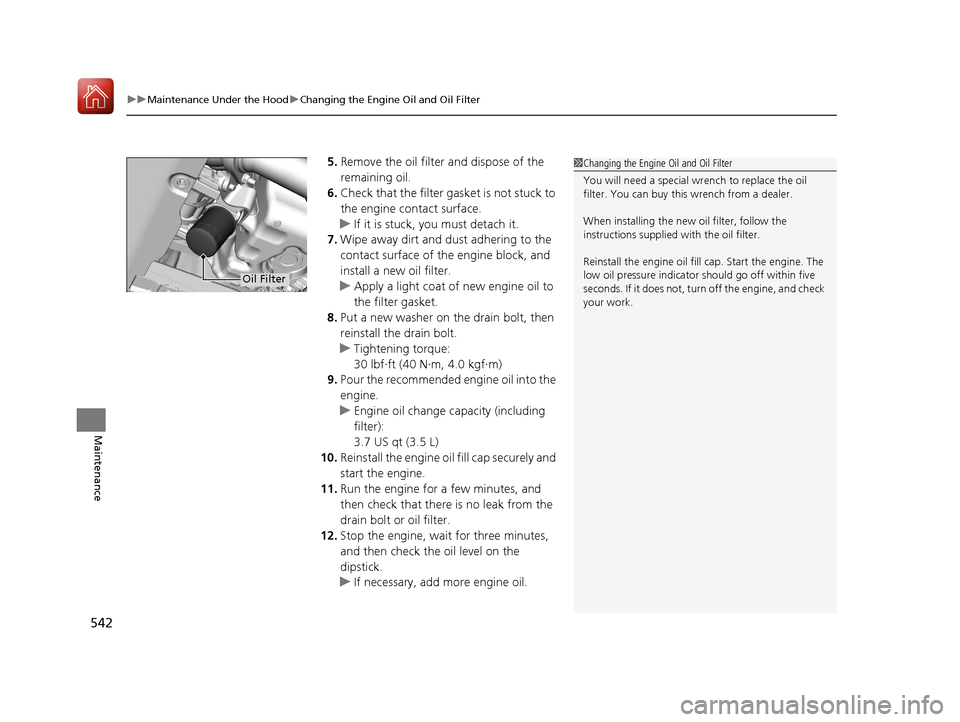
5. Remove the oil filter and dispose of the
remaining oil.
6. Check that the filter ga sket is not stuck to
the engine contact surface.
u If it is stuck, you must detach it.
7. Wipe away dirt and dust adhering to the
contact surface of the engine block, and
install a new oil filter.
u Apply a light coat of new engine oil to
the filter gasket.
8. Put a new washer on the drain bolt, then
reinstall the drain bolt.
u Tightening torque:
30 lbf∙ft (40 N∙m, 4.0 kgf∙m)
9. Pour the recommended engine oil into the
engine.
u Engine oil change capacity (including
filter):
3.7 US qt (3.5 L)
10. Reinstall the engine oil fill cap securely and
start the engine.
11. Run the engine for a few minutes, and
then check that ther e is no leak from the
drain bolt or oil filter.
12. Stop the engine, wait for three minutes,
and then check the oil level on the
dipstick.
u If necessary, add more engine oil.1Changing the Engine Oil and Oil Filter
You will need a special wrench to replace the oil
filter. You can buy this wrench from a dealer.
When installing the new oil filter, follow the
instructions supplied with the oil filter.
Reinstall the engine oil fill cap. Start the engine. The
low oil pressure indicator should go off within five
seconds. If it does not, turn off the engine, and check
your work.
Oil Filter
17 CIVIC 5D (KA KC KL)-31TGG6000.book 542 ページ 2016年6月8日 水曜日 午 後2時8分
Page 578 of 641
Continued577
uuCleaning uInterior Care
Maintenance
Wipe using a glass cleaner.
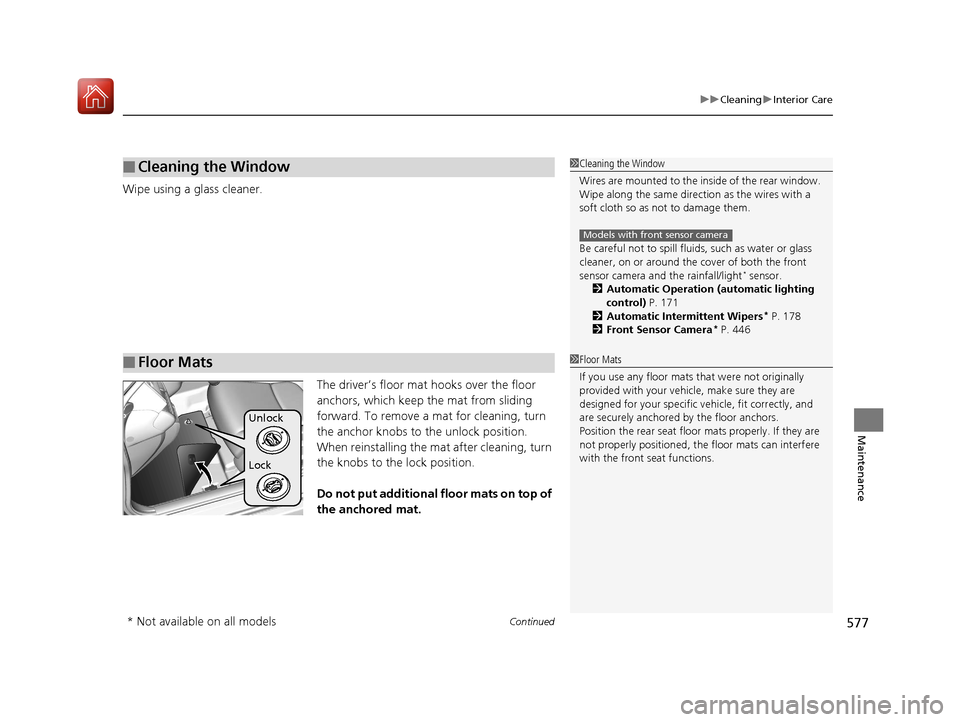
The driver’s floor mat hooks over the floor
anchors, which keep the mat from sliding
forward. To remove a mat for cleaning, turn
the anchor knobs to the unlock position.
When reinstalling the mat after cleaning, turn
the knobs to the lock position.
Do not put additional floor mats on top of
the anchored mat.
■Cleaning the Window
■Floor Mats
1Cleaning the Window
Wires are mounted to the in side of the rear window.
Wipe along the same direct ion as the wires with a
soft cloth so as not to damage them.
Be careful not to spill flui ds, such as water or glass
cleaner, on or around the co ver of both the front
sensor camera and the rainfall/light
* sensor.
2 Automatic Operation (automatic lighting
control) P. 171
2 Automatic Intermittent Wipers
* P. 178
2 Front Sensor Camera* P. 446
Models with front sensor camera
1Floor Mats
If you use any floor mats that were not originally
provided with your vehicle, make sure they are
designed for your specific ve hicle, fit correctly, and
are securely anchored by the floor anchors.
Position the rear seat floor mats properly. If they are
not properly positioned, the floor mats can interfere
with the front seat functions.
Lock Unlock
* Not available on all models
17 CIVIC 5D (KA KC KL)-31TGG6000.book 577 ページ 2016年6月8日 水曜日 午 後2時8分
Page 592 of 641
Continued591
uuIf a Tire Goes Flat uChanging a Flat Tire
Handling the Unexpected
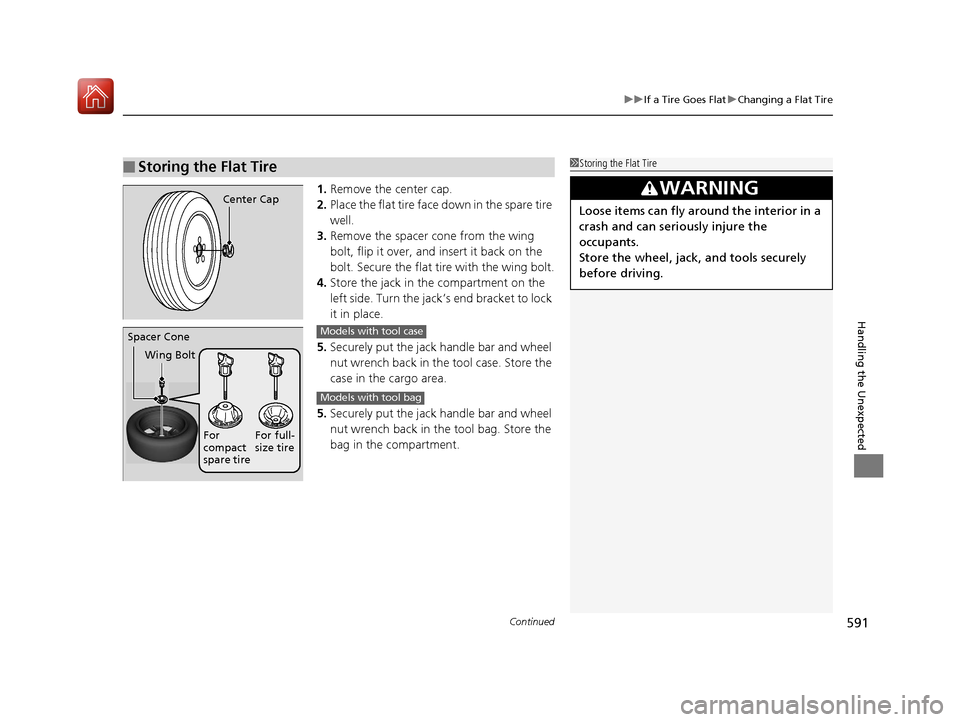
1. Remove the center cap.
2. Place the flat tire face down in the spare tire
well.
3. Remove the spacer cone from the wing
bolt, flip it over, and insert it back on the
bolt. Secure the flat tire with the wing bolt.
4. Store the jack in the compartment on the
left side. Turn the jack’s end bracket to lock
it in place.
5. Securely put the jack handle bar and wheel
nut wrench back in the tool case. Store the
case in the cargo area.
5. Securely put the jack handle bar and wheel
nut wrench back in the tool bag. Store the
bag in the compartment.
■Storing the Flat Tire1Storing the Flat Tire
3WARNING
Loose items can fly around the interior in a
crash and can seriously injure the
occupants.
Store the wheel, jack, and tools securely
before driving.Center Cap
Spacer Cone
Wing Bolt
For
compact
spare tireFor full-
size tireModels with tool case
Models with tool bag
17 CIVIC 5D (KA KC KL)-31TGG6000.book 591 ページ 2016年6月8日 水曜日 午
後2時8分
Page 597 of 641
596
Handling the Unexpected
Jump Starting
Jump Starting Procedure
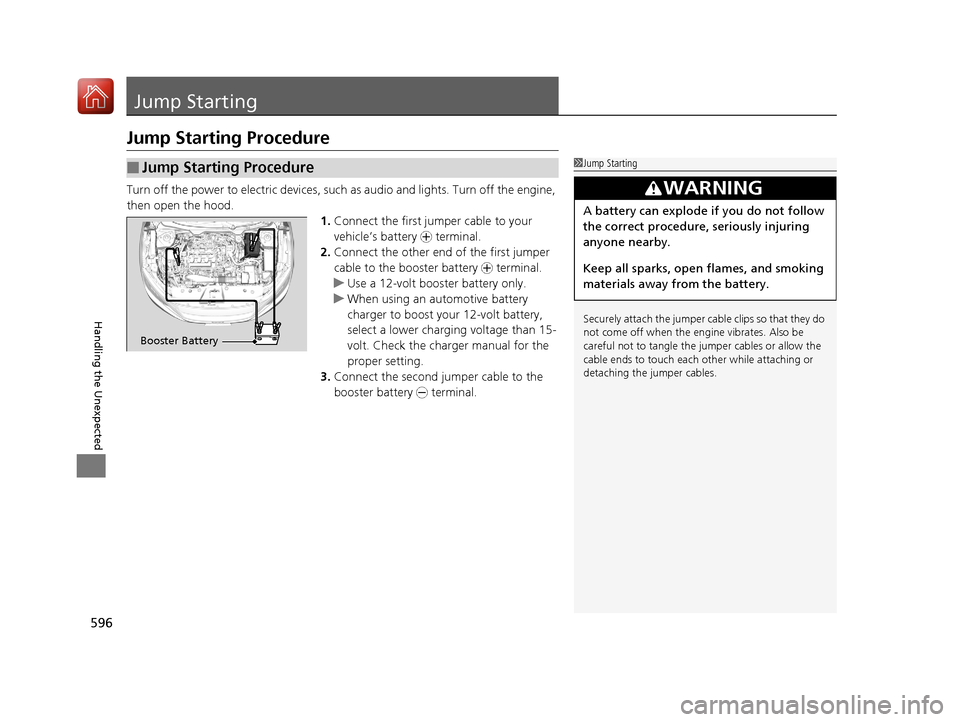
Turn off the power to electric devices, such as audio and lights. Turn off the engine,
then open the hood. 1.Connect the first jump er cable to your
vehicle’s battery + terminal.
2. Connect the other end of the first jumper
cable to the booster battery + terminal.
u Use a 12-volt booster battery only.
u When using an automotive battery
charger to boost your 12-volt battery,
select a lower charging voltage than 15-
volt. Check the charger manual for the
proper setting.
3. Connect the second jumper cable to the
booster battery - terminal.
■Jump Starting Procedure1Jump Starting
Securely attach the jumper cable clips so that they do
not come off when the engine vibrates. Also be
careful not to tangle the ju mper cables or allow the
cable ends to touch each other while attaching or
detaching the jumper cables.
3WARNING
A battery can explode if you do not follow
the correct procedure, seriously injuring
anyone nearby.
Keep all sparks, open flames, and smoking
materials away from the battery.
Booster Battery
17 CIVIC 5D (KA KC KL)-31TGG6000.book 596 ページ 2016年6月8日 水曜日 午 後2時8分
Page 609 of 641
608
Handling the Unexpected
Fuses
Fuse Locations
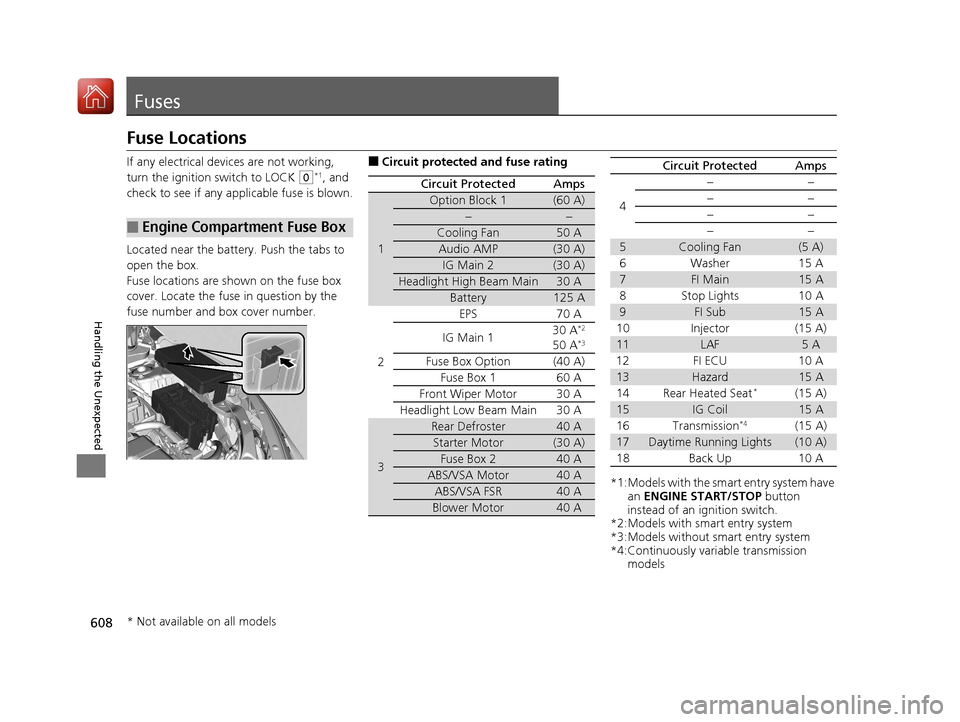
If any electrical devices are not working,
turn the ignition switch to LOCK
(0*1, and
check to see if any appl icable fuse is blown.
Located near the battery. Push the tabs to
open the box.
Fuse locations are shown on the fuse box
cover. Locate the fuse in question by the
fuse number and box cover number.
■Engine Compartment Fuse Box
■Circuit protected and fuse rating
Circuit ProtectedAmps
1
Option Block 1(60 A)
−−
Cooling Fan50 A
Audio AMP(30 A)
IG Main 2(30 A)
Headlight High Beam Main30 A
Battery125 A
2
EPS70 A
IG Main 1 30 A*2
50 A*3
Fuse Box Option(40 A)
Fuse Box 1 60 A
Front Wiper Motor30 A
Headlight Low Beam Main 30 A
3
Rear Defroster40 A
Starter Motor(30 A)
Fuse Box 240 A
ABS/VSA Motor40 A
ABS/VSA FSR40 A
Blower Motor40 A
*1:Models with the sma rt entry system have
an ENGINE START/STOP button
instead of an ignition switch.
*2:Models with smart entry system
*3:Models without smart entry system
*4:Continuously variable transmission models
4
−−
−−
−−
−−
5Cooling Fan(5 A)
6Washer 15A
7FI Main15 A
8 Stop Lights 10 A
9FI Sub15 A
10 Injector (15 A)
11LAF5A
12 FI ECU 10 A
13Hazard15 A
14 Rear Heated Seat*(15 A)
15IG Coil15 A
16 Transmission*4(15 A)
17Daytime Running Lights(10 A)
18 Back Up 10 A
Circuit ProtectedAmps
* Not available on all models
17 CIVIC 5D (KA KC KL)-31TGG6000.book 608 ページ 2016年6月8日 水曜日 午 後2時8分
Page 631 of 641
Index
630
Index
Index
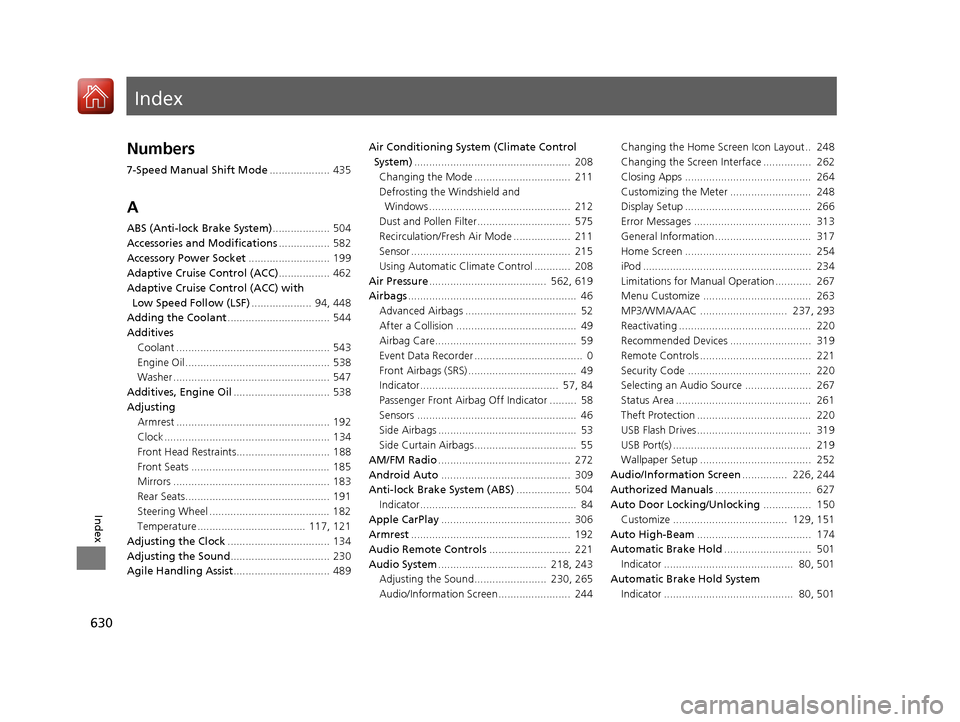
Numbers
7-Speed Manual Shift Mode.................... 435
A
ABS (Anti-lock Brake System) ................... 504
Accessories and Modifications ................. 582
Accessory Power Socket ........................... 199
Adaptive Cruise Control (ACC) ................. 462
Adaptive Cruise Control (ACC) with
Low Speed Follow (LSF) .................... 94, 448
Adding the Coolant .................................. 544
Additives
Coolant ................................................... 543
Engine Oil ................................................ 538
Washer .................................................... 547
Additives, Engine Oil ................................ 538
Adjusting
Armrest ................................................... 192
Clock ....................................................... 134
Front Head Restraints............................... 188
Front Seats .............................................. 185
Mirrors .................................................... 183
Rear Seats................................................ 191
Steering Wheel ........................................ 182
Temperature .................................... 117, 121
Adjusting the Clock .................................. 134
Adjusting the Sound ................................. 230
Agile Handling Assist ................................ 489 Air Conditioning System (Climate Control
System) .................................................... 208
Changing the Mode ................................ 211
Defrosting the Windshield and Windows ............................................... 212
Dust and Pollen Filter............................... 575
Recirculation/Fresh Air Mode ................... 211
Sensor ..................................................... 215
Using Automatic Climate Control ............ 208
Air Pressure ....................................... 562, 619
Airbags ........................................................ 46
Advanced Airbags ..................................... 52
After a Collision ........................................ 49
Airbag Care............................................... 59
Event Data Recorder .................................... 0
Front Airbags (SRS) .................................... 49
Indicator.............................................. 57, 84
Passenger Front Airbag Off Indicator ......... 58
Sensors ..................................................... 46
Side Airbags .............................................. 53
Side Curtain Airbags.................................. 55
AM/FM Radio ............................................ 272
Android Auto ........................................... 309
Anti-lock Brake System (ABS) .................. 504
Indicator.................................................... 84
Apple CarPlay ........................................... 306
Armrest ..................................................... 192
Audio Remote Controls ........................... 221
Audio System .................................... 218, 243
Adjusting the Sound........................ 230, 265
Audio/Information Screen........................ 244 Changing the Home Screen Icon Layout.. 248
Changing the Screen Interface ................ 262
Closing Apps .......................................... 264
Customizing the Meter ........................... 248
Display Setup .......................................... 266
Error Messages ....................................... 313
General Information................................ 317
Home Screen .......................................... 254
iPod ........................................................ 234
Limitations for Manual Operation ............ 267
Menu Customize .................................... 263
MP3/WMA/AAC ............................. 237, 293
Reactivating ............................................ 220
Recommended Devices ........................... 319
Remote Controls ..................................... 221
Security Code ......................................... 220
Selecting an Audio Source ...................... 267
Status Area ............................................. 261
Theft Protection ...................................... 220
USB Flash Drives...................................... 319
USB Port(s) .............................................. 219
Wallpaper Setup ..................................... 252
Audio/Information Screen ............... 226, 244
Authorized Manuals ................................ 627
Auto Door Locking/Unlocking ................ 150
Customize ...................................... 129, 151
Auto High-Beam ...................................... 174
Automatic Brake Hold ............................. 501
Indicator ........................................... 80, 501
Automatic Brake Hold System Indicator ........................................... 80, 501
17 CIVIC 5D (KA KC KL)-31TGG6000.book 630 ページ 2016年6月8日 水曜日 午 後2時8分
Page 635 of 641
634
Index
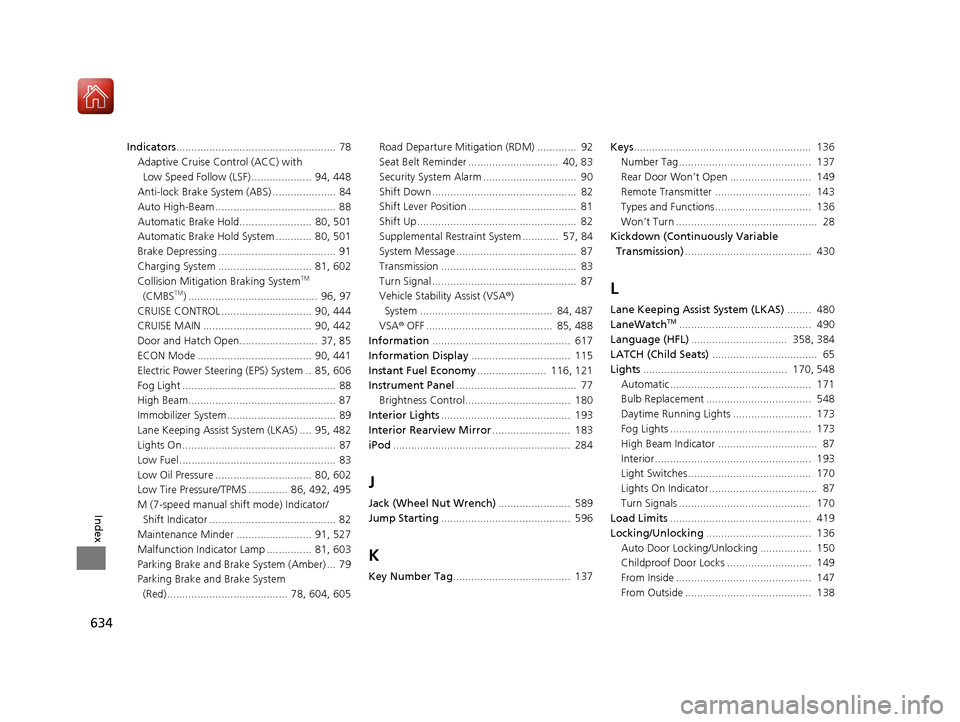
Indicators..................................................... 78
Adaptive Cruise Control (ACC) with
Low Speed Follow (LSF) .................... 94, 448
Anti-lock Brake System (ABS) ..................... 84
Auto High-Beam ........................................ 88
Automatic Brake Hold........................ 80, 501
Automatic Brake Hold System ............ 80, 501
Brake Depressing ....................................... 91
Charging System ............................... 81, 602
Collision Mitigati on Braking System
TM
(CMBSTM) ........................................... 96, 97
CRUISE CONTROL .............................. 90, 444
CRUISE MAIN .................................... 90, 442
Door and Hatch Open.......................... 37, 85
ECON Mode ...................................... 90, 441
Electric Power Steering (EPS) System .. 85, 606
Fog Light ................................................... 88
High Beam................................................. 87
Immobilizer System .................................... 89
Lane Keeping Assist System (LKAS) .... 95, 482
Lights On ................................................... 87
Low Fuel .................................................... 83
Low Oil Pressure ................................ 80, 602
Low Tire Pressure/TPMS ............. 86, 492, 495
M (7-speed manual shift mode) Indicator/ Shift Indicator .......................................... 82
Maintenance Minder ......................... 91, 527
Malfunction Indicator Lamp ............... 81, 603
Parking Brake and Brake System (Amber) ... 79
Parking Brake and Brake System (Red) ........................................ 78, 604, 605 Road Departure Mitigation (RDM) ............. 92
Seat Belt Reminder .............................. 40, 83
Security System Alarm ............................... 90
Shift Down ................................................ 82
Shift Lever Position .................................... 81
Shift Up..................................................... 82
Supplemental Restraint System ............ 57, 84
System Message ........................................ 87
Transmission ............................................. 83
Turn Signal ................................................ 87
Vehicle Stability Assist (VSA
®)
System ............................................ 84, 487
VSA ® OFF .......................................... 85, 488
Information .............................................. 617
Information Display ................................. 115
Instant Fuel Economy ....................... 116, 121
Instrument Panel ........................................ 77
Brightness Control................................... 180
Interior Lights ........................................... 193
Interior Rearview Mirror .......................... 183
iPod ........................................................... 284
J
Jack (Wheel Nut Wrench) ........................ 589
Jump Starting ........................................... 596
K
Key Number Tag ....................................... 137 Keys
........................................................... 136
Number Tag............................................ 137
Rear Door Won’t Open ........................... 149
Remote Transmitter ................................ 143
Types and Functions................................ 136
Won’t Turn ............................................... 28
Kickdown (Continuously Variable Transmission) .......................................... 430
L
Lane Keeping Assist System (LKAS) ........ 480
LaneWatchTM............................................ 490
Language (HFL) ................................ 358, 384
LATCH (Child Seats) ................................... 65
Lights ................................................ 170, 548
Automatic............................................... 171
Bulb Replacement ................................... 548
Daytime Running Lights .......................... 173
Fog Lights ............................................... 173
High Beam Indicator ................................. 87
Interior.................................................... 193
Light Switches......................................... 170
Lights On Indicator.................................... 87
Turn Signals ............................................ 170
Load Limits ............................................... 419
Locking/Unlocking ................................... 136
Auto Door Locking/Unlocking ................. 150
Childproof Door Locks ............................ 149
From Inside ............................................. 147
From Outside .......................................... 138
17 CIVIC 5D (KA KC KL)-31TGG6000.book 634 ページ 2016年6月8日 水曜日 午 後2時8分