Code 9 HONDA CIVIC HATCHBACK 2017 10.G Owners Manual
[x] Cancel search | Manufacturer: HONDA, Model Year: 2017, Model line: CIVIC HATCHBACK, Model: HONDA CIVIC HATCHBACK 2017 10.GPages: 641
Page 82 of 641
81
uuIndicators u
Continued
Instrument Panel
*1:Models with the smart entry system have an ENGINE START/STOP button instead of an ignition switch.
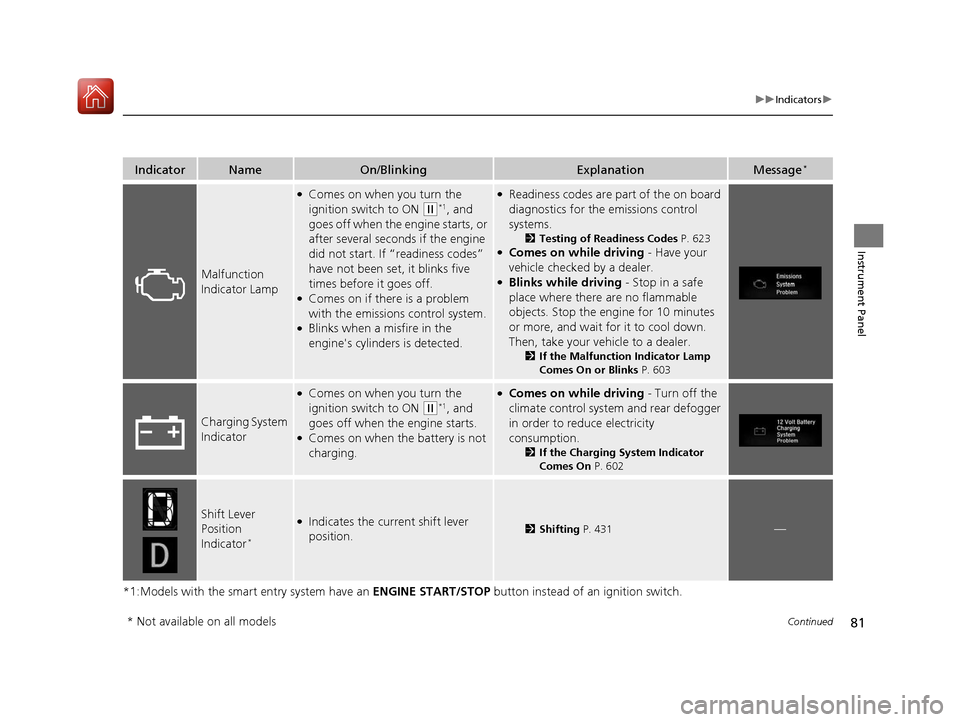
IndicatorNameOn/BlinkingExplanationMessage*
Malfunction
Indicator Lamp
●Comes on when you turn the
ignition switch to ON
(w*1, and
goes off when the engine starts, or
after several seconds if the engine
did not start. If “readiness codes”
have not been set, it blinks five
times before it goes off.
●Comes on if there is a problem
with the emissions control system.
●Blinks when a misfire in the
engine's cylinders is detected.
●Readiness codes are part of the on board
diagnostics for the emissions control
systems.
2 Testing of Readiness Codes P. 623●Comes on while driving - Have your
vehicle checked by a dealer.
●Blinks while driving - Stop in a safe
place where there are no flammable
objects. Stop the engine for 10 minutes
or more, and wait for it to cool down.
Then, take your vehicle to a dealer.
2 If the Malfunction Indicator Lamp
Comes On or Blinks P. 603
Charging System
Indicator
●Comes on when you turn the
ignition switch to ON
(w*1, and
goes off when the engine starts.
●Comes on when the battery is not
charging.
●Comes on while driving - Turn off the
climate control system and rear defogger
in order to reduce electricity
consumption.
2 If the Charging System Indicator
Comes On P. 602
Shift Lever
Position
Indicator
*
●Indicates the current shift lever
position.2Shifting P. 431—
* Not available on all models
17 CIVIC 5D (KA KC KL)-31TGG6000.book 81 ページ 2016年6月8日 水曜日 午後 2時8分
Page 116 of 641
115
uuGauges and Displays uInformation Display*
Continued
Instrument Panel
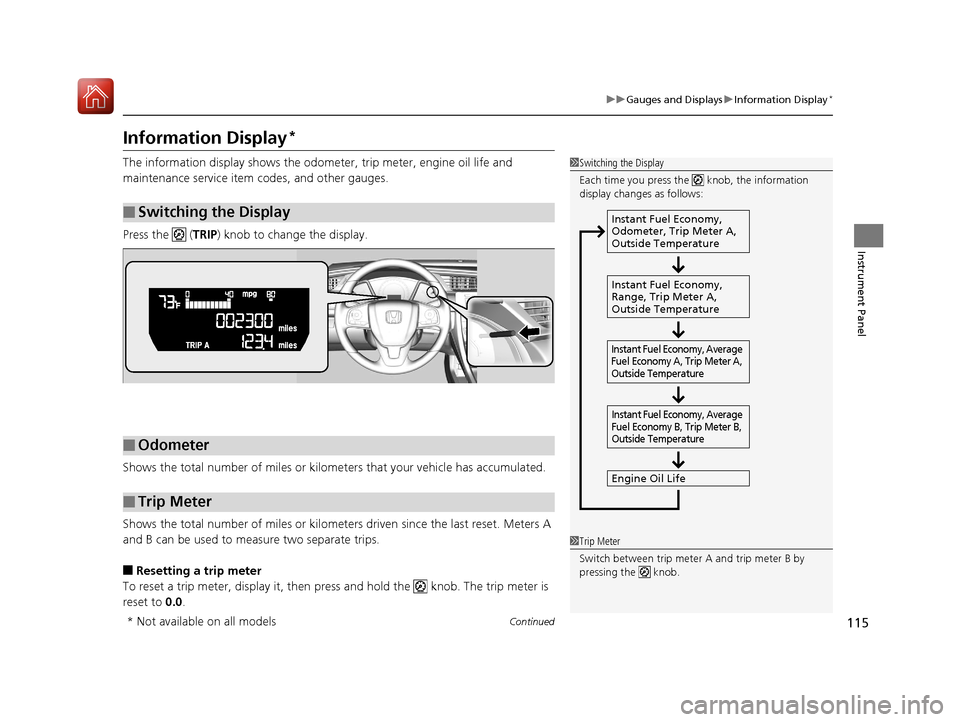
Information Display*
The information display shows the odom eter, trip meter, engine oil life and
maintenance service item codes, and other gauges.
Press the ( TRIP) knob to change the display.
Shows the total number of miles or kilome ters that your vehicle has accumulated.
Shows the total number of miles or kilomete rs driven since the last reset. Meters A
and B can be used to measure two separate trips.
■Resetting a trip meter
To reset a trip meter, display it, then pr ess and hold the knob. The trip meter is
reset to 0.0.
■Switching the Display
1Switching the Display
Each time you press the knob, the information
display changes as follows:
Instant Fuel Economy,
Odometer, Trip Meter A,
Outside Temperature
Instant Fuel Economy,
Range, Trip Meter A,
Outside Temperature
Engine Oil Life
Instant Fuel Economy, Average
Fuel Economy A, Trip Meter A,
Outside Temperature Instant Fuel Economy, Average
Fuel Economy B, Trip Meter B,
Outside Temperature
■Odometer
■Trip Meter
1 Trip Meter
Switch between trip meter A and trip meter B by
pressing the knob.
* Not available on all models
17 CIVIC 5D (KA KC KL)-31TGG6000.book 115 ページ 2016年6月8日 水曜日 午 後2時8分
Page 221 of 641
220
uuAudio System uAudio System Theft Protection
Features
Audio System Theft Protection
The audio system is disabled when it is di sconnected from the power source, such as
when the battery is disconnected or goes dead. In certain conditions, the system
may display a code entry screen. If this occurs, reactivate the audio system.
■Reactivating the audio system
1. Turn the ignition switch to ON
(w*1.
2. Turn on the audio system.
3. Press and hold the audio system power button for more than two seconds.
u The audio system is reac tivated when the audio co ntrol unit establishes a
connection with the vehicle control unit. If the control unit fails to recognize
the audio unit, you must go to a dealer and have the audio unit checked.
*1: Models with the smart entry system have an ENGINE START/STOP button instead of an
ignition switch.
17 CIVIC 5D (KA KC KL)-31TGG6000.book 220 ページ 2016年6月8日 水曜日 午 後2時8分
Page 300 of 641
299
uuAudio System Basic Operation uHondaLink ®
Continued
Features
■Messages from Honda
Displays helpful and important information from Honda.
■Weather*
Displays a weekly five-day weather forecast for any lo cation you want. You can
change the ZIP Code at any time.
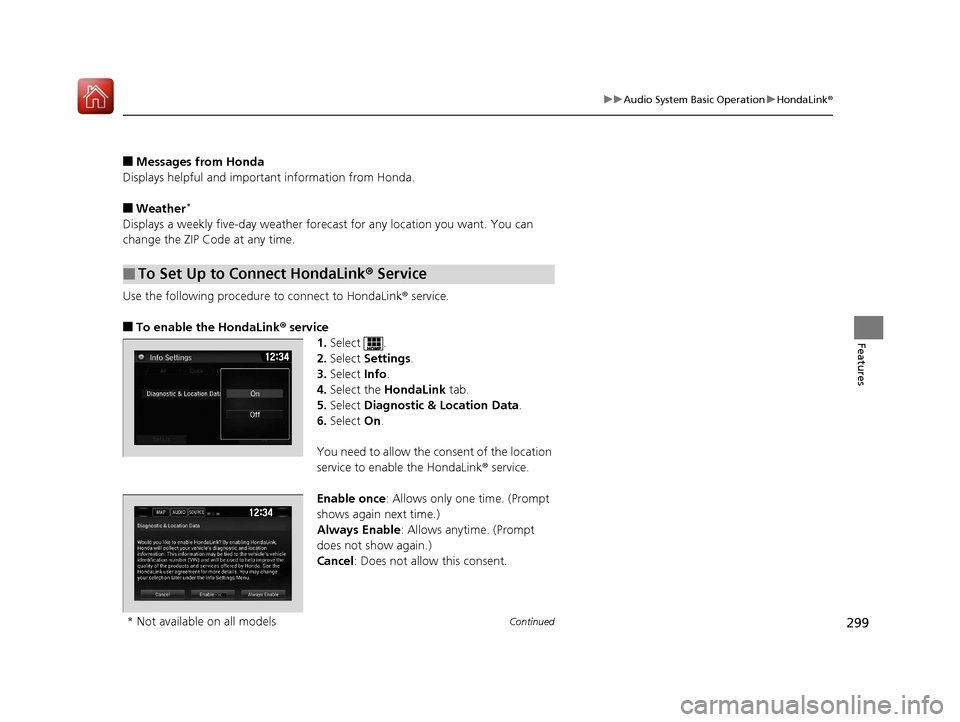
Use the following procedure to connect to HondaLink ® service.
■To enable the HondaLink® service
1.Select .
2. Select Settings .
3. Select Info.
4. Select the HondaLink tab.
5. Select Diagnostic & Location Data.
6. Select On.
You need to allow the consent of the location
service to enable the HondaLink ® service.
Enable once : Allows only one time. (Prompt
shows again next time.)
Always Enable: Allows anytime. (Prompt
does not show again.)
Cancel: Does not allow this consent.
■To Set Up to Connect HondaLink ® Service
* Not available on all models
17 CIVIC 5D (KA KC KL)-31TGG6000.book 299 ページ 2016年6月8日 水曜日 午 後2時8分
Page 329 of 641
328
uuCustomized Features u
Features
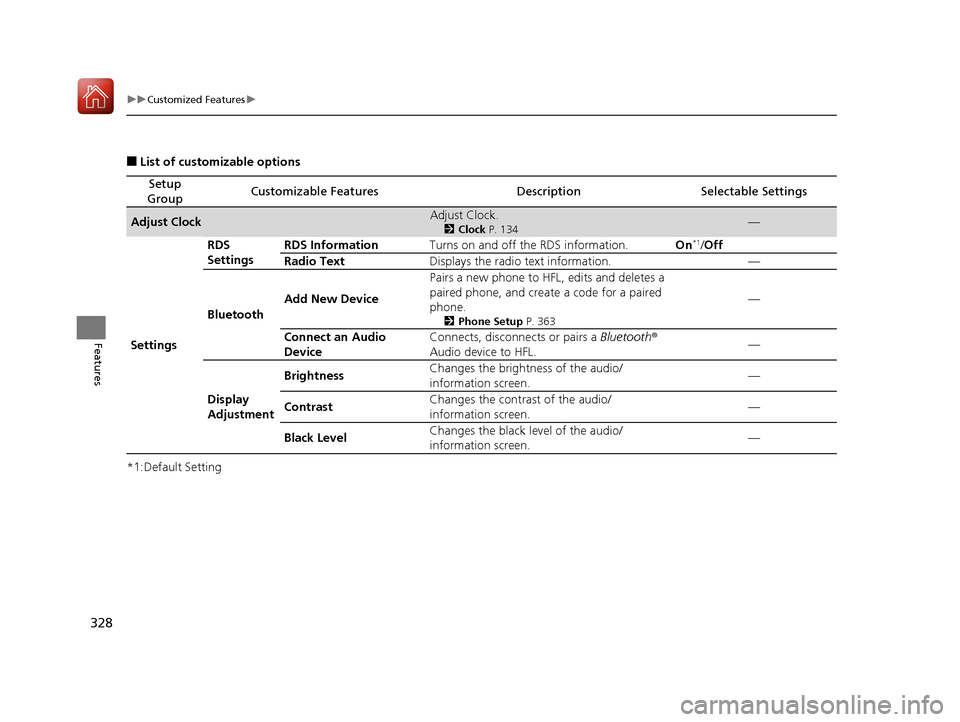
■List of customizable options
*1:Default Setting
Setup
GroupCustomizable FeaturesDescriptionSelectable Settings
Adjust ClockAdjust Clock.
2 Clock P. 134—
Settings RDS
Settings
RDS Information
Turns on and off the RDS information. On
*1/Off
Radio Text Displays the radio text information. —
Bluetooth Add New Device Pairs a new phone to HFL, edits and deletes a
paired phone, and create a code for a paired
phone.
2
Phone Setup P. 363
—
Connect an Audio
Device Connects, disconnects or pairs a Bluetooth
®
Audio device to HFL. —
Display
Adjustment Brightness
Changes the brightness of the audio/
information screen.
—
Contrast Changes the contrast of the audio/
information screen. —
Black Level Changes the black level of the audio/
information screen. —
17 CIVIC 5D (KA KC KL)-31TGG6000.book 328 ページ 2016年6月8日 水曜日 午
後2時8分
Page 331 of 641
330
uuCustomized Features u
Features
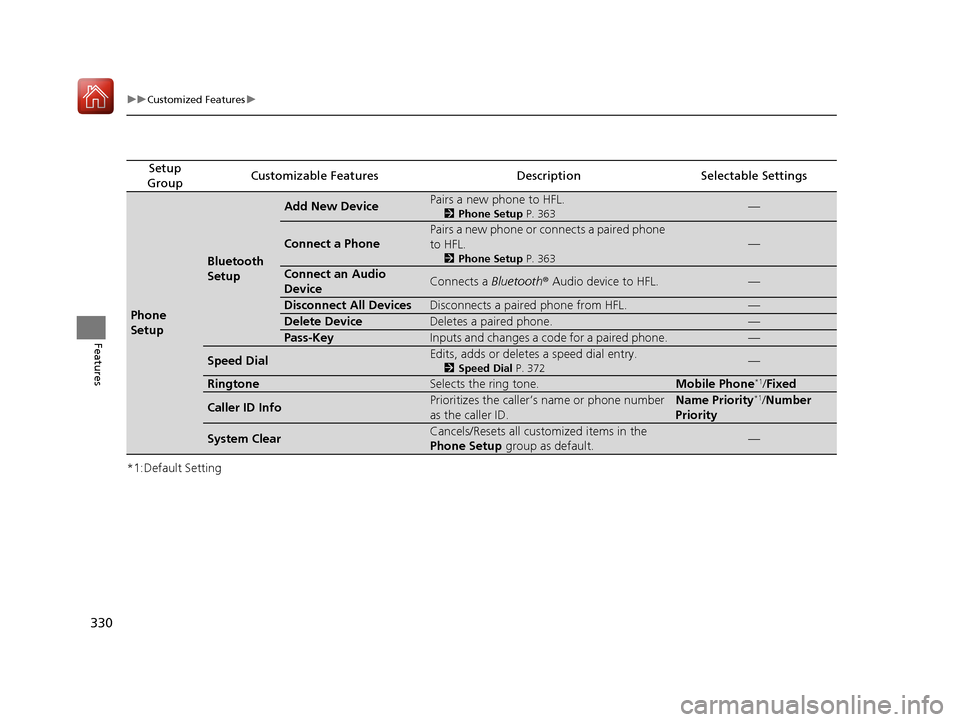
*1:Default Setting
Setup
GroupCustomizable FeaturesDescriptionSelectable Settings
Phone
Setup
Bluetooth
Setup
Add New DevicePairs a new phone to HFL.
2 Phone Setup P. 363—
Connect a Phone
Pairs a new phone or connects a paired phone
to HFL.
2Phone Setup P. 363
—
Connect an Audio
DeviceConnects a Bluetooth® Audio device to HFL.—
Disconnect All DevicesDisconnects a paired phone from HFL.—
Delete DeviceDeletes a paired phone.—
Pass-KeyInputs and changes a code for a paired phone.—
Speed DialEdits, adds or deletes a speed dial entry.
2Speed Dial P. 372—
RingtoneSelects the ring tone.Mobile Phone*1/Fixed
Caller ID InfoPrioritizes the caller’s name or phone number
as the caller ID.Name Priority*1/Number
Priority
System ClearCancels/Resets all customized items in the
Phone Setup group as default.—
17 CIVIC 5D (KA KC KL)-31TGG6000.book 330 ページ 2016年6月8日 水曜日 午 後2時8分
Page 334 of 641
333
uuCustomized Features u
Continued
Features
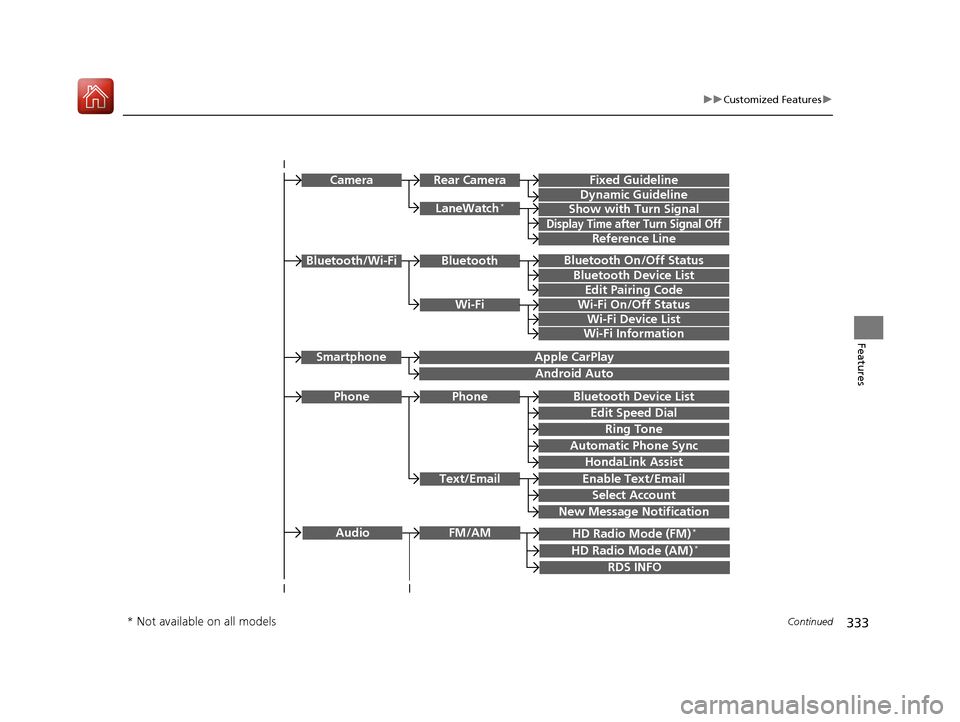
Bluetooth On/Off Status
Bluetooth Device List
Edit Pairing Code
Wi-Fi On/Off Status
Wi-Fi Device List
Wi-Fi
BluetoothBluetooth/Wi-Fi
Wi-Fi Information
Text/Email
Bluetooth Device List
Edit Speed Dial
Ring Tone
Phone
Automatic Phone Sync
HondaLink Assist
Enable Text/Email
Select Account
New Message Notification
Phone
LaneWatch*
Fixed Guideline
Dynamic Guideline
Show with Turn Signal
Rear CameraCamera
Display Time after Turn Signal Off
Reference Line
HD Radio Mode (FM)*
RDS INFO
AudioFM/AM
HD Radio Mode (AM)*
Apple CarPlay
Android Auto
Smartphone
* Not available on all models
17 CIVIC 5D (KA KC KL)-31TGG6000.book 333 ページ 2016年6月8日 水曜日 午 後2時8分
Page 343 of 641
342
uuCustomized Features u
Features
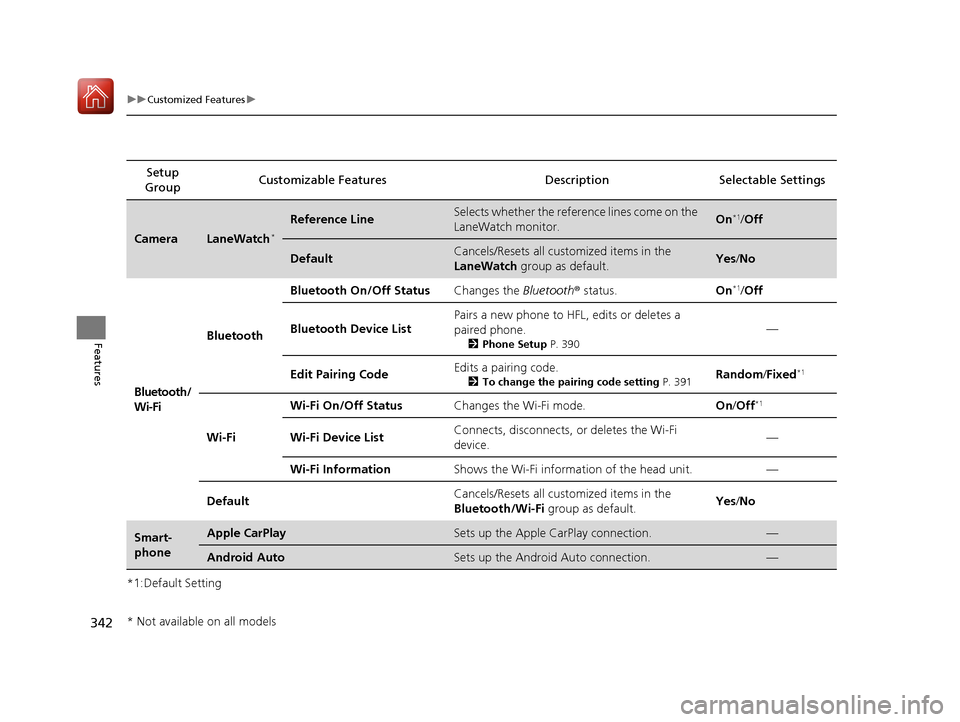
*1:Default SettingSetup
Group Customizable Featur
es Description Selectable Settings
CameraLaneWatch*
Reference LineSelects whether the reference lines come on the
LaneWatch monitor.On*1/Off
DefaultCancels/Resets all customized items in the
LaneWatch group as default.Yes/No
Bluetooth/
Wi-Fi Bluetooth
Bluetooth On/Off Status
Changes the Bluetooth® status. On
*1/Off
Bluetooth Device List Pairs a new phone to HFL, edits or deletes a
paired phone.
2
Phone Setup P. 390
—
Edit Pairing Code Edits a pairing code.
2
To change the pairing code setting P. 391Random/Fixed*1
Wi-Fi Wi-Fi On/Off Status
Changes the Wi-Fi mode. On/Off
*1
Wi-Fi Device List Connects, disconnects, or deletes the Wi-Fi
device.
—
Wi-Fi Information Shows the Wi-Fi information of the head unit. —
Default Cancels/Resets all customized items in the
Bluetooth/Wi-Fi
group as default. Yes
/No
Smart-
phoneApple CarPlaySets up the Apple CarPlay connection.—
Android AutoSets up the Android Auto connection.—
* Not available on all models
17 CIVIC 5D (KA KC KL)-31TGG6000.book 342 ページ 2016年6月8日 水曜日 午 後2時8分
Page 361 of 641
360
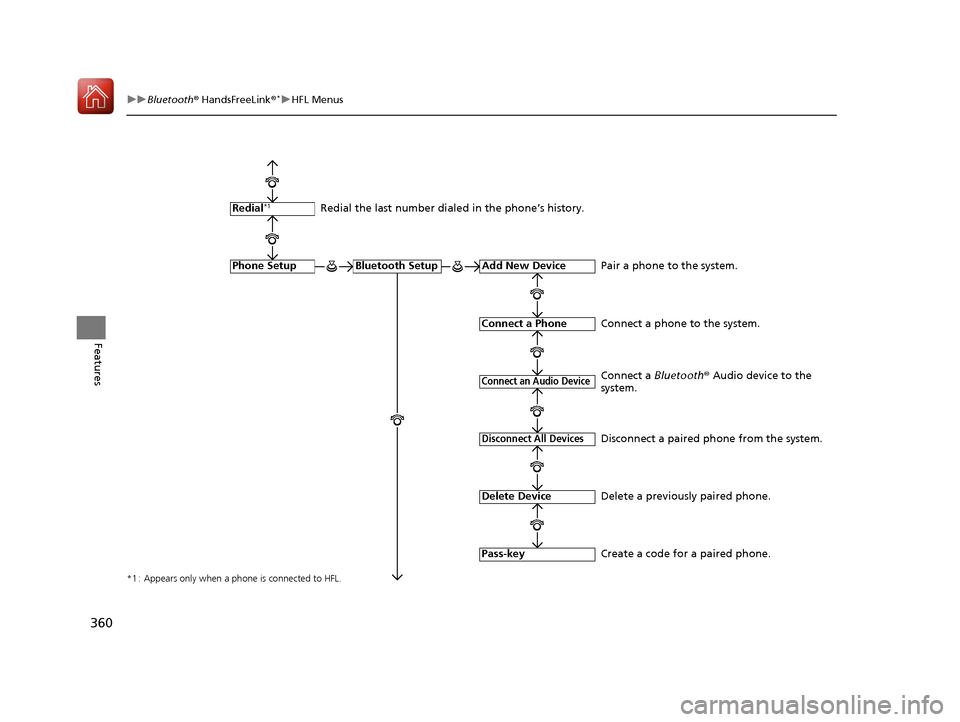
uuBluetooth ® HandsFreeLink ®*uHFL Menus
Features
*1 : Appears only when a phone is connected to HFL.
Redial the last number dialed in the phone’s history.
Add New Device
Connect a Phone
Connect an Audio Device
Bluetooth SetupPhone Setup
Redial*1
Pair a phone to the system.
Connect a phone to the system.
Create a code for a paired phone.
Disconnect All Devices
Delete Device
Pass-key
Disconnect a paired phone from the system.
Delete a previously paired phone. Connect a Bluetooth® Audio device to the
system.
17 CIVIC 5D (KA KC KL)-31TGG6000.book 360 ページ 2016年6月8日 水曜日 午 後2時8分
Page 363 of 641
362
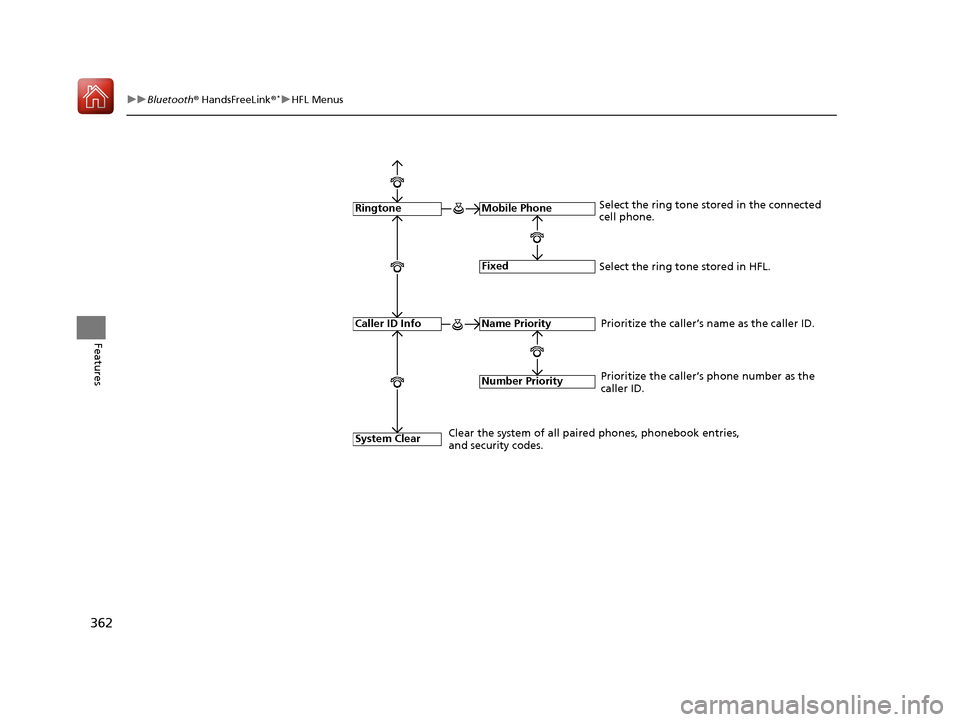
uuBluetooth ® HandsFreeLink ®*uHFL Menus
Features
Fixed
Mobile Phone
System Clear
RingtoneSelect the ring tone stored in the connected
cell phone.
Name Priority
Number Priority
Caller ID InfoPrioritize the caller’s name as the caller ID.
Clear the system of all paired phones, phonebook entries,
and security codes. Prioritize the caller’s phone number as the
caller ID.
Select the ring tone stored in HFL.
17 CIVIC 5D (KA KC KL)-31TGG6000.book 362 ページ 2016年6月8日 水曜日 午
後2時8分