battery replace HONDA CIVIC HATCHBACK 2017 10.G Owners Manual
[x] Cancel search | Manufacturer: HONDA, Model Year: 2017, Model line: CIVIC HATCHBACK, Model: HONDA CIVIC HATCHBACK 2017 10.GPages: 641
Page 27 of 641
26
Quick Reference Guide
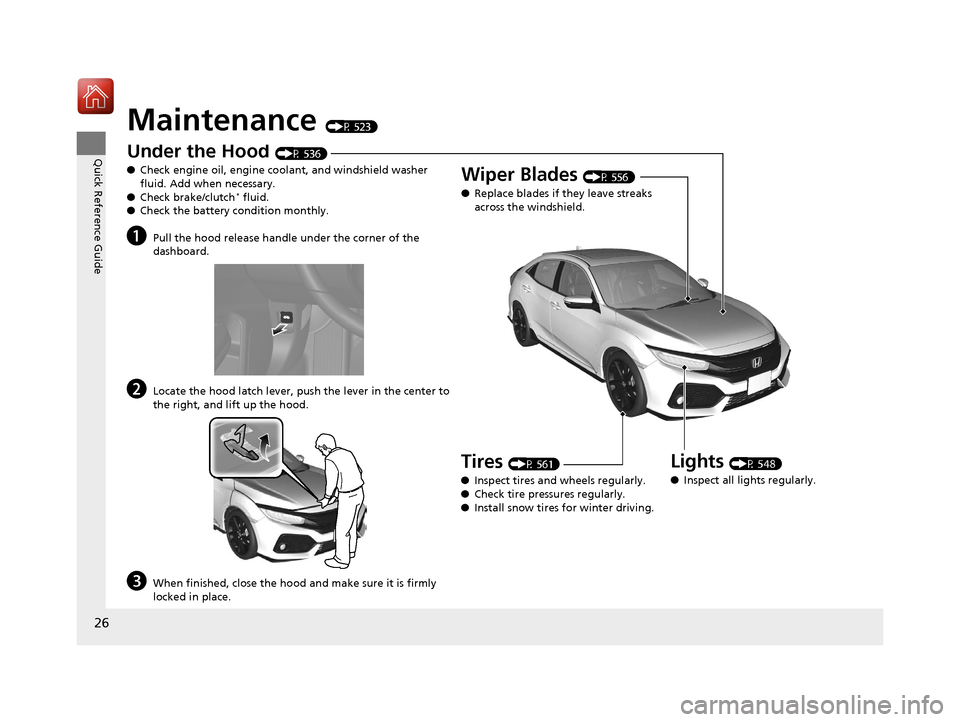
Maintenance (P 523)
Under the Hood (P 536)
● Check engine oil, engine coolant, and windshield washer
fluid. Add when necessary.
● Check brake/clutch
* fluid.
● Check the battery condition monthly.
aPull the hood release handle under the corner of the
dashboard.
bLocate the hood latch lever, pus h the lever in the center to
the right, and lift up the hood.
cWhen finished, close the hood and make sure it is firmly
locked in place.
Lights (P 548)
● Inspect all lights regularly.
Wiper Blades (P 556)
● Replace blades if they leave streaks
across the windshield.
Tires (P 561)
● Inspect tires and wheels regularly.
● Check tire pressures regularly.
● Install snow tires for winter driving.
17 CIVIC 5D (KA KC KL)-31TGG6000.book 26 ページ 2016年6月8日 水曜日 午後 2時8分
Page 28 of 641
Quick Reference Guide
27
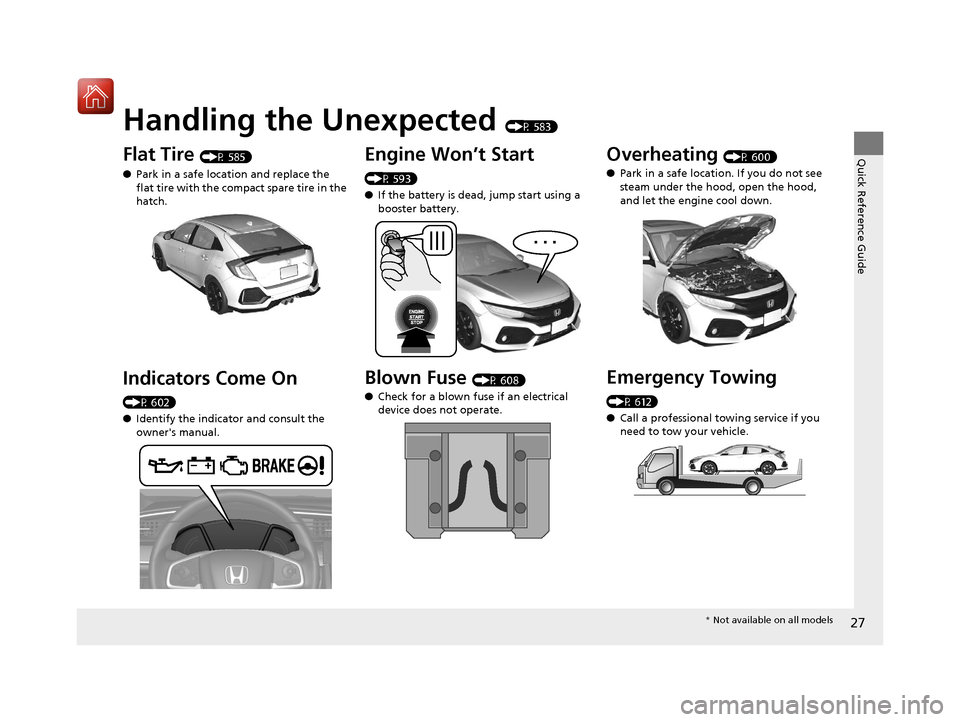
Handling the Unexpected (P 583)
Flat Tire (P 585)
● Park in a safe location and replace the
flat tire with the comp act spare tire in the
hatch.
Indicators Come On
(P 602)
● Identify the indica tor and consult the
owner's manual.
Engine Won’t Start
(P 593)
● If the battery is dead, jump start using a
booster battery.
Blown Fuse (P 608)
● Check for a blown fuse if an electrical
device does not operate.
Overheating (P 600)
● Park in a safe location. If you do not see
steam under the hood, open the hood,
and let the engine cool down.
Emergency Towing
(P 612)
●Call a professional towing service if you
need to tow your vehicle.
* Not available on all models
17 CIVIC 5D (KA KC KL)-31TGG6000.book 27 ページ 2016年6月8日 水曜日 午後 2時8分
Page 87 of 641
86
uuIndicators u
Instrument Panel
*1:Models with the smart entry system have an ENGINE START/STOP button instead of an ignition switch.
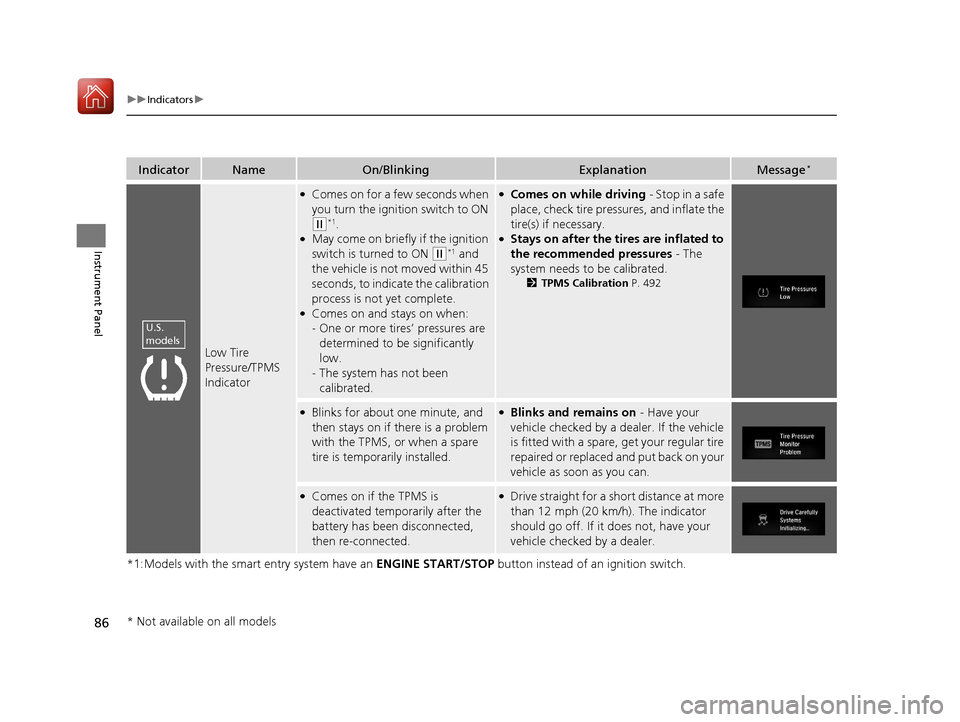
IndicatorNameOn/BlinkingExplanationMessage*
Low Tire
Pressure/TPMS
Indicator
●Comes on for a few seconds when
you turn the ignition switch to ON
(w*1.●May come on briefly if the ignition
switch is turned to ON
(w*1 and
the vehicle is not moved within 45
seconds, to indicate the calibration
process is not yet complete.
●Comes on and stays on when:
- One or more tires’ pressures are
determined to be significantly
low.
- The system has not been
calibrated.
●Comes on while driving - Stop in a safe
place, check tire pressures, and inflate the
tire(s) if necessary.
●Stays on after the tires are inflated to
the recommended pressures - The
system needs to be calibrated.
2 TPMS Calibration P. 492
●Blinks for about one minute, and
then stays on if there is a problem
with the TPMS, or when a spare
tire is temporarily installed.●Blinks and remains on - Have your
vehicle checked by a dealer. If the vehicle
is fitted with a spare, get your regular tire
repaired or replaced and put back on your
vehicle as soon as you can.
●Comes on if the TPMS is
deactivated temporarily after the
battery has been disconnected,
then re-connected.●Drive straight for a short distance at more
than 12 mph (20 km/h). The indicator
should go off. If it does not, have your
vehicle checked by a dealer.
U.S.
models
* Not available on all models
17 CIVIC 5D (KA KC KL)-31TGG6000.book 86 ページ 2016年6月8日 水曜日 午後 2時8分
Page 105 of 641
104
uuIndicators uDriver Information Interface Wa rning and Information Messages*
Instrument Panel
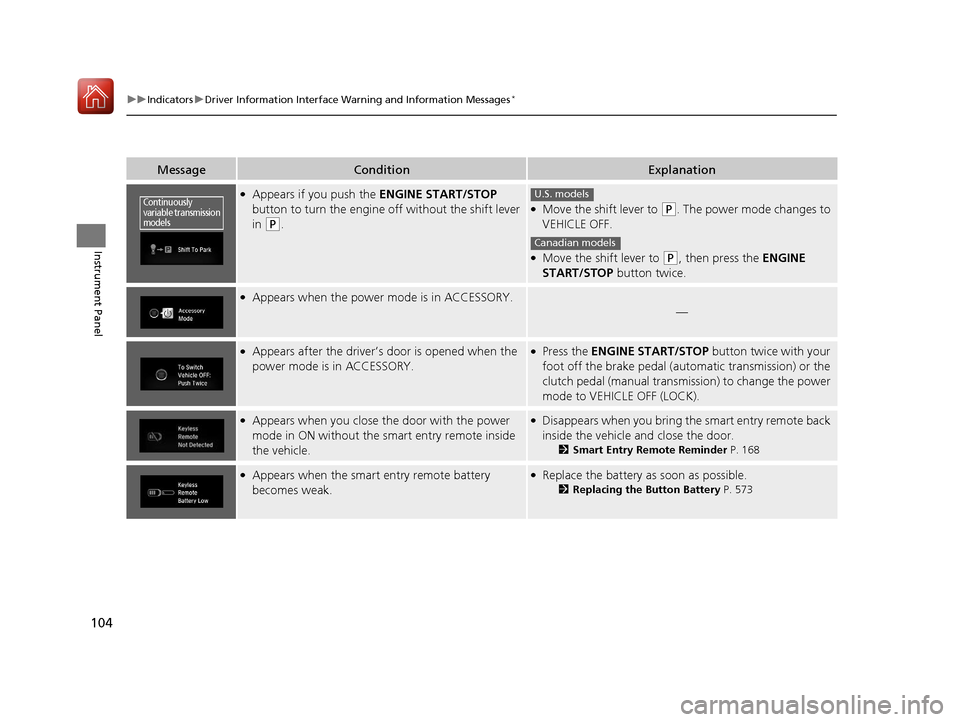
MessageConditionExplanation
●Appears if you push the ENGINE START/STOP
button to turn the engine off without the shift lever
in
(P.
●Move the shift lever to (P. The power mode changes to
VEHICLE OFF.
●Move the shift lever to (P, then press the ENGINE
START/STOP button twice.
●Appears when the power mode is in ACCESSORY.
—
●Appears after the driver’s door is opened when the
power mode is in ACCESSORY.●Press the ENGINE START/STOP button twice with your
foot off the brake pedal (automatic transmission) or the
clutch pedal (manual transmission) to change the power
mode to VEHICLE OFF (LOCK).
●Appears when you close the door with the power
mode in ON without the smart entry remote inside
the vehicle.●Disappears when you bring the smart entry remote back
inside the vehicle and close the door.
2Smart Entry Remote Reminder P. 168
●Appears when the smart entry remote battery
becomes weak.●Replace the battery as soon as possible.
2Replacing the Button Battery P. 573
Continuously
variable transmission
modelsU.S. models
Canadian models
17 CIVIC 5D (KA KC KL)-31TGG6000.book 104 ページ 2016年6月8日 水曜日 午 後2時8分
Page 138 of 641
137
uuLocking and Unlocking the Doors uLow Smart Entry Remote Signal Strength*
Controls
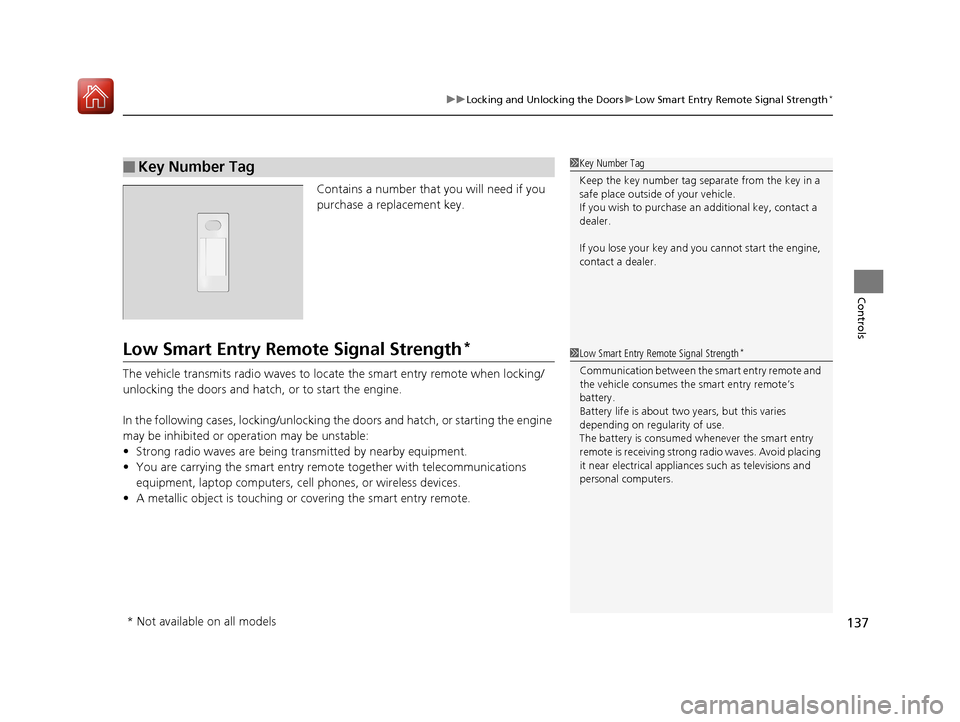
Contains a number that you will need if you
purchase a replacement key.
Low Smart Entry Remote Signal Strength*
The vehicle transmits radio waves to loca te the smart entry remote when locking/
unlocking the doors and hatch, or to start the engine.
In the following cases, locking/unlocking th e doors and hatch, or starting the engine
may be inhibited or operation may be unstable:
• Strong radio waves are being transmitted by nearby equipment.
• You are carrying the smart entry remo te together with telecommunications
equipment, laptop computers, ce ll phones, or wireless devices.
• A metallic object is touching or covering the smart entry remote.
■Key Number Tag1Key Number Tag
Keep the key number tag separate from the key in a
safe place outside of your vehicle.
If you wish to purchase an additional key, contact a
dealer.
If you lose your key and you cannot start the engine,
contact a dealer.
1 Low Smart Entry Remote Signal Strength*
Communication between the smart entry remote and
the vehicle consumes the smart entry remote’s
battery.
Battery life is about two years, but this varies
depending on regularity of use.
The battery is consumed whenever the smart entry
remote is receivi ng strong radio wave s. Avoid placing
it near electrical appliances such as televisions and
personal computers.
* Not available on all models
17 CIVIC 5D (KA KC KL)-31TGG6000.book 137 ページ 2016年6月8日 水曜日 午 後2時8分
Page 160 of 641
Continued159
uuSecurity System uSecurity System Alarm
Controls
■Setting the security system alarm
The security system alarm automatically sets when the following conditions have
been met:
• The ignition switch is in LOCK
(0*1, and the key has been removed from the
ignition switch.
• The hood is closed.
• All doors and the hatch are locked with the key, the remote transmitter, or smart
entry system
*.
■When the security system alarm sets
The security system alarm indicator in the instrument panel blinks. When the
blinking interval changes after about 15 se conds, the security system alarm is set.
■To cancel the security system alarm
The security system is canc eled when the vehicle is unlocked using the remote
transmitter, smart entry system
*, or the ignition swit ch is turned to ON (w*1. The
security system indicator go es off at the same time.
*1: Models with the smart entry system have an ENGINE START/STOP button instead of an
ignition switch.
1 Security System Alarm
Do not set the security system alarm when someone
is in the vehicle or a window is open. The system can
accidentally activate when:
•Unlocking the door with the lock tab.•Opening the hood with the hood release.
•Moving the shift lever out of ( P.
If the battery goes dead after you have set the
security system alarm, the security alarm may go off
once the battery is re charged or replaced.
If this occurs, deactivate the security system alarm by
unlocking a door using the key, remote transmitter or
smart entry system
*.
Continuously variable transmission models
* Not available on all models
17 CIVIC 5D (KA KC KL)-31TGG6000.book 159 ページ 2016年6月8日 水曜日 午 後2時8分
Page 494 of 641
Continued493
uuWhen Driving uTire Pressure Monitoring System (TPMS)
Driving
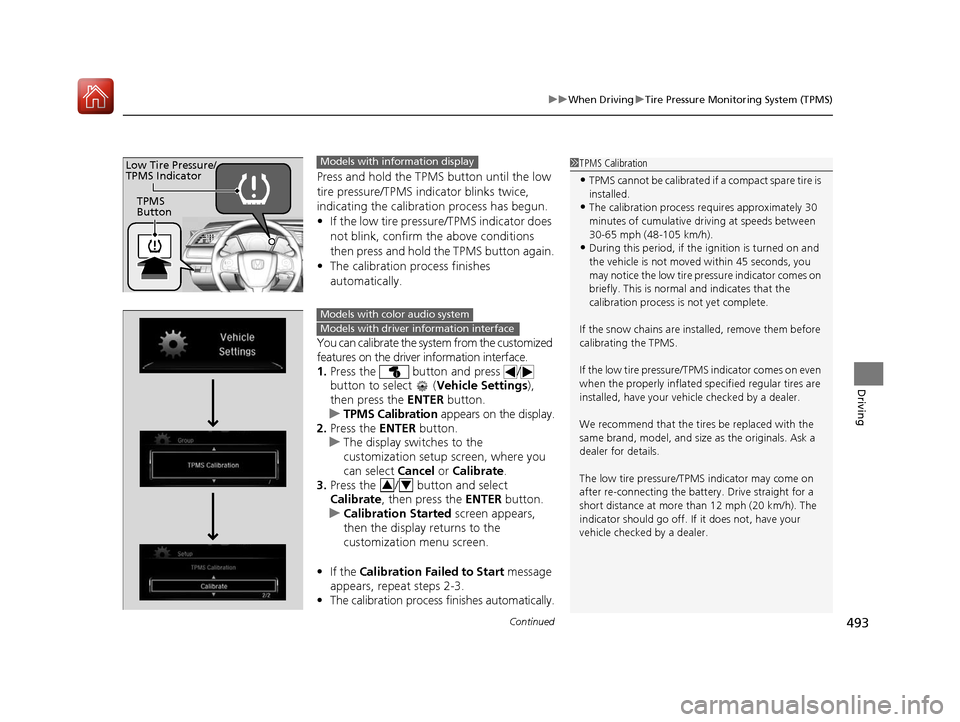
Press and hold the TPM S button until the low
tire pressure/TPMS indicator blinks twice,
indicating the calibration process has begun.
• If the low tire pressure/TPMS indicator does
not blink, confirm the above conditions
then press and hold the TPMS button again.
• The calibration process finishes
automatically.
You can calibrate the system from the customized
features on the driver information interface.
1. Press the button and press /
button to select ( Vehicle Settings),
then press the ENTER button.
u TPMS Calibration appears on the display.
2. Press the ENTER button.
u The display swit ches to the
customization setup screen, where you
can select Cancel or Calibrate .
3. Press the / button and select
Calibrate , then press the ENTER button.
u Calibration Started screen appears,
then the display returns to the
customization menu screen.
• If the Calibration Failed to Start message
appears, repeat steps 2-3.
• The calibration process finishes automatically.
1TPMS Calibration
•TPMS cannot be calibrated if a compact spare tire is
installed.
•The calibration process requires approximately 30
minutes of cumulative dr iving at speeds between
30-65 mph (48-105 km/h).
•During this period, if the ignition is turned on and
the vehicle is not move d within 45 seconds, you
may notice the low tire pressure indicator comes on
briefly. This is normal and indicates that the
calibration process is not yet complete.
If the snow chains are installed, remove them before
calibrating the TPMS.
If the low tire pressure/TPMS indicator comes on even
when the properly inflated specified regular tires are
installed, have your vehicle checked by a dealer.
We recommend that the tires be replaced with the
same brand, model, and size as the originals. Ask a
dealer for details.
The low tire pressure/TPMS indicator may come on
after re-connecting the battery. Drive straight for a
short distance at more than 12 mph (20 km/h). The
indicator should go off. If it does not, have your
vehicle checked by a dealer.
TPMS
Button
Low Tire Pressure/
TPMS IndicatorModels with info rmation display
Models with color audio system
Models with driver information interface
34
17 CIVIC 5D (KA KC KL)-31TGG6000.book 493 ページ 2016年6月8日 水曜日 午 後2時8分
Page 524 of 641
523
Maintenance
This chapter discusses basic maintenance.
Before Performing MaintenanceInspection and Maintenance ............ 524
Safety When Performing Maintenance .... 525Parts and Fluids Used in Maintenance Service ........................................... 526
Maintenance Minder
TM..................... 527
Maintenance Under the Hood
Maintenance Items Un der the Hood .... 536Opening the Hood ........................... 537
Recommended Engine Oil ................ 538
Oil Check ......................................... 539
Adding Engine Oil ............................ 540
Changing the Engine Oil and Oil Filter..... 541
Engine Coolant ................................ 543
Transmission Fluid ............................ 545
Brake/Clutch
* Fluid .......................... 546
Refilling Window Washer Fluid......... 547
Replacing Light Bulbs ....................... 548
Checking and Maintaining Wiper
Blades .......................................... 556
Checking and Maintaining Tires
Checking Tires ................................. 561
Tire and Loading Information Label ..... 562Tire Labeling .................................... 562DOT Tire Quality Grading (U.S. Vehicles) ...... 564Wear Indicators................................ 566 Tire Service Life ................................ 566
Tire and Wheel Replacement ........... 567
Tire Rotation .................................... 568
Winter Tires ..................................... 569
Battery ............................................... 571
Remote Transmitter Care
Replacing the Button Battery ........... 573
Climate Control System Maintenance .. 575Cleaning
Interior Care .................................... 576
Exterior Care.................................... 579
Accessories and Modifications ........ 582
* Not available on all models
17 CIVIC 5D (KA KC KL)-31TGG6000.book 523 ページ 2016年6月8日 水曜日 午 後2時8分
Page 573 of 641
572
uuBattery uCharging the Battery
Maintenance
Charging the Battery
Disconnect both battery cables to prevent da maging your vehicle’s electrical system.
Always disconnect the negative (–) cable first, and reconnect it last.
*1: Models with the smart entry system have an ENGINE START/STOP button instead of an
ignition switch.
1 Battery
When you find corrosion, cl ean the battery terminals
by applying a baking powder and water solution.
Clean the terminals with a damp towel. Cloth/towel
dry the battery. Coat the terminals with grease to
help prevent future corrosion.
When replacing the battery, the replacement must be
of the same specifications.
Consult a dealer for more information.
The VSA ® system, VSA ® OFF, low tire pressure/TPMS
*
and CMBSTM * indicators may come on when your
turn the ignition switch to ON ( w*1 after re-
connecting a battery.
Drive straight for a short distance at more than 12
mph (20 km/h). Each indicato r should go off. If none
of them do, have your ve hicle checked by a dealer.
* Not available on all models
17 CIVIC 5D (KA KC KL)-31TGG6000.book 572 ページ 2016年6月8日 水曜日 午 後2時8分
Page 574 of 641
573Continued
Maintenance
Remote Transmitter Care
Replacing the Button Battery
If the indicator does not come on when the button is pressed, replace the battery.
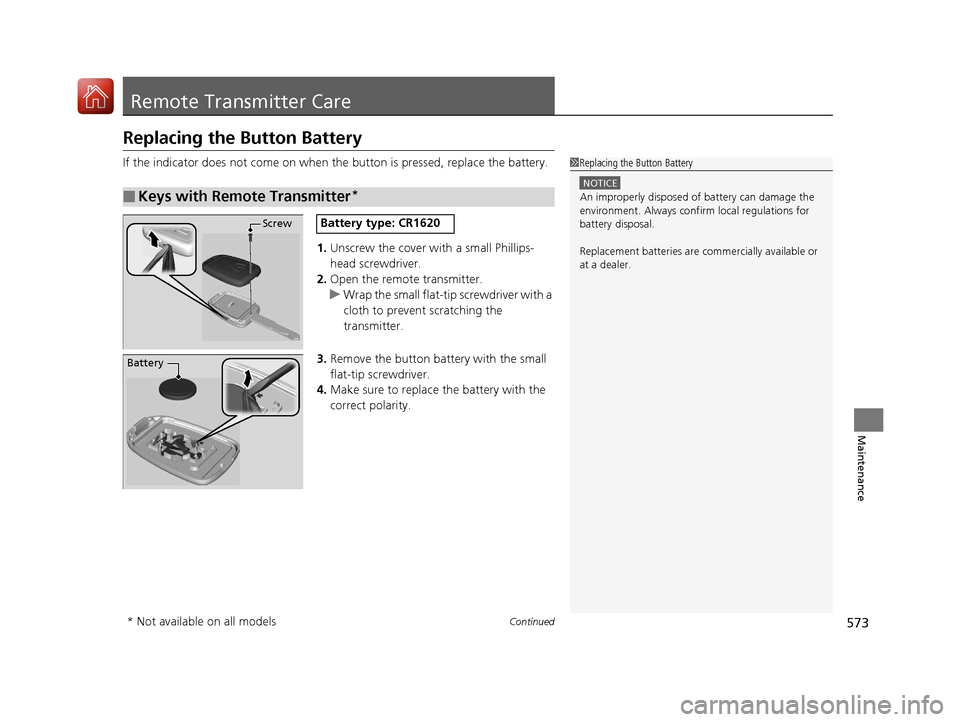
1. Unscrew the cover with a small Phillips-
head screwdriver.
2. Open the remote transmitter.
u Wrap the small flat-tip screwdriver with a
cloth to prevent scratching the
transmitter.
3. Remove the button battery with the small
flat-tip screwdriver.
4. Make sure to replace the battery with the
correct polarity.
■Keys with Remote Transmitter*
1Replacing the Button Battery
NOTICE
An improperly disposed of battery can damage the
environment. Always conf irm local regulations for
battery disposal.
Replacement batteries are commercially available or
at a dealer.
ScrewBattery type: CR1620
Battery
* Not available on all models
17 CIVIC 5D (KA KC KL)-31TGG6000.book 573 ページ 2016年6月8日 水曜日 午 後2時8分