set clock HONDA CIVIC HATCHBACK 2018 (in English) Owner's Guide
[x] Cancel search | Manufacturer: HONDA, Model Year: 2018, Model line: CIVIC HATCHBACK, Model: HONDA CIVIC HATCHBACK 2018Pages: 703, PDF Size: 24.31 MB
Page 354 of 703
352
uuCustomized Features u
Features
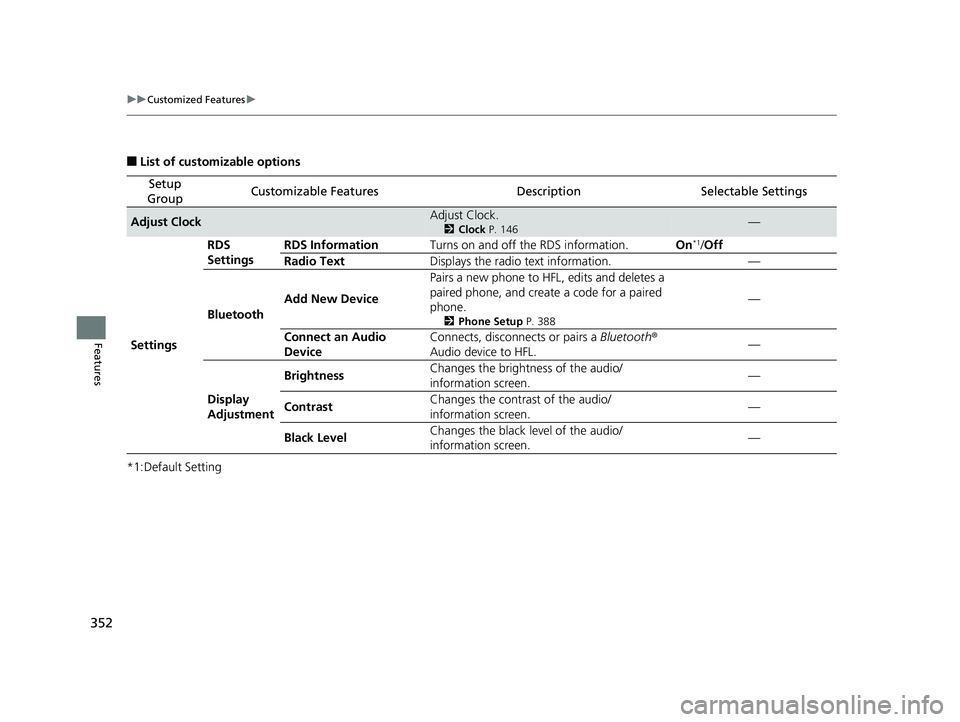
■List of customizable options
*1:Default Setting
Setup
GroupCustomizable FeaturesDescriptionSelectable Settings
Adjust ClockAdjust Clock.
2 Clock P. 146—
Settings RDS
Settings
RDS Information
Turns on and off the RDS information. On
*1/Off
Radio Text Displays the radio text information. —
Bluetooth Add New Device Pairs a new phone to HFL, edits and deletes a
paired phone, and create a code for a paired
phone.
2
Phone Setup P. 388
—
Connect an Audio
Device Connects, disconnects or pairs a Bluetooth
®
Audio device to HFL. —
Display
Adjustment Brightness
Changes the brightness of the audio/
information screen.
—
Contrast Changes the contrast of the audio/
information screen. —
Black Level Changes the black level of the audio/
information screen. —
18 CIVIC 5D (KA KC KL)-31TGG6100.book 352 ページ 2017年12月27日 水曜日 午前11時2分
Page 355 of 703
353
uuCustomized Features u
Continued
Features
*1:Default Setting
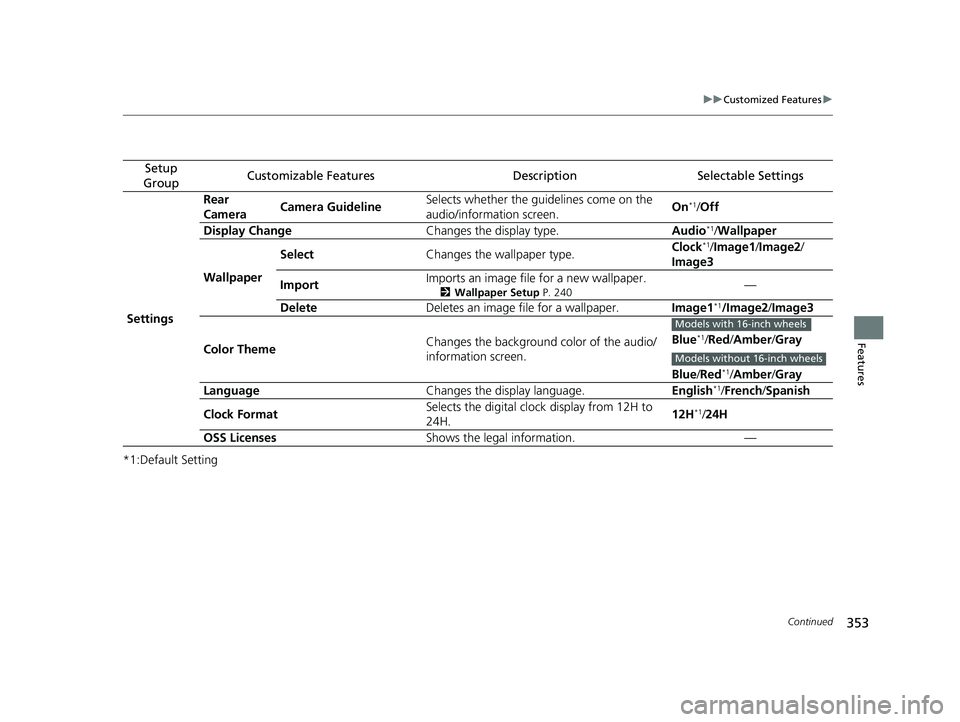
Setup
GroupCustomizable FeaturesDescriptionSelectable Settings
Settings Rear
Camera
Camera Guideline Selects whether the guidelines come on the
audio/information screen.
On
*1/
Off
Display Change Changes the display type. Audio
*1/Wallpaper
Wallpaper Select
Changes the wallpaper type. Clock*1/
Image1/ Image2/
Image3
Import Imports an image file for a new wallpaper.
2
Wallpaper Setup P. 240—
Delete Deletes an image file for a wallpaper. Image1
*1/Image2/Image3
Color Theme Changes the background color of the audio/
information screen. Blue
*1/
Red /Amber /Gray
Blue /Red
*1/Amber /Gray
Language Changes the display language. English*1/French /Spanish
Clock Format Selects the digital clock display from 12H to
24H.
12H
*1/
24H
OSS Licenses Shows the legal information. —
Models with 16-inch wheels
Models without 16-inch wheels
18 CIVIC 5D (KA KC KL)-31TGG6100.book 353 ページ 2017年12月27日 水曜日 午前11時2分
Page 358 of 703
356
uuCustomized Features u
Features
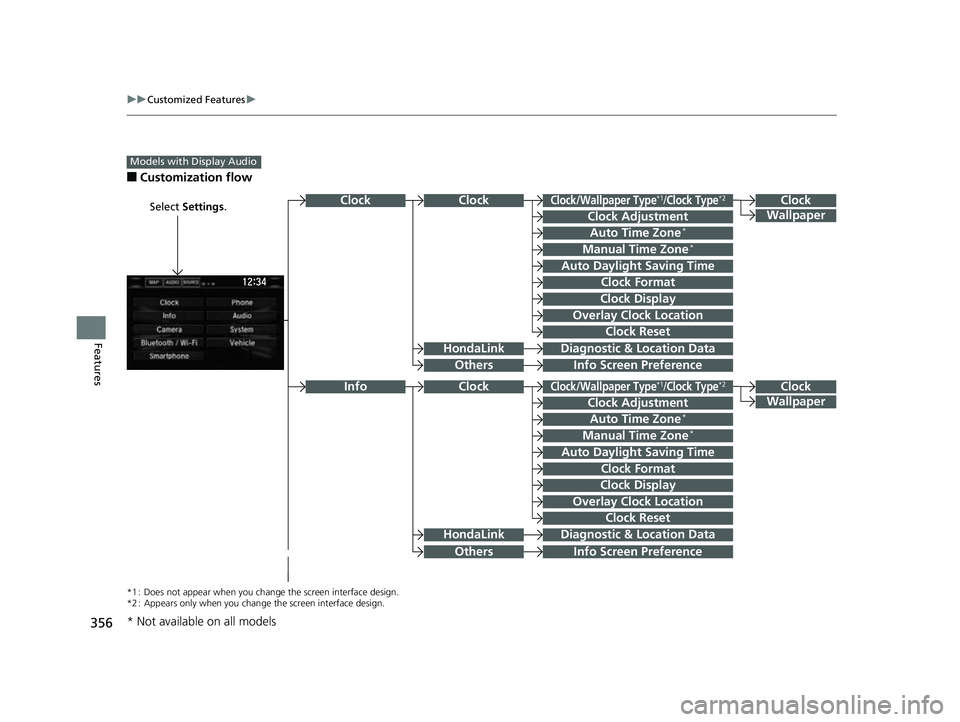
■Customization flow
Models with Display Audio
Select Settings.Clock
Wallpaper
Others
Clock/Wallpaper Type*1/Clock Type*2
Clock Adjustment
Clock Format
ClockClock
Auto Time Zone*
Manual Time Zone*
Auto Daylight Saving Time
Clock Display
Overlay Clock Location
Clock Reset
Info Screen Preference
Clock
Wallpaper
Others
Clock/Wallpaper Type*1/Clock Type*2
Clock Adjustment
Clock Format
Clock
Auto Time Zone*
Manual Time Zone*
Auto Daylight Saving Time
Clock Display
Overlay Clock Location
Clock Reset
Info Screen Preference
Info
HondaLinkDiagnostic & Location Data
HondaLinkDiagnostic & Location Data
*1 : Does not appear when you chang e the screen interface design.
*2 : Appears only when you change the screen interface design.
* Not available on all models
18 CIVIC 5D (KA KC KL)-31TGG6100.book 356 ページ 2017年12月27日 水曜日 午前11時2分
Page 362 of 703
360
uuCustomized Features u
Features
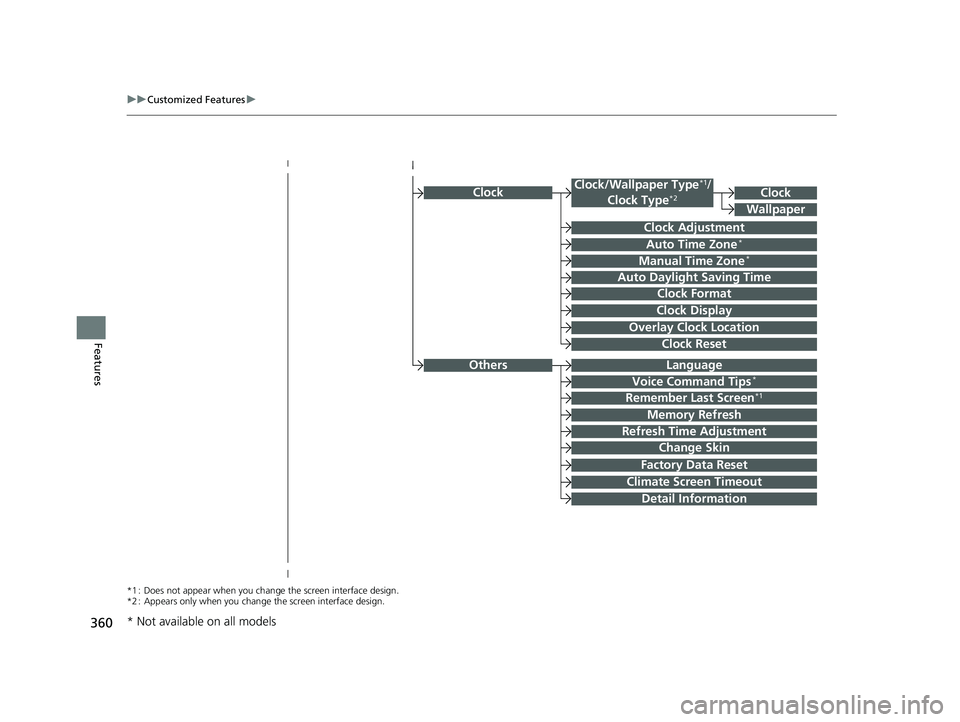
Clock
Clock Adjustment
Clock Format
Auto Time Zone*
Manual Time Zone*
Auto Daylight Saving Time
Clock Display
Overlay Clock Location
Clock Reset
Clock
Wallpaper
*1 : Does not appear when you chang e the screen interface design.
*2 : Appears only when you change the screen interface design.
OthersLanguage
Voice Command Tips*
Remember Last Screen*1
Memory Refresh
Refresh Time Adjustment
Change Skin
Factory Data Reset
Climate Screen Timeout
Detail Information
Clock/Wallpaper Type*1/
Clock Type*2
* Not available on all models
18 CIVIC 5D (KA KC KL)-31TGG6100.book 360 ページ 2017年12月27日 水曜日 午前11時2分
Page 365 of 703
363
uuCustomized Features u
Continued
Features
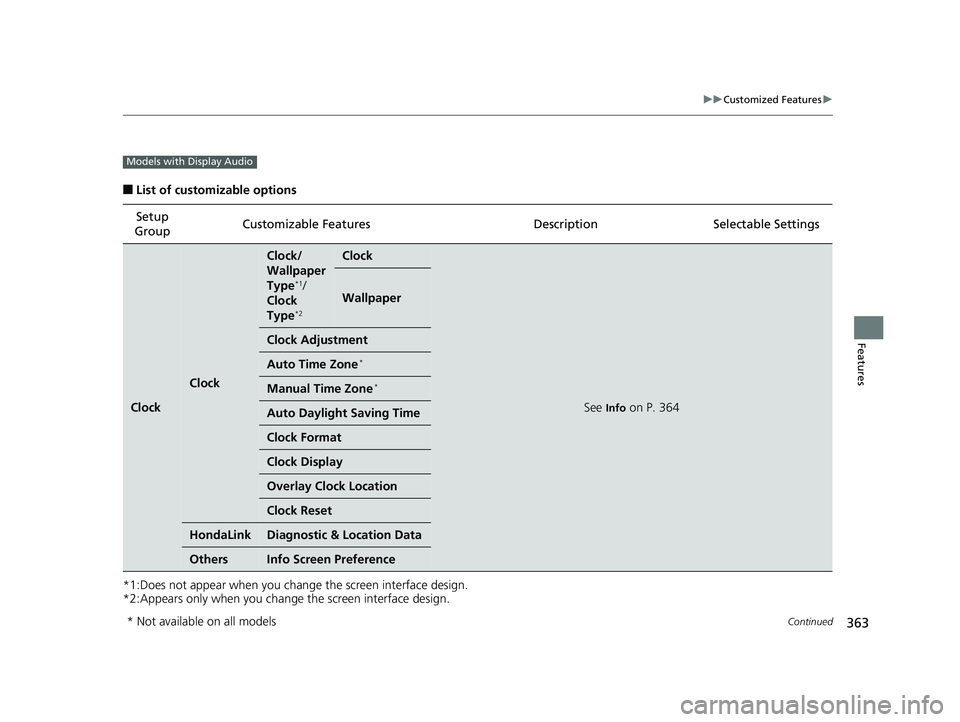
■List of customizable options
*1:Does not appear when you chan ge the screen interface design.
*2:Appears only when you change the screen interface design. Setup
Group Customizable Features Desc
ription Selectable Settings
Clock
Clock
Clock/
Wallpaper
Type
*1/
Clock
Type
*2
Clock
See Info on P. 364
Wallpaper
Clock Adjustment
Auto Time Zone*
Manual Time Zone*
Auto Daylight Saving Time
Clock Format
Clock Display
Overlay Clock Location
Clock Reset
HondaLinkDiagnostic & Location Data
OthersInfo Screen Preference
Models with Display Audio
* Not available on all models
18 CIVIC 5D (KA KC KL)-31TGG6100.book 363 ページ 2017年12月27日 水曜日 午前11時2分
Page 366 of 703
364
uuCustomized Features u
Features
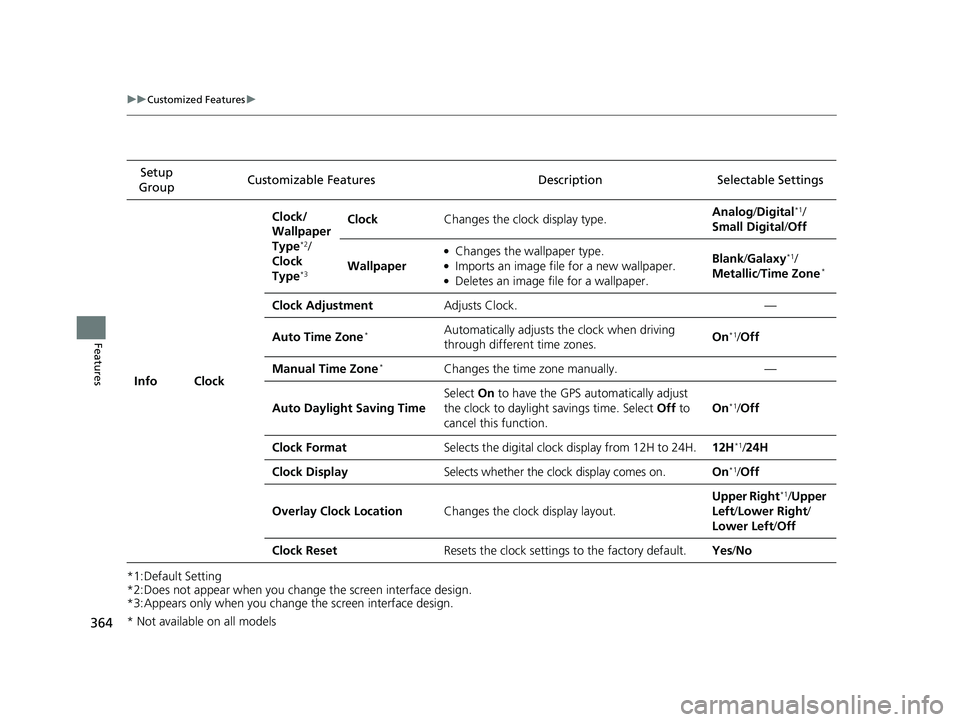
*1:Default Setting
*2:Does not appear when you change the screen interface design.
*3:Appears only when you change the screen interface design.Setup
Group Customizable Features Desc
ription Selectable Settings
Info Clock Clock/
Wallpaper
Type
*2/
Clock
Type
*3
Clock Changes the clock display type. Analog
/Digital*1/
Small Digital /Off
Wallpaper
●Changes the wallpaper type.●Imports an image file for a new wallpaper.●Deletes an image file for a wallpaper. Blank
/Galaxy
*1/
Metallic /Time Zone*
Clock Adjustment Adjusts Clock. —
Auto Time Zone
*Automatically adjusts th e clock when driving
through different time zones. On*1/
Off
Manual Time Zone
*Changes the time zone manually. —
Auto Daylight Saving Time Select
On to have the GPS automatically adjust
the clock to daylight savings time. Select Off to
cancel this function. On
*1/
Off
Clock Format Selects the digital clock display from 12H to 24H. 12H
*1/24H
Clock Display Selects whether the clock display comes on. On
*1/Off
Overlay Clock Location Changes the clock display layout. Upper Right
*1/
Upper
Left/ Lower Right/
Lower Left /Off
Clock Reset Resets the clock settings to the factory default. Yes/No
* Not available on all models
18 CIVIC 5D (KA KC KL)-31TGG6100.book 364 ページ 2017年12月27日 水曜日 午前11時2分
Page 375 of 703
373
uuCustomized Features u
Continued
Features
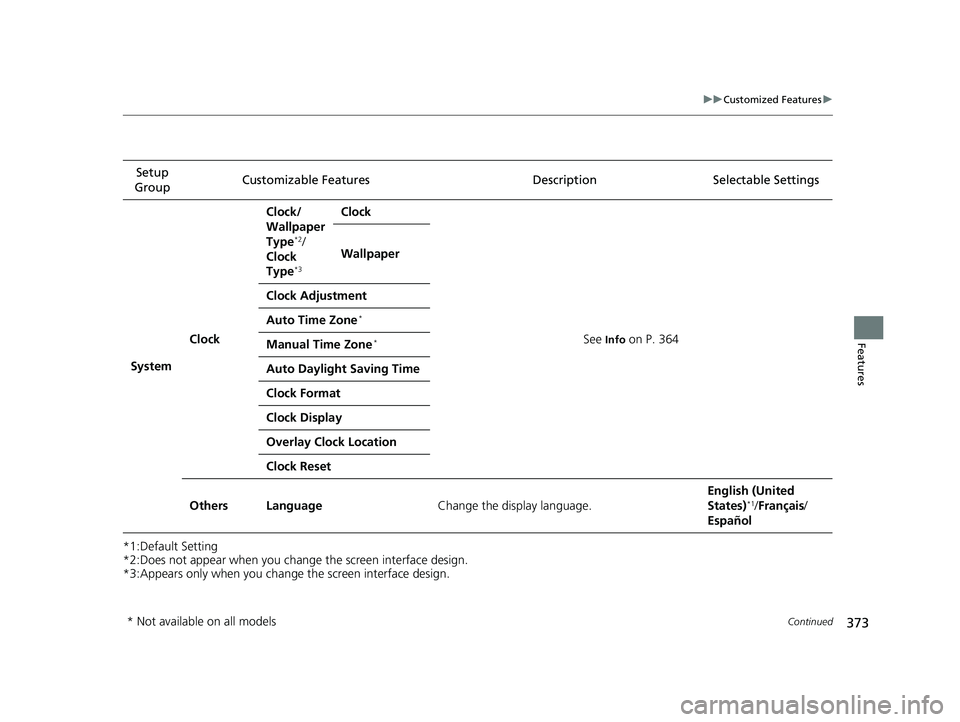
*1:Default Setting
*2:Does not appear when you chan ge the screen interface design.
*3:Appears only when you change the screen interface design. Setup
Group Customizable Features
Description Selectable Settings
System Clock Clock/
Wallpaper
Type
*2/
Clock
Type
*3
Clock
See
Info on P. 364
Wallpaper
Clock Adjustment
Auto Time Zone
*
Manual Time Zone*
Auto Daylight Saving Time
Clock Format
Clock Display
Overlay Clock Location
Clock Reset
Others Language Change the display language. English (United
States)
*1/
Français /
Español
* Not available on all models
18 CIVIC 5D (KA KC KL)-31TGG6100.book 373 ページ 2017年12月27日 水曜日 午前11時2分
Page 589 of 703
587Continued
Maintenance
Replacing Light Bulbs
Headlight Bulbs
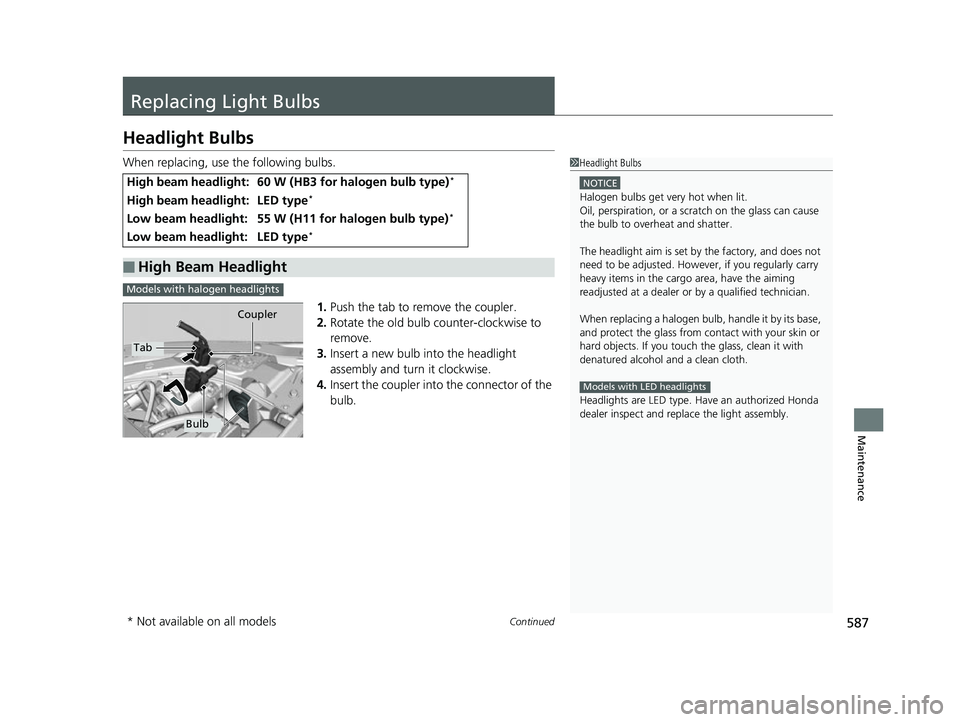
When replacing, use the following bulbs.1.Push the tab to remove the coupler.
2. Rotate the old bulb counter-clockwise to
remove.
3. Insert a new bulb into the headlight
assembly and turn it clockwise.
4. Insert the coupler into the connector of the
bulb.
High beam headlight:60 W (HB3 for halogen bulb type)*
High beam headlight:LED type*
Low beam headlight:55 W (H11 for halogen bulb type)*
Low beam headlight:LED type*
■High Beam Headlight
1 Headlight Bulbs
NOTICE
Halogen bulbs get very hot when lit.
Oil, perspiration, or a scratch on the glass can cause
the bulb to overhe at and shatter.
The headlight aim is set by the factory, and does not
need to be adjusted. Howeve r, if you regularly carry
heavy items in the cargo area, have the aiming
readjusted at a dealer or by a qualified technician.
When replacing a halogen bu lb, handle it by its base,
and protect the glass from c ontact with your skin or
hard objects. If you touch the glass, clean it with
denatured alcohol and a clean cloth.
Headlights are LED type. Ha ve an authorized Honda
dealer inspect and replace the light assembly.
Models with LED headlights
Models with halogen headlights
Tab Coupler
Bulb
* Not available on all models
18 CIVIC 5D (KA KC KL)-31TGG6100.book 587 ページ 2017年12月27日 水曜日 午前11時2分
Page 615 of 703
613
Maintenance
Battery
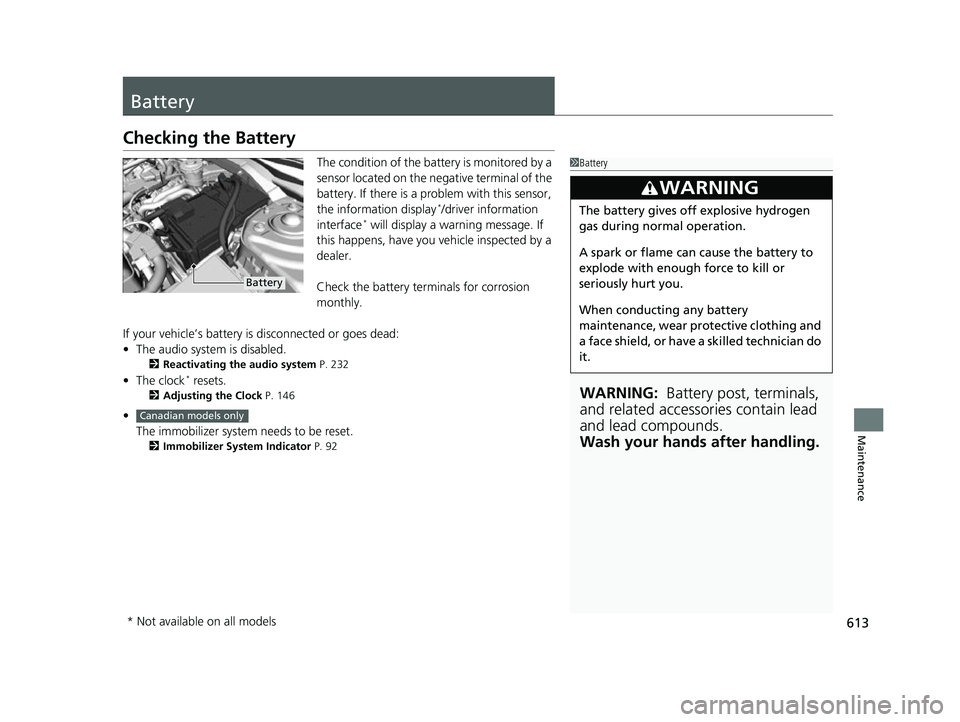
Checking the Battery
The condition of the battery is monitored by a
sensor located on the negative terminal of the
battery. If there is a problem with this sensor,
the information display
*/driver information
interface* will display a warning message. If
this happens, have you vehicle inspected by a
dealer.
Check the battery termi nals for corrosion
monthly.
If your vehicle’s battery is disconnected or goes dead:
• The audio system is disabled.
2 Reactivating the audio system P. 232
•The clock* resets.
2 Adjusting the Clock P. 146
•
The immobilizer system needs to be reset.
2 Immobilizer System Indicator P. 92
1Battery
WARNING: Battery post, terminals,
and related accessories contain lead
and lead compounds.
Wash your hands after handling.
3WARNING
The battery gives off explosive hydrogen
gas during normal operation.
A spark or flame can cause the battery to
explode with enough force to kill or
seriously hurt you.
When conducting any battery
maintenance, wear prot ective clothing and
a face shield, or have a skilled technician do
it.
Battery
Canadian models only
* Not available on all models
18 CIVIC 5D (KA KC KL)-31TGG6100.book 613 ページ 2017年12月27日 水曜日 午前11時2分
Page 648 of 703
uuIf a Tire Goes Flat uChanging a Flat Tire
646
Handling the Unexpected
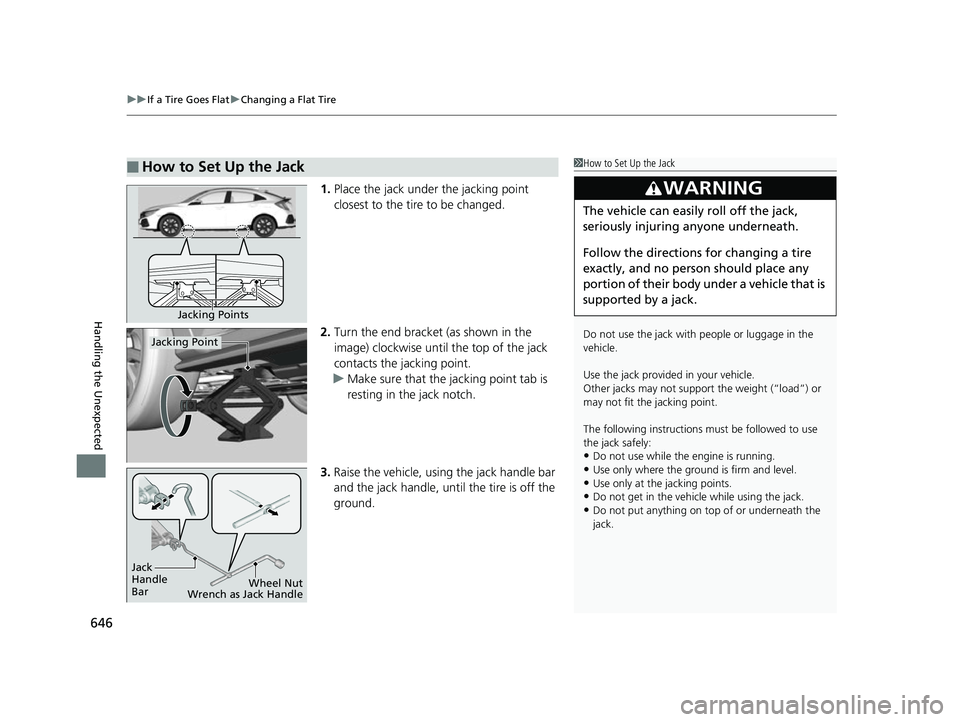
1. Place the jack under the jacking point
closest to the tire to be changed.
2. Turn the end bracket (as shown in the
image) clockwise until the top of the jack
contacts the jacking point.
u Make sure that the jacking point tab is
resting in the jack notch.
3. Raise the vehicle, using the jack handle bar
and the jack handle, until the tire is off the
ground.
■How to Set Up the Jack1How to Set Up the Jack
Do not use the jack with people or luggage in the
vehicle.
Use the jack provided in your vehicle.
Other jacks may not support the weight (“load”) or
may not fit the jacking point.
The following instructions must be followed to use
the jack safely:
•Do not use while the engine is running.
•Use only where the ground is firm and level.•Use only at the jacking points.
•Do not get in the vehicle while using the jack.
•Do not put anything on top of or underneath the
jack.
3WARNING
The vehicle can easily roll off the jack,
seriously injuring anyone underneath.
Follow the directions for changing a tire
exactly, and no person should place any
portion of their body under a vehicle that is
supported by a jack.
Jacking Points
Jacking Point
Jack
Handle
Bar Wheel Nut
Wrench as Jack Handle
18 CIVIC 5D (KA KC KL)-31TGG6100.book 646 ページ 2017年12月27日 水曜日 午前11時2分