phone HONDA CIVIC HATCHBACK 2018 Owner's Manual (in English)
[x] Cancel search | Manufacturer: HONDA, Model Year: 2018, Model line: CIVIC HATCHBACK, Model: HONDA CIVIC HATCHBACK 2018Pages: 703, PDF Size: 24.31 MB
Page 23 of 703
21
Quick Reference Guide
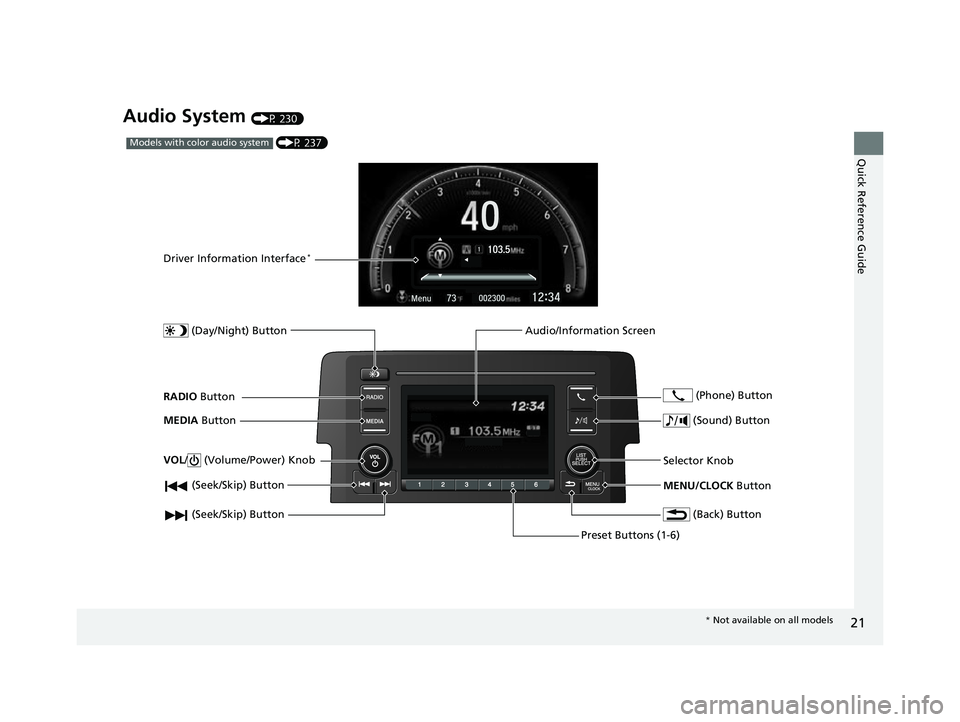
Audio System (P 230)
(P 237)Models with color audio system
(Seek/Skip) Button
RADIO Button
Driver Information Interface*
(Day/Night) Button
MEDIA Button
Preset Buttons (1-6)
(Seek/Skip) Button
VOL
/ (Volume/Power) Knob
Audio/Information Screen
(Back) Button
(Sound) Button
MENU/CLOCK Button
Selector Knob (Phone) Button
*
Not available on all models
18 CIVIC 5D (KA KC KL)-31TGG6100.book 21 ページ 2017年12月27日 水曜日 午前11時2分
Page 36 of 703

34
Safe Driving
For Safe Driving
The following pages explain your vehicle's safety features and how to use them
properly. The safety precauti ons below are ones that we consider to be among the
most important.
Important Safety Precautions
■Always wear your seat belt
A seat belt is your best protection in all types of collisions. Airbags are designed to
supplement seat belts, not replace them. So even though your vehicle is equipped
with airbags, make sure you and your passe ngers always wear your seat belts, and
wear them properly.
■Restrain all children
Children ages 12 and under should ride properly restrained in a back seat, not the
front seat. Infants and small children shoul d be restrained in a child seat. Larger
children should use a booster seat and a lap/shoulder seat belt until they can use the
belt properly without a booster seat.
■Be aware of airbag hazards
While airbags can save lives, they can cause serious or fatal injuries to occupants
who sit too close to them, or are not prop erly restrained. Infants, young children,
and short adults are at the greatest risk. Be sure to follow all instructions and
warnings in this manual.
■Don't drink and drive
Alcohol and driving don't mix. Even one dr ink can reduce your ability to respond to
changing conditions, and your reaction time gets worse with every additional drink.
So don't drink and drive, and don't let your friends drink and drive, either.
1Important Safety Precautions
Some states, provinces and territories prohibit the use
of cell phones other than hands-free devices by the
driver while driving.
18 CIVIC 5D (KA KC KL)-31TGG6100.book 34 ページ 2017年12月27日 水曜日 午前11時2分
Page 37 of 703
35
uuFor Safe Driving uImportant Safety Precautions
Safe Driving
■Pay appropriate attention to the task of driving safely
Engaging in cell phone conversation or other activities that keep you from paying
close attention to the road, other vehicles, and pedestrians could lead to a crash.
Remember, situations can change quickly, and only you can decide when it is safe to
divert some attention away from driving.
■Control your speed
Excessive speed is a major factor in crash injuries and deaths. Generally, the higher
the speed, the greater the risk, but serious injuries can also occur at lower speeds.
Never drive faster than is safe for current conditions, regardless of the maximum
speed posted.
■Keep your vehicle in safe condition
Having a tire blowout or a mechanical failure can be extremely hazardous.
To reduce the possibility of such problems, check your tire pressures and condition
frequently, and perform all regul arly scheduled maintenance.
■Do not leave children unattended in the vehicle
Children left unattended in the vehicle may be injured if they activate one or more
of the vehicle controls. They may also cause the vehicle to move, resulting in a crash
in which the children and/or another pers on(s) can be injured or killed. Also,
depending on the ambient temperature, th e temperature of the interior may reach
extreme levels, which can re sult in injury or death.
Even if the climate control system is on, never leave children in the vehicle
unattended as the climate control system can shut off at any time.
18 CIVIC 5D (KA KC KL)-31TGG6100.book 35 ページ 2017年12月27日 水曜日 午前11時2分
Page 126 of 703
124
uuGauges and Displays uDriver Information Interface*
Instrument Panel
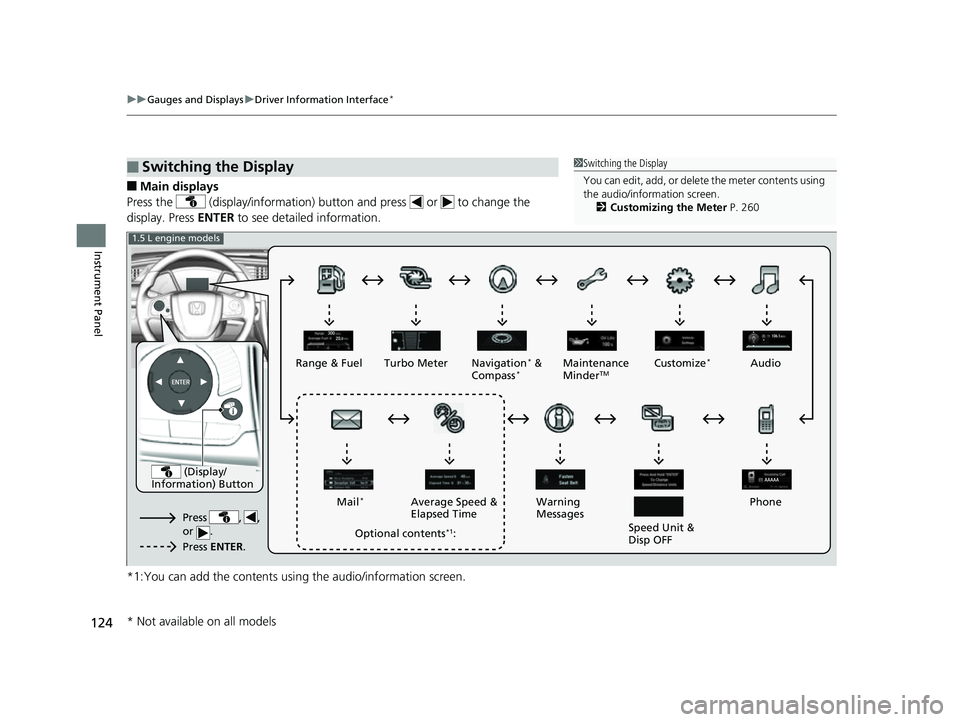
■Main displays
Press the (display/information) butt on and press or to change the
display. Press ENTER to see detailed information.
*1:You can add the contents usin g the audio/information screen.
■Switching the Display1Switching the Display
You can edit, add, or delete the meter contents using
the audio/information screen.
2 Customizing the Meter P. 260
(Display/
Information) Button
Press , ,
or .
Press ENTER .
Range & Fuel Turbo Meter Navigation* &
Compass*Maintenance
MinderTMCustomize*Audio
Phone
Speed Unit &
Disp OFF
Warning
Messages
Average Speed &
Elapsed Time
Mail
*
Optional contents*1:
1.5 L engine models
* Not available on all models
18 CIVIC 5D (KA KC KL)-31TGG6100.book 124 ページ 2017年12月27日 水曜日 午前11時2分
Page 127 of 703
125
uuGauges and Displays uDriver Information Interface*
Continued
Instrument Panel
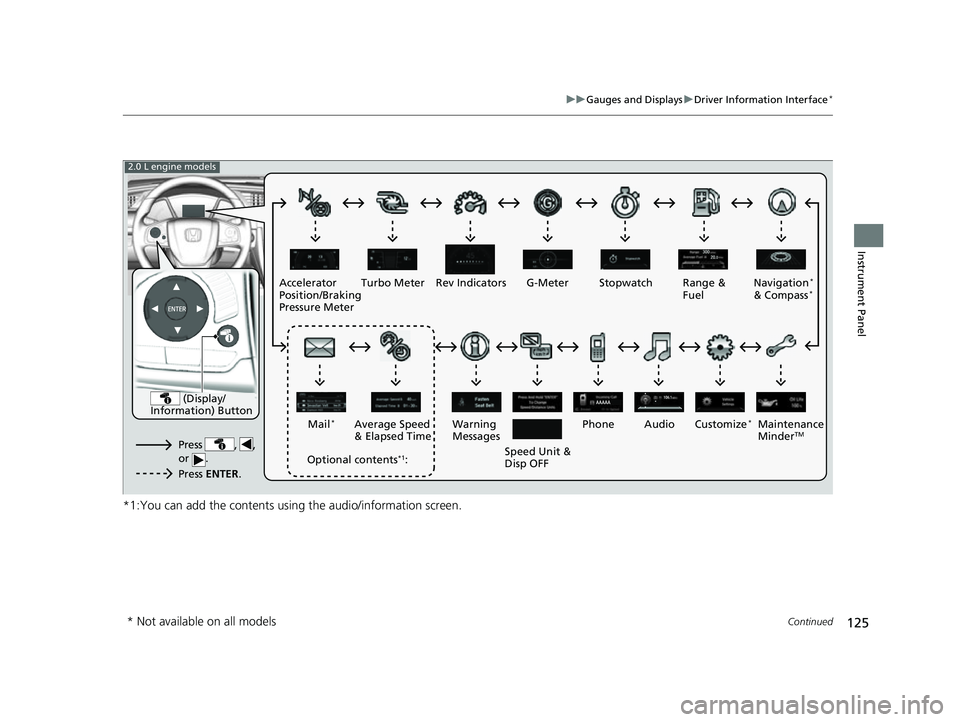
*1:You can add the contents using the audio/information screen.
Accelerator
Position/Braking
Pressure Meter Turbo Meter Rev Indicators G-Meter Stopwatch Range &
Fuel
Phone
Speed Unit &
Disp OFF
Warning
Messages
Average Speed
& Elapsed Time
Mail
*
Optional contents*1:
2.0 L engine models
Navigation*
& Compass*
Audio Customize*Maintenance
MinderTMPress , ,
or .
Press ENTER .
(Display/
Information) Button
* Not available on all models
18 CIVIC 5D (KA KC KL)-31TGG6100.book 125 ページ 2017年12月27日 水曜日 午前11時2分
Page 131 of 703
Continued129
uuGauges and Displays uDriver Information Interface*
Instrument Panel
Shows you turn-by-turn driv ing directions to your destination linked with the
navigation system.
2 Refer to the Navigation System Manual
Shows the current audio information.
2Audio System Basic Operation P. 237, 255
Shows the current mail information.
2Bluetooth ® HandsFreeLink ®* P. 407
Shows the current phone information.
2Bluetooth ® HandsFreeLink ®* P. 381, 407
■Turn-by-Turn Directions*
■Audio*
■Mail*
■Phone*
1Turn-by-Turn Directions*
You can select whether th e turn-by-turn display
comes on or not during the route guidance.
2 Customized Features P. 133, 348
* Not available on all models
18 CIVIC 5D (KA KC KL)-31TGG6100.book 129 ページ 2017年12月27日 水曜日 午前11時2分
Page 150 of 703
uuLocking and Unlocking the Doors uLow Smart Entry Remote Signal Strength*
148
Controls
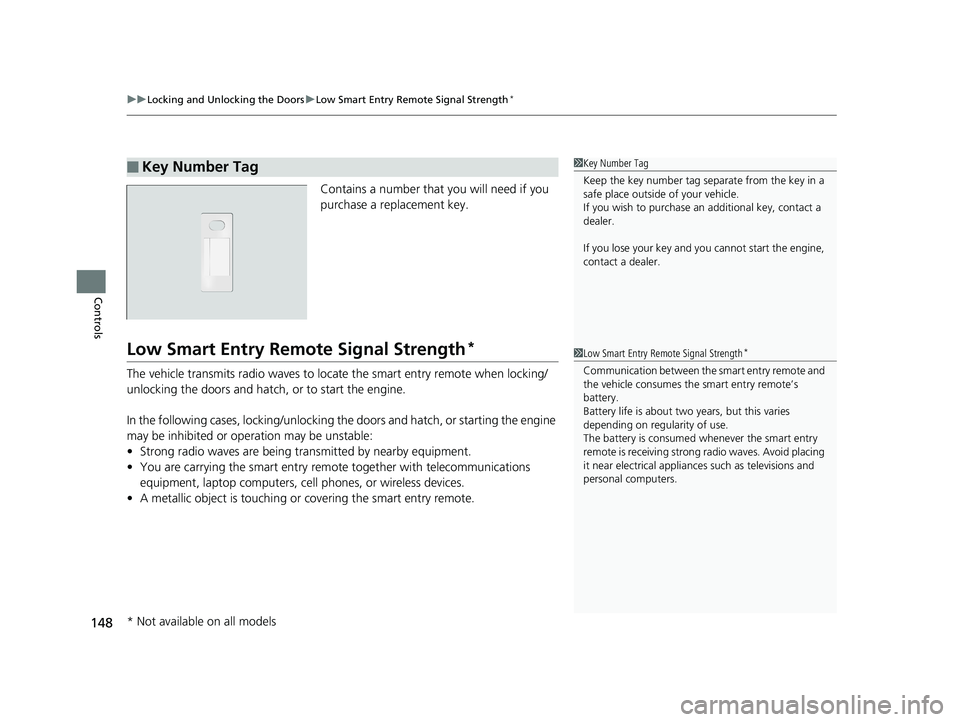
Contains a number that you will need if you
purchase a replacement key.
Low Smart Entry Remo te Signal Strength*
The vehicle transmits radio waves to loca te the smart entry remote when locking/
unlocking the doors and hatch, or to start the engine.
In the following cases, locking/unlocking the doors and hatch, or starting the engine
may be inhibited or operation may be unstable:
• Strong radio waves are being tra nsmitted by nearby equipment.
• You are carrying the smart entry remote together with telecommunications
equipment, laptop computers, ce ll phones, or wireless devices.
• A metallic object is touching or covering the smart entry remote.
■Key Number Tag1Key Number Tag
Keep the key number tag separate from the key in a
safe place outside of your vehicle.
If you wish to purchase an additional key, contact a
dealer.
If you lose your key and you cannot start the engine,
contact a dealer.
1 Low Smart Entry Remote Signal Strength*
Communication between the smart entry remote and
the vehicle consumes the smart entry remote’s
battery.
Battery life is about two years, but this varies
depending on re gularity of use.
The battery is consumed whenever the smart entry
remote is receivi ng strong radio wave s. Avoid placing
it near electrical appliances such as televisions and
personal computers.
* Not available on all models
18 CIVIC 5D (KA KC KL)-31TGG6100.book 148 ページ 2017年12月27日 水曜日 午前11時2分
Page 232 of 703
230
Features
Audio System
About Your Audio System
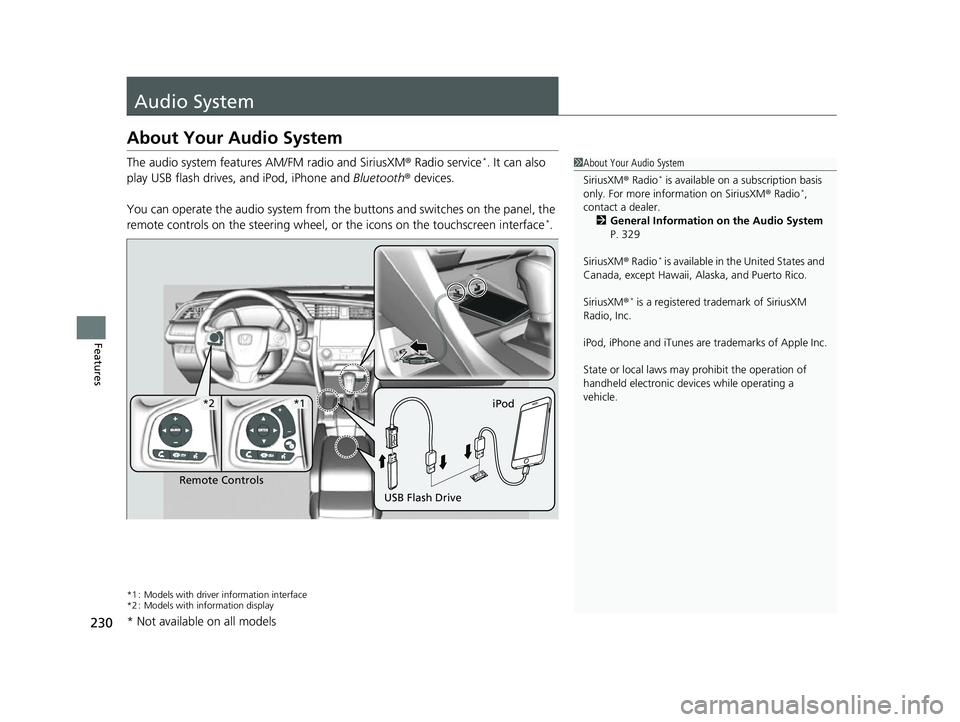
The audio system features AM/FM radio and SiriusXM® Radio service*. It can also
play USB flash drives, and iPod, iPhone and Bluetooth® devices.
You can operate the audio system from the buttons and switches on the panel, the
remote controls on the steering wheel, or the icons on the touchscreen interface
*.
*1 : Models with driver information interface
*2 : Models with information display
1 About Your Audio System
SiriusXM ® Radio
* is available on a subscription basis
only. For more information on SiriusXM ® Radio*,
contact a dealer.
2 General Information on the Audio System
P. 329
SiriusXM ® Radio
* is available in the United States and
Canada, except Ha waii, Alaska, and Puerto Rico.
SiriusXM ®
* is a registered trademark of SiriusXM
Radio, Inc.
iPod, iPhone and iTunes are trademarks of Apple Inc.
State or local laws may prohibit the operation of
handheld electronic devices while operating a
vehicle.
Remote Controls iPod
USB Flash Drive
*2*1
* Not available on all models
18 CIVIC 5D (KA KC KL)-31TGG6100.book 230 ページ 2017年12月27日 水曜日 午前11時2分
Page 233 of 703
231
uuAudio System uUSB Port(s)
Features
USB Port(s)
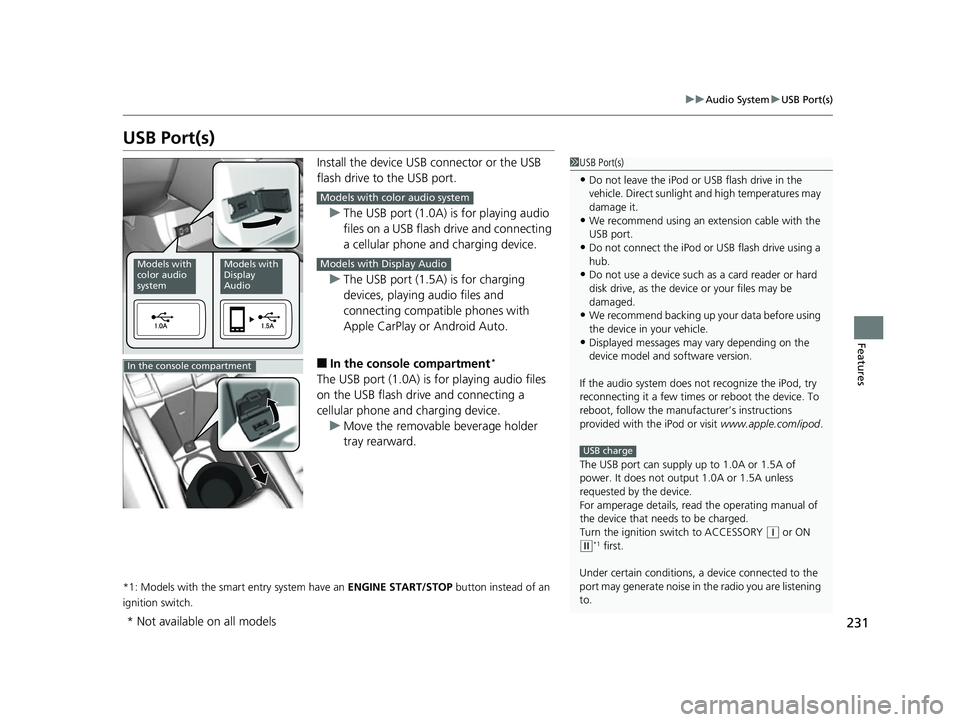
Install the device USB connector or the USB
flash drive to the USB port.
u The USB port (1.0A) is for playing audio
files on a USB flash drive and connecting
a cellular phone and charging device.
u The USB port (1.5A) is for charging
devices, playing audio files and
connecting compatib le phones with
Apple CarPlay or Android Auto.
■In the consol e compartment*
The USB port (1.0A) is for playing audio files
on the USB flash drive and connecting a
cellular phone and charging device.
u Move the removable beverage holder
tray rearward.
*1: Models with the smart entry system have an ENGINE START/STOP button instead of an
ignition switch.
1 USB Port(s)
•Do not leave the iPod or USB flash drive in the
vehicle. Direct sunlight and high temperatures may
damage it.
•We recommend using an ex tension cable with the
USB port.
•Do not connect the iPod or USB flash drive using a
hub.
•Do not use a device such as a card reader or hard
disk drive, as the device or your files may be
damaged.
•We recommend backing up yo ur data before using
the device in your vehicle.
•Displayed messages may vary depending on the
device model and software version.
If the audio system does not recognize the iPod, try
reconnecting it a few times or reboot the device. To
reboot, follow the manufac turer’s instructions
provided with the iPod or visit www.apple.com/ipod.
The USB port can supply up to 1.0A or 1.5A of
power. It does not output 1.0A or 1.5A unless
requested by the device.
For amperage details, read the operating manual of
the device that ne eds to be charged.
Turn the ignition switch to ACCESSORY
( q or ON
(w*1 first.
Under certain condi tions, a device connected to the
port may generate noise in the radio you are listening
to.
USB charge
Models with
color audio
systemModels with
Display
Audio
Models with color audio system
Models with Display Audio
In the console compartment
* Not available on all models
18 CIVIC 5D (KA KC KL)-31TGG6100.book 231 ページ 2017年12月27日 水曜日 午前11時2分
Page 254 of 703
252
uuAudio System Basic Operation uPlaying Bluetooth ® Audio
Features
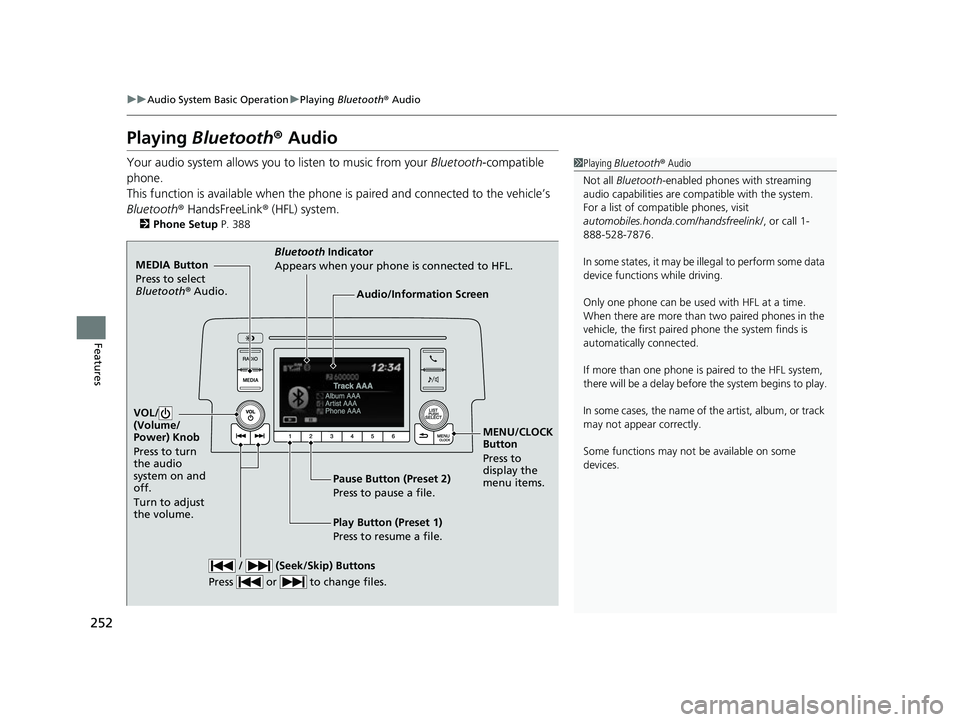
Playing Bluetooth® Audio
Your audio system allows you to listen to music from your Bluetooth-compatible
phone.
This function is available when the phone is paired and connected to the vehicle’s
Bluetooth ® HandsFreeLink ® (HFL) system.
2 Phone Setup P. 388
1Playing Bluetooth ® Audio
Not all Bluetooth -enabled phones with streaming
audio capabilities are compatible with the system.
For a list of compatible phones, visit
automobiles.honda.com /handsfreelink/, or call 1-
888-528-7876.
In some states, it may be illegal to perform some data
device functions while driving.
Only one phone can be used with HFL at a time.
When there are more than two paired phones in the
vehicle, the first paired phone the system finds is
automatically connected.
If more than one phone is paired to the HFL system,
there will be a delay before the system begins to play.
In some cases, the name of the artist, album, or track
may not appear correctly.
Some functions may not be available on some
devices.
MEDIA Button
Press to select
Bluetooth ® Audio.
VOL/
(Volume/
Power) Knob
Press to turn
the audio
system on and
off.
Turn to adjust
the volume.
MENU/CLOCK
Button
Press to
display the
menu items.
Audio/Information Screen
Bluetooth Indicator
Appears when your phone is connected to HFL.
/ (Seek/Skip) Buttons
Press or to change files.
Play Button (Preset 1)
Press to resume a file. Pause Button (Preset 2)
Press to pause a file.
18 CIVIC 5D (KA KC KL)-31TGG6100.book 252 ページ 2017年12月27日 水曜日 午前11時2分